
Overriding module settings
System Administrators will see an ‘Override’ option at the top of some pages in Elements. This controls if settings should be applied system wide or by group.
If Override is checked: the settings you make will be applied to all users in the system. Any settings previously made by Primary Group administrators will be overwritten and cannot be retrieved. Primary Group administrators will not be able to change these settings for their Primary Group.
If Override is not checked: the settings you have made will be applied to the Group. Primary Group administrators will have the option to change these settings for their Primary Group.
If you select the override for any module setting, an alert will be displayed before confirmation, warning that any existing group-level settings will be discarded and that Primary Group administrators will not be able customise the setting for their Primary Group.
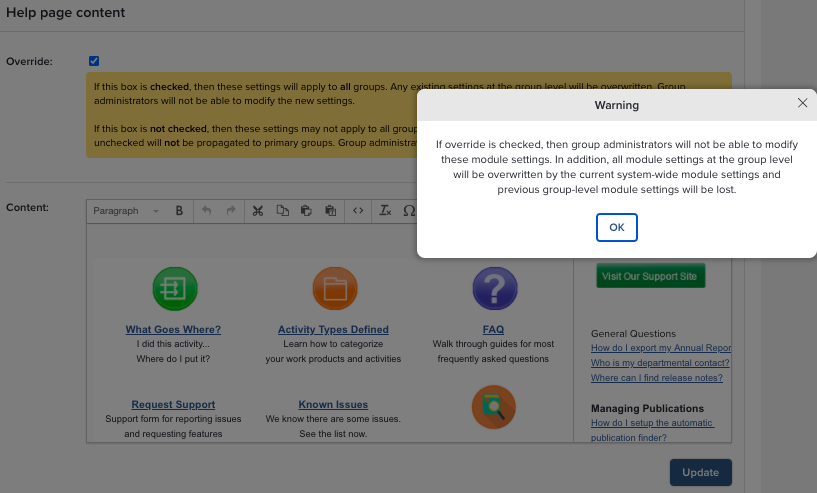
These are the settings that you can override:
Module | Description |
|---|---|
System | Help page contents |
Publications | Notification email |
Publications | Reminder email |
Publications | Control display of citation information |
Publications | Control display of journal statistics |
Publications | Set the default search terms for new users |
Publications | Show/hide publication types on the home page. Not relevant for v6.x |
System | Set OpenURL base URL |
Publications | Control the availability of online searchable data sources |
OA Monitor | Deposit email reminder |
Professional Activities | Show/hide professional activities on the home page. Not relevant for v6.x |
Teaching Activities | Show/hide teaching activities on the home page. Not relevant for v6.x |