
Are preprints available through Elements?
In academic publishing, a preprint is a draft of a scientific paper that has not yet been published in a peer-reviewed scientific journal. The peer-review process can frequently require weeks or even months, and the need to quickly disseminate current information within a research community led researchers to distributing documents before the process is completed. Since the rise of the internet, the distribution process has been almost exclusively electronic, leading to massive preprint databases such as arXiv.org, bioRxiv, ChemRxiv and medRxiv.
Preprints support several important use cases:
They can help researchers locate potential collaborators
They can help funding organisations assess a researcher's outputs and monitor their progress
They can offer insight into a researcher's most recent work and provide a broader overview
Having used ArXiv as a data source for over ten years, Elements has had a long history with pre-prints. Over that time, we have seen preprints really come of age as a research output and be embraced by a wide range of research fields. There are now a plethora of preprint servers catering to different research disciplines and a standardised information management practice has begun to spring up around them.
In reflection of this change, in Elements v6.1 we significantly extended support for preprints in Elements in a number of ways:
by introducing a new stock publication type
by adjusting data source integrations to collect preprints
by adjusting the Elements matching algorithm to prevent automatic merges between preprints and journal articles
by adding new linking functionality to help organisations understand the relationships between preprints and later published works
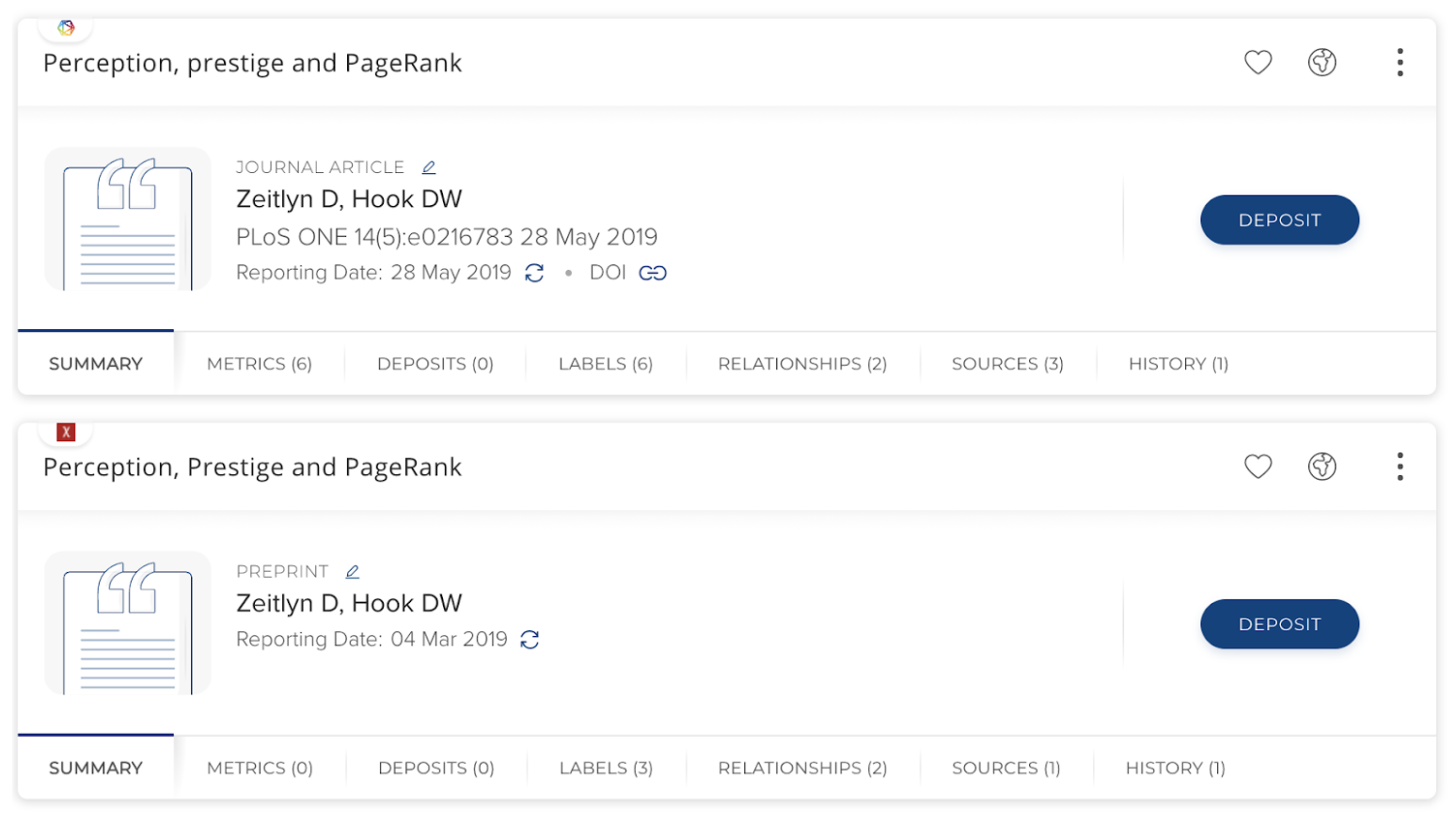
Image: A preprint record alongside the record for the later published journal article which it is linked to.
Preprint stock publication type
We have introduced a new stock publication type for capturing Preprints within Elements. This new type includes a predefined set of metadata fields and as per other stock types, organisations can optionally make configuration adjustments, setting display names for fields or adding metadata fields to align with local requirements
Please note, if prior to v6.1 you have been using a custom publication type to capture preprints, you may wish to migrate those records to the new stock Preprint type, as this stock type is where all automatically harvested preprint records will be mapped to in the future. You can adjust the type on existing records via the Elements UI or in bulk via the API (see an example of how to do this in our Postman API collection titled 'Update an object type').
Finding preprints from data sources
Several of our data source integrations can create preprint publication items:
Dimensions- via name based search, automatic claiming using Dimensions Researcher IDs or supplementary search.
Arxiv - via name based search or automatic claiming using Arxiv IDs.
Crossref - via supplementary search and/or assisted entry via the seek duplicates page.
Europe PubMed Central - via supplementary search.
figshare.com - via harvest from a user's connected Figshare account.
RT2 insititutional repository integrations (depending on harvest crosswalk configuration)
For more information about data retrieved from specific data sources please see this support article.
Please note, in the work on v6.1, we reviewed our other data source integrations to see if we could also retrieve Preprint records from those sources. At that point in time the other sources either did not yet support the ability for us to cleanly identify preprint records via the API or were still only piloting the inclusion of Preprints (eg PubMed). We will review these sources at a later date for possible future expansion.
Click on this link to see a blog post about preprints in Scopus.
Click on this link to read about the NIH's preprint pilot.
Matching and linking
We have adjusted the Elements matching algorithm so that newly harvested preprint records will only match to other preprint records in the system. These changes will ensure preprints will no longer automatically merge with journal articles even if they share a similar or identical title.
We have also extended Elements’ automatic linking functionality so that the system will automatically create an 'is preprint of' relationship between the preprint & an associated publication if the metadata for the preprint includes a Crossref identifier which corresponds to a Crossref record in an existing publication record. These publication to publication links will assist researchers and administrators understand the relationships between preprints and subsequent publications.
Managing previously harvested records from Arxiv
Historically Elements has treated ArXiv as an additional data source for journal articles. To ensure a smooth transition, any Arxiv records in your Elements instances which were ingested into the system prior to your upgrade to 6.1 will remain where they are and their type information won't change. This means that if there is an Arxiv record which was harvested prior to the 6.1 upgrade, it will remain of the type Journal Article, and if it previously merged with other sources it will stay merged. We are not automatically migrating Arxiv records previously harvested into Elements as a part of this upgrade as we do not wish to undo any data curation you may have done locally.
Whilst most of the changes will be confined to records harvested after the upgrade to 6.1, there will be one change to previously harvested Arxiv records, publication dates will start to appear in the records. This will happen gradually after upgrade, as each record goes through the periodic data refresh process. This change is beneficial both in terms of general data quality and completeness and to ensure these records are appropriately represented in Reports or on the Discovery Module.
The publication dates from Arxiv are likely to differ from other records within a given ‘journal article’ as they represent when the work was published on Arxiv, not formally published at another location. If Arxiv is the highest precedence source for a given work, this could lead to the publication date and possibly also the reporting date fluctuating for those items in Elements or in downstream integrations. To minimise the impact of this change, you may wish to ensure that Arxiv is set low in your data source precedence list if it is not already. If you encounter any specific records which cause concern as a result of this change, you can resolve the issue by splitting off the Arxiv record and changing it to a type of ‘Preprint’.
lh