
How to import publications from a BibTeX file
It is possible to import publication lists in the BibTeX directly into Elements. This guide will outline how this is done, and what formats the files should be in.
How to import
The BibTeX import functionality is accessible via Menu > Profile & work > [PUBLICATIONS] > Import publications (V6.n My Profile > Tools > Import Publications).
(Note: Your system might have renamed Publications to Research outputs or similar.)
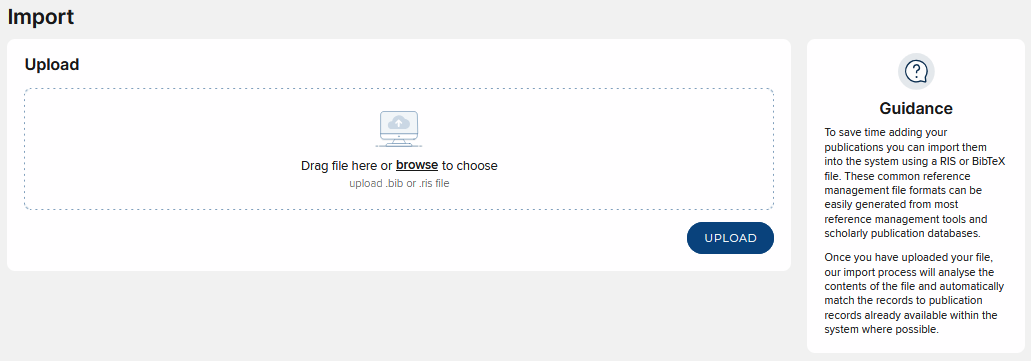
To upload a file:
Click 'Browse…' and select the .bib file in your file system.
Make sure that the 'BibTeX' option is selected.
Click 'Upload'.
The Format of a BibTeX file
Elements' BibTeX importer attempts to be flexible where possible, and will try to import as many entries as possible from a file which contains other entries which it doesn't understand.
The general interpretation of the BibTeX format which Elements adheres to is taken from a few sources.
BibTeX files contain a number of entries, which refer to specific publications. There are also more advanced features, which are explained later.
BibTeX entries
A BibTeX entry always starts with an @ sign, is always encased in braces ({, }), and takes the following form:
@<entry-type> { <cite-key>,
                      <tag>,
                      <tag>,
                       ...
                      <tag>
}
The various parts of this take the following form:
<entry-type>
This refers to the type of publication. There are many valid entry types. Some of the most common are: book, article, report, conference, incollection, inproceedings, phdthesis, procedings.
<cite-key>
This is used within BibTeX systems to refer to a given BibTeX entry, and is not interpreted by the Elements BibTeX importer. A <cite-key> is a string which uses characters a-z, A-Z, 0-9, and the following non-alphanumeric: !
amp;*+-.:;<>?[]^`|=. The <cite-key> must be followed by a comma.<tag>
These contain the bibliographic information for an entry. A <tag> can take one of the following forms:
<tag-name> = "<tag-value>"
<tag-name> = {<tag-value>}
<tag-name> = <tag-value>
Note: The last format one is only valid when every character in <tag-value> is a number 0-9.
Each tag is followed by a comma, except for the last one.
<tag-name>
This is the type of bibliographic information.
The most common are: author, booktitle, chapter, editor, edition, journal, month, year, number, pages, publisher, series, title, volume, year.
<tag-value>
This is the contents of the bibliographic field. It is a string in LaTeX format (for example, {Mot {\"o}rhead). Strings can be joined using a # symbol.
So, for example, a well-formed BibTeX entry is:
@book { geb-egb,
             title = "G{\"o}del, Escher, Bach" # ": " # "an Eternal Golden Braid",
             author = {Douglas R. Hofstadter},
             year = 1999,
             month = "January",
             publisher = {Basic Books}
}
A BibTeX document consists of a list of such entries.
Names
Any tag value which contains a list of names should separate each name with the word "and". Names can either be of the form "first last" or "last, first".
For example the following are valid name lists:
Richard Marin and Tommy Chong
Kenobi, Obi-Wan and Amidala, Padm{\'e} and Jinn, Qui-Gon
Supported and unsupported BibTeX features
Unfortunately, there is no standard format for BibTeX files which is universally agreed and adhered to by the different systems which import and export them.
One of the many reasons for this is that BibTeX files can contain arbitrary LaTeX macros, which affect the interpretation of the BibTeX file for example when being rendered into a LaTeX document.
Advanced supported features
The Elements BibTeX importer supports the following features of BibTeX:
@string declarations
BibTeX allows certain commonly used phrases to be stored in string variables and reused. String variables are defined thus:
@string {
              stringVariableName = "Contents of string variable"
}
String variables can be re-used inside entries, for example:
@string { myName = "Cai Wingfield" }
@book {
          author = myName,
          ...
}
String variables can be used with the Elements BibTeX importer, provided that the variable name uses only the characters a-z, A-Z, 0-9 and _ (underscore).
For example:
@string { my_uni_06_09 = "University of Cambridge" }is valid, but
@string { tu-dresden = "Technische Universit{\"a}t Dresden" }is not.
The variable is referred to case-sensitively, so
myNameis not the same asMyName.The variable is not referred to inside a quote-delimited value, so this is valid:
@string { myName_first = "Cai" }
@string { myName_last = "Wingfield" }
@book {
          author = myName_first # " " # myName_last # " and Charles Darwin",
          ...
}
But this is not:
@string { myName_first = "Cai" }
@string { myName_last = "Wingfield" }
@book {
          author = "myName_last, myName_first and Darwin, Charles",
          ...
}
Plaintext comments
Any text which is not a valid entry and which appears outside of any valid entries is considered a comment and is completely ignored by the importer.
% This text is completely ignored, and the following entry is
% Imported ok
@book {originofspecies6,
 title = {The origin of species. Sixth edition},
 author = {Charles Darwin},
 publisher = {John Murray},
 year = {1872}
}
% this text between entries is ignored
article{
 title = "this 'entry' does not begin with an an-sign",
 author = "and so is interpreted as a comment",
 year = "and ignored by the importer"
}
It is important to remember that the at sign @ is a special character in BibTeX, and should not be included within comments.
Single @comment declarations
An entry which begins with @comment instead of an entry definition like @book or @report is ignored. @comment entries do not need to be well-formed.
Unsupported features
The Elements BibTeX importer does not support the following features:
Block @commenting
Some BibTeX users are in the practice of "block-commenting" a number of unwanted entries in the following way:
@comment{
@article {article1,
 ...
}
@book {book2,
 ...
}
}
This is not supported by the importer. The "commented-out" entries will still be imported, and @comment entries may not contain the @ symbol.
@preamble declarations
BibTeX files can contain arbitrary LaTeX commands and marcos which can then be referenced within the BibTeX entries. They are declarations which look like this:
@preamble {
 \newcommand{\code}[1]{\texttt{\footnotesize #1}}
}
The importer will completely ignore these declarations, and they will have no effect on the imported entries.
Importing malformed BibTeX files
When the Elements BibTeX importer encounters an entry which does not conform to the specification described here (for example, if a comma is missing from the end of a line), the importer will not import that entry. Instead it will continue until it finds the beginning of the next entry and start importing entries form there.
Due to the nature of the importer, it is possible that the reported line numbers and error messages will not precisely relate to the location of the error. Rather they refer to the point line at which the importer detected it was in a bad state. The reported line should always be within the same entry as the error and is usually either the line with the error or the immediately following line.