
Records of Impact - Quick Start Guide
This guide gives a brief introduction of the Impact Module. You will learn how to create different types of records, link them to users or outputs, and attach evidence. Users can start recording the potential impacts, plan their impact activities and set up evidence capture in Elements from the beginning of projects and progressively link outputs and outcomes as they are delivered. Over time, a portfolio of evidence is built, and these can be used to create narratives or case studies of the measurable impact.
Create a new record
Users can begin by navigating to Profile & work > Other activities > Records of impact. The Impact Officer can navigate to System admin > Data category settings > Records of impact > Manage records of impact.
Click the Add a new impact button in the top right-hand corner of the page.

Add Impact
NOTE: before V6.6, there was only one type of record: Records of Impact, on upgrade to v.6.6+ this type is mapped to the Impact Narrative type.
Select the type of record that fits your purpose best:
Impact plan - Capture information about the intended impact of a piece of research and the activities planned to reach those goals.
Engagement activity - Record public engagement activities as they occur, and monitor the success of different kinds of engagement activities by linking them to impact indicators as they arise.
Impact indicator - Track indicators of possible impact, such as mentions in policy papers, notable reviews or key industry engagements. While it isn’t always possible to know at the time whether those indicators on their own will represent impact, capturing them as they arise will ensure they can be drawn upon later to inform impact narratives and case studies as the wider impact of the work are understood.
Impact narrative - Record a narrative of events describing the impact of a piece of research. Impact narratives may link together multiple impact indicators and engagement activities and be drawn upon for the development of impact case studies.
Impact case study - Many organisations are now developing impact case studies that summarise and showcase the impact of their researchers. This new stock type allows records relating to those case studies to be added to Elements so they can be linked to associated researchers and research outputs/activities to support analysis and data reuse.
Then users fill in the details on the data entry screen, use the ? symbol for guidance on the content you should create. Users must fill in at least the following:
Relationship: Selected based on whether the user is the lead or making a contribution (Not displayed if you are an Impact Officer).
Title: This can be a working title or the title for a case study. Unique titles will be easier to locate and retrieve.
Save the details to move to the next step.
Users can include various key details at this stage such as Start/End dates, URL, underpinning research, DOI or relevant users and organisations to enrich the records.
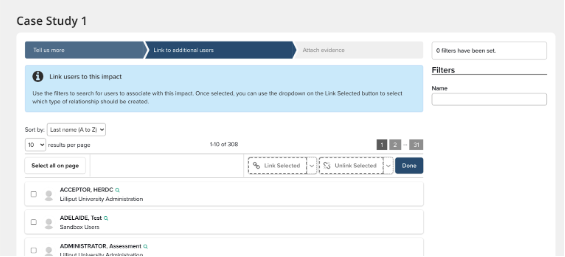
Link Users
Add additional users from your institution in order to create relationships and give attribution to your colleagues. This allows the creation of one shared record and avoids duplication of effort. Please note that this step in the workflow can be switched off from the module settings page. This allows all relationship information to be captured on the first step of the wizard.
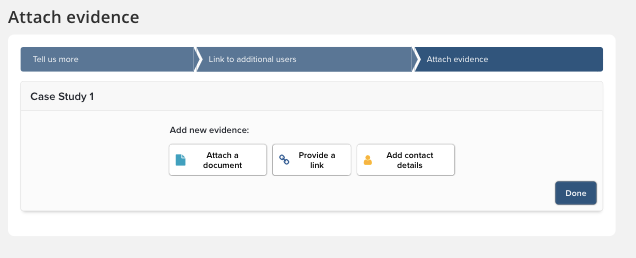
Attach Evidence
Attach evidence in the form of documents, links or contact details. Each piece of evidence can be annotated with additional detail to explain the nature of the evidence. Some examples of evidence are:
Documents: News Articles, Commentary, Reviews, Editorials, Blogs, Tweets, TV and Video, etc.
Links: check whether the link is correct by using the Preview (This will open in a new window so you don't lose any data). Be aware that links can break and content can be removed or archived from websites and social media. Look for permanent links like DOI's, Handles, Official Websites or Repositories. Alternatively, consider capturing details in Digital Image, PDF or Print and Scan, and then attach the files on the link screen. Ask for advice from your Elements team on the best way to do this.
Contacts: names of Journalists, Reviewers, Commentators, Colleagues, Government Representatives, Experts, and etc.
Specific problems that are mitigated when you keep a record of your impact
Finding, collecting and storing evidence of impact is an arduous task for researchers and can exist in many forms and in many places (e.g. media mention on New York Times).
The task is made much more difficult when the evidence has to be collected after the fact. Impact can often take years to develop and is created, shaped and driven by those conducting the research.
Time is ticking to the next Assessment exercise, be that an Annual Faculty Review in the US, the REF in the UK, the ERA in Australia, or PBRF in NZ. The timely capture of this information will help you to prepare.
Some tips:
As soon as evidence is obtained, capture it so it is ready to be used again for reporting or assessment within Elements. It also brings evidence out of silos and stores it in a secure, central location!
Write short or long narratives as they arise. They can be developed or revisited at a later stage. By capturing qualitative impact as early as possible you have an ongoing narrative to which you can refer.
Link the impact to related publications, grants or conference proceedings. This helps to build links between research inputs (funding), the activities, as well as the resulting outputs and outcomes (publications, conference proceedings). Elements helps to capture the entire research life cycle - input, activities, output, outcome to IMPACT!