
How to get a secure Elements API endpoint running
N.B. This guide applies to clients hosting their own instances of Elements. If Symplectic hosts your Elements instances, please raise a support ticket asking us to create the new API endpoint.
Before you can get a secure Elements API endpoint to work you need:
An unused port that can get through the firewall
This port assigned a valid (real) SSL certificate
Please also refer to the API Administrator Guide as it has more information than this article, including a troubleshooting guide.
Find an available port
Pick an unused one within the range that's already open in the firewall:
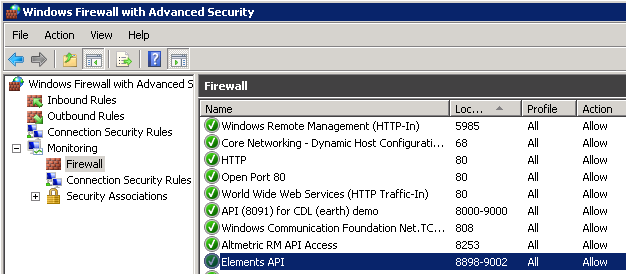
To see the ports currently in use run this from a command line:
netstat -an | find /i "listening"Verify SSL certificate assignment
Find a valid SSL certificate
In IIS select Server Certificates to find the details of a valid SSL certificate on the server.
Note: If no real SSL certificate is installed on the machine you will need to add one first.
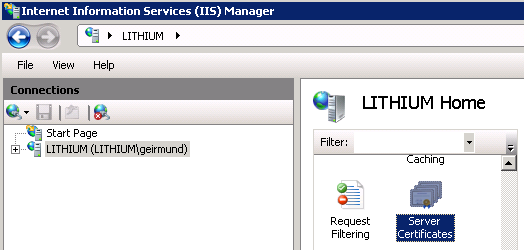
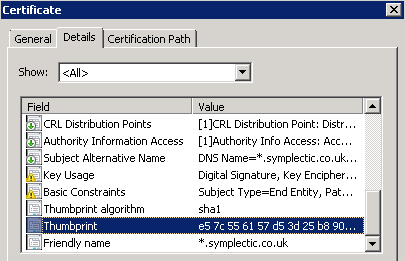
Copy the Thumbprint of the certificate from the Details tab and paste it in to a text editor, and check if the correct certificate is assigned to your port
Run this to see if your port is listed:
netsh http show sslcertAssign a cert to your port
Replace the <port number> and <SSL certificate thumbprint> and run this in a command prompt on the server (as an Administrator):
netsh http add sslcert ipport=0.0.0.0:<port number> certhash=<SSL certificate thumbprint> appid={00112233-4455-6677-8899-AABBCCDDEEFF}Tip: Beware the copy-paste gremlins! They often insert an extra '?' character or two after 'certhash=' so if that command is unsuccessful go check that.
Assign a URL reservation to your port
Check your port shows up in the list of URL reservations (URL ACL)
netsh http show urlaclIf it's not in the list, add it:
netsh http add urlacl url=https://+:<port number>/ user="NT AUTHORITY\LOCAL SERVICE"Configuring an endpoint in Elements
Specify user accounts that are allowed to use the API.
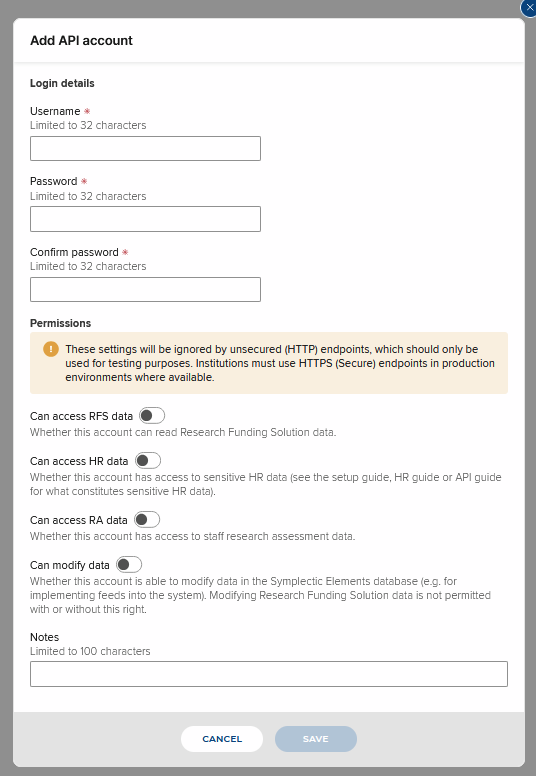
Add a set of credentials on the Menu > System admin > [AUTHENTICATION & ACCESS] > API accounts. (V6.n System Admin > Setup > API Accounts).
Note: If you want to use an API endpoint for importing users into Elements you'll need to assign "Can access HR Data" and "Can modify data" rights to the account:
Specify external systems that are allowed to use the API.
Add an entry for the IP address of the external system that will access the API go to Menu > System admin > [AUTHENTICATION & ACCESS] > API Configuration - (V6.n System Admin > Setup > API Configuration):
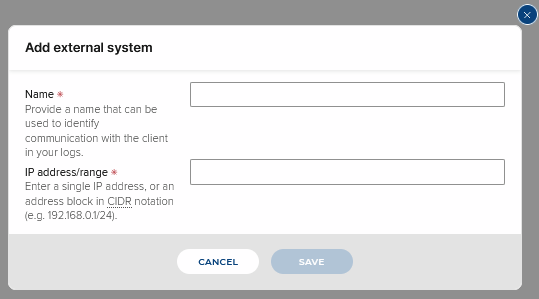
Set up an endpoint
Note: If Symplectic hosts your Elements instances, please raise a support ticket asking us to create the new API endpoint.
Make sure the host name is the fully qualified domain name of the server, before adding an entry for the endpoint; select your endpoint version, and add your port and relative URL details.
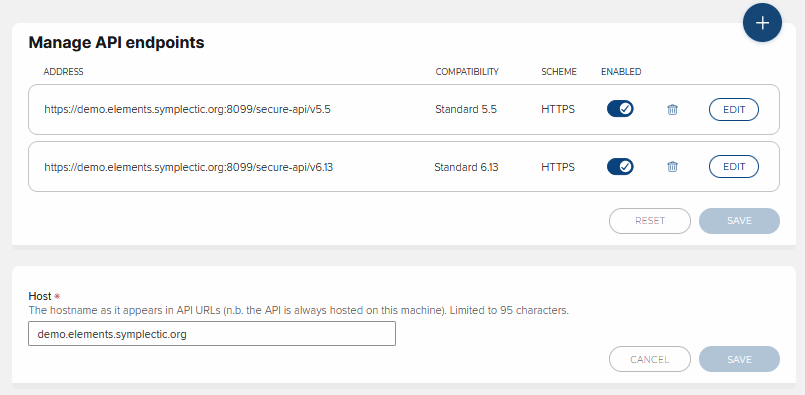
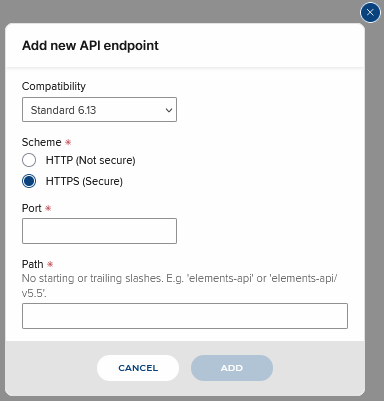
Enable the endpoint, and hit Update to save this change.
Now re-start the API on the System Admin > Operations > Scheduled Jobs - there's a link in the notification you get once you've saved any changes to the endpoints:

Test the endpoint
Check your new endpoint is returning data - post the url into a browser on the external system (server) you enabled access for. Once you have provided the credentials you set up above, you should receive an XML response like this:
<?xml version="1.0" encoding="utf-8"?>
<feed xmlns="http://www.w3.org/2005/Atom" xmlns:api="http://www.symplectic.co.uk/publications/api">
	<api:schema-version>4.9</api:schema-version>
	<category scheme="http://www.symplectic.co.uk/publications/atom/feeds/" term="introduction" label="Introduction"/>
	<id>tag:elements@lilliput,4.10:/410qa1/elements-api/v4.9secure/feeds/default</id>
	<updated>2014-05-16T10:54:53.5102+01:00</updated>
	<generator uri="https://carbon.symplectic.co.uk/elements/suzie/" version="4.10">Symplectic Elements</generator>
	<icon>https://carbon.symplectic.co.uk:8789/410qa1/elements-api/v4.9secure/symplectic.ico</icon>
	<rights>This data is the property of the Organisation, and can only be used with permission.</rights>
	<subtitle>The following is an example of a few API resources that you can access.</subtitle>
	<link type="application/atom+xml" rel="self" href="https://carbon.symplectic.co.uk:8789/410qa1/elements-api/v4.9secure"/>
	<title>Symplectic Elements API</title>
	<author>
		<name>Symplectic Elements at LIT</name>
	</author>
</feed>