
HowTo: Query the Reporting Database for Name Based Search Settings
Edited
This query will allow you to extract the Name Based Search Settings for all your users, current and non current. This can be useful to determine what should be changed in your user's Name based Search Settings.
SELECT U.[Proprietary ID],
    U.ID [User ID],
    U.[First Name],
    U.Initials,
    U.[Last Name],
    COALESCE(USD.[Author Override],D.Author) [Name Based Search],
    COALESCE(USD.[Affiliation Override],D.Affiliation) [Address],
    COALESCE(USD.[Journal Override],D.[Journal]) [Journal],
    COALESCE(USD.[Keyword Override],D.[Keyword]) [Keyword],
    USD.[Source Name],
        REPLACE(REPLACE(USD.[Override Author],1,'Yes'),0,'No') [Overriden Author],
    REPLACE(REPLACE(USD.[Override Affiliation],1,'Yes'),0,'No') [Overriden Address],
    REPLACE(REPLACE(USD.[Override Journal],1,'Yes'),0,'No') [Overriden Journal],
    REPLACE(REPLACE(USD.[Override Keyword],1,'Yes'),0,'No') [Overriden Keywords]
FROM [User Search Term Overrides] USD
INNER JOIN [USER] U
    ON U.ID=USD.[User ID]
INNER JOIN [User Search Term Defaults] D
    ON D.[User ID]=USD.[User ID]
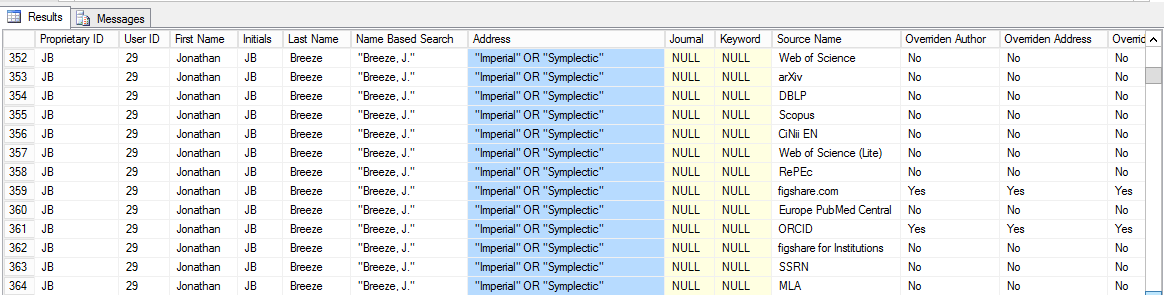
The results of this query
Was this article helpful?
Sorry about that! Care to tell us more?