
How to add a preferred name
Users can set a preferred first name and/or surname. This functionality allows users and institutions to deal with cases where there is a difference between the legal name and the name preferred by the user – for example; the use of a maiden name in a professional setting, while a married name is used for HR purposes.
This preferred name will override the name imported into Elements from HR systems and will be displayed throughout the system. (NB: The name stored in the HR system will not be changed and it will still be possible to search for users using this name.)
Institutions can enable this feature from System Admin > System Settings > Global Settings (by toggling the ‘Allow user preferred name’ check box. If this feature is not enabled, system administrators will still have the option of adding a preferred name by impersonating a user.
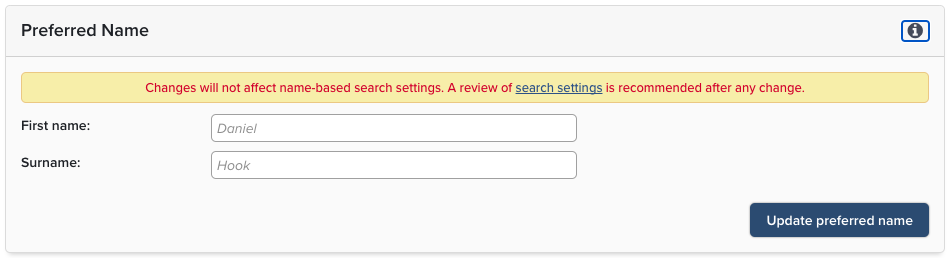
If enabled, users can add a preferred name from My Profile > About Me > Set Preferred Name.
Note:
Preferred names will not be reflected on Bibliographic Author lists imported from third party data sources.
The addition of a preferred name will not affect name based publication search settings and these should be updated separately. A warning is displayed to users in a prominent position when they add a preferred name.
For customers using the Discovery Module and providing a Customised URL via the HR Feed, this will need updating separately. For Discovery Module customers using the Elements provided URL the Preferred Name will update the URL automatically. Users should be instructed to update any links to their Discovery module URL.
The preferred name will override the standard name in the UI only. It will not overwrite the information in the ‘FirstName’ or ‘LastName’ fields in the Reporting Database.
A new field containing the user’s preferred name will be added to the user table. There will also be a ‘computed name’ field that shows what name is displayed in the system (computed based on the presence or absence of a preferred name).
Changes to the Reporting Database will be reflected in the latest version of the Reporting Database Guide v5.12.