
REF Validation report

Released : 5.20
Updated : 5.20.0.2685, 5.20.0.2803, 5.20.0.2906, 5.20.0.2927, 5.21 (and 5.21.0.2804, 5.21.0.2915, 5.21.0.2926), 6.0.0.2805 (and 6.0.0.2897, 6.0.0.2928), 6.1.0.2898, 6.1.0.2929
REF Validation report
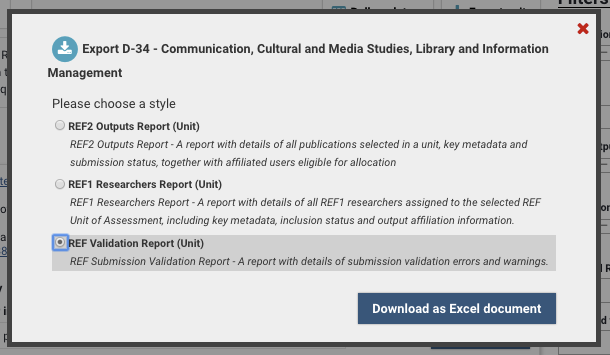
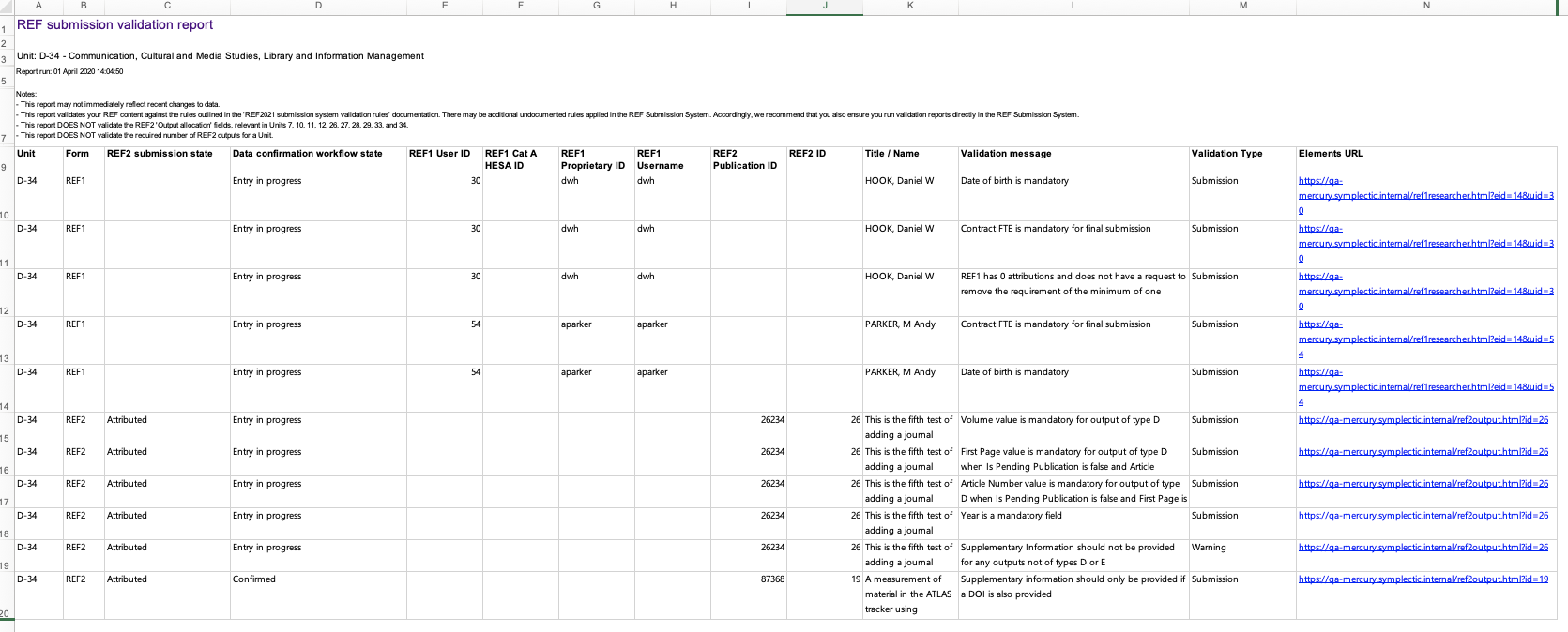
The REF Submission validation report is designed to give managers of a unit or an exercise definition ready access in Microsoft Excel to a detailed list of all REF validation errors and warnings.
Note that the REF Submission Validation report validates your REF content against the rules outlined in the REF2021 submission system validation rules. There may be additional undocumented rules applied in the REF Submission System. Accordingly, we recommend that you also ensure you run validation reports directly in the REF Submission System.
The report is available from:
Screen | Whole exercise | Unit-level |
Manage units | Y (excluding default Unit) | Y (excluding default Unit) |
Manage exercise | Y | - |
Manage selections | - | Y |
Manage REF2 Research outputs | - | Y |
Manage REF1 Researchers | - | Y |
Field | Notes |
Unit | |
Form | One of:
|
REF2 submission state | Will be either 'Accepted' or 'Attributed' |
Data confirmation workflow state | The Data confirmation workflow state of the record in question |
REF1 User ID | User ID of the REF1 Researcher (for REF1 or REF2 staff output link validation issues) |
REF1 Cat A HESA ID | HESA ID of the Cat A REF1 Researcher (for REF1 or REF2 staff output link validation issues) |
REF1 Proprietary ID | Proprietary ID of the REF1 Researcher (for REF1 or REF2 staff output link validation issues) |
REF1 Username | Username of the REF1 Researcher (for REF1 or REF2 staff output link validation issues) |
REF2 Publication ID | Publication ID of the REF2 output (for REF2 or REF2 staff output link validation issues) |
REF2 ID | REF2 ID of the REF2 output (for REF2 or REF2 staff output link validation issues) |
Title / Name | The REF1 Researcher name or the REF2 Output Title |
Validation message | Details of the validation issue encountered |
Validation type | The type of validation issue:
|
Elements URL | The URL of the record in question, enabling you to go straight to the record to resolve the validation issue. For 'REF2 staff output link' messages, the URL is for the REF2 record. |
The validation report runs the validation rules for selected content, as follows:
REF1 Researchers:
Included in submission
All data confirmation workflow states
REF2 Research Outputs:
Accepted or Attributed outputs
All data confirmation workflow states
Further notes:
This report DOES NOT validate:
the REF2 'Output allocation' fields, relevant in Units 7, 10, 11, 12, 26, 27, 28, 29, 33, and 34
the required number of REF2 outputs for a Unit
for duplicate DOIs (as this was not listed in the published validation rules)
for where the REF2 publication date does not fall within the contract dates for Cat B staff (as this is not listed in the published validation rules)
for Author contribution statements in Panels C and D (not required) (as this was not listed in the published validation rules)
This report only validates REF2 Author contribution statement(s) for the Attributed REF1 Researcher(s)
Non-english outputs. Where the output has been flagged as being produced in a language within the remit of the Unit, no validation is performed against the English abstract.
This report may not immediately reflect recent changes to data
When validating the number of attributions per REF1 Researcher, Reserve outputs are excluded, but outputs to be input directly in the REF submission system are included
When the REF2 Output type is missing, this will generate a validation error, along with additional errors that are the result of the output type being missing (e.g. missing Title). Once the REF2 Output type is set, those additional errors will be resolved (but new ones that are specific to the selected Output type may be generated).