
Symplectic Elements v6.3 - Release Notes
Elements v6.3
Introduction
Welcome to Elements Version 6.3!
Our latest release introduces an array of new functionality to improve and expand our new Research Funding Solution, the Reporting Hub, and the Discovery Module. It also includes many other smaller improvements developed in response to feedback and feature requests from our community.
Coming up in June is our Asia Pacific Virtual Showcase, including an overview of our upcoming 2021-2022 roadmap, which you can sign up for here. We are looking forward to announcing dates for our EMEA and NA user meetings soon.
We’re delighted that two clients have already signed-up to be early adopters of the new Research Funding Solution, which builds upon the tried-and-tested functionality of Elements to give institutions one centralised space to easily manage both research information and funding workflows. In this release, we have continued to expand our new suite of pre-award functionality to help streamline internal review & approval processes and make them more transparent by allowing all stakeholders - applicants, reviewers, and administrators - to track the progress of their proposal through the review workflow. We have also improved the management of organisational metadata by introducing a new GRID integration and added a number of new reports.
In the Reporting Hub, we are excited to introduce the ability to create Custom Data Extracts. This new functionality makes custom reporting easier than ever before and will help reduce the overhead of creating and maintaining custom reports. With this functionality, organisations can create a custom report simply by writing their own SQL query and uploading that query to the Reporting Hub. Available to clients licensed to use our Analytics Module, Custom Data Extracts complements our suite of highly flexible reporting tools including custom dashboards and custom formatted reports to ensure you have the reporting flexibility you need to create tailored, actionable insights about your organisation’s research activities.
We have also made a number of other improvements to the Reporting Hub and introduced three new stock reports, including a new version of the NIH Biosketch developed in response to the recent 2021/2022 NIH public access policy update.
In the Discovery Module, we have introduced new labels-based filters to help organisations further tailor the Discovery Module search experience to align with the focus of their organisation so that visitors to the site can identify the perfect co-investigator or collaborator.
As always, the new version of Elements and associated upgrade instructions can be found in the Elements upgrade forum.
Updates to the Reporting Hub
Introducing Custom Data Extracts to the Reporting Hub
We are excited to introduce the latest addition to our suite of custom reporting tools - Custom Data Extracts. Available to clients licensed to use our Analytics Module, this new functionality makes custom reporting easier than ever before and will help reduce the overhead of creating and maintaining custom reports. With this functionality, organisations can create a custom CSV extract simply by writing their own SQL query and uploading that query to the Reporting Hub. Once registered and shared, the data extract can be run by users via the Reporting Hub, without the need for specialist technical skills.
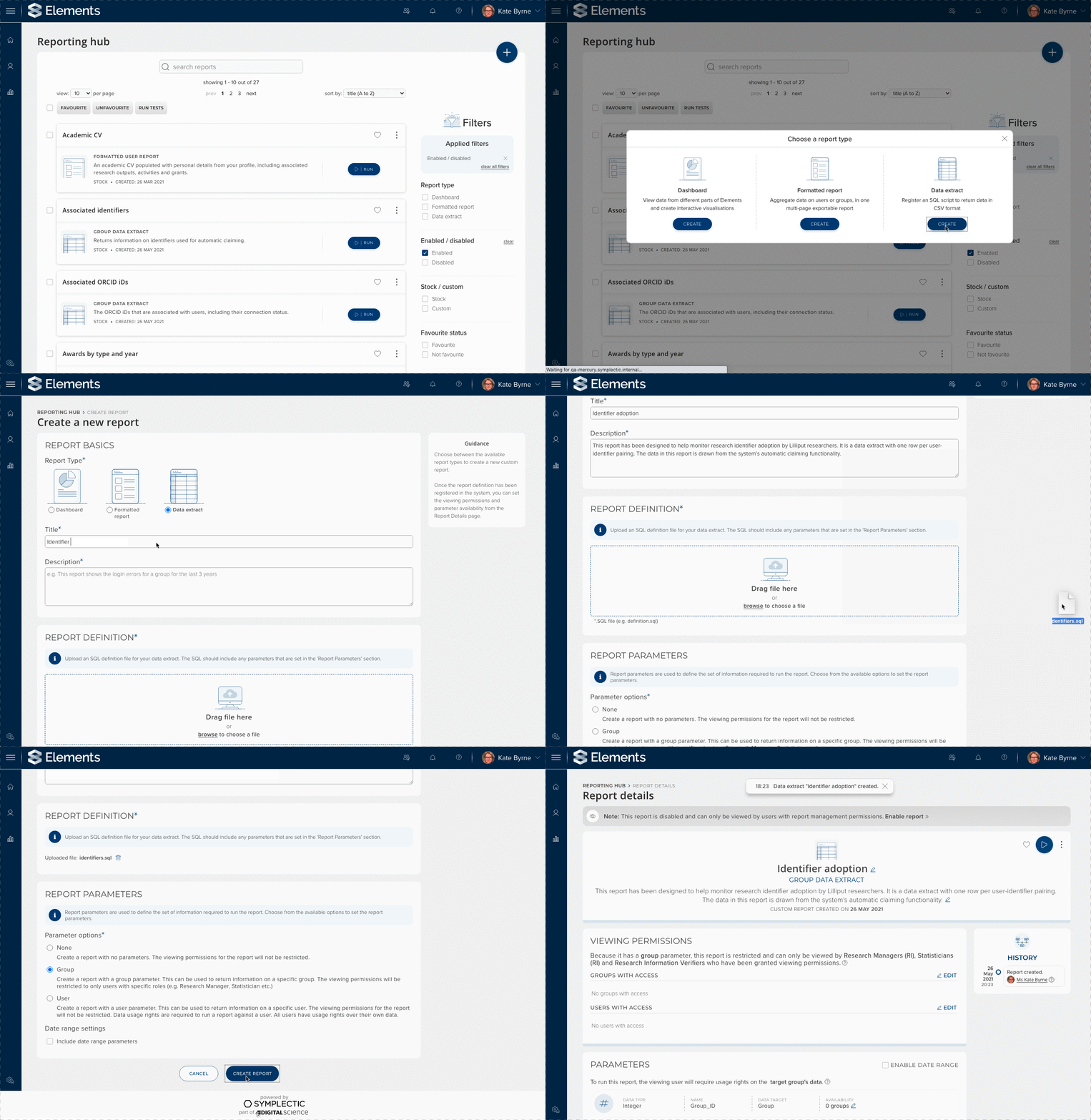
Image: An administrator adding a new custom data extract to the Reporting Hub by uploading an SQL query and configuring report parameters.
When creating a custom data extract, administrators register an SQL script to define the set of data to be returned and to update an existing custom extract in the future, you need only adjust your SQL query and re-upload it. SQL is a widely used language designed for querying relational databases and it is already used by many of our clients to directly query the Reporting Database. This new functionality makes it easier to share those reports with your communities of users. To ensure consistency, the approach to managing viewing permissions and parameter availability for Data Extracts has been aligned with other reports in the Reporting Hub. For more information about Data Extracts please see the support site.
New stock reports available
We are continuing to expand the range of stock reports available to meet a range of reporting needs, including introducing our first stock Data Extracts to the Reporting Hub. All stock Data Extracts can be copied to access the underlying SQL that powers the report, giving organisations visibility of how data is sourced for stock reports.
In this release, two stock Data Extracts have been added to the Reporting Hub;
NEW ‘Associated identifiers’ extract - This Data Extract summarises information about the identifiers associated with each user & whether or not they are currently being used for automatic claiming.
‘Associated ORCID iDs’ - This Data Extracts summarises the ORCID IDs associated with each user and (if using) whether it is being used for automatic claiming, to read data from ORCID or to send data to their ORCID account. This is a replica of the basic report of the same name which has now been removed from the basic reports page.
We have also added;
A new formatted user report, ‘NIH biographical sketch (2021)’. This updated version of the NIH Biosketch was developed in response to the recent 2021/2022 NIH policy update. The older biosketch reports remain available for users who still need to report under the older rules.
New ‘Create a new report’ page
As a part of our work to introduce Data Extracts to the Reporting Hub, we have also introduced a new ‘Create a new report’ page. This updated page provides a new unified and simplified experience for creating custom reports.
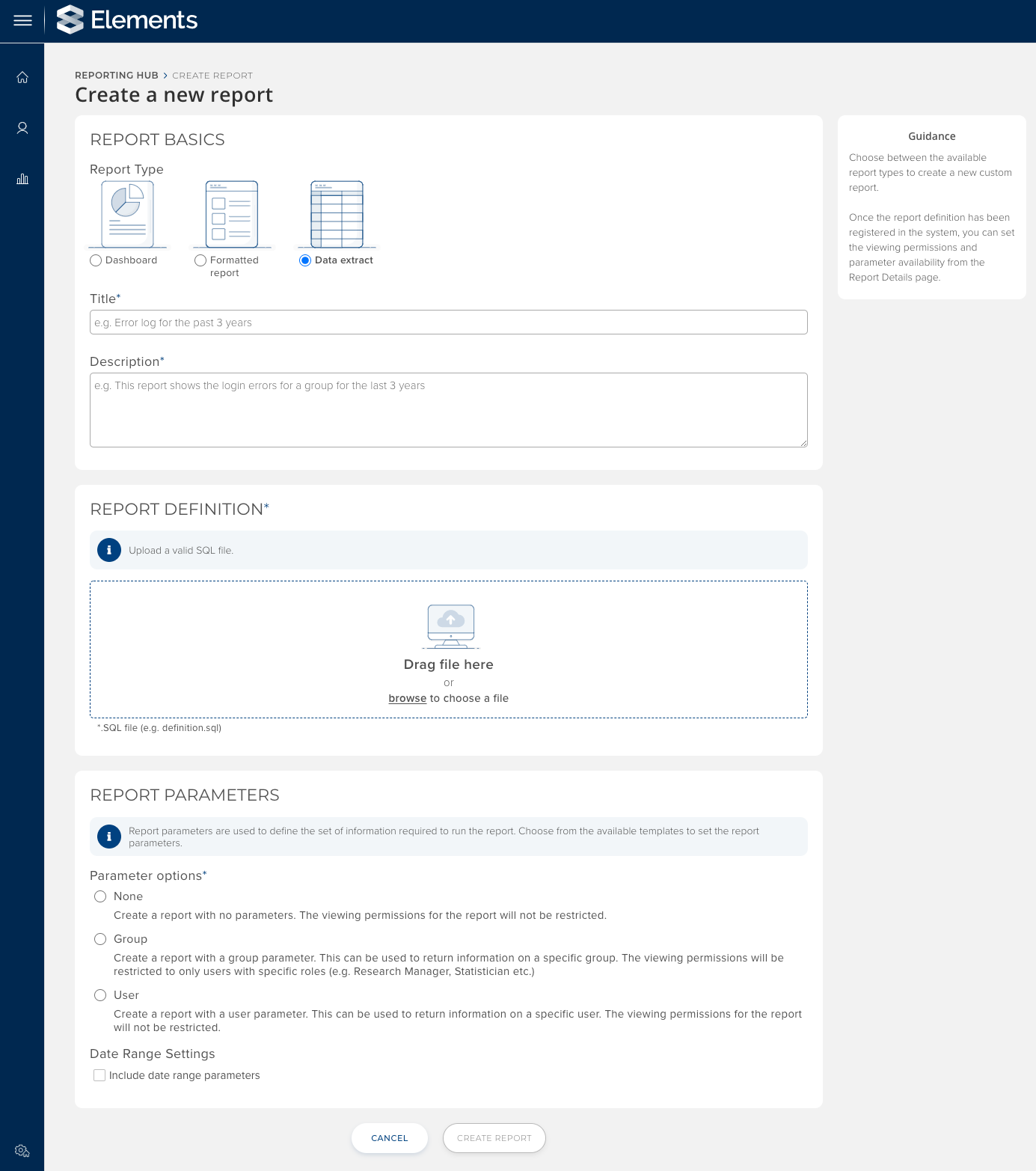
Image: The updated ‘Create a new report’ page provides a unified and simplified experience and includes the option of registering an SQL script as a Data Extract.
To create a new report, Administrators with the appropriate permissions choose whether they wish to add a new custom data extract, dashboard or formatted report and then will be prompted to upload the relevant report definition & configure the report’s parameters. Once a report has been created, the administrator can configure viewing permissions and report availability settings. More information about managing reports in the Reporting Hub can be found on the support site.
Monitor and manage data storage in the Download Centre
In our last release we introduced our new ‘collect later’ functionality to allow users to choose to collect a large report later so they continue with other tasks. Reports can be collected from the user’s Download Centre once they are ready to be downloaded and each report will be automatically deleted once downloaded.
In this release we have built on that functionality, introducing the ability for administrators to monitor and manage data storage in the Download Centre. Administrators with appropriate permissions will now see a new panel within the Download Centre allowing them to check whether there is enough storage available for users to continue to use the ‘collect later’ functionality. This new panel also allows Administrators to delete reports to free up storage space, with a choice whether to delete reports over 30 days old or to delete all reports.
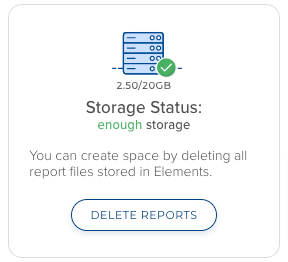
Image: Administrators can view whether there is enough storage available to support the ‘collect later’ workflow and choose to delete reports if they wish.
Updates to the Statistician role
The permissions associated with the Statistician role have been modified to allow users with this role to run reports with a ‘user’ parameter (e.g. CVs) against any users in a group that they are a statistician for. This change brings user reports in line with group reports & basic reports, consolidating reporting permissions associated with this role.
Research Funding Solution
Following on from the launch of the Research Funding Solution (RFS) in our last release, we have continued to expand our new suite of pre-award functionality to help streamline internal review & approval processes, improve the management of organisational metadata and add a number of new reports. This new functionality builds upon the features released in v6.2 to help organisations manage proposal development & internal approval workflows for both internal funding programs & external funding applications.
Review & approval functionality
We have made a number of improvements to our Review & Approval functionality to better support ease of configuration, allocation to teams of reviewers, and increased transparency.
These include:
Expanding the Proposal details & Review pages to introduce a new section which makes the review and approval workflow visible to project participants. This ensures that all relevant stakeholders can see where a proposal currently sits in the workflow, increasing transparency for researchers.
New functionality to support the allocation of reviews to a team ‘pool’ (e.g. Faculty Research Office or finance team). One allocated to a team, individual reviewers can then ‘claim’ a review to avoid any duplicated efforts.
Improvements to the process of configuring review & approval workflows including both the default workflow for a funding opportunity, and where needed custom workflows for individual proposals within a funding opportunity.
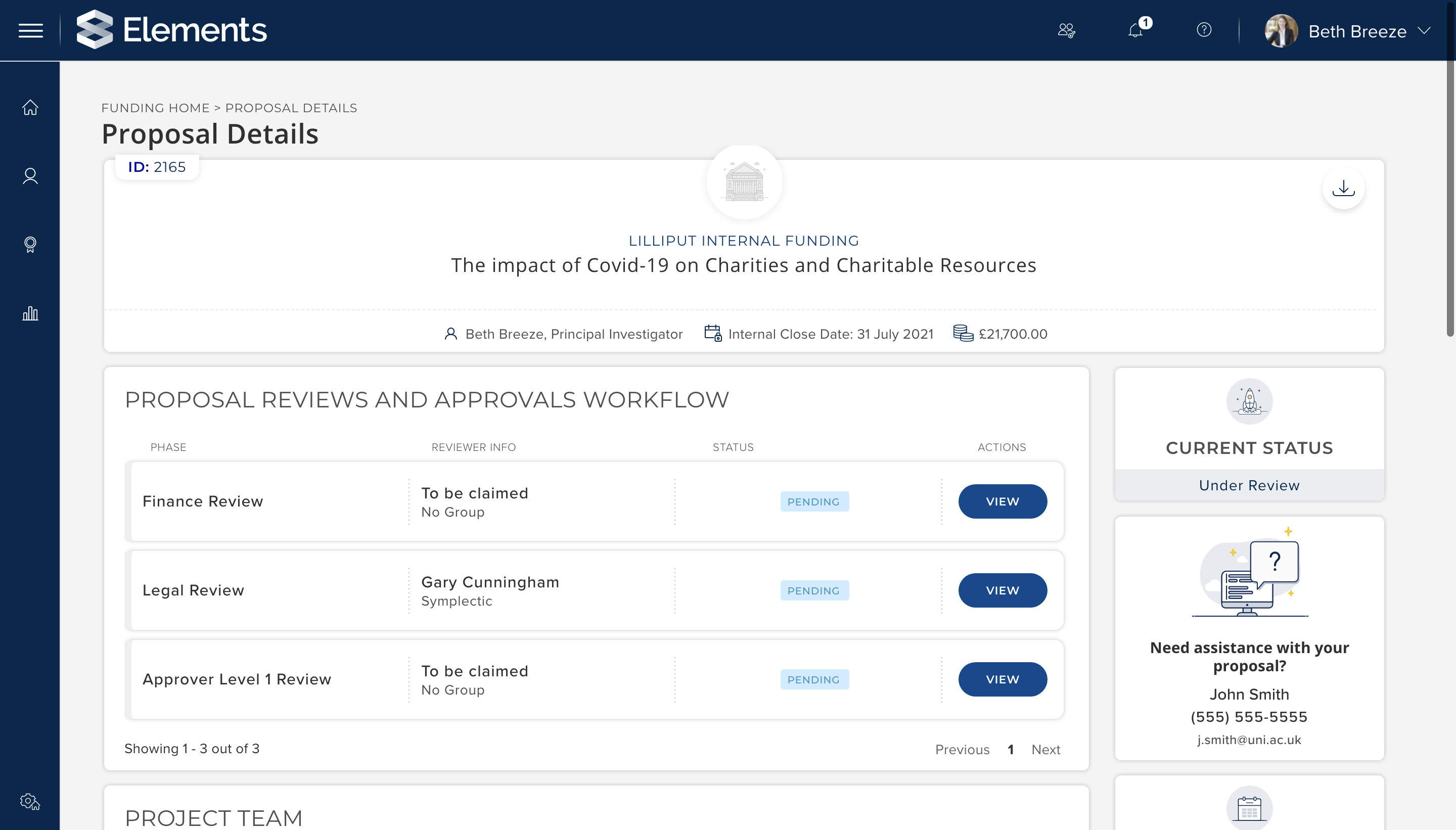
Image: A researcher can see the review & approval workflow for their submitted proposal.
GRID integration
To ensure that organisational metadata (eg. metadata about funders or external collaborators) is as structured and reusable as possible, we have expanded our external organisation model in RFS to integrate directly with GRID. With this integration, external organisation records in RFS are now sourced from GRID where possible, but can also be supplemented and enhanced through the use of local records. This new functionality will help enhance the quality of organisational reporting & minimise the risk of duplicate records.
Reporting
We are continuing to expand the available stock reports as more functionality is delivered in RFS. In addition to minor additions to existing reports, this release includes three new stock reports:
User list of Proposals : Lists all Proposals affiliated with the selected User(s).
Proposal statuses by Managing Group : Summary tables of all proposals (by status, by PI, full details), by Managing Group
Activity on open Funding Opportunities by Managing Group : List of Proposals for open Funding Opportunities, by Managing Group
These new reports are available via the Elements Reporting Hub, allowing administrators to configure who within the organisation should have access to the reports.
Discovery Module - Label-based custom filters
Organisations can now choose to add new label-based custom filters to their Discovery Module. This new functionality complements existing filter configuration options to help organisations further tailor the Discovery Module search experience to align with the focus & needs of their organisation.
From v6.3 onwards, organisations can choose to enable up to five custom filters based on either a label-scheme or a HR field. Organisations can choose to use any label scheme which has a restricted vocabulary including both stock and custom schemes. Organisations can configure which schemes or fields will be used to populate each custom field via the the Discovery Module Management page and the filters themselves can be renamed in the Discovery Module configuration file. For assistance configuring this functionality, please contact Symplectic Support.
We have also updated the behaviour of the Discovery Module footer, so that it will initially appear ‘below the fold’ on the landing, search and profiles pages. It will appear automatically when a user scrolls down.
Repository Tools 2
Enhanced Figshare for institutions integration
We have updated our Repository Tools 2 (RT2) integration for Figshare to make the integration more efficient and offer enhanced matching. This integration now is based on our more contemporary ‘harvest’ model, using our specialist offline search functionality to match works harvested from an integrated Figshare for Institutions repository to authors within Elements. This new matching technique will allow Elements to match harvested works to as many internal authors as possible and not just owners or depositors. Where users have a known identifier within both systems, Elements will continue to automatically claim the works on behalf of the author(s).
The integration has also been updated to Allow Figshare for Institutions RT2 interop to harvest ‘known’ items whilst in a draft state, reducing the risk of duplicate deposits.
Other improvements
Improvements to error messaging to help prevent duplicate deposits if there is an issue harvesting a record from the repository immediately after successfully making a deposit.
It is now possible to crosswalk only the code of a code-based label scheme (eg. FOR codes) via the RT2 crosswalks, reducing the need for value maps within crosswalks.
Equipment Module data model updated
We have updated the Elements Equipment Module, expanding its out-of-the-box data structures by introducing 5 new stock equipment types: instrument, collection, biological material, reagent & lab. Organisations continue to be able to supplement our set of stock types by adding their own custom types or configuring key metadata (eg. adjusting type names).
These changes have been introduced in preparation for an upcoming expansion of the Discovery Module introducing a new suite of functionality to surface Equipment ‘profiles’ & a dedicated search to help make equipment, facilities & services more discoverable. This new functionality will help organisations to promote their resources & capabilities to foster new partnership opportunities & maximise use of these valuable resources.
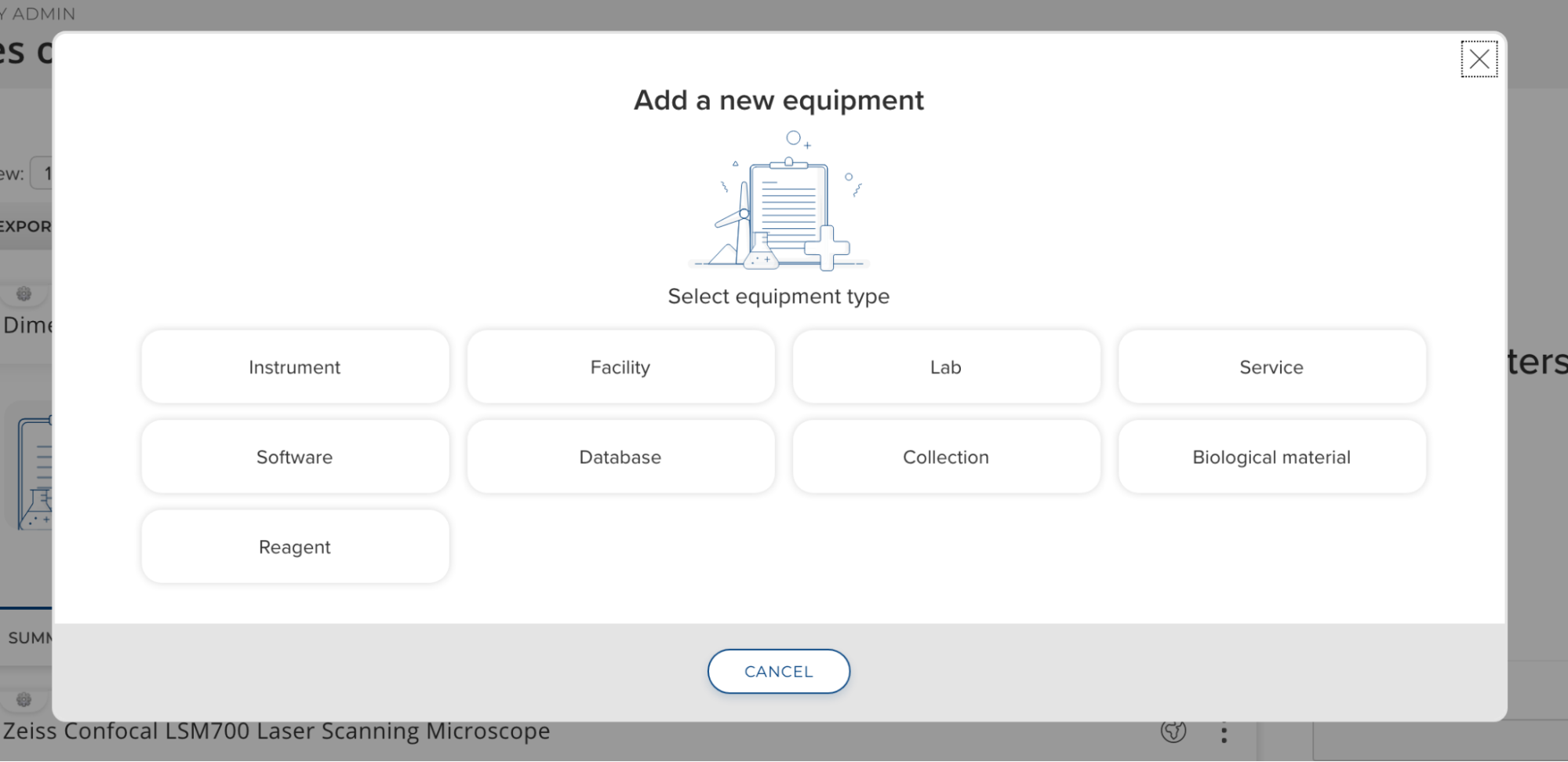
Image: The equipment module now includes 9 stock types.
We have also introduced a number of new stock fields to help capture information about equipment specifically targeted at improving discoverability. New fields include:
Capabilities/Specifications - A list field designed to capture information about the abilities and technical specifications of each item.
Availability - Allows an organisation to indicate whether a particular piece of equipment or resource is available for either internal or external use.
Contact information - a new set of contact information fields to optionally capture location, email address and phone number to allow someone to get in contact about possible use of a particular piece of equipment or resource.
Training available - A new boolean field to indicate whether or not training is available
Other improvements
For clients using the Annual Collection Module, there is a new homepage action to prompt users if they have any nominations which require ‘more information.’ Once configured, this new action will display to users who have 1 or more nominations with a status of ‘Pending Response’.
Person list fields can now capture an email address and/or phone number as well as address information for each person. These new sub-fields are optional and can be configured per usage of the ‘person list’ underlying field type (eg. for each publication type or grant type etc.).
We continue to make accessibility related improvements to Elements. In this release we have made improvements to SVG handling and our use of ARIA labels in common components to enhance experience for screenreader users. We have also made Improvements to our automatic contrast checking functionality on the Elements Branding page, to ensure conformance with WCAG-AA standards.
Fixes
There was an issue with Discovery Module’s Tag search where the tags could compress if multiple tags were selected. This has been fixed.
We have improved text wrapping in the Discovery Module profile sidebar to better handle long website links in desktop view and email addresses in the mobile view.
Fixed an issue with the Discovery collaboration network diagram where the ‘Extended view’ key on the would continue to display after a user switched back to ‘Direct network view’.
The new preprint type was not being formatted properly in CV-style reports. This has been fixed.
The Annual Collection notification in the header bar could show an incorrect count of the number of items requiring more information as it was including non-authorship links. This has been fixed.
Fixed an issue where grant-to-grant relationships were incorrectly displaying a reporting date field.
References to the CASRAI Dictionary on the Professional & Teaching activity pages have been removed as there is no longer a current weblink available for this resource.
The link for ‘more info’ on an Altmetric Donut has been updated on the My Publications page as this article has moved.
End of support
As always, we recommend that you regularly review our End of Support Announcements for information about upcoming end of support in Elements for various technologies.
Need help?
We hope you enjoy getting to know the latest version of Elements. Remember should you have any questions, we’re here to help! Just contact us at support@symplectic.co.uk for assistance.
Best wishes,
The Symplectic Team