
Symplectic Elements v6.5 - Release Notes
Elements Version 6.5
Introduction
Welcome to Elements v6.5!
In our September release, we are very excited to announce a new suite of functionality to allow you to track and report on how your researchers are contributing towards the United Nations Sustainable Development Goals as we all work towards achieving a better and more sustainable future for all. We know a lot of you have been interested in using Elements to support tracking your contributions, and we share your passion - here at Digital Science we have recently set up a climate change working group to explore ways to make how we work more sustainable.
If you use one of our Repository Tools 2 integrations, you have more power than ever before to tailor the integration to your needs. The release offers several new configuration options including the ability to configure which publication types are permitted to be deposited to your repository, giving you a greater level of control over your open access workflows.
In the Discovery Module, we’ve continued our work introducing Equipment Profiles, adding new tabs to show related experts, publications and grants, helping you signpost researchers to people who have experience or expertise with these specialist tools, facilities or services as well as showcase the research findings and outputs that your equipment has made possible.
We have also continued to grow our new Research Funding Solution in this release, with major new functionality for post-award grants management. This will help support the management of active projects, letting you monitor deliverables and giving your researchers more transparency and access to key project data.
There are also many other improvements across Elements, many of which were inspired by feedback and feature requests from our community. Thank you all for your continued engagement!
North American clients are invited to join us for our virtual user meeting next week, where – as well as looking at the Elements roadmap for 2022 – we’ll be exploring Elements’ new privacy features, the new SDG tracking functionality, and hearing from Andrew Mckenna-Foster of Figshare on the benefits of the Elements/Figshare integration. We’re also very excited to hear from Steve Marois and Maura Monahan of Boston University, and Clarke Iakovakis and Megan Macken of Oklahoma State University about their use of Elements.
As always, the new version of Elements and associated upgrade instructions can be found in the Elements upgrade forum.
Remember, if you have any questions, we’re here to help! You can contact us at support@symplectic.co.uk.
Best wishes,
The Symplectic Team
Tracking Sustainable Development Goals
New functionality to support tracking Sustainable Development Goals
The United Nations’ Sustainable Development Goals (SDGs) are designed to be a blueprint for achieving a better and more sustainable future for all by addressing the global challenges we face. Since SDGs were first introduced, there has been a growing interest in tracking, analysing and showcasing the ways in which researchers are contributing to achieving these goals. So it is with great excitement we are releasing a new suite of functionality to help our clients do exactly that!
At the core of this new functionality is the ability to track which outputs and activities connect back to the 17 SDGs via use of a new stock label scheme. SDG labels can be applied to any items captured in Elements (eg. publications, grants, professional & teaching activities and records of impact) as well as to user profiles. They can be applied either automatically (via our Dimensions integrations*), manually or in bulk via the Elements API. Once collected, the data can be used in many different ways both within Elements such as for reporting, on public profiles or in an integrated repository.
To streamline the classification process as much as possible, we have expanded our publications & grants data source integrations with Dimensions to harvest SDG labels where available. Dimensions automatically analyses publications and grants to map them to relevant SDGs - creating labels which we can then harvest into Elements. To date, the Dimensions team have mapped SDG labels to over five million publications and hundreds of thousands of grants, with more records being analysed and mapped all the time.
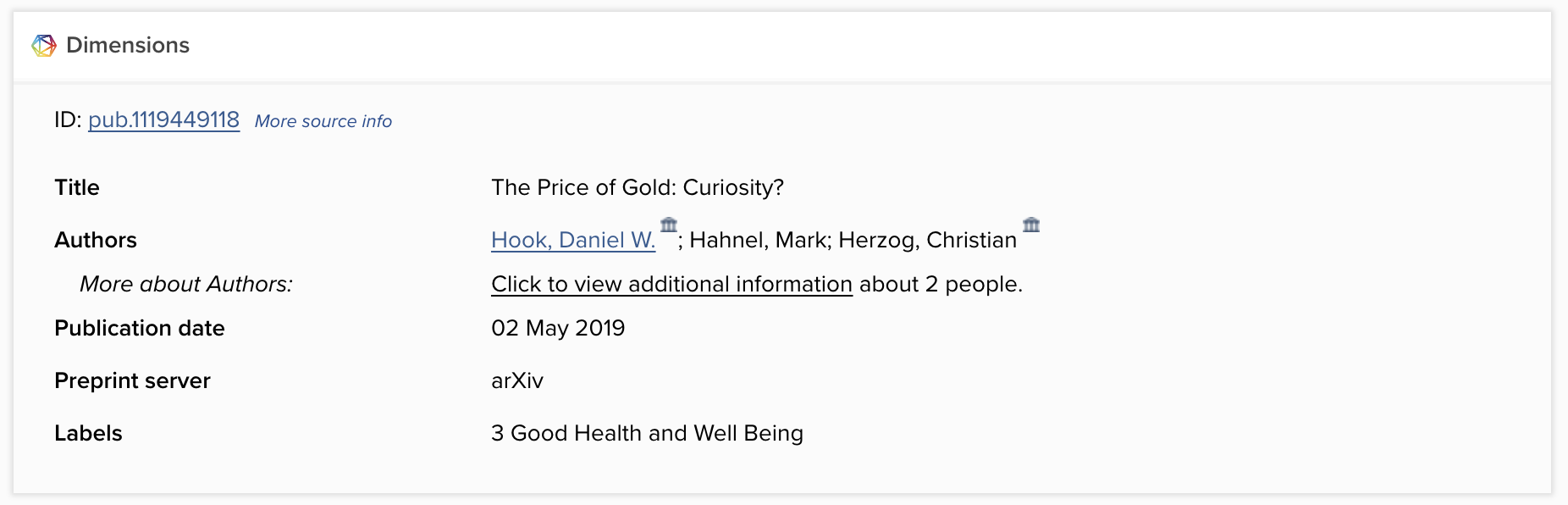
Image: An example of a record harvested from Dimensions with an SDG Label.
For clients already using Dimensions as a data source, SDG labels will begin to be added to your Elements instance automatically following your upgrade to Elements v6.5. Any records harvested prior to v6.5 will have any missing SDG labels added the next time the record is refreshed as a part of our automated data refresh processes.
*Please note, a licence to use Dimensions as a data source is required to enable this functionality.
Reporting on SDGS
To help you easily analyse & report on SDGs, we have added two stock reports to the Elements Reporting Hub. Our new stock dashboard has been designed to help you identify trends in the SDGs labels associated with publications within your Elements instance. This dashboard can be filtered by group and time to allow you to explore how different parts of your organisation may be contributing to the SDGs. For easy visual analysis the colours in this dashboard have been aligned to the colours associated widely with each SDG.
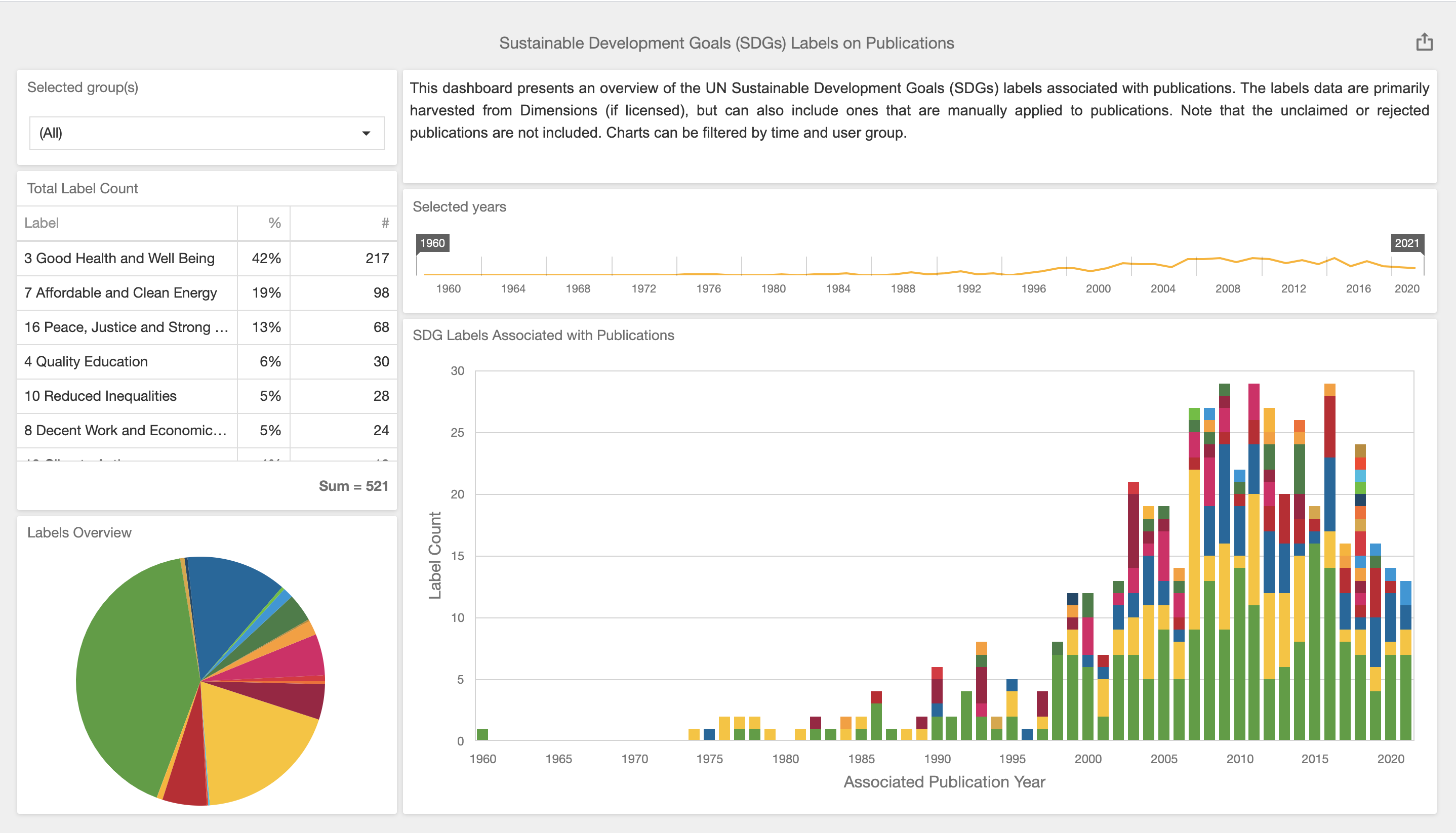
Image: An example of our new SDG dashboard analysing SDG labels associated with publications in Elements.
To make it easy to pull out the data to explore it further, we have also introduced a new stock data extract that allows you to export a CSV summary of the SDG labels applied to publications. All SDG label data is also available via the Elements Reporting Database and the Elements API, and can be included in custom dashboards and reports as desired.
Showcasing SDGs on Discovery
For organisations seeking to showcase your contributions to the SDGs, you can choose to enable an SDG filter on the Discovery Module to allow visitors to easily find researchers who specialise in particular goals.
As with all filters, it is important to ensure you have the right data to underpin this functionality, so we recommend that you consider how best to curate this data to offer the most meaningful search and discovery experience. If you require guidance, please contact our team via Symplectic Support.
Repository Tools 2: New configuration options
Configure which types of publications can be deposited
To give organisations even greater flexibility for integrating their repository with Elements, we have introduced new functionality which allows organisations using our Repository Tools 2 integrations to configure which publication types are permitted to be deposited to the integrated repository. This new functionality simplifies the deposit experience for organisations who have integrated two repositories with Elements (eg. separate publications and data repositories) as it ensures Elements can definitively guide the user to deposit to the correct repository for each publication type. It can also be used by institutions who wish to prevent users from depositing specific types of publications they do not currently collect in their repositories (eg. preprints or other non-traditional output types) or who use an alternative deposit workflow for certain publication types (eg. theses).
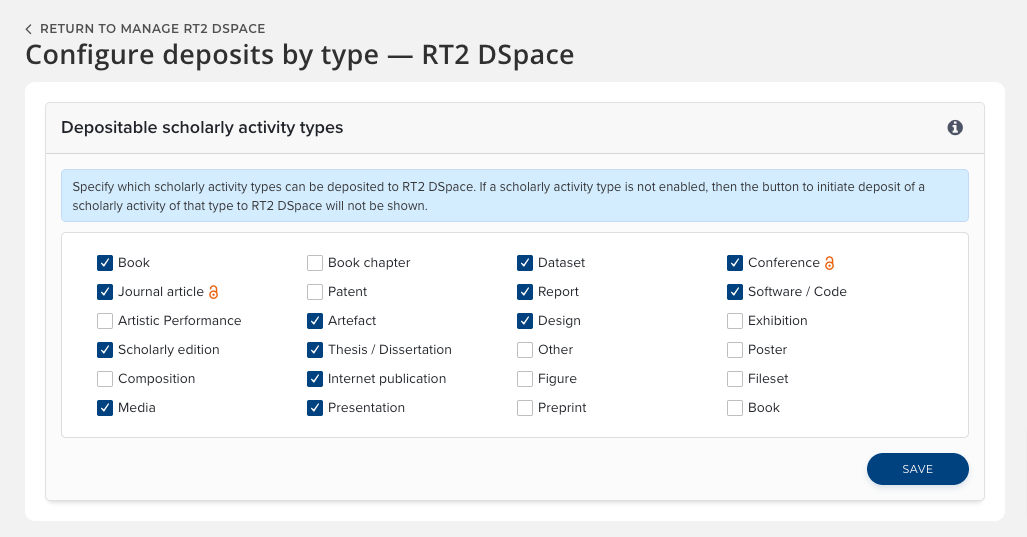
Image: Administrator can easily configure which publication types are allowed to be deposited to a repository.
Once configured, users will only see deposit buttons for items permitted to be deposited to an integrated repository. If there is more than one integrated repository, the deposit button will automatically take them to the relevant deposit page, streamlining the deposit process.
This new functionality is available for any supported RT2 repository integration (Figshare for Institutions, DSpace, EPrints or Hyrax) and does not impact the RT2 harvest capability. This means that if desired, publication types which are not deposited via Elements can still be harvested into Elements from the repository as metadata records.
Configure when files can be re-deposited
We have also introduced a new configuration option to allow administrators the ability to restrict when users are permitted to deposit additional files to the integrated repository based on the item’s status in the repository.
This expansion of our subsequent deposit functionality introduces new configuration options to control whether redeposits are permitted ‘for all repository items’ regardless of status, only permitted ‘for non-public items’ or are not permitted at any time. If permitted ‘for non-public items’ is chosen, users will be permitted to upload additional files to items that are in review, or have been rejected from a review process, but they will not see the option to upload and deposit new files to any items which are already publicly visible at the repository.
These new configuration options are available for our RT2 DSpace, EPrints and Hyrax integrations and can be configured via the relevant repository data source management page.
Discovery Module: Equipment enhancements
New tabs to show related experts, publications and grants
Building on the Equipment search introduced to the Discovery Module in our last release, we have added a number of new features to help bring the equipment profiles to life. This new functionality seeks to help visitors to the site to explore how each piece of equipment (or facility or service) connects to the organisation’s research by showcasing links between equipment records, profiles, publications and grants.
On the Equipment ‘About’ tab, we have introduced a new section to highlight related equipment, facilities and services. This section will be populated with up to ten links based on links between Equipment records in Elements. It will allow visitors to easily browse between associated records - for example to review the instruments associated with a specific facility or service.
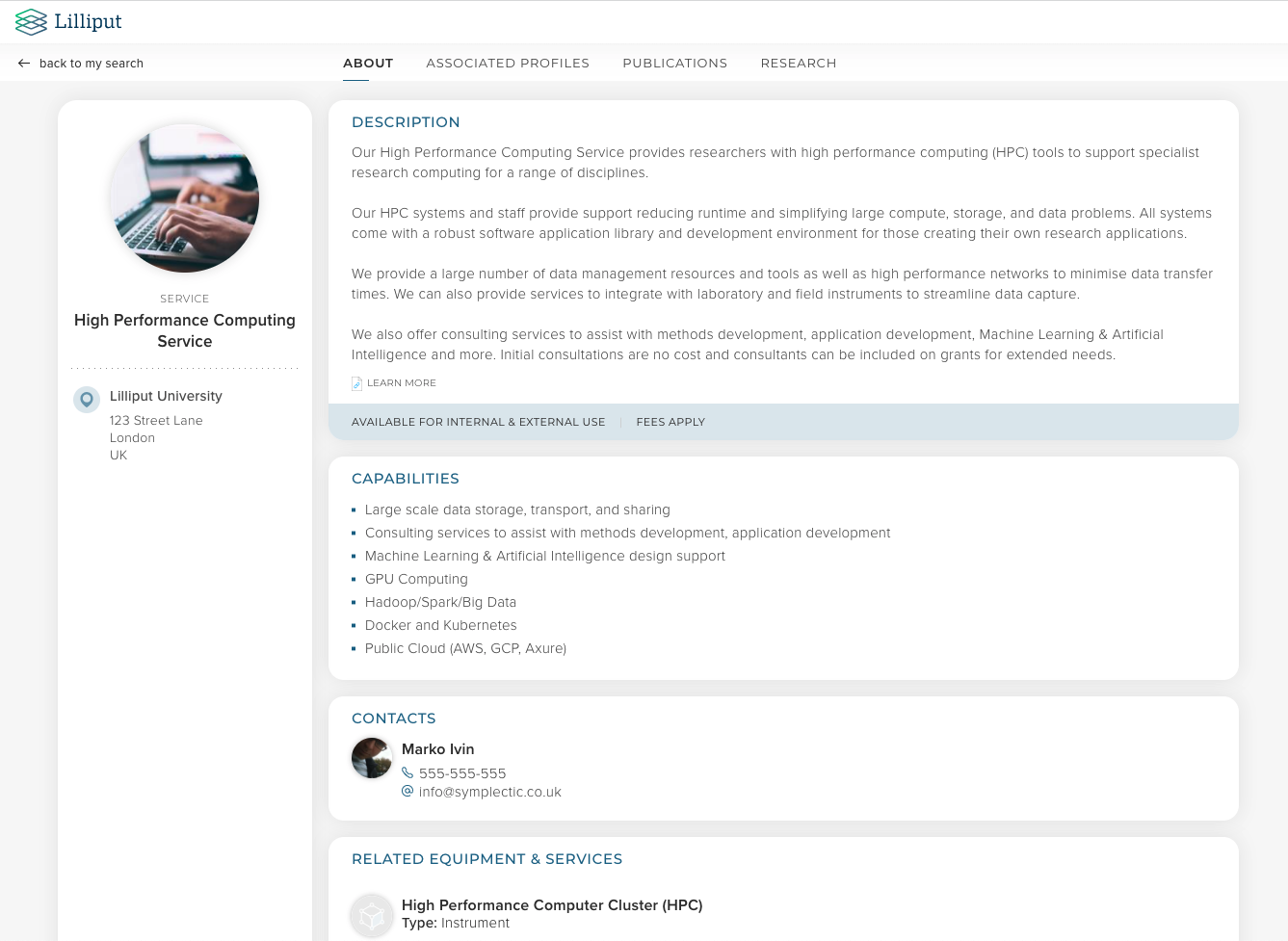
Image: Equipment profiles will now include a related equipment list on the About tab.
We have also introduced tabs to the Equipment profiles, bringing them in line with the Experts profiles and showcasing associated experts, publications and grants. This new functionality ensures visitors to Discovery can easily browse through to view an associated expert’s profile and explore the publications and grants associated with a given piece of equipment, facility or service. By highlighting the ways in which equipment or facilities have contributed to research we hope to help further foster opportunities for even more meaningful partnerships, collaborations and discoveries.
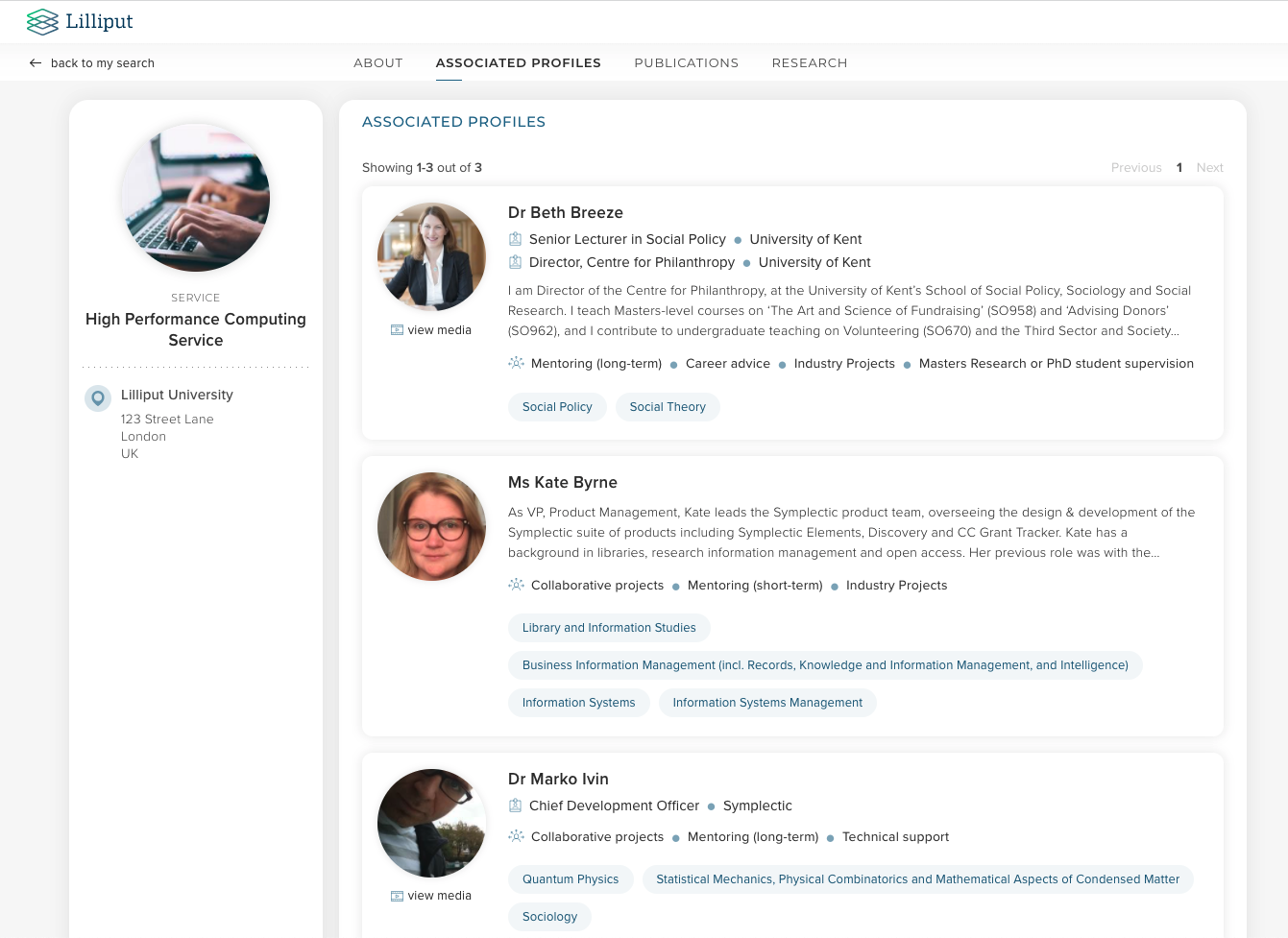
Image: Visitors can explore associated profiles, publications and grants via tabs on each equipment profile.
Underpinning this functionality is a set of configuration options similar to Experts, allowing organisations to configure the names of the tabs and sections and to decide when to hide irrelevant tabs.
Other Discovery improvements
New Contact URL field added to Equipment to allow organisations to choose to point visitors to an external site or form for managing contact requests.
Performance improvements to make the Discovery Experts search more efficient.
Improvements to error handling to enhance SEO.
Research Funding Solution
Introduction of post-award functionality
The Elements Research Funding Solution (RFS) continues to grow significantly and in this release we are very excited to introduce new functionality to support post-award grants management.
This new suite of functionality has been designed to help manage the transition from awarded grant to active project, and to support the management of projects throughout their life, including monitoring deliverables and managing change requests. New My Projects and Project details pages have been added to the core Elements interface to allow researchers to easily access information about their projects, whilst the Funding Management Console has been expanded with new functionality for administrators.
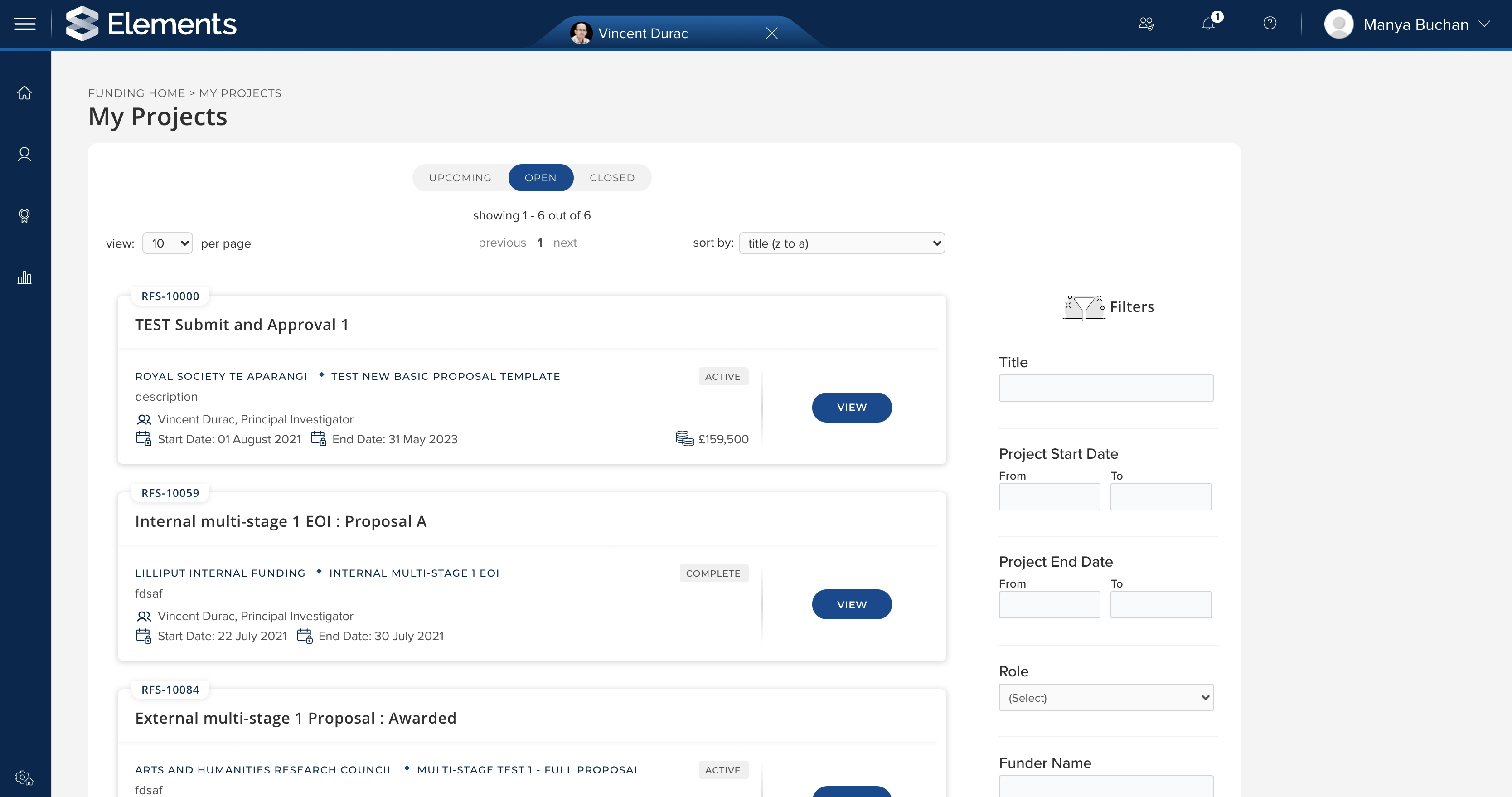
Image: RFS ‘My Projects’ screen
Highlights from this release include:
Project activation functionality, providing a clear distinction between pre and post-award activities,
New project related statuses, enabling the current status of projects to be visible to all relevant stakeholders,
Functionality to support the management of project deliverables, including capturing responsible users, due dates, and reminders to help all relevant stakeholders ensure all funder requirements are met on schedule, and
Management of change requests, supporting the tracking of submitted change requests and subsequent metadata updates as required.
Full details of the RFS functionality released in v6.5 are available in the RFS release notes on our support site.
Other improvements
The MESH label scheme has been updated to align with the 2021 MESH headings to ensure inclusion of COVID related terms and other recent changes.
We have updated the ORCID write integration to prevent Elements sending inconsequential updates to ORCID.
Reporting Hub enhancements:
Introduced new ability to download report definition files for stock Dashboards and Data Extracts).
Now possible to select the entire organisation when setting availability of group parameters.
Dimensions data source integration updated to map data to the ‘Name of conference’ field for publication records.
Improved the import of publications using BibTeX files so that publication status will be mapped to the ‘status’ field where available.
Introduced a setting to configure whether or not users can change equipment type.
Improved unsaved changes warnings on the data source management page.
Administrators will now see links to view Annual collection nominations via the Publication Details page for all potentially eligible publications regardless of whether the linked authors are or are not in an Annual Collection Group. (Note, any nominations which are nominated without the author being in a collection group will automatically be affiliated with the organisation group.)
If a user makes a subsequent deposit on a DSpace item which had previously been rejected by a reviewer, the associated DSpace item will now automatically be moved back into the review stage within DSpace after the new files are uploaded. This functionality is enabled by default but can be disabled via a setting in the crosswalks if desired.
Enhancements to the Create Links page to reintroduce the ability of non-admin-users to search for grants by grant number and the ability of non-admin-users to search for objects to which they are not linked whilst continuing to ensure that private objects are appropriately protected.
Fixes
Fixed an issue where saving an invalid ISSN would cause an error.
Resolved an issue where the ‘In OA Policy’ badge could display incorrectly on the ‘My Publications’ page for organisations with more than one repository integrated..
There was an issue where in rare circumstances adding or removing labels would not function correctly. This has been fixed.
Updated crosswalk engine to correctly parse person field values in all situations.
Ensured all Address Hashes resolve to the global Address Table in the Reporting Database.
Fixed an issue with the display of updated when/updated by data for narrative entries on records of impact.
End of Support
As always, we recommend that you regularly review our End of Support Announcements for information about upcoming end of support in Elements for various technologies.
Learn more about the release
We hope you enjoy getting to know the latest version of Elements. Remember should you have any questions, we’re here to help! Just contact us at support@symplectic.co.uk for assistance.
Best wishes,
The Symplectic Team