
System Log and Search Errors
It can often be helpful to check the activity of your Elements system. To help you do this, the system keeps a record of all processes it carries out and reports them in the system log.
The System Log includes information about users logging in, the changes they make and the errors they experience, as well as information about other, internal, system processes and interactions with other systems.
The system log can be inspected by all System Administrators by navigating to System admin > Logs & monitoring > System log.
System log
An active system will record many thousands of log entries each day, so it is helpful to use the various filtering options to narrow down the range of entries. Finding out the approximate time a problem occurred, and in which component, will make it much easier to identify the problem.
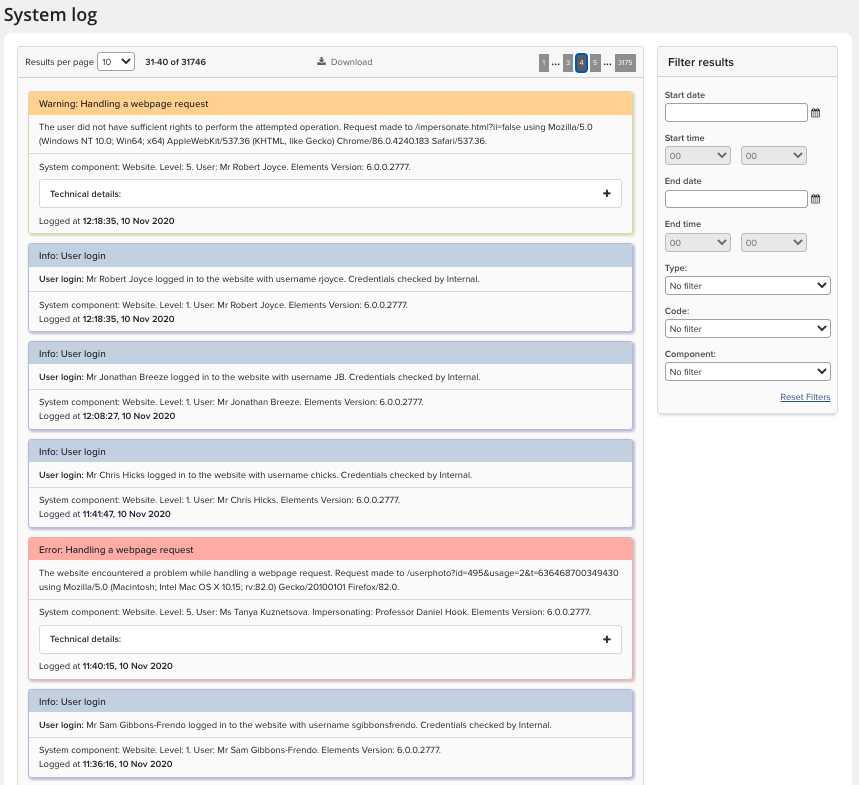
Log Types
Filters available by type are indicated in the screen shot below and consist of
Errors in Red
Warnings in Yellow
Information in Blue.
Errors and Warnings have Technical details that can be accessed by clicking on the plus sign next to the log entry.
Tip: If you raise a ticket about anything visible in the System log, you should always include the technical details to give us a better chance to resolve your issue
Code Category
The system log categories error types by code, this is available on the filter drop down. If you need to log a support call include a screen shot or include the error code to assist with analysis.
Unspecified
Server operation timeout
Concurrency issue
Insufficient user rights
Licence error
Authentication error
Refusal of credentials
User login
Systems interop issue
Database connection
No search index
Bad request
External report issue
System Component
Further details about the system component area affected are included in the system logs.
Website
Synchroniser
Emailer
Digital repository webservice
Data event broadcaster
Digital repository email relayer
Digital repository data cacher
API webservice
Scheduler
Search re-indexer
Reporting synchroniser
Analytics datacube processor
Analytics dashboard designer
Search Errors
The search errors log can be inspected by all System Administrators by navigating to System admin > Logs & monitoring > Search errors. It is useful to check this daily and modify the search settings to clear any problems from reoccurring.
You can also clear the search errors by source for arXiv, figshare for Institutions, Scopus and Web of Science.
