
Administration Dashboard
Before beginning, it is important to understand all the options and tools that you as a System Administrator have at your disposal. In this section, we will present a quick overview of the system administration where you will make changes to all parts of the system.
Administration Dashboard
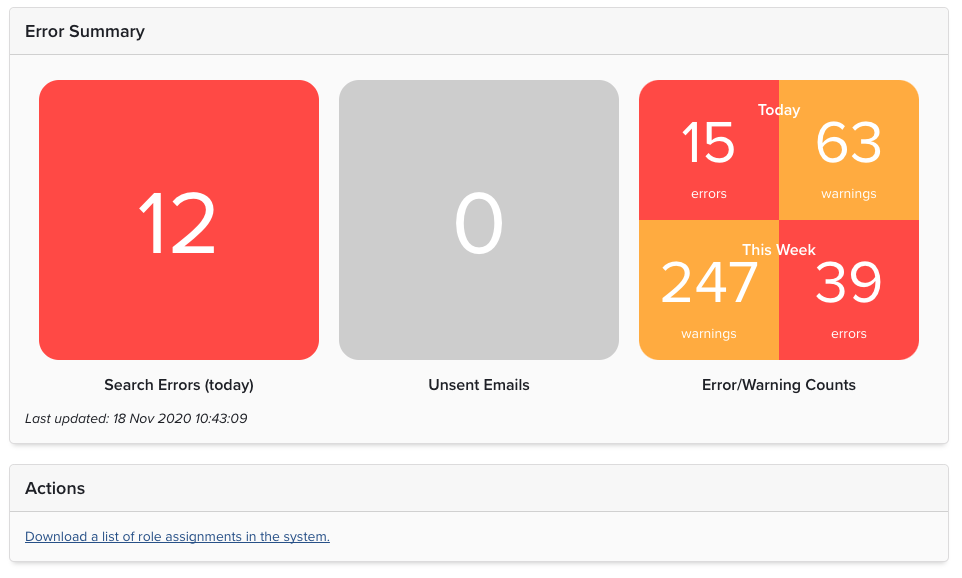
The Administrator Dashboard consists of three sections, which give an instant status of the system.
Error Summary
The Error Summary section displays three central indicators to aid in the daily management of the system:
Search Errors: the number of users whose searches have not completed successfully;
Unsent Emails: the number of emails that remain in the queue;
Error/Warning Counts: the number of system errors and warnings that have been logged by the system for the current day and week
Actions: provides a CSV download with the role assignments allocated in Elements. Note: Information is limited where groups are assigned a role.
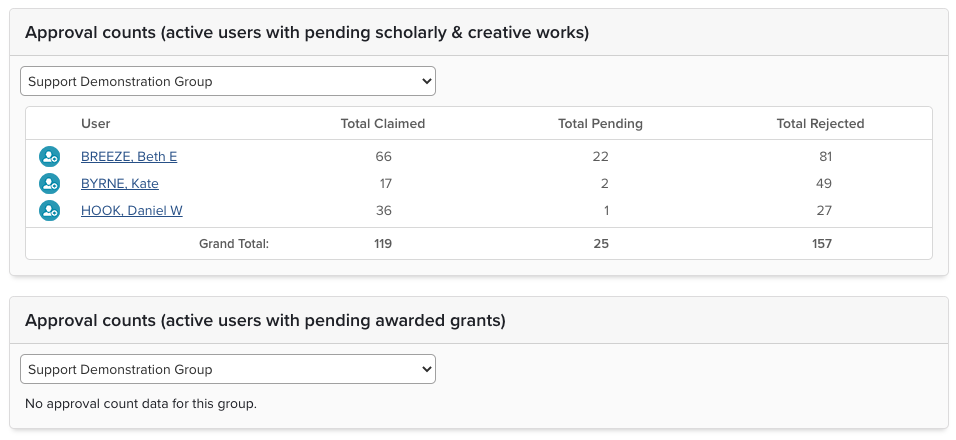
Approval counts
This table lists users by group and displays their individual approval, pending and declined counts. The number of pending, claimed and declined items associated (via any link type) with the implicit users of the selected group for every user who has at least one publication sat in pending. Any users who have only declined or only claimed pubs will not show up in the list or in the totalised numbers. The logic being that the section is designed to aid admins in identifying people who either need help or are not engaging. The Awarded Grants table will only show if you have the Dimensions Grant data source enabled.
Currently logged-in users
This table lists the users that are currently logged in to the system. This is useful for troubleshooting or determining system downtime.