Publications Module - Manage Underlying Fields
This article explains how Elements uses underlying fields. Every field is available to be used in all the publication types. When you change types the underlying data is preserved.
Elements contains 49 default underlying fields. You cannot edit or remove the default fields, but you can create your own. Where possible, use the default fields rather than creating your own. You can change a type without loss of data as long as the equivalent underlying fields exists in the two types. For example - "Title" is used by all publication types. If you are considering varying from the default types the following article on Customising will provide more information.
Manage Underlying Fields
From the Manage page System admin > Data category settings > Publications > Underlying fields, you have the following options:
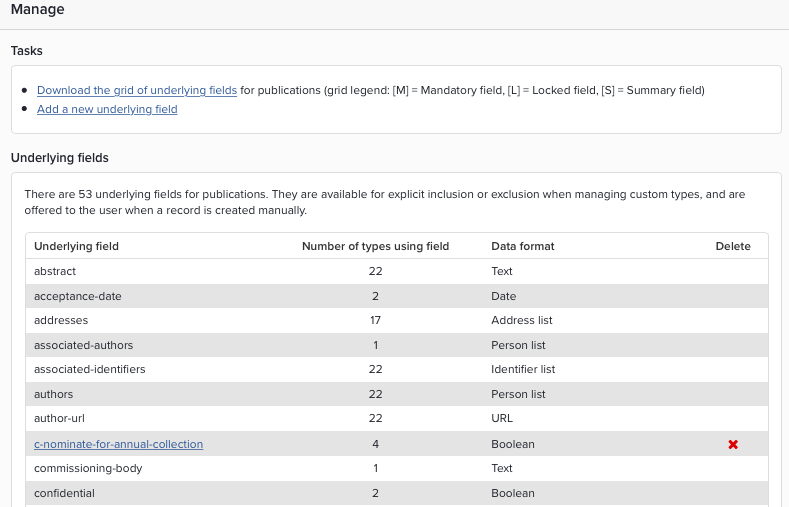
Download the grid of underlying fields - A CSV formatted document shows field mapping for the publication types.
Create a new underlying field - The "Underlying field properties" screen will open. Locally created or custom underlying fields are prefixed c- and can be deleted (click the red cross).
Underlying field types - View the number of publications types using a field and the data format for each field. Some fields are reserved for use by external datasources. More information is available in the Data Migration article. Locally created or custom underlying fields are prefixed c- and can be deleted by clicking the red cross.
Create a new underlying field
The field properties screen contain the following input fields:
Name - Specify your custom underlying field. Separate words with a dash (-) and be mindful of naming conventions if you plan to use this field in multiple publication types.
Data Format - The data format will determine input options. Note that the data format cannot be changed after it has been created. The following formats are available from the drop down menu:
Text (allows you to specify the Length of the text field)
Date
Choice (a set number of choices to be filled with inputs such as radio button lists or drop-downs - once selected null values cannot be entered in the data entry screens)
Integer (a number, restricted to whole numbers)
Boolean (true/false)
Number (a number, without the integer restriction)
List (a set of separate pieces of data – such as keywords, which users will add one by)
Person list (a set of separate names, entered by users one by one, and which the system will parse intelligently) Choose Person with Organisation - to use the pre-populated list of organisations from the GRID database for manual data entry
Keyword list (a set of separate keywords, each with an indicator to show if it is a MeSH keyword, entered one by one by users, and parsed intelligently by the system)
ISBN-10
ISBN-13
ISSN
URL
DOI
Pagination (a free text box for entering page ranges, used intelligently when displaying in lists)
Address list (a list of addresses, stored in a suitable format, which users will enter one by one)
Funding acknowledgements (a list of acknowledgements for funding of an activity, with pre-formatted details collected and parsed intelligently, including a list of grants and acknowledgements)
Money
Person
Underlying Field Use
The table below provides information on the use of the default fields.
Underlying field | Data format | More Information |
|---|---|---|
abstract | Text | Plain text - line spacing not supported |
addresses | Address list | Used by external data sources |
acceptance-date | date | Added in v4.11 to store the date an item is accepted for publication |
arxiv-pdf-url | URL | Used in arXiv records |
associated-authors | Person list | Used only in the Patent type. It holds data on persons associated with a patent who are not a primary author. If patents are imported in RIS format, Secondary Author (A2) and Editor (ED) will be mapped here. |
authors | Person list | Used in all publications types. |
author-url | URL | The URL of a version of the publication made available by the author, e.g. in a preprint archive or the author's own website (cf. publisher-url) |
commissioning-body | Text | Used in the Report type |
confidential | Boolean | Used in the Report type |
doi | DOI | No http prefix required |
edition | Text |
|
editors | Person list |
|
eissn | ISSN |
|
external-identifiers | Identifier list | Used by external data sources to store unique IDs, such as how Dimensions records show PubMed IDs. |
filed-date | Date | Used in the Patent type |
finish-date | Date | Used by the Conference, Patent and some creative work types |
funding-acknowledgements | Funding acknowledgements | Used to store funder information, grant details and text. From 4.12 pre-populated with Funder Data from FundRef, Sherpa Juliet and PubMed |
isbn-10 | ISBN-10 | Single entry only |
isbn-13 | ISBN-13 | Single entry only |
is-open-access | Boolean | Used by external data sources |
issn | ISSN | Single entry only |
issue | Text |
|
journal | Text | Used by Journals and Other for Journal title, and by Conference for Published Proceedings title |
keywords | Keyword list |
|
language | Text |
|
location | Text | Used by Journal, Conference, Patent, Performance, Exhibition and Other |
medium | Text |
|
name-of-conference | Text | For Conference refers to the Name of Conference not Published Proceedings name. For Theses refers to Presented At |
notes | Text | Free Text |
number | Text |
|
number-of-pieces | Text |
|
online publication date | Date |
|
pagination | Pagination |
|
parent-title | Text | Used in Book Chapter for Book title and in Report for Series title |
patent-number | Text |
|
patent-status | Text | Used for Patent specific data like Classification Status or Code |
pii | Text | Used by external data sources |
place-of-publication | Text | Used by Conference, Book, Chapter, Report, Software and Other |
publication-date | Date |
|
publication-status | Choice | To describe the publication Status like Published, Accepted, Submitted |
publisher | Text |
|
publisher-url | URL | The URL of the version of the article published by the publisher named in the 'publisher' field (cf. public-url, author-url) |
references | List |
|
series | Text |
|
start-date | Date |
|
thesis-type | Choice | Currently limited to PhD, Masters and Undergraduate Dissertation. Doctoral theses should use PhD |
title | Text |
|
types | List |
|
version | Text |
|
volume | Text | |
Reserved fields | ||
are-files-confidential | Boolean |
|
author-licence | Choice |
|
collections | List |
|
confidential-files-reason | Text |
|
embargo-release-date | Date |
|
is-compliant-with-inst-policy | Boolean |
|
is-embargoed | Boolean | Is the publication under embargo? |
is-open-access | Boolean | Does the publication meet Open Access requirements? |
oa-location-file-version | Text |
|
oa-location-url | URL | A URL to an Open Access compliant version of the publication |
public-url | URL | A URL to a publically available version of the publication (usually in an institutional repository) |
record-created-at-source-date | Date | The date that the metadata record for the publication was created at this data source |
record-made-public-at-source-date | Date | The date that the metadata record for the publication was made public at this data source |
relative-citation-ratio | Number | A citation metric available from certain data sources |
repository-status | Choice |
|
Switching Types
Equivalence is used in a number of places in Elements:
When a publication is switched between types (see example below).
In reporting – so the system will display the contents of these fields in one column in a CSV export.
The underlying field types may also be useful in simplifying calls to the system API.
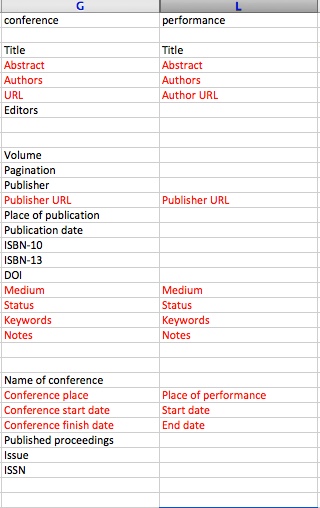
Example: Switching ‘Conference contribution’ to ‘Performance’
The grid of underlying fields for publications shows which fields in each publication type Elements considers to be equivalent. If you change type from Conference contribution to Performance, Elements will move data between the fields that share underlying type. All other fields will not be populated. If you change your mind and revert back to a Conference contribution, underlying data (in red) is retained and re-populates the fields.
Note that colour has been added and all other publication types have been removed from this grid to better illustrate the example.