
Overview: Data Migration and Integration
This article provides further detail of what may be involved in the Data Migration and Integration activity described in How we run implementation projects.
Overview
Three routes are available to the client for transfer of data from external systems to Elements:
Client-led through the API (requires client development resource for code against our API).
Joint effort using the Standard Elements Importer tool (at present, this is only supported for one-off imports) or the Ongoing Import toolkit (for continuous data feeds into Elements).
Symplectic-led where Symplectic will be contracted to complete a custom piece of work (this requires a separate scoping and pricing activity).
All routes will require you to become familiar with the Elements data structure and decide how legacy data should be mapped. Note that both routes 2 and 3 are chargeable activities. If this has not been previously agreed, please contact Symplectic.
This article will discuss option 2, for which the high-level process is outlined below:
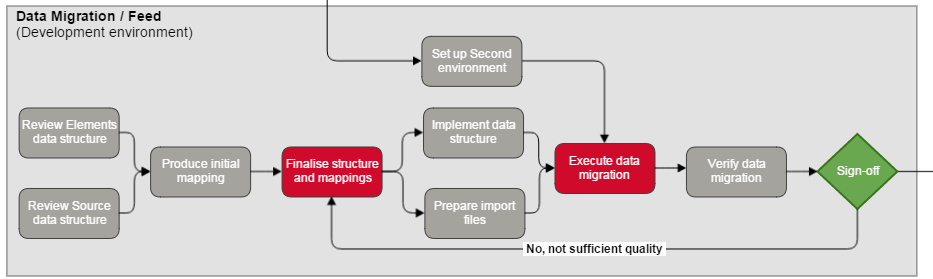
This diagram is part of the full implementation diagram.
Parameters
Driver | Shared |
|---|---|
Symplectic Primary Contact | Data transfer specialist |
Start of Activity | Second environment is available |
End of Activity | Client sign-off of acceptance of data migration |
Expected Length | Dependent on client requirements and resourcing |
Data Transfer
The data transfer part of the implementation process is a commitment to import relevant metadata and their confirmed staff association links (as identified by staff ID or similar) from one source system into Elements.
When using the Standard Elements Import tool you must supply data that meets the required specifications
Your data structure is reviewed by the data transfer specialist
Required specifications
It is understood that the source data is:
Of reasonable quality: Data will be of reasonable quality, well-structured in a computer understandable or readily machine-parsable form, according to a format to be agreed with Symplectic.
Already linked to Elements users: Data will contain a unique ID for each user that matches the unique ID in the HR Feed data being brought into Elements and establishes a relationship with source records associated with each user.
De-duplicated: Data will be de-duplicated, such that a single distinct record that describes a data item uniquely; and each unique record may link to one or more institutional users.
Tasks
Review the Elements data structure and Source data structure - this is to familiarise yourself with the origin and destination of the data migration. We recommend that you read the module guides for Managing Types and Underlying Fields.
Produce Initial Mappings - the attached Elements Default Data Fields has been put together as template that can be used for this exercise. As a general rule it is advisable to make full use of the default types and fields shipped with Elements. However, should you require customisation, we recommend that you read Customise Elements data structure
Finalise suggested structure and mappings - we will complete this step collaboratively.
Implement the finalised data structure - configure Elements to correspond to final data structure.
Prepare import files - the data needs to be transformed to effectively represent the mapped fields in the source. In the case of one-off imports through the Standard Elements Importer, the format is clearly defined. Please see attached for definition and sample CSV files.
Install data migration tool - we will provide an import tool to handle the mapping and data provided.
Execute data migration - we will run the data migration tool.
Verify data migration - you will have to review the quality of the data migration.
Sign-off - this signifies that you are happy with the data migration and it is ready to be run against your production environment.
Note: Two rounds of requirement alterations within the standard costing is provided for one data migration.
Note: To assist resource planning please provide indicative dates for the activities listed above.
Standard Elements Importer (SEI)
The Standard Elements Importer (SEI) is a tool which ingests csv files, process and transforms the contents, then imports into the Symplectic Elements API. The result is either the creation or update of a record within Symplectic Elements, as well as the update or creation of any links specified by the links file.
The imported data is directly updated within the Symplectic Elements operational database, unlike with the Standard HR importer, where a staging table is used then later processed.
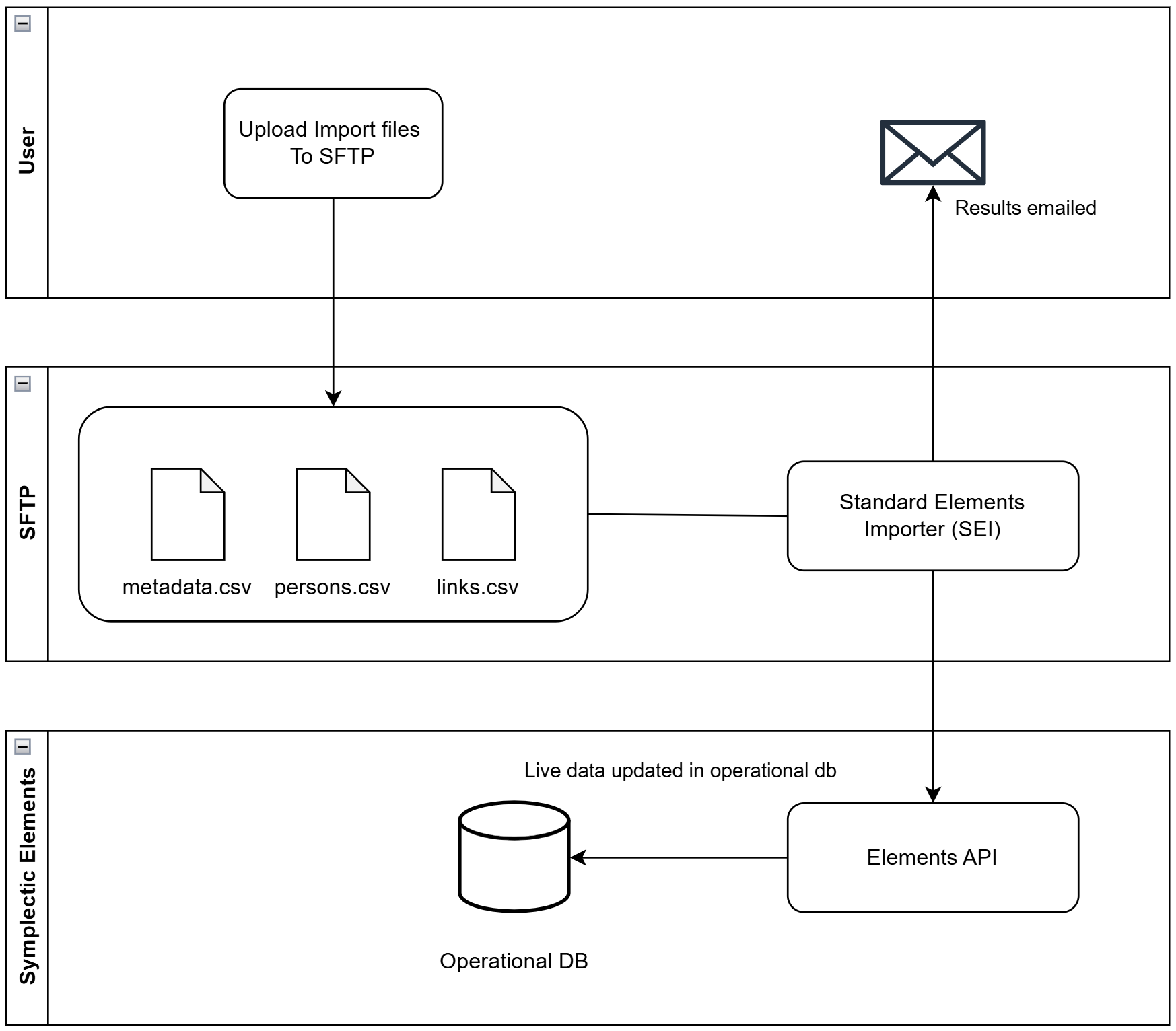
The resulting logs of an import may be imported to a configurable recipient upon completion.
The SEI may be run manually or can be configured to to run in a scheduled manner such as nightly or weekly.
Mapping files are available on request.
Acceptance Criteria
Acceptance criteria will vary according to client requirements
# | Acceptance area | Acceptance criteria |
|---|---|---|
1 | Quality | Your data is transformed and loaded into Elements |
2 | Relationships | The relationships between users and data in the Elements modules is correctly matched |
3 | Numbers match | The number of records loaded are exactly the same as what you supplied |