
Profile Data: Elements data used in the Discovery Module
This article outlines which Elements data will be displayed in the Discovery Module and explains how Elements data is used by the search in the Discovery Module.
The Discovery Module is powered by Elements data. This data not only creates interesting profiles which showcase your groups, your equipment, and the work of your researchers, it also powers search in the public domain, making those profiles easy to find. Visitors to your Discovery website will have a richer experience when the profiles are well-populated with data in Elements.
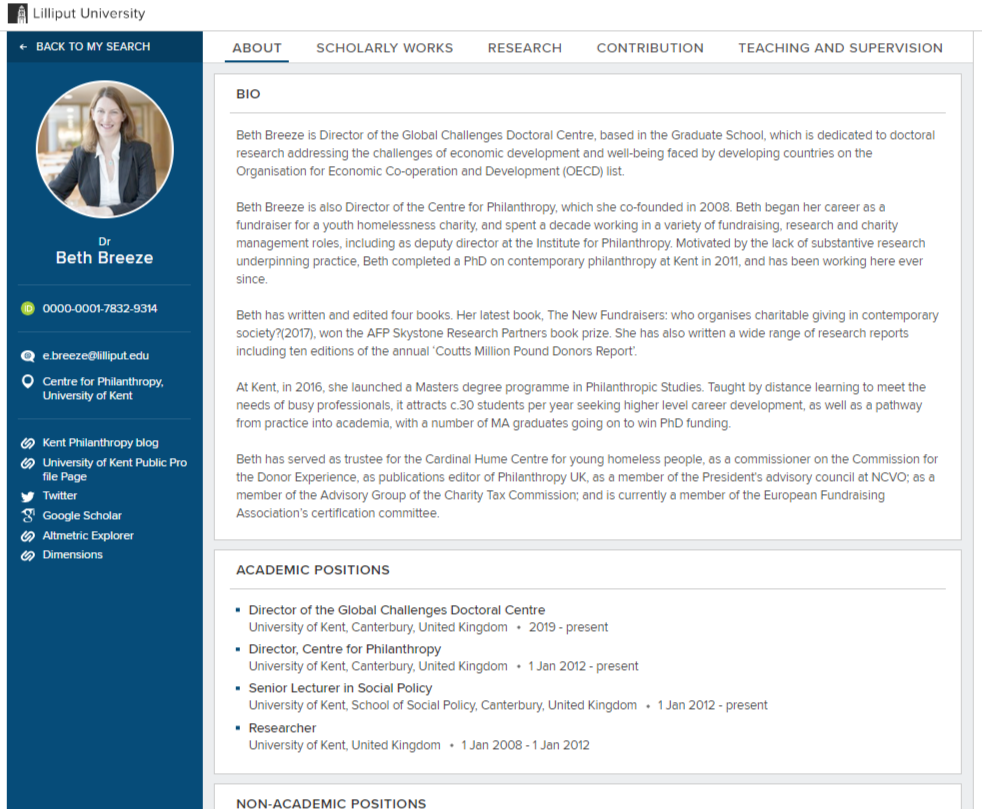
Elements Data that can be displayed in the Discovery Module
Researchers Search | Equipment Search | Groups Search |
|---|---|---|
|
When available, information about linked objects can also be displayed:
|
When available, information about linked objects can also be displayed:
Full details on Groups in Discovery are available in this support article. |
Searching in Discovery
Free text search in Discovery uses simple searches, which look at the search string in the following fields:
Researchers Search | Equipment Search | Groups search |
|---|---|---|
|
|
|
Some of the fields, such as researcher names and equipment titles, have been weighted as search terms so that they are treated as a higher priority over other metadata. This is to ensure if someone is searching for a specific researcher or equipment by their names (the most common use case), their profiles are found first. For example, a search on "Hook" will return Daniel Hook's profile by matching his name as a higher priority result than a match of "Hook" in any other field.
It does not make use of logical operators or phrases (like OR, AND or ""); if used, they will be ignored by the search.
For example, if you search for the text "widening", you will return only users that have the word "widening" in any one of the fields used in searches. If you search for the text "widening participation", you will return users that have either (or both) of those two words in the fields that are being searched, which is why you get more rather than fewer results back.
This is standard practice for simple searches. Search engines (including Discovery) use sophisticated scoring algorithms to order the search results (relevance), with profiles calculated to be more relevant to the search string scoring higher and being displayed first. In the "widening participation" example, profiles that have both words appearing in their profiles will be scored higher and appear towards the top of the results. Profiles matching only one of the words will generally have a lower relevance score and appear lower in the search results.
At the moment Discovery doesn't support other search patterns, for example, those that would limit which fields are searched, or allowing users to include logical operators.
Back to the Discovery Module index