What this article covers: | |
Privacy of data available in the Discovery module
How is privacy of Discovery data managed? | As the data for Discovery is fed from Elements, researchers or their delegates can use privacy settings within Elements to decide whether or not specific fields or publications, grants, or other activities will be displayed on the Discovery module.
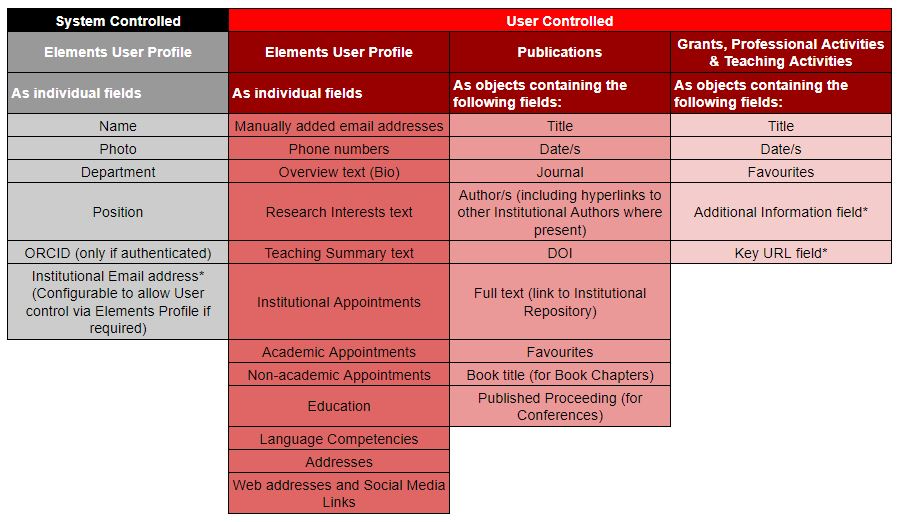
The following Elements metadata fields will appear on the Discovery Module:
|
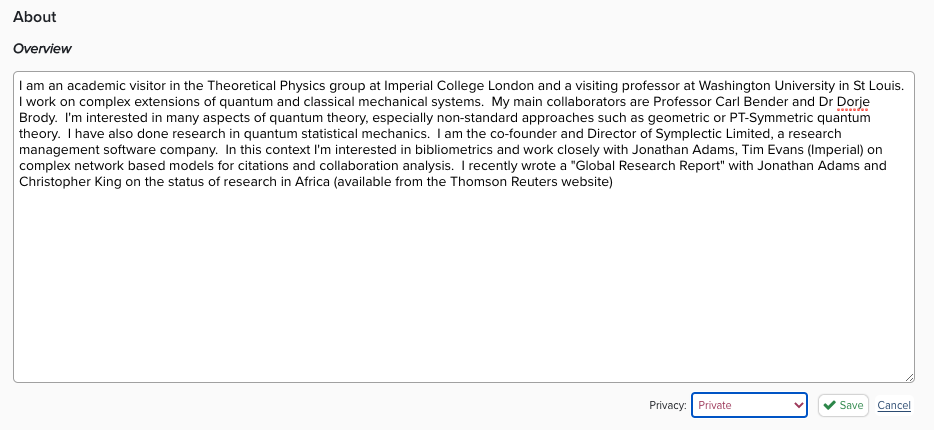
How is privacy of Elements profile data managed? | Researchers have the ability to choose a privacy setting for the fields on their Elements User Profile. For each field, the user can chose from up to three options: Data marked as public may be shared publicly, possibly via external systems. Data marked as internal may be shared with any other user of Symplectic Elements. Data marked as private may be shared with those users directly involved in the associated research activity (where applicable) and with users assigned privileged access rights. These include: Your delegates; Various types of research administrator; Your collaborators on the research activity. Collaborators can access information about your collaboration. For example, if you have marked your authorship of a publication as private, details of your authorship can still be shared with a co-author.
Please note some Elements Profile Data items cannot be made private or internal by the user as they are required for the system to function: Title and Name (including. "Known as" name) Department ORCID (included only in Discovery if the User has "Claimed" their ORCID) Labels (used as part of the keyword search on the Discovery Module if they have been added)
|
How is privacy of Elements data objects managed?
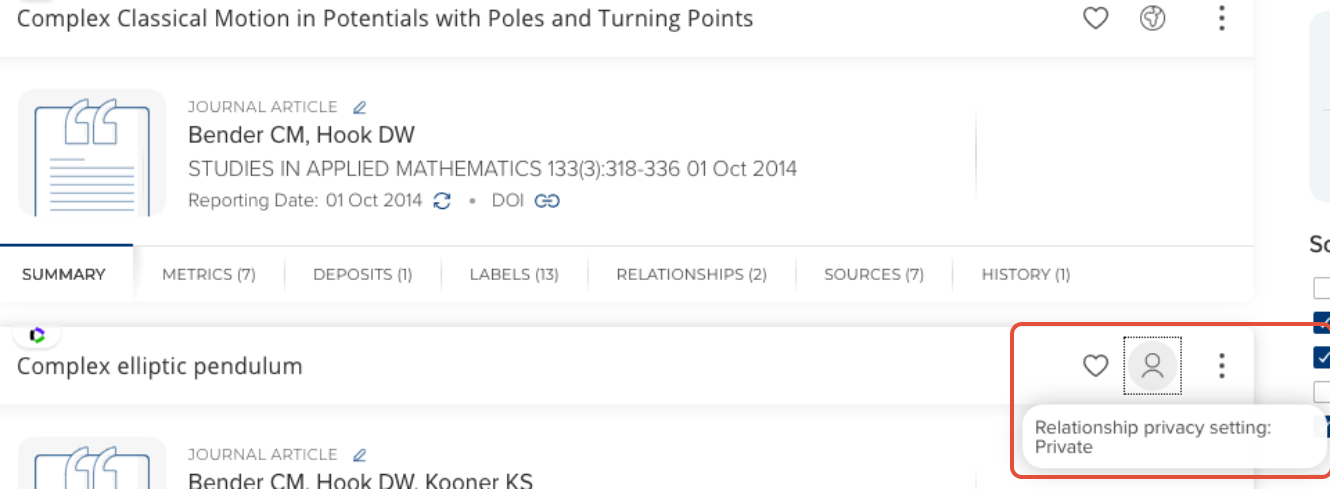
| The following data items can be hidden from display on the Discovery Module by a user hiding it. The following are hidden using the "Eye" button: Publications Grants Teaching Activities Professional Activities
When an object has been hidden, it will display grey hatching to identify that the user link is hidden.
The hide function hides the user's link to the object, rather than the object itself. If a publication has been claimed by multiple users and hidden by one user will still be shown on the Discovery module for the users that have not hidden it.
For example: Nick, Geirmund and Youssef have all claimed a single publication. Nick has hidden the Publication from his Profile.
Result: Elements and the Discovery Module shows the Publication for Geirmund and Youssef but not for Nick.
If you have a 3rd party system feeding data into Grants, Professional Activities or Teaching Activities, the feed can have a configuration that allows users to change the visibility of the item and for this to be persisted.
For example: A grant is fed in flagged as "Hidden" Nick changes the flag from "Hidden" to "Show" The grant feed is run again with the flag set to hidden.
Result: the Grant is still shown for Nick as the User Preference is persisted.
|
Privacy of Discovery profiles
How is Discovery profile privacy managed/ configured?
| Privacy of a profile - i.e. whether it appears on the public Discovery website - is based on 3 aspects: A default privacy level of Public or Internal. This applies if no other settings applied. User control of privacy - if enabled allows users to switch themselves between Public and Internal. If enabled for user profiles and a change is made, it will overwrite the default value. System Admin control of privacy via the HR Feed (or the UI for "local" users). There are 3 possible states that can be applied in the IsPublic column: No value: 1 and 2 are applied (as configured). Public: user is PUBLIC and cannot use 2 to override this state. Note: clients normally provide a support link somewhere for users as part of the rollout so that they can speak to someone if they disagree with this decision. Internal: user is INTERNAL and cannot use 2 to override this state.
To simplify privacy when planning your implementation, answer the following questions - these will determine how your privacy should be configured: Is there a group of people that should always be public? -> System Admin: update the HR feed Is there a group of people that should never be public? -> System Admin: update the HR feed Should users be allowed to control the privacy of their profile? -> User control of privacy: enable Should the default starting state be Public or Internal? -> Default privacy level: set to Public or Internal
It is also possible to create a more complex solution, but this will probably require a script which is not included in your Discovery Module implementation, i.e. it will be chargeable (which can be covered by Bulk Hours if available).
If the options above do not completely satisfy your requirements, please don't hesitate to contact your Implementation Manager to discuss this. |
Locked fields & data privacy for Elements User profile fields
How is privacy managed for imported or integrated data? | Many institutions populate Elements with data fed from 3rd party systems as as either a one-off import (migration) or an ongoing feed (integration). These kinds of feeds are often used to populate Institutional Academic Appointments, or other Elements user profile fields, such as Other Academic Appointments, Education, Certifications and Languages. For users to be able to edit the privacy of these items, the data will need to be imported as not locked. However, this can be problematic for ongoing feeds as any changes will be overwritten. Therefore, we recommend institutions review locked fields before launching the Discovery module to maintain appropriate data integrity: | One off imports: | Ongoing feeds | Field/Section IS NOT "Locked" | The data item can be set to Internal by the researcher
For example:
"Other Academic Appointments" are fed in from a 3rd party system with visibility set to Public.
Once the data is in Elements, the researcher can choose whether to leave the visibility as Public for public consumption or change the setting to Internal to remove it from the Discovery Module. | If a user changes the visibility setting for an item fed in from an ongoing feed this will be overwritten the next time the feed runs. Symplectic recommend that these fields or sections are Locked.
For example:
Other Academic Appointments are fed in from a 3rd party system. There is currently no control over the visibility setting which defaults to Public.
The researcher changes the visibility to Internal.
The visibility will be overwritten to Public the next time the feed is run. | Field/Section IS "Locked" | The data item visibility cannot be set by the researcher. | The data item visibility cannot be set by the researcher. |
|
Return to the Discovery Module index
