
Privacy control for institutional email addresses
In order to provide greater control over the downstream use of information in Elements, System Administrators can configure the privacy setting for user’s institutional email addresses.
From the System Admin > General settings > Privacy configuration page it is possible to add a default setting for the privacy level of institutional email addresses. The default privacy setting can be set to ‘Public’ – meaning the information can be passed on to downstream systems and potentially viewed by members of the public. Or, the default can be set to ‘Internal’ – meaning only other users of Elements will be able to view the institutional email address.
Additionally, System Administrators can set whether users are able to adjust the privacy level themselves.

It should be noted that after changing the default ‘institutional email address’ privacy level, a full search reindex should be carried out to ensure that these changes propagate to downstream systems.
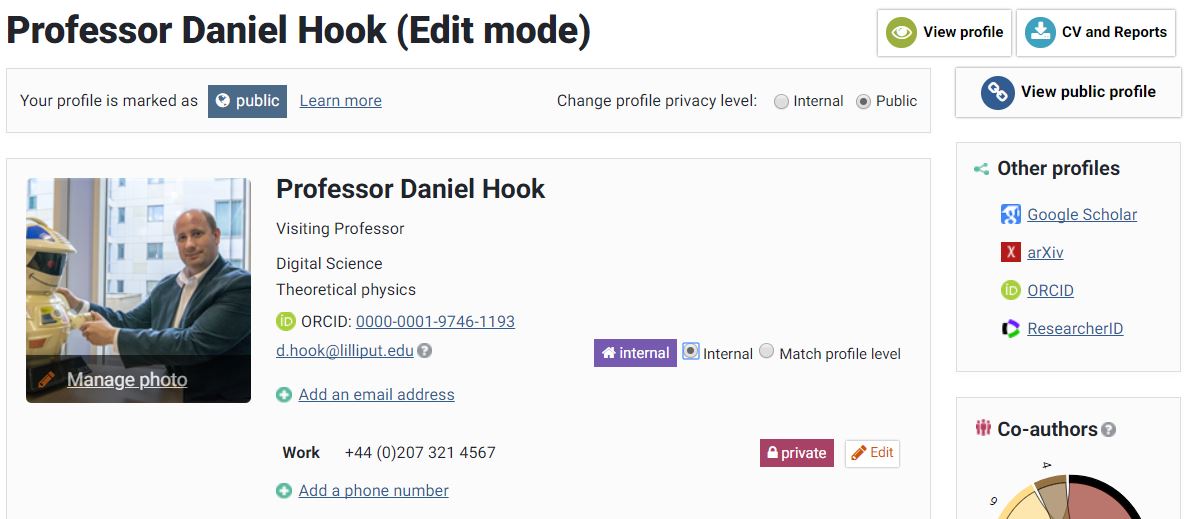
If System Administrators have given users control to set the privacy level of their institutional email address, users can set the privacy from the Edit profile page.
Users can either set the privacy level to ‘Internal’ or to ‘Match profile level’. This means that an institutional email cannot have a privacy level that is more permissive than the privacy level of the users profile.
On rare occasions, System Administrators may need to override user control. This can be done at the individual user level from the System admin > Users & Groups > User management > Manage users & user feed page. More information on managing users can be found in Managing Users.
