
Deleting, moving, and merging REF2s

UPDATED : 5.19
Deleting, moving, and merging REF2s
REF2 Research outputs have many relations in Elements - to the associated publication record and to affiliated REF1 Researchers. Any changes to the properties of these related items impact upon the REF2 Research output. Some examples include:
REF2 movement when REF1 Researchers move UoA
Duplicate publications (each with their own associated selections for REF) are merged, creating multiple REF2s in the same Unit associated with a single publication
A publication with an associated REF2 is deleted from Elements
In the article below, we describe how Elements behaves in particular scenarios.
Moving REF2s
It is not possible to directly move REF2 Research outputs across Units. This must be done by moving the associated REF1 Researcher(s) - see the Unit of Assessment support article.
Merging REF2s
It is not possible to merge REF2 Research outputs records. If you have duplicate REF2s (for example, resulting from the selection of duplicate publications (see below)), you should change the submission status of one of the duplicate REF2s to 'Not accepted' (and record the reason) and manually copy over any required metadata.
Deleting REF2s
Once an output has been Accepted, it is not possible to delete the REF2. It is only possible to record it as 'Not accepted' in order to remove it from the submission.
If the item is still in the 'Selected' submission state, you can delete it on the Manage selections screen.
REF2 movement when REF1s move UoA
Prior to a publication being accepted for submission, the publication exists as an Assessment item in the REF2021 exercise for each Researcher that has selected the publication. Therefore, no specific functionality is required to deal with movement of REF1 Researchers across UoAs; any publications they have selected for the REF2021 exercise will move UoA with them, along with any Review scores and Supporting text input.
But once the acceptance decision for a publication in a UoA is recorded, the behaviour changes such that a single REF2 output for the UoA is created. Therefore, we have functionality that handles the movement of staff across UoAs to ensure their associated REF2 outputs (and relevant content) move with them.
When a REF1 Researcher with associated REF2 outputs is moved UoA, the following takes place for each output that the individual directly selected (note that outputs not directly selected by the individual are not migrated to the new UoA):
The Assessment item is visible in the new UoA, in the Selected state (therefore any acceptance decision recorded by the original UoA is not copied to the new UoA)
If the item already existed in the new UoA (i.e. affiliated with another co-author), the moved researcher is added to the existing REF2 output but no other content is migrated
The REF2 output also remains in the original UoA. If the moved REF1 Researcher was the only affiliated author in the original UoA, the REF2 output will have no affiliated REF1 Researcher and its Selection status changes to 'Not attributable'. You should change the submission status of this REF2 output to 'Not accepted' and record the reason.
Duplicate REF2s resulting from merged associated Publications
Where duplicate publications (each with their own associated selections for REF) are merged, there are implications in terms of their associated selections in the REF exercise.
Selected items
Where duplicate publications have each been selected for the REF exercise and are in the Selected state, and the duplicate publications are then merged, this results in a single assessment item in the REF exercise. Note that any supporting information accompanying the duplicate selections is not merged - only the values from the 'primary' records are carried forward.
The items will appear as 'invalid' in the individual's exercise, and they can choose to unselect the duplicate from their exercise.
Accepted or Attributed items
Where duplicate publications have each been selected for the REF exercise and are in either the Accepted or Attributed state (i.e. have associated REF2 output records), and the duplicate publications are then merged, this results in duplicate REF2 outputs (both now associated with the single merged Publication record). As it is not possible to delete REF2 output records (see below), you will need to flag one of the duplicate REF2s as 'Not accepted' (and it is recommended you capture the reason why).
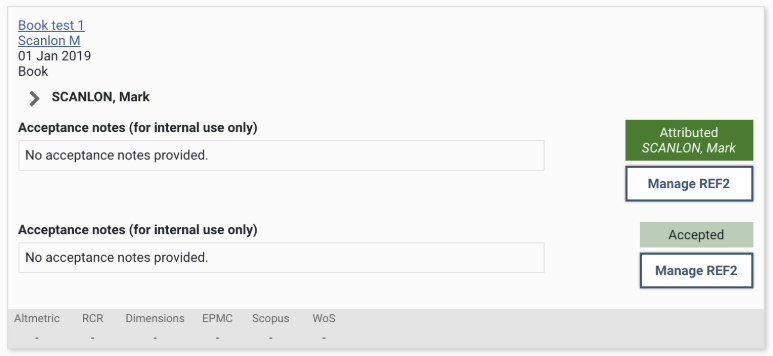
Again, the items will appear as 'invalid' in the individual's exercise, and they can choose to unselect the duplicate from their exercise.
Deleting associated Publications
If a publication is:
linked to an object (user / publication / grant / etc.), or
selected in an Assessment list, or
associated with a REF2 Research Output
Elements will not delete the Publication (otherwise, such publications would be deleted by the background Synchroniser service).
However, it is possible for publications to be deleted (e.g. using the API). If a publication is deleted in this manner, all associated items and REF2 outputs in the assessment (regardless of submission state) are also deleted.