
Symplectic Elements v6.2 - Release Notes
Elements v6.2
Introduction
Welcome to Elements v6.2!
Our first release for 2021 is an absolutely enormous release packed with our new object privacy model, extensions to the Reporting Hub, new functionality for the Discovery Module; plus the launch of our new Research Funding Solution!
We are very excited to be launching the Elements Research Funding Solution (RFS), a new suite of functionality to support the management of research funding workflows. Our initial RFS release is focussed on pre-award funding management with support for communicating funding opportunities, developing proposals, and managing internal reviews & approvals. The RFS will continue to grow throughout 2021 and beyond, as we extend support across the research funding lifecycle covering both pre- and post-award activities.
This release also includes a major extension to the Elements privacy model, introducing ‘object-level’ privacy for the very first time. This new functionality allows users and administrators to manage privacy settings for their ‘objects’ (eg. publications, grants, teaching activities, professional activities), choosing whether they should be public, internal or private. Our highly configurable new object privacy model ensures organisations can both encourage researchers to showcase their research and feel confident that more sensitive data will be appropriately protected.
We have also added Formatted User Reports (e.g. CVs) to the Reporting Hub, increasing the discoverability of these reports and making it easier for administrators to generate reports on behalf of users.
For the Discovery Module we have added a new feature that allows organisations to configure the ‘tag’ functionality to use a label scheme of their choice. This new functionality enables organisations to more closely align the Discovery Module’s search and faceting toolset with the organisation's focus & expertise. We have also updated the design of the Discovery Profile pages with a new wider interface and an updated look and feel.
Many of these features were developed in direct response to community feedback and in collaboration with our development partners. We would like to thank you all for being a part of the Symplectic community. We hope you enjoy the new release!
As always, the new version of Elements and associated upgrade instructions can be found in the Elements upgrade forum.
Introducing the Elements Research Funding Solution
We are very excited to deliver the first release of the Elements Research Funding Solution, a new suite of functionality to support the management of research funding workflows. The Research Funding Solution (RFS) brings research funding activities together with the other functionality already in Elements consolidating research management tasks for your researchers in one place, and all within our new ‘V6’ user interface.
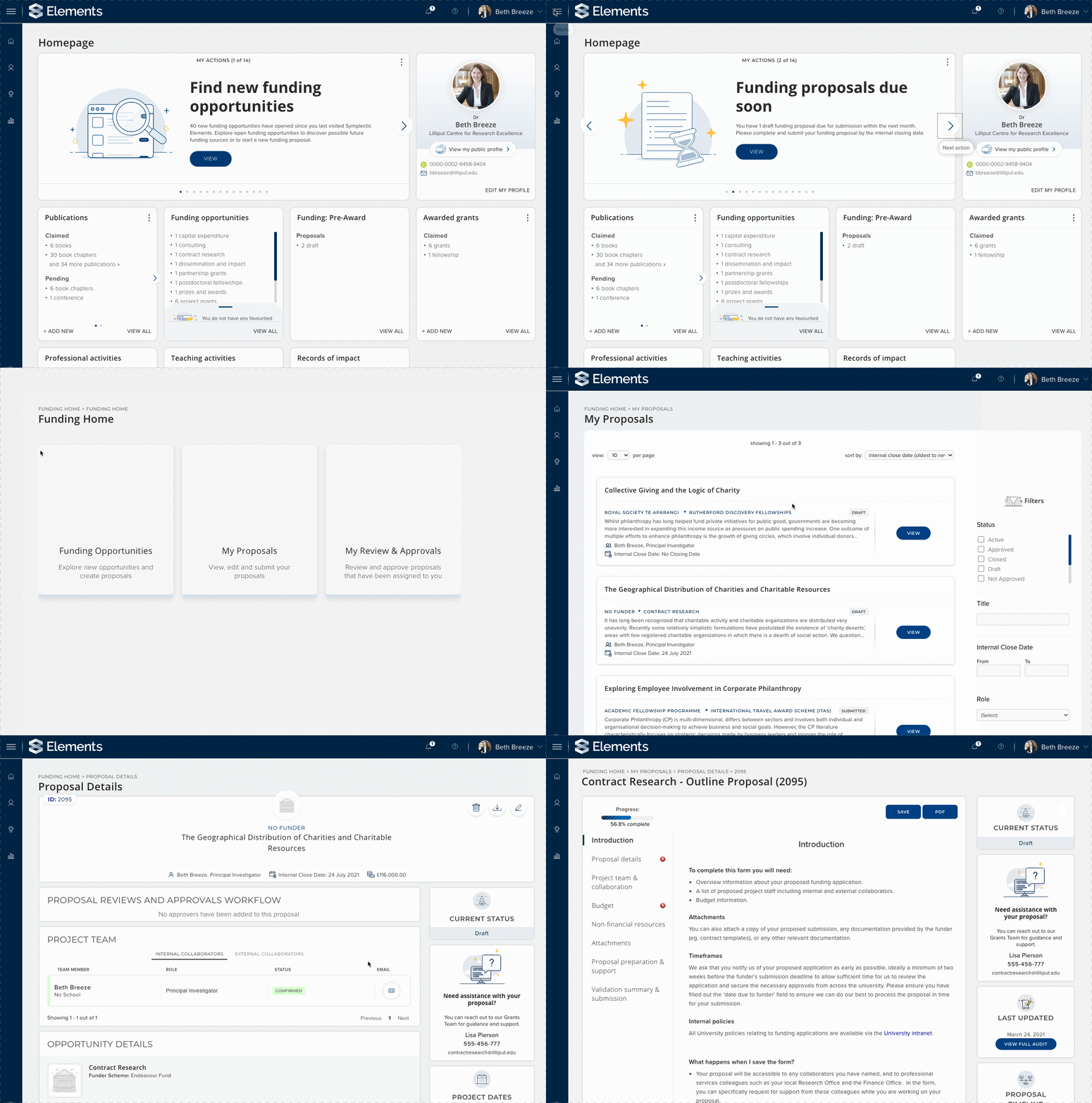
Image: A researcher browsing the new RFS homepage actions and editing a proposal
This initial release of RFS functionality is focussed on pre-award funding management including:
Funding Opportunities: Promote upcoming funding opportunities to your researchers by uploading editable records that allow you to bring together funder & institutional information in one space.
Proposal development: Our flexible proposal development functionality allows your researchers to develop their proposals and associated budgets collaboratively using eligibility & proposal forms tailored to your institution's needs.
Review & approvals workflows: Ensure all proposals receive timely feedback and the necessary internal sign-offs using our configurable review & approval workflows.
Reporting: Reporting functionality for pre-award data including extensions to the Elements Reporting Database, as well as new out-of-the-box RFS data extracts & formatted group reports about funding opportunities & proposals.
Management console: RFS offers a specialist management console for administrators as a dedicated interface for configuring forms & workflows and managing monitor funding activities throughout their lifecycle.
Security & Permissions: We have extended our security model & introduced a new suite of user roles to support the effective & secure management of funding data and workflows.
Notifications: New homepage actions & tiles ensure that RFS functionality is front & centre for researchers whilst a range of email notifications ensure that researchers, reviewers & approvers are prompted to complete key tasks on schedule.
Document management: Researchers & administrators can upload and store a wide variety of documents to ensure all relevant materials are stored securely in one place.
API & data migration tools: Our new RFS-specific API endpoint has been designed to support integrations & data feeds and our migrations tool will support implementing clients.
The Research Funding Solution will continue to grow throughout 2021 and beyond, as we extend support across the research funding lifecycle covering both pre- and post-award activities.
We have also developed a new range of implementation services to support the adoption of the Research Funding Solution and our client service team have been working in parallel with our product team to help support the upcoming implementations of our RFS early adopters. Please note, to enable this new functionality you must have a licence for the Research Funding Solution and utilise Symplectic cloud hosting services. For more information about the Research Funding solution, please contact support@symplectic.co.uk.
A new 'object' privacy model
In the years since Elements was first launched as a publications management system, the variety of data collected within Elements has grown significantly and so too has the range of sensitivities associated with some of that data. Over that time we have received feedback from our community requesting the introduction of a more extensive privacy framework that would allow the system to support the capture of more sensitive data types by allowing objects/items to be set as private.
This has been a big project and one has been a long time coming, so it is with great pleasure we are releasing our new ‘object’ privacy functionality. This major extension to the Elements privacy model allows users and administrators to manage privacy settings for their ‘objects’ (eg. publications, grants, teaching activities, professional activities) to choose whether they should have a privacy level of public, internal or private.
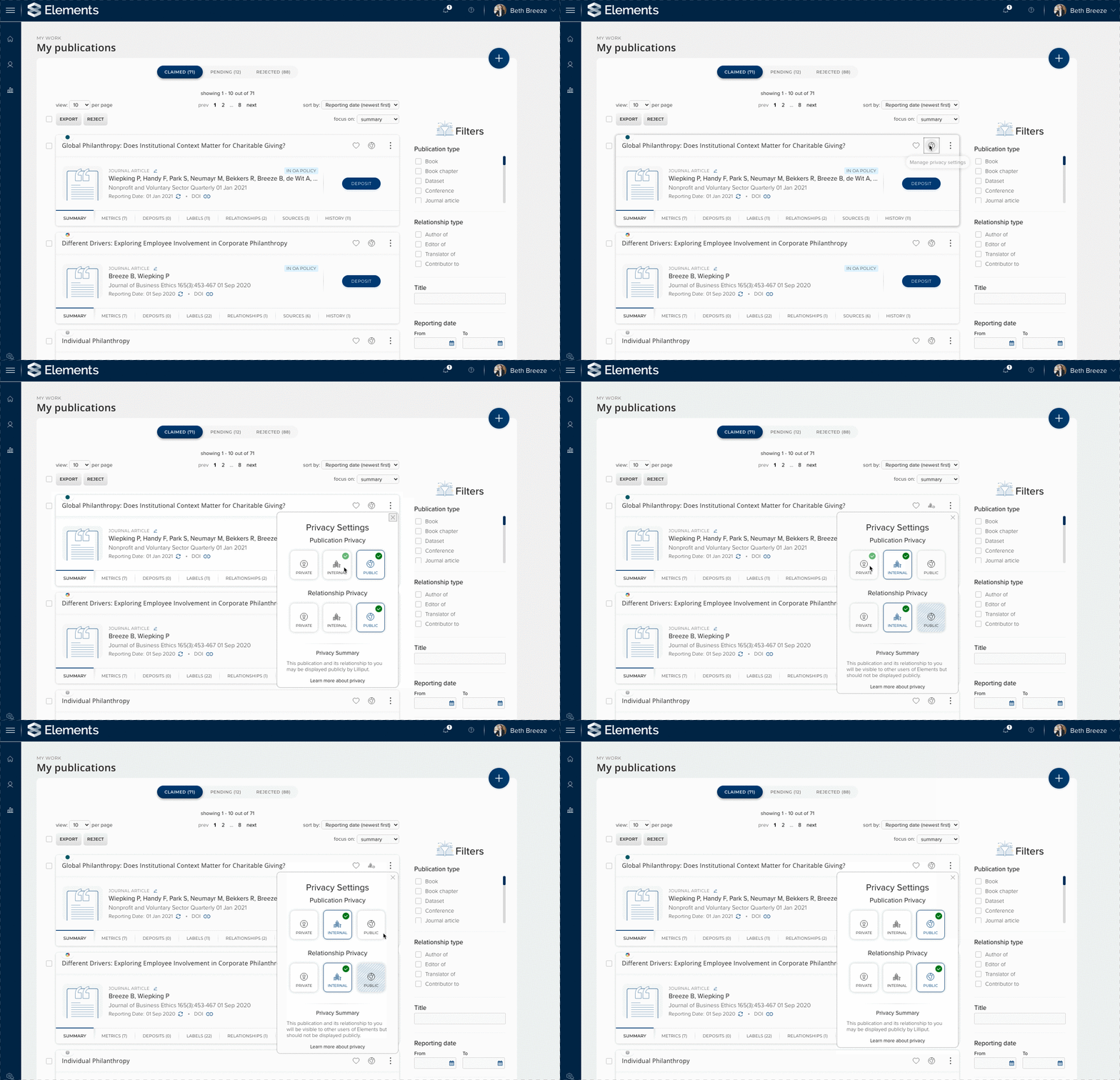
Image: A researcher adjusting the privacy level of one of their publications
This new functionality offers organisations and users greater control over data privacy. The new model not only allows the secure, private storage of records relating to more sensitive activities, it also allows less-sensitive data to be shared (either internally or publicly) with confidence. Organisations will now be able collect a wider range of data within Elements including more sensitive data types which have previously not been able to be stored within Elements due to privacy concerns. This could include internal or contract funding, additional types of teaching activity records (eg. teaching evaluations) and additional types of service/professional activity data.
The new object privacy modal is configurable via a new series of global settings which will determine the default and permitted privacy levels for each data category. New category settings pages available via the Category Admin Menu allow administrators to configure default privacy levels at the category and object type levels. You can also put additional protections on certain data types by restricting the use of particular privacy levels for a given object type. For example, for confidential activities which should never be made public you could elect to remove the public and internal privacy level options.
This new functionality also includes additional controls which allow administrators to effectively lock certain privacy settings and prevent users from editing them if required. This can be configured on a data category level or can be applied by locking individual objects on a case by case basis.
The new object privacy model is a very powerful tool to allow organisations and users nuanced control over the privacy of their data. It has broad-reaching implications across Elements and we highly recommend you review the documentation on the support site and please do let us know if you have any question whilst configuring this new functionality.
Changes to key Elements roles
In this release we have needed to make some adjustments to core administrative roles within Elements. The trigger for these changes was the introduction of the Research Funding Solution (RFS), however these changes affect all clients even if not licensed for RFS.
As a part of these changes we have:
Elevated the role of System Administrator - The System Administrator role has been lifted up one additional layer in the Elements role hierarchy. This allows this role to have additional privileges including managing roles for both existing Elements functions (now known as ‘Research Information’ roles) and the new RFS-related roles (if licensed).
Introduced a new role of Research Information Administrator - This is a new role that has many of the same abilities as the pre-v6.2 ‘System administrator’ role. However this role is more focussed on system-wide information management and has a reduced ability to manage key system functions (eg. Scheduled jobs).
Renamed some existing roles - A number of existing Elements roles have been slightly renamed in order for them to be clearly distinguishable from their RFS counterparts. For example the Research Manager role has been renamed Research Manager (RI).
Please note upon upgrade, all users with a pre-6.2 System Administrator role will be automatically transferred to the new Research Information Administrator role. This is to prevent us giving users more rights than they should have. Once you have upgraded to v6.2, you will need to use the System account to grant the new System Administrator role to one or more users. For hosted clients, we will assist you with this as a part of your upgrade process. For more information please see the support site.
Updates to the Reporting Hub
Bringing Formatted User Reports (e.g. CVs) to the Reporting Hub
Introduced in Elements v6.1, the Reporting Hub provides a central home for reporting functionality within Elements. In this release we have added Formatted User Reports (e.g. CVs) to the Reporting Hub, increasing the discoverability of these reports and making it easier than ever before for administrators to generate these reports on behalf of users.
If a user has been granted permission to view a Formatted User Report they will gain access to the Reporting Hub and be able to run the report from there. The ‘CV and Reports’ button remains available on the user’s profile page, allowing reports to continue to be run from this location as well. For Administrators, it is no longer necessary to impersonate each user to run a CV or other Formatted User Report on their behalf. Instead, they can simply visit the Reporting Hub search from a list of all available users and specify which user they wish to run the report for.
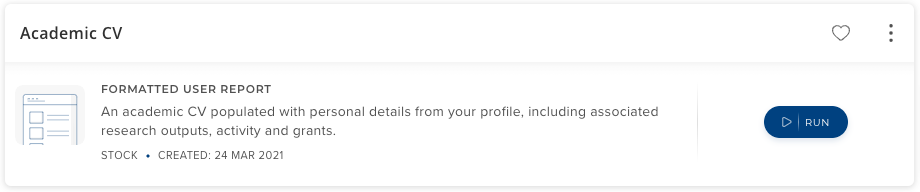
Image: A Formatted User Report in the Reporting Hub. The addition of this report type to the Reporting Hub improves the visibility of these reports for researchers and administrators
To ensure consistency, the approach to managing viewing permissions and parameter availability for Formatted User Reports has been aligned with other reports in the Reporting Hub. More information about managing reports in the Reporting Hub can be found on the support site.
Please note, Formatted Reports with other targets (eg. Assessment reports) are still managed on the ‘Registered Reports’ page. We will gradually be transitioning from the term ‘Registered report’ to ‘Formatted report’ as we migrate report types to the Reporting Hub.
Introducing 'collect later' functionality
To make running large reports quicker & easier for administrators, we’ve introduced new ‘collect later’ functionality to the Reporting Hub. Previously, running complex and large reports could be frustrating for Administrators as they could have to wait a long time for the report to run and very large reports could timeout while they were waiting. With the new ‘collect later’ functionality administrators will receive a prompt if their report has taken more than 10 seconds to run allowing them to choose to collect their report later.
This new functionality allows administrators to run their reports and then continue on with other tasks while the report is running for them in the background. When the report has completed, the user can collect their report from our new Elements ‘Download Centre’ and a notification will appear in the header letting the user know their report is ready. Once the user has downloaded their report it will be automatically deleted from the Download Centre.
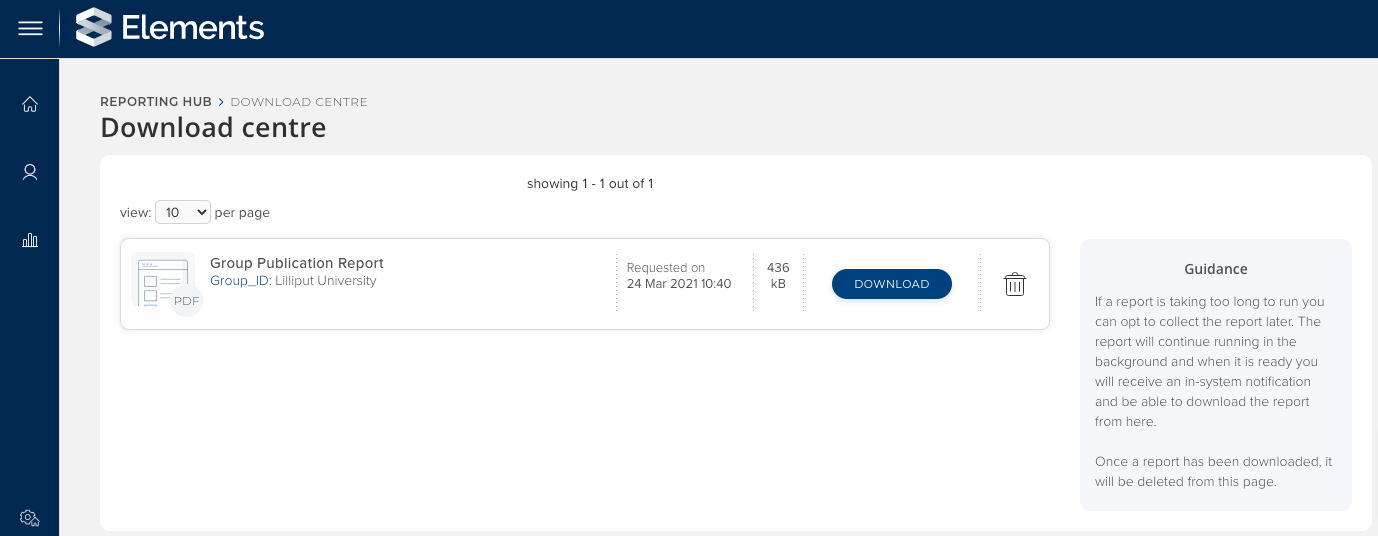
Image: The new Download Centre allows users to choose to collect reports that are taking a long time to complete later.
This new functionality allows the introduction of a longer report timeout (30 minutes by default), meaning larger and more complex reports can be run from the Reporting Hub. Individual report outputs are restricted to be no larger than 500MB. Please note, the temporary storage provided by the Download Centre has a total maximum capacity of 20GB.
To ensure reports are as up-to-date as possible, the system will also offer the ‘collect later’ option to users if it detects that there has been a delay in data being synchronised to the Reporting Database (eg. if the system is working through a particularly large batch of changes). In this case, a user can choose to run the report now or to ‘collect later’ so that the system will wait for the Reporting Synchroniser to catch up and then automatically run the report for them.
Discovery Module
'Tags' functionality supports choice of label scheme
In the Discovery Module, researchers can tag their profile to highlight their areas of expertise. This information allows visitors of the Discovery Module to ‘search by tag’ and to use tags as a facet to help narrow down their search results. Up until now, tag functionality has been exclusively based on the Fields of Research labels scheme, and community feedback highlighted a desire for greater flexibility. From v6.2, it is now possible for organisations to configure the tags functionality to be based on a label scheme of their choice.
This new functionality enables organisations to enhance the discoverability of their researchers by allowing the search and faceting toolset to be more closely aligned with the organisation's focus & expertise. For example, a specialist arts organisation could choose to use a scheme focussed on creative practice, whilst a medical school could choose to use a scheme focussed on medical and health sciences.
As a part of these changes we’ve also updated the UI design of the tag functionality to ensure they stand out appropriately on the search results page.
For assistance configuring this new functionality & for guidance on optimising a tag scheme for discoverability purposes, please contact Symplectic Support.
Design updates to the Discovery Module
We have also updated the design of the Discovery Module profile page. The update page features a new wider design to better support longer tab names as well as an updated look & feel aligned with recent development on the search results page.
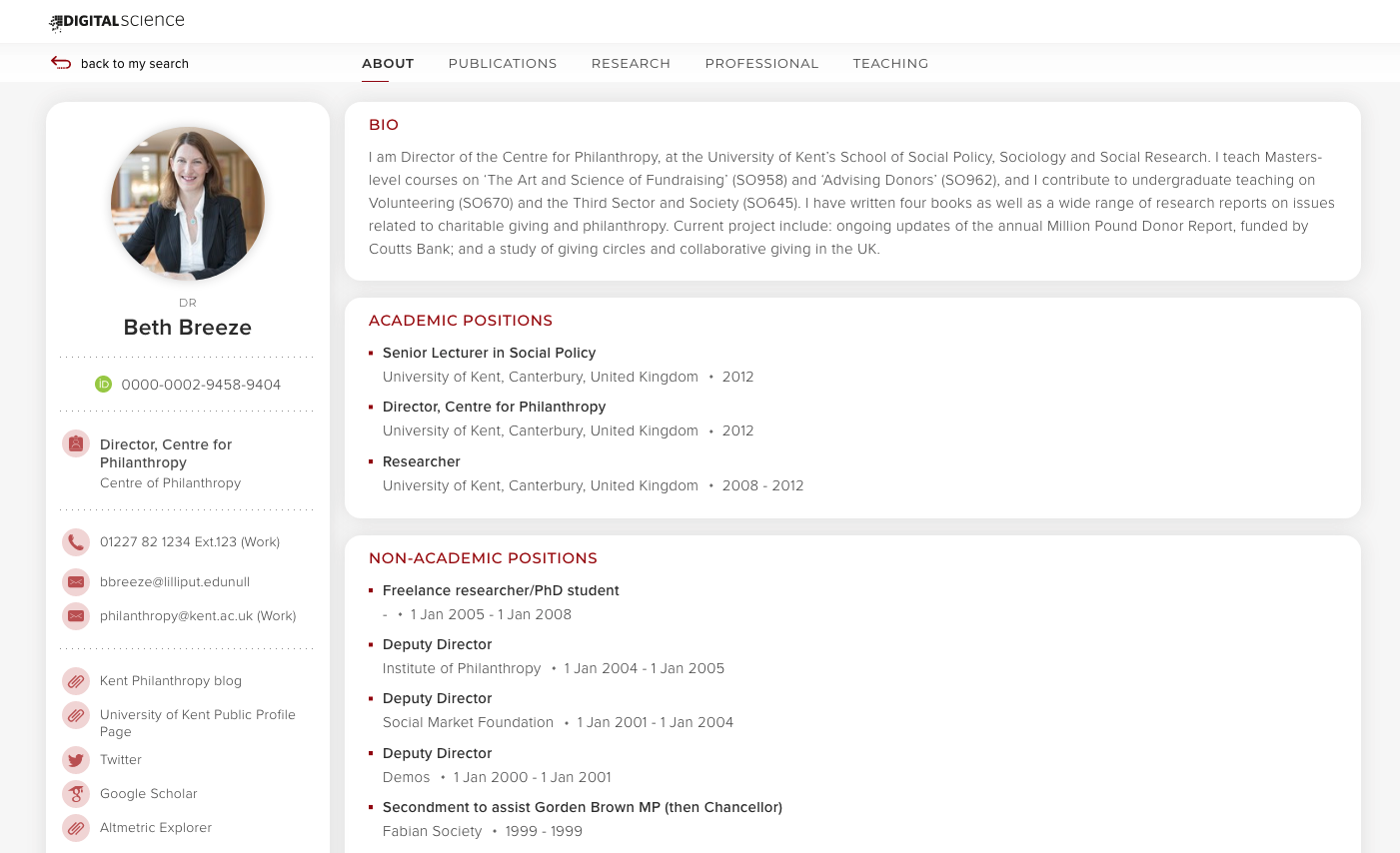
Image: A researcher's Discovery Module profile page feature the new wider design
We also have introduced a new ‘light’ branding option for the profile page for enhanced readability which allows organisations to choose to use a white background for the ‘hero’ bar accented with your branding colour.
Other Discovery Module changes
HTML links are supported in the ‘contact us’ section of the Discovery Module Footer.
Discovery Module webforms will capture the referring URL of the requesting person.
Degrees will now include ‘Field of study’ on the Discovery Module (if populated).
Improved data sent to Google Analytics from Discovery Module pages.
Other improvements
New label search functionality has been introduced to help users see available relevant options when adding labels. This new feature means that you no longer need to key in the start of a given label and instead can type in any keyword and be offered all labels which contain those terms.
Expanded the range of languages available on the Elements profile to add support for a number Canadian indigenous languages.
Added a new default ‘enabled’ filter in the Reporting Hub so that only enabled reports will appear for Reporting Hub administrators by default.
GRID data has been updated to the latest GRID release (v 2020-12-09)
Updated the ‘Impact type label’ filter on the Records of Impact page to automatically list available labels.
Updated the field usages section on the ‘Edit types’ configuration page to provide clearer guidance on how these configurations impact behaviours across the system.
Dimension for Universities has now been retired as a data source, as it has been replaced by the newer Dimensions datasource.
Introduced a new configuration option for the RT2 DSpace integration to allow relevant Elements users to access, via the Elements website, DSpace files which are not yet publicly available, such as those which are embargoed or awaiting review.
Fixes
Fixed in an issue in the Discovery Module mobile view with the display of long names.
Administrators were unable to delete objects or label objects in the Equipment, Organisational structures, Projects, Publisher deposit advice and Records of impact data categories. This has been fixed.
Fixed an issue where empty ‘address type’ dropdown options were present on non-publication object categories.
There was an issue where some roles could appear when the associated module wasn’t licensed. This has been fixed.
Assessment Administrators were unable to access the ‘Manage underlying fields’ page from the ‘Edit supporting fields’ page if they were not also System administrators. This has been fixed.
When editing the user profile page, unedited year-only dates could be erroneously stored as being from the 1st of January. This has been fixed.
Fixed a validation issue when creating a new underlying ‘choice’ field.
End of support
As always, we recommend that you regularly review our End of Support Announcements for information about upcoming end of support in Elements for various technologies.
Need help?
We hope you enjoy getting to know the latest version of Elements. Remember should you have any questions, we’re here to help! Just contact us at support@symplectic.co.uk for assistance.
One of the most special things about Symplectic is our amazing community who are willing to share their experiences with each other. We would love you to consider sharing some of your updated guidance materials, roll out approaches and even testing plans with the community to help others, via our community forums, our community Slack channel or on our community repository.
Best wishes,
The Symplectic Team