
Symplectic Elements v6.4 - Release Notes
Elements v6.4
Introduction
Welcome to Elements v6.4!
In our July release, we are excited to announce that we have significantly expanded the scope of the Discovery Module, introducing our new dedicated search for equipment, facilities & services. This new version of Elements also brings updates to the Reporting Hub and improvements in Repository Tools, as well as continuing growth of the Research Funding Solution.
Our new Discovery Equipment search will help organisations promote their research equipment, facilities & services to maximise the use of these valuable resources. It will also help foster meaningful connections and collaborations with industry partners and other research organisations. Whilst it’s called the ‘Equipment’ search, this new functionality can showcase a wide range of instruments, facilities, databases, collections, and services within a dedicated search experience.
In the Reporting Hub, we’ve added new report parameters, to give you more granular control over the data returned, allowing you to further fine-tune your report configurations. We have also migrated nine data extracts into the Reporting Hub to make it even easier for you to get the insight you need as quickly and simply as possible.
For clients using our repository integrations, we’ve made improvements to our EPrints and DSpace integrations, streamlining operations and helping to enrich repository records and optimise metadata to ensure maximised indexing and discoverability.
We have continued the development and refinement of our new Research Funding Solution in this release, with extensions to the suite of pre-award functionality and new award management functionality. We were thrilled to have Liam Cleere of University College Dublin - one of our early RFS adopters - present at a recent client showcase, and if you’d like to hear more about the project at UCD you can catch up on the recording here.
There are also numerous other improvements, many of which were inspired by feedback and feature requests from our community. Thank you all for your continued engagement!
We were happy to see so many of you (albeit virtually!) at our recent APAC and EMEA user meetings - if you missed out on any sessions, you can find all the recordings on our Community Figshare. We are looking forward to announcing dates for our North America user meeting soon.
As always, for our self-hosted customers, the new version of Elements and associated upgrade instructions can be found in the Elements upgrade forum.
Discovery Module: Introducing new Equipment search
We are excited to significantly expand the scope of the Discovery Module, through the introduction of our new dedicated search for equipment, facilities & services.
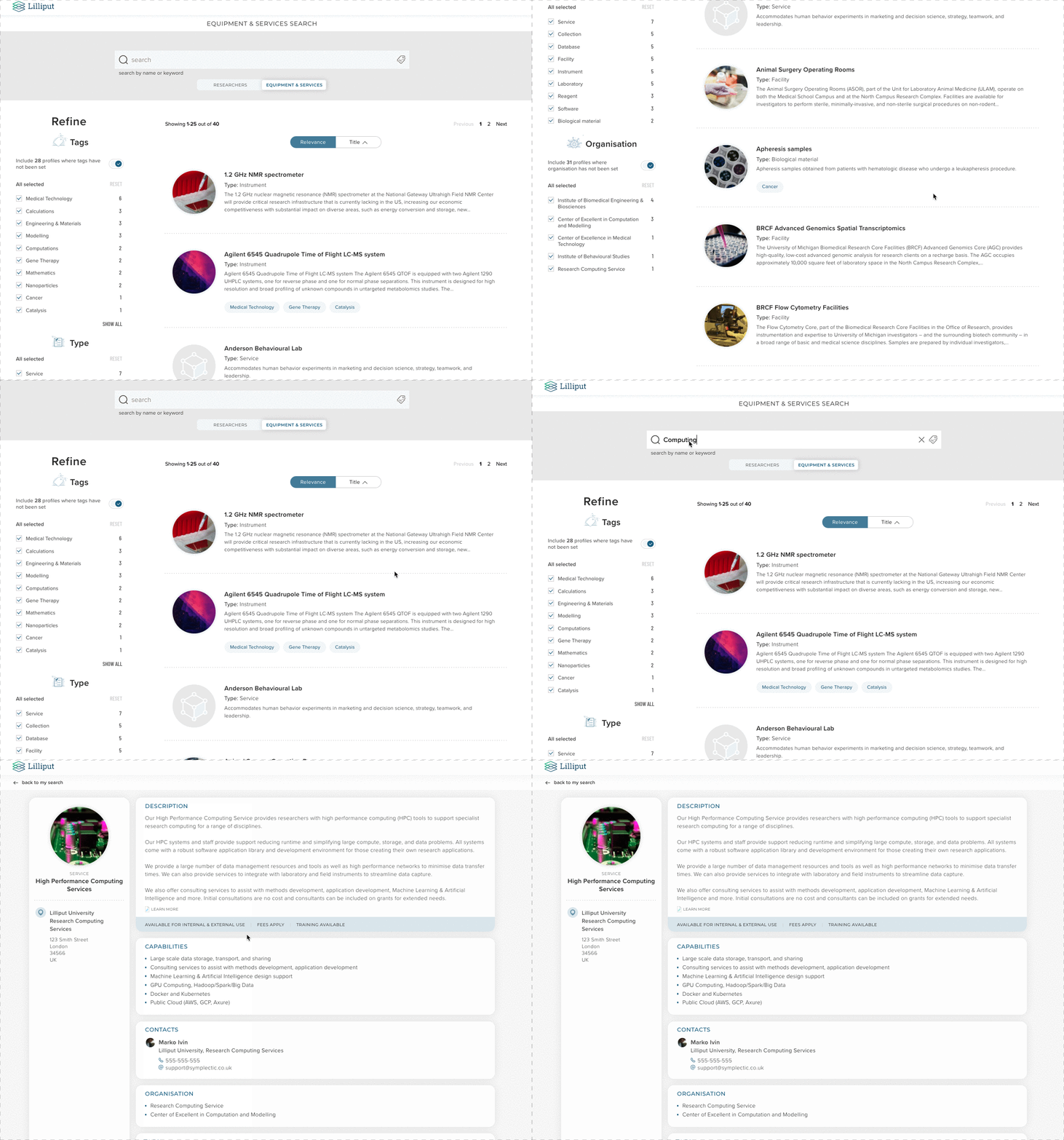
Our new Discovery Equipment search will help organisations promote their research equipment, facilities & services in order to maximise the use of these valuable resources. It will also help foster meaningful connections and collaborations with industry partners and other research organisations.
Whilst it’s called the ‘Equipment’ search, this new functionality can showcase a wide range of instruments, facilities, databases, collections, and services, all of which can be captured via the Elements Equipment Module. Once configured, these records are then pushed to the Discovery Module where they are showcased and made discoverable both via the dedicated Equipment search but also through search engines such as Google.
Each facility, service or piece of equipment is featured on its own dedicated profile page which includes an image, a description, a breakdown of key capabilities & location information. It can also include flags to highlight whether each resource is currently available for internal or external use, whether fees apply and if training is available. Contact information can be displayed for each resource either listing a specific named contact person (with a link to their Discovery Profile) or more generic contact details. Additional information can also be added through the use of custom labels, which can power filters as a part of the Equipment search experience.
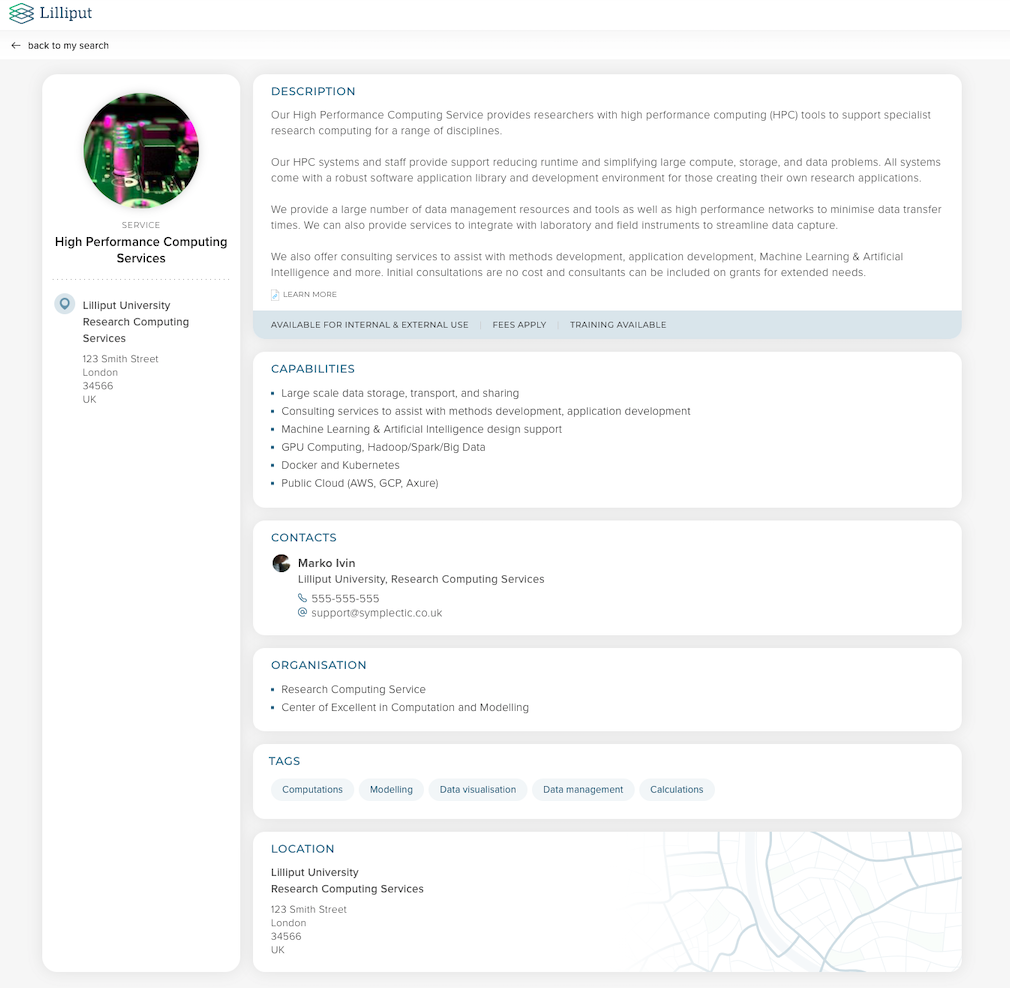
Image: An example of a service ‘profile’ on the Discovery Module.
Visitors to the Discovery Module can toggle between searching for Experts and searching for Equipment & Services using a new search mode selector. Similar to the existing Experts search, they can choose to either do a free text search or to search or filter by tag or a range of other filters.
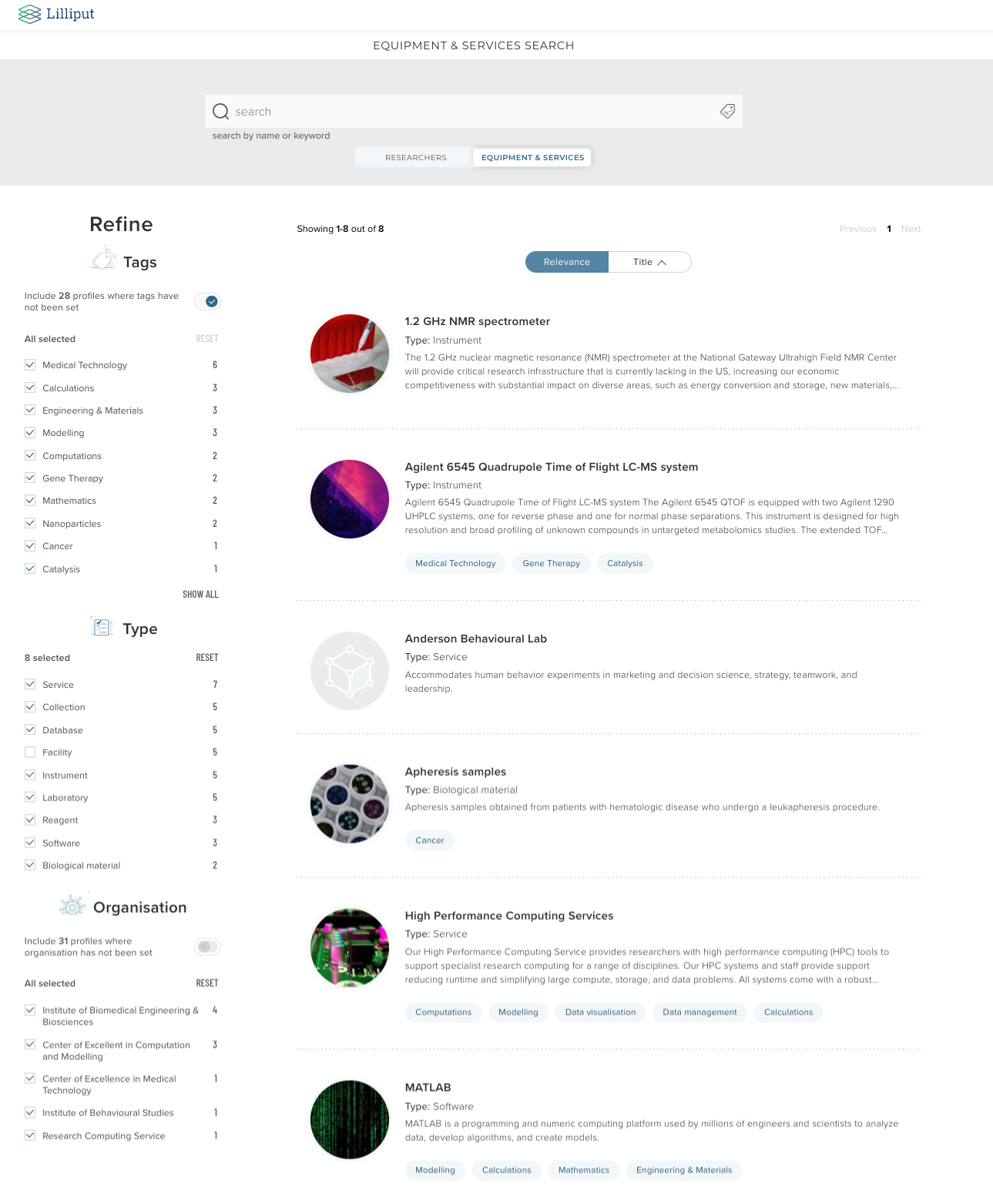
Image: An example of the Equipment search page showing filters for tags, type and organisation, the last of which is a custom label-based filter.
The Discovery Module supports the use of different customisable tag schemes for the Experts and Equipment search experiences to ensure that the profiles can be appropriately classified to aid discoverability. Each organisation can also configure their choice of customisable label-based filters to help visitors find the resources they may be interested in, and these once again can be configured separately for the Experts and Equipment search experiences. For example, in the above images, the Equipment search includes a custom label based filter for organisation, which contains only organisations specifically tailored to the equipment content. We also offer the ability for organisations to configure the names of the different search modes (eg. Experts & Equipment) from a range of options, to ensure the Discovery portal will accurately describe your organisation’s collection of profiles.
For more information about Equipment in Discovery please contact our team via Symplectic Support.
Upload thumbnail images for objects
They say a picture is worth a thousand words, and sometimes descriptive metadata just isn’t enough to bring a work to life. To ensure Elements can effectively showcase as wide a variety of outputs, activities & objects as possible, we have added new functionality to allow a user to upload a thumbnail image to each of their objects in Elements. The new images will help works stand out, and will be available for reuse in a number of ways.
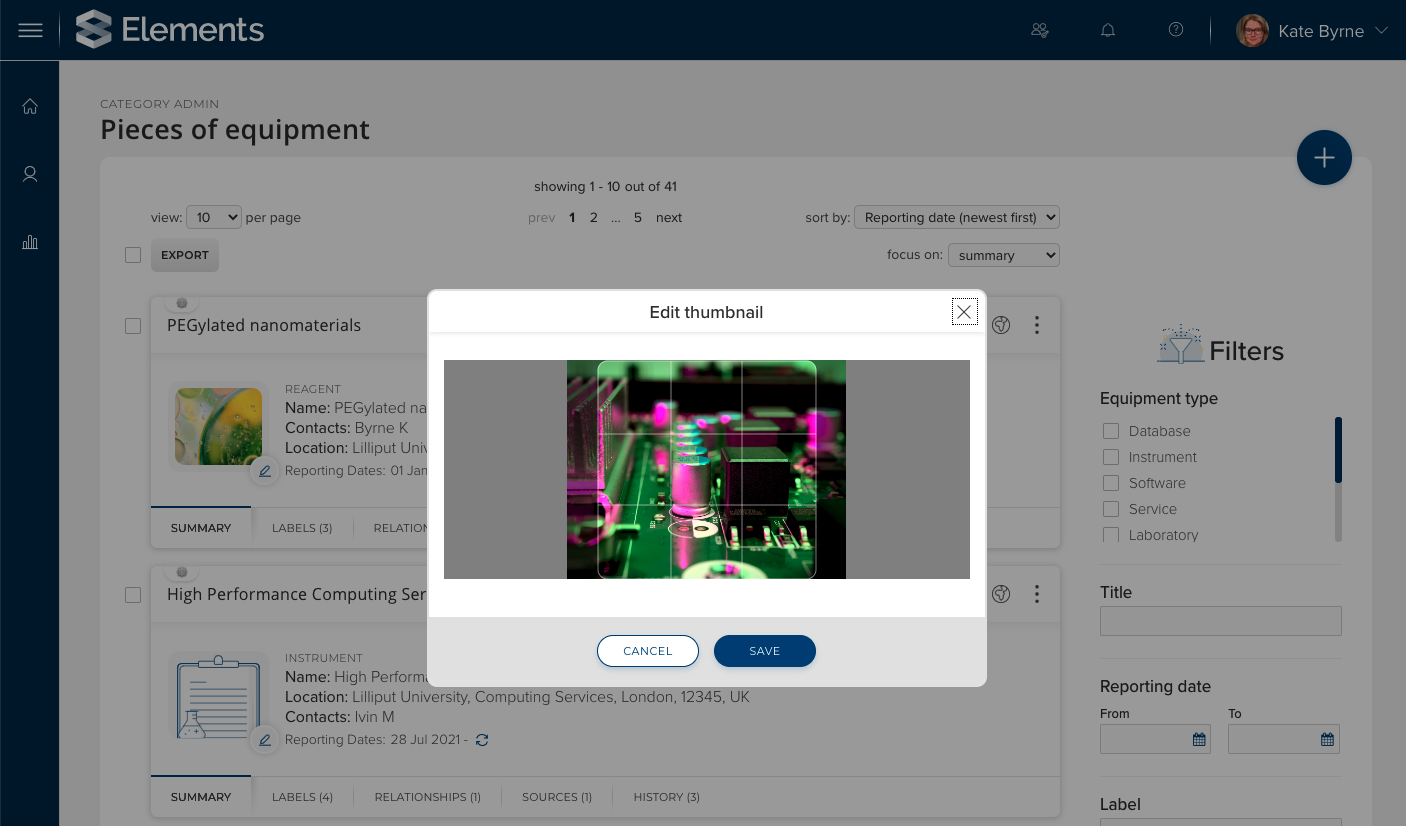
Image: Uploading a thumbnail for a piece of equipment via the Manage Pieces of Equipment page.
This new functionality is available for both user-managed (eg. publications, grants, activities and impact) and administratively-managed object types (equipment, organisational structures and projects). To upload a thumbnail, simply visit the relevant ‘list’ page (eg. My Publications) and click the pencil icon on the icon/thumbnail of the relevant object. Administrators can also import or export thumbnails via the API.
Updates to the Reporting Hub
Introducing additional report parameters
In order to offer greater reporting flexibility, we have added several new report parameters to the reporting hub. These new parameters provide additional options for configuring which data should be returned when a formatted report or data extract is run.
There are three new parameters now available:
Groups and Users - This new parameter links together the group & user parameters previously released and allows reports to be run against multiple groups and/or users at the same time. Reports with this parameter have restricted viewing permissions - meaning users require specific roles to view reports containing this parameter. Please see the support site for more information.
IncludeNonCurrent - This parameter allows the user running the report to decide whether or not to include ‘non-current’ users in a report. When included on a report, this parameter defaults to false, so that data associated with users who are no longer current are excluded by default.
IncludeNonAcademic - This parameter allows the user running the report to decide whether or not to include ‘non-academic’ users in a report. When included on a report, this parameter defaults to false, so that data associated with users who are ‘non-academic’ (aka have the is-academic flag on their user details set to false) are excluded by default.
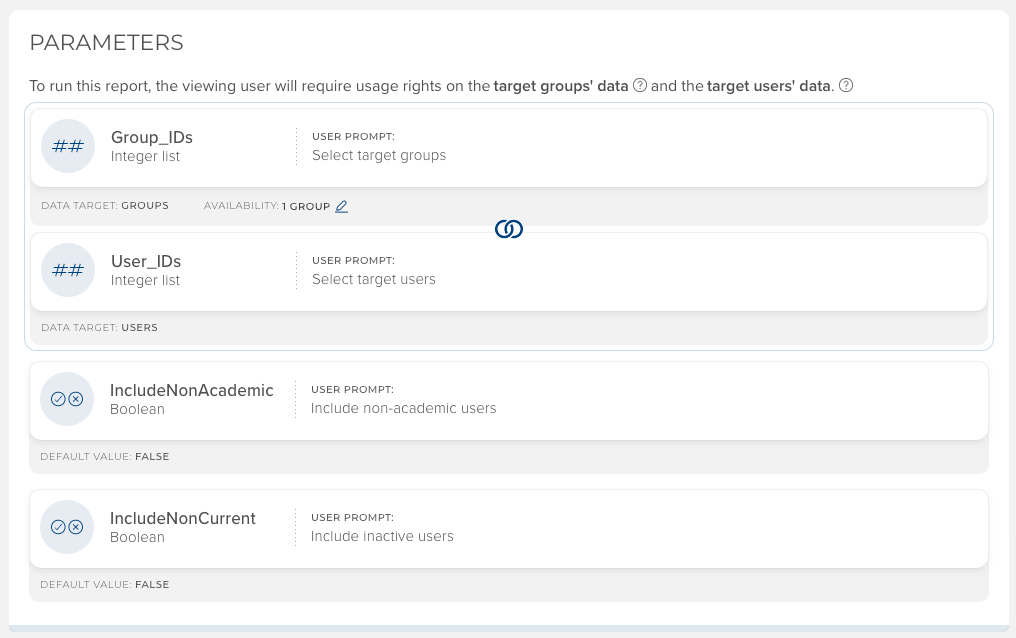
Image: New parameters displayed on the report details page. The updated interface clearly indicates which parameters are enabled, as well as a number of other key properties.
New stock Data Extracts added to the Reporting Hub
Building on the introduction of Data Extracts to the Reporting Hub in Elements v6.3, we have increased the range of stock Data Extracts available, consolidating many of the users, usage and summary reports from the Basic Reports page into the Reporting Hub. This migration will improve the discoverability of these reports, and connect them to other Reporting Hub features such as the collect later functionality.
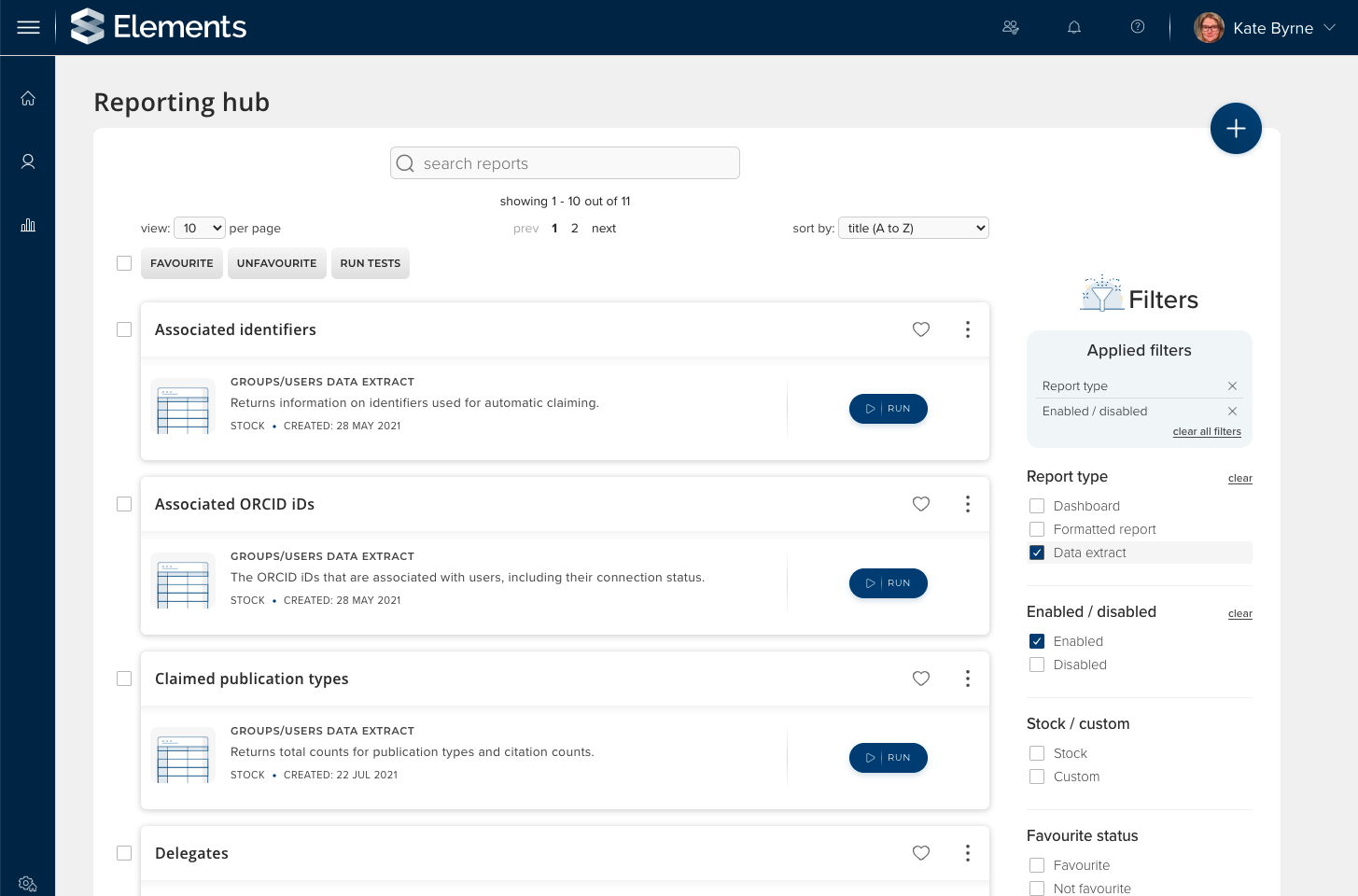
Image: New data extracts in the Reporting Hub can be found by searching or filtering
The Reporting Hub now includes the following data extracts on publications:
Publication approval count: This extract returns counts of each user's pending, claimed and rejected publications.
Claimed publication types: This extract returns counts of each user’s claimed publications broken out by type. It also includes total citation counts (totalled per data source).
Publications summary: This extract provides a summary of a user's publications with a smaller subset of descriptive metadata as well as citation counts.
The following data extracts on grants:
Grant approval count: This extract returns counts of each user's pending, claimed and rejected grants.
Grants summary: This extract provides a summary of a user's grants with a smaller subset of descriptive metadata.
As well as the following data extracts on users, user settings and their usage of Elements:
User profile and email privacy settings: This extract summarises the user profile privacy settings applied for each user’s profile and their institutional email address.
User profile completeness: This extract provides a summary of how ‘complete’ each user’s profile is including whether or not key sections on their profile page have been populated, as well as counts of publications, grants and other activities.
Logins: This extract includes the date and time of the first and last time each user logged in to Elements as well as a count of the total number times they have logged in.
Delegates: This extract summarises which users have been set as delegates for other users.
All of these Stock Data Extracts can now also be copied to create a custom Data Extract* which can then be modified to create your own tailored versions of the report. This direct access to a report’s definition provides unparalleled visibility of the queries underlying each report and a powerful new ability to tailor a report to your local needs.
*Please note - to create Custom Data Extracts you must be licensed to use the Analytics Module.
Research Funding Solution
Following on from the launch of the Research Funding Solution (RFS) in v6.2, we have continued to expand our new suite of pre-award functionality and introduce new award management functionality. Highlights from this release includes functionality for:
Tracking application submissions to funders
Capturing funder outcome details
Configuring multi-stage proposals (e.g. Expression of Interest through to full Proposal)
Managing contract review workflows
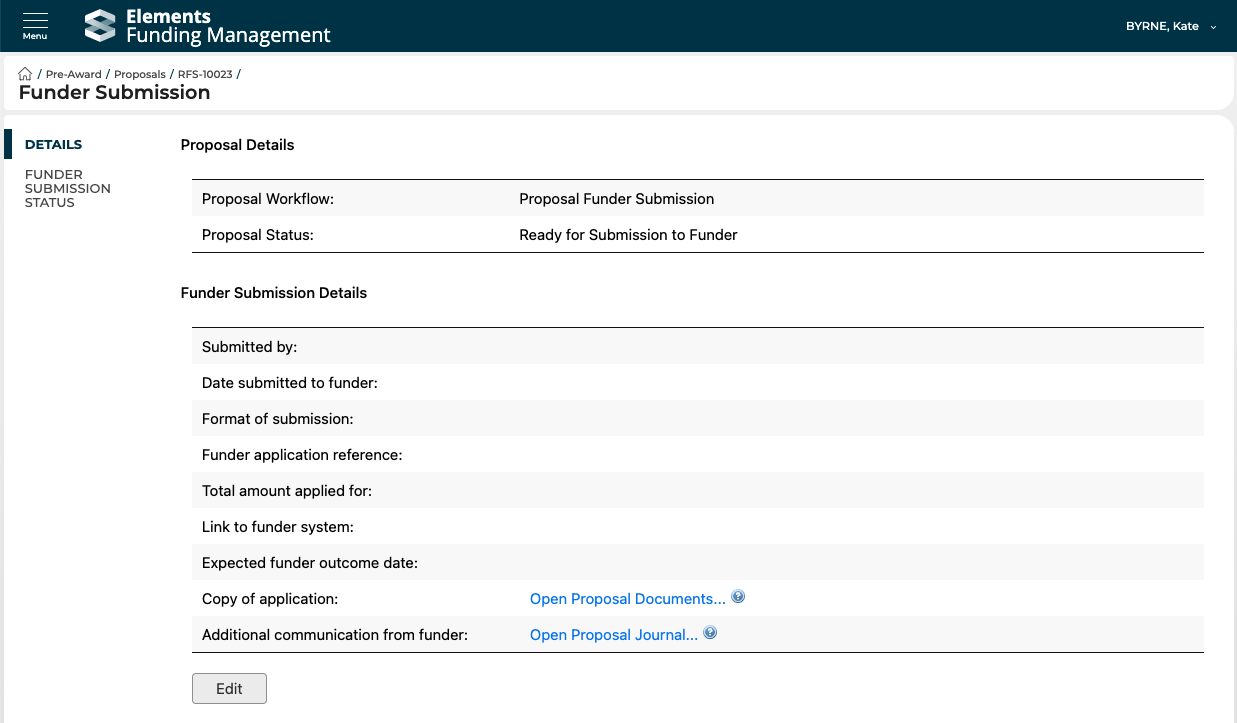
Image: The new page in the RFS funding management console for capturing metadata about the submission of a given application to the funder.
Full details of the RFS functionality released in v6.4 are available in the RFS release notes on our support site.
Repository Tools
Automated metadata updates for EPrints 3.4.2+
We have extended our RT2 EPrints integration to enable our automated metadata updates functionality to be compatible with EPrints version 3.4.2 or higher. This functionality will allow organisations using EPrints 3.4.2 to automatically update metadata in their repository with metadata from Elements. This functionality can be used to enrich repository records & to help optimise metadata to maximise discoverability and SEO (eg. for Google Scholar indexing). For details on how to enable and configure this functionality, please see the support site.
RT2 DSpace performance improvements
We have made some performance improvements to the RT2 DSpace harvest functionality, reducing the number of API calls needed by only requesting file metadata for bitstreams in the ‘original’ bundle. This reduces redundant API calls and improves integration performance.
Other improvements
We have made improvements to the Import Publications page to update the page text and guidance information to make the behaviour clearer to users and to change the default behaviour to not import records which are matched to existing items already in Elements, instead creating a link to the existing item if one does not already exist.
It is now possible to create additional data sources ‘slots’ for additional custom institutional feeds if required. As this is a significant irreversible action, this is not configurable via the UI, but instead can be created for clients upon request via the Symplectic Support site.
We have introduced a new Publication Status filter on the My Publications page. This new filter has been aligned to work consistently with the equivalent filter in the OA Monitor & will filter on the ‘most published’ status from the available records.
There is a new ’Manage Delegates’ link in the Menu for all users to make it easier for users to find where they can add/remove a delegate. The new link is available under My Profile > Settings or via menu search.
We have added the ability to capture multiple roles (from either the Creative or CREDIT taxonomies) for each author/creator. This update to the person-list field type makes it possible for users to select more than one role from any enabled taxonomy.
We have introduced a new optional Homepage action to highlight to users items which cannot be verified. Once enabled, this action will be displayed to users with one or more publications with a status of ‘cannot verify’. It will link the user through to a pre-filtered version of the My Publications page, where they can view verification comments and edit their publications as necessary.
The ‘Run sync’ button on the ORCID settings page will now enqueue a refresh of all metadata from Elements to ORCID, rather than only pushing deletion or insertions of Works.
The ORCID API connection string is now displayed to administrators on the ORCID Data source management page. This is to help ensure that development instances are only ever connected to the ORCID sandbox.
As a part of our ongoing commitment to ensure Elements is an efficient and sustainable application, we have altered the way journal data is cached in the system. These changes significantly reduce memory usage by Elements, without the need to make major functional changes. Please note, some journal-related information now requires a full reindex to complete before you will see it.
Fixes
Fixed an issue on the global settings page where the "Show verification to all users" checkbox could not be set unless the "Is verification enabled" checkbox was already set at page load.
There was an issue where reordering a person in a person list could cause the loss of unsaved changes. This has been fixed.
Fixed an issue where Waiver Requests could truncate the last digit of the publication's ISSN.
Implemented a fix to ensure that when a user is deleted, all of their identifiers are removed. This could result in an error appearing in the system log as an error analysing user identifiers in the background.
Resolved a browser-specific issue where in Edge and Chrome, at certain browser widths, the actions carousel and other carousel sections would always show a right-arrow.
Fixed an issue with the display of hyperlinks on author/creator names on the <My Objects> page (eg. My Publications). This was erroneously showing links for authors who had marked the relationship as Private.
There was an issue where the User Privacy Configuration page can time out when updating the default user privacy level. This has been fixed.
End of Support
As always, we recommend that you regularly review our End of Support Announcements for information about upcoming end of support in Elements for various technologies. We would particularly like to remind organisations using RT1 DSpace or RT1 EPrints repository connections that we have announced an end of support for these integrations for the first release in Q1 2022. If you require information about migrating to RT2, please contact our support team.
Learn more about the release
We hope you enjoy getting to know the latest version of Elements. Remember should you have any questions, we’re here to help! Just contact us at support@symplectic.co.uk for assistance.
Best wishes,
The Symplectic Team