
Symplectic Elements v6.12 - Release Notes
Symplectic Elements Release Notes Feb 2023 v6.12
Introduction
Welcome to Elements v6.12!
Our first release of the year sees some exciting additions to the Assessment Module, as well as a redesign of how Groups work in Elements to make them more powerful.
We’ve continued our focus on enhancing and streamlining submission and review processes in the Assessment Module. You will now be able to design ‘multi-response’ assessment exercises, allowing users to create and submit multiple responses to a single exercise. This will enable the Assessment Module to support a wider range of use cases where you need to gather submissions from your users, such as publication approvals, requests to attend conferences, or other requests for assistance.
To support this exciting new functionality, we have updated the UX style and improved the UI to surface key information and guide administrators through creating and managing single or multi-response exercises. We have also introduced the ability to rename the Assessment Module in a way that reflects its new use-cases and makes it most meaningful and useful to your community. This introduces flexibility to support the different ways the Assessment Module is used around the world: whether that be faculty annual reviews, compliance exercises, national assessment frameworks such as the REF, ERA or PBRF, or any of the new use-cases now introduced by multi-response assessments.
We have also introduced a number of key new features for the Assessment Module including the ability to view PDF attachments within the Assessment module, configure review impersonation and to allow reviewers to capture attachments, as well as many other improvements informed by community feedback.
We have begun a significant redesign and expansion of our Groups functionality which will allow organisations to capture a much wider range of metadata about their internal groupings to support a wider set of use cases, including surfacing group information on public profiles. Through this redesign, we also seek to significantly streamline the management of groups. In this release, we’re excited to deliver the first phase of enhancements to our groups functionality. In this work, we have moved groups into alignment with the object-based data model used elsewhere within Elements, allowing you to capture descriptive metadata via our configurable data model. This change brings new functionality as well as greater consistency to make it easier for administrators to understand and to manage groups.
Other changes in this release include API improvements for the Research Funding Solution, and updates to Google Analytics.
As always, the new version of Elements and associated upgrade instructions can be found in the Elements upgrade forum.
Introducing ‘multi-response’ Assessment exercises
Until now, the Assessment Module has supported organisations to design and manage reporting exercises in which users can create a single submission for review and approval; a workflow which is well suited for carrying out one-off, annual review and research evaluation processes.
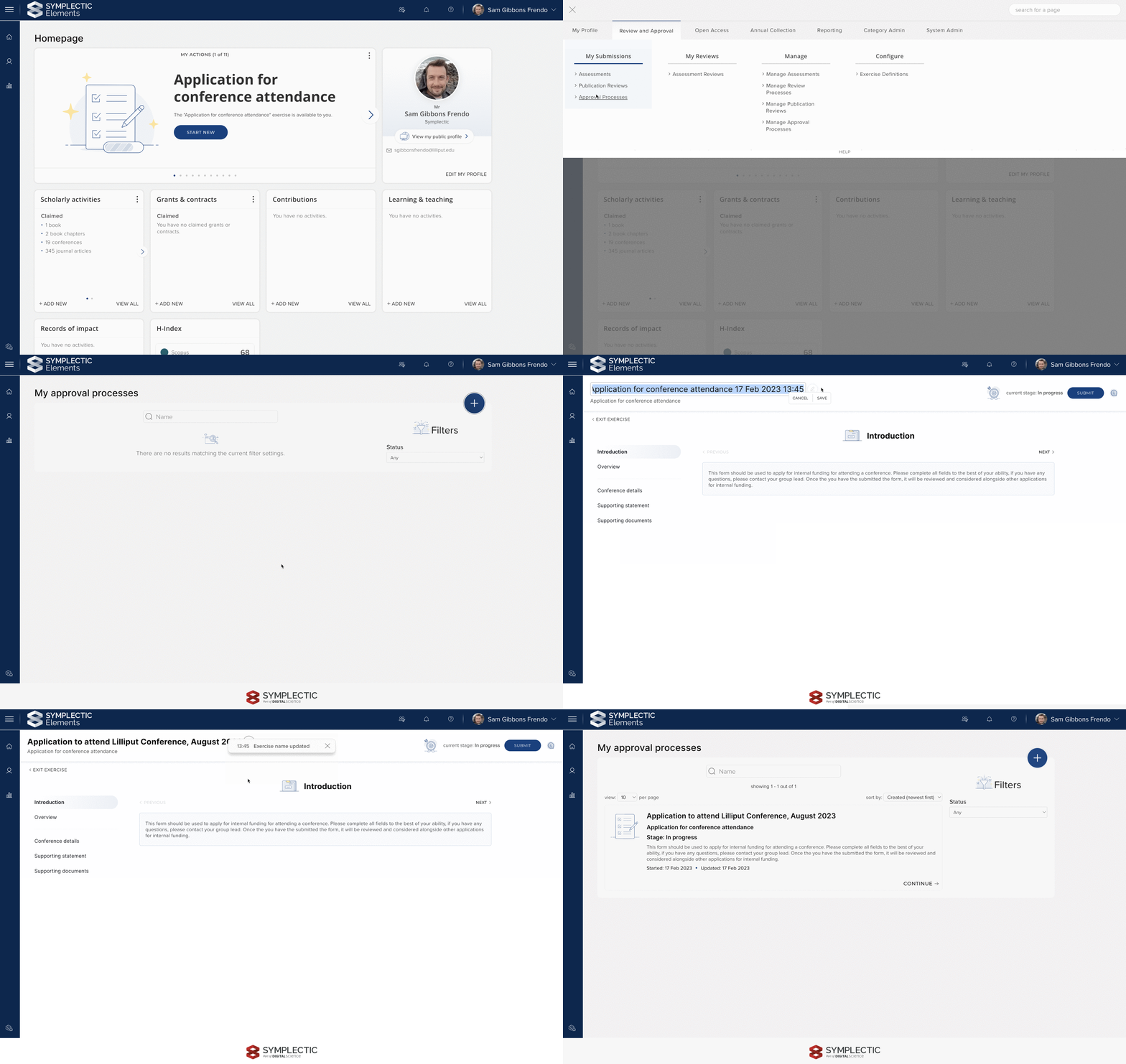
In this release, we are excited to introduce support for a wider range of review and approval processes with our new ‘multi-response’ Assessment types. This new functionality will allow users to create and submit multiple responses to a single exercise. Submissions can be made concurrently, and each response can travel through the configured review and approval workflow independently.
The new multi-response configuration options for Assessment opens up a range of new use cases, such as publication approval workflows, activity approvals (eg. Conference attendance), and requests for access or assistance.
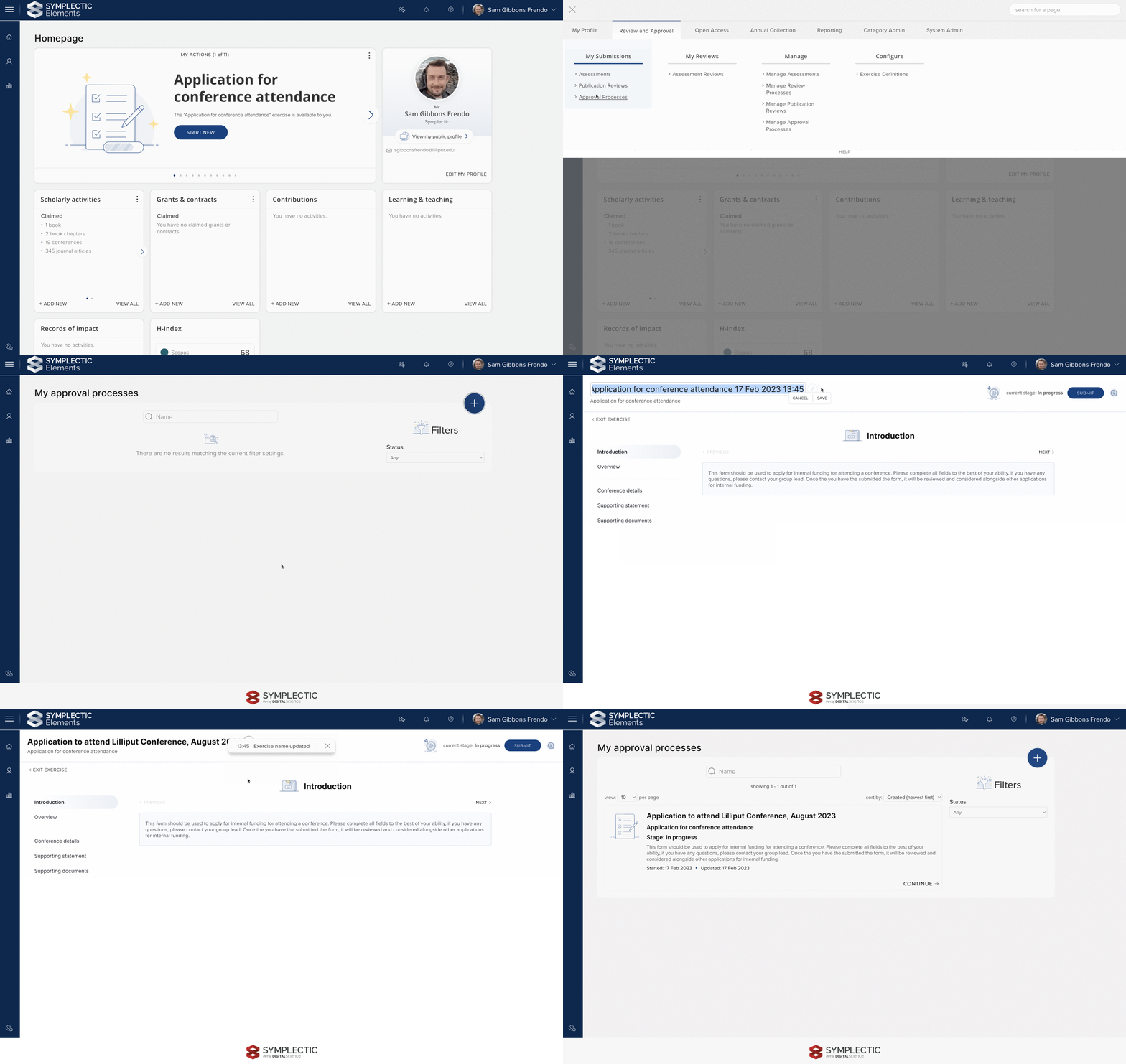
Image: Users can create multiple Exercise forms at any point, while the Exercise is available to them. It is possible for users to rename the Exercise form so that they can be easily identified.
When configuring a new Exercise definition, Administrators can now choose between creating a single or multi-response type Exercise. Administrators are then prompted to select from a range of subtypes before going on to configure the Exercise form, stages, reviewers, and other settings. There are three subtypes available for multi-response exercises; Publication review, Approval process, and Requests. These can be used to control how the Exercise forms are described to users in their menu options.
Once configured, users will see new options available for multi-response type exercises which allow them to start a new submission, or continue an existing one. Multi-response type Exercises have their own homepage actions control, allowing these to be managed independently of single-response type Exercises.
For more information about configuring multi-response type Exercises, please see this support article.
Redesigned Assessment Module pages
To support multi-response type Exercises and improve the user experience for Assessment Managers and Administrators, we have made significant changes to a number of pages within the Assessment Module. These changes bring the pages in line with our updated UX style, surfacing key information and actions in prominent positions and reducing the visual complexity of the pages.
Redesigned Assessment management page
In the redesigned Assessment Management page, we have introduced a new tabbed interface, which allows Assessment Managers to easily toggle between the set of users who have been asked to complete the Exercise, and any Exercise forms that they have created. The two tabs are linked, so when a Manager is viewing a user they can easily click through to view the exercises they have. To help simplify the page, primary actions carried out by Managers are surfaced prominently whilst secondary actions have been relocated to the three dot menu.
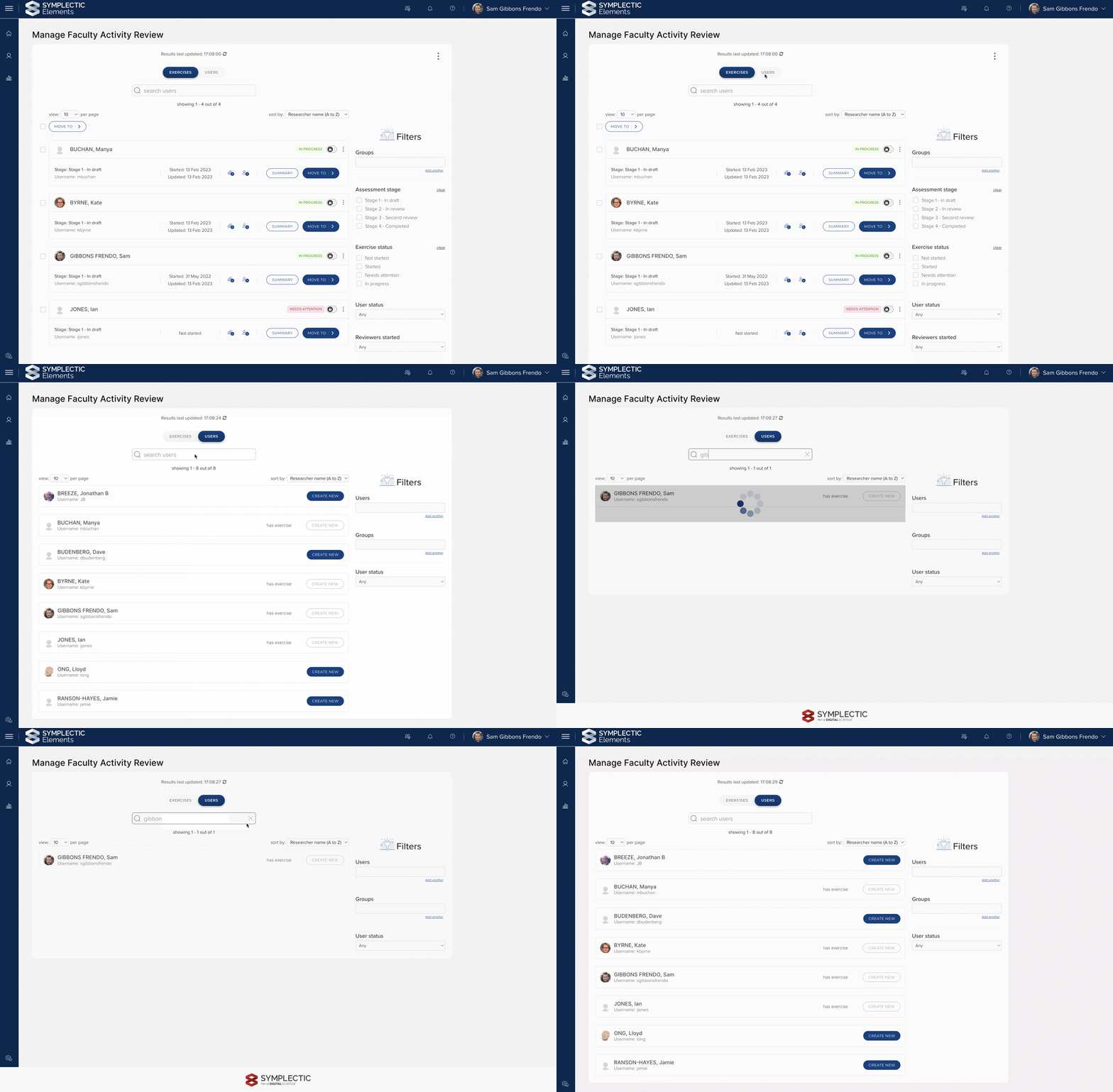
Image: The redesigned management page clearly differentiates between the users who have been asked to complete the Exercise and the Exercise forms that they have created using tabs.
The layout of the filters has been standardised, with a user search at the top of the page so that managers can quickly find the user or Exercise they are looking for. The page also features sort options for both Users and Exercises, offering a rich, browsing experience.
Redesigned ‘Exercise definitions’ page
The Exercise definitions page has been redesigned to help make it quicker and easier for administrators to find and manage their Exercise definitions. The page now features a new search bar at the top of the page to help you quickly find a specific exercise definition. The list of Exercise Definitions have been simplified and updated to clearly show the state of the Exercise Definition. Less frequently used actions are now available via the three dot menu.
We have also introduced a new clearer process for creating a new exercise definition which will guide administrators through creating a new single or multi-response exercise definition.
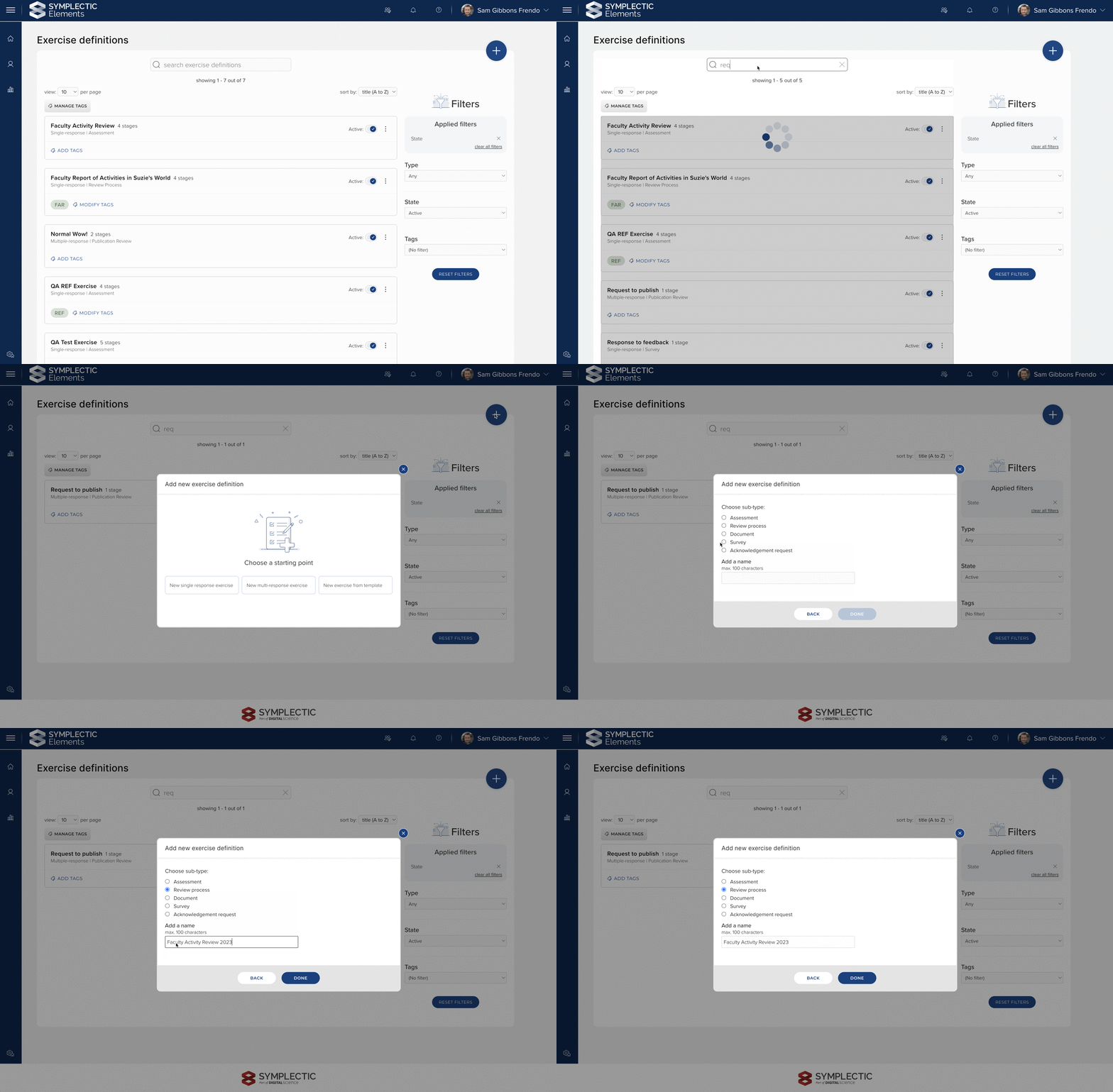
Image: The redesigned ‘Exercise definitions’ page makes it easier to browse, search, and add Exercise definitions.
Redesigned ‘My [Exercises]’ page
The My [Exercises] page (eg. My Assessments, My Review Processes) is where each user can see all of their exercises of a particular subtype. We have updated this page to make it easier to find a specific exercise submission by introducing the ability to sort, filter by exercise and status, and search by title (for multi-response type Exercises only). This will help users find particular submissions quickly and easily.
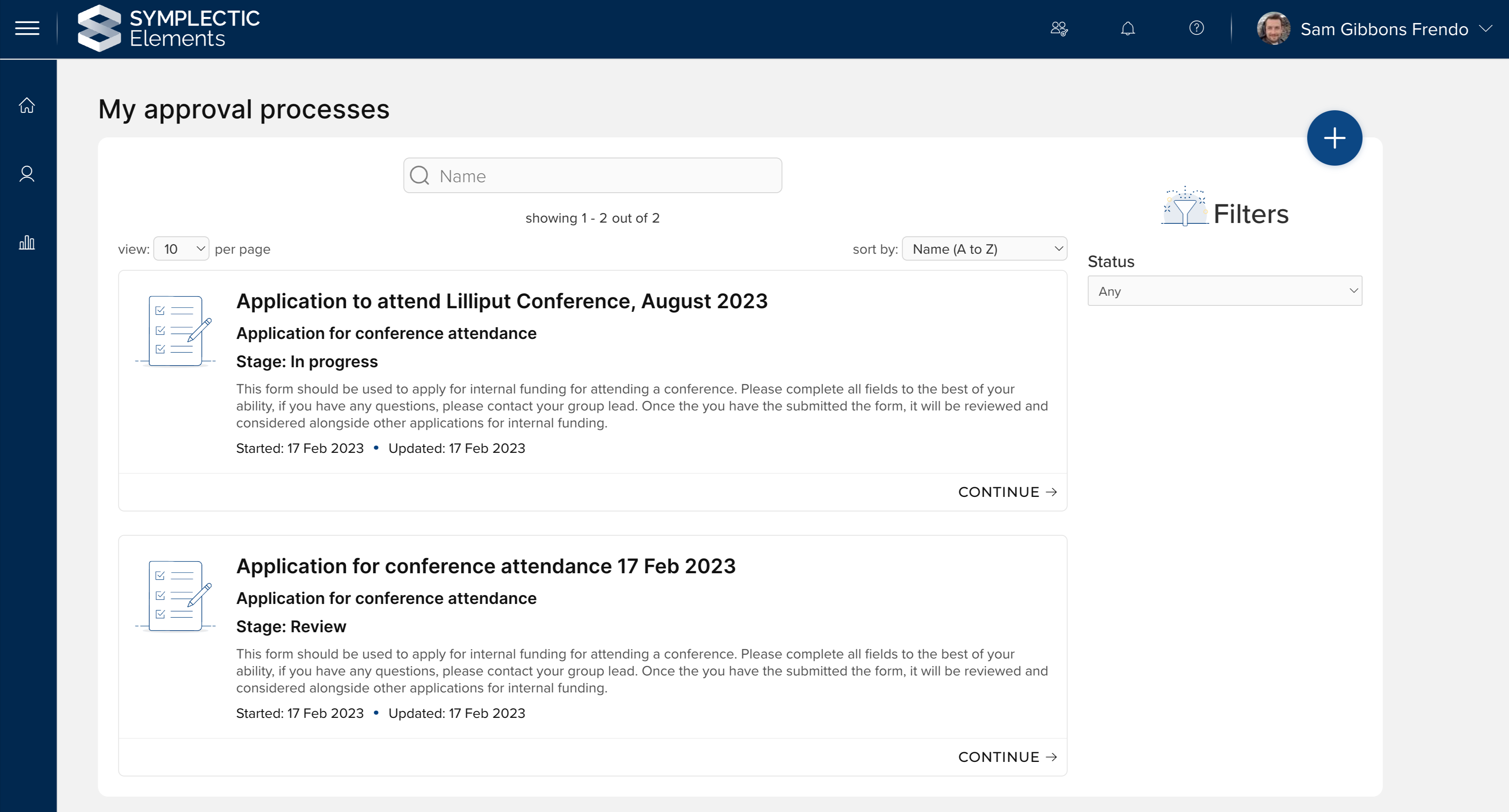
Image: The redesigned ‘My [Exercises]’ page provides filter, sorting and searching, meaning users can quickly find the Exercise form they are looking for.
For multi-response subtypes, the page will also display a plus icon which allows the user to create new submissions from the exercises available to them.
Assessment Module Renaming
The Assessment Module now supports a wide range of review and evaluation processes and is used by organisations around the world. To help ensure that you can describe the module in a way that is meaningful to your community, we have introduced a new configuration setting to allow you to choose a Display name for the Assessment Module.
On the ‘Configure module display names’ page, administrators can now choose a display name for your instance of Elements from a set of 7 options: Assessment, Evaluation, Evaluation and requests, Evaluation and review, Review, Review and approval, or Reporting and Evaluation. As with our other Module Display names, once selected, the Elements UI will automatically be updated to reflect the new name.
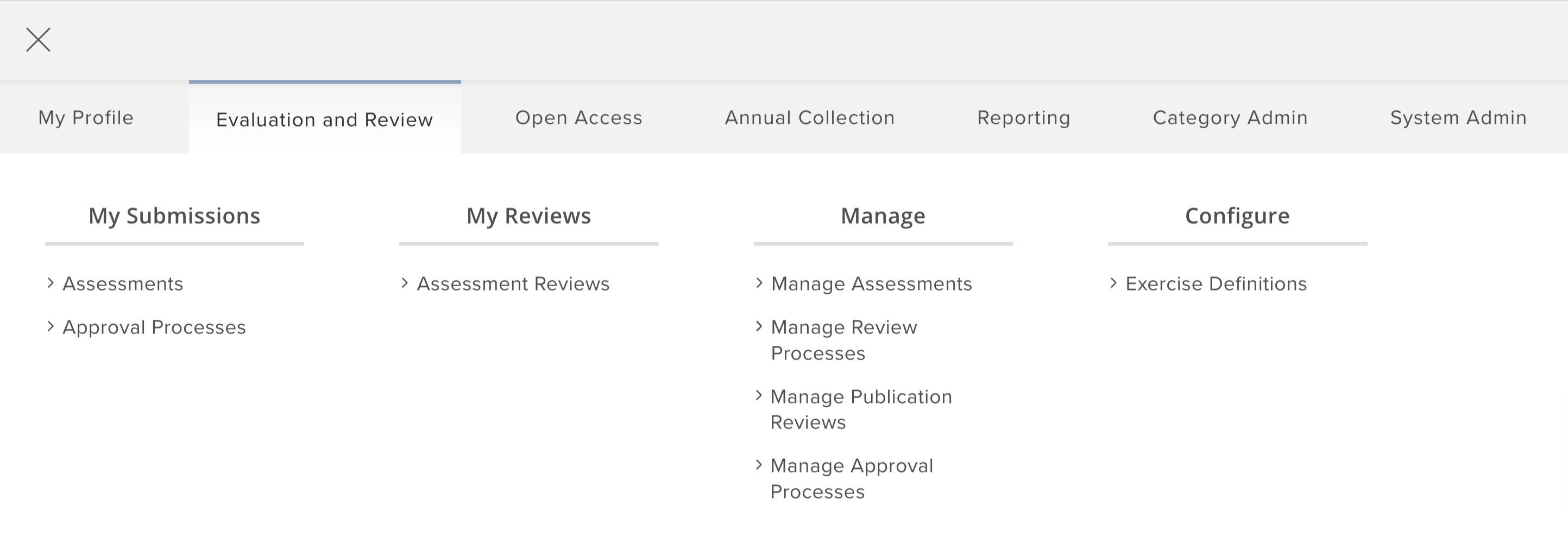
Image: Administrators can quickly choose how they want to describe the Assessment Module in the main menu of Elements.
Other improvements to the Assessment Module
View PDF attachments in the Assessment Exercise
The ability for researchers and reviewers to add attachments is an important way of capturing a broad range of information in the Assessment Module. To reduce workflow interruption and help streamline the review and approval workflow, we have introduced the ability to view PDFs within the Assessment Exercise. Researchers and reviewers can view the PDF at a click of a button, saving time and reducing the need to download data unnecessarily.
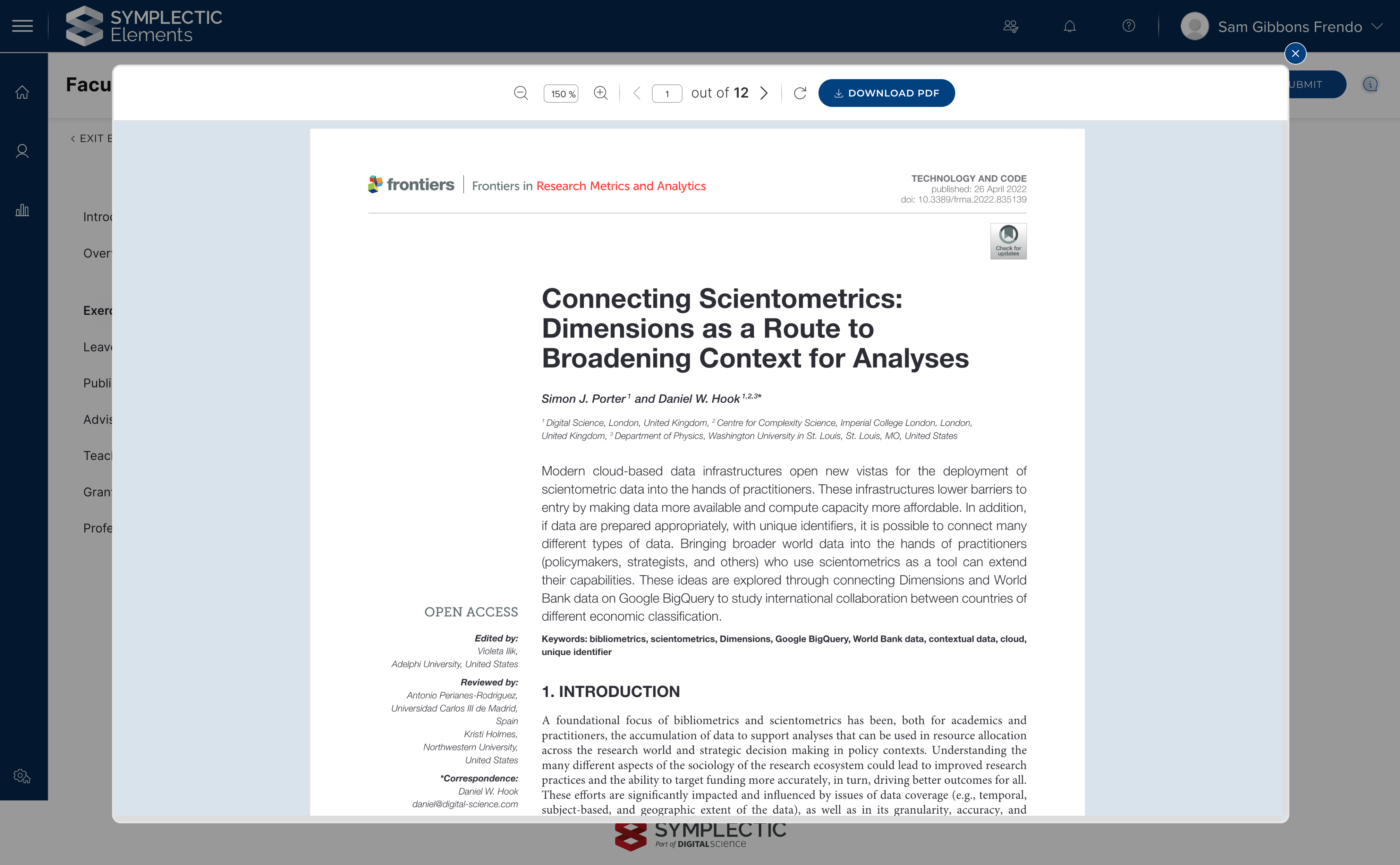
Image: Viewing PDFs in the browser means that researchers and reviewers can view information at the click of a button, rather than having to interrupt their workflow by downloading a document).
Reviewer impersonation
The ability to impersonate users can help administrators troubleshoot issues or carry out actions on behalf of users. Due to the potentially sensitive nature of review and evaluation processes, it wasn’t previously possible to access the Assessment Module as a reviewer on behalf of an impersonated user. In this release we have added the flexibility for organisations to choose to configure, on a per exercise definition basis, whether reviewers should be able to be impersonated. This means that administrators can decide to allow reviewer impersonation, while retaining the ability to restrict this behaviour if necessary due to the confidential nature of the reviews being captured in the system.
Introducing attachments for Reviewers
We have introduced the ability for reviewers to add attachments to reviews, to help streamline capturing letters of recommendation and other supporting information, and extending the range of information that can be captured from reviewers.
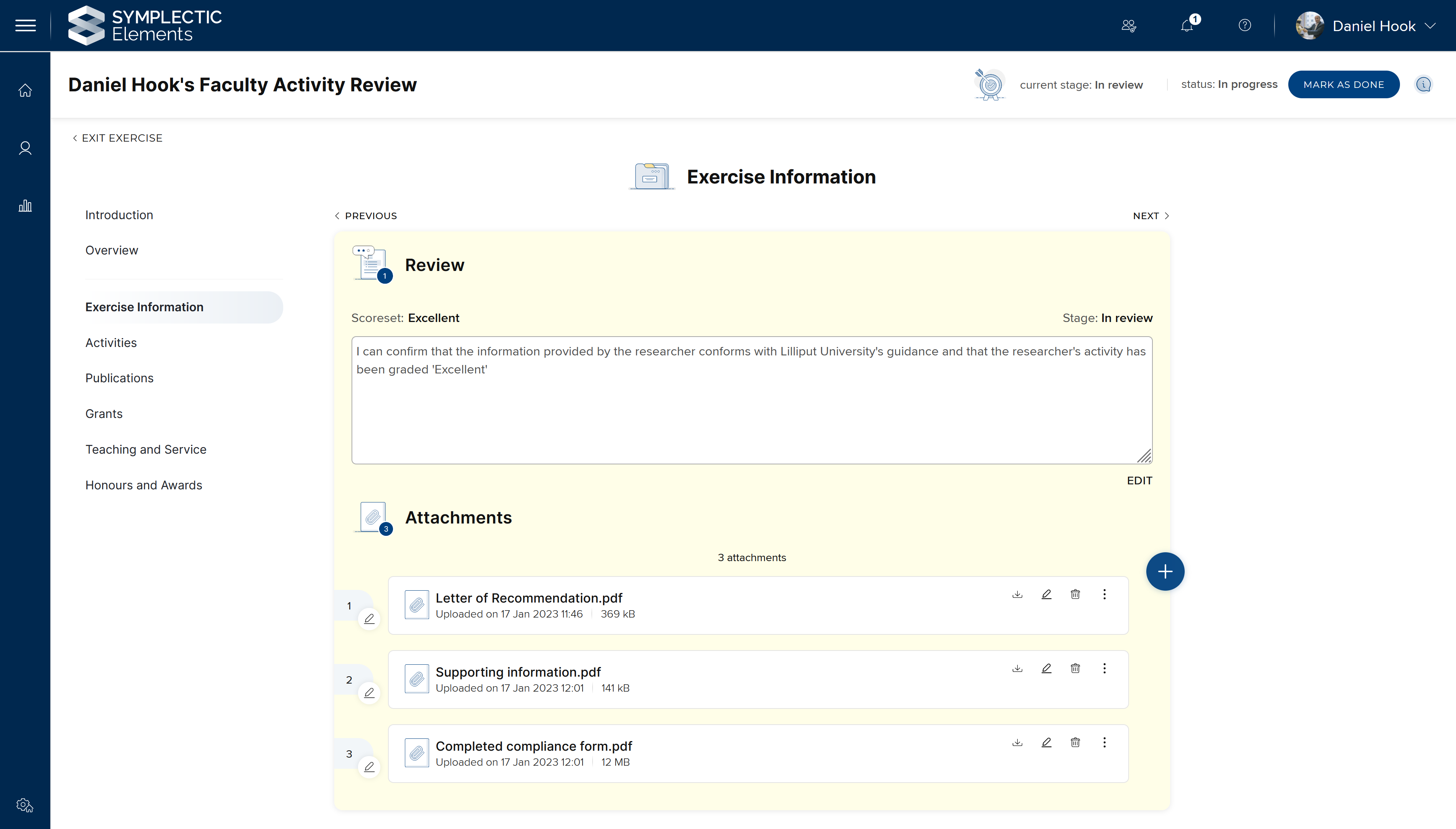
Image: The ability for reviewers to add attachments to reviews extends the range of information that can be captured in the Assessment Module.
Review attachments will have the same visibility as the review itself and can be reordered and can include descriptions if required. This functionality will be configurable, allowing Administrators to decide which reviews should also include attachments.
Other improvements to the Assessment Module
Attachments can now be sorted in the same way as items. This allows users to easily ensure that information is submitted in the manner that they wish.
Researchers can bulk sort items once they have been added to a list. It is possible to carry out this sort by Title, Reporting date, Citation count, and RCR.
Administrators can now configure whether reviewers use the ‘mark exercise as done’ feature on a per stage basis. This gives administrators even greater control when designing workflows for reviewers. For example, if you are designing a stage with multiple reviewers, it can be useful to allow reviewers to mark their reviews as done once they have finished work, so that Assessment Managers can easily check when all reviews are complete and then can transition the exercise to the next stage. If there is only a single reviewer of the Exercise form at a particular stage, then they can simply submit their review and automatically transition the exercise to the next stage, removing the need to mark their review as ‘done’.
We have improved the style of the ‘see more / see less’ and made overview and guidance text more visible with new blue styling, consistent with other parts of Elements.
We have standardised the headings on the Exercise Definition configuration pages.
We have improved the layout of the ‘Stages’ configuration tab within the Exercise definition configuration pages.
Redesigning Elements Groups
The ability to create structured groups of users representing different aspects of an organisation is at the very core of Elements. This long-standing functionality is key to configuring and managing Elements. It allows organisations to manage roles and permissions and govern access to functionality and data, as well as allowing organisations to explore and manage the data within Elements through the lens of their internal structures.
The Elements groups functionality to date has allowed organisations to capture basic operational metadata, and define hierarchical relationships to create representations of their internal group structures. The flexible group tree model allows administrators to define multiple branches representing both formal and informal groupings at their organisations.
We have begun a significant redesign and expansion of our Groups functionality which will allow organisations to capture a much wider range of metadata about their internal groupings to support a wider set of use cases, including surfacing group information on public profiles. Through this redesign, we also seek to significantly streamline the management of groups.
In this release, we’re excited to deliver the first phase of enhancements to our groups functionality. In this work, we have moved groups into alignment with the object-based data model used elsewhere within Elements. This change brings new functionality as well as greater consistency to make it easier for administrators to understand and to manage groups.
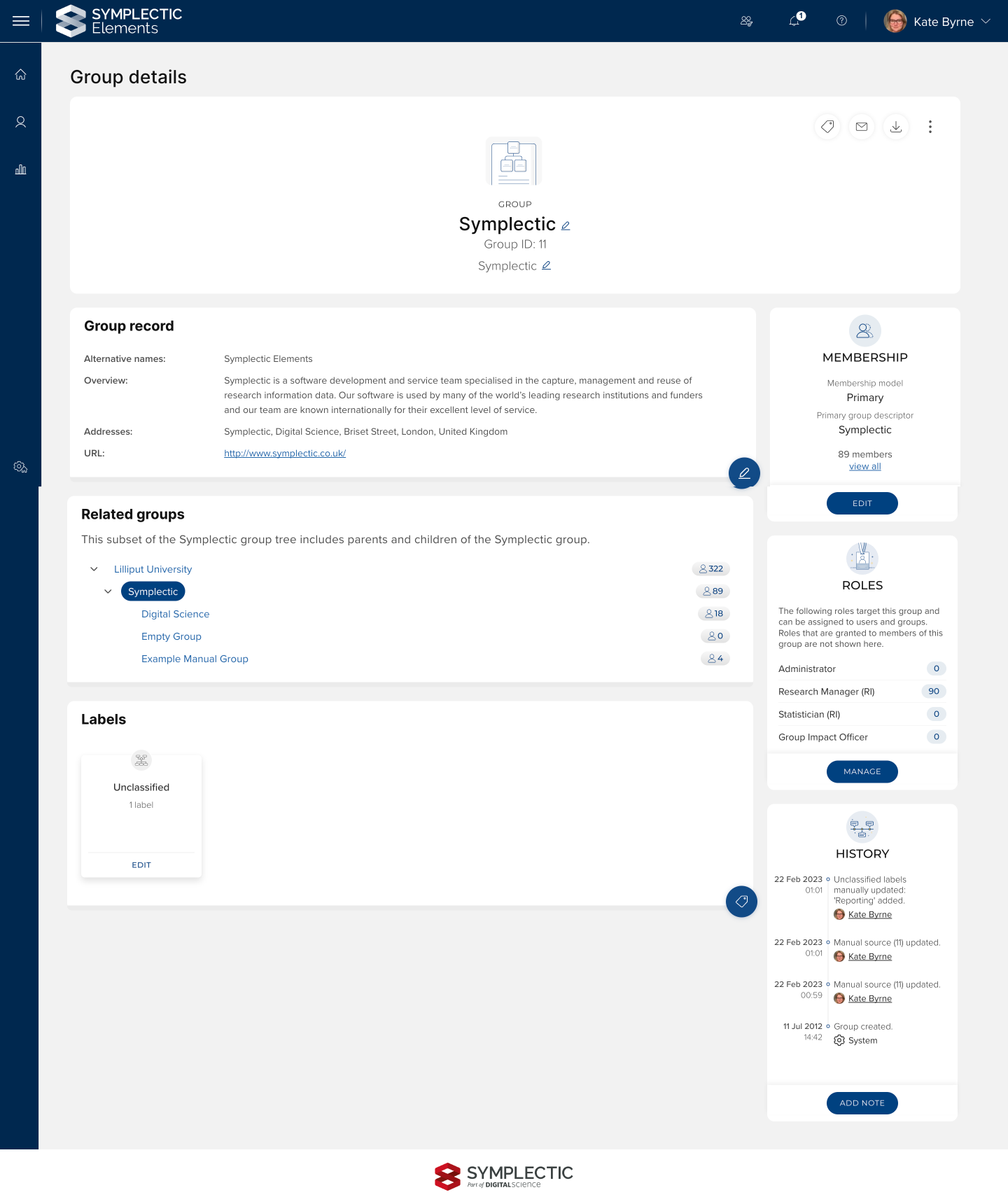
Image: The new Group page allows administrators to manage a variety of new data about groups.
As a part of this release, we have redesigned the Group page in Elements to make it consistent with our updated UX design and to surface the new groups functionality, including:
Group records: Each group can now have a group record to support the curation of information about the group, such as an overview, alternative names and contact information or web links. As with other objects within Elements, your administrators can configure which metadata fields should be used to support your organisation’s needs.
New descriptive Group types: We have begun to introduce the ability to categorise groups using a new descriptive group type (similar to publication types). In this release, there are just two types available, Organisation and Group, which can be renamed if desired. Upon upgrade, all of your existing groups will automatically be transformed into one of these two types. In a future release, we plan to expand upon this functionality with a wider range of stock types as well as introduce the ability to configure custom types.
Highlighting Related Groups: To help administrators easily view and navigate to the groups related to the selected group (including parent and child groups), the new Group page now displays a targeted view of the group tree, which allows you to navigate up or down the group tree in just a click.
Membership Model: The older ‘type’ structure for groups (Organisation Group, Primary Group, Auto-Group, and Manual Group) has been transformed into a new concept called Membership Model. Each group’s Membership Model is highlighted via a dedicated section which also provides administrators with guidance about how to configure that type of membership model.
Labelling Groups: Groups can now be labelled with classification schemes via the Elements labelling functionality. As with other data categories, this can include labels from our stock label schemes (such as Fields of Research Codes or Sustainable Development Goals) or custom schemes developed by your organisation. Administrators must first enable the desired label scheme for groups via the Manage Label Schemes page for them to appear on the Groups page.
Group History: A new group history section highlights changes made to a group record and the group’s metadata.
Roles section: The new roles section provides easy visibility of how many users have each group role. Administrators can easily link through to manage and view role details.
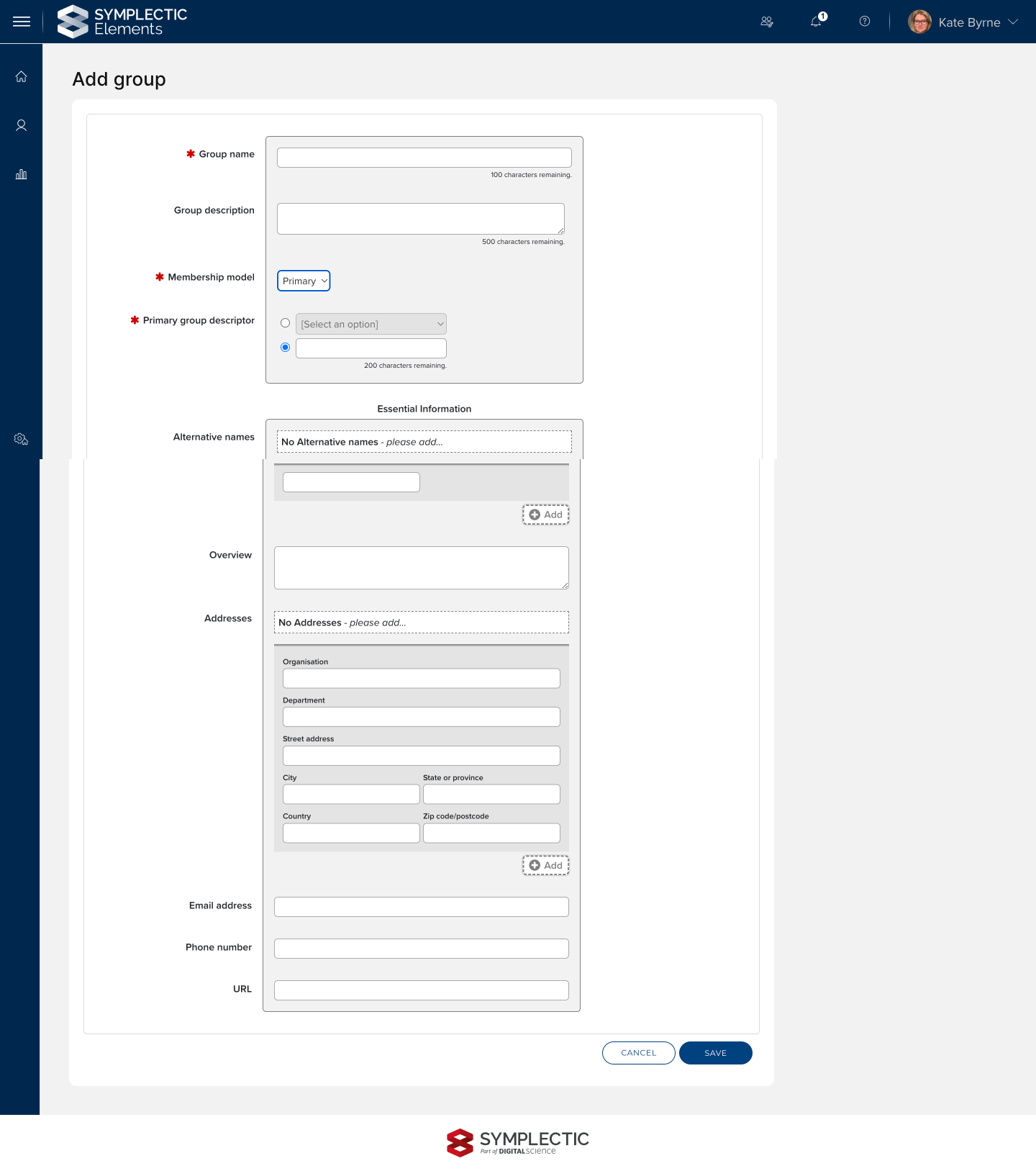
A new Add Group page allows administrators configuring new groups to add both core operational metadata (title, description and membership model) and descriptive metadata to provide a streamlined creation experience.
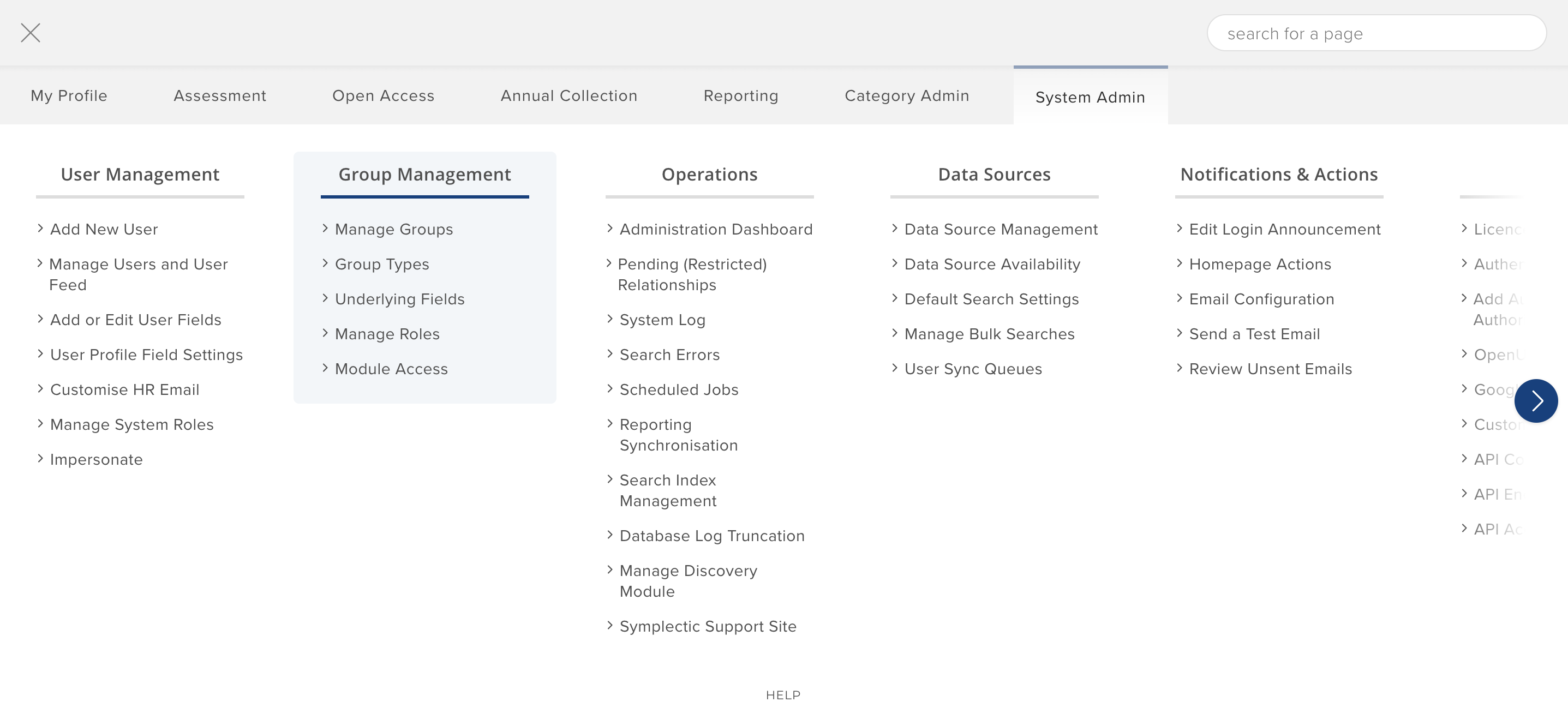
To help administrators find the new functionality, groups now have a dedicated column for navigation from the main menu that is simplified and more aligned with other objects.
Google Analytics Updates
To integrate Elements with Google Analytics, you previously pasted the whole Google Analytics script into a dedicated text area on the “Google Analytics” page. This script was then included in the HTML source on every Elements page to enable Google Analytics tracking.
In this release, the Google Analytics page has been updated to capture the Google Analytics IDs, removing the need to capture the whole script, and the older method of managing Google Analytics via a script has been migrated to a new page also available to System Administrators. If you already use Google Analytics, upon upgrade, the existing script will have been automatically migrated to the new Custom script page. This will continue working, however we recommend that you remove the script entirely and use the new Google Analytics page to configure your IDs. Through this new functionality, Elements now supports Universal Analytics, Google Tag Manager, and Google Analytics 4 codes. We support the use of multiple codes, of any of the three types.
Future End of Support for Older Google Analytics functionality
Universal Analytics will be retired by Google on 1st July 2023, and we will remove them from Elements in the first release after that date.
We plan to retire the Custom script page in a future version of Elements, so we would encourage clients to migrate their Google Analytics codes to the new interface as soon as possible, and delete any scripts from the Custom script page. If you have difficulty doing this, please contact our team for assistance.
Research Funding Solution - API Improvements
For the Research Funding Solution, our main focus this release has been expanding the range of information available to query via the RFS API. This underpins planned work to expand reporting and integrations with institutional BI tools. These improvements include:
New endpoints for Deliverables, Change requests, and Budgets
Updates to the Funding Records endpoint
Updates to the Funding Opportunities endpoint
Updates to the Research Funding Solution endpoint
Other RFS improvements
The Manage forms > Proposal forms screen in the Management Console has been updated to populate the Lead applicant column and the Applicant name filter now returns the expected results.
The Review details page in the Management Console has been updated to align field names with names used elsewhere in RFS, and to include the 'Guidance for Reviewer' field.
Group Console user permissions have been updated, following on from improvements delivered in the v6.11 release.
Checklists are now available to view and modify via Manage forms in the Management Console.
As with previous releases, full details of the RFS functionality released in v6.12 are available in the RFS release notes on our support site.
Other improvements
It is possible to configure the size of the ‘text area’ field for both manual entry forms and the Supporting Information in the Assessment Module. When configuring the underlying field, Administrators will have a choice between three field sizes.
As part of Symplectic’s commitment to ensuring secure account management, we now display the date of last usage on the API Accounts page. This supports the process of regularly carrying out access rights reviews.
Manual changes to label schemes are now captured in an object’s history events.
On the account settings page it is now possible for users to ‘show password’ so they can see the password they are entering as plaintext.
It is now possible to download text logs from the Search index management page.
We have expanded the information on a user’s ORCID write settings held in the Reporting Database. This includes whether or not the connection is read/write enabled and what write settings the user has configured.
We have improved the accessibility of the tabbed interface on the user profile page sections.
We have updated our display of links in a number of places in Elements, to ensure they are compliant with web accessibility criteria.
Fixes
Sections with no associated components are no longer displayed on the overview page of the Assessment Module.
End of support
As always, we recommend that you regularly review our End of Support Announcements for information about upcoming end of support in Elements for various technologies. In this release we have enabled support for SQL Server 2022 and SSRS 2022, and removed support for SQL Server 2016 and SSRS 2016.
We would particularly like to draw your attention to the announcement about the recent introduction of end of support dates for versions of Elements. If you need assistance planning to upgrade, please contact our team via the Support Site.
We’re here to help!
We hope you enjoy getting to know the latest version of Elements. Remember should you have any questions, we’re here to help! Just contact us at support@symplectic.co.uk for assistance.
Best wishes,
The Symplectic Team