
Symplectic Elements v6.14 - Release Notes
Symplectic Elements Release Notes July 2023 v6.14
Introduction
Welcome to Elements v6.14, another release packed with enhancements and new features!
In this release, we have redesigned the Elements Profile page, updating the look and feel of the page and making a significant number of accessibility-related improvements. These changes will help to ensure your researchers can quickly and easily capture information about their expertise and experience. We’ve also introduced the ability to configure additional custom ‘overview’ fields on the Elements Profile page to give you greater flexibility on how you may wish to prompt your users to describe their work.
We have continued to enhance our Groups functionality. In response to community feedback, we have introduced new content and membership manager roles, allowing you greater nuance when assigning roles to administrators. We’ve further streamlined group administration by adding new functionality which allows admins to easily update a group’s parent group and membership model, making it easier than ever to maintain the group structure. Plus we’ve introduced support for Group - Object relationships to allow you to curate lists of featured outputs, activities and facilities.
We’ve introduced a new Discovery Configuration page to the Elements admin UI, designed to empower your System Administrators and save you time and effort by allowing you to quickly and easily manage many of the Discovery configuration settings directly within the Elements admin UI.
For the Research Funding Solution, we’re excited to launch our new Project Closure functionality, grow our reporting capabilities, and make more data available via the RFS API.
Plus this release contains accessibility improvements and many other smaller features and enhancements, including 6 feature requests from our community!
As always, the new version of Elements and associated upgrade instructions can be found in the Elements upgrade forum.
Profile page redesign
As more and more organisations use Elements to power public profiles and to generate CVs, the Elements Profile page has become more important than ever. To help ensure your researchers can quickly and easily capture information about their expertise and experience, in this release we have redesigned the Profile page to both update the look and feel of the page and to make a significant number of accessibility-related improvements.
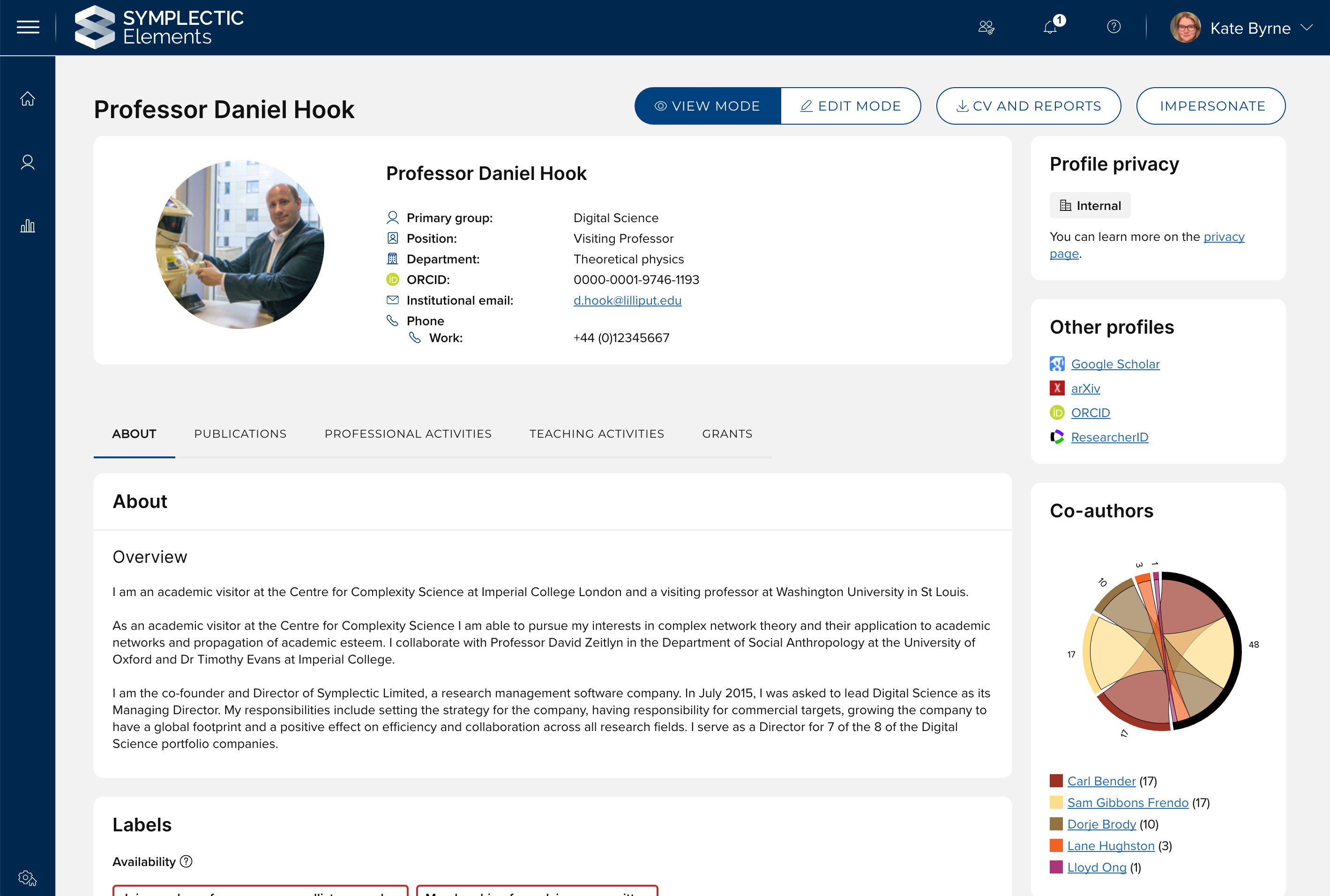
Image: The updated profile page continues to offer users clear ‘view’ and ‘edit’ modes so they can easily see how their profile will appear to other users.
The design of the Profile page has focussed on improving readability and usability, resulting in updates to the general layout of information as well as to the profile and field-level privacy controls. These improvements bring this important page more in line with the Elements ‘v6’ interface, providing researchers with a more consistent user experience. They also bring the page in line with our new standard UI development technologies and techniques, helping to ensure we can continue to enhance and grow our profile functionality in the future.
The page has also been carefully designed to be as accessible as possible to ensure that we are making it as easy as possible for users with diverse needs to update their profile information. This includes the introduction of a new profile photo uploader/cropper which is fully keyboard accessible.
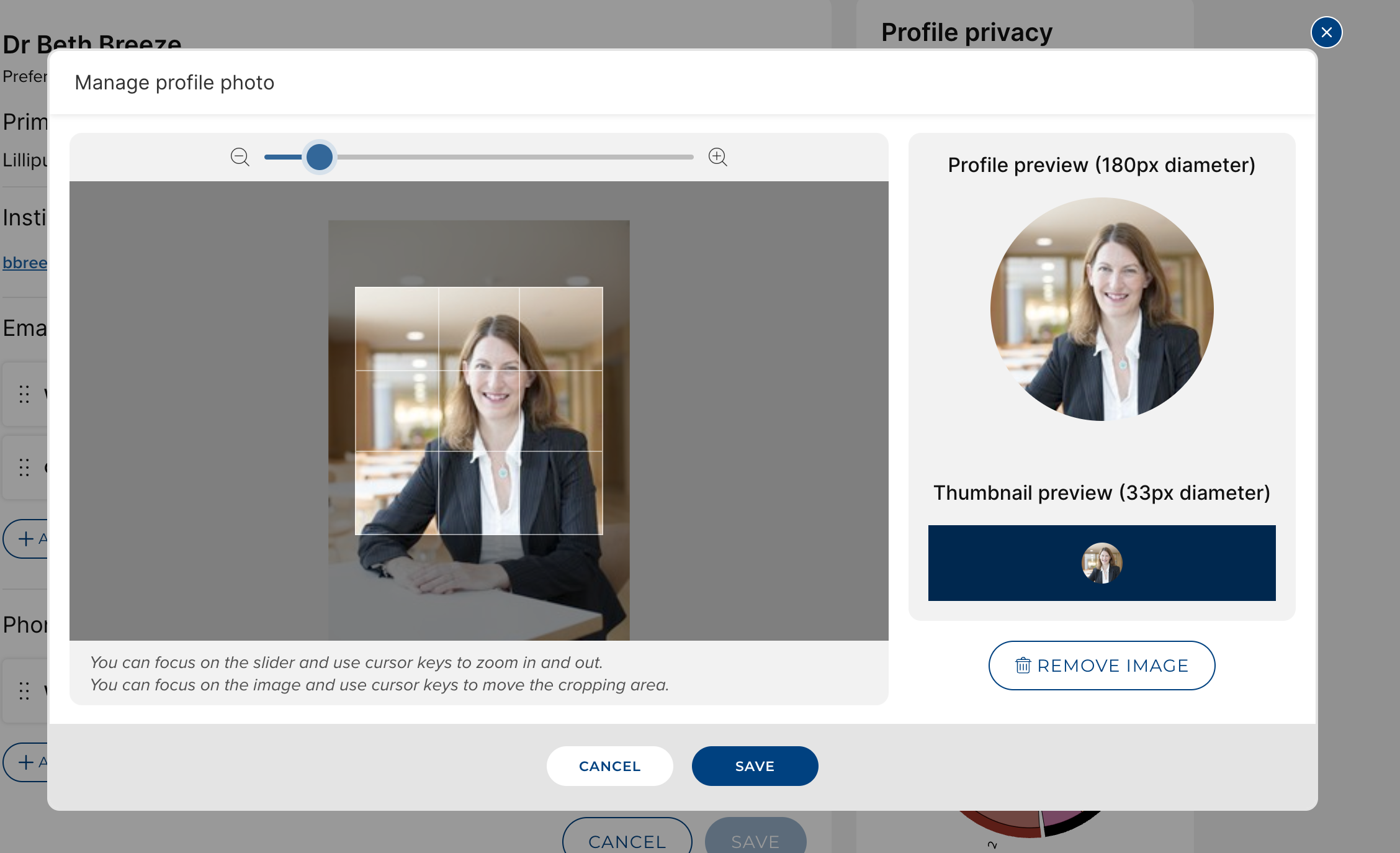
Image: The new profile photo manager is fully keyboard accessible, and provides previews for how the image will appear across Elements.
To help simplify the page we have removed two pieces of functionality: the graph on the publications tab and the ‘recent’, ‘favourites’ and ‘all’ sub-tabs, as feedback had indicated that users found these features confusing rather than useful.
New custom ‘overview’ profile fields
Organisations increasingly use Elements to curate information about a wide range of activities, reaching beyond just research and teaching. In line with the widened scope, we have introduced the ability to configure additional custom ‘overview’ fields on the Elements Profile page to give you greater flexibility on how you may wish to prompt your users to describe their work. This new functionality allows you to create additional text fields which will appear in the ‘About’ section of the Elements profile page, prompting users to describe additional aspects of their work. For example, these new custom fields could be used to prompt users to add an Impact summary, information about their industry experience, or even an alternative biography for use in specific reporting scenarios (eg. to populate narrative CVs).
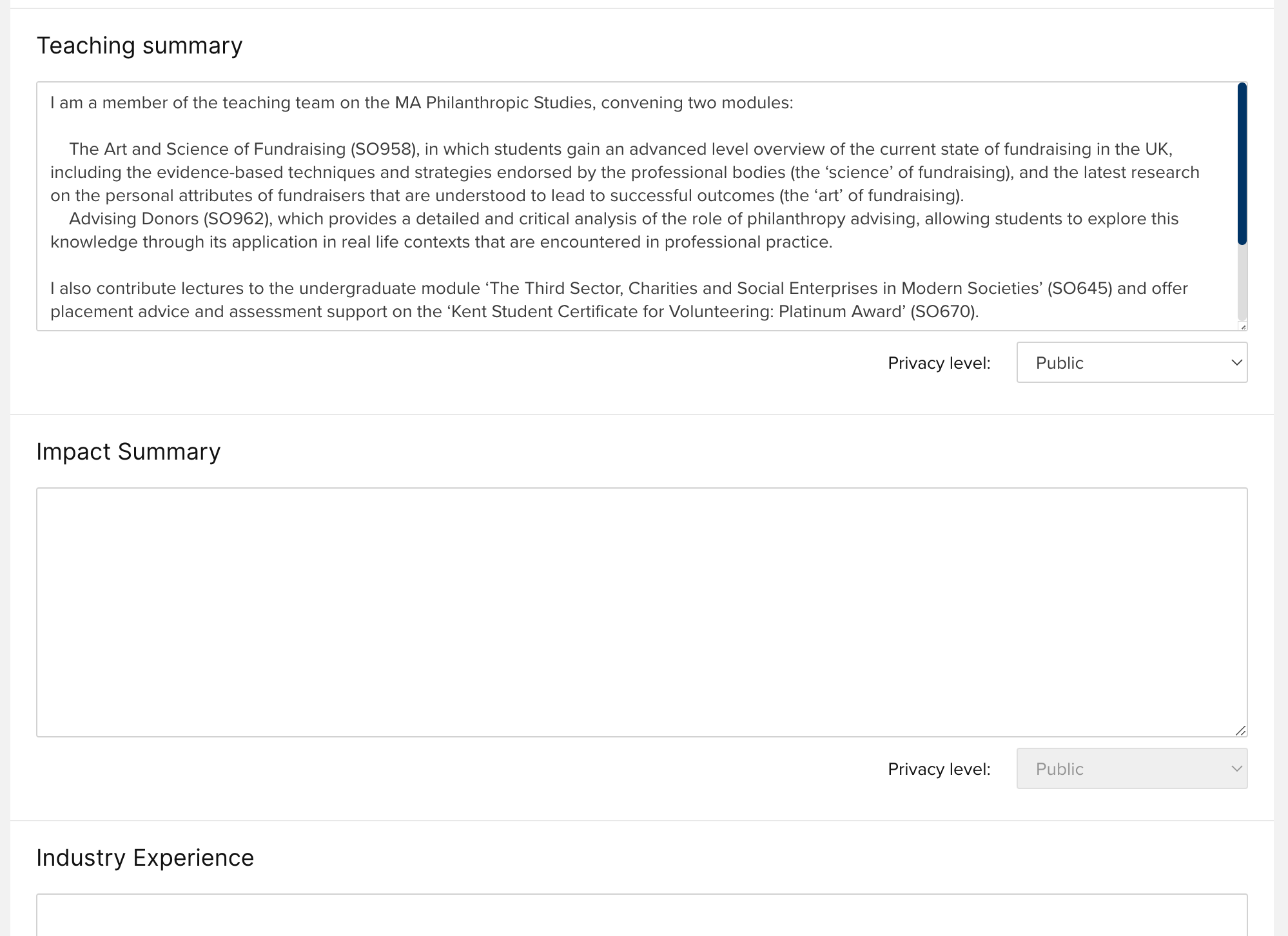
Image: An example of custom ‘overview’ text fields created to allow users to add summaries of their impact and their industry experience.
System administrators can add custom text fields via the User profile field settings page by clicking ‘Add new field’, where they will be prompted to add an underlying field name and a display name. The resulting field will be immediately available to your users. Custom text fields offer the same set of configuration options as stock fields, allowing administrators to elect to lock the fields so that they can be populated via an external source if desired.
The data captured via these new custom fields is available for use via the Reporting Database and the API.
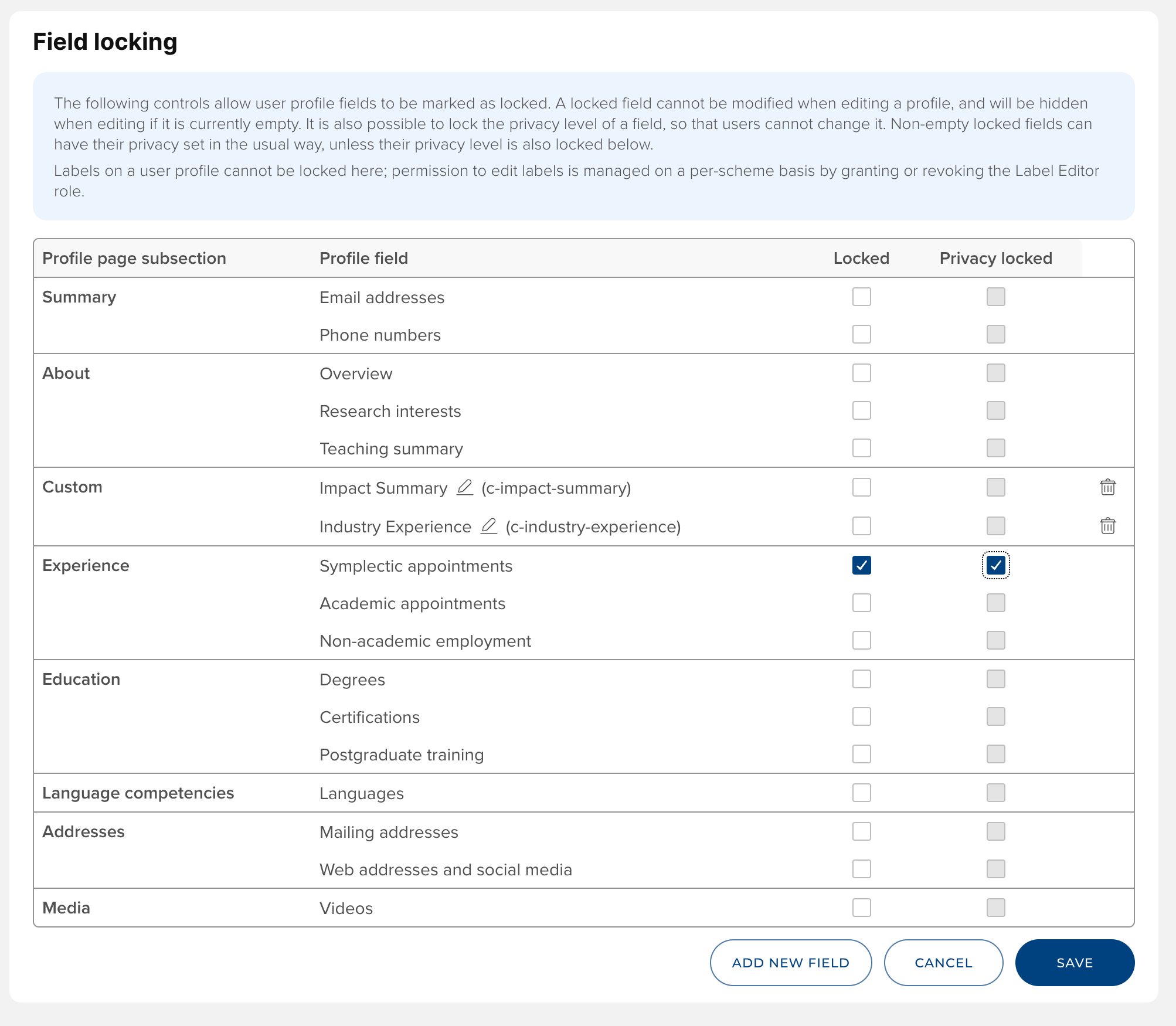
Image: Custom overview fields can be added via the User Profile Field settings page.
Other Profile page improvements
Organisations with locked fields on the Elements Profile page can now configure whether users can set the privacy level of those fields. Via the User profile field settings page, system administrators can now select for each locked field whether the privacy setting should also be locked, preventing users from being able to edit it.
The configuration setting on the Display citations and metrics page to disable citation information from Dimensions will now hide the badges on the Elements profile page as well as on the publications themselves.
Expanding Group functionality
In this release we have continued to enhance our Groups functionality to help streamline the management of groups and to support capturing more information about a groups’ outputs, activities and facilities. In response to community feedback we have introduced new content and membership manager roles, allowing you greater nuance when assigning roles to administrators. We’ve added new functionality which allows admins to easily update a group’s parent group and membership model, making it easier than ever to maintain the group structure. Plus we’ve introduced support for Group - Object relationships to allow you to curate lists of featured outputs, activities and facilities.
New Group roles
To provide more granular control over Group data we have introduced two new Group roles to Elements. Prior to this, only System Administrators and Group Administrators could make changes to Groups. These new roles allow control over Group data to be more decentralised and provide Administrators with a greater range of options when granting permissions over Groups.
‘Membership managers’ are able to control the memberships of Groups. Users with this role can manage the membership model for Groups and set the membership criteria (e.g. primary group descriptor and WHERE clause in the case of Primary Groups and Auto-Groups respectively). In the case of Manual Groups, membership managers are able to add and remove members.
‘Content managers’ are able to edit metadata associated with Groups. Users with this role are able to edit Group metadata records. In addition they can edit labels, history notes and privacy.
These new roles have a limited set of permissions beyond their primary purpose. These roles are not able to impersonate members of the Group, or create or delete Groups.
Change the parent of a Group
The structure of organisations is not static, and often needs to be adjusted to reflect real world changes. To reduce the administrative burden associated with managing the structure of your Group hierarchy in Elements, it is now possible to change the parent of a Group via the user interface. This allows administrators to modify the Group hierarchy at the click of a button. When changing the parent of a Group, all subgroups will also be moved to the new branch in the Group hierarchy tree.
Changing a group’s parent may impact a number of important group properties, including the roles that apply to the Group’s members. It is therefore important to consider the impact of changing a Group's parent. More information on this can be found in this support article.
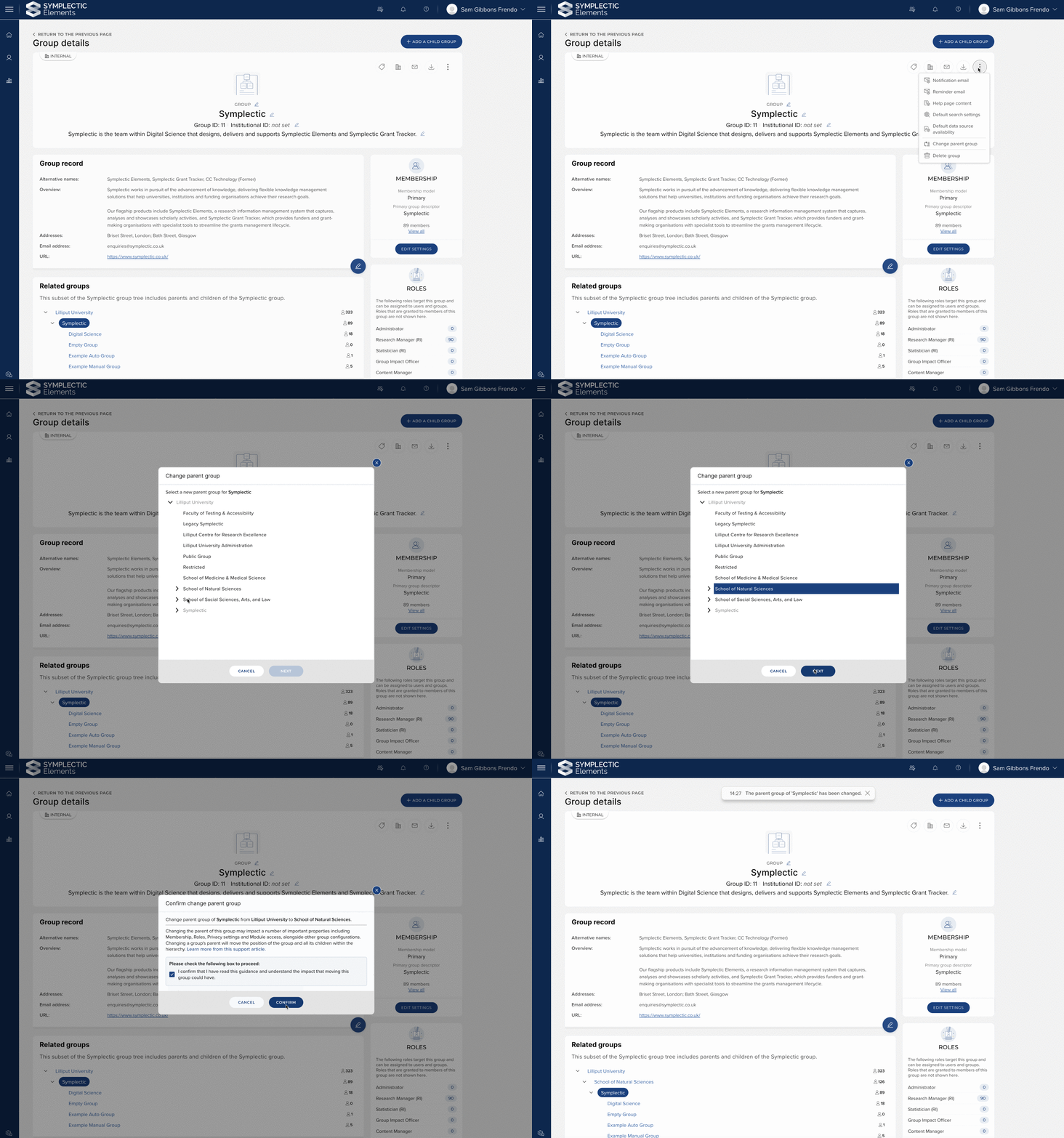
Image: A Group’s parent can now be updated via the user interface, allowing administrators to easily update the Group hierarchy.
Change Group membership model
The ability to control the members of a Group is key to managing where each user ‘belongs’ within the organisation, and controls a range of system behaviour - from configuration to reporting.
In this release we have introduced the ability to change the membership model of a Group via the UI. This means that you have greater control over how the Group hierarchy behaves, and can switch the membership model of Groups between Primary Groups, Auto-Groups and Manual Groups.
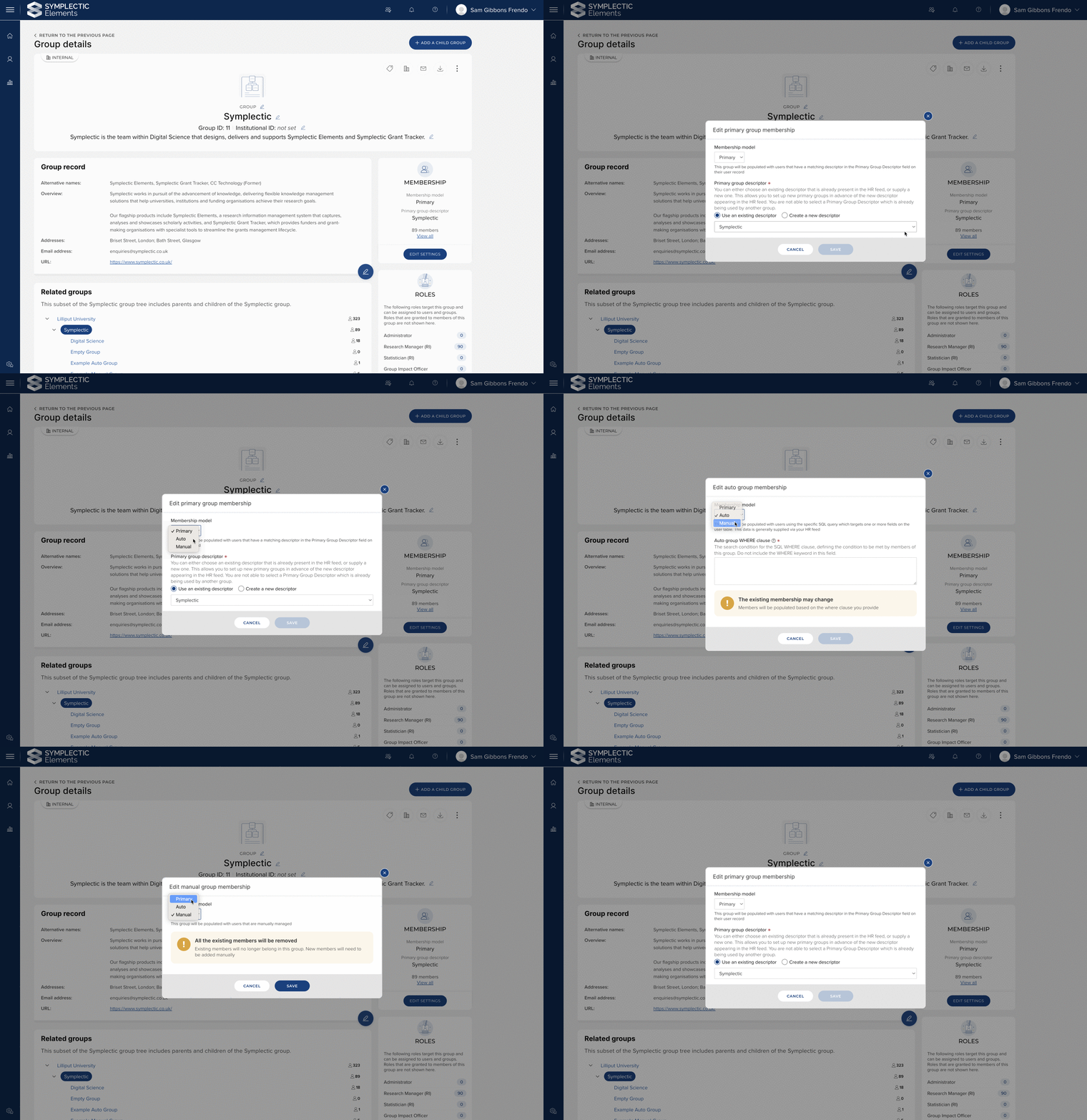
Image: Administrators can quickly and simply modify the membership model of a Group via the user interface.
Introducing relationships for Groups
The ability to create relationships between objects allows organisations to capture a rich set of data for reporting and display purposes. In this release, we have introduced the ability to create relationships between Groups and other objects.
This allows organisations to capture relationships to users, outputs, and activities that they want to ‘highlight’ for a particular Group, and supports planned future work to publicly showcase groups via new ‘Department’ pages in the Discovery Module. The available relationship types for Groups are:
User - ‘Head of’
User - ‘Administrator of’
User - ‘Administrative head of’
User - ‘Director of’
User - ‘Contact for’
Grant - ‘Funded by’
Publication - ‘Highlighted in’
Project - ‘Highlighted in’
Project - ‘Funder of’
Equipment - ‘Housed in’
Equipment - 'Owned by’
Impact - ‘Highlighted in’
Group - ‘Collaborates with’
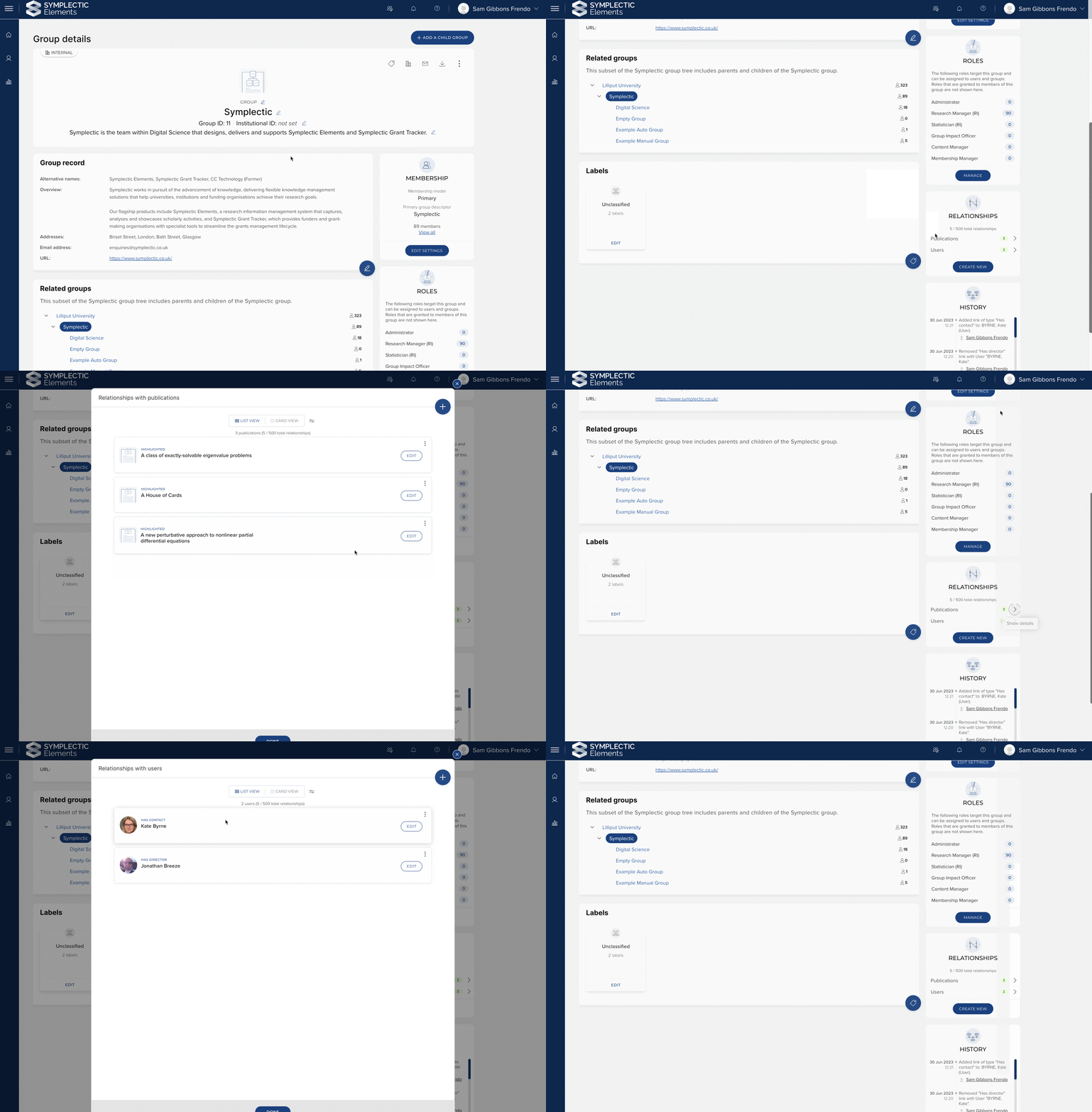
Image: Relationships can be created between Groups, users, and other outputs and activities, allowing organisations to capture rich information about Groups.
The general model for reporting on outputs and activities associated with a Group remains the same. That is, we consider all outputs and activities associated with members of a Group, to be associated with the Group. Group relationships are intended to capture a unique subset of these objects, allowing administrators to highlight relationships important to the group. Therefore, Groups support a maximum of five hundred relationships, per Group.
Improved Group privacy controls
Introduced in v6.13, Group privacy allows organisations to control which Groups are suitable to be shared publicly and groups which should remain internal to Elements. In this release we have made a number of improvements to the way Group privacy is managed;
It is now possible to set the default privacy level for Groups. This simplifies the process of setting privacy for Groups across the whole hierarchy. Updating the default privacy level for Groups will impact all Groups that are using the default privacy level.
The privacy level of groups can be viewed and configured on the ‘Manage groups’ page. This provides administrators with a complete overview of privacy in the context of the Group hierarchy.
We have made improvements to the display of Group privacy, ensuring that the effective privacy level of the Group is clearly indicated, as well as providing context to the user to make it clear how the privacy level can be modified.
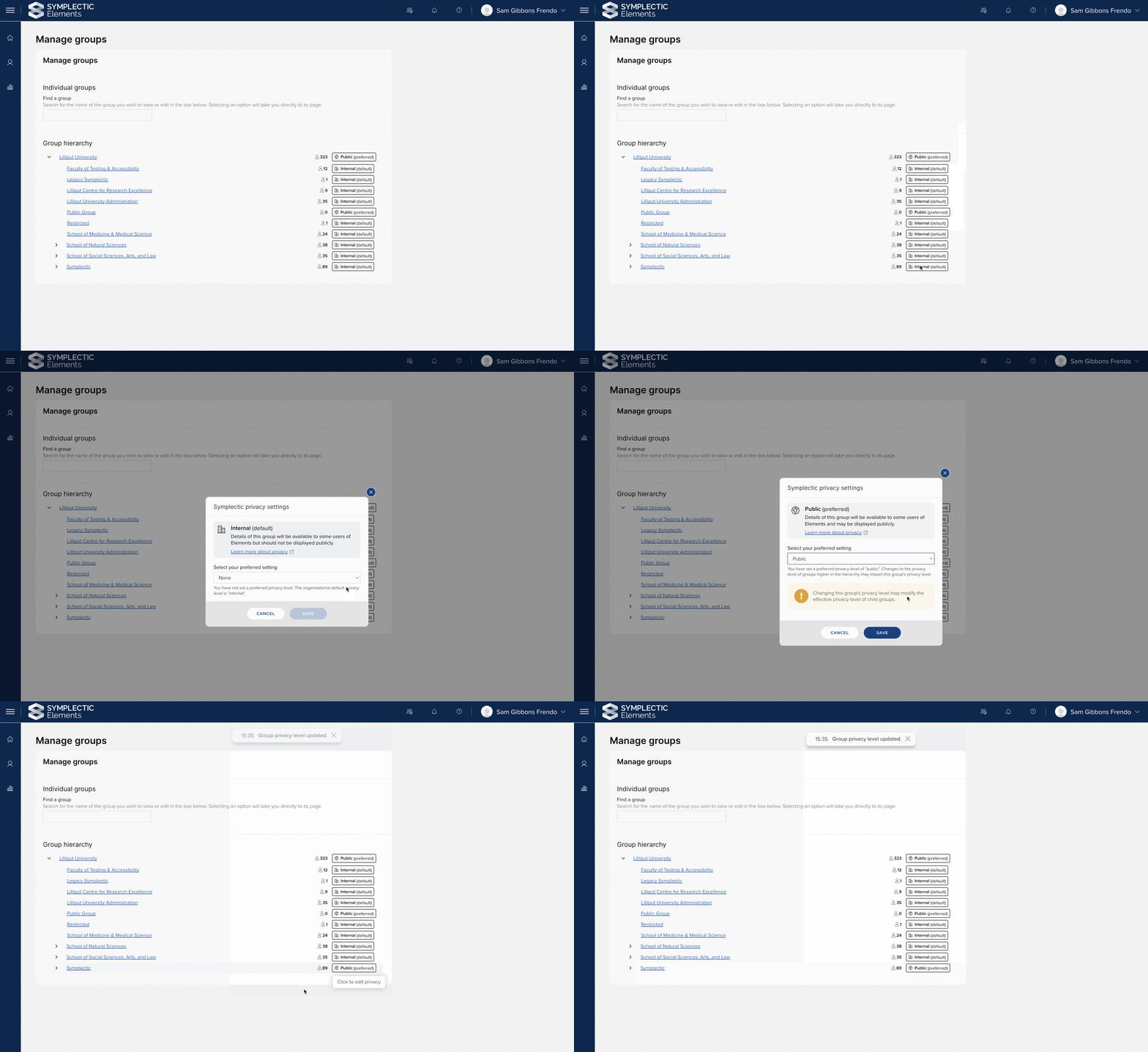
Image: The updated privacy control for Groups clearly indicates the effective privacy level of the Group. Being able to view and control Group privacy on the ‘Manage groups’ page provides administrators with oversight of privacy across the hierarchy.
‘Institutional Identifiers’ for Groups
Being able to map data in Elements with external systems helps organisations build an integrated picture of the data they hold.
In this release we have introduced a new object level field - Institutional Identifier. This field allows organisations to capture an identifier that can be used to map Elements Groups to external systems. For example, the Institutional Identifier could be used to capture the ID from an HR system, to aid data mapping. Each Institutional Identifier added to a Group must be unique. The Institutional Identifier is distinct from the system generated ‘Group ID’ that uniquely identifies Groups in Elements.
Discovery configuration management
Up until now, the process of configuring Discovery has been managed by Symplectic staff on your behalf. When Discovery was first introduced, this enabled our team of experts to guide early adopters through the configuration of the system. However, Discovery has now reached a point in its maturity where it’s important that we empower your System Administrators and save you time and effort by allowing you to quickly and easily manage many of these configuration settings directly within the Elements admin UI.
In this release, we have introduced a new Discovery Configuration page to the Elements System Admin menu. From this page, your System Administrators will be able to directly configure many of the Discovery Configuration settings including:
Organisation Name
Logo positioning
Homepage title and descriptions
Footer content and links
SEO meta description
Enabling/Disabling key features
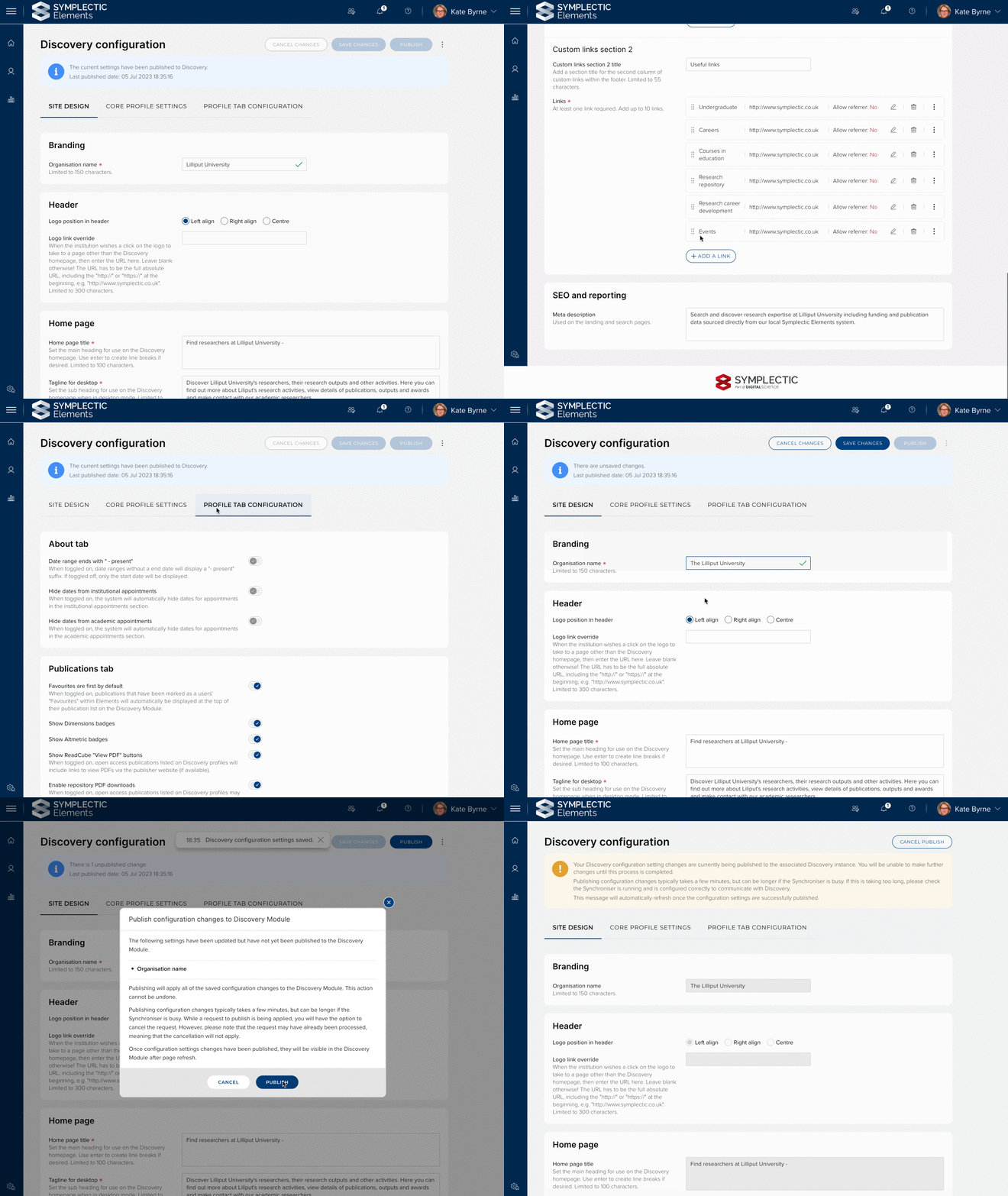
Image: Many Discovery configuration settings can now be edited via the new Discovery Configuration page. Once a change has been saved, a System Administrator can click ‘Publish’ to update the associated Discovery site.
Each time you visit the page, the system will first check that there is an active connection to the associated Discovery instance. You can then make the desired configuration changes via a set of validated fields which include guidance information on how to optimise your data. Once your changes are complete, you can save the settings before electing to publish the changes to Discovery. The page will then provide you with live updates whilst the publishing process is underway, so that you can easily see when the process is complete. If you have saved configuration changes but change your mind before you push those changes to Discovery, we also offer an option to import the current configuration settings from Discovery, to make it quick and easy to roll-back if required.
To make the process of managing these settings as easy as possible, within the three dot menu, you will find options to export or import your configuration settings. This allows you to export the settings from one instance of Elements and import them into another, so long as the two instances are running the same version of Elements. This can allow you to copy over your configuration settings from non-production to production quickly and easily. This feature will also assist with the migration of your existing Discovery settings upon upgrade to Elements v6.14, where our team will help you import your existing settings.
For more information about configuring the Discovery Module please see the Symplectic Support Site.
Other Discovery improvements
We have added a new configuration option which will enable a new user research survey tool which will allow users to elect to ‘Give Feedback’ on the site. This optional feature will help support our user research efforts as we continue to grow and improve the Discovery Module. If you are interested in enabling it to support our user research efforts, please contact Symplectic Support.
We have introduced new cascading date logic, so that If a publication is missing a publication date, the online publication date will be displayed instead.
Research Funding Solution
This release represents a milestone for the Research Funding Solution (RFS) as it includes the introduction of Project closure functionality. This now enables clients to employ Elements to support the full funding lifecycle, from initial identification and publication of funding opportunities, through to the closure of Projects. It also includes a significant expansion of RFS content available in the Elements reporting database as well as a number of other improvements.
Project closure
We have introduced Project closure functionality in this release, enabling users to easily identify and resolve any outstanding actions prior to closure, close a Project (with relevant outcome, dates, reasons, and notes), modify closure metadata post-closure, and easily re-open a Project that was closed prematurely.
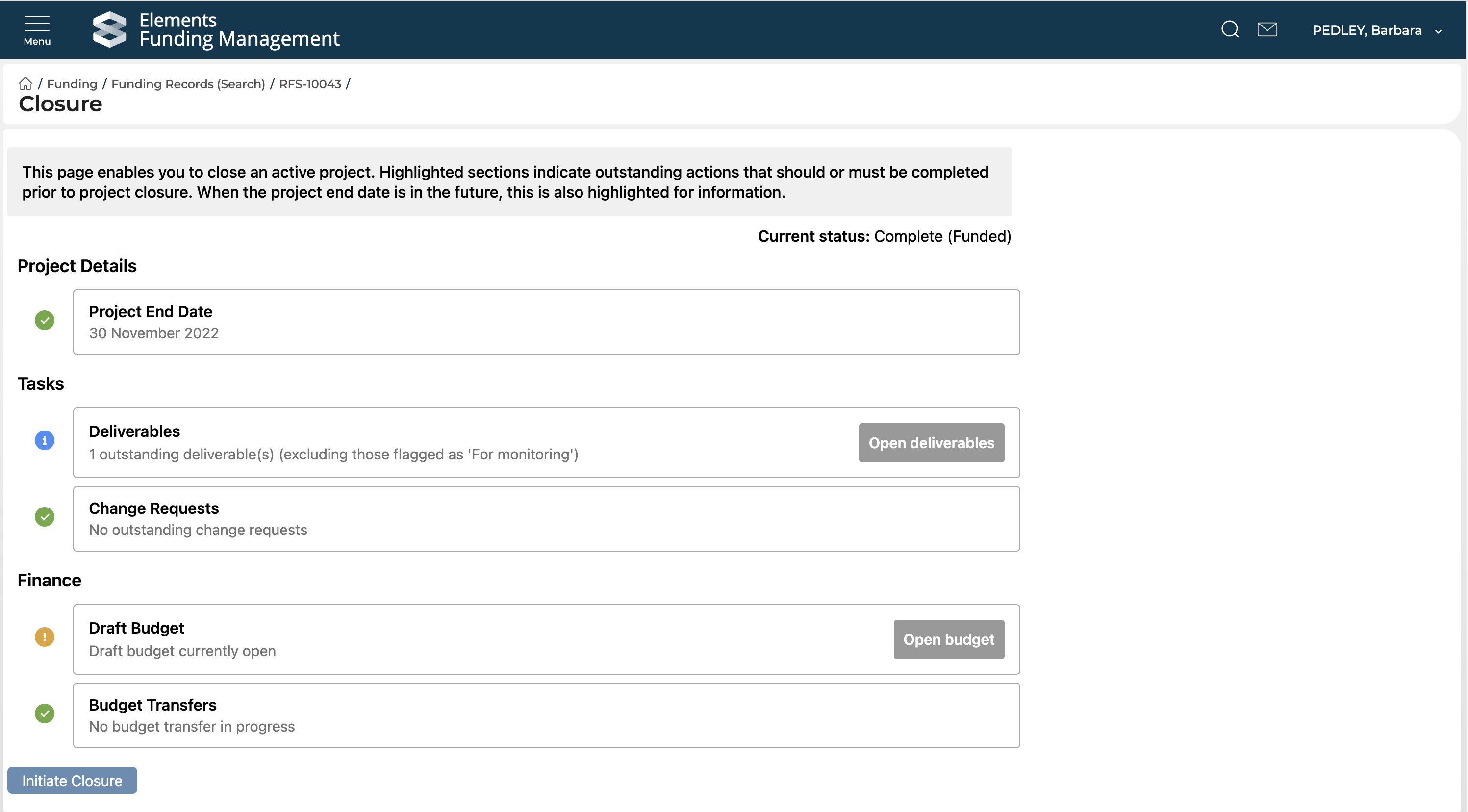
Image: RFS Project Closure screen, highlighting actions required prior to closure.
Reporting database
We have added new tables and views to the Elements reporting database relating to Projects, Budgets, Deliverables and Relationships.
Additional improvements
This release also includes a number of additional improvements, including the following:
System Administrators and Research Funding Administrators are now able to revert activation and approval where these have been actioned in error.
We have updated the individual Project Deliverables and Change requests pages to enable filters and export.
We have made further additions to the RFS API including new Eligibility form endpoints, and updates to the Funding Records endpoint to include Finance codes and Project closure information.
As with previous releases, full details of the RFS functionality released in v6.14 are available in the RFS release notes on our support site.
Accessibility improvements
We have introduced a new fully keyboard accessible date picker. The new date picker has been applied on the updated Profile page in this release. It will be used across the system over time.
On the Elements login page, the username field is now set to allow use of the auto-complete attribute.
The accessibility of the Group trees and Group pickers within Elements has been improved.
Improvements
We have made improvements to the matching algorithm in response to community feedback. Objects of the type ‘Thesis’ will now only be merged with other records of the same type to reduce the risk of erroneous matches to subsequent publications with similar names.
The interface for uploading and managing thumbnail images has been updated to match the improvements made to the profile image uploader and is now fully keyboard accessible.
We have improved the deposit process for DSpace 7 integrations to ensure that deposits which take longer than 30 minutes will no longer timeout (when configured).
We have upgraded our dashboard platform, DevExpress, to v22.2 which includes a number of usability enhancements.
Elements will now generate and display a citation string for Preprints.
There is now additional validation when adding display names for generic fields on a user record to prevent you from accidentally adding duplicate names and to introduce a character limit. These improvements will prevent data inconsistencies which can cause issues upon upgrade. Please note that these new validation rules will be automatically applied upon upgrade; any existing duplicated names will automatically be assigned new non-clashing names and any names which are longer than 200 characters will be automatically cropped.
Additional data is available via Elements v6.13 API endpoint, including:
The Suspected-deleted-at-source flag is now available via the API
Group membership configuration properties and a count of group members are now available via the Elements v6.13 API endpoint.
Fixes
Summary fields were not being displayed on the My Publications page. This has been fixed.
Case-sensitivity was impacting sort order on the Discovery Module, this has been resolved.
We have updated our handling of SSRN Author URLs in line with changes in SSRN. They should now resolve correctly.
The Relationships pop-up was not displaying the relevant data category name, which could cause confusion for users. This has been fixed.
In the Assessment Module, overview text from the wrong Exercise form component could be displayed when adding supporting fields to the form. This has been corrected.
On the Manage Links page, the direction of certain user-to-user links (eg. manager-of) was incorrectly always being assigned from the first object to the second object. This has been fixed.
On the Edit page for manual records, there was an issue for some users on Chrome where accessing the help text in a specific set of circumstances could trigger a flickering effect. This has been resolved.
End of support
As always, we recommend that you regularly review our End of Support Announcements for information about upcoming end of support in Elements for various technologies.
We would particularly like to draw your attention to the announcement about the recent introduction of end of support dates for versions of Elements, as the first date for clients using Elements v6.1 or earlier has recently passed on the 30th of June 2023, with the next date coming up on the 31st of July 2023. If you need assistance in planning to upgrade, or would like to consider moving to hosting to simplify upgrades, please contact our team via the Support Site.
We would also like to let you know that we have recently withdrawn our planned end of support for the ‘Custom script’ page in Elements as feedback from our community highlighted a number of ongoing use cases for this functionality.
We’re here to help!
We hope you enjoy getting to know the latest version of Elements. Remember should you have any questions, we’re here to help! Just contact us at support@symplectic.co.uk for assistance.
Best wishes,
The Symplectic Team