
Symplectic Elements v6.16 - Release Notes
Symplectic Elements Release Notes December 2023 v6.16
Introduction
Welcome to v6.16, our last release of 2023!
We’re excited to round out the year with a really massive release for the Symplectic Elements' Discovery Module, which we’ve packed full of new features designed to provide users with a more powerful and customisable experience. This includes a new Impact tab which allows users to showcase impact records prominently in order to highlight the real-world outcomes and influence of their work.
We’ve also made some major enhancements to the Discovery search experience including redesigning the Discovery search algorithm, and introducing new relevance indicators. Plus, in a small change that we know will make a big difference, if users have added their pronouns to their profile in Elements, they will be displayed on their Discovery profile too, creating a more inclusive and personalised experience.
We have continued to build on our extensions to functionality in Groups, extending the new Groups importer to make it easier to update group hierarchies in bulk in a way that streamlines group management and controls data accuracy.
Ongoing improvements to the Research Funding Solution (RFS) bring support throughout the research funding lifecycle, including new stock reports and dashboards, new email notification templates, and bulk actions to drive efficiencies. These enhancements will improve transparency and collaboration throughout the review process, reduce manual effort and time spent, and increase user access to reporting data for informed decision-making.
Plus this release contains accessibility improvements and many other smaller features and enhancements, including a number of feature requests from our community!
As always, the new version of Elements and associated upgrade instructions can be found in the Elements upgrade forum.
Discovery Module
Introducing Impact to the Discovery Module
Sharing impact case studies can help organisations to demonstrate their researchers’ expertise by highlighting the reach of their work and the ways in which they have impacted the world. In this release, we’ve introduced new functionality for the Discovery Module to help organisations showcase their researchers’ impact via a new optional tab in the Discovery Module.
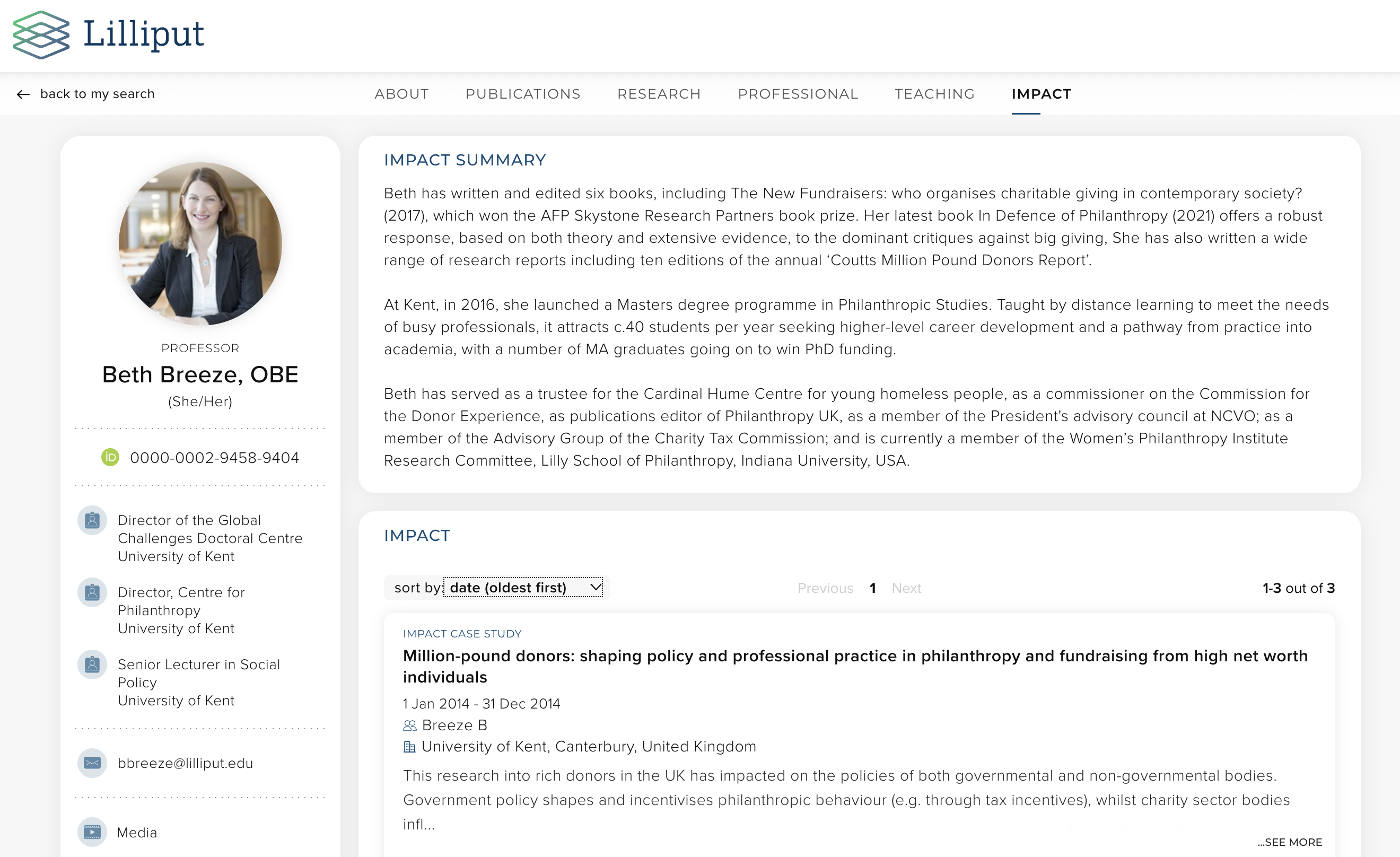
Image: The new Impact tab can include impact records and an impact summary.
Our new Discovery impact functionality allows researchers & administrators to share research impact achievements via a dedicated tab on their Experts profile. When enabled, the impact tab will be automatically populated with any impact records with a privacy level of ‘public’, making it easy to highlight the researcher’s work. We have also introduced a new optional Impact Summary section, to help researchers further bring their impact and engagement activities to life. Researchers can use this section to describe their impact and engagement strategies and achievements.
We recognise that not all impact records within your Elements instance will be suitable to share publicly on the Discovery Module. To help you manage this, there are two levels of protection. The first is an administrative configuration, where you can determine which types are eligible to be pushed to the Discovery Module at all. This is an easy way to protect certain types of data that you never want to appear in the Discovery Module. In addition, our robust configurable privacy settings make it easy to control which specific Impact Records should be made public via the Discovery Module so that you can be confident that only appropriate data will be made publicly available.
This functionality is available to all clients who licence both the Discovery Module and the Impact Module. For information about how to configure this functionality, please see the Support Site.
Discovery Search Algorithm Enhancements
In response to feedback from our community, we’ve redesigned the Discovery search algorithm to help visitors more easily find the expertise they are looking for. Changes of this nature involve making a series of complex and subtle adjustments to the ways in which data is included in searches. As a part of this change, we have adjusted the data included in the search process, as well as making adjustments to how queries are structured and weighted behind the scenes.

Image: The new improved Discovery Search experience will help users to refine their search, providing more targeted results.
As a result of these adjustments, users will see less results as they add terms and begin to pinpoint their search more. However, those results should be much more clearly relevant to the terms being searched, particularly in cases where they are searching for multiple terms or multi-word terms.
These kinds of adjustments can be highly data dependent, so we are particularly keen to get community feedback on how you find the new search algorithm. Please do get in touch with our team via the Support Site to share any feedback you may have as you upgrade and explore this new functionality.
Highlighting the relevance of search results
Alongside the improvements to the search algorithm itself, we have also introduced a new relevance indicator designed to highlight to a user why each profile has been included in their search results on Discovery. In this new section, the system will highlight where the search terms have matched to major sections within an expert profile (where possible).

Image: An example of the new messaging to highlight to visitors why these profiles were returned in response to their search.
This new functionality will help visitors to the site to be able to make decisions on how each profile returned in response to their search might be relevant, providing them with clearer pathways for selecting which profiles to explore and over time, growing the confidence in the site. This new functionality also aims to provide users with way-finding information to help guide them to which parts of the profile might be most relevant to their interests.
Configure ‘summary’ section to appear on any profile tab
To give organisations even greater flexibility in how they wish to encourage their researchers to describe their work, we have added new configuration options which allow administrators to configure a summary section for every tab in the Discovery Profile if desired. This new capability extends the flexibility introduced for the new Discovery Impact tab to all tabs within the Experts profile, thereby allowing administrators to both be able to map the stock summary fields (Bio, Research Interests, Teaching Interests) and new custom summary fields to appear as summary fields at the top of each tab in Discovery.
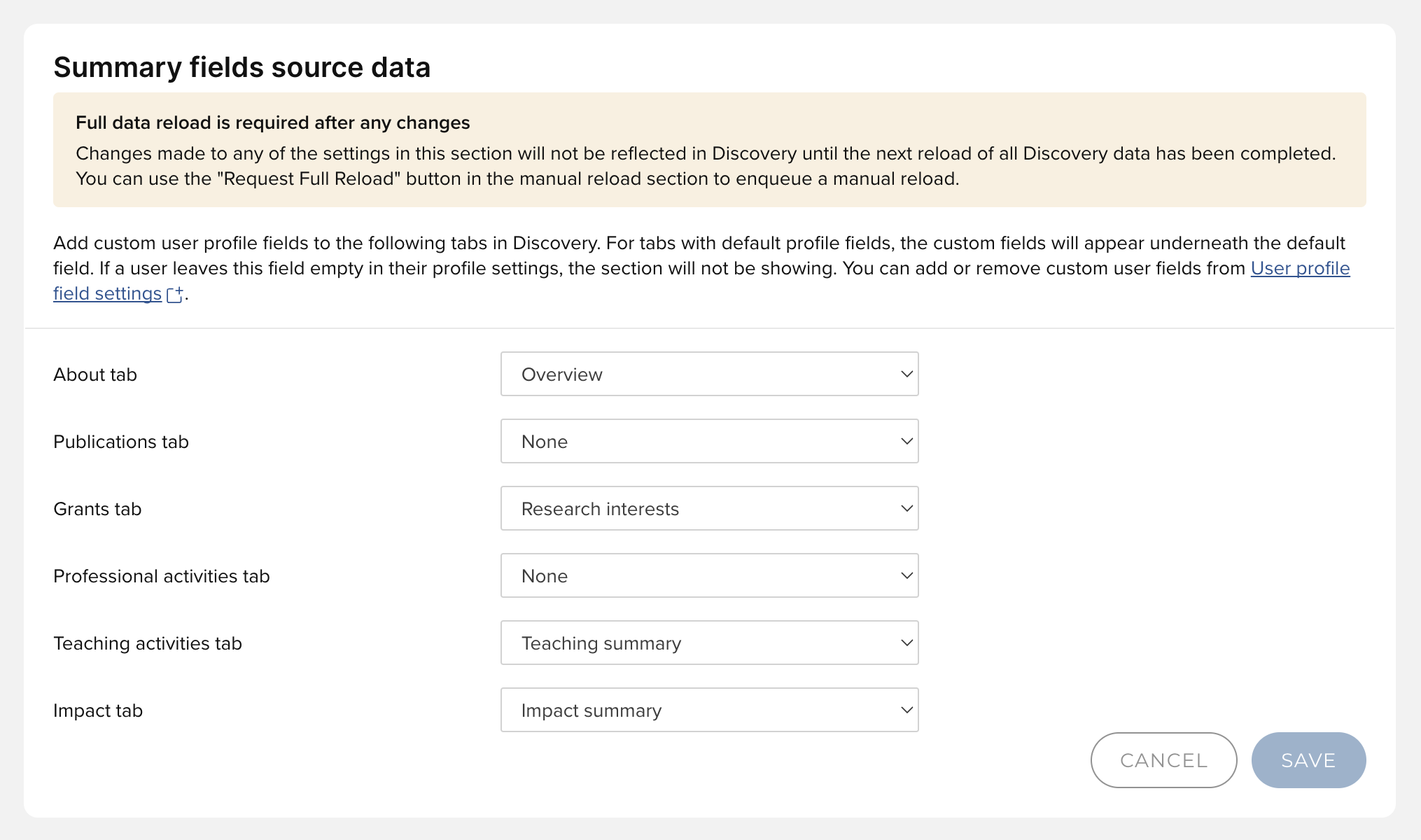
Image: You can now choose to configure summary sections to appear on each tab of the Discovery Module via the Manage Discovery Configuration page.
Once enabled via the Manage Discovery Data page (as shown above), administrators can also configure what the field should be called in the Discovery Module. Please note, when naming these fields, we recommend that you choose fairly specific names (eg. Impact Summary and not just Summary), so that both researchers and visitors to the site can clearly identify which field is which.
Pronouns added to Discovery Profiles
In v6.11, we introduced a new global setting to allow users to enter their preferred pronouns via their account settings page. If enabled, any users who chose to add their pronouns to the system would see them displayed on their Elements profile. It has been wonderful to see this functionality so enthusiastically adopted by so many of our clients. To further support adoption, organisations utilising the Discovery Module will now also display pronouns on a user's Experts profile page.
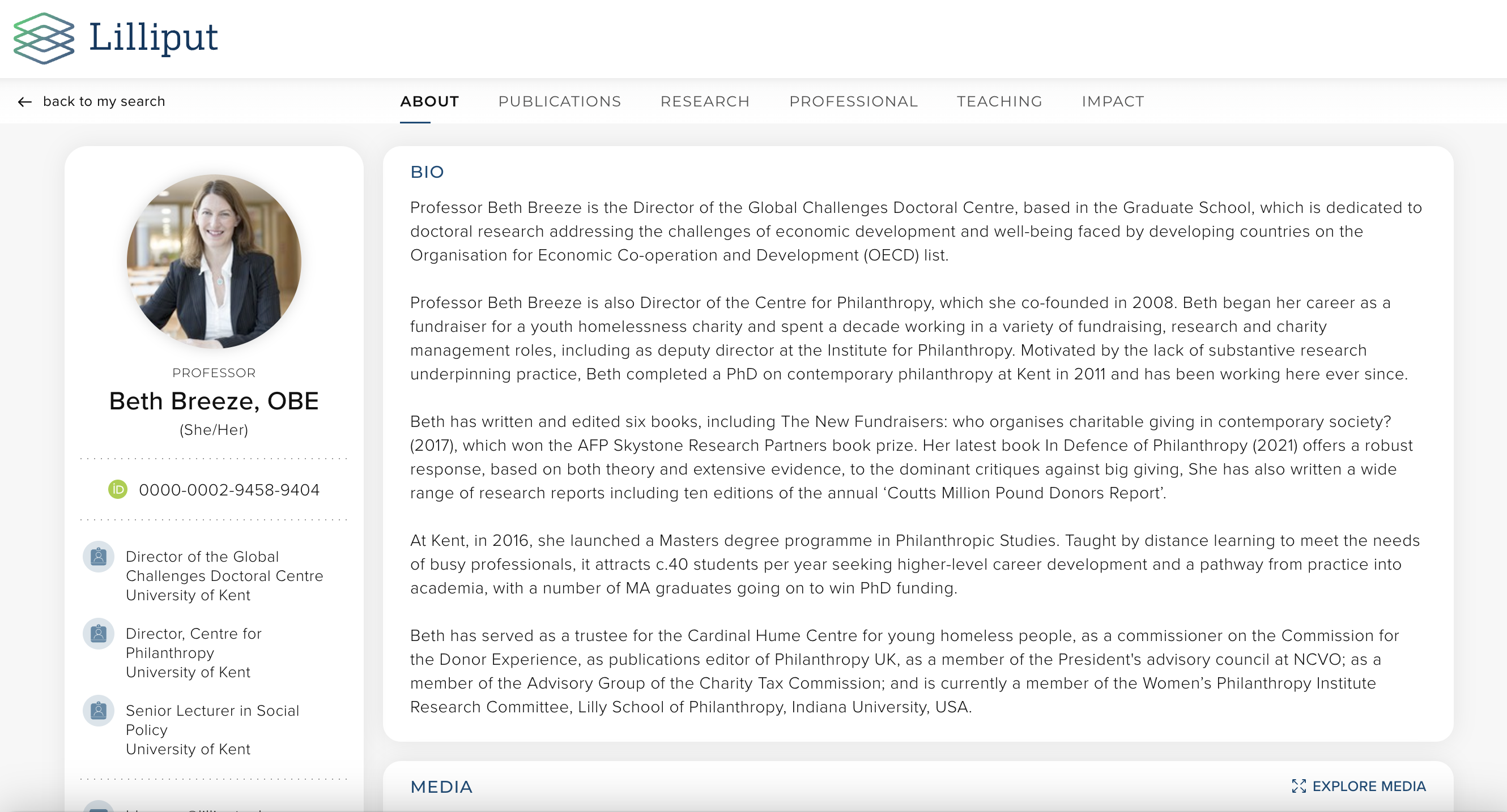
Image: If entered, each users’ pronouns will be displayed on their Experts profile page just below their name in the sidebar.
Improved UX for zero results in Discovery Search
As a part of an ongoing series of improvements to the Discovery Search user experience, we have implemented an enhanced UI for visitors to the site who have run a search with zero results. To encourage users who have encountered this to try again, they will now see an engaging illustration, accompanied by a prompt to adjust their search strategy to find the expertise they are looking for. The prompts the user will see will vary depending on the pathway that leads them to this point.
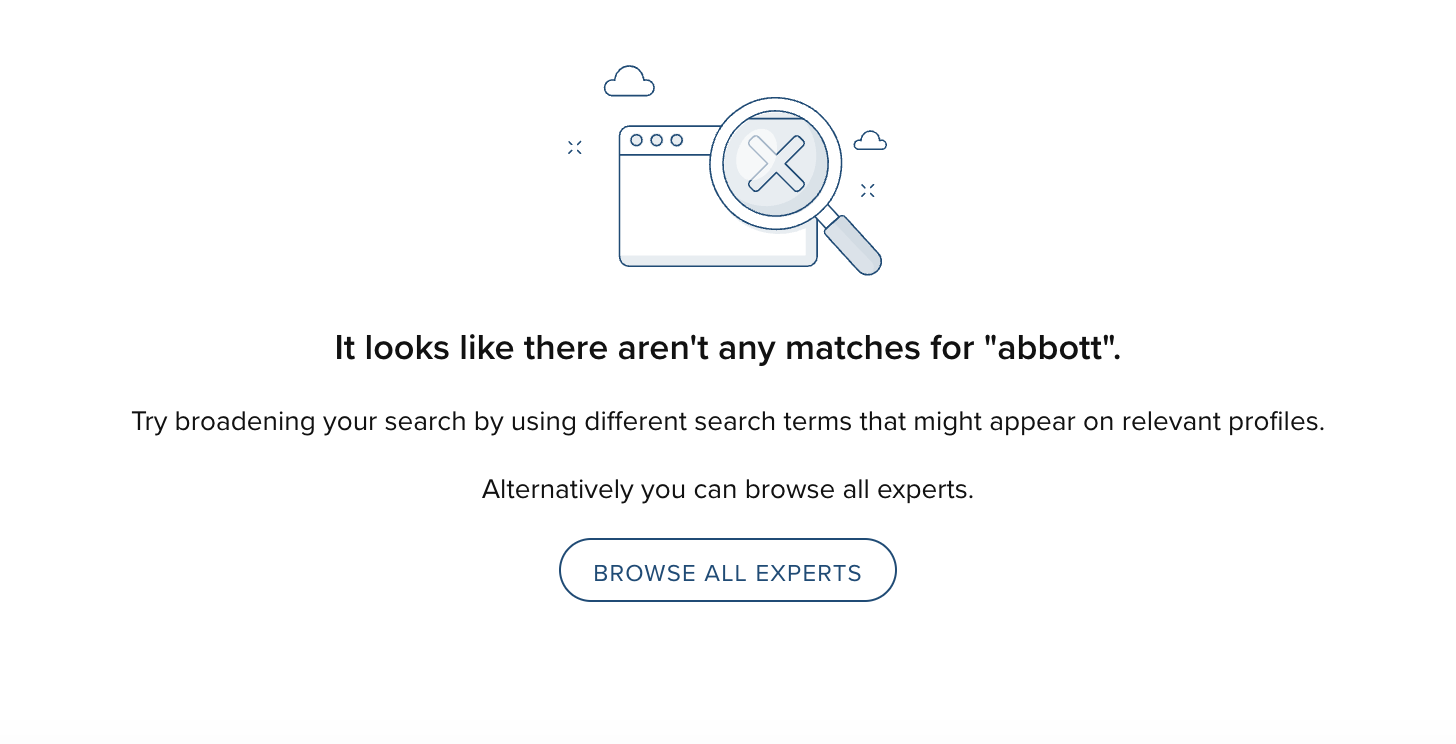
Image: An example of a page explaining to a user that there are zero results matching their query and suggesting they may need to adjust their search.
Extensions to group functionality
New group importer settings
The group importer allows organisations to update the Elements group hierarchy in bulk, bringing further automation to the management of groups to reduce manual work and help ensure data accuracy.
In this release we have introduced a new ‘Group import settings’ page, providing administrators with a number of new settings which will help them to set up and use the group import functionality.
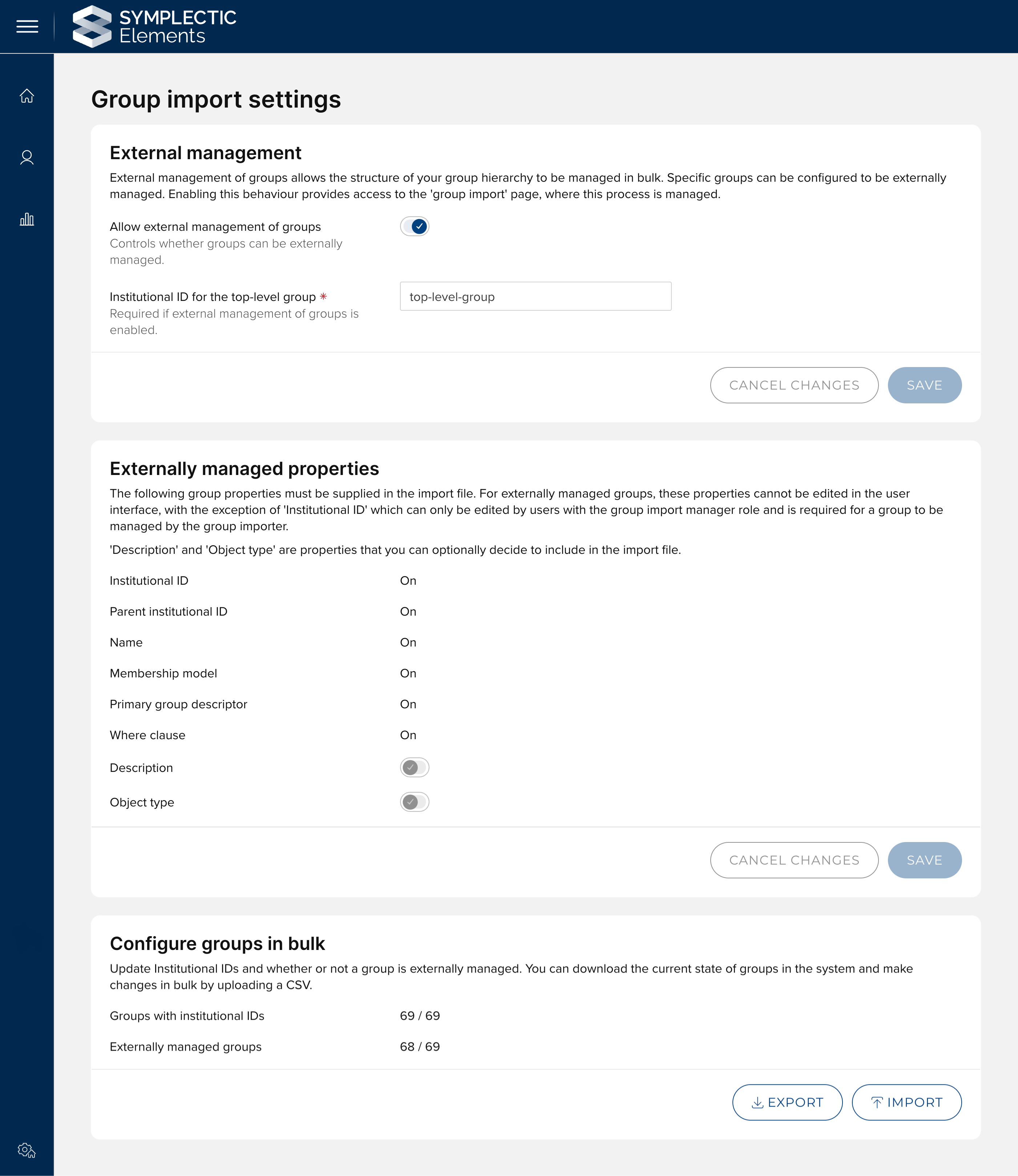
Image: The new ‘Group import settings’ page provides administrators with additional control over the group import process, as well as the ability to bulk configure Institutional Identifiers and whether or not groups are externally managed.
Enable the group importer
Organisations can now enable the group importer functionality via the user interface, making it simple for organisations to begin to use this functionality. The ‘External management’ section allows administrators to enable the group importer functionality and configure the top level group’s Institutional ID.
Configure externally managed properties
We have extended the range of properties that can be managed by the group importer and administrators can now also choose to include group type and group description in an import file. These additional fields allow group information to be further managed information in bulk by importing it into Elements.
Configure groups in bulk
As we mentioned in the previous release notes, to begin to manage groups in bulk using the Groups Importer, you must first set an Institutional ID for each group. This ID is similar to proprietary IDs used in Elements, in that it is used to ensure that the system can uniquely identify groups to ensure that subsequent updates will be correctly applied.
To streamline the necessary set-up, we have introduced a new CSV import tool which allows you to upload Institutional Identifiers and switch groups to ‘externally managed’ in bulk. This provides administrators with the tools they need to transition existing groups to be managed by the group importer.
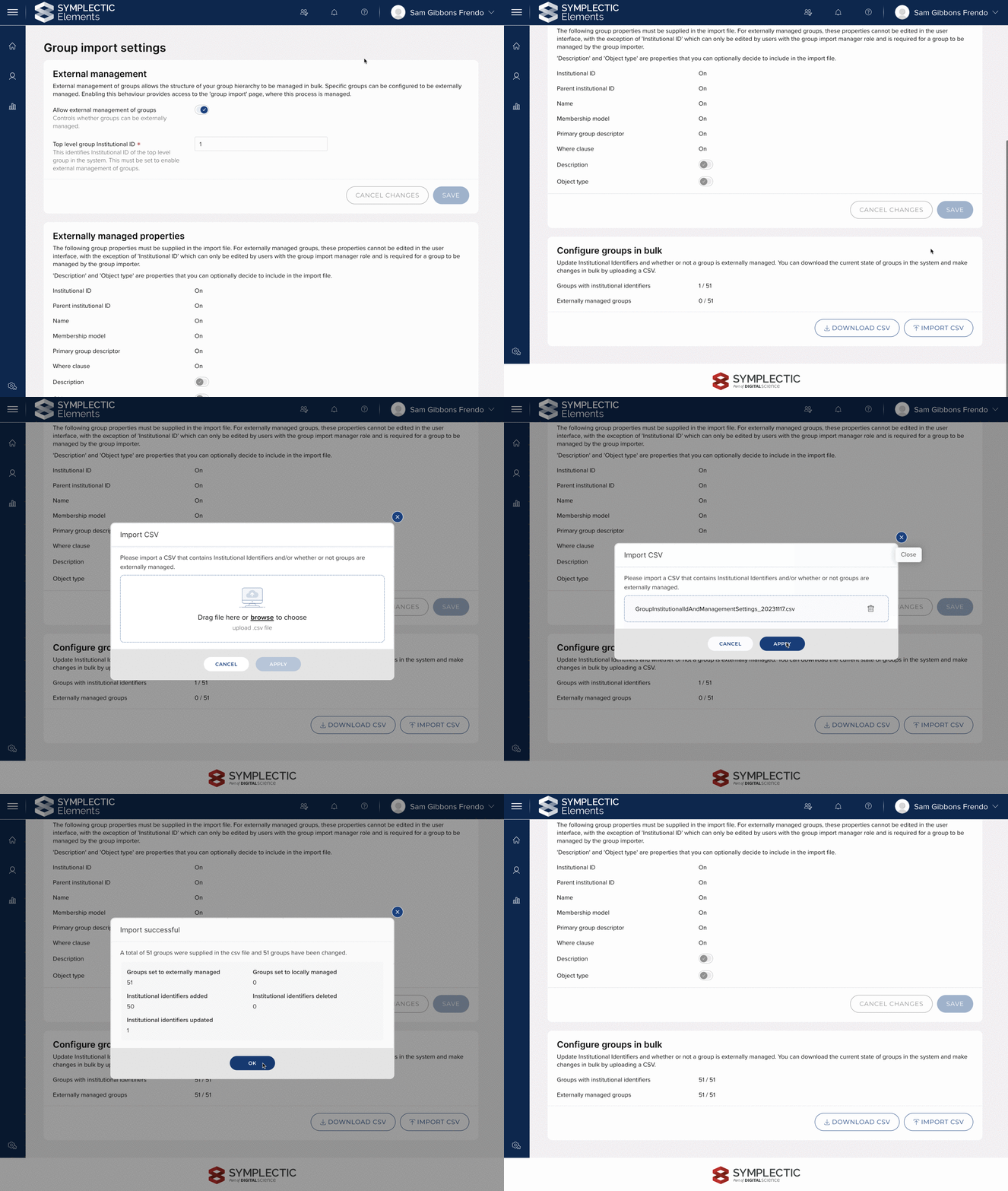
Image: Administrators can Bulk update Institutional IDs and whether or not groups are externally managed from the Group import settings page.
Further information about the group import settings page can be found on the support site. If you have any additional questions, please do not hesitate to contact Symplectic support.
Extending the ‘Review and apply’ step
The Groups Importer provides powerful functionality that allows large numbers of changes to be made in bulk. The ‘review and apply’ step of the Groups Importer provides administrators with oversight of the changes that will take place, allowing confirmation that the pending changes are as expected and providing an opportunity to cancel the changes.
In this release we have increased the information made available during the ‘Review and apply’ step. You can also download the full details of the analysis as a CSV, including:
Group structure changes - A full summary of the groups that are being created, updated, moved and deleted. Details of updates to the group name, parent institutional ID, membership model, Primary Group Descriptor and WHERE clause, are provided.
Group membership changes - Exact counts of the explicit members and total members of a group before and after the import has been applied.
System role changes - Counts of the number of users granted system roles through group membership before and after the import, as well the number of users added or removed to system roles are provided.
Changes that impact locally managed groups - Highlighting where planned changes to externally managed groups will also impact locally managed groups.
In addition, a high-level summary of these changes is displayed to administrators as part of the import process. This allows administrators to view important changes at-a-glance. Together, these extensions of the ‘Review and apply’ step provide the ability for administrators to review the pending changes, make spot checks and ensure the outcome of applying the import is expected.
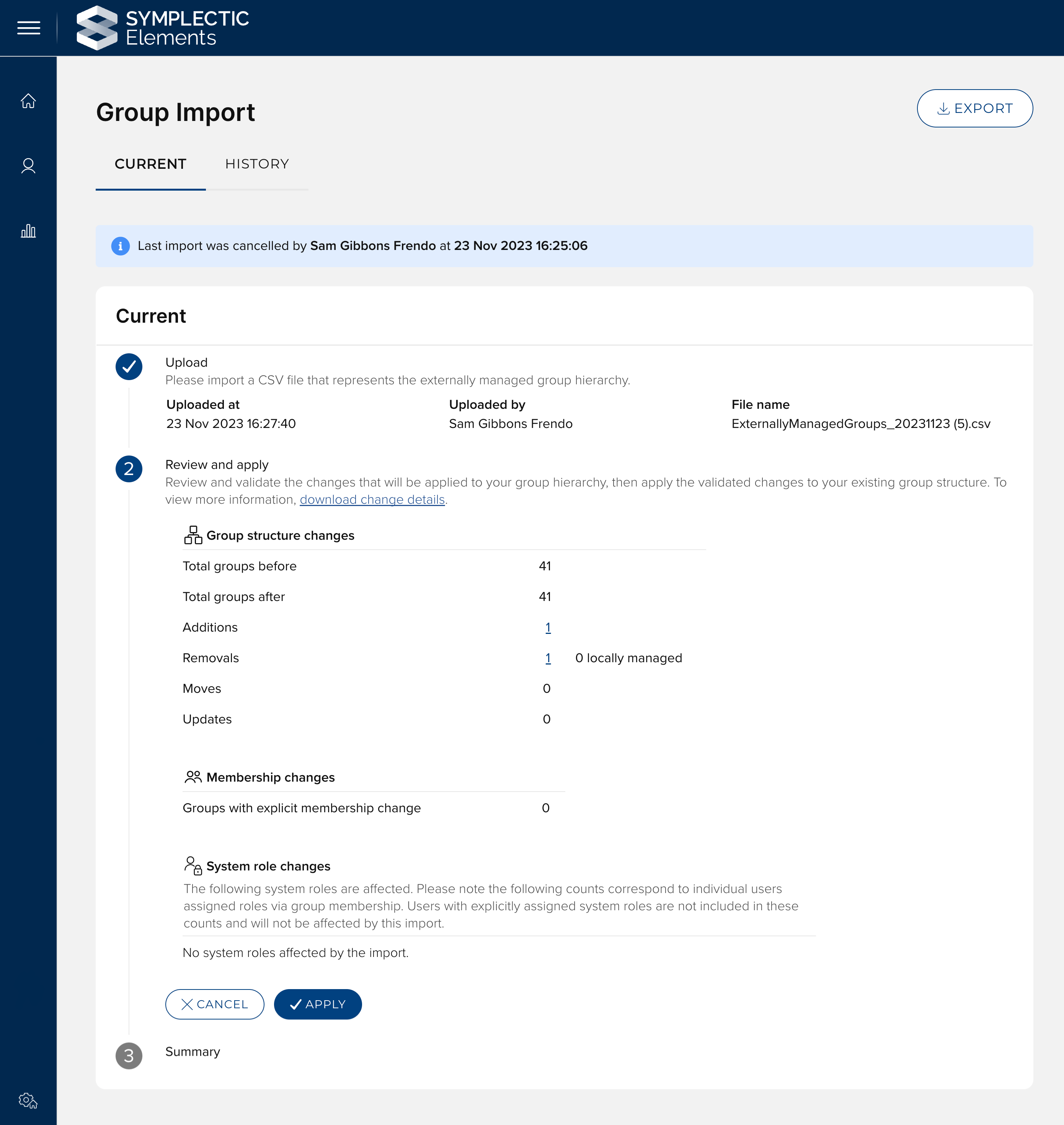
Image: The extended ‘Review and apply’ step provides a summary of the pending changes, as well as the ability to download detailed analysis.
Updated display of group members
Groups provide structure to user data and allow for configuration and reporting at the group level. Being able to quickly view and manage the members of a group is important for ensuring that users are correctly assigned and the correct settings apply to them.
To make it as easy as possible to view and manage group membership, we have redesigned the display of group members, relocating this information from its own standalone page to the ‘Group details’ page. The new section allows specific users to be found using new search functionality embedded within the Member list. The new format also clearly displays and supports filtering for explicit and implicit group members.
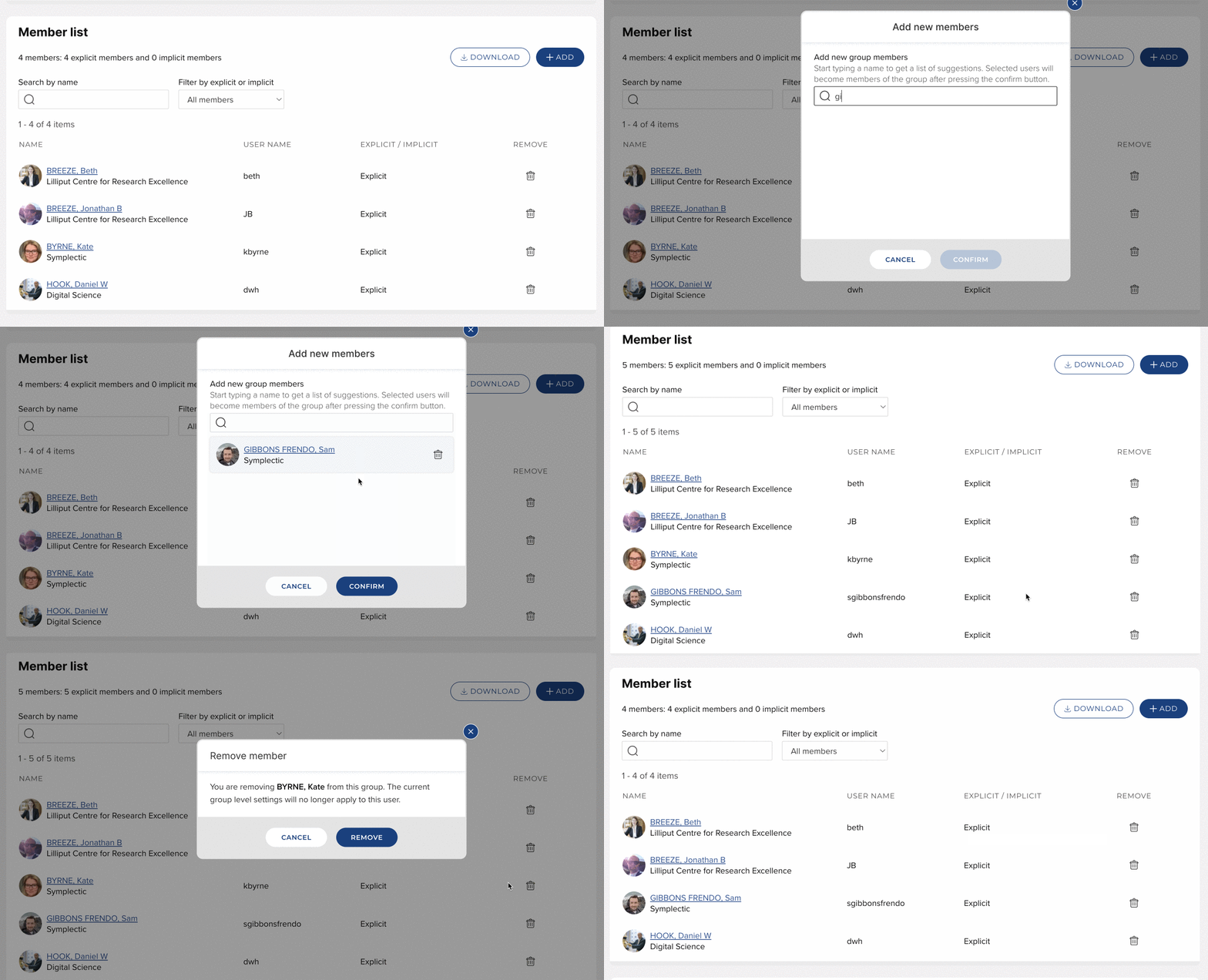
Image: The new ‘Members list’ section on the Group details page provides an intuitive and powerful new user interface for viewing and managing the members of a group.
Other improvements to group functionality
It is now possible to access the ‘Edit management settings’ modal from the Manage groups page. This allows administrators to make changes to the Institutional ID and whether or not a group is externally managed in the context of the group hierarchy.
We have made performance improvements to the apply step, meaning large volumes of changes can be processed and applied more quickly, saving administrators time.
Repository Tools 2: New general comments section
In response to a popular feature request, we have introduced a new configuration option to allow organisations to choose to enable a new general deposit comment box on the Repository Tools 2 (RT2) Deposit page. This new functionality gives your users a dedicated place to add notes to administrators and other deposit comments during the deposit process.
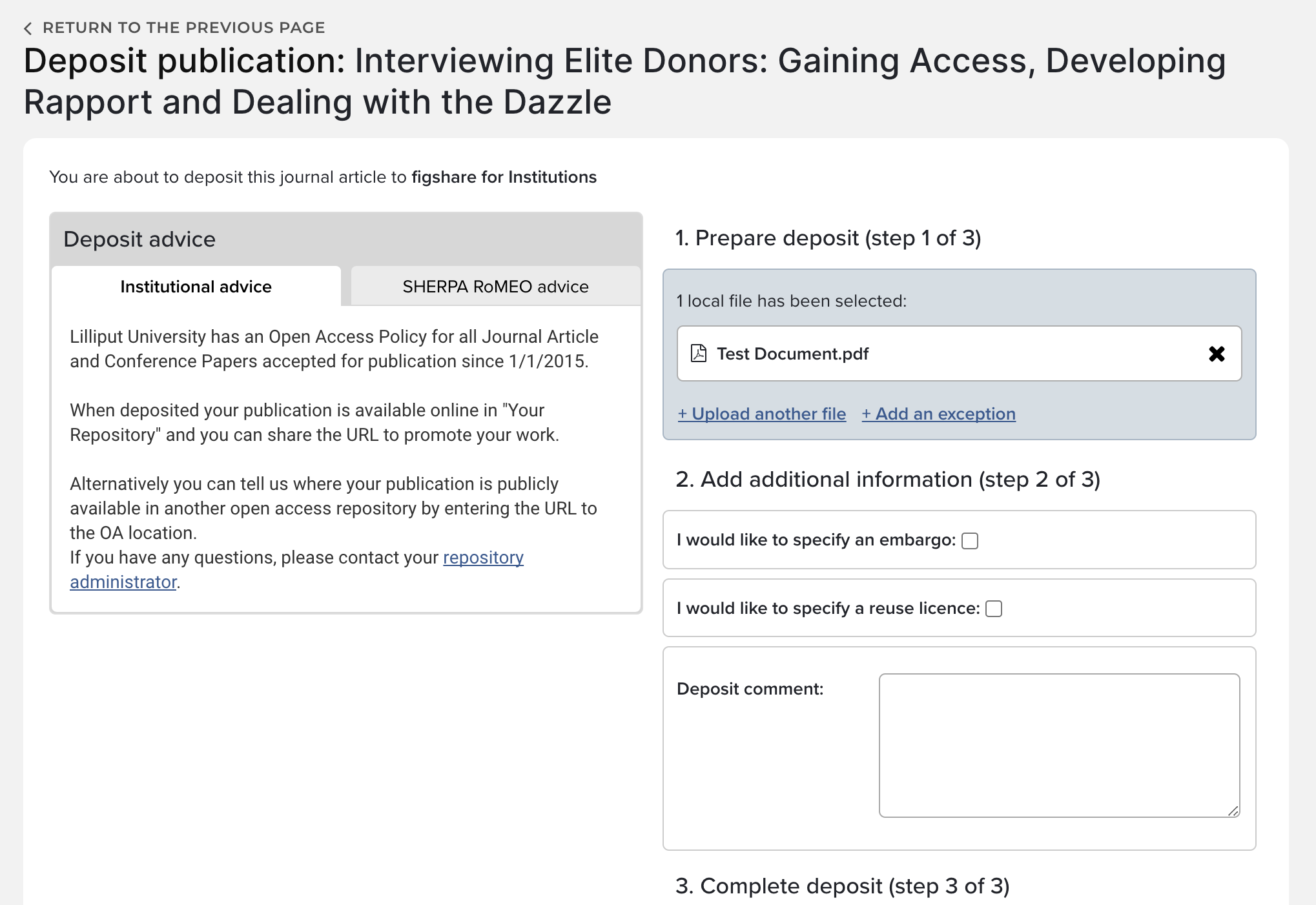
Image: When enabled, the Deposit Comment box will appear on the deposit page for users to be able to add a comment as they deposit their works.
This new functionality can be enabled via the management page for each RT2 integration. If you wish to enable this functionality, please ensure you also adjust your crosswalks to ensure the resulting metadata will be crosswalked to the appropriate place in your repository.
Extending verification beyond publications
Functionality to allow administrators to verify publications by checking the metadata in manual records has been a part of Elements for a very long time. It has allowed administrators to curate this metadata and lock it, so it can be relied on as authoritative metadata that is ready for reuse. In this release, we have extended this functionality, making verification available for a much wider range of object types, including: Impact, Grants, Professional and Teaching Activities, Projects and Equipment. When enabled, this functionality will allow administrators to review and verify the metadata in any manual records for objects in that category. Once the administrator is satisfied with the quality of the record, they can set a verification status which can be then used to identify trusted, reviewed records.
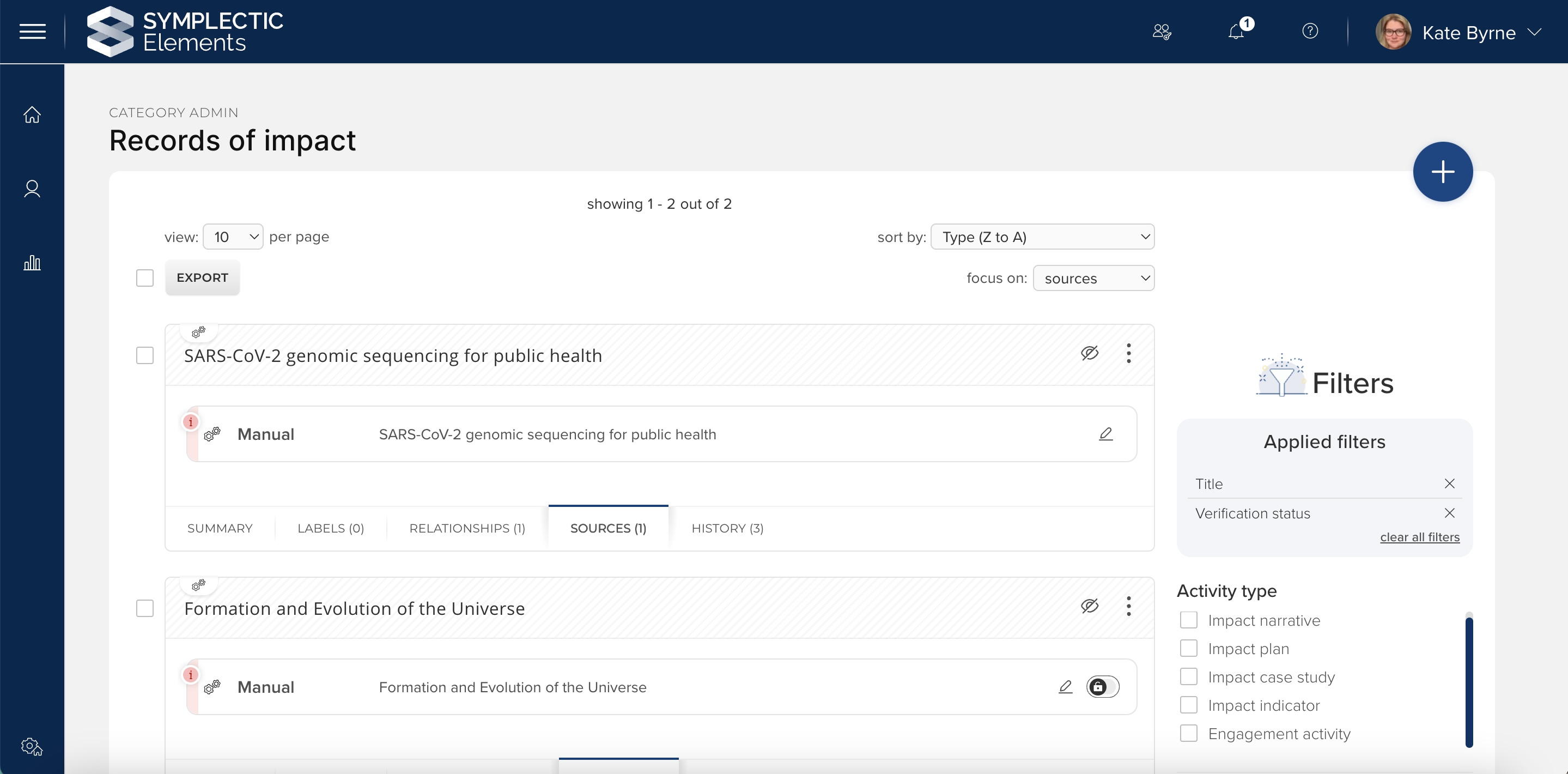
Image: Verifying impact records via the Manage Impact page where administrators can filter by verification status.
This functionality can now be enabled via a pair of configuration options available on the Settings page for each of the above data categories. The first setting enables verification for that category, the second determines whether or not verification should be visible to users. The verification functionality for each category will default to off upon upgrade. If you are already using the Publication Verification functionality, your current settings will be automatically preserved. As with existing verification functionality, the verification flags are available for reuse via the Reporting Database and the API.
Research Funding Solution
In this release, we are pleased to introduce additional Review & Approval and Funder submission and outcome features, along with a number of additional improvements and enhancements supporting various aspects of the research funding lifecycle. This includes a number of new stock reports and dashboards. This additional functionality builds on features introduced in recent releases to help streamline the administration of grants and projects.
Funder submission & outcome improvements
In this release, we've introduced new email templates aligned with various steps in the funder submission and outcome workflow. These templates include prompts at key stages, ensuring relevant colleagues receive notifications for required actions or status updates.
We have also enhanced the 'Approve all' bulk action available on the Pre-approved search screen in the Management Console. This improvement enables bulk processing of Proposals and EOIs from the Pre-approved state to Ready for submission to funder.
And lastly, we have introduced functionality to enable you to capture a 'Declined' outcome (along with reasons and notes) for proposals in the Approved state. Previously, you could only capture 'Declined' prior to moving the proposal to Approved. This enhancement allows for the accurate recording of a declined award, such as after unsuccessful contract negotiations.
Reporting
We are continuing to expand the RFS data available in the reporting database, adding Journal (notes) content in this release.
We have also been working hard to expand the RFS content available in the Reporting hub, updating existing stock reports in order to capture new data available and to rationalise the behaviour of these reports to ensure that they continue to meet client needs. We have also added new post-award stock reports and dashboards now that this content is available in the reporting database.
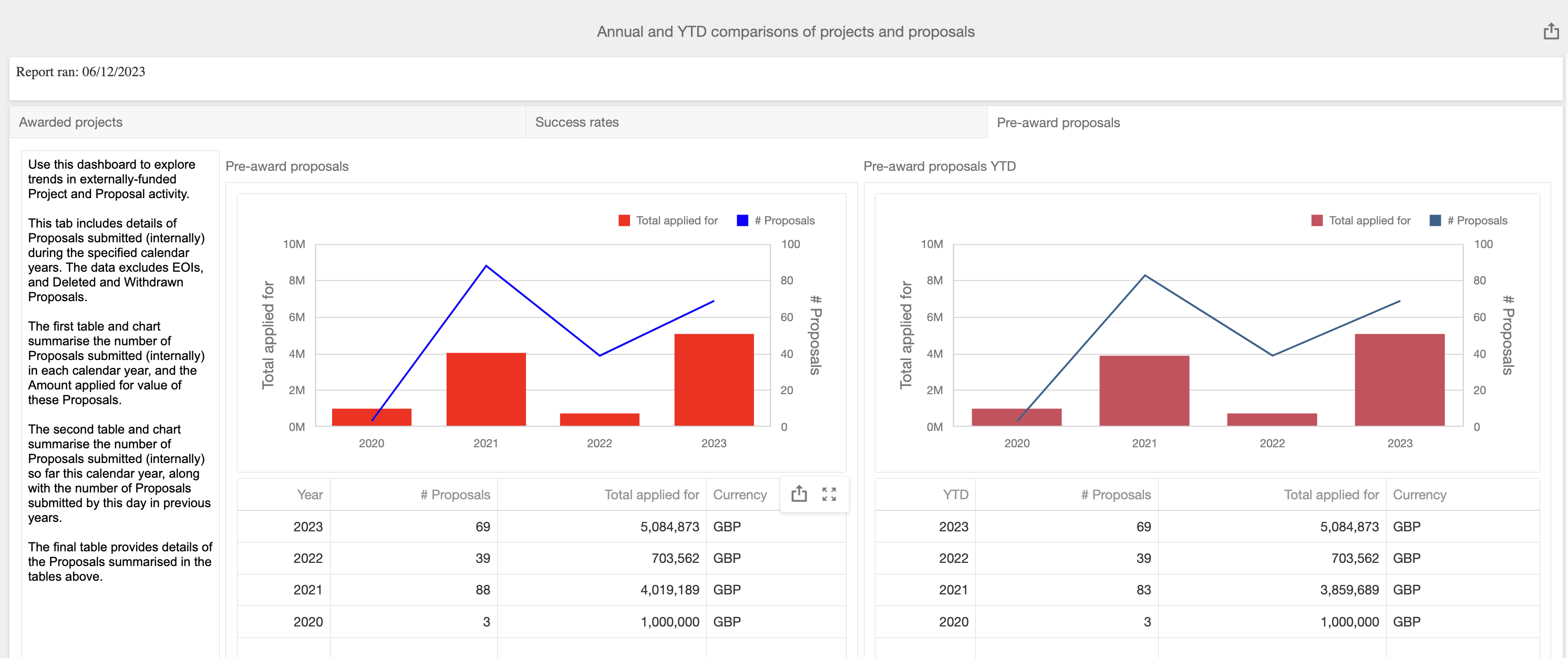
Image: Annual and YTD comparisons of projects and proposals dashboard.
As with previous releases, full details of the RFS functionality released in v6.16 are available in the RFS release notes on our support site.
Accessibility improvements
Updated the HTML Editor presented across Elements to add accessibility guidance and apply a number of other accessibility improvements.
A number of improvements to the Discovery Module to improve usability for screen readers and users that rely on keyboard navigation
Improved accessibility related labelling for sub-content section headers.
Updated the Login Announcements page and implemented a number of accessibility improvements.
For fields with auto-complete functionality, we have improved the tabbing behaviour for keyboard navigation.
Other improvements
We have updated the heading of the NIH Biosketch (2021) report template.
We have updated the Twitter icon and tooltip on both the Elements Profile page and the Discovery Module to align with the new X branding guidelines.
The tabs on a Discovery profile will now automatically reflow on to a second line if they are too long to fit on a users’ page width.
Tab display configurations for Discovery have now also been migrated to the Manage Discovery Configurations page.
There is a new configuration option to hide the Elements Quick Start Guide from users on the Elements Help page. System administrators can enable this configuration via the Global Settings page.
We have added a new prompt to remind administrators to restart the synchroniser when reconfiguring their DSpace RT2 integration from pre-v7 to v7.
We have updated the Help Page Content page to bring it in line with our modern technology and design standards.
When creating a new Assessment Exercise, the ability to impersonate researchers will now be disabled by default. If you have cloned an existing exercise, the setting will be set as per the original exercise.
The report timeout period for OA Monitor Reports and User Search Settings is now configurable. The timeout period defaults to 10 minutes and it can be extended in the Elements Web Config file.
Fixes
In the Assessment Module, if you added a new output/activity while impersonating, you would be redirected to the Thank you page rather than back to the Selection page within Assessment. This has been fixed.
If the Address field was set to null when importing a Discovery Configuration file to Elements the import could fail. This has been fixed
There was an issue where grouped dropdown fields on the Edit page would not fully respect the defined order of their contents. This has been fixed.
We have fixed an issue that could lead to the label auto-complete functionality operating very slowly.
We have strengthened the reporting synchroniser to protect against erroneous data that could make the synchroniser fail.
There was an issue with the Annual Collection Module’s ‘Clone Group Structure’ functionality where it could fail to apply changes at deeper levels of the group structure. This has been fixed.
If a user attempted to download a report after their session had timed out, the post-login redirect would trigger the download of the report instead of opening an Elements page. This has been fixed.
End of support
We would like to remind you about the upcoming end of support for some Cryptographic Protocols and Cypher Suites from the 12th of December 2023. Please ensure all client systems connected to Elements use a modern and secure set of cypher suites in order to ensure ongoing compatibility with Elements. For information on the specific cypher suites being phased out see the Support site.
In our next release we will be introducing support for .NET8, a core underlying technology upgrade that impacts the end of support dates for versions of Elements. To remain in a supported version of Elements, you will need to plan to upgrade to v6.17 or higher by 31 October 2024. This is because .NET6 will be going out of support at this point in time. You can see our published end of support dates for all versions of Elements on the Support Site. If you need assistance in planning to upgrade, please contact our team by raising a ticket on the Support Site.
As always, we recommend that you regularly review our End of Support Announcements for information about upcoming end of support in Elements for various technologies.
We’re here to help!
We hope you enjoy getting to know the latest version of Elements. Remember, should you have any questions, we’re here to help! Just contact us at support@symplectic.co.uk for assistance.
Best wishes,
The Symplectic Team