
Symplectic Elements v6.17 - Release Notes
Symplectic Elements Release Notes February 2024 v6.17
Introduction
Welcome to v6.17, our first release of 2024!
This release focuses on three of our key themes for the year - showcasing engaging content, enhancing administrative workflows, and streamlining researcher experiences. It delivers enhanced usability and efficiency, resulting in a more streamlined and intuitive experience for users and administrators alike.
Notable enhancements in this release include:
A refined Discovery search experience, helping visitors find the relevant experts and equipment they are looking for with more clarity and precision.
Enhanced control for researchers over how they represent their work, by introducing HTML editing options for profile page summary fields.
Empowering administrators to have further control and confidence when managing their group hierarchies in bulk.
Improved reporting in the Research Funding Solution (RFS), through updates to the API and Reporting database as well as several enhancements targeting the overall RFS experience.
This release also contains some exciting smaller improvements and fixes, including new relationship categories for enriched data capture, a new configuration option for retaining embargo dates from Figshare items, and performance enhancements for hosted clients when refreshing data sources.
As always, the new version of Elements and associated upgrade instructions can be found in the Elements upgrade forum.
Discovery Module
Improved searching experience
An intuitive and effective search experience is an essential part of the Discovery module, helping visitors quickly and easily find relevant experts and equipment. In this release, we have delivered functionality that offers the user greater transparency and precision in their searching and have made some parts of Discovery more intuitive to use.
Building on search improvements delivered in our previous v6.16 release, we’ve expanded the relevance indicator to Equipment, highlighting to a user why each Equipment profile has been included in their search results on Discovery. In this new section, the system will highlight where the search terms have matched major sections within an Equipment profile (where possible).
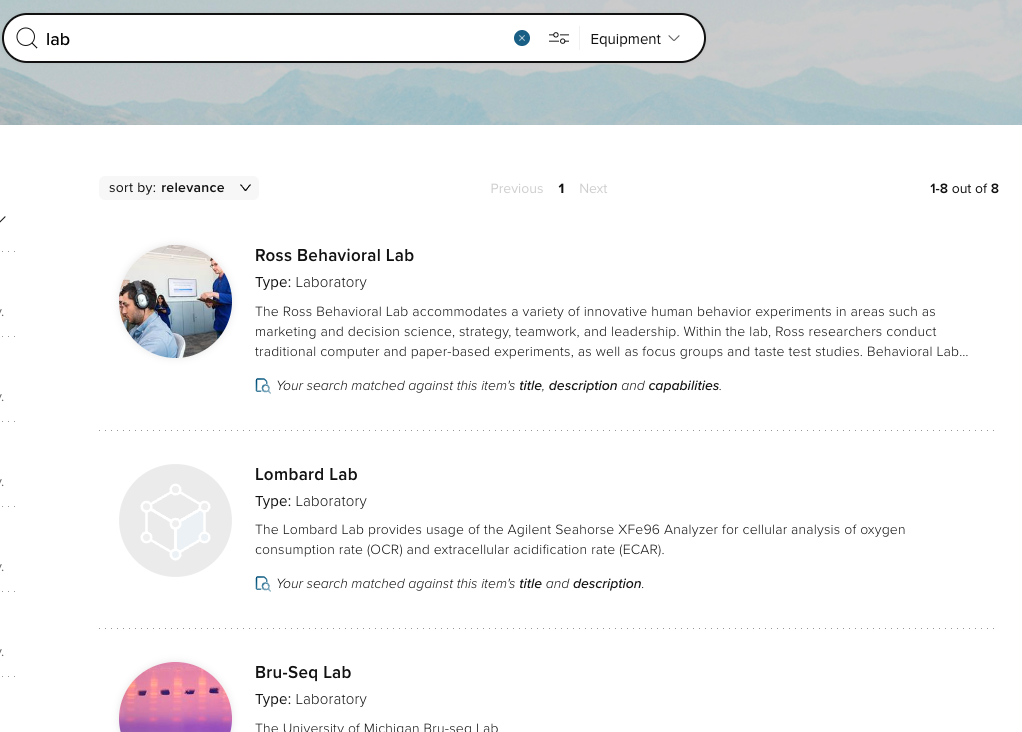
Image: An example of the new Equipment messaging to highlight to visitors why these profiles were returned in response to their search.
We have also modernised the way tags are suggested when searching in Discovery, auto-completing values in the search box to improve the user’s ability to refine their search results.
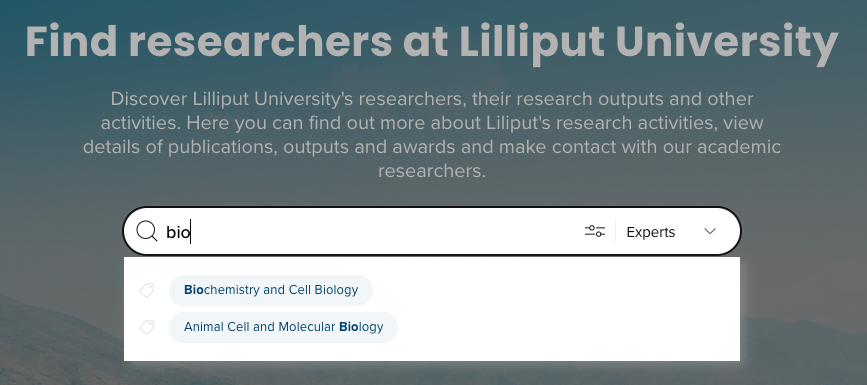
Image: Auto-completion of tags
Enhanced filter experience
The list of available filters is now collapsible, making the full list of available filters more prominent and easier to navigate.
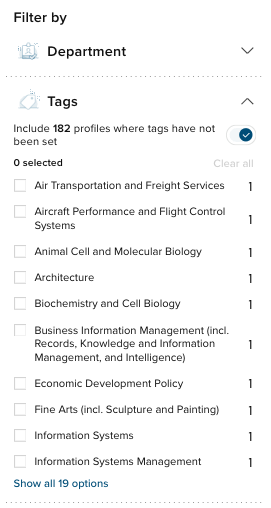
Image: Collapsible filters
Additionally, we now also highlight to the user what filters they have already applied, making search results more transparent and easier to refine.
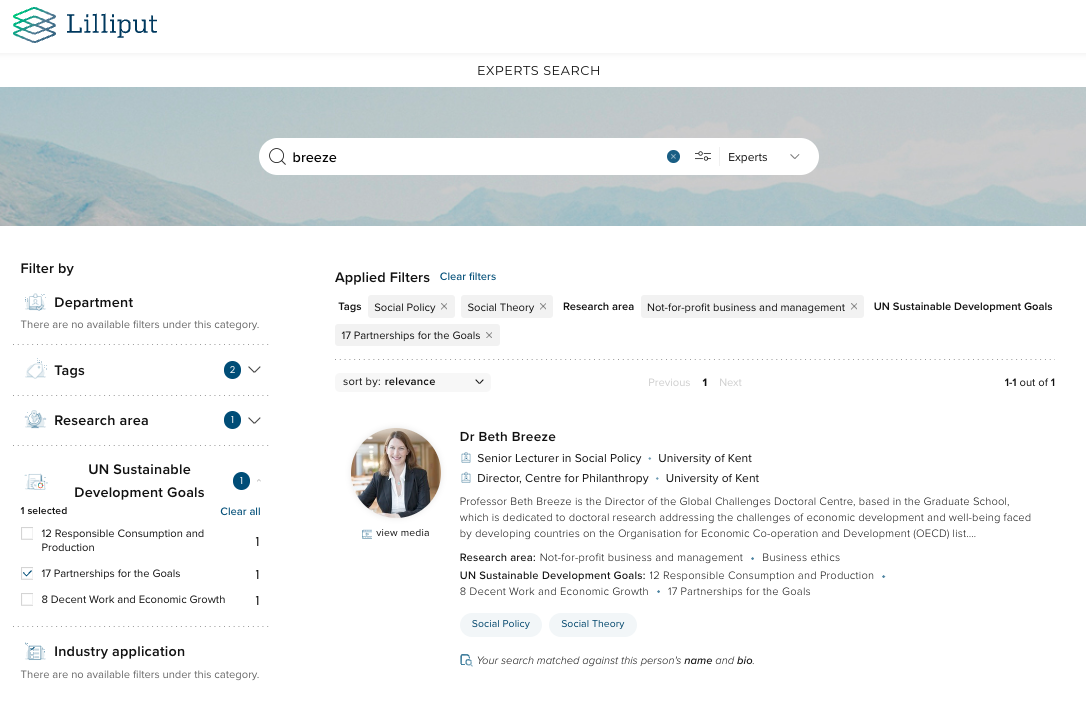
Image: Applied filters
In this release, we have also enhanced the search experience for users interacting with the Discovery module via a smaller screen by including the ability to filter results. This offers mobile users a more complete Discovery experience.
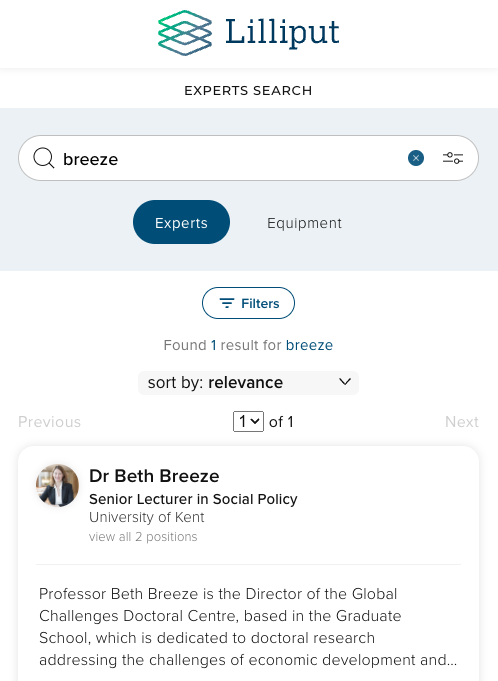
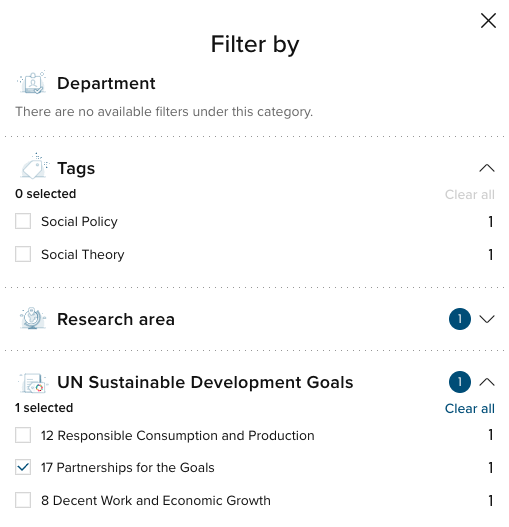
Image: Filters for mobile users
Search within a profile list
In response to user feedback, we have introduced the facility to search a list for content within that list (e.g. search within a user’s publications for a specific publication). This search function supports searching by Title for non-user objects, and by Name for users.
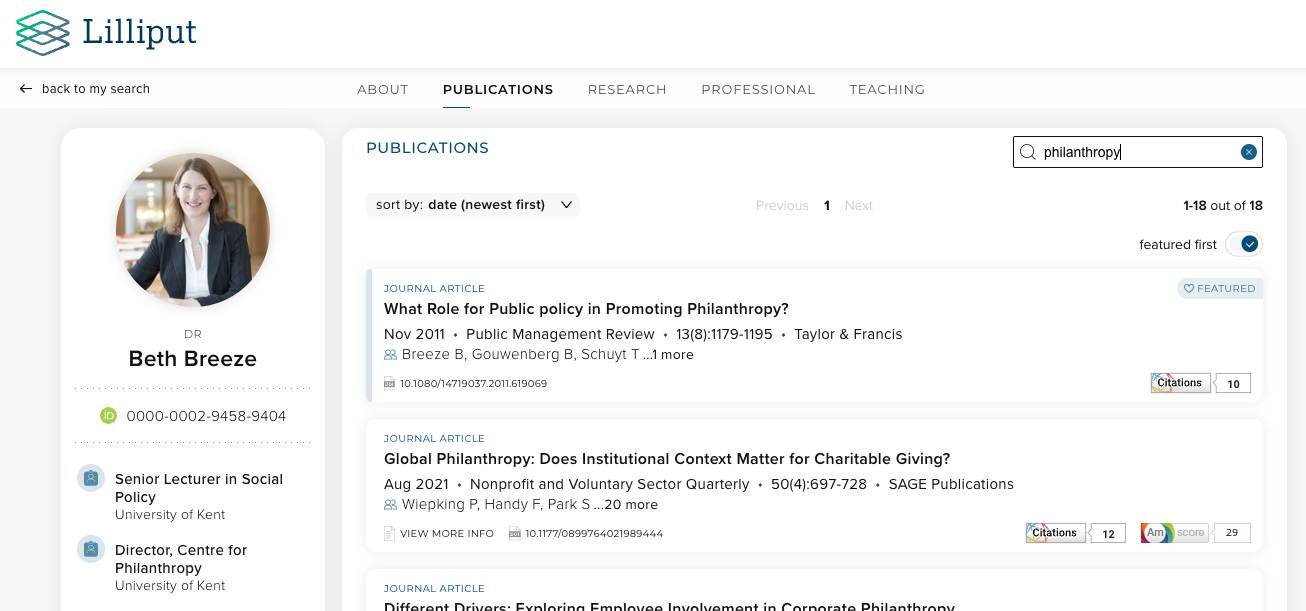
Image: Searching for publications within a Publications list
New ‘Contact us’ button
In this release, we have introduced a new optional ‘Contact us’ button appearing on Discovery profiles, linking to the institution’s contact form. This functionality enables you to get a sense of the queries that are generated via Discovery and may be helpful for those institutions that don’t wish their researchers’ email addresses to be so easily accessible. This feature is offered as a more prominent addition to the existing Contact link in the footer (System Admin > Operations > Manage Discovery configuration > Site design > Footer).
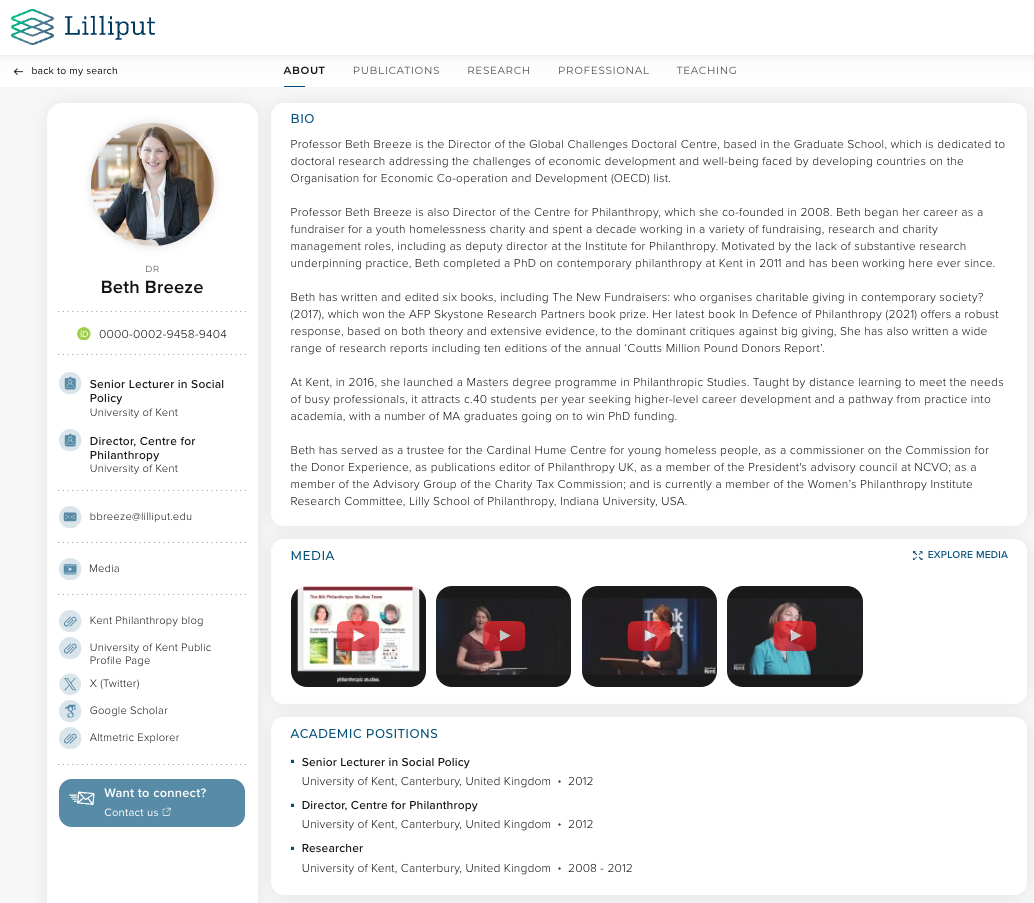
Image: ‘Contact us’ profile sidebar button
This function is configured in the Discovery configuration > Core profile section.
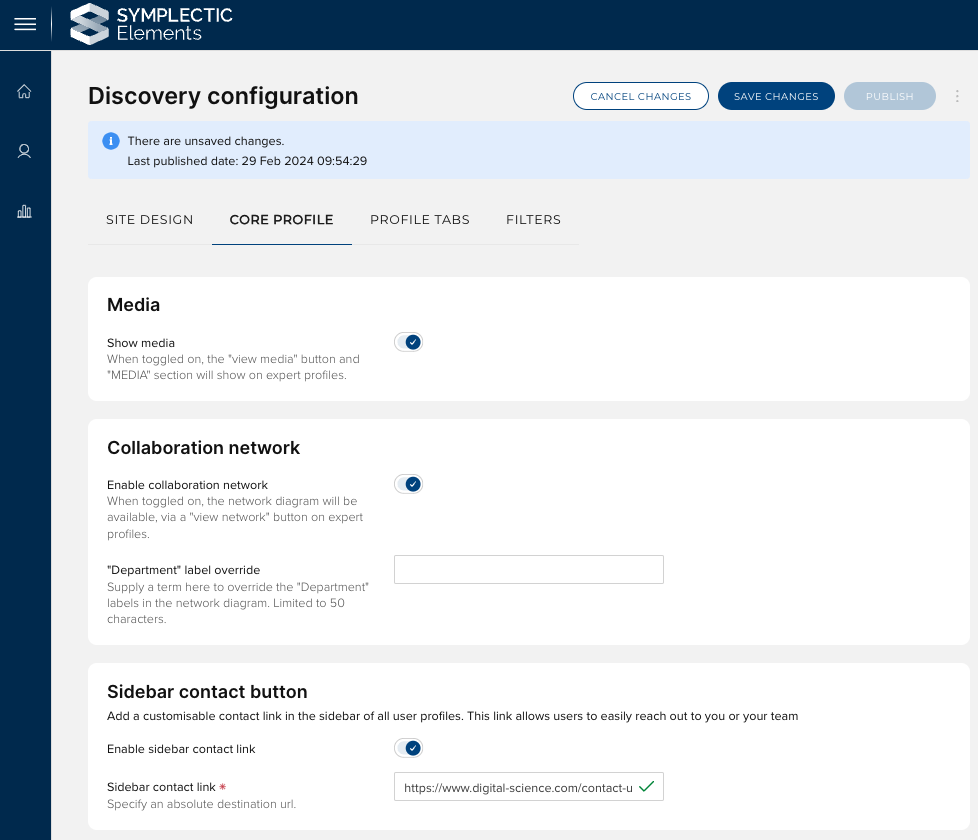
Image: Configuring the ‘Contact Us’ sidebar button
Profile page summary fields now support HTML editing
In response to a very popular feature request, we have updated the ‘summary’ fields on the Elements Profile page (stock fields Overview, Research Interests and Teaching Summary as well as any custom summary fields that you may have configured) to capture data via an HTML editor. This new functionality will give researchers greater control to describe their work by allowing them to incorporate formatting as well as links to related information.
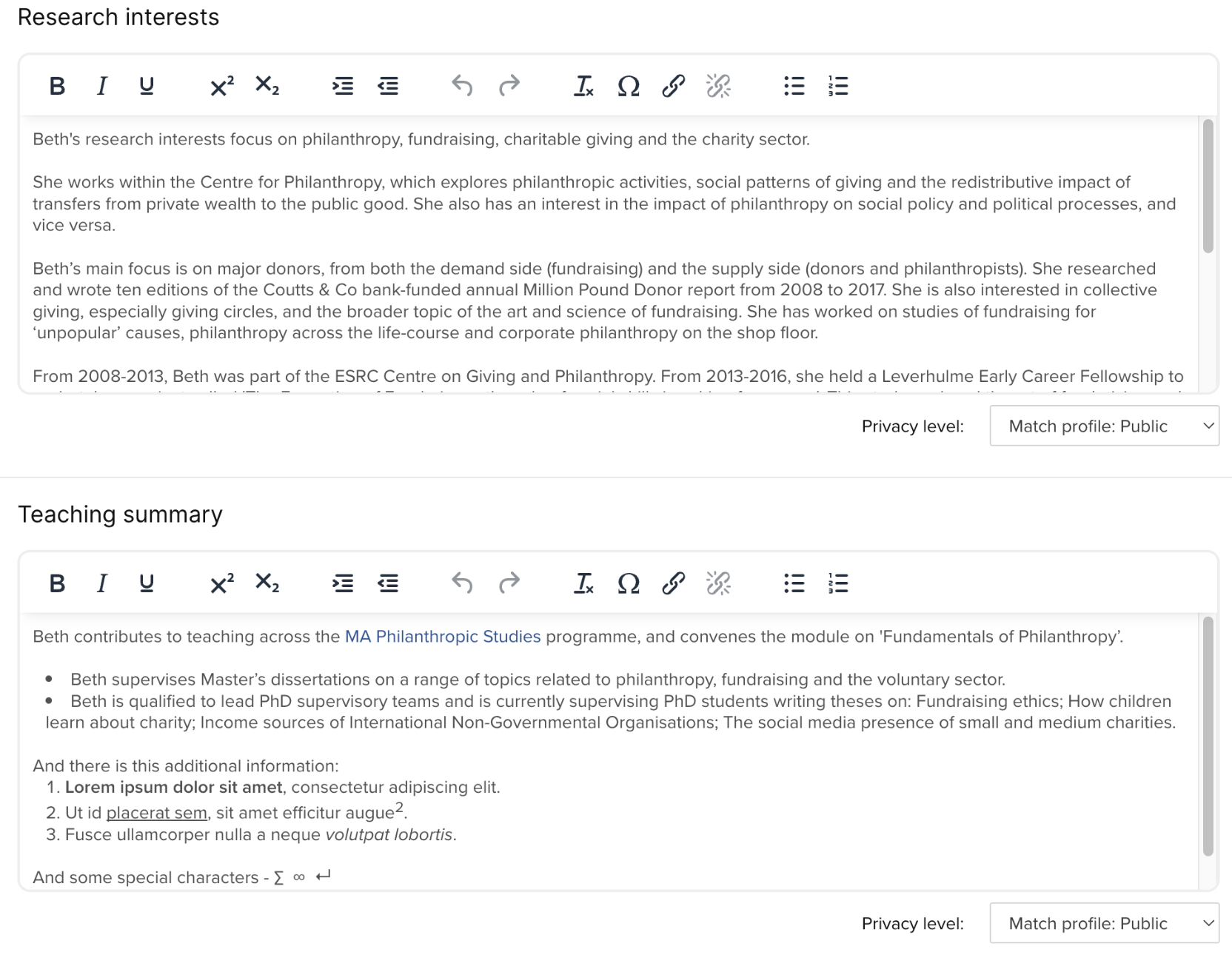
Image: The updated Research Interests and Teaching Summary fields show the new HTML editing options.
Before this release, these fields were plain text fields, which did not support the capture of any formatting. They are now presented with editors which support a range of HTML formatting including:
Text formatting options: Bold, italic, underline, subscript, and superscript
Text layout options: Indents, bullets and numbered lists
Hyperlinks
Please note: Due to accessibility and security considerations, the HTML editor does not support embedding images or tables or the use of custom HTML.
Upon upgrade, the fields will be automatically rolled over from Text to HTML, preserving any data already captured and making it easy for your users to then add any desired formatting.
Implications for Discovery
The Discovery Module has been updated to ensure your public profiles will automatically display any formatting added via the new editors. Changes in formatting are now included in Elements’ change detect process so that once saved the updates will be promptly sent to Discovery.

Image: An example of a biography on Discovery with italics, links and bullets added.
Implications for the Elements API
For the API, we have introduced a new set of field names for the new formatted version of these fields, incorporating an '-html' suffix (eg. to access to formatted overview, you will now access the overview-html field. To ensure backwards compatibility, the original field names now allow you to access a plaintext version of the data (eg. the data in the 'overview-html' field will be transformed into plaintext and made available under the previous name of 'overview'). This should ensure that any existing integrations incorporating these fields will not break upon upgrade, allowing you to review and update them at a time of your choosing.
Implications for Reporting
We have updated all stock SSRS reports which include these fields to use the new HTML fields. If you have custom SSRS reports that use these fields, you can either update the SSRS templates to change from plain text to HTML or enable a new setting for each relevant field on the User profile Field Settings page which will prompt the system to populate the relevant column in the Reporting Database with a version of the data transformed from HTML to plain text.
Extensions to group import functionality
The group importer allows organisations to update the Elements group hierarchy in bulk, bringing further automation to the management of groups, reducing manual work and helping ensure data accuracy.
This release includes improvements to the group import functionality to provide administrators with greater insight into the impact of importing group structure, vital for determining the critical step of whether or not to apply the group import.
Introducing group import ‘cutoff’ values
When carrying out an import of the group structure, it is important to be able to ensure that the changes that will be applied to the group structure are as expected.
In this release, we have introduced the ability to configure ‘cutoff’ values for different parameters relating to the group import (e.g. number of groups created). This allows administrators to see at a glance if specific thresholds have been reached, before opting to apply the group import. This improvement ensures that administrators have all the information they need to be confident when choosing to apply the group import.
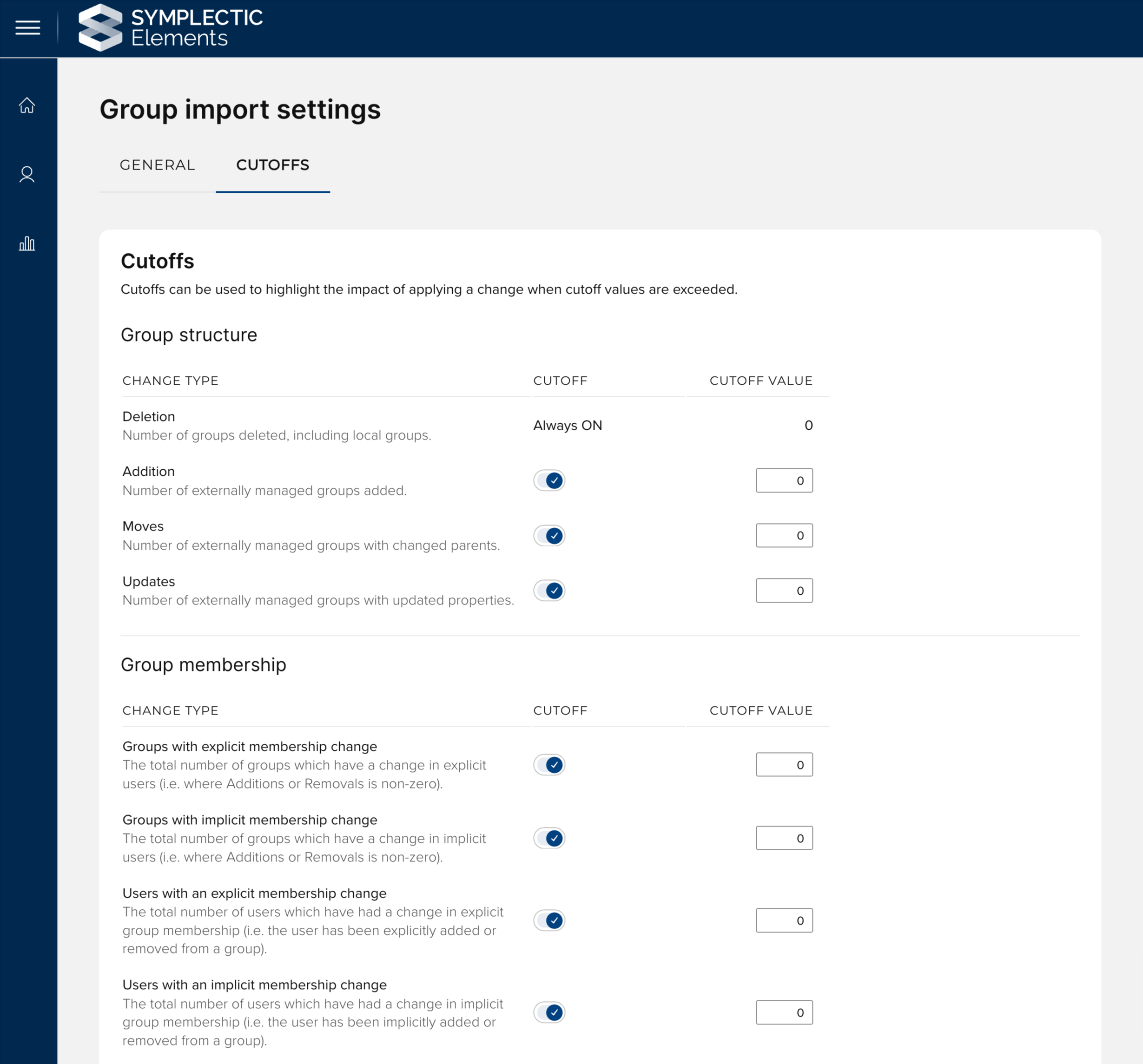
Image: The updated ‘Group import settings’ page allows cutoffs to be set to inform the group import process.
Administrators can set ‘cutoff’ values across four key types of changes;
Group structure - These cutoffs relate to structural changes to the group hierarchy, such as adding, moving or deleting groups.
Group membership - The cutoffs relate to changes in the membership of groups. The group import can affect implicit and explicit group membership, and you can set cutoffs that relate to both.
System roles - These cutoffs relate to changes to the number of users with system roles based on their group membership.
Group roles - These cutoffs relate to changes in the permissions gained by users with group roles. This can be due to more users being added to a group that has been assigned a role, or due to more users being added to a group that is targeted by a role.
When cutoffs are met, this will be flagged as part of the ‘review and apply’ step, ensuring that users carrying out the group import can review the flagged changes before applying the import. This provides administrators with the tools they need to make informed decisions, ensuring that every change to the group structure, membership and roles is backed by a robust review process. Further information about configuring cutoffs can be found in this support article.
Improved ‘review and apply’ step
When carrying out a group structure import, the ‘review and apply’ step allows administrators to view a summary of changes to group structure, membership and roles. This allows a review of the changes to be carried out before the import is applied. In this release, we have added a new section - ‘Group role changes’ that displays a count of the number of permissions gained.
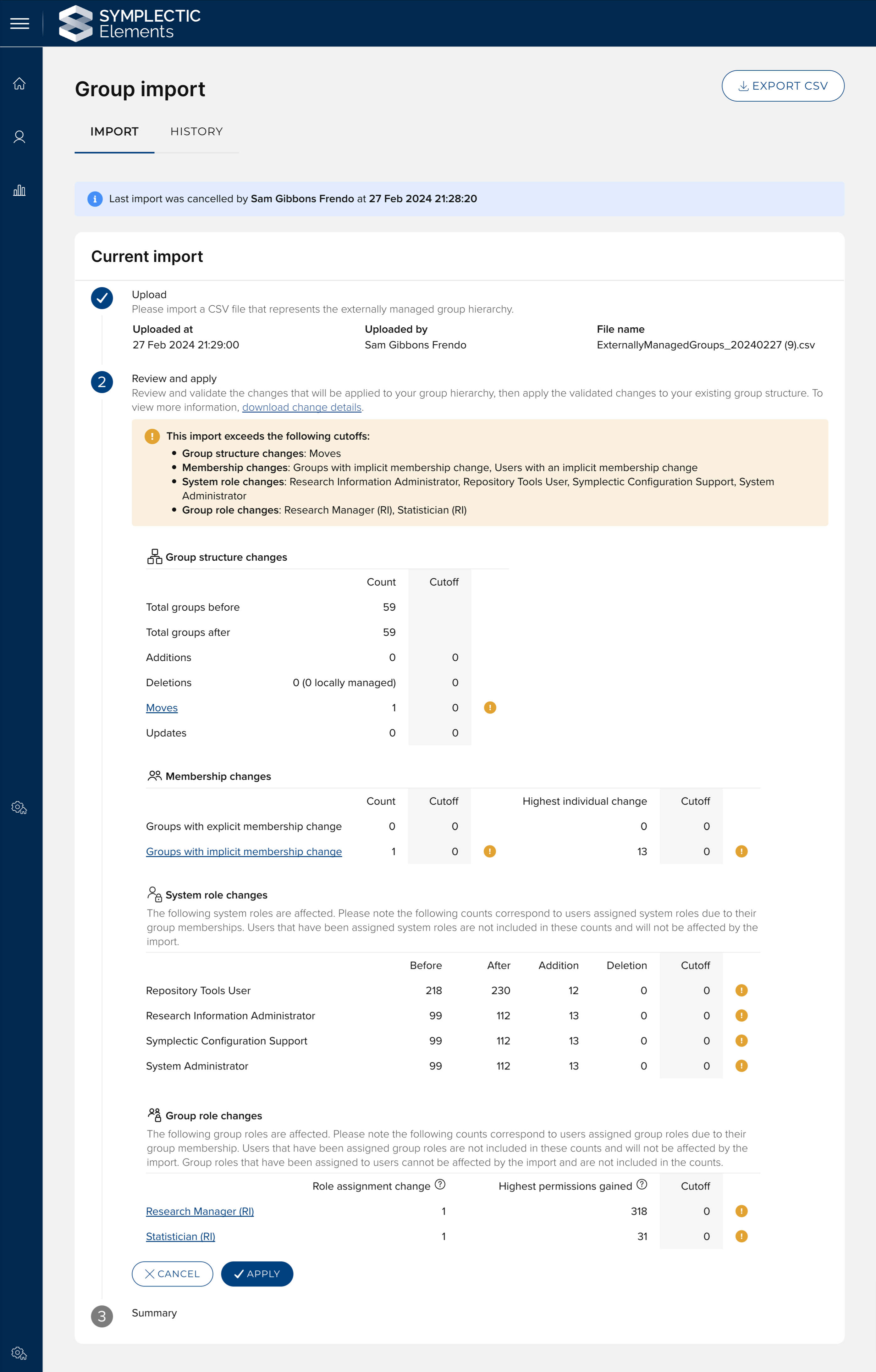
Image: The new ‘Group role changes’ section on the ‘review and apply’ step provides additional information to users carrying out a group import.
The information returned in the ‘download change details’ export has also been extended. This download will now return a zipped folder containing two files; the existing ‘Group Import Analysis’ file and a new ‘Group Roles Analysis’ file that contains detailed information about all group role changes.
These changes provide administrators with detailed insights before applying changes, helping ensure data integrity and optimising the import workflow. This enables a more automated, accurate, and efficient management of group structures.
Research Funding Solution
In this release, we are pleased to introduce updates to the API and Reporting database, along with a number of additional improvements and enhancements supporting various aspects of the research funding lifecycle.
As with previous releases, full details of the RFS functionality released in v6.17 are available in the RFS release notes on our support site.
Other improvements
A set of new ‘collaborates with’ relationships have been added between project-project categories, project-group categories, and group-user categories. This supports the capture of a richer set of relationships within the system.
We have added a new Account Setting for users to allow them to decide whether or not their title (eg. Dr, Ms, Mr,) is displayed on their profile. This new account setting can be enabled for your organisations via the Global Settings page.
We have added a new configuration option for our Figshare repository integration to allow organisations to choose to use cached embargo dates. This functionality ensures that Elements can continue to present the embargo end date and use them for OA Monitoring, even if the embargo end date is removed from Figshare (eg. because the embargo date has passed).
We have improved performance for self-hosted clients when performing database refreshes, significantly decreasing the amount of time needed to copy data across environments when data clearage is in effect.
The Discovery Module now supports ‘webp’ format branding images (in addition to ‘jpg’), as the ‘webp’ format enables improved page load performance.
UPDATE: For clients upgrading after the 20th of May 2024, we have released a patch for Discovery that updates the fonts used in Discovery, moving the primary font from Proxima Nova to Inter. The new font has a stronger font weight and will improve readability of content on Discovery.
Fixes
To reduce the chance that large “CSV” style reports will fail due to a long processing time, the “tabular stats” timeout setting now applies to all “CSV” style reports generated in Elements, and the default timeout has been set to 10 minutes.
An error was occurring when attempting to remove a link between two publications via the ‘create links’ page. This has been fixed.
We retired a configuration option for Discovery where administrators could make the publications tab the default tab for a user profile. This configuration was not in use and led to unnecessary complexity.
We resolved an issue where deleting a group type that is in use caused an unexpected error. Elements will now prompt you to remove the usage of the group type before the type can be deleted.
End of support
As always, we recommend that you regularly review our End of Support Announcements for information about upcoming end of support in Elements for various technologies. We would like to draw your attention to the upcoming end-of-support dates for versions of Elements. Upcoming dates include:
Elements version | Release date | End of support date |
6.16 | 7 December 2023 | 7 December 2025 |
6.15 | 12 October 2023 | 12 October 2025 |
6.14 | 6 July 2023 | 6 July 2025 |
6.13 | 27 April 2023 | 31 October 2024* |
6.12 | 23 February 2023 | 31 October 2024* |
6.11 | 8 December 2022 | 31 October 2024* |
6.10 | 6 October 2022 | 6 October 2024 |
6.9 | 21 July 2022 | 21 July 2024 |
6.8 | 19 May 2022 | 19 May 2024 |
If you need assistance in planning to upgrade, please contact our team via the Support Site.
We’re here to help!
We hope you enjoy getting to know the latest version of Elements. Remember, should you have any questions, we’re here to help! Just contact us at support@symplectic.co.uk for assistance.
Best wishes,
The Symplectic Team