
External Organisations category
The External Organisations category was introduced in Elements 6.22.
Category administration
The External Organisations category is administrator-managed, meaning that only appropriately privileged users are able to view and make changes to it. By default, only users with the System Admin role have these rights.
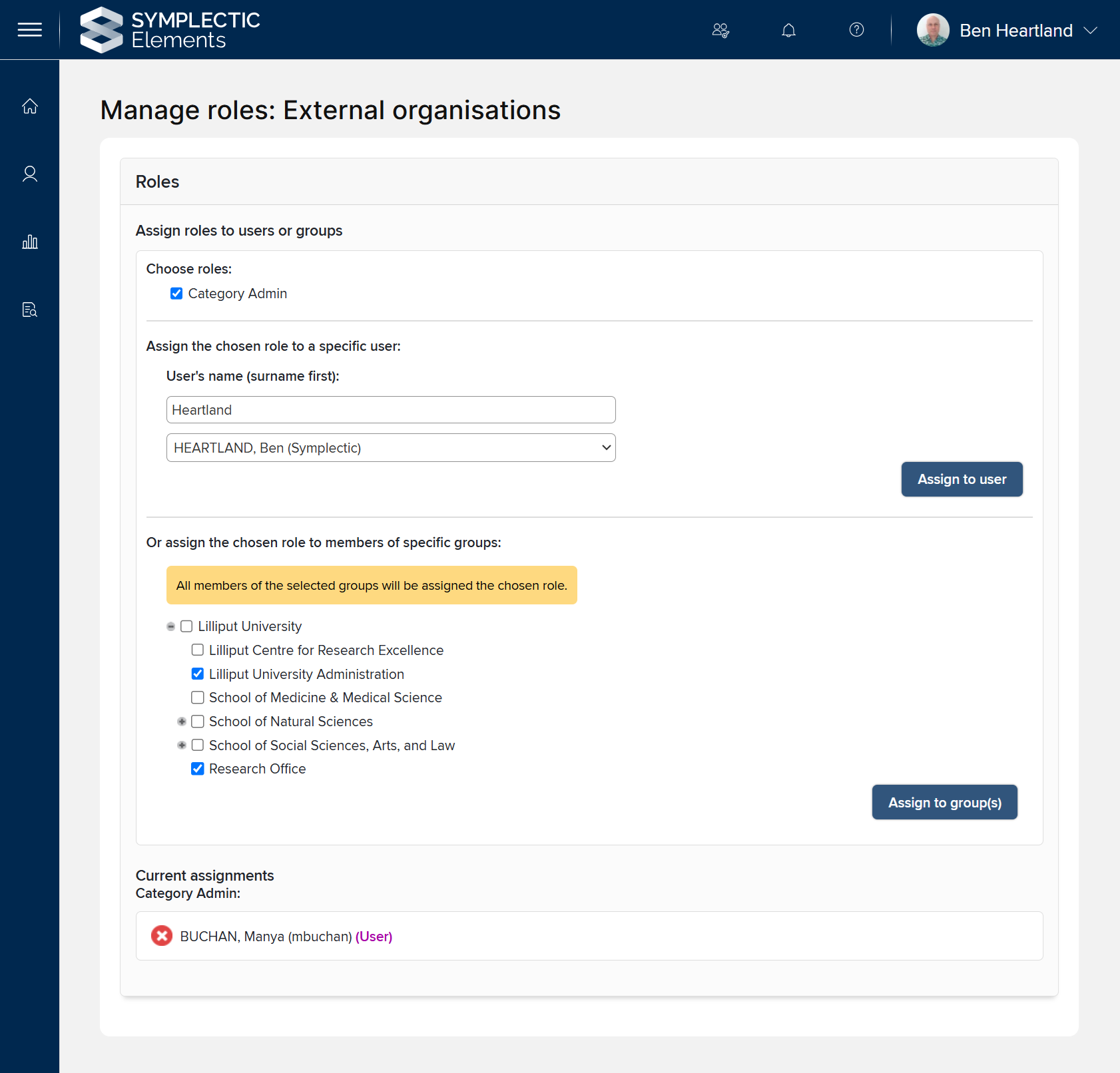
As a System Admin, assign category administration rights to individual users, or to entire user groups. To do this, first go to System Admin > Data Category Settings > External Organisations > Manage Category Roles. There is a single role available, called Category Admin. If the role is already assigned to any users or groups, this will be shown in the Current assignments section.
To assign the Category Admin role to a user or group, first check "Category Admin" under Choose roles. This will expand the 'assign to user' and 'assign to groups' sections. To assign the role to a user, search for them by name, select the correct user from the dropdown list, then click the Assign to user button. To assign the role to a group or groups, select them in the expandable group tree, then click the Assign to group(s) button.
To remove an existing role assignment, click the red cross immediately to its left in the current assignments section.
Data sources
Dimensions Organisations
On upgrade from Elements 6.21 or below to 6.22 or above, the category's Dimensions Organisations data source will be pre-populated with the final public domain release of the Digital Science GRID database. A Dimensions subscription is not required for this. If your organisation does subscribe to Dimensions and has registered a Dimensions API key with Elements, this data source will be periodically updated with new organisations data from the Dimensions database.
Research Organization Registry (ROR)
The Research Organization Registry is a global, community-led registry of open persistent identifiers for research and funding organizations. Elements ingests records from ROR on an 'as needed' basis, i.e. when ingested metadata contains a ROR for which Elements does not already have a ROR record, Elements will request the corresponding record from ROR.
Institutional data source
If your institution maintains a list of external organisations, this can be imported via the API. If you are interested in using this option, please open a support ticket. We highly recommend including ROR, GRID, ISNI, Wikidata, and/or Open Funder Registry IDs in your institutional data, as this will ensure that your institutional records are merged with corresponding records from Dimensions and ROR.
Manual records
Category admins can create manual records for External Organisation objects. A manual record can be created as a completely new organisation, or as an additional record for an existing external organisation, alongside its other data sources. The process of creating and editing manual records works in the same way as for other data categories.
Underlying fields
The category's stock underlying fields are as follows:
Underlying field | Data format | Description |
|---|---|---|
acronyms | List | A list of acronyms by which the organisation is known, e.g. "NIH". |
addresses | Address list | Street address(es) for the organisation. |
aliases | List | A list of aliases or alternate names by which the organisation is known. |
child-organisation-identifiers | Identifier list | Identifiers for child or member organisations. |
established | Date | Date the organisation was established or founded. |
identifiers | Identifier list | Identifiers for this organisation. |
latitude | Number | Latitude of the organisation's geographic location. If geographically distributed, this is typically the location of the organisation's headquarters or head office. |
links | Web address list | A list of links to websites representing or related to the organisation. |
longitude | Number | Longitude of the organisation's geographic location (see 'latitude'). |
name | Text | The primary name by which the organisation is known. |
parent-organisation-identifiers | Identifier list | Identifiers for parent organisations. |
preceded-by-organisation-identifiers | Identifier list | Identifiers for organisations that chronologically preceded this organisation. |
related-organisation-identifiers | Identifier list | Identifiers for organisations that are related in some way to this organisation. Note that the nature of the relationship is not stated. |
succeeded-by-organisation-identifiers | Identifier list | Identifiers for organisations that chronologically succeeded this organisation. |
types | List | The type or types of this organisation, according to the data source. Note that these values represent each data source's opinion of the organisation's type(s); as such, it is possible for them to conflict with other data sources and with the type assigned to the External Organisation object as a whole. Some data sources may provide multiple types, e.g. "Government", "Funder" |
url | URL | A URL for the organisation, typically linking to the home page of the organisation's website. |
Category admins have the ability to add custom underlying fields if needed; for example, to support institutional data that does not fit into any of the stock fields. The process for adding and managing new fields is the same as for other data categories.
External Organisation types
The category has nine stock organisation types, which are aligned with the types defined by ROR:
Educational institution
Funder
Healthcare organisation
Company
Archive
Nonprofit organisation
Government organisation
Facility
Other
Category admins have the ability to define custom types if needed. The process for adding and managing new types is the same as for other data categories.
Labels
From Elements 7.3 upwards, administrators can apply labels to External Organisation objects. For instructions on enabling a label scheme for the External Organisations category, see "Manage and Create Label Schemes".