
Symplectic Elements v6.23 - Release Notes
Welcome to Symplectic Elements v6.23!
For our second release of 2025, we've focussed on updates and improvements to several areas, including:
Enhancements to External Organisations metadata, building on the new category introduced in v6.22.
Improvements to the Repository Tools module, ensuring that Symplectic Elements continues to have robust and flexible integrations with current repository platforms.
Further enhancements to the OA Monitor, providing greater control and clarity in OA management.
An improved user experience for researchers and reviewers in the Awards Management module.
In the External Organisations category, we have added the Research Organisation Registry (ROR) as a source of organisation metadata. We have also extended the scope of organisation lookup via Dimensions to include funder-related fields in publications and grants data, and addresses in user profiles. For reporting, we have added a new External Organisations reporting parameter, and new Reporting Database tables to make reporting on External Organisations easier and more performant. Two new stock reports demonstrate the use of these.
For the Repository Tools module, we've introduced support for DSpace 8, and the ability to harvest reuse licences for individual files. We have also made a number of improvements aimed at supporting a wider set of use cases and repository configurations.
In the OA Monitor, a new group-based 'OA Manager' role can be assigned to users who are responsible for managing OA compliance, granting them the permissions appropriate to that role. We have also improved the OA management workflow with the addition of new bulk actions, as well as greater clarity and transparency around the data used in making compliance calculations.
For clients using the Awards Management module, we have made major improvements to the experience for researchers and reviewers, including new actions, more information, a redesigned interface and improved performance.
This release also contains accessibility improvements and many other smaller features and enhancements.
As always, the new version of Elements and associated upgrade instructions can be found in the Elements upgrade forum.
External Organisations
In Elements 6.22, we introduced the External Organisations category to help institutions manage and report on data involving other organisations, for example collaboration networks and funding sources. For Elements 6.23, we have expanded Elements' capabilities in using this new set of metadata for organisation disambiguation and reporting.
Synchronisation with ROR
We have added the Research Organisation Registry (ROR) as a supplementary data source for the External Organisations Category, meaning that each External Organisation will be enriched with a metadata record from ROR, where available.
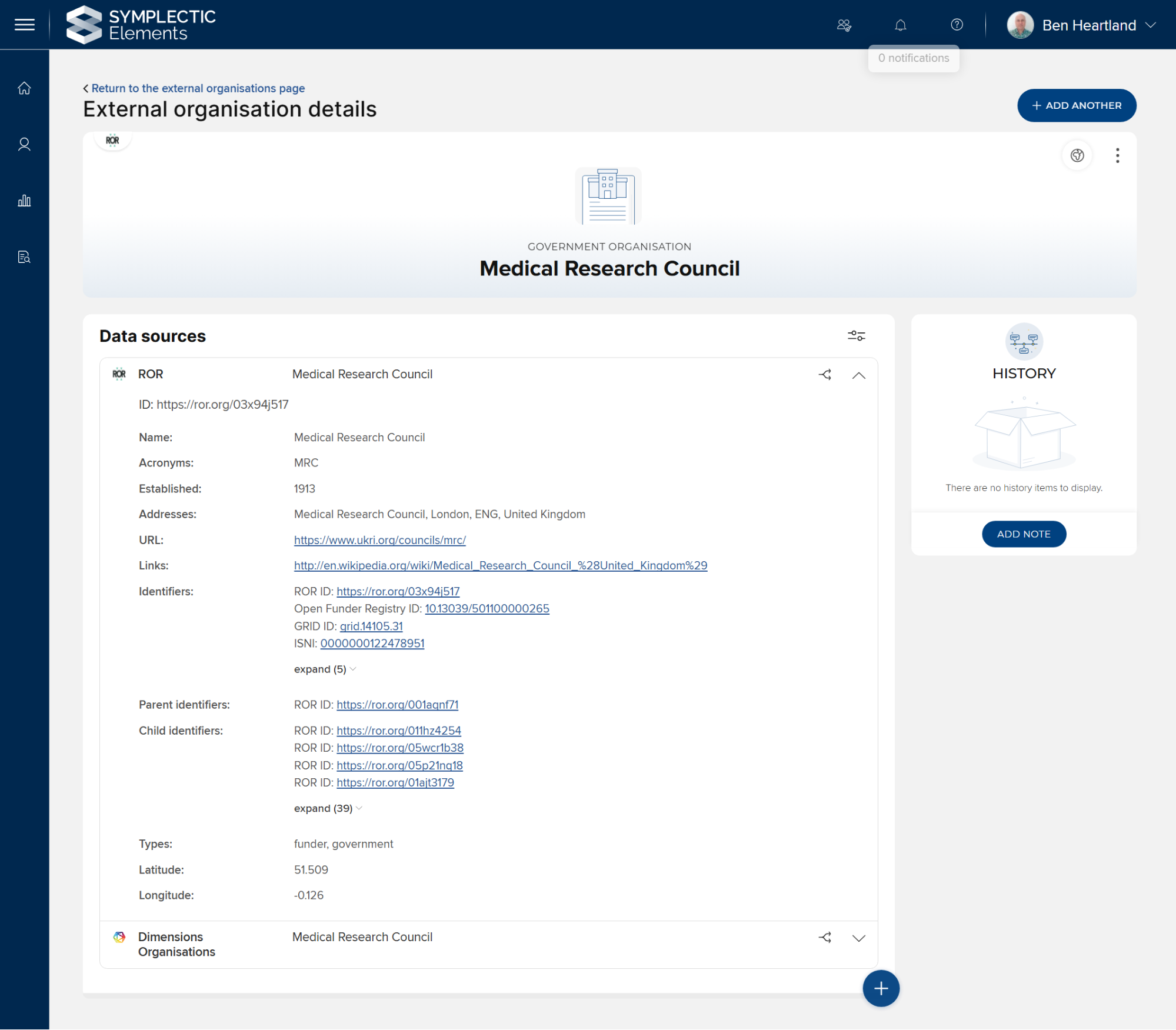
ROR records are refreshed approximately every 30 days, so that their data reflects recent changes in the ROR database.
Organisation lookup for funding acknowledgements and funder fields
In 6.22, clients with a Dimensions as a data source subscription benefitted from organisation lookup in Dimensions to infer GRID IDs for author affiliations and other address data. In 6.23, we have extended this lookup functionality to the funding acknowledgements field in publications and the funder field in grants.
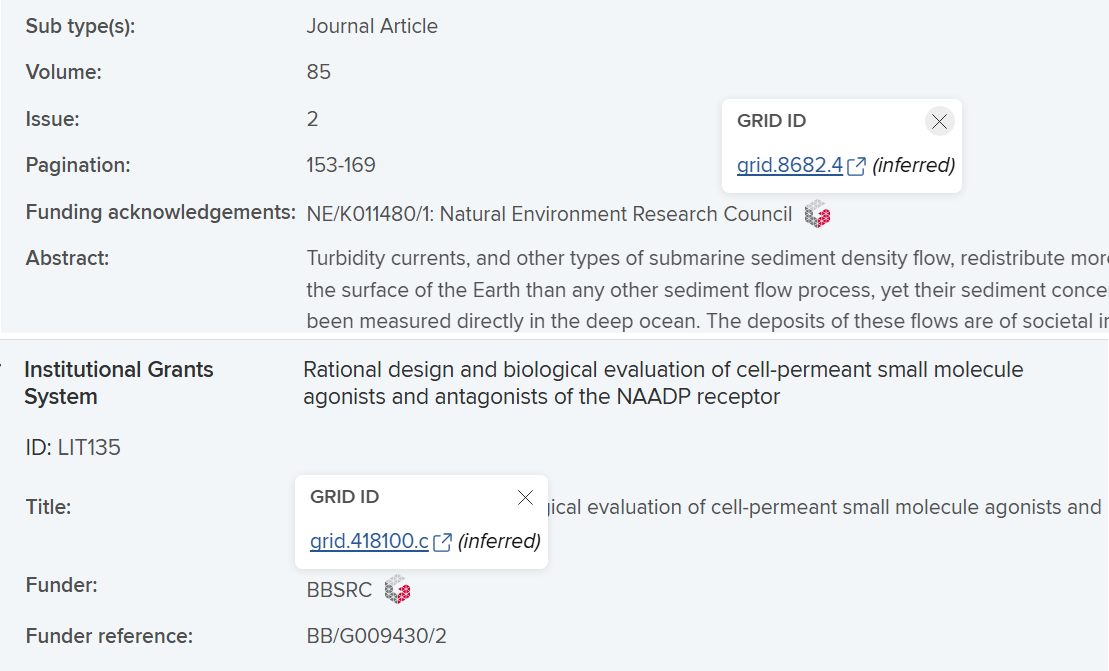
These inferred GRID IDs and the resolutions they create to External Organisations are available in the Reporting Database, allowing for reporting on the organisations identified within funders and funding acknowledgements.
Organisation lookup in user profiles
Organisation lookup in Dimensions has also been extended to organisation names and addresses in user profile fields: for example, in the Experience and Education sections.
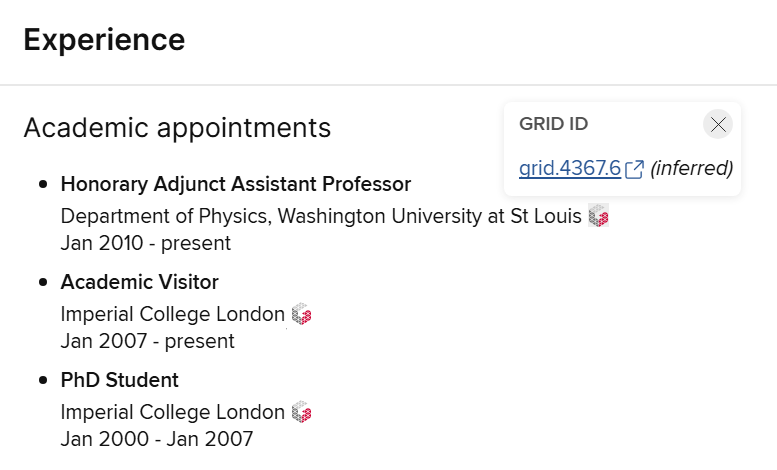
These inferred GRID IDs and the resolutions they create to External Organisations are available in the Reporting Database, allowing for reporting on the organisations identified within user profiles.
External Organisations reporting parameter
We have added a new External Organisations reporting parameter, to allow the writing of reports that can target specific organisations. Potential use cases include:
reporting on collaborations with a specific organisation or set of organisations
finding publications that acknowledge a specific funder
discovering researchers with connections to a specific institution
Reporting Database improvements
In this release, we have added new Reporting Database tables which eliminate the need for most table joins, making these External Organisation reports easier to write and more performant.
Tables such as [Publication Record External Organisation] and [Grant Record External Organisation] contain pre-calculated resolutions to External Organisations, that can be used to join directly from record metadata to External Organisations objects.
New stock reports
Two new stock reports have been added:
Publications by organisations in funding acknowledgements is a data extract that makes use of the new External Organisations reporting parameter.
User profile organisation associations is a dashboard that uses inferred GRID IDs in user profiles to report on researchers' connections to External Organisations.
Both of these can be used as-is, or used as inspiration for your own custom reports.
Repository Tools
We have made a number of significant improvements to the Repository Tools module.
Support for DSpace 8
We have added support for 8.x versions of DSpace.
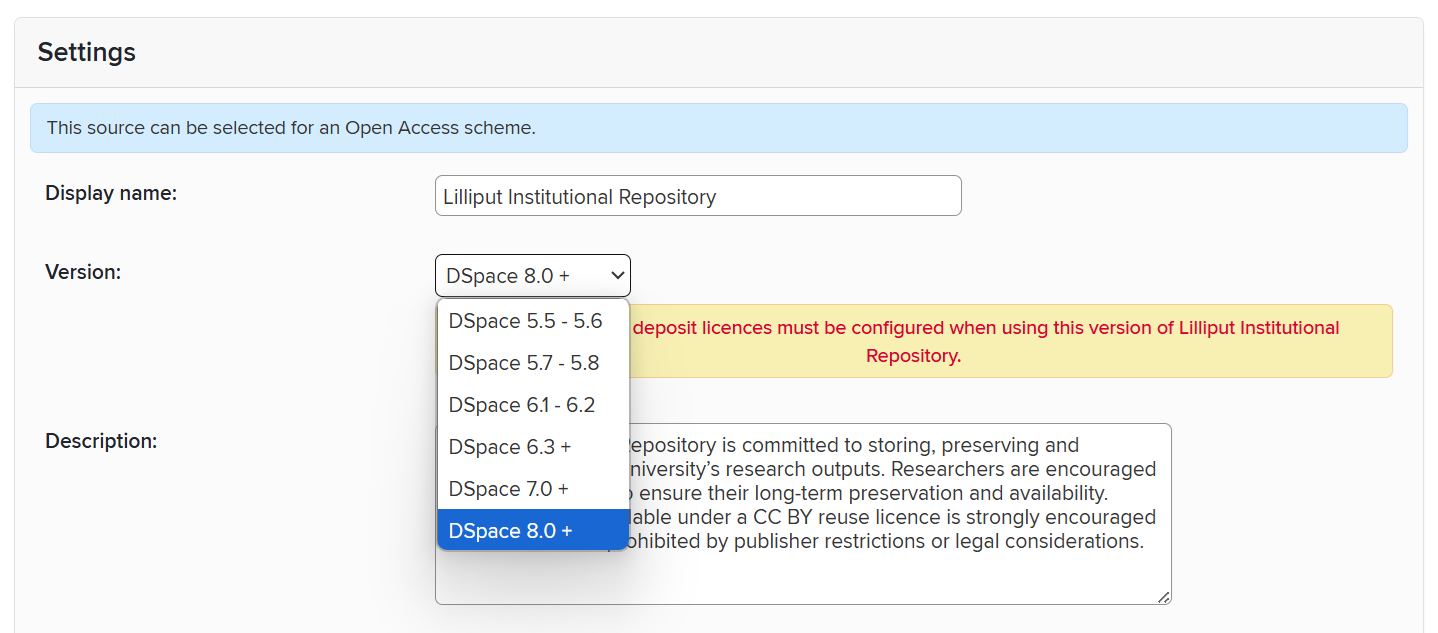
If upgrading a connected DSpace instance from 7.x to 8.x, the only action needed in Elements is to change the version number in the DSpace data source settings.
If upgrading from DSpace 5.x or 6.x directly to 8.x, please read this support article.
Support for harvesting file-level reuse licences
OA policies frequently specify reuse license requirements which must be met in order for an output to be compliant. Previously, Elements could harvest only one reuse licence per repository item. However, it may be the case that a single repository item contains multiple files, each of which is licensed differently. In v6.23, we have introduced the ability to harvest a reuse licence per file.
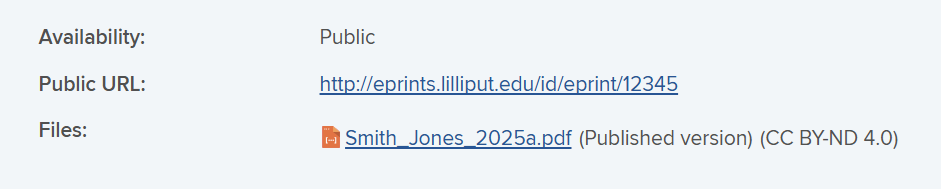
The effect of this, and whether your institution needs to take action, is dependent on your repository platform and current configuration.
EPrints: File-level reuse licences will be harvested by default. You will not need to change your harvest crosswalk unless either:
it contains a custom
<file-metadata-map>which overrides the default file-level mappings; oryour EPrints system has been customised to support reuse licences other than the stock licences supported by EPrints 3.3 or 3.4.
If either of these are the case, please contact the support team for advice.
DSpace: As standard, DSpace currently allows for a single reuse licence per repository item. If your institution has a custom DSpace configuration that allows file-level reuse licences, they can be harvested with changes to your harvest crosswalk. If this is the case, please contact the support team for advice.
Figshare: Figshare currently allows for a single reuse licence per repository item. We coordinate closely with the Figshare team and will be monitoring their roadmap for any changes relating to reuse licences.
Using file-level reuse licences in OA Monitor
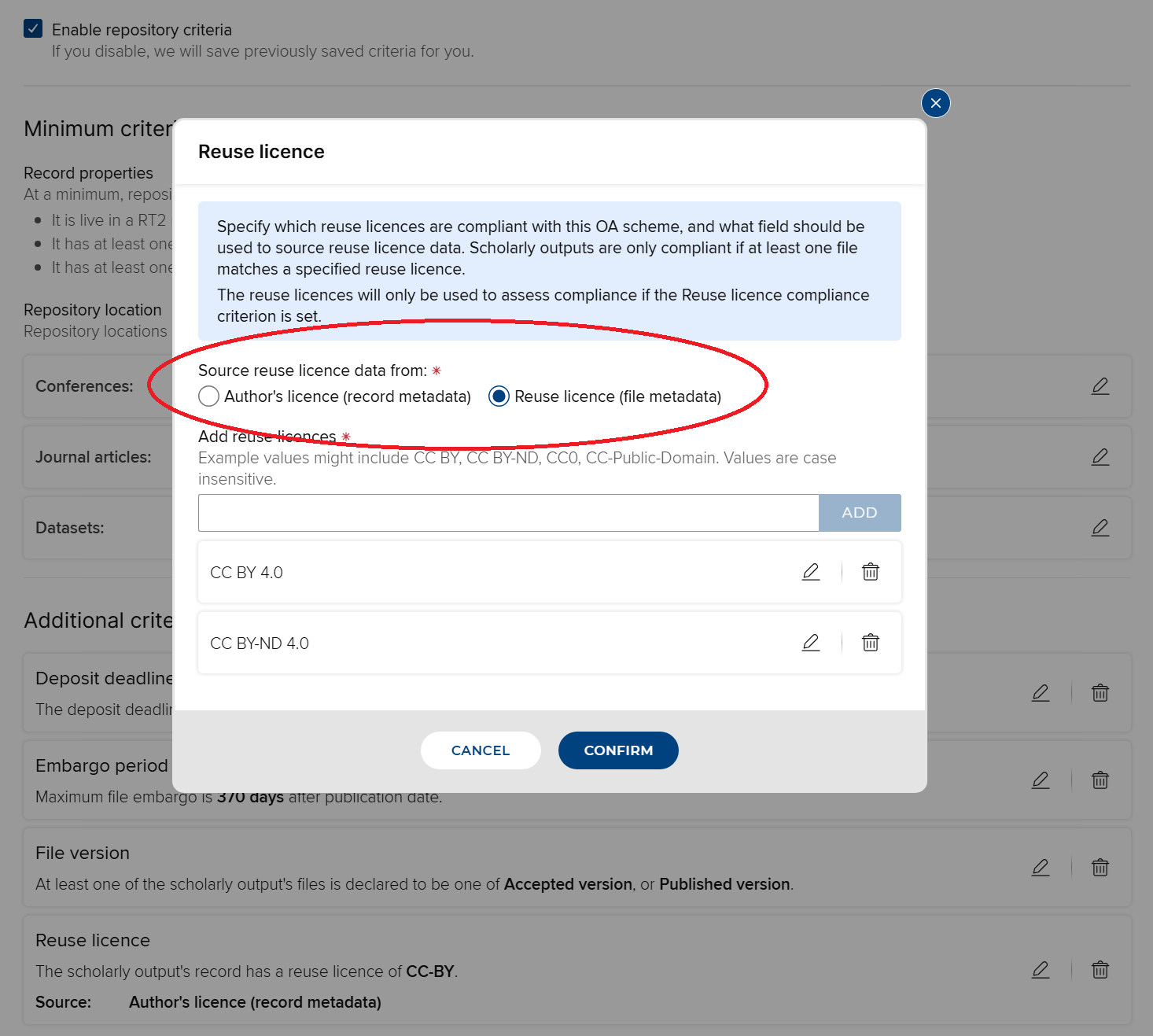
In its compliance calculations, OA Monitor can optionally be configured to use reuse licence metadata harvested from either the repository item or from individual files, depending on which is most suitable for your institution's set up.
DSpace 7 & 8: use PATCH operations in automated metadata updates
Some clients using the Elements 'Automated Metadata Updates' feature in conjunction with DSpace's 'Authority Control' feature have reported issues caused by Elements' use of HTTP PUT operations to make updates, i.e. always writing the full set of metadata for an item. In Elements 6.23, we have revised the Automated Metadata Updates feature in the DSpace 7 and 8 integrations so that it makes updates using PATCH operations, i.e. by writing only to the specific metadata fields being updated.
Please note: it is still possible to create a conflict between Elements and DSpace by giving both systems authority to write to the same metadata field in the repository. If using Automated Metadata Updates in conjunction with Authority Control, care should be taken to ensure that Automated Metadata Updates cannot write to any metadata field that can be written to by Authority Control. This includes any fields containing values from DSpace's ‘virtual metadata’ feature.
Other RT2 improvements
For clients with DSpace repositories:
Allow deposit and harvest to target bundles other than 'ORIGINAL'.
Restore the 'resubmit on redeposit' behaviour for DSpace 7 and above. In the event that an Elements user performs a redeposit operation for a DSpace 'workspace' item (typically an item that was previously rejected from review), this ensures that the item is resubmitted into the review workflow.
Respect the 'xwalk-in-without-files' parameter during full harvest.
Open Access Monitor
Continuing to build on the new OA Monitor framework delivered in recent releases, this release includes additional enhancements, providing an enriched user experience for Open Access managers.
OA Manager group user role
We have added a new ‘OA Manager’ group role in this release, delivering focussed OA Monitor permissions for relevant group users in order to ensure colleagues can perform their tasks with appropriate access rights.
This role gives the user rights to manage publications within the OA Monitor that are affiliated with members of the group(s) that they have OA Manager access to, including depositing files on users’ behalf (if RT2 is also licenced).
OA Managers do not have permission to create or configure OA schemes, nor override the compliance status of a publication or exclude publications from a scheme.
Manage publications in OA scheme page improvements
In this release, we have made improvements to the ‘Manage Publications in OA scheme’ page, enriching the user experience for you and your colleagues.
Bulk actions
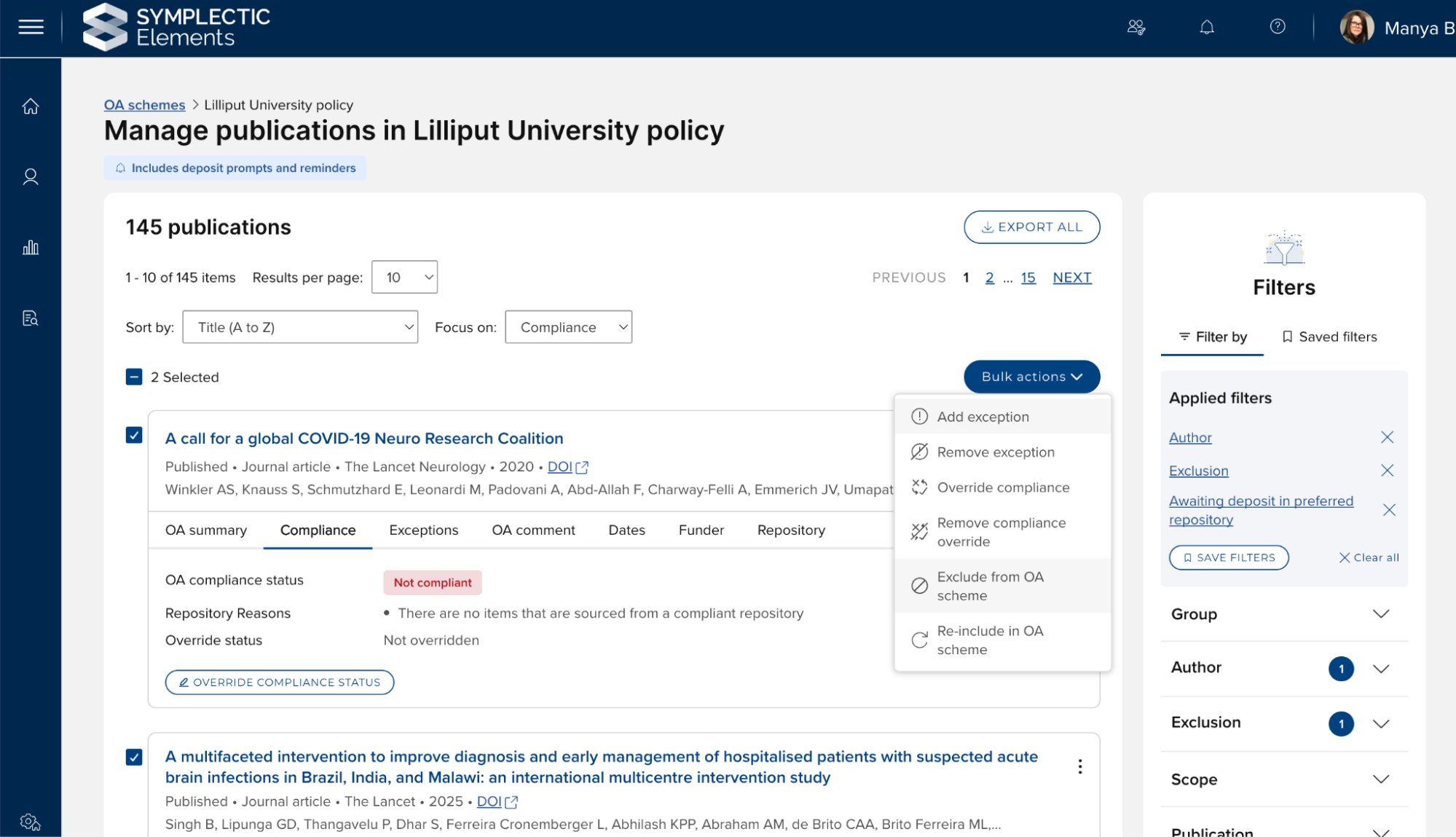
In this release, we have added bulk actions for overriding compliance and excluding publications from an OA scheme.
Enhanced data clarity and transparency
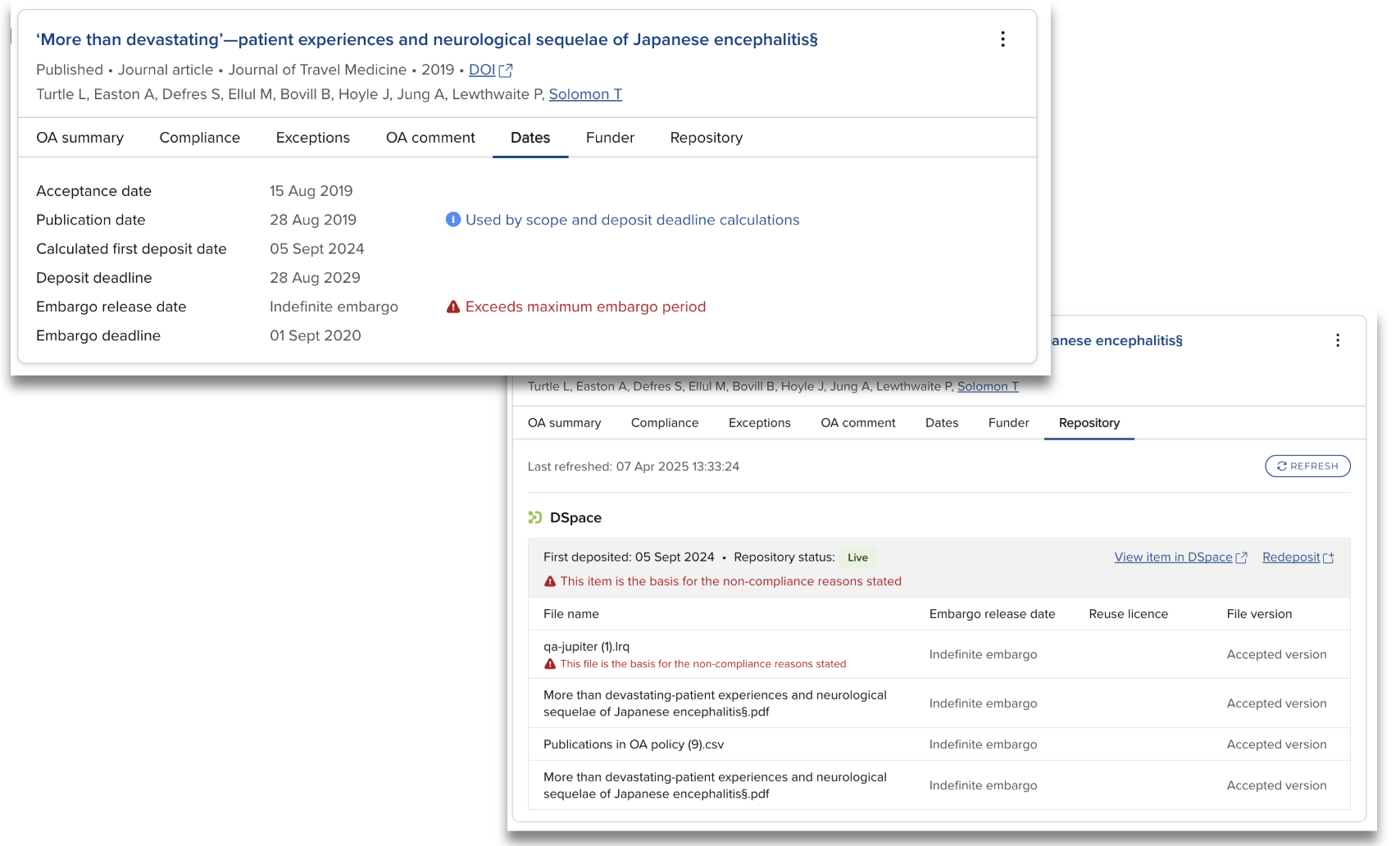
The calculations used in the OA Monitor can be complex and difficult to interpret, particularly where a single publication has multiple deposited files and/or repository items. To aid users in assessing compliance calculations, in this release we have focussed on:
Optimising the reliability of data presented for each publication, ensuring the card displays the metadata upon which compliance or non-compliance was determined,
Indicating which repository item and/or file formed the basis of the compliant / not-compliant status (where relevant),
Rationalising filter behaviour to ensure consistent terminology and predictable results, and
Improved warnings for when a deposit is outstanding or overdue, and when the embargo period and/or deposit deadline has been exceeded.
File-level reuse licences
As noted above, the introduction of support for harvesting file-level reuse licences from RT2 data sources enables you to make use of the file reuse licence compliance criterion, selecting the file metadata source option.
Awards Management
This release includes major improvements to the Awards Management module experience for researchers and reviewers, including:
A refined user experience, including enhanced sign-posting of calls to action, improved filtering, and export list options,
New actions for researchers including the ability to directly submit deliverables, and to view more information such as budget summary, change requests, documents, contract documents, and contract review statuses, and
Improved performance.
As with previous releases, full details of the Awards Management functionality released in v6.23 are available in the Awards Management release notes on our support site.
Accessibility improvements
As part of our continual incremental work to improve the accessibility of Elements, enhancing the navigability of the system for users with disabilities, this release includes a small number of changes, including:
Ensuring it is possible to distinguish between different checkbox states in high contrast mode.
Other improvements and fixes
Clients using Google or Microsoft as their email provider can now authenticate with these services using OAuth.
Improve the performance of the internal collaboration network diagram in the Discovery module, particularly for users with large collaboration networks.
End of support
As always, we recommend you regularly review our End of Support Announcements for information about upcoming end of support in Elements for various technologies. We would like to draw your attention to the upcoming end-of-support dates for versions of Elements. Upcoming dates include:
Elements version | Release date | End of support date |
6.22 | 28 February 2025 | 28 February 2027 |
6.21 | 28 November 2024 | 28 November 2026 |
6.20 | 19 September 2024 | 19 September 2026 |
6.19 | 27 June 2024 | 27 June 2026 |
6.18 | 25 April 2024 | 25 April 2026 |
6.17 | 29 February 2024 | 28 February 2026 |
6.16 | 7 December 2023 | 7 December 2025 |
6.15 | 12 October 2023 | 12 October 2025 |
6.14 | 6 July 2023 | 6 July 2025 |
If you need assistance planning to upgrade, please contact our team via the Support Site.
We’re here to help!
We hope you enjoy getting to know the latest version of Elements. Should you have any questions, we’re here to help! Just contact us at support@symplectic.co.uk for assistance.
Best wishes,
The Symplectic Team