
OpenURL Base URL
OpenURL base URL
Please note: For configuration the OpenURL in version 6.7+ please see this support article
The OpenURL is a standard similar to the DOI (Digital Object Identifier) and is widely used to launch and resolve links directly to full text content. The OpenURL is constructed from a base URL together with some bibliographic data from Elements and passed directly as a request to your institutional Link Resolver Knowledge Base. This request is authorised to retrieve full text content from the publishers that your library subscribes to and delivers this in a new window.
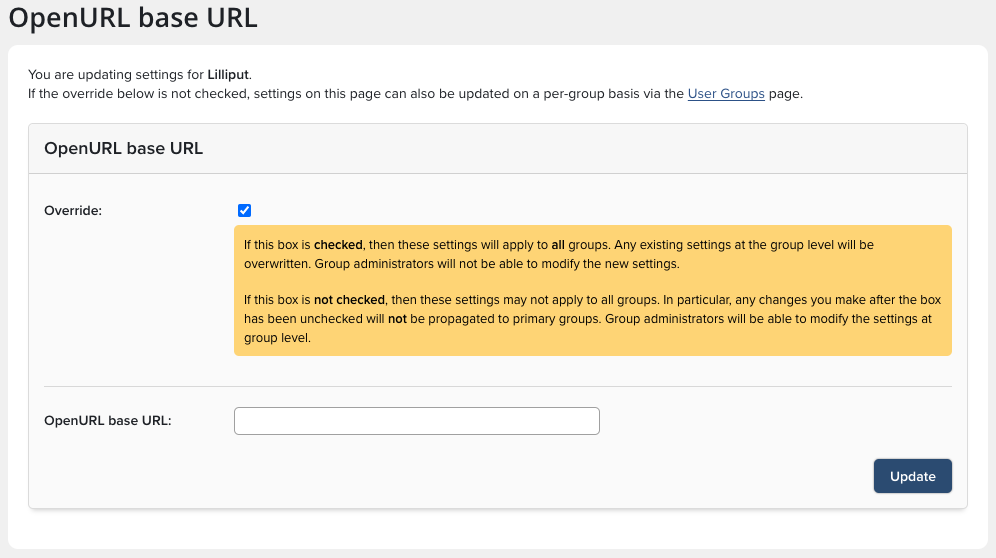
Enter the base URL via System Admin > Setup > OpenURL Base URL.
The OpenURL icon (example sfx.gif) for your OpenURL resolver is stored in the web interface <Main_Installation_Folder>\Website\images, should you need to replace the image file ask your technical support to replace the current file. The baseline dimensions of the icon is 40 x 14 pixels. You can further customise the base URL to use SID by adding this syntax to the base URL eg. https://lit.open.com/?sid=symplectic:elements
Some examples of OpenURL Base URL are available here https://www.zotero.org/support/locate/openurl_resolvers
Want to remove the OpenURL Logo and Text?
Follow these simple steps:
Navigate to System Admin > Setup > OpenURL Base URL
Ensure Override is checked (assuming you want to remove it system wide)
Clear the content of the OpenURL base URL field.
Click Update.