
OA Monitor: Date logic
This article describes how the OA monitor sources specified dates, used in scope and compliance calculations.
Publication date
Using the 'Default' data source precedence list, the OA Monitor selects:
The highest precedence record with a publication date, and
The highest precedence record with an online publication date.
Then it takes whichever date is the earliest and uses this as the 'publication date' in the OA Monitor.
To give a couple of examples:
Publication 1: All data sources have a publication date of June 2016 (represented as 1/6/2016) including the highest precedence source PubMed - which is selected. CrossRef also has an online publication date of 15 May 2015. It is the only source that has an online publication date, so is automatically the highest precedence. OA monitor takes the earliest of these two dates - which is the CrossRef online publication date.
Publication 2: The highest precedence data source (PubMed) has a publication date of 2016 - which within Elements defaults to 1/1/2016 when a more granular date is required. The online publication date in the highest precedence record is 6 June 2016 (in the CrossRef record). The OA Monitor takes the earliest of these two dates - which is the PubMed date.
You can affect this process by changing which source has a higher precedence at System Admin > [DATA SOURCES] > Data Source Management. If you find that a particular data source commonly does not provide a more granular date than the year, you may wish to choose another source as your top preference.
Some additional notes:
Precedence rules are always followed (even if there is a more complete date of lower precedence).
If a date is incomplete (e.g. year only or month+year only), the OA Monitor presumes the earliest possible value (so 1 Jan or 1 of month).
Acceptance date
The OA Monitor selects acceptance date from the highest precedence record with an acceptance date.
Some additional notes:
Precedence rules are always followed (even if there is a more complete date of lower precedence).
If a date is incomplete (e.g. year only or month+year only), the OA Monitor presumes the earliest possible value (so 1 Jan or 1 of month).
Primary source date
This is the date type configured to be used as the primary source for an OA scheme as works as follows:
If “Acceptance date” is selected, the acceptance date is used. If it is not available, the earlier of the online publication date and publication date is used.
If “Publication date” is selected, the earlier of the online publication date and publication date is used. If neither is available, the acceptance date is used.
Override deposit deadline: Use cutover from publication to acceptance date
When configuring an OA scheme (6.20+) or an OA policy (v6.19 and earlier), there is an option to override the standard use of primary source date for assessing deposit deadlines.
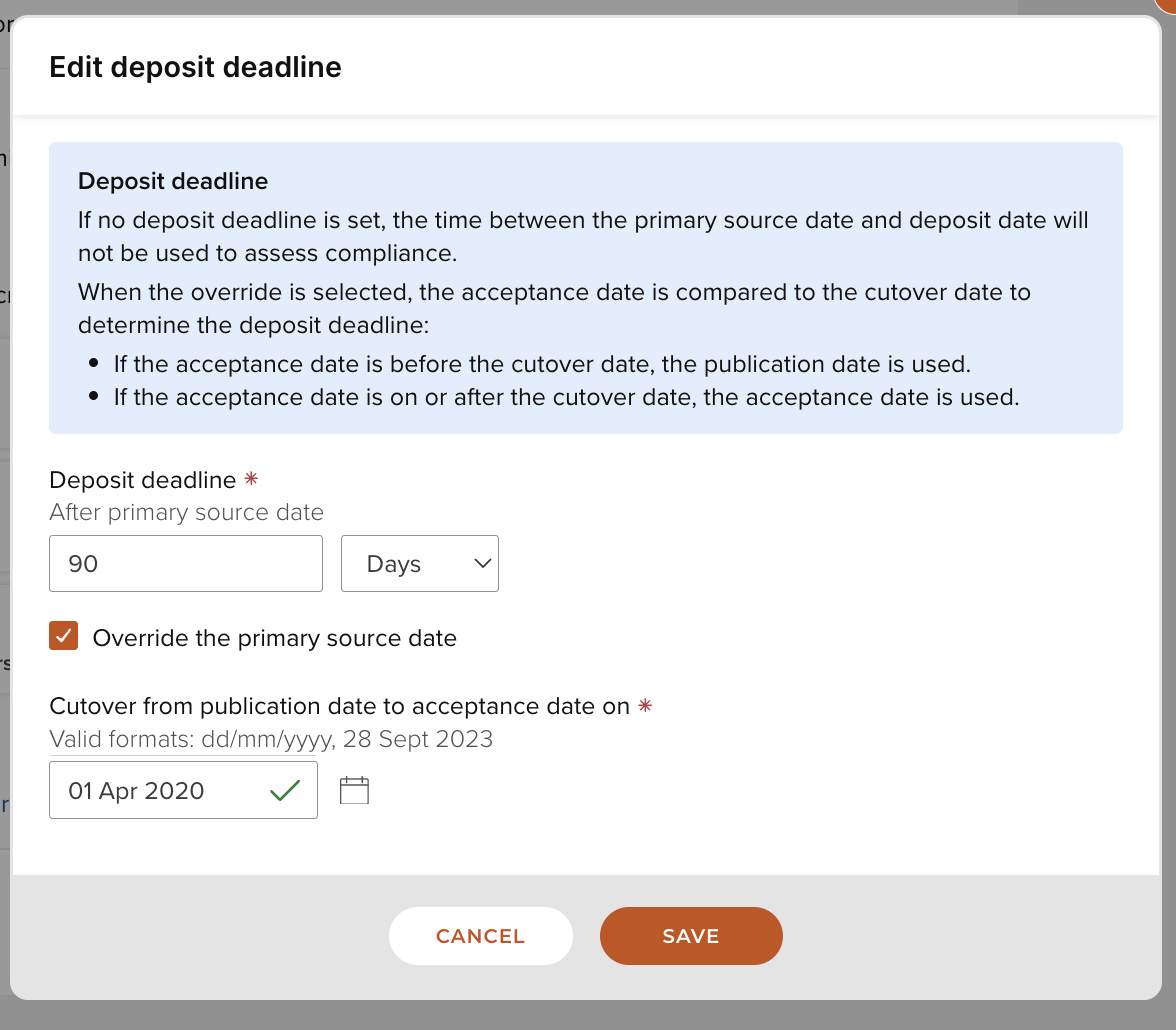
Image: New cutover setting enabled to cutover at 1/4/2020
This setting was developed to allow UK institutions to configure their OA policy to take account of the introductory period for assessing compliance in the REF2021 Open Access policy.
It allows an institution to assess deposit deadlines against publication dates until a defined 'cutover' date from which to assess them against acceptance dates.
If an institution was to configure their OA Policy to:
Use the ‘Acceptance date’ as the primary source date to determine what is in scope / in policy, and
Choose to override the primary source date for the deposit deadline and cutover from publication date to acceptance date on 1 April 2020.
Then, if the publication is:
Accepted before 1 April 2016 it is not in scope / in policy.
Accepted between 1 April 2016 – 31 March 2020 then it is in scope / in policy and deposit should be made within XX days/ months of publication (90 days in the example above).
Accepted 1 April 2020 onwards then it is in scope / in policy and deposit should be made within XX days / months of acceptance (90 days in the example above).
If a date needed for a calculation is missing, the OA Monitor will display a non-compliance reason prompting the administrator to add the date.
Other data fields
The OA Monitor takes all other data fields from the highest precedence record, according to the 'Default' data source precedence list.