
Previous Changes to Data Privacy by Elements Version
This document, started with the release of v5.9.1 of Elements, aims to provide a version-based overview of any significant changes to the handling of data privacy in Elements.
For information on data privacy in v6.2 onwards please see - Introducing Object Privacy (v6.2 Onwards)
Elements v5.9.1
Until 2018, to expose public researcher profiles based on Elements data, your institution created their own export of data from Elements into a suitable public facing system such as an in-house CMS for your public facing web pages. During 2018, we plan to release the Elements Discovery Module, a separately licensed component that includes new researcher profile pages that can be surfaced publicly. In advance of this, and to provide you with finer control over which user profiles should be exposed in your public facing systems more generally, additional privacy settings are introduced in Elements v5.9.1.
A new per-user "is-public" setting
We anticipate that some users (and some administrators on behalf of those users) will want to suppress the public sharing of certain information - potentially even their entire profile. As such, and ahead of the general release of the Elements Discovery Module, v5.9.1 of Elements introduces the ability of your HR feed to mark a user's profile as "for public display", or not for public display. Once the HR feed has been processed, the provided value is then visible on the Manage User page.

A new default "is-public" setting
When you first upgrade Elements to v5.9.1 or later, your institutional HR feed into Elements will not yet be providing per-user "is-public" values. A new default "is-public" setting managed on the "Manage Users and User Feed" page determines what the value should be in this case.
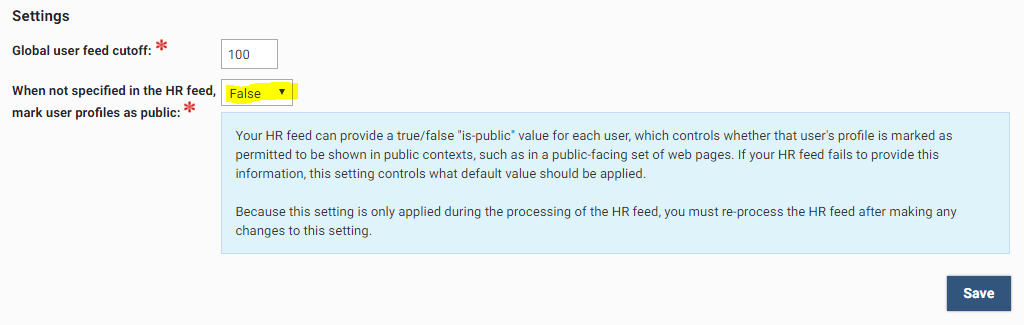
Upon upgrade, this setting will begin its life in the "False" state, corresponding to all of your users being marked as "not for public display".
Manual override of the per-user "is-public" setting
Elements has always allowed you as an administrator to take over management of a user's HR feed data manually by selecting the user for "Local" management.
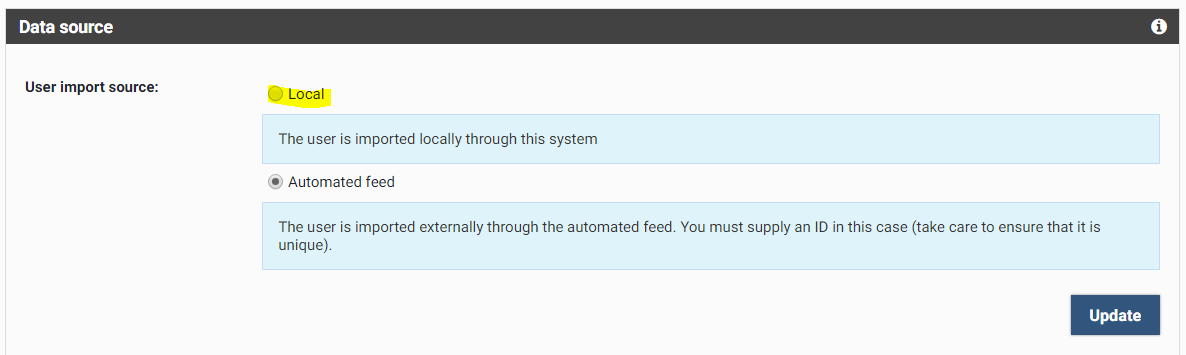
As with any HR feed data, if you switch to local (non HR feed) management of a user, you will be able to manually manage the per-user "is-public" setting.

Marking user profiles for public display
So, in order to mark your users for public display, you must either
Adjust your HR feed to provide appropriate per-user "is-public" values; or
Switch users from being HR feed managed to be locally managed, then manually set each of their "is-public" values; or
Alter the default "is-public" setting to "True", marking all HR fed users as eligible for public display.
In this way, a positive action by your institution is required in order to mark any user's profile as eligible for public display.
Use of the per-user "is-public" setting by Elements
Initially, only system administrators will be able to see, and control, the per-user "is-public" setting. We hope to introduce further ways of viewing and controlling this value in the future.
The per-user "is-public" setting will be respected by the Discovery Module from its very first release planned for later in 2018 (i.e.only users whose profiles are marked as eligible for public display will have their data surfaced in the Discovery module).
Your use of the per-user "is-public" setting
The wider intention of the setting is that it will indicate whether any of the user's information (their profile and their relationships to all other data in Elements) is eligible for display in any public context (not just via Elements Discovery Module). However, you may already be using data from Elements in public contexts, such as in your own system of public facing web pages, by extracting data from the Elements API or reporting database. This will continue to function as before, but you should follow the advice above to ensure the users whose data you are already showing publicly are marked as eligible for public display, to make your use of the data be consistent with how you are declaring its intended use in Elements.
From v5.9.1, the per-user "is-public" setting is made accessible from the API and from the reporting database for your use, so that your downstream systems can see which users you have decided should not have their information displayed publicly.
After upgrading to or through v5.9.1 of Elements, you should:
Review and adjust the default "is-public" setting (used when the HR feed does not provide a per-user "is-public" setting) according to your institution's actual usage of Elements data.
Ensure that the new per-user "is-public" values are respected appropriately in your downstream systems.
This latter action will become even more important in future versions of Elements if/when Elements allows you to display the per-user "is-public" setting to the researchers to whom it applies, and possibly even allow them to modify it. At that point in time, a researcher will anticipate that if they see "Your research profile will not be publicly displayed" or similar in Elements, that your public systems that use data from Elements will respect that statement.
Please also see the Managing Users product documentation.