
Introducing Object Privacy (v6.2 Onwards)
A large variety of data is collected within Elements and there is a broad range of sensitivities associated with some of this data. Elements 6.2 introduces a more extensive privacy framework to allow the system to support the capture of a greater range of data types, including more sensitive data types by allowing objects/items to be set as private, internal or public.
Prior to v6.2, Elements provided broad, default levels of data privacy to support the sharing of information across an institution. In Elements v6.2 the concept of ‘Object Privacy’ has been introduced to provide fine grained control over data access for both administrators and researchers.
For information on Data Privacy in Elements prior to v6.2 please see;
An ‘object’ in Elements refers to the outputs and information that can be linked to a user (e.g. publications, grants, professional activities etc.) Prior to v6.2 the only way to prevent users from viewing objects and their associated data was by removing access to a module. In the case of the Impact Module, object privacy controls were introduced in v6.6.
Users were able to mark their relationship with some objects as ‘Private’ and this functionality persists in v6.2 onwards. Marking a relationship as private prevents the object from appearing on the user's own internal Elements profile page, and indicates that their relationship to the object should not be displayed by the institution in public-facing systems. However, this does not affect the visibility of the object itself, only the user's relationship to the object.
In Elements 6.2 there are now three levels of object privacy to choose from;
Public - This indicates that the data can be shared publicly - for example in a public profile system such as ‘Discovery’.
Internal - Data marked as ‘Internal’ should not be shared publicly but can be viewed freely by other users of the system.
Private - Data marked as private will only be viewable by users with a claimed link to the object. Private objects will still be viewable by certain privileged users. Delegates of the linked user and other system and group roles (e.g. System Administrators, Research Managers etc.) will be able to view the object.
Configuration by Administrators
The new object privacy functionality applies to objects of the category: Publications, Grants, Professional Activities, Teaching Activities, Equipment and Projects.
On the Category Settings page Menu > [DATA CATEGORY SETTINGS] > {object category} > Category settings.
(V6.n Category Admin > [Object category] > Category Settings) there are configuration options available that allow administrators to set the privacy options for the object category, as well as each object type.
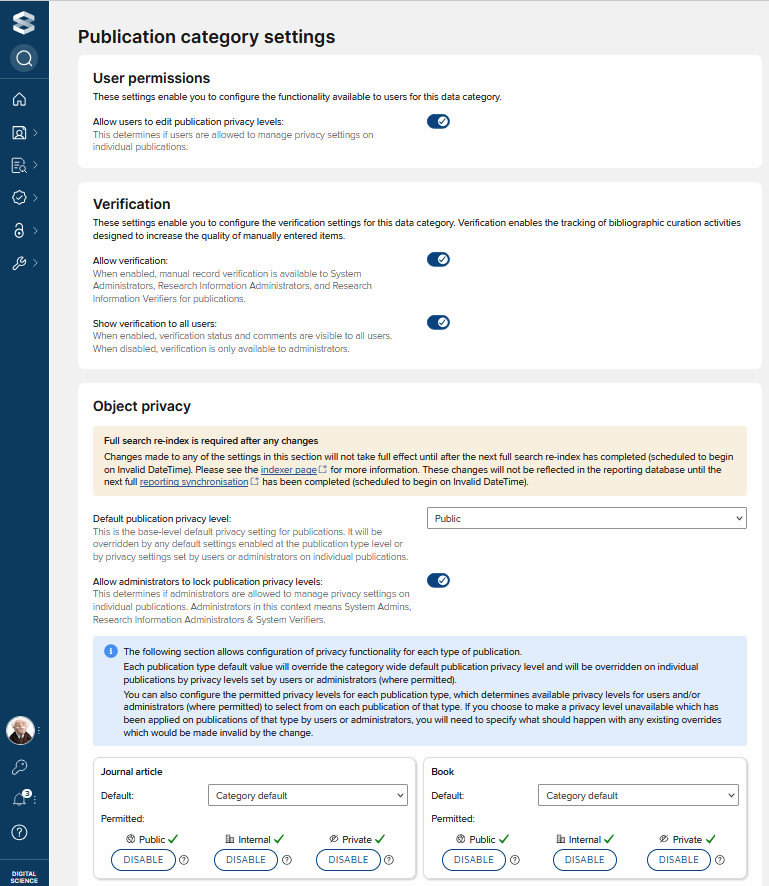
Default [object] privacy level - The base-level default privacy level for the object. This determines what privacy level should be applied to all types of the object. Additional controls provide the ability to modify this default privacy level.
Allow users to edit [object] privacy levels - When checked, owners of an object (e.g. users with a claimed link to the object) are able to edit the default privacy level based on the permitted privacy levels for the object type (see below).
Allow administrators to lock [object] privacy levels - When checked, administrators (System Admins, Research Information Administrators & System Verifiers) are able to lock individual objects of this category to prevent changes.
[Object type] - Default - For each object type it is possible to choose whether to use the base-level default, or ‘private’, ‘internal’ or ‘public’ for the object type. This provides granular control of privacy for each object type.
[Object type] - Permitted - For each object type it is possible to define the set of options available to users when setting the privacy level for an individual object.
Considering configurations
When deciding which privacy levels to choose for different object categories and types, and when deciding whether or not researchers should have control over object privacy, it is important to carefully consider the impact on the ease of use of the system.
Being overly restrictive when setting default object privacy, as well as allowing users to set objects to private if not absolutely necessary, will introduce significant administrative burden with regards to managing pending links (see below). A preference should therefore always be given to ‘public’ or ‘internal’ privacy settings.
Adjusting configurations
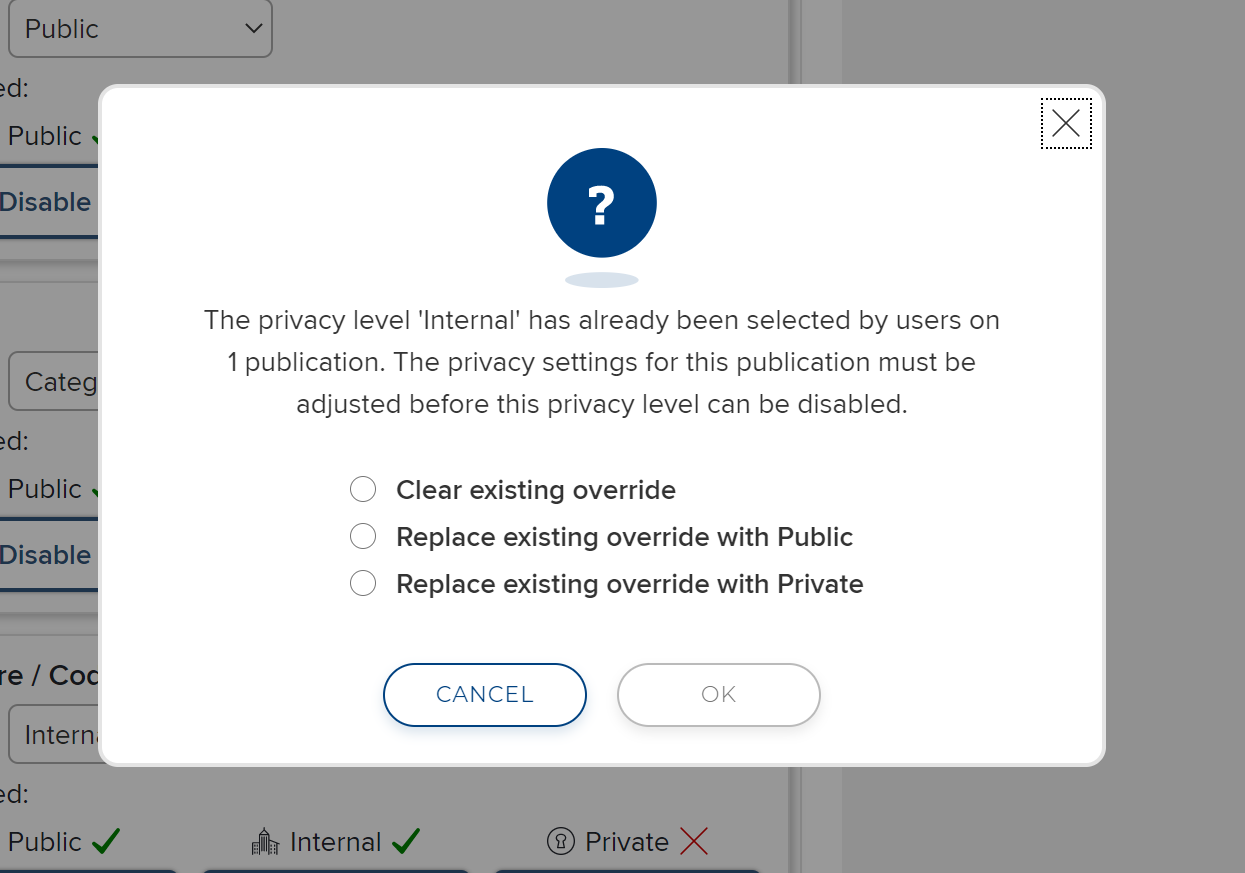
Care must be taken if changing the configuration of privacy settings after they have been used by your community. If an administrator decides to change the range of permitted privacy levels for a particular object-type and wish to disable a privacy level which has already been selected by users they will see a prompt to decide what should happen to existing settings where that privacy level was selected by users. You can choose to:
Clear existing override - which will clear the users selection and reset those privacy settings back to the default for the object type.
Replace the existing values with a specified value - this allows you to change those user settings to a specific value (eg. from internal to private).
Setting Privacy level on an Object
Depending on the Module configuration options chosen, it may be possible for researchers or privileged users to set the privacy level for an object. This is set per-object on the list objects page. Users can choose from the available options to set the privacy level for an object.
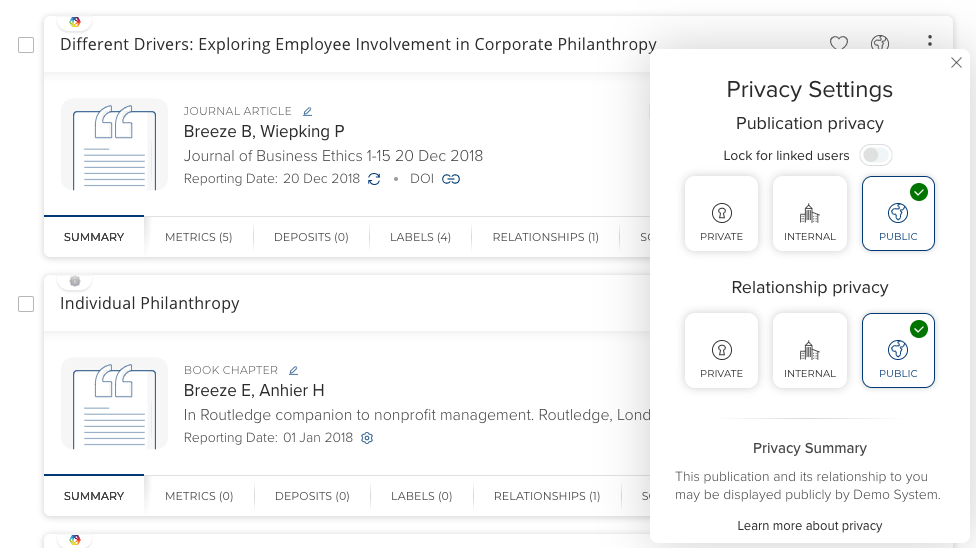
If multiple users have permission to change the object privacy level, then the object privacy level will reflect the last option chosen.
If a user is not permitted to edit the privacy level of an object it will appear greyed out. This can either be because an administrator has ‘locked’ the specific object preventing users from editing it further, or due to configuration not allowing users to edit privacy levels for that category.
Relationship privacy
Relationship privacy allows users to manage the visibility of their relationships with an object. Marking a relationship as private does not affect the visibility of an object in the system. Objects with relationships marked as private may still be sent to external systems but the relationship with the user should not be displayed (e.g. a publication might still be sent to a co-authors public profile)
Relationship privacy is managed independently from object privacy. However, a given relationship’s privacy level is intrinsically to the ‘objects’ at either ends of the link - ie. the user’s profile privacy level and the privacy level of the object in question. If either the user’s profile or the object they are linked to has a more restrictive privacy level than their relationship privacy setting, the system will automatically calculate an effective privacy setting aligned to the more restrictive level.
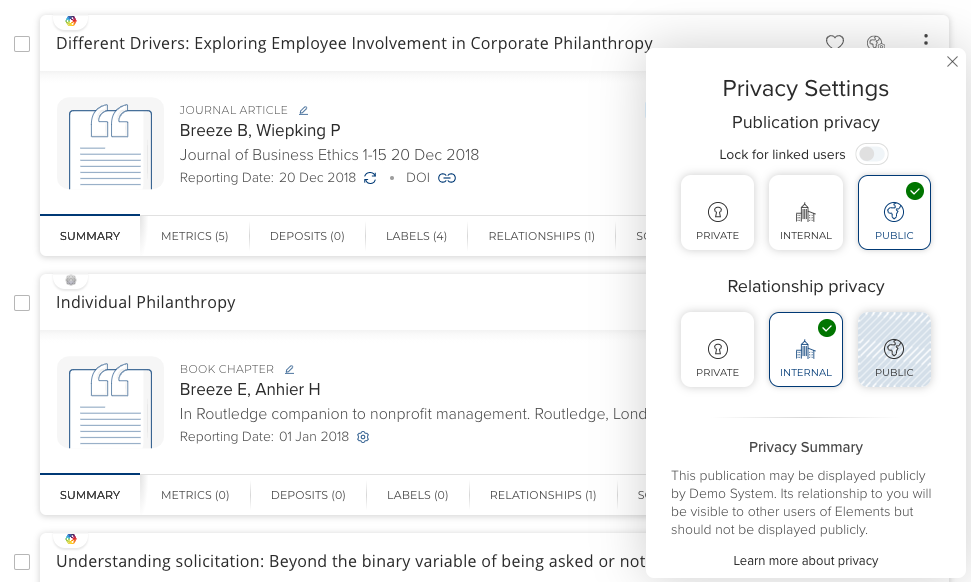
Where the ‘computed’ relationship privacy level differs from the user’s desired privacy level, the relationship privacy control will display both, differentiating the ‘effective’ privacy level from the user’s selection. The system remembers the user’s selection so that should the computed/effective privacy level ever change (eg. their profile moves from internal to public) the system can ensure each relationship is never going to be made ‘more public’ than the user’s selection.
Object privacy and pending links
Publications and Grants can be harvested from external systems and therefore users can be offered ‘Pending’ links that can be claimed or rejected.
When a user has a claimed link to an object they will be able view that object irrespective of the privacy level of the object. However, if a user has a pending link to an object that is marked as private before it is claimed, then they will not be able to view the object details, instead users will be informed that they have a ‘Pending (restricted)’ link to the object. The Elements’ Object ID will be visible, but no other identifying information will be made available.
A ‘Pending (restricted)’ relationship requires an Administrator (System Admin, System Verifier or Research Information Admin) to either claim the item on the user’s behalf or remove the restriction on the pending relationship inviting the user to see the object so they can claim/reject it themselves.
Pending (restricted) relationships can be reviewed and addressed in two possible ways.
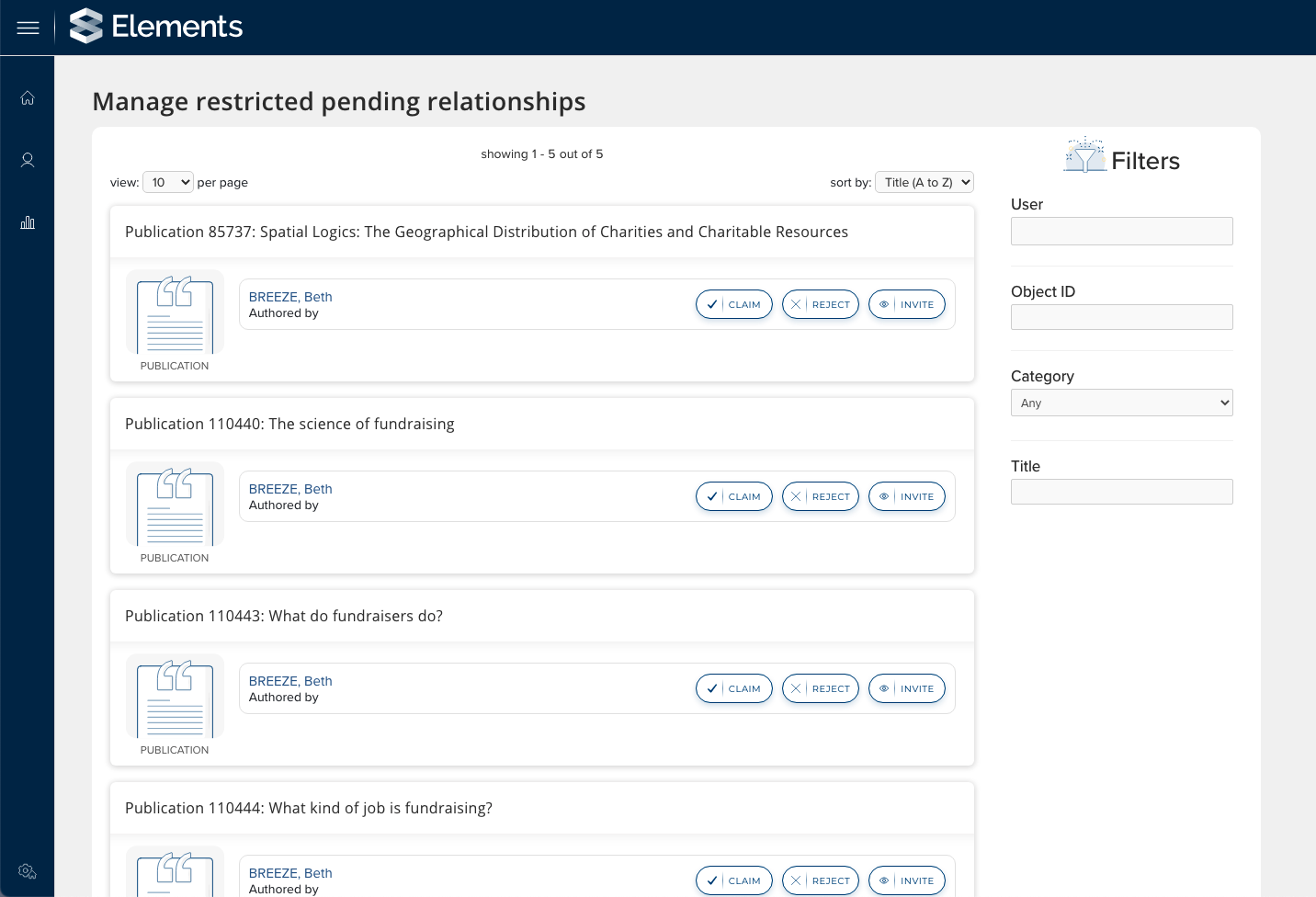
Pending (Restricted) Relationships page - This is a new page available to System Admins, System verifiers & Research information Administrators via the System Admin menu. It provides administrators with a list of all objects which have 1 or more Pending (Restricted) relationships. From here administrators with one of the above roles can link through to review the object, and can choose to claim or reject the relationship on behalf of the user or ‘invite’ the user to be able to view the item removing the ‘restriction’ from the pending link.
My <Objects> & Object Details pages - On both pages we distinguish between a regular pending relationship and a pending (restricted) relationship, so that the users who can see the object can distinguish whether other users with a pending link to the item can see it or not.
Changes to the API and Reporting Database
The Elements API has been updated to allow organisations to read privacy information via the API. A new value ‘privacy-level="private/public/internal” has been added in addition to the existing information on relationship privacy ‘is-public=”y/n”. It is not currently possible to update privacy levels via the Elements API or importer tools.
Columns detailing the privacy levels for objects have been added to the Reporting Database to provide access to this information for reporting purposes. Stock reports have not been modified and will continue to return all objects irrespective of privacy level. Only privileged users are able to run reports on users other than themselves, as such they are permitted to see private records and therefore the inclusion of these records in reports is not restricted.