
Introduction to Data Privacy and Personal Data in Elements
Symplectic privacy policy
The protection of your personal data is important to us. You can see Symplectic's general Privacy Notice here.
Data privacy and personal data in Elements
The remainder of this document provides an overview of how Elements has been designed with respect to data privacy, and how Elements is used to process personal data.
This document applies to v5.12 of Elements onwards. For additional details on the per-object privacy controls introduced in v6.2, please see Introducing Object Privacy (v6.2 Onwards).
Data privacy
In order for you as an institution to ensure that the personal data processed using Elements is adequately safeguarded, you need to know how Elements has been designed with respect to data privacy. This section provides a high-level overview of the levels of privacy supported in the design of Elements.
Data privacy within Elements
Elements has been designed from the ground up to promote the sharing of information across your institution, and includes broad default levels of data privacy to support this. For example, by default, all publication information entered into the system is discoverable by any user of the Publications module, including the bibliographic data values in all publication metadata fields. Where data privacy controls are available, your institution can then alter the behaviour of Elements away from this default behaviour.
By default, there is no public access to any data managed in Elements. To access data in Elements, some form of authentication is required, typically by securely logging in to the Elements web application. This restricts all access to the controlled list of users of the system managed by your institution.
Data in Elements is separated into several modules of functionality such as Users, Publications and Professional Activities. All users of Elements have access to the Users module. Access to other modules can be enabled by your institution for nominated individuals and groups of users.
By default, access to any of the following modules provides access to all research objects within that module:
Publications
Users
Teaching Activities
Professional Activities
The expectation is that you as the research institution actively wish your researchers to be able to search for and find each other, and to be able to discover information about the research outputs, teaching and professional activities of all of their institutional colleagues, as well as enter and maintain information about their own research activities. Further, researchers are encouraged to "claim" joint ownership of what then become shared items, such as jointly-authored publications or jointly-experienced professional activities. This helps create an accurate picture of shared research activities and collaborations across your institution. Discoverability-by-default of data entered by other users into these modules is key to this approach, which is core to the usage of Elements.
There do exist some specific, documented user fields that may only be viewed and modified by suitably privileged administrative users, and cannot otherwise be viewed within Elements by the subject of the data themselves. These allow an institution to store information that for whatever reason it does not want the relevant individual (or other non-privileged users) to access. Please see the following article for more information:
Information stored in the Equipment, Grants, Projects, and Organisational-Structure modules of the system is typically maintained only by suitably privileged users, but is by default accessible to all users with access to the relevant module.
Information stored in the Journals module of the system is also typically maintained only by suitably privileged users, but can be displayed by the system to any user in appropriate contexts.
There are some modules of the system (the Assessment, Impact and RFS modules) whose associated data is, by default, heavily access-restricted, such that only highly-privileged nominated users have access to the data entered by individual researchers.
By default, most of the users engaging with these modules will only be able to view and edit the data associated with their own account that they themselves have entered, or to which they have been specifically invited by other users. The Assessment module in particular supports a rich multi-level role security setup that allows for Reviewers, for example, to review a researcher's assessment exercises without the researcher having access to the information in that review. The RFS module allows non-administrative users access only to data for funding applications and grants that they are required to see either as the lead applicant, a co-applicant, a signatory or a reviewer.
Finally, customers can enable the Discovery module web application, which is designed to actively expose researcher profile data to the public. However, this module will never publicly expose data marked by data privacy controls as internal or private.
Privacy controls on relationships and objects
For some categories of research object such as publications, your institution can configure Elements to show privacy controls to the relevant end-users. These allow a user to mark their relationship to an object as private, and/or to mark the object itself as private.
Marking a relationship as private prevents the object from appearing on the Elements profile page representing the user, for example, and indicates that their confirmed relationship to the object should not be displayed by the institution in public-facing systems. But this does not affect the privacy level of the object itself, only of the user's relationship to the object. This is useful in order for other users to be still able to find and associate themselves with the object.
On the other hand, making an object private prevents the object from being discovered by unprivileged end-users who have not already registered a relationship with it.
Note that the data in a non-private object may include (and is very likely to include in the case of publications) the name of a user who has chosen to make merely their relationship with the object private. For example, the ‘authors’ field of an authored publication will likely include such a user's name. In the case of publications, this is very often a matter of public record. This information cannot be hidden without restricting access to the entire object.
Public, Internal and Private data fields and objects
Since version 5.12 of Elements, some user profile fields offer a subset of choices of privacy level from amongst the three values of Public, Internal and Private. The privacy.html page of the Elements web application, available from the main menu to all users, fully describes how Elements and the institution may share data marked with these attributes.
Data privacy outside of Elements
There are three ways data can flow out of Elements.
One is for you to enable functionality that causes Elements to actively push certain data about your users to third party services for various purposes. The main example of this is the ability of Elements to search online data sources such as PubMed or Web of Science for research outputs that are potentially associated with the users you have configured in Elements. The data supplied to these third party services is just enough to perform those searches. For a typical researcher this might include their publishing name variants, their ORCID and other identifiers. All such functionality can be disabled by you on a per data source and per user basis whenever you wish to do so. Please see the Personal Data section for more information.
The second way is for you to enable the Discovery module, which is designed to expose to the public researcher profile data that is classified within Elements as public.
The final way for data to flow out of Elements is for you to actively extract it, using either the user interface or a program to extract data from the Elements API or reporting database. For this to occur, you must have assigned rights and credentials to the user(s) in question.
In this way you are in full control of how data flows out of Elements, and who may extract it.
Once it has been extracted from Elements, responsibility for ensuring the continued appropriate level of privacy for data that originated in Elements rests with your institution. For example, if you wish to display extracted data in a public context, such as on your institutional web pages, you must ensure that the data is suitable for sharing publicly. Where privacy controls have been used by users of Elements to indicate that use of certain data should be restricted (relative to default privacy levels), these indications are made clearly available by the data export interfaces of Elements (the API and the reporting database) for your use. Please see the appropriate interface documentation for more details.
Personal data
This section provides a high level overview of the categories of personal data Elements is typically used to process, and how that data is used and shared within Elements itself. It is intended to help you as an institution explain to the users of Elements how personal data about them is used (see the Privacy Notice section below on how this might be done).
Categories of personal data
The types of personal data that Elements is typically used to process will include: name; contact information; supplementary identifiers (e.g. ORCID ID, institutional identifiers, photos); basic professional information (e.g. job title, place of work/area of research/department); research-biography information (e.g. publication and affiliation history). You may also choose to include other personal data in the various fields that are available (or which you configure) within Elements. However, we do not expect Elements to be used for the storage of sensitive personal data, and Elements is not designed for the storage of specially regulated or classified information such as health or similar sensitive personal information.
Use of personal data
As a research information and funding management, aggregation, reporting and sharing platform, the following core activities that involve the processing of personal data may be carried out by Elements (on your behalf):
Sharing of users' details and research activities with other users within your institution, and optionally with the public
Collecting and storing personal data that users may upload about themselves or other data subjects, which may or may not be shared with other users
Collecting and storing personal data about users from third-party data sources (see the Collection of Personal Data section below)
Formatting personal data to make it easier to understand and report on (e.g. by automatically merging duplicate publication records from external sources)
Suggesting possible corrections, improvements or additions to personal data to appropriate users of the system (e.g. by asking users whether an ORCID ID is theirs)
For Symplectic-hosted instances of Elements: aggregation of application logs into a centralised logging service used by Symplectic for the purpose of service quality improvements and security monitoring
No additional processing of personal data within Elements is made by Symplectic other than to support the customer’s use of the system.
Collection of personal data
Personal data may be entered directly by end-users of the system or programmatically by you via the Elements API.
In addition, you may configure Elements to connect to various third-party data services to perform data searches, in order to accumulate information about research activities related to your institution and users, and to build and enrich academic research profiles for those users. Such data synchronisation typically occurs at a steady rate in the background.
When enabled, some connections can use personal data in Elements to search for matching additional information held by the providers of those data services (e.g. by searching the Web of Science using the names of users). The personal data transferred within search queries to the integrated services used in this way is just enough to perform those matches, and may include:
Name variants, including configured publishing name variants
Other search-specific user settings (including research institution affiliations, research career start date, research keywords and journal names)
Various non-research-institution-specific researcher identifiers (including arXiv author identifier, Researcher ID, ORCID, SSRN Author ID, Scopus ID)
Most enabled connections will collect personal data from the connected service into Elements.
It is the client’s responsibility to verify that these services comply with the client's data sovereignty requirements for the data transferred into or out of Elements before enabling interoperability with them.
Automated processing
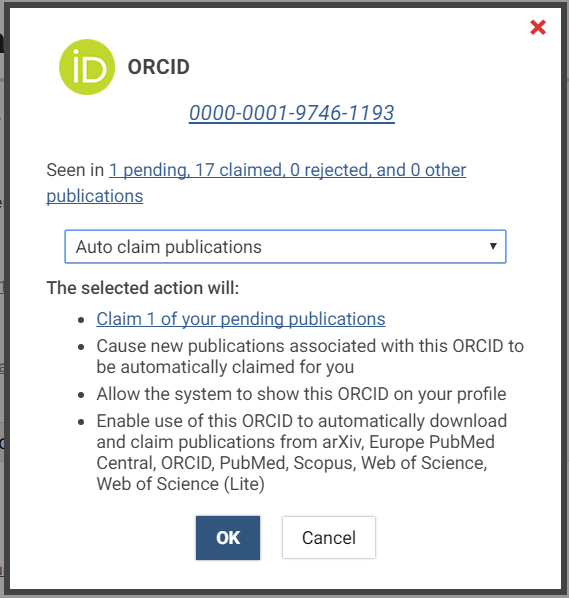
While Elements does enable certain automated processing activities to be performed (such as attempting to match individuals with details of their research activities - see the Collection of Personal Data section above) and is capable of carrying out complex instructions based on decisions made by humans (such as "whenever you see my ORCID ID in a publication's metadata, please register that publication as mine" - see an example below), we do not consider these activities to involve the evaluation of any personal aspect relating to the relevant data subject (i.e. "profiling") nor to be automated decision-making functionality.
Your privacy notice
Various Data Protection legislation requires you as the controller of the data in Elements to inform your data subjects about how you are processing personal data about them. This is often done through a Privacy Notice displayed on a website, although the relevant information may also be provided in other ways (for example, for employees, it may be included in their employment contract).
Elements has a configurable login page and a configurable privacy information page, either of which can be used to display or link to an institutional privacy notice which could include an explanation of how data in Elements is used by your institution.
GDPR data processing agreement
It may be that our contract with your institution needs to be updated to meet the new requirements of the GDPR, which requires certain provisions to be included. We have developed a GDPR contract addendum for this purpose, which is intended to replace pre-GDPR data protection provisions in our customer contracts, and which is available on request.
Affiliates and third parties who may be used to process data
Symplectic may engage the following group and third-party entities to assist us in connection with our products and services, including to provide hosting and infrastructure services and customer and technical support, and which may therefore involve the processing of customer personal data:
Affiliate Name | Location |
Digital Science & Research Solutions Ltd | UK |
Digital Science & Research SRL | Romania |
Digital Science & Research Pty Ltd | Australia |
DS Digital Science GmbH | Germany |
Digital Science & Research Solutions Inc. | US |
Third-party Service Provider Name* | Location | Function |
Freshworks, Inc. | US | Client support |
Slack Technologies, LLC | US | Client support |
Amazon Web Services, Inc. | US (server location may differ) | Hosting |
Hetzner Online GmbH | Germany | Hosting |
OVH US, LLC | US | Hosting |
OVH LIMITED | UK (server location may differ) | Hosting |
Microsoft Limited | UK (server location may differ) | Hosting |
OpenAI, LLC | US | Data processing |
Google LLC | US | Data processing |
*Please note that not all service providers will be used for every customer.
When we bring on a new sub-processor that processes personal information, or we change how we use a current sub-processor, we will update this page. If you have questions or concerns about any of the above, we'd be happy to chat with you. Please contact us at support@symplectic.co.uk
Elements support services
Support for use of Elements is provided to your institution primarily via Basecamp (the Symplectic project management communication portal, mostly used during implementation) and Freshdesk (the Symplectic support site, mostly used after implementation), each of which is an email-based communication platform.
Users of the support platforms should not post or attach any confidential data to them that they would not ordinarily be happy to send by email. Where such data is posted by your institution, Symplectic's policy permits it to be treated as data suitable for subsequent transfer by email in replies from Symplectic.
The recommended way for you to transfer confidential data to Symplectic is via Symplectic's secure FTP servers.