
Repository Tools 2 - FAQ
How does Repository as a Data Source (RT2) work?
RT2 uses your repository as a datasource. Each Repository platform - DSpace, EPrints and Figshare - has different configuration options. To begin, go to System admin > Data sources > Data source management and locate your Repository type from the options available. Then, go to the appropriate support article by clicking on the Setup & usage guide link for guidance on how to configure your RT2 integration.

How does Elements match publications harvested from your repository?
In exactly the same way as it matches publications from any other data source. Therefore, if the author data is correct and sufficiently complete, it will match harvested publications to the appropriate authors. If your repository author data contains author identifiers such as ORCIDs, Elements will use these for publication auto-claiming, as it would for any other data source.
What happens when I withdraw or delete an item from my repository?
The repository status of the record in Elements will be updated appropriately and any files will become inaccessible. The record metadata will remain as it was at the point of removal. Note that in the case of a deletion, record update may take up to a week.
What happens when I merge an item in Elements with repository connections?
You will have two repository records connected to a single Elements object. See the How to Merge article for details on how to handle these situations.
What options do I have to pass embargo information to my repository?
This depends on the version of your repository software and which repository platform you are using. Embargo information can be added as free text passed to your repository from the deposit process. Once the item is in the repository workflow you can apply restrictions which will be reflected in Elements in the Repository Deposit screen and the OA Monitor module.
When a file is restricted in my repository, but the metadata is public, then what should I see in Elements?
The file name will be displayed without a hyperlink. Even when no hyperlink is displayed, Elements keeps a record of the file's URL, which is accessible in the Reporting Database through the [Publication Record File] table.
Under what conditions is a file hyperlinked?
The file is hyperlinked if and only if:
the item's repository status is public (i.e. it is in the Live Archive); AND
the file is also public; AND
the file is not under any embargo
If I make changes to the metadata in my repository will they be updated in Elements?
Yes, you will see the change in the repository data source record. This is controlled by the harvest crosswalk and the differential harvest.
If I make a change to metadata in Elements, will the item be updated in the repository?
For supported combinations of repository and Elements versions, you can configure this behaviour using "automated metadata updates" feature of RT2. Using a "relevance scheme", you can define which changes in Elements metadata will trigger the update process, and what publication metadata will be used to make the update. In addition, a "field authority list" in the deposit crosswalk gives you control over which repository metadata fields Elements is allowed to update, allowing you to protect your curated repository metadata.
Repository platform & version | Minimum Elements version required for automated metadata updates |
|---|---|
DSpace 5.x | 5.16.0 |
DSpace 6.x | 6.9.0 |
EPrints 3.3.15 | 5.15.0 |
EPrints 3.4.2+ | 6.4.0 |
Figshare for Institutions | 6.8.0 |
(version information correct as of Oct 2022)
For details, see Repository Tools 2: Configuring Automatic Metadata Updates including Relevance Schemes
Why is it that when I deposit an item in Elements, only the metadata makes it through to the repository?
Your network or firewall maybe blocking this traffic, or your repository is unable to accept files. Raise a support ticket for assistance.
How often does the harvest occur?
During the initial deposit from Elements to your repository: once the deposit of a publication is complete, the new repository item's metadata is immediately harvested back into Elements as a new publication record alongside the other data source records for that publication.
Full harvest: occurs every 30 days. Harvests all public items from the collections/sets/groups specified for harvest.
Differential harvest: occurs every hour, harvests the latest metadata changes from the specified collections/sets/groups.
N.B. For DSpace, differential harvest is dependent on the OAI index being up-to-date. E.g. if the DSpace OAI indexer is scheduled to run nightly, changes made to items in DSpace will not be reflected in Elements until the following day.
Refetch: occurs on a per-item basis; if the record of a known repository item has not been recently updated, Elements will refresh it with the latest metadata from the repository:
DSpace and EPrints: an item is refreshed after 7 days
Figshare for Institutions: an item is refreshed after 14 days
Is it possible to stop the full harvest, I mistakenly clicked it?
No but you could comment on this feature request: https://support.symplectic.co.uk/support/discussions/topics/6000062954
What causes an Automated Metadata Update to be triggered?
Whenever an publication is re-indexed (e.g. following some change to it or during a full reindex), Elements calculates and stores a hash value for it, using the rules defined in the relevance scheme. If the hash value changes, the automated metadata update process is triggered.
I only want to harvest certain collections/sets/groups. Is this possible?
This is available for the following repositories, via the appropriate option in the Harvest settings on the data source configuration page:
DSpace: "Collections to harvest". Enter the name of each collection on a new line. Use the collection name (not its handle or ID). DSpace communities cannot be entered here, only collections (i.e. the lowest level of the DSpace 'tree').
EPrints: "Sets to harvest". Enter the name of each set on a new line. A list of available sets can be obtained from the OAI-PMH API of your EPrints repository, using the ListSets verb. Enter the setName, not the setSpec.
Figshare for Institutions: "Groups to harvest". Enter the name of each group on a new line.
Elements will then restrict Full and Differential harvests to those collections/sets/groups.
Note that once an item has been harvested by Elements, the regular refresh cycle will continue to update its record even if the item is later moved to a collection/set/group that is not listed in this setting.
In addition, any item deposited from Elements is always harvested back immediately after the initial deposit, regardless of the collection/set/group it belongs to.
Can I add a file to an item after the initial deposit is complete on the Elements side?
Yes: This is available for DSpace, EPrints and Figshare for Institutions. To enable this feature, check the "Allow redeposit" configuration setting for the data source in System admin > Data sources > Data source management.
The exact behaviour of the redeposit operation depends on the repository platform and version. The following is correct for the latest version of Elements at the time of writing (version 6.11, Feb 2023):
DSpace 5/x.6.x
Files added to an item will be embargoed (i.e. have all resource policies removed).
If the item is in the workspace, it will be resubmitted to review (or to the public archive if there is no review step).
Optionally, item-level metadata can be added at the time of redeposit via a special field map in the deposit crosswalk.
DSpace 7.x
Files added to a live, in-archive item will be embargoed (i.e. have all resource policies removed).
Files added to non-public items will be added with the default resource policies for the item.
EPrints
New files will be added to the EPrints item as restricted files (document/security = "staffonly").
The format description of the added files (document/formatdesc) will contain the following text:
"Added by {depositor full name} in a redeposit operation from Symplectic Elements".
Figshare for Institutions:
Figshare embargos are set at the item level - if the item has an embargo in place, it will apply to the new file(s) as well as the pre-existing files.
If a review process is in place, the redeposit will trigger the review process for the revised item with the new file(s) attached. The previous version (without the new files) will remain public until the new version is approved by a reviewer.
If there is no review process, the new files will be added to the public item immediately.
For all platforms, it is not currently possible to include OA Location, change the reuse license or embargo period via re-deposit.
Can I delete a file from an item after the initial deposit is complete on the Elements side?
At the time of writing (Feb 2023), repository files cannot be deleted via Elements RT2. Instead, files should be deleted in the repository; RT2 harvesting will then update the Elements record to reflect the change in the repository.
UPDATE: This feature is marked as "planned" in this thread on our feature request forum. Please follow the thread for the latest updates and to contribute to the discussion around the implementation of this feature.
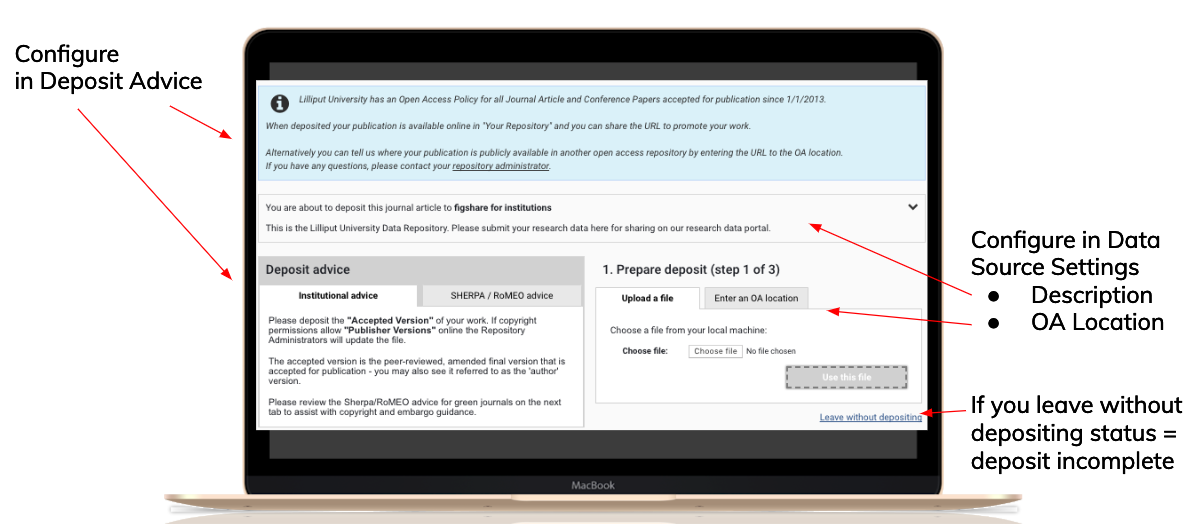
Where do I change configuration to show Guidance text, Deposit Advice, OA Location in Step 1 of the deposit process?
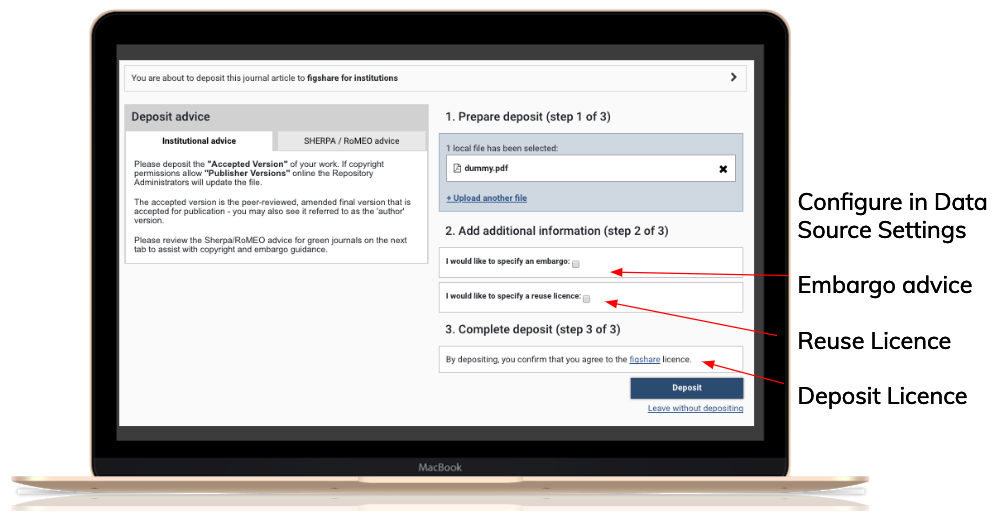
Where do I change configuration to show Embargo, Reuse licences, and Deposit Licences in Steps 2 and 3 of the deposit process?
Which APIs are used during deposit to DSpace?
Deposit to DSpace 5.x and 6.x uses a combination of the DSpace SWORDv2 and REST APIs:
SWORDv2 call to create the item
REST call to add item metadata
REST call to add each file
SWORDv2 call to close the deposit
Deposit to DSpace 7.x uses the (new) REST endpoint exclusively:
REST call to create a new workspace item
REST call to add item metadata
REST call to add each file
REST call to grant the deposit licence
REST call to submit the item to review/live archive (depending on DSpace configuration)
When I process deposits or make updates in the repository this is not showing in Elements - why?
This is controlled by background processes, there is a delay while these are updated. You can force an instant refetch - in the author's publication list, switch to Detailed view, find the publication and click on the Full text tab. This will prompt Elements to refresh the record with current status and data.
Can I restrict which publication types are deposited?
Yes (from Elements 6.5.0). On the repository's data source management page, in the deposit settings select "Manage depositable types" and use the checkboxes to determine which publication types users are allowed to deposit.
Am I able to modify the file version text that is available to select during deposit?
Yes, for the DSpace, EPrints and Hyrax integration. Starting with Elements 6.8.0, admins can configure the dropdown list of file versions that users select from when depositing.
For all versions:
You can turn off the file versions dropdown so that users are not prompted to describe their files during deposit.
You can freely alter the file versions used for determining OA compliance in OA Policy Settings (i.e. the file versions harvested from the repository are not necessarily limited to the file versions available on deposit).
Note: For Elements versions up to and including 6.7.0, the RT2 file version dropdown list is a fixed set of four options.
Note: File version is not used in the Figshare for Institutions integration.
What part do mandatory fields play in RT2?
In Elements, mandatory fields are enforced in the input forms used to create or edit manual record metadata. When creating or editing a manual record, you won't be able to save it until the required fields are entered.
Mandatory fields are not enforced for publication records harvested from third-party data sources or imported via the API. It is therefore possible that publications without a manual record may not have a value for a mandatory field.
Therefore, if your repository has mandatory metadata fields which must have a value on deposit, it is possible that there may be no value for the corresponding Elements field, even if it is configured as "mandatory". In these cases, you could (a) customise your deposit crosswalk to supply a default value and/or (b) train your users to always create a manual record before depositing.
Can Elements provide Open Access files from external sources?
Yes. For deposit to DSpace and EPrints, you can allow depositors to deposit using open access files from ArXiv and Europe PubMed Central (EMPC), if they are available.
The Open Access Monitor allows you to filter by Full-Text available, to see which items have available open access full text copies.
How does Object Privacy in Element affect the Repository Integrations?
The crosswalk framework now allows institutions to optionally include the object privacy setting in their crosswalks if desired.
The Deposit Crosswalk does not automatically exclude non-public data.
The relevance framework for RT2 metadata updates natively prevents any metadata associated with non-public objects from being pushed to the repository.