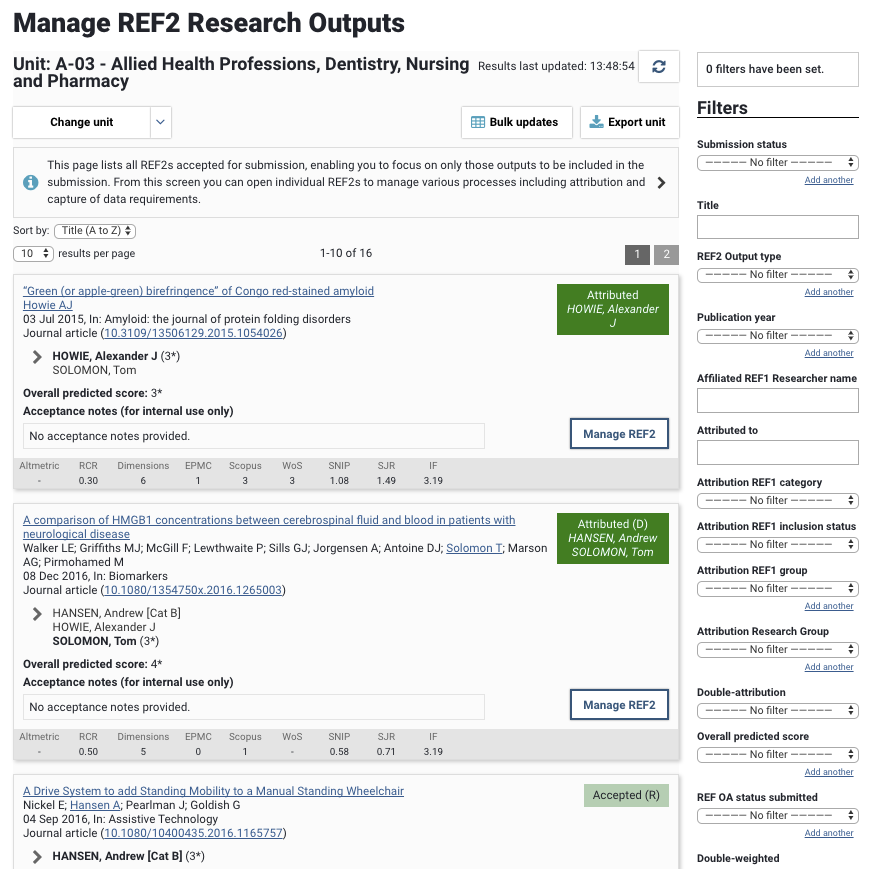
Manage REF2 Research outputs screen

Released : 5.16
Updated : 5.17, 5.18, 5.19, 5.20 (and 5.20.0.2803), 5.21.0.2804, 6.0.0.2805
Manage REF2 Research outputs screen
Accessible from the Manage Selections and Manage Units screens, the Manage REF2 Research outputs screen lists all REF2 outputs accepted for submission, enabling you to focus on only those outputs to be included in the submission. From this screen you can open individual REF2 records to manage various processes including attribution and the capture of data requirements.
Filters available include (list is not exhaustive):
Submission status
Overall predicted score
Attribution REF1 category
Attribution REF1 inclusion status
Attribution Research Group
REF2 Output type
REF OA status
Double-weighting
Pending
Reserve
Interdisciplinary, Forensic science, and Criminology identifiers
COVID-19 delayed
REF2 data confirmation workflow
You can navigate to the Manage REF2 Research Outputs screen for any Unit you have access to via the 'Change unit' drop down.