
Symplectic Elements v6.6 - Release Notes
Elements Version 6.6
Introduction
Welcome to Elements v6.6, our final release for 2021!
As we come to the end of another busy year, we’ve been working hard to bring you even more functionality to help you to build a rich and comprehensive picture of your organisation’s research data.
A lot of what Elements is designed for is to help ensure that your researchers get full credit for all of their work, and this release is no exception. We have expanded the Elements Impact Module to allow you to capture a wider range of impact-related data than ever before, going beyond traditional research metrics to unearth the real-world stories of how your research is contributing to wider society.
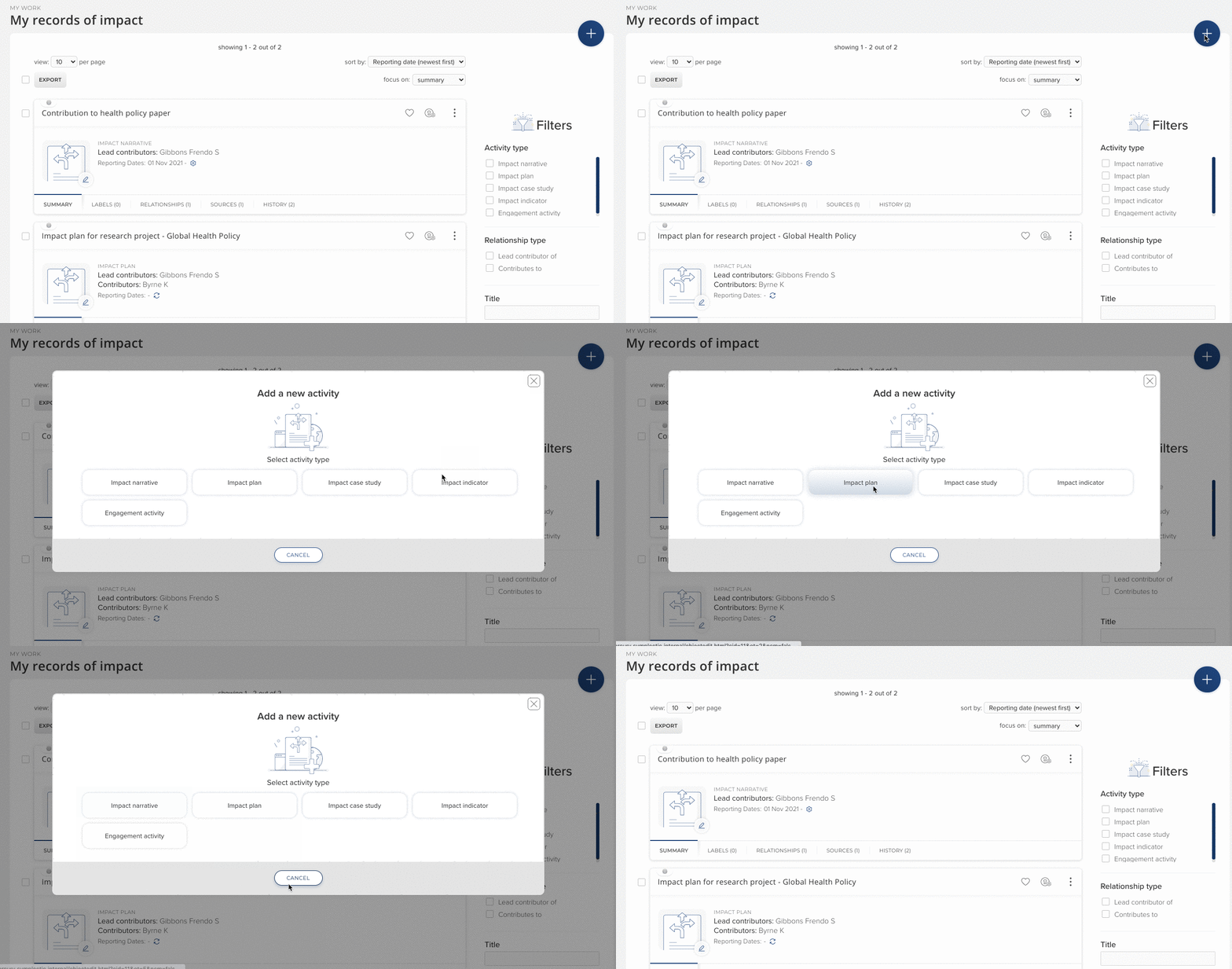
Image: A user choosing to add a new record from the new range of stock impact types.
As you know, we seek to streamline the Elements data collection as much as possible, saving researchers time by reducing manual entry. Following feedback from the community, we’re pleased to be introducing the ability for faculty and researchers to create professional & teaching activities by copying existing items. This pre-population process ensures they can add records about similar activities quickly and easily, reducing the need for repetitive manual entry.
We have made a number of enhancements to the Discovery Module in response to feedback from the Elements community and to help ensure that the Discovery Module continues to offer organisations a contemporary public profile solution which is both easy to use and manage. Improvements in this release include updates to the display of editorships, enhancements to the Discovery mobile and desktop experiences to refine the search controls and improve readability as well as additional branding configuration options to allow organisations to strengthen the visual identity of their Discovery instances throughout the search process.
We have also continued to grow our new Research Funding Solution in this release, with new functionality across the funding lifecycle. If you missed it earlier in the year, you can catch up on our introductory webinar for the Research Funding Solution here to find out how it builds upon Elements to let you promote upcoming funding opportunities, develop proposals collaboratively, configure review and approval workflows, and manage reporting and post-award activities - all in one centralised space.
We were glad to see North American friends and colleagues (albeit virtually!) at our user group in October. All the recordings are available here or on the Symplectic Figshare - including sessions on how to track SDGs in Elements, an introduction to new privacy features, an overview of how Elements reads from/writes to Figshare as a downstream data repository, and wonderful client showcases from Boston University and Oklahoma State University. Our thanks to those that presented.
As always, the new version of Elements and associated upgrade instructions can be found in the Elements upgrade forum.
We wish a restful and healthy festive season to all of those celebrating, and hope very much to be able to see some of you in person in 2022!
Capturing a wider range of impact than ever before
Over the last five years, recording and understanding the ways in which research is having an impact beyond academia has become a vital task for many organisations. More funders, government bodies and organisations than ever before are seeking to go beyond the confines of traditional research metrics to unearth the stories of how their research is contributing to the wider world.
Since its introduction, the Impact Module in Elements has been used by many organisations to capture records of impact, build narratives about impact-related activities, and collect related evidence. Once collected, this data can be drawn on for internal reporting and analysis, external assessment activities (such as REF or ERA) or developed into public interest stories for communicating to the media and wider world.
In this release we’ve significantly enriched and expanded the Impact Module, adding greater flexibility to allow organisations to further tailor the data collection process to their needs while also empowering researchers and administrators to capture a wider range of types of impact data than ever before.
New impact stock types
It can take a long time for research to lead to impact, and much of the evidence which emerges throughout the pathway to impact can be ephemeral and difficult to find if it isn’t captured at the time. Our new stock impact types will allow organisations to build up a richer library of impact data over time, ready for administrators to be able to help their researchers map and understand their pathways to impact. The new stock types include:
Impact plan - Capture information about the intended impact of a piece of research and the activities planned to reach those goals.
Engagement activity - Record public engagement activities as they occur, and monitor the success of different kinds of engagement activities by linking them to impact indicators as they arise.
Impact indicator - Track indicators of possible impact, such as mentions in policy papers, notable reviews or key industry engagements. While it isn’t always possible to know at the time whether those indicators on their own will represent impact, capturing them as they arise will ensure they can be drawn upon later to inform impact narratives and case studies as the wider impact of the work are understood.
Impact narrative* - Record a narrative of events describing the impact of a piece of research. Impact narratives may link together multiple impact indicators and engagement activities and be drawn upon for the development of impact case studies.
Impact case study - Many organisations are now developing impact case studies that summarise and showcase the impact of their researchers. This new stock type allows records relating to those case studies to be added to Elements so they can be linked to associated researchers and research outputs/activities to support analysis and data reuse.
*Note: Existing ‘Records of impact’ will be mapped to the new ‘Impact narrative’ type
These new impact types all enable researchers and administrators to capture evidence, add labels, and link to other objects in Elements. They also contain an expanded set of stock fields and can be configured with additional custom fields if desired. On upgrade, the new types are enabled for the whole organisation by default.
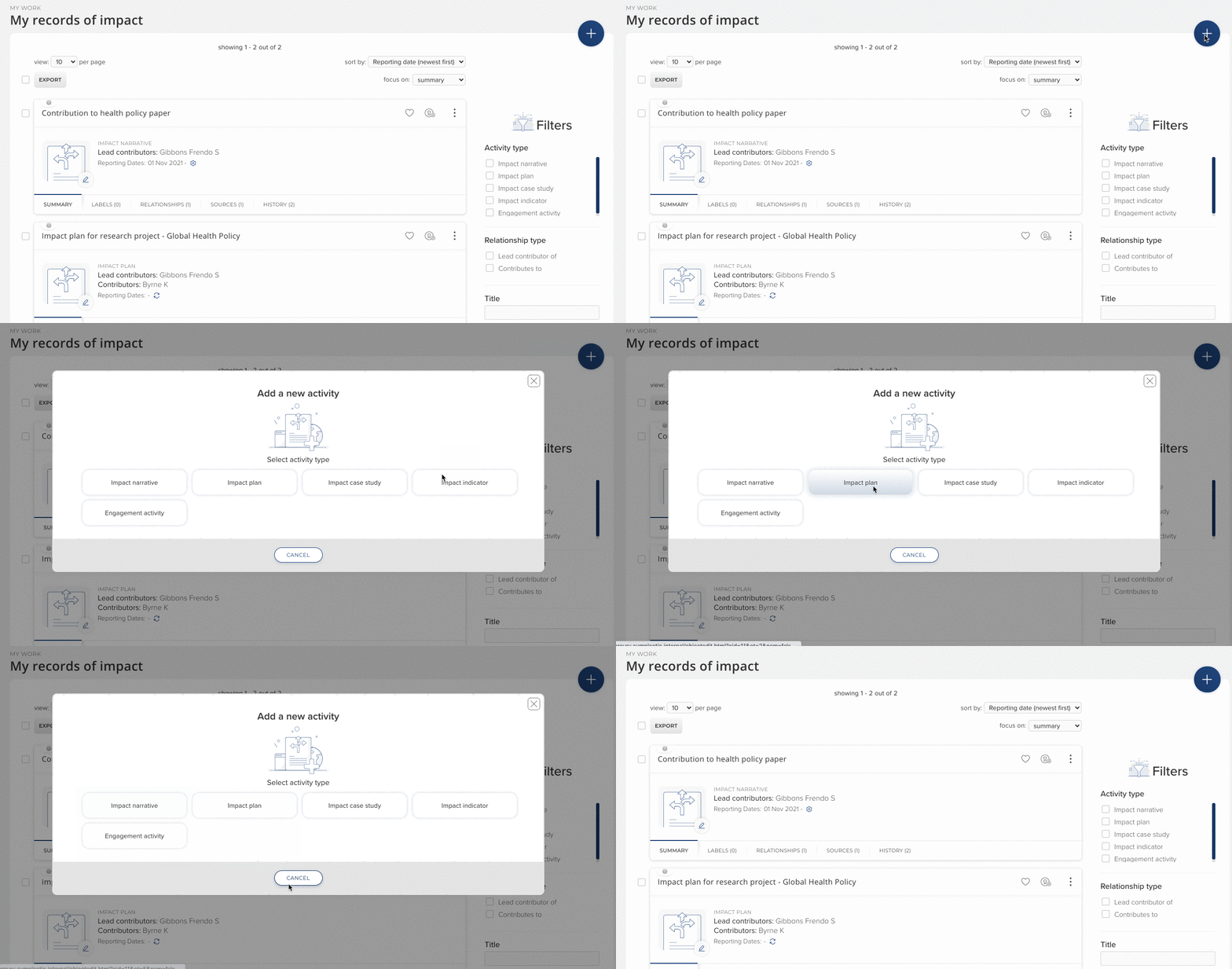
Image: A user choosing to add a new record from the new range of stock impact types.
Introducing custom types and fields
To give your organisation complete control over the data being captured, we have also introduced a configurable data model for the Impact Module, with support for custom types and fields. Building on the model used elsewhere in Elements, administrators can now shape the data being collected by adding custom fields (using a range of validated underlying field types) or entirely custom types tailored to your organisation’s needs. Consistent with our other data categories, administrators can now also define configurable guidance text per field and set whether each field should be mandatory.
Start Dates, End Dates & Reporting Dates
In recognition of the importance of dates for reporting purposes, we have introduced support for Reporting Dates in line with the functionality already available for all other data categories, and all stock types now include Start and End Dates by default. Additional custom fields can be added via the custom field functionality.
Ability for administrators to lock Impact records
At some organisations, specialist administrators work alongside researchers to support the development of impact narratives and impact case studies.
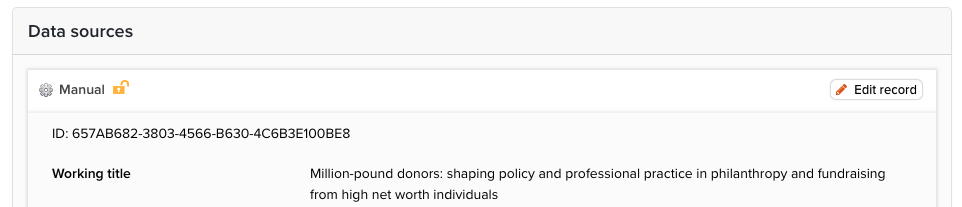
Image: Administrators can click the lock icon to prevent edits to Impact records
In recognition of this work, we have introduced a new feature to the Impact Module which allows administrators with an appropriate role to lock an Impact record, preventing users from being able to edit it. This will allow administrators to add authoritative Impact Records (eg. REF impact case studies) with confidence that they cannot be changed.
Introducing configurable object privacy
Users often wish to keep research impact information confidential, developing it in a private space or being selective about what is appropriate for sharing more widely. For this reason, the Impact Module was first implemented with privacy ‘locked’, so that information could only be private.
However, feedback from our community indicates that there is an increasing desire to allow some types of Impact records to be more discoverable, either internally or via a public portal. To support this, we have updated the Impact Module to bring it in line with other data categories, offering the full object and relationship privacy model used elsewhere in Elements.
As per other data categories, the default and permitted privacy levels are configurable by the organisation so that you can tailor the privacy strategy for this module to your needs. To ensure that data is not accidentally made more public than is appropriate, upon upgrade the category-level default will be set to private, and user-editing permissions switched off. You will then be able to configure the privacy settings as desired via the module settings page.
To learn more about object privacy, please see the Support Site and contact support@symplectic.co.uk if you have any questions.
Configurable module display names
To give organisations greater ability to position the Impact Module in line with the data you seek to collect, we have extended our configurable module display name functionality to include the Impact Module. This functionality sets a ‘display name’ within the Elements UI so that you can decide how the data category will be described across Elements. Please note, this will not change how the module is referenced in the Reporting Database or API.
We are launching this new functionality with a set of four new name options:
Records of impact
Engagement and Impact
Impact and Engagement
Pathways to impact
Changes to more accurately capture contributor data
We’ve made adjustments to how information on contributor data is captured for Impact records to help with the creation of relationships between users and their Impact records.
The existing ‘External contributors’ field has been replaced with a ‘Contributors’ field that can capture both internal and external contributors. The field resolves to the ‘contributors’ link type, meaning that if an Elements user is added to this list, a relationship will automatically be created between the research impact and the contributor. Additionally, we’ve added a new ‘lead contributors’ field which behaves in the same way. For any existing Impact records, all data within the existing external contributors field will be automatically rolled over to the new Contributors field upon upgrade. You may wish to supplement this with internal contributors in due course.
Please note: This change has meant that we have renamed this field in the Reporting Database. Any custom reports that use this field will need to be adjusted. All stock reports have been updated and will continue to function as normal.
Adopting the enhanced Impact Module
This release introduces quite a significant suite of enhancements to the Impact Module with significantly greater flexibility for how you may wish to adopt and use the module. This provides an opportunity for you to review your use of the module and develop an approach to capture and track information on impact in a way that best suits your organisation’s requirements. Further information on Impact Module settings can be found on the support site. If you would like some guidance about these changes or to discuss how your organisation can make the most of the Impact Module please contact our team via support@symplectic.co.uk.
Save time by copying professional and teaching activities
Researchers often carry out similar professional and teaching activities over time, such as teaching the same course in different terms, delivering similar presentations at different events, participating in similar boards or committees or even giving the same interview to multiple media outlets.
In response to community feedback and to reduce the need for repetitive data entry, we have added new functionality which allows researchers to copy their existing professional and teaching activities as the basis of creating a new record. When a user clicks ‘create copy’, Elements will generate a manual entry form pre-populated with all of the metadata from the existing item. The user will then be prompted to edit the record before saving it.
To ensure that the correct set of existing relationships are copied, users will be presented with a list of all existing relationships to the copied item, allowing them to select which should be recreated on the new object.
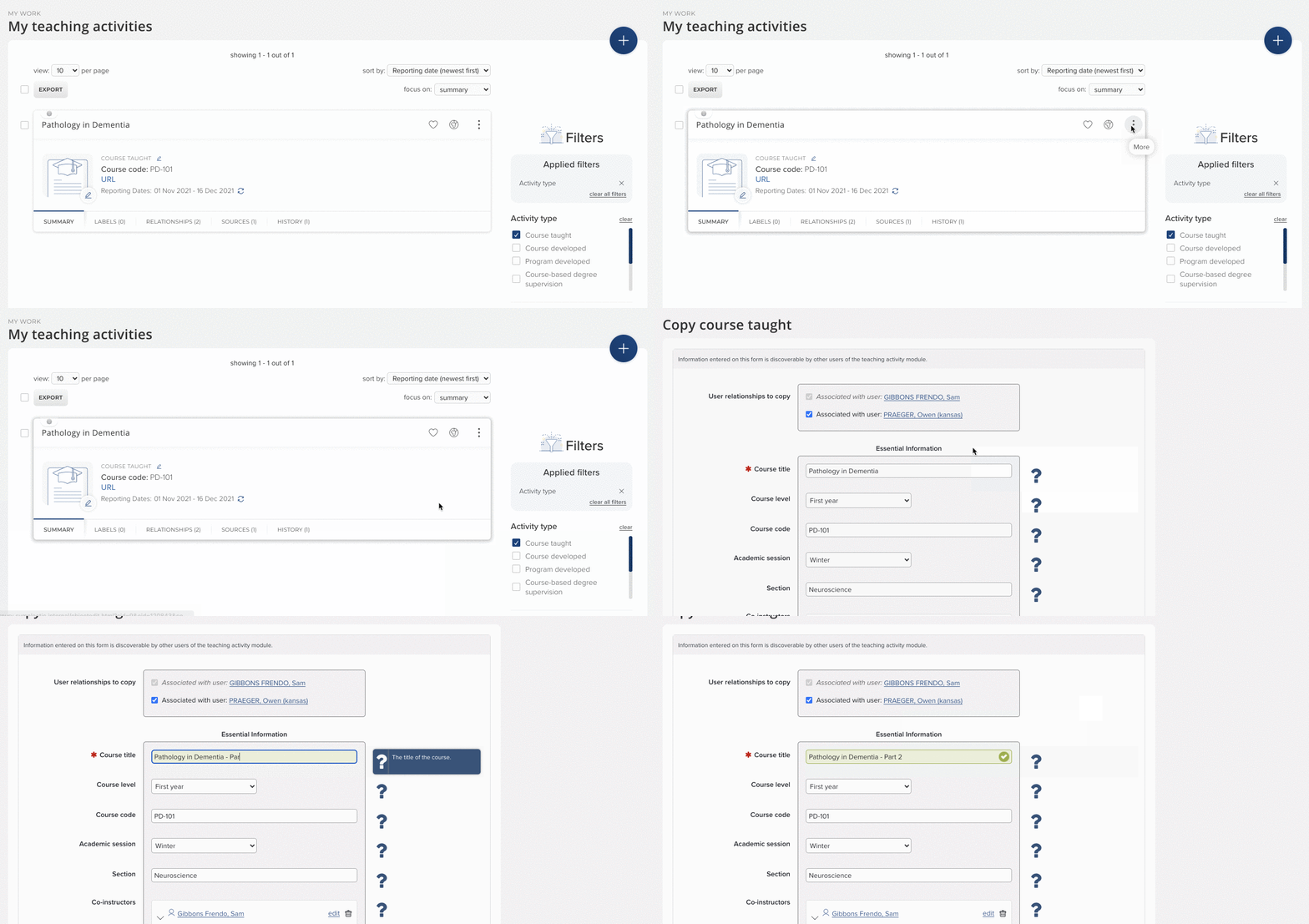
Image: Users can copy Professional Activities and Teaching Activities at the click of a button, allowing quick and simple data entry
To minimise the risk of creating duplicate records, Elements requires users to edit the new object in some way before they can save and create the new object. In addition, to help track the use of this functionality for audit and data management purposes, we have introduced a flag into the Reporting Database to identify Professional and Teaching Activity records that have been created via this method. The history section will also clearly indicate when an object has been created by this method and will include a reference to the copied object.
On upgrade, this functionality is enabled by default. However, it is possible to choose to switch off the functionality at a category-wide level for either Professional or Teaching Activities if desired via the category settings page.
Discovery Module enhancements
In this release we have made a number of smaller enhancements to the Discovery Module in response to feedback from the Elements community. These changes all help to ensure that the Discovery Module continues to offer organisations a contemporary public profile solution which is both easy to use and manage.
Enhancements to the Discovery search experience for Mobile and Desktop
We have made several enhancements to the Discovery mobile and desktop experiences to refine the search controls and enhance readability. We have also expanded the branding configuration options to allow organisations to strengthen the visual identity of their Discovery instances throughout the search process.
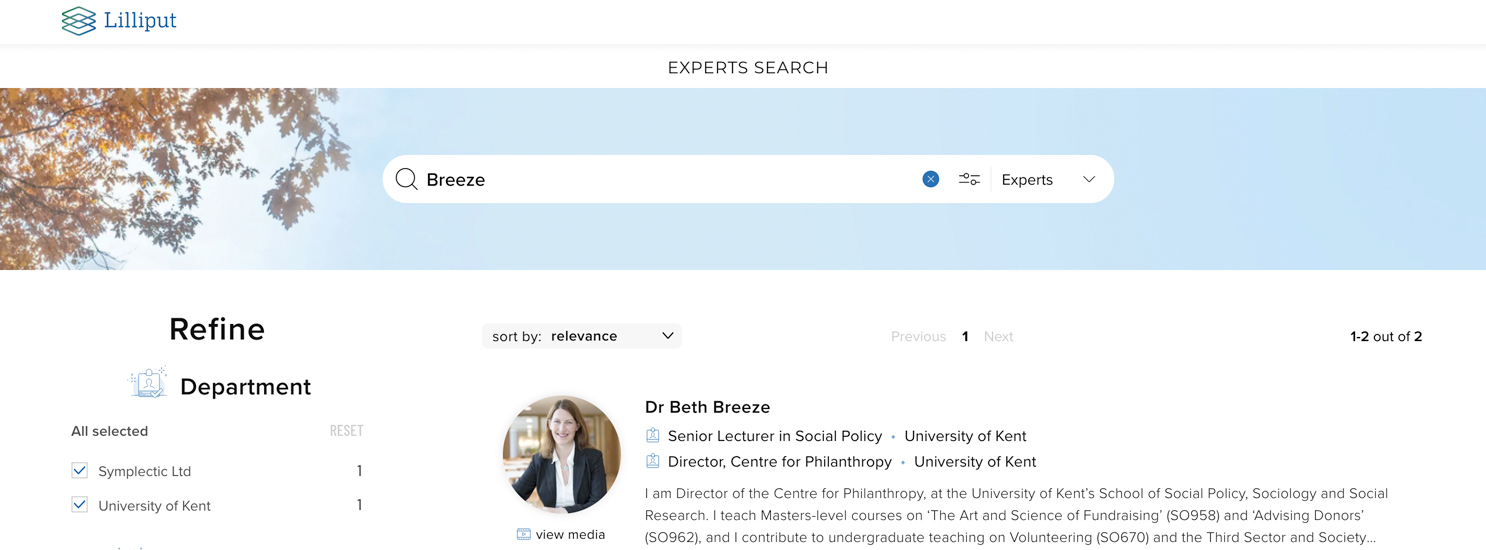
Image: The image from the Discovery homepage can now optionally also appear behind the search bar on the search results page.
These enhancements include:
Labels applied from schemes used as custom filters will now display on the search results stub for each Profile to help visitors to the site find relevant experts and/or equipment.
The UX of the main search box has been updated to encourage use of the search mode selector and make it easier for visitors to switch between free-text and tag search modes.
The sort controls have been updated to improve the user experience and allow users visitors to more easily sort items in search results and on profile tabs.
A new branding configuration option has been introduced to allow organisations to choose to display the home page image behind the search results bar, strengthening the visual identity of the Discovery instances through the search experience.
The Discovery Mobile experience has been updated to both bring it in line with recent updates to the desktop interface as well as to increase readability on small screens. This includes updates to the branding in Mobile mode to ensure that Discovery offers a distinctive experience that also meets accessibility recommendations.
Displaying editor relationships for publications
In response to community feedback, we have updated the display of publications within an expert’s profile to highlight any editors associated with that work. This will help to ensure researchers are getting appropriate recognition for their work. If a researcher is listed within the publication’s metadata as an editor, their name will now be displayed in the person list with the term 'editor' alongside it.

Image: An example of a publication with two authors and an editor.
Please note that information about editors will only be displayed if they are listed in the metadata for the highest precedence data source for the publication. As not all data sources supply this information you may at times need to add this information via a manual record for it to appear.
Highlighting how profiles are related to Equipment
We have also updated the new Associated Profiles tab on Equipment profiles (added in v6.5) to display the way in which each profile is related (eg. team member, manager, etc) to a piece of equipment or facility informed by the link type linking the user to the equipment object within Elements.
This additional metadata will ensure that visitors to your Discovery site can easily identify the most relevant experts for a given Equipment, Service or Facility, creating new opportunities for collaborations and engagement.
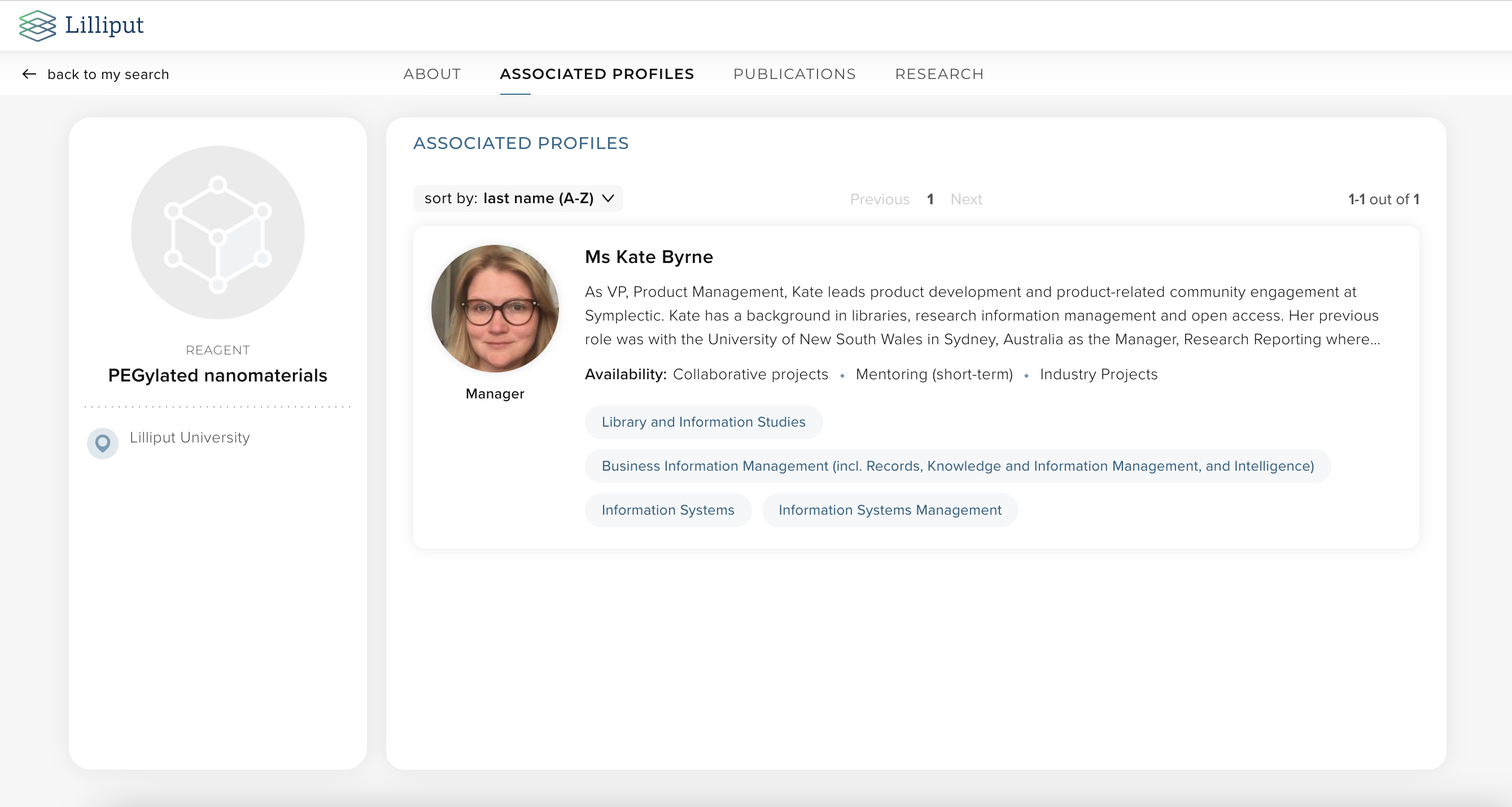
Image: The user’s relationship with a piece of equipment is now displayed on the Associated Profiles tab
Streamlining the management of data configurations
As a part of our commitment to ensuring that configuration management is as streamlined as possible, we have updated the Discovery Module settings page to allow administrators to control which types of data should be pushed to the Discovery Module. Previously these configuration settings were located within the Discovery Module configuration file and required a request to the Symplectic team to edit them.
This new section also provides a collection of helpful links to other relevant settings within Elements to assist administrators seeking to configure which data will appear on Discovery.
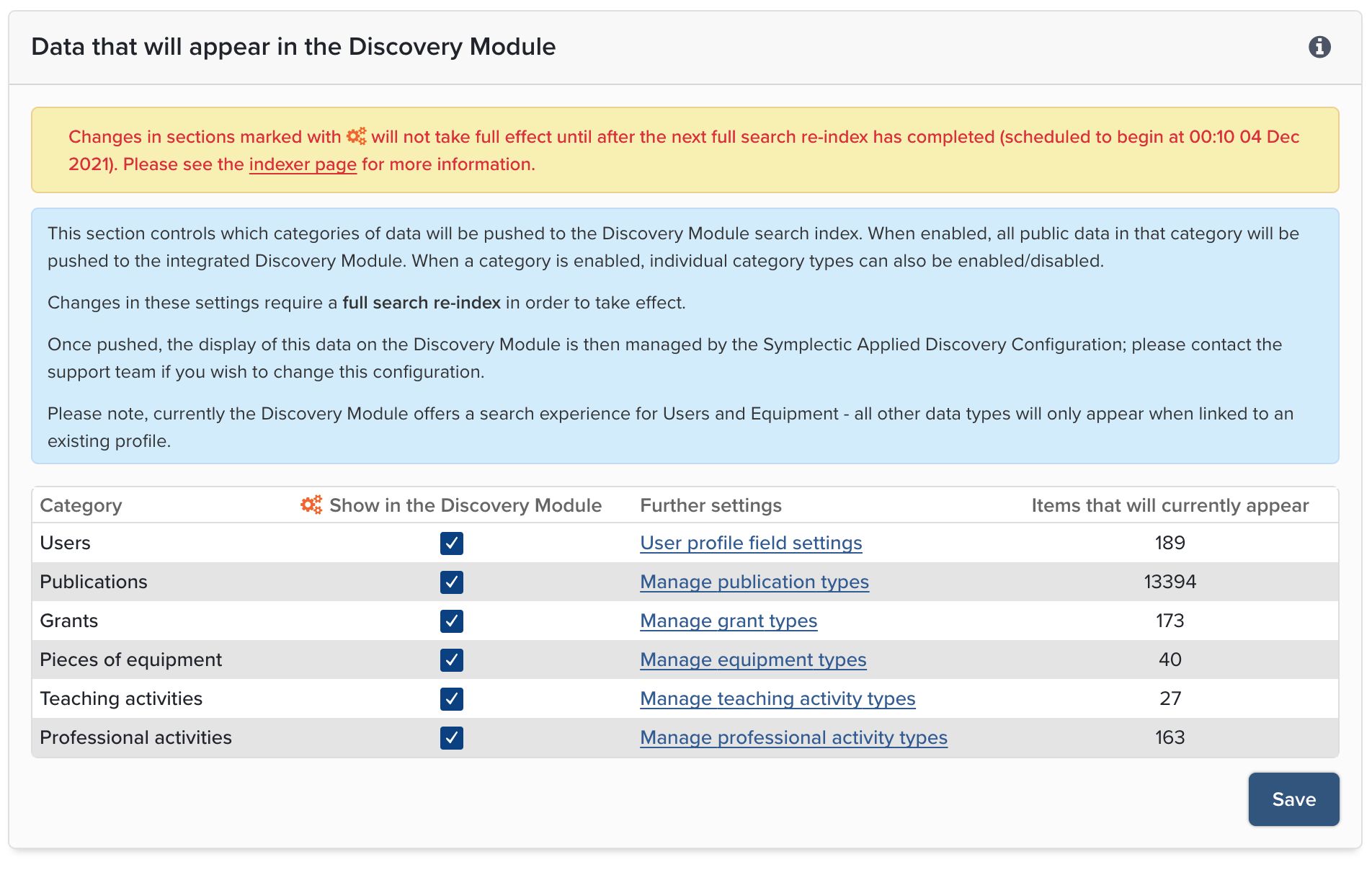
Image: Administrator(s) is now able to control which categories of data will appear on the Discovery Module.
Research Funding Solution
Our Research Funding Solution (RFS) continues to grow, and in this release we are pleased to introduce new functionalities supporting various aspects of the research funding lifecycle. As with previous releases, the full details of the RFS functionality released in v6.6 are available in the RFS release notes on our support site.
Highlights from this release include:
New functionality to allow administrators to choose to share certain Funding Opportunities with only individual users and/or specific groups.
The release of the RFS API for organisations to begin to use for integration purposes.
New functionality to enable administrators to apply classification schemes to Organisations via the RFS Management Console (for example classifying funders by statutory reporting classification schemes such as for the PBRF).
Improvements to processes relating to capturing funder submission and outcomes.
Other improvements
On the Elements Profile Page users can now set the privacy level of locked profile fields (e.g. fields where data is being fed from an external system).
Updates to the Elements Profile Page to improve layout and enhance accessibility.
We have updated the object thumbnail image uploader, introducing a new slider to adjust the zoom and to better guide users in relation to image placement.
Adjustments to the ORCID write integration to better represent journal publication status.
Improvements to the layout of the User profile field settings page.
Reporting Date 2 will now resolve to the end of the month/year when mapping an incomplete date (e.g. Mar 2021) to a three-part date.
Effective relationship privacy levels are now available via the Elements API.
Fixes
Profile pictures on the Manage Links page were being distorted. This has been fixed.
End of Support
As always, we recommend that you regularly review our End of Support Announcements for information about upcoming end of support in Elements for various technologies.
Learn more about the release
We hope you enjoy getting to know the latest version of Elements. Remember should you have any questions, we’re here to help! Just contact us at support@symplectic.co.uk for assistance.
Best wishes,
The Symplectic Team