
Symplectic Elements v6.11 - Release Notes
Symplectic Elements Release Notes Dec 2022 v6.11
Introduction
Welcome to Elements version 6.11, our final release for 2022!
Throughout this year we’ve delivered 5 releases packed with new features across the system including significant enhancements to the Assessment Module, Open Access functionality and repository integrations, the Impact Module and the Discovery Module. So much of this work has been enabled via our engagement with the community and our user research programs. We would like to say a big thank you to everyone who has taken part!
In this release we’ve continued our focus on enhancing and streamlining submission and review processes in the Assessment Module. Building on the UX improvements introduced over the last few releases, we have made updates to the Module adding new functionality to improve and streamline the experience for both administrators and researchers. This includes new capabilities to pre-populate lists, display our newly-added Annotations capability within Item pages, and to add missing items directly within an exercise, as well as new configuration options including new bulk reviewer assignment functionality.
For organisations using Fields of Research (FoR) 2020 classifications, we’ve significantly streamlined capturing this data with new automatic labelling functionality from Dimensions as a data source, as well as from the ERA 2023 journal list.
In a small but important change, we have introduced a new configuration option which allows users to add pronouns to their profiles within the Account Settings page, ensuring researchers and administrators can choose how to represent themselves.
For Research Funding Solution we have continued to expand our finance system integration with Finance systems in order to enable project set-up and cross-pollination of data. We’ve also made a number of improvements to review & approval functionality, introducing automatic assignment of reviewers or reviewer groups and streamlining the review dispatch process.
This release also includes some updates to our Web of Science Expanded API integration which we have redesigned to adapt to changes in the API to address the throttling issue some clients have been experiencing.
We have also made many other improvements to Elements, many of which were based on feedback and requests from our community. Once again, we would like to thank you for your continued engagement and contributions as a part of the amazing Symplectic community. It has been a pleasure working with you all throughout 2022, and we look forward to continuing to do so in the new year.
As always, the new version of Elements and associated upgrade instructions can be found in the Elements upgrade forum.
Extensions to the Assessment Module
In this release, we’ve continued our work in the Assessment Module to help organisations to further streamline their review and evaluation processes. Annual reporting processes can often feel burdensome, stressful or overwhelming to those fulfilling them. We want to ensure that the Assessment Module can help organisations make the process as easy as possible, so in this release we’ve focussed on adding new functionality which makes it even easier for researchers to complete their submissions.
We’ve also made a number of improvements to the reviewer and administration experience to provide a clearer user experience and to make the experience of configuring an Exercise simpler and quicker.
Pre-population of lists
Lists are a key part of the Exercise form, allowing researchers to select which of their outputs and activities should appear in their submission. Once their works are captured in Elements, researchers can add an item to a list at the click of a button, ensuring there’s no need to waste time re-entering metadata. The Assessment Module allows administrators to define the eligibility criteria for each list: limiting by type, start and end date and to optionally set a minimum or maximum number of items which can be selected. This allows organisations to tailor the information captured in the exercise by creating lists for specific purposes. For example, you could configure a list which asks researchers to submit a list of just their journal articles from the last academic year.
In order to make it quicker and easier for users to complete the Exercise form, Elements now offers a new configuration option which allows you to set lists so they will be automatically pre-populated with all eligible items when the user starts their Exercise. This new functionality is particularly useful where an organisation wants to ask researchers to include all of their outputs or activities from a particular time period in their submission, as it will save researchers time selecting their works, so they can focus on reviewing and refining the list and any supporting information.
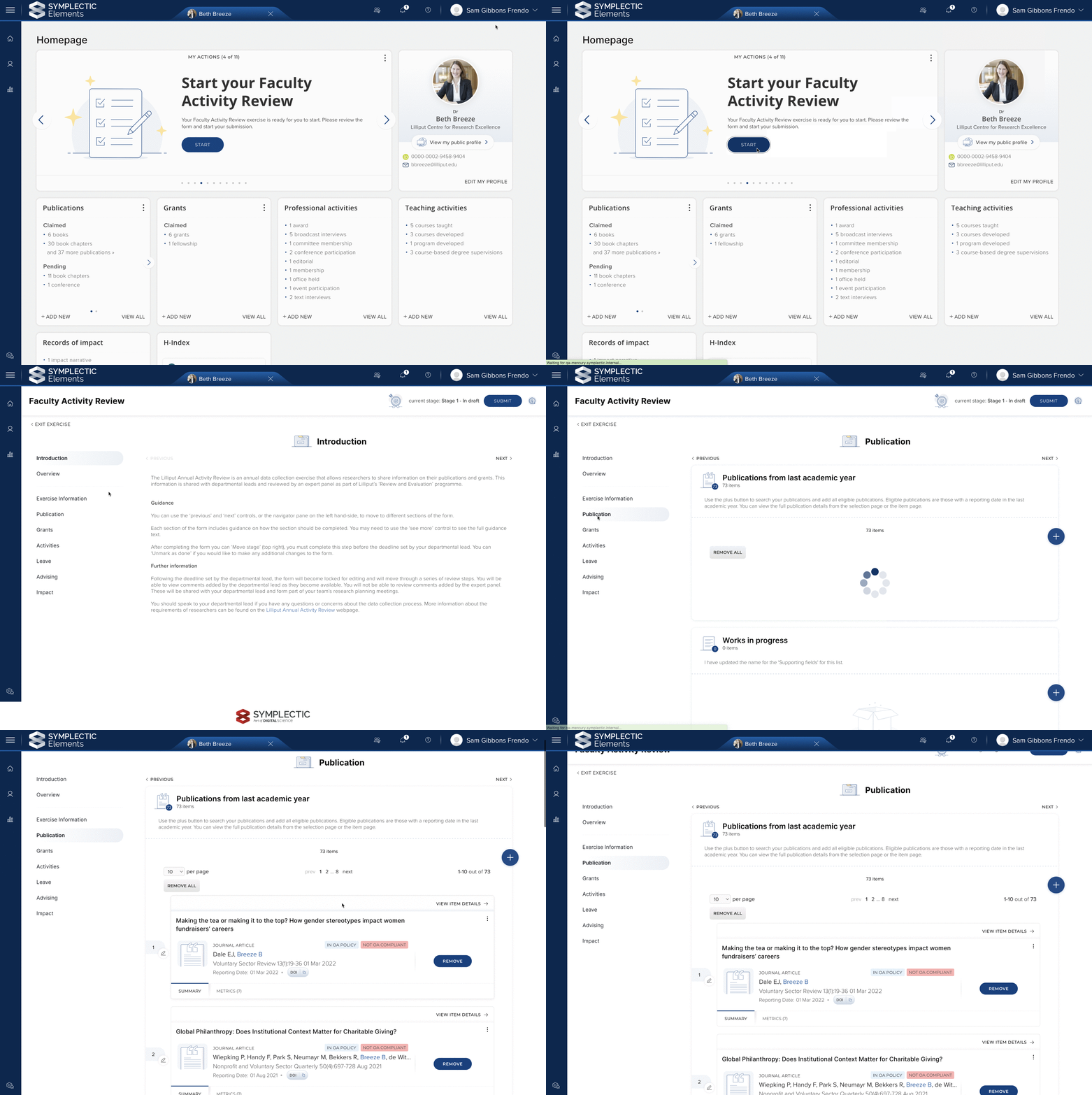
Image: Lists can be pre-populated with eligible items when the user starts their Exercise.
Users can still make any adjustments they wish to the list, adding new items or adjusting the sort order prior to submitting the form. Lists are only populated at the start of an exercise, ensuring that user changes will never be overwritten by the system.
Add missing outputs and activities from the Assessment Module
The ability to add existing outputs and activities makes completing an Exercise quick and simple. But what if they don’t yet exist in the system? Previously, it was necessary for users to navigate away from the Exercise form in order to add missing outputs and ensure that everything was included. This release makes it possible to add a new eligible output or activity directly from the Exercise form itself, saving time and keeping the user within one contained workflow. These new works are also automatically added to the user’s profile, making them available for reuse across Elements.
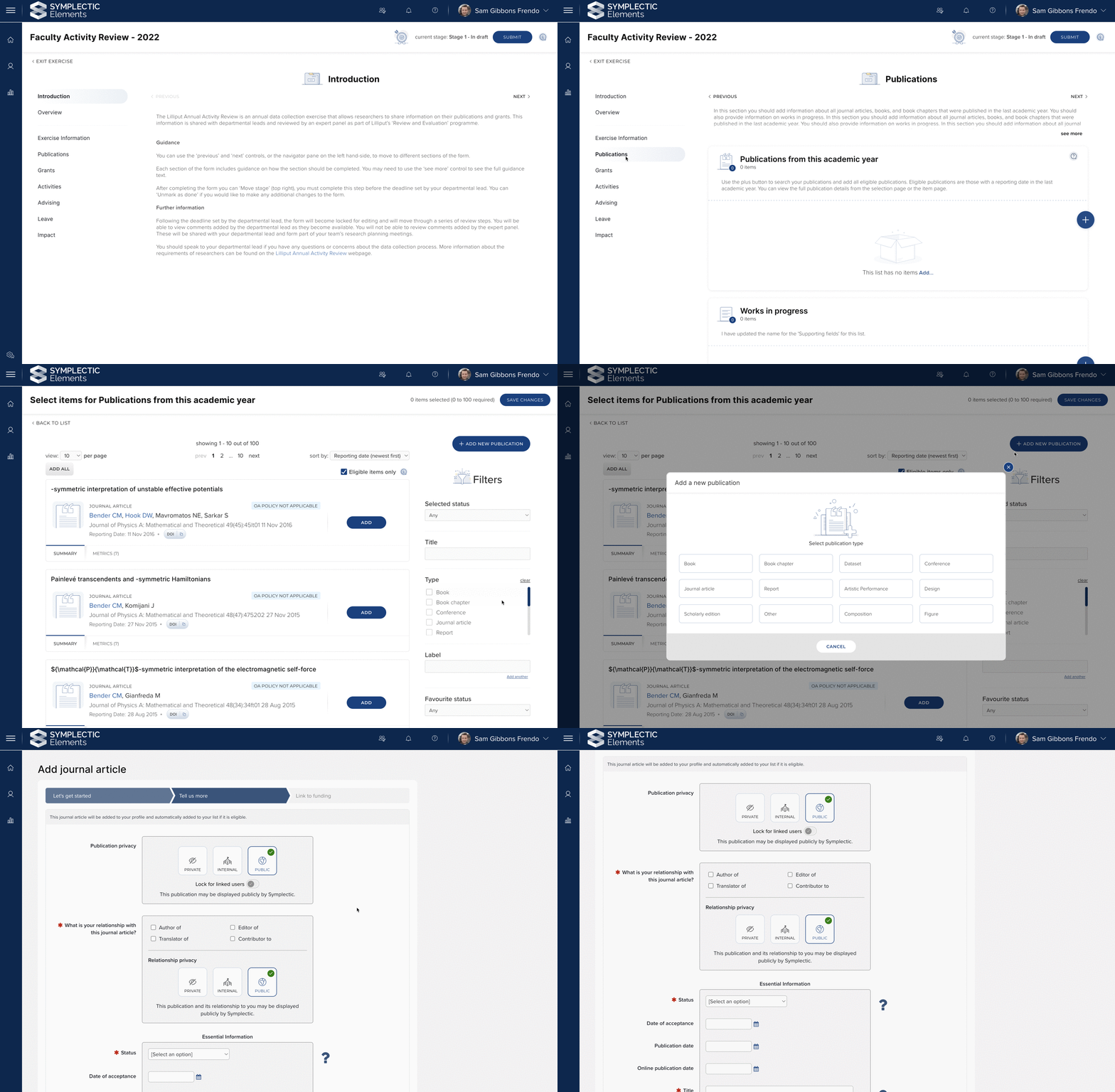
Image: Users can add new outputs and activities from the Assessment Module. In addition, the edit page now provides the ability to set the object and relationship privacy levels (see below).
Display annotations on the item page
Introduced in the version 6.10 release, Annotations allow researchers to more readily capture contextual information on their contribution or relation to research items within Elements, such as publications, grants, or non-standard outputs. This new functionality allows organisations to capture rich information about their researchers’ efforts in a reusable way, ready for rapid reuse during faculty reporting or promotion & tenure activities to ensure that researchers get credit for all their work.
We have now extended the Assessment Module so that Annotations can be displayed on the item page, making the information more prominent for researchers and reviewers. This means that users only need to add this information once and can then reuse it across multiple Exercises. Administrators can control whether or not Annotations are shown on the item page for each list in the Exercise.
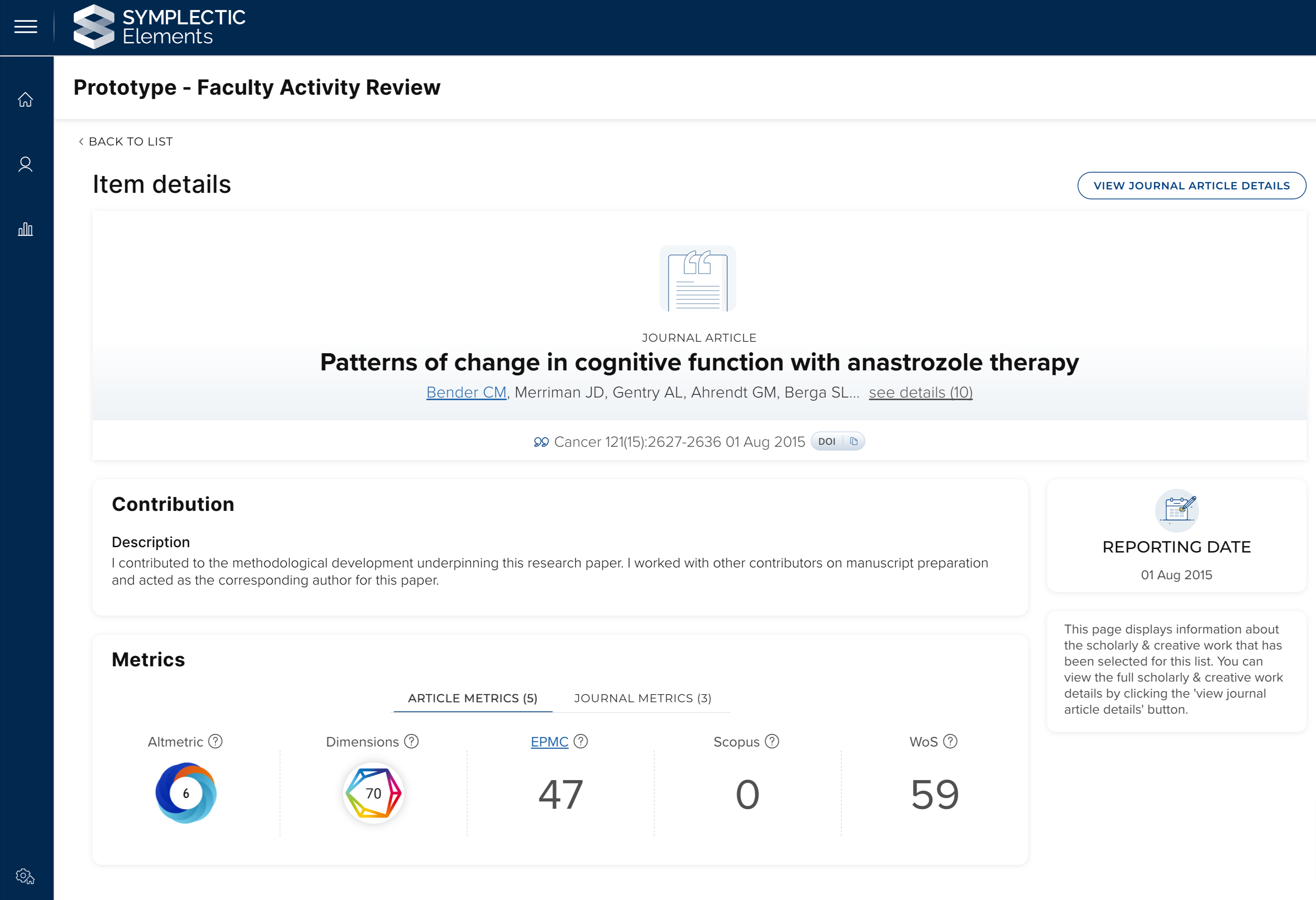
Image: Information about the user’s contribution, captured as an Annotation, can be displayed on the ‘Item’ page.
Assigning reviewers in bulk
Managing complex reviewer assignments can be a time-consuming process involving many moving parts. To help make this easier for administrators, we have introduced the ability to add a reviewer’s assignments via CSV upload. This means that reviewer assignments can be collated and checked outside the system, and then imported in bulk. In addition, administrators can export existing reviewer assignments, make changes to the file, and re-import to update the existing individual reviewer assignment.
We have also updated the reviewer management page so that it is possible to remove individual reviewers from a reviewer assignment, giving administrators a greater level of control.
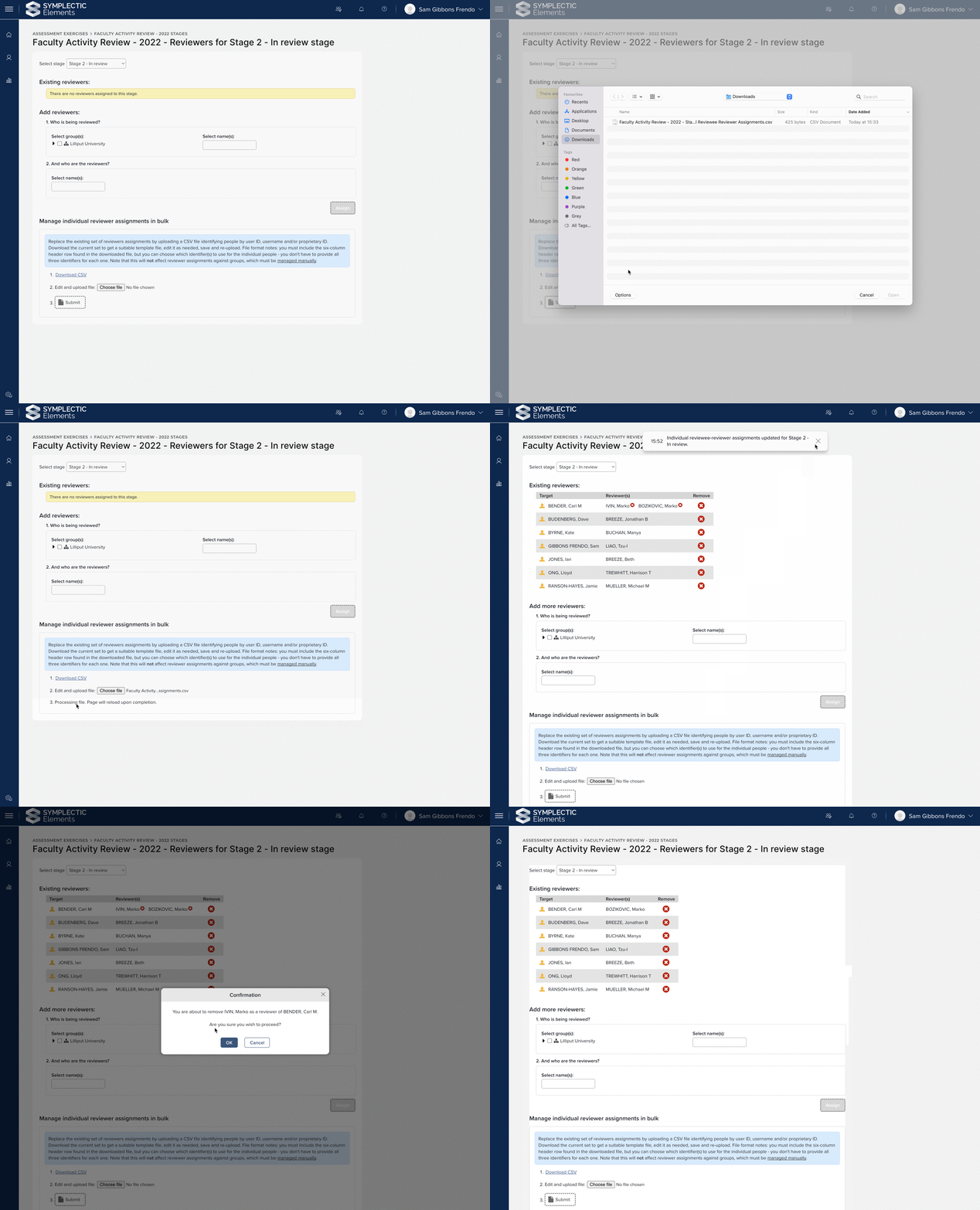
Image: Administrators can bulk upload individual reviewer assignments, as well as remove individual reviewers from assignments.
Improved display of reviews
We have made some adjustments to the display of reviews so that the experience is more intuitive for both reviewers and researchers:
If researchers have been granted permission to see a review, we will only display this review component to researchers once a review has been added. This avoids the potentially confusing display of an empty review component, at stages prior to the point that the review can be added.
We have improved the display of the ‘Summary’ modal for reviewers so that it returns more useful information on the reviews that they have added.
Other improvements
We have renamed the ‘Advanced’ tab to ‘Warnings’ to better reflect the purpose of the page. In addition, it is now possible to control the display of errors and warnings for sections, alongside lists and items. This means that administrators have complete control over which components of the Exercise form display errors and warnings to researchers and reviewers.
To make the management of a long list easier, it is now possible to directly edit the index of an item. This means you can move an item straight to a specific position without having to use the ‘move up/down’ arrows.
Reviews now retain line breaks when the reviewer marks the reviews as ‘done’.
CSV uploads that can result in data deletion (i.e. assigning reviewers, users and bulk managing units) will now fail if there is any data issue that results in a warning. The issue is communicated to administrators so the underlying data can be corrected or reimported where necessary.
Supporting field sets can now be deleted in the same manner as custom field list items.
We have reconfigured the section and list definition pages in order to better group related information. For example, on the list definition pages, settings for ‘eligibility criteria’ have been grouped together.
We have improved the performance of both the management page and paginated lists on the Exercise form. This means that the system is better able to deal with Exercise forms that contain lists with a very large number of items.
Manage privacy settings when adding new outputs or activities
While Elements is designed to enable data sharing and reuse, we are always careful to make sure that users remain in control of the privacy of their data. Our object and relationship privacy functionality provides users with visibility of and control over the privacy settings for each of their outputs and activities, and it is important that users are aware of how their data could be shared by their organisation.
In order to provide users with greater control and visibility across the privacy settings for their works, privacy controls will now appear on the edit form, prompting users to review and if needed adjust the work’s privacy settings whilst manually adding it to the system. This new functionality removes the need for users to go and view the work after creation to confirm the privacy levels associated with the work, providing users with greater transparency and saving them time.
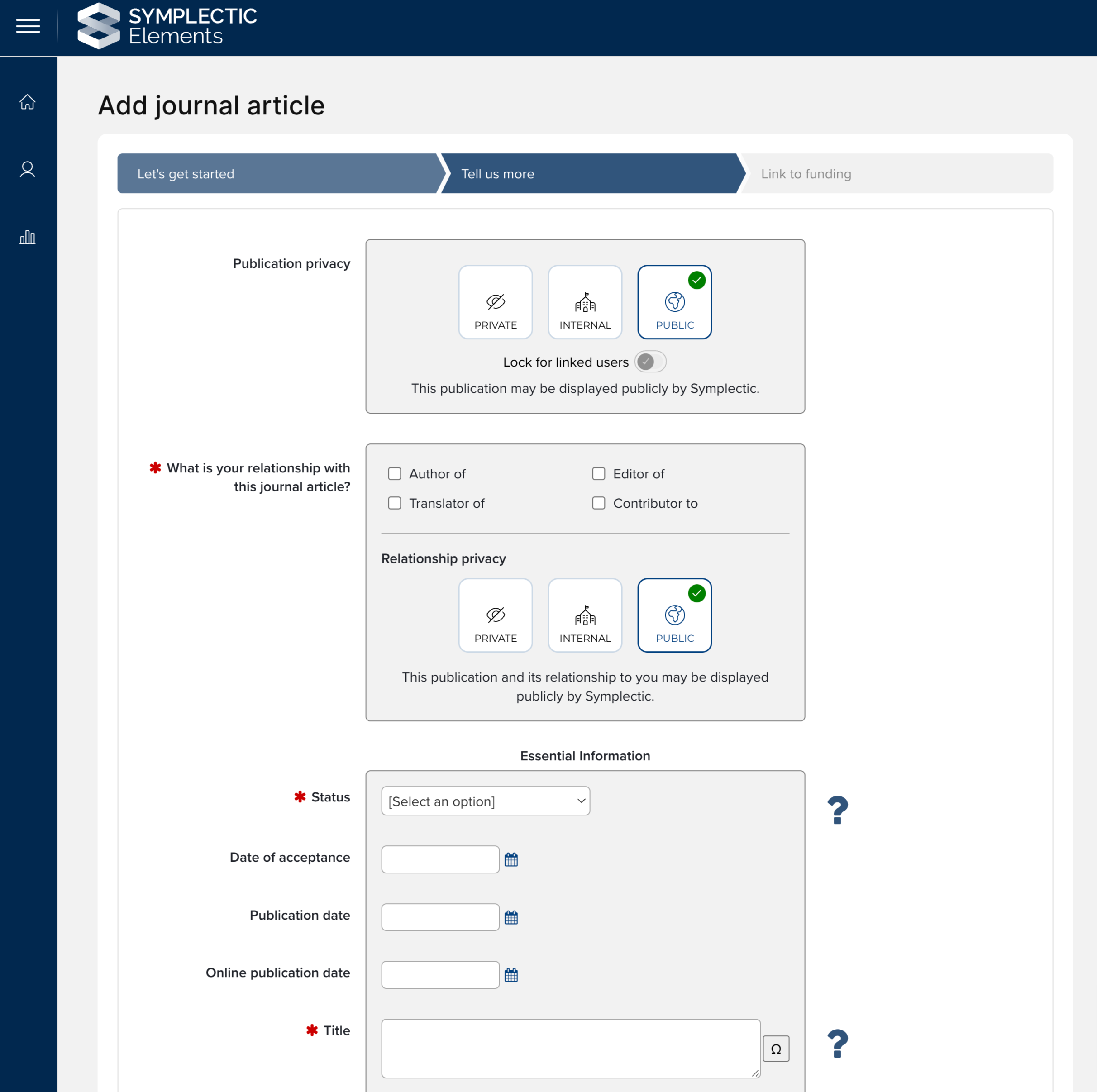
Image: Users can now set object and relationship privacy during object creation. The options available will depend on the privacy configuration.
Automatically applying FOR 2020 labels
The Fields of Research (FoR) classification scheme is a widely used classification system which seeks to categorise a broad range of research activities using a single schema. Since we first introduced the ability to capture this classification using label schemes, FOR codes have been adopted by organisations all over the world, applying them to outputs, activities, and user profiles. FOR labels are used in many ways including as part of national assessment exercises (ERA and PBRF), for reporting/analysis, or as tags in the Discovery Module to help organisations showcase their researcher’s fields of expertise.
To help organisations further their use of FOR 2020 labels, we are pleased to introduce two new forms of automatic labelling.
Harvesting FOR 2020 labels from Dimensions
Dimensions recently introduced updated functionality which analyses metadata about publications and grants within Dimensions and automatically applies relevant labels from the FOR 2020 classification scheme. These FOR 2020 labels will now be automatically harvested from Dimensions into Elements alongside other label schemes and descriptive metadata.
This new functionality will help organisations to streamline the classification process in Elements as much as possible, reducing the need for researchers and administrators to manually apply labels to their works.
For clients already using Dimensions as a data source, the FoR labels will automatically start being added to your Elements instance the next time records are refreshed following your upgrade to Elements v6.11. If you are not yet using Dimensions as a data source and would like to find out more, please contact Symplectic Support for assistance.
Applying FOR 2020 labels using the ERA 2023 journal list
We have also introduced an updated version of some existing functionality which will automatically apply FOR 2020 labels to journal articles based on the journal classifications used by ERA 2023 journal list classifications. This updated functionality provides additional sources of FOR labels using an authoritative list from the Australian Research Council.
Users can add pronouns
To better enable connection and collaboration, it is important for users of Elements to be able to represent themselves fully and in line with their wishes within the system. We have therefore added the ability for users to set their pronouns on their Account Settings page. Once set, the new pronouns field will display on the Elements profile page below the users’ name.
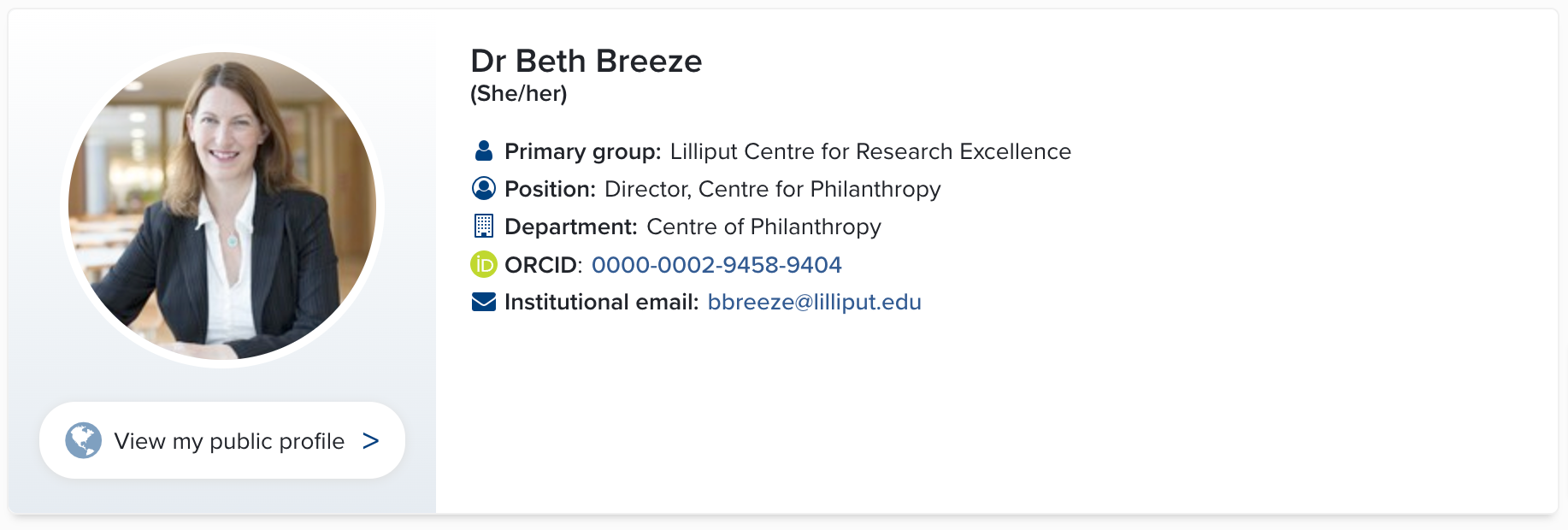
Image: Users can add their pronouns and they will be displayed on their profile page.
This new functionality is configurable and can be enabled by System Administrators via the Global Setting page.
Research Funding Solution
Continued development of the RFS finance integration
We have continued development of the Research Funding Solution (RFS) Finance integration. This will ultimately allow organisations to pass information from RFS to their institutional finance system in order to assist with project set-up, and to import information about expenditure from the finance system back into RFS.
In this release we have delivered the following:
Added a number of new fields for Projects including: External link, Additional finance reference, Finance status, and a flag whether to include the Project in the RFS extract). These new fields will support fuller integration across systems.
The second phase of functionality to ingest data from institutional finance systems, supporting the import of the newly introduced fields outlined above.
Updates to the RFS extract of Project information, enabling the inclusion of different organisation types (supporting Head Funder / Lead Organisation identification), and the exclusion of selected records from the extract.
Review & approval functionality improvements
We have also delivered improvements to the Review & Approval functionality, aimed at enhancing the administrator user experience and reducing the effort needed to manage and monitor reviews. These improvements include:
Automatically assigning reviewers or reviewer groups (where assigned roles permit).
Introducing the ability to dispatch reviews directly from the review assignment page.
Updates to the Manage Reviews page to increase the visibility of all reviews created and their current status, and to introduce direct access to completed reviews.
Improvements to the Review dispatch page, adding additional search filters and displaying more information to provide administrators with a clearer overview.
Improvements to the review menu to streamline the user experience.
Other RFS improvements
Other RFS improvements include:
The list of available Groups for selection as Managing Groups in the Console has been updated to include only active Groups.
Console permissions have been updated to ensure that Group users are only able to access content affiliated with the Group(s) against which they have been assigned a role, and that Review content is not visible in the Console to Finance Manager (Funding) users (this work is continuing into the 6.12 release).
As with previous releases, full details of the RFS functionality released in v6.11 are available in the RFS release notes on our support site.
Other improvements
We updated our Web of Science (WoS) Expanded API integration to address the throttling issue some clients have been experiencing. The updated integration harvests from WoS Expanded API in a much more efficient way and significantly decreases the record limit usage required for the user search and refetch processes. No action is required for clients to activate this update upon upgrading to v.6.11. Please note that this update is not relevant for WoS Lite API users.
We have renamed the User Group ‘types’ concept to ‘membership model’ throughout the Elements UI and Reporting Database in preparation for our forthcoming work to expand groups functionality within Elements. This is a change in terminology only and there are no changes to the underlying data model (three types: primary, auto, manual) or group membership functionality as a result of this change. As announced earlier this year, this change may impact any custom reports or SQL queries which make use of the affected column [Type] in [Group] table and you will need to plan to update those reports/queries. Please note: This change does not impact the Elements API at this time.
We added a new User Group membership stock data extract which allows authorised users to export a report of all of the groups each user is associated with. This new report will help organisations to more easily review group membership.
We have made a number of API improvements, including:
Introducing a new notes field when setting up API accounts to help track information about the account.
We have added a continuation href when users reach the end of a paginated result set to allow organisations to more easily identify where to start a new differential update from.
We have made a number of accessibility improvements, including:
Updating page headings used on the claimed/pending/tabs on the My Publications and My Grants pages to ensure these pages have unique headings to assist with navigation.
Improved use of aria-labels for a number of components including menu search, filters and certain field types to improve navigation for screenreader users.
Updates to the user profile privacy setting radio buttons to create clearer association for this control to the related information.
Improved styling and visual differentiation for links across multiple parts of Elements.
Fixes
There was an issue with date parameters in the Reporting Hub where users could be permitted to enter dates in an invalid format which would then cause an error to be shown. This has been fixed.
We have fixed an issue with addresses in Tanzania and Chechnya that could lead to them being matched to an incorrect location.
There was an issue for impact officers creating impact records where a user’s ID would display instead of the full name. This has been fixed.
When impersonating a user via the profile page there was an issue that would lead the page to always reload into ‘view mode’. This has been fixed and the page reload will preserve the previous state of the page (eg. remain in edit mode or view mode).
We have updated our DSpace 7 integration to ensure we are appropriately refreshing authentication settings to avoid 401 errors.
A user could be unable to see a private object that another user had linked them to in certain circumstances. This has been fixed.
End of support
As always, we recommend that you regularly review our End of Support Announcements for information about upcoming end of support in Elements for various technologies.
Please note that as of this release, the Repository Tools 1 code within Elements has now been deleted. You will not be able to upgrade to v6.11 or higher if you still have an RT1 connection in place. If you do not yet have a plan to migrate to RT2, please contact Symplectic Support.
Self-hosted customers should also note that as of this release, there has been a change in the installation prerequisites for Elements to require the use of .NET6.
Learn more about the release
One of the most special things about Symplectic is our amazing community who are willing to share their experiences with each other. We would love you to consider sharing some of your updated guidance materials, roll out approaches and even testing plans with the community to help others, via our community forums, our community Slack channel or on our community repository.
Thank you all for your contributions to the Elements community throughout 2022, we look forward to working with you in the new year and we hope you enjoy getting to know the latest version of Elements.
Remember should you have any questions, we’re here to help! Just contact us at support@symplectic.co.uk for assistance.
Best wishes,
The Symplectic Team