
Symplectic Elements v6.13 - Release Notes
Symplectic Elements Release Notes April 2023 v6.13
Introduction
Welcome to Elements v6.13!
We have continued the redesign and expansion of our Groups functionality, started in our last release. For v6.13, we have made further expansions to the Groups data model, adding support for configurable descriptive group types and introducing Group privacy settings. We have also begun to make this data available for re-use by adding it to the Reporting Database and the API. These enhancements are part of a bigger initiative which aims to to help organisations capture a wider range of metadata about their internal groupings and to significantly streamline the management of groups.
This release also includes the last major batch of enhancements to the Assessment Module coming out of our Assessment UX review last year. In this release we’ve introduced a number of new configuration options for the Module including a new ‘Viewer role’, and options to restrict the download of attachments. We’ve also made a number of smaller improvements to further streamline the user experience within the Module based on feedback from early adopters of the new Assessment functionality. We recently held a webinar about some of the new use cases you can now use the Assessment Module to support; if you missed it you can catch up with it on demand via our website.
For clients using the Research Funding Solution (RFS), this is a very exciting release which includes enhancements to the RFS finance system integration particularly to support ingesting project income and expenditure data. We’ve also introduced new project relationships, made enhancements to the review and approval functionality and introduced new quick actions for administrators.
Alongside this release, we are launching a new version of the Elements API. This new endpoint supports the introduction of the new group-related data, as well as making a number of breaking changes which move the API in step with changes made in the product since the last API version was released. We have also made a number of other improvements, many of which were based on feedback and requests from our community. Thank you for your continued contributions through the support site and your conversations with our team.
We would also like to make you aware that registration for this year’s European user day, planned for early July, will open shortly. If you would be interested in presenting a client spotlight or sharing your experience with a particular element of research information management during the event, please reach out to us - we’d love to hear from you.
As always, the new version of Elements and associated upgrade instructions can be found in the Elements upgrade forum.
Expanding Groups functionality
In our last release, we began a significant redesign and expansion of our Groups functionality to help organisations capture a much wider range of metadata about their internal groupings. This new functionality aims to support a wider set of use cases, including surfacing group information on public profiles. Through this redesign, we also seek to significantly streamline the management of groups.
In this release, we have continued to further develop and expand the Elements Groups functionality, introducing configurable descriptive group types and privacy settings. We have also begun to make this data available for re-use by adding it to the Reporting Database and the API.
Introducing new group types, including custom types
To help Groups within Elements reflect the way you think and talk about your organisational structure and to support a more detailed categorisation of groups, we have introduced a descriptive type structure for groups.
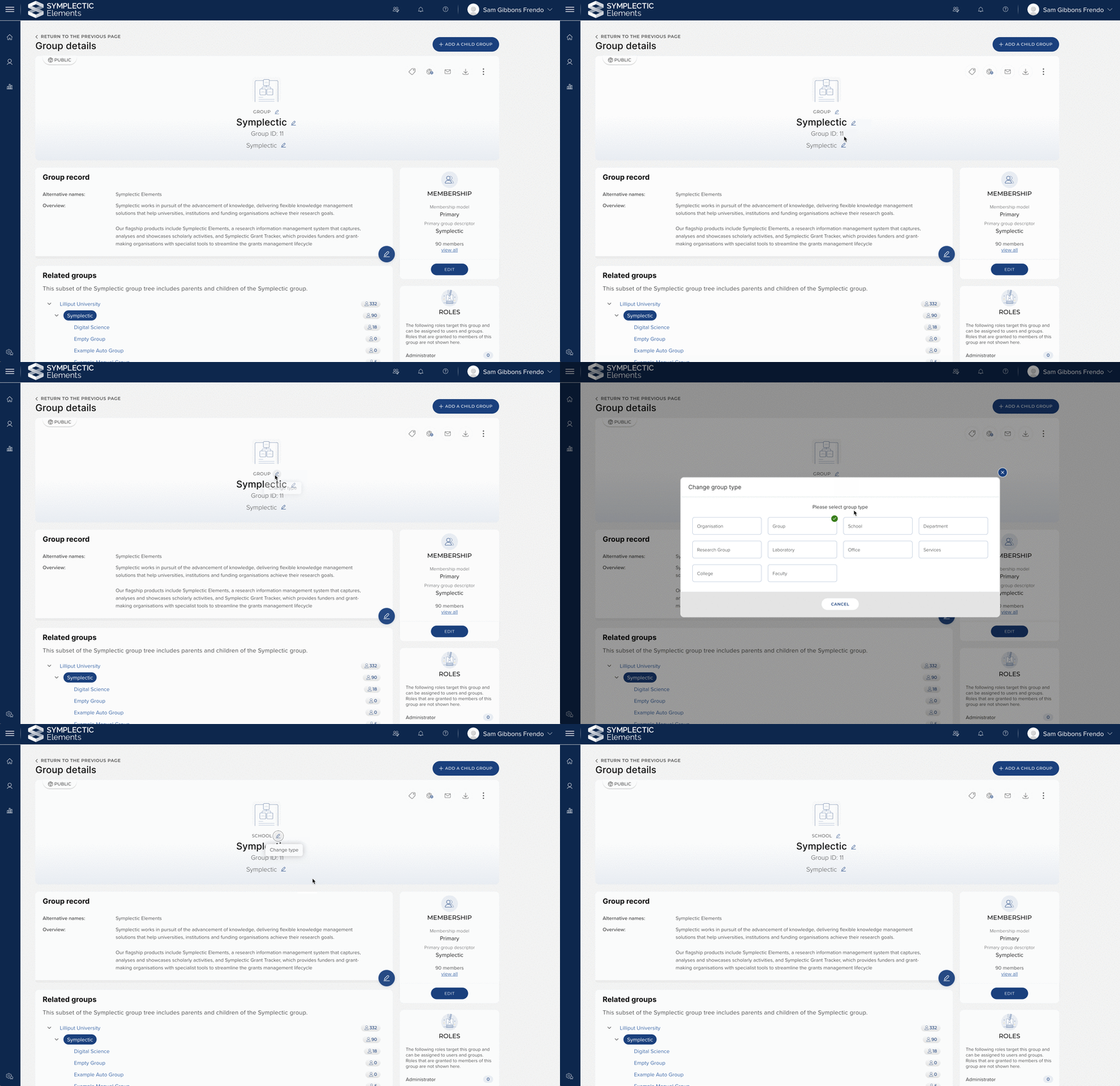
Image: Group types can be changed at the click of a button. When adding a new group you can choose from any of the newly introduced group types.
This new functionality works just like the existing ‘types’ capability for other data categories within the system, with both stock and custom types, making it easy to configure and use this functionality. The Group stock types include: Organisation, Group, College, Faculty, School, Department, Research Group, Laboratory, Office, and Services.
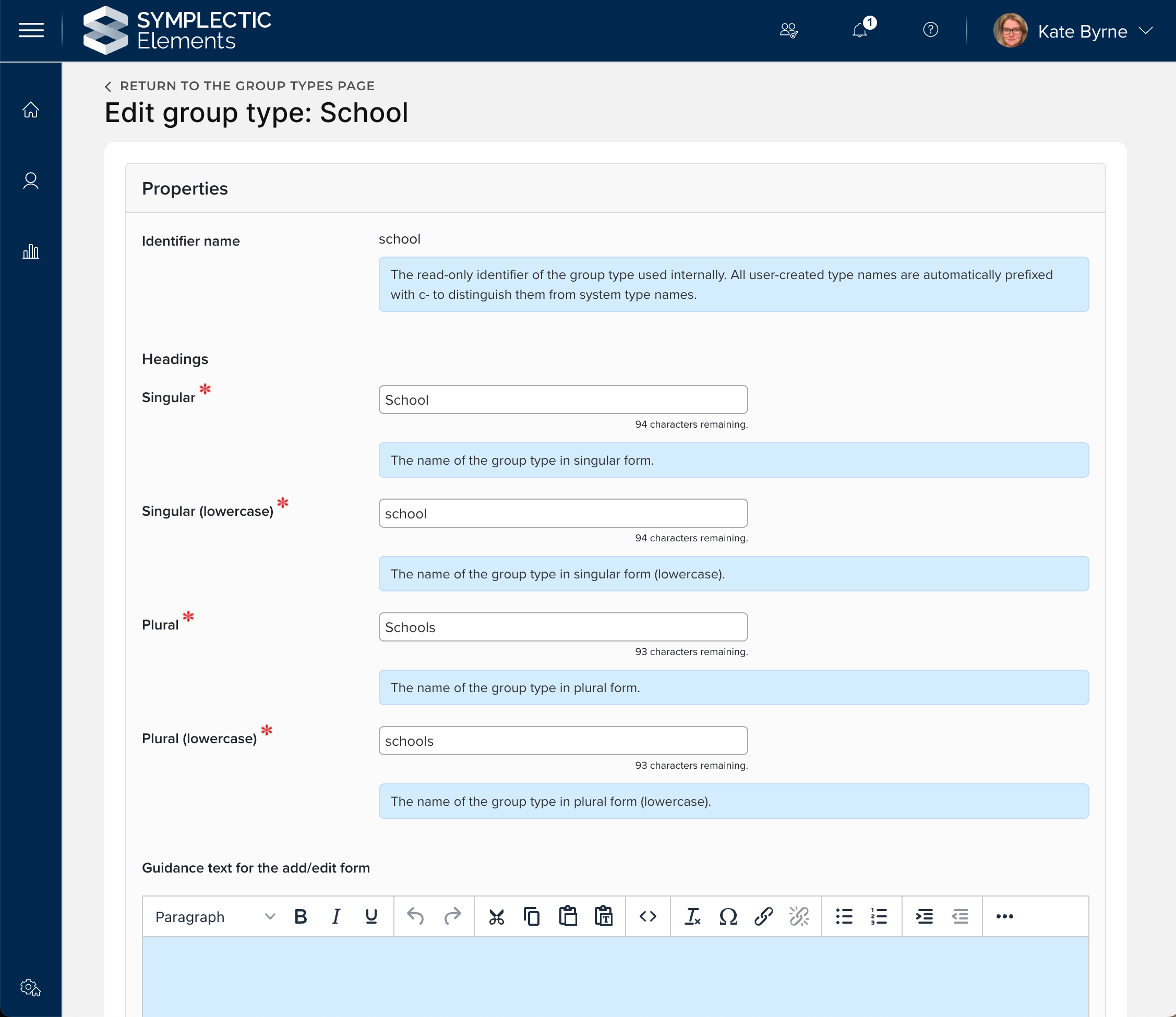
Image: Each group type can be configured by the relevant group types page.
Control group privacy levels
One of the key drivers for the expansion of the Elements groups capability is to underpin planned future work to publicly showcase groups via new ‘Department’ pages in the Discovery Module. We are, however, very mindful that the Groups functionality within Elements is relied upon for many different kinds of activities, and that not all groups represented within Elements will be suitable for sharing publicly. To help clearly differentiate between groups which are suitable to be shared publicly and groups which should remain internal to Elements, we have introduced new privacy settings for groups.
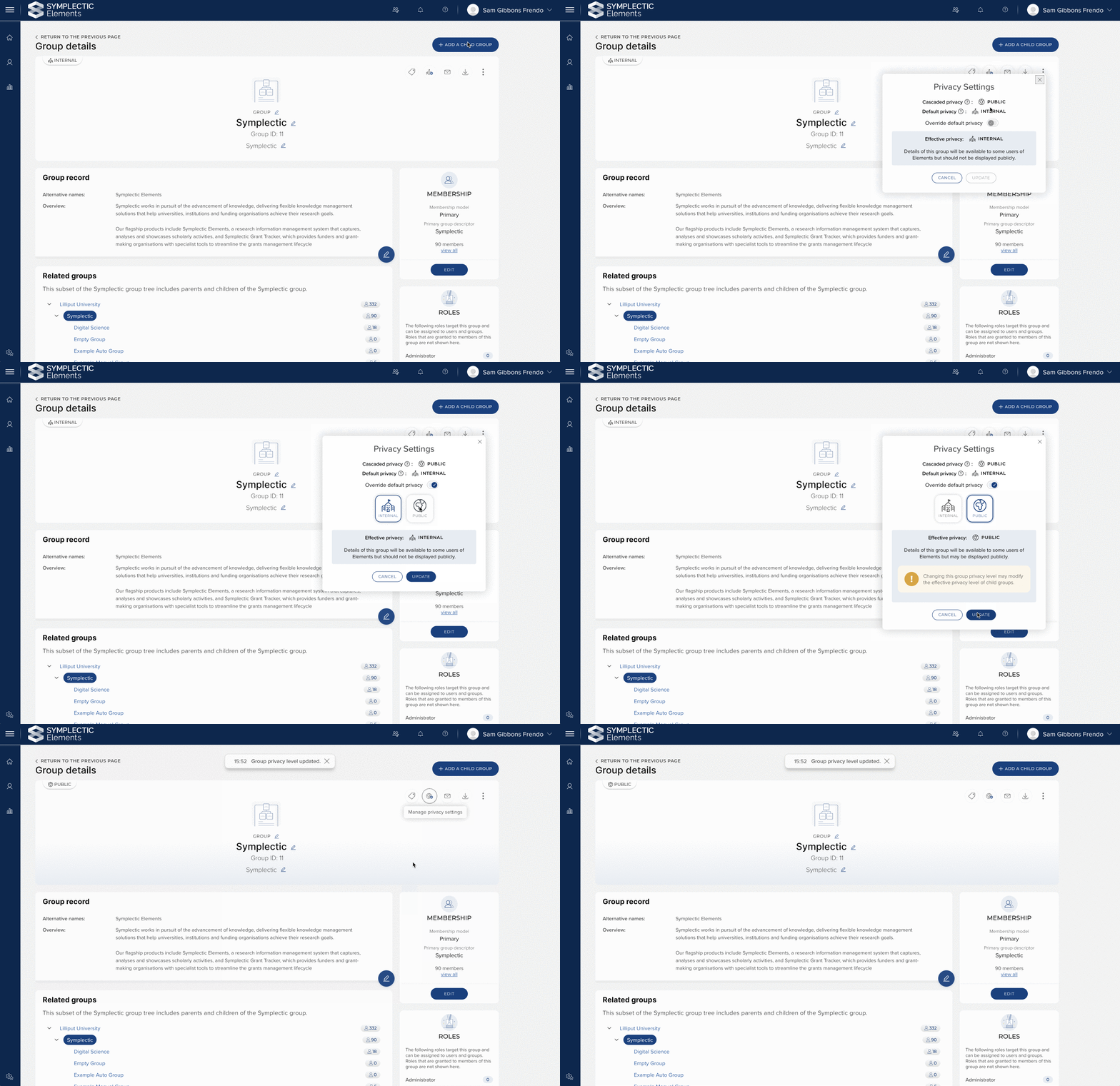
Image: The Group privacy control can be used to override the default ‘internal’ privacy level for groups. The control displays information about the inherited privacy level that ‘cascades’ from any parent Groups.
Through this new capability, Groups can now be configured to have a privacy level of either ‘internal’ or ‘public’, and this setting can be used to control the display of Group information in downstream systems. To ensure that you remain in control of your group structure’s privacy levels, we have elected to launch this functionality as an ‘opt-in’ with a system default privacy level of ‘internal’. As you identify groups you wish to make more publicly available, you can simply adjust the privacy levels of those groups.
Because of the hierarchical nature of Groups within Elements, and to ensure that group information is never shown inappropriately, group privacy levels are designed to automatically ‘cascade’ down the group tree. If a parent group is set to ‘internal’, the system will automatically apply an override to all child groups below it in the group tree, giving them an ‘effective’ privacy level of internal. It is therefore important to consider the privacy level of Groups with respect to their position in the hierarchy.
More information about Group privacy can be found on our support site.
New Groups data now available for reporting
To help you monitor and report upon the data captured about groups within Elements, we have expanded our reporting capabilities on Groups data.
For easy access to the new group data, we have introduced a new stock Data Extract ‘Group details’ to the Reporting Hub. This Data Extract returns information on all Groups in the system including their privacy level and any associated stock metadata fields. This report is intended to aid managers by providing an overview of Group data in the system.
We have also updated the Reporting Database to incorporate all of the new data now being captured about groups. The new tables and views include:
Group (Field Display Names) Table
Group Field Table
Group History Table
Group Label Table
Group Record Table
Group Record (Field Display Names) Table
Group Record Address Table
Group Record Small Text Table
Group Type Table
Group Source View
Please note that this is not a breaking change; all reports that make use of existing group data in the Reporting Database will continue to function. The following tables and views are still available:
Group Table (Note: More columns have been added to this table, however all previous columns are still present and existing SQL accessing this table will continue to function)
Group User Membership Table (Unchanged)
Group User Role Table (Unchanged)
Group Ancestor View (Unchanged)
Introducing a new API version
For the first time in six years, we are releasing a new updated API endpoint for Elements (API v.6.13). This new API endpoint includes the ability to read and update information on Group objects, allowing organisations to manage metadata about Groups in bulk, and to easily use Group-related metadata in downstream systems.
The new v6.13 API endpoint also includes some breaking changes which relate to functionality which have been retired or significantly updated since the last (v5.5) endpoint was created, including functionality relating to privacy and relationships. To learn more about the new API, please see this support article and the updated Postman collection on the support site which now includes example calls against the new v6.13 API.
In line with our standard processes, the previous v5.5 API will be supported for use for two years from the date of this release. We know that for many of you, it can take some time to update existing integrations, so we do recommend that you plan your transition well in advance of the end of support date.
Please note that the new Groups functionality available via the API is limited to updating metadata about groups. It is not possible to modify the group structure itself (adding, deleting or moving groups) via the API. We plan to introduce support for this via a dedicated Groups feed function in a future release.
Improvements to the Assessment Module
The last few releases have seen significant improvements to the way in which the Assessment Module functions. This release sees a number of extensions to the module that once again expand the range of options for administrators and improve the experience of completing an Exercise for both researchers and reviewers.
Adding a new ‘viewer’ role
Elements’ role-based permissions model is designed to ensure that users can only view and/or edit data they are authorised to manage. Within the Assessment Module, the ability to view and edit an exercise form or the associated reviews is restricted to the ‘researcher’ and ‘reviewer’ roles, while flexible, stage-based configuration options allow administrators to decide when users with those roles should have access to the Exercise form. This allows you to control who can view and edit the Exercise form as it moves through different stages of the review and evaluation workflow.
In this release, we have introduced a new ‘viewer’ role to offer a more flexible range of configuration options for the Assessment Module. Users assigned the viewer role have permission to view all information collected in the Exercise form, including reviews, but they cannot make edits to the data collected in the form or any reviews that have been added. This new role allows view access to the Exercise to be maintained across stages, even when the user should no longer be able to edit the submission. For example, reviewers can be set as viewers in different stages, so that they can maintain visibility of a submission as it moves through the workflow stages.
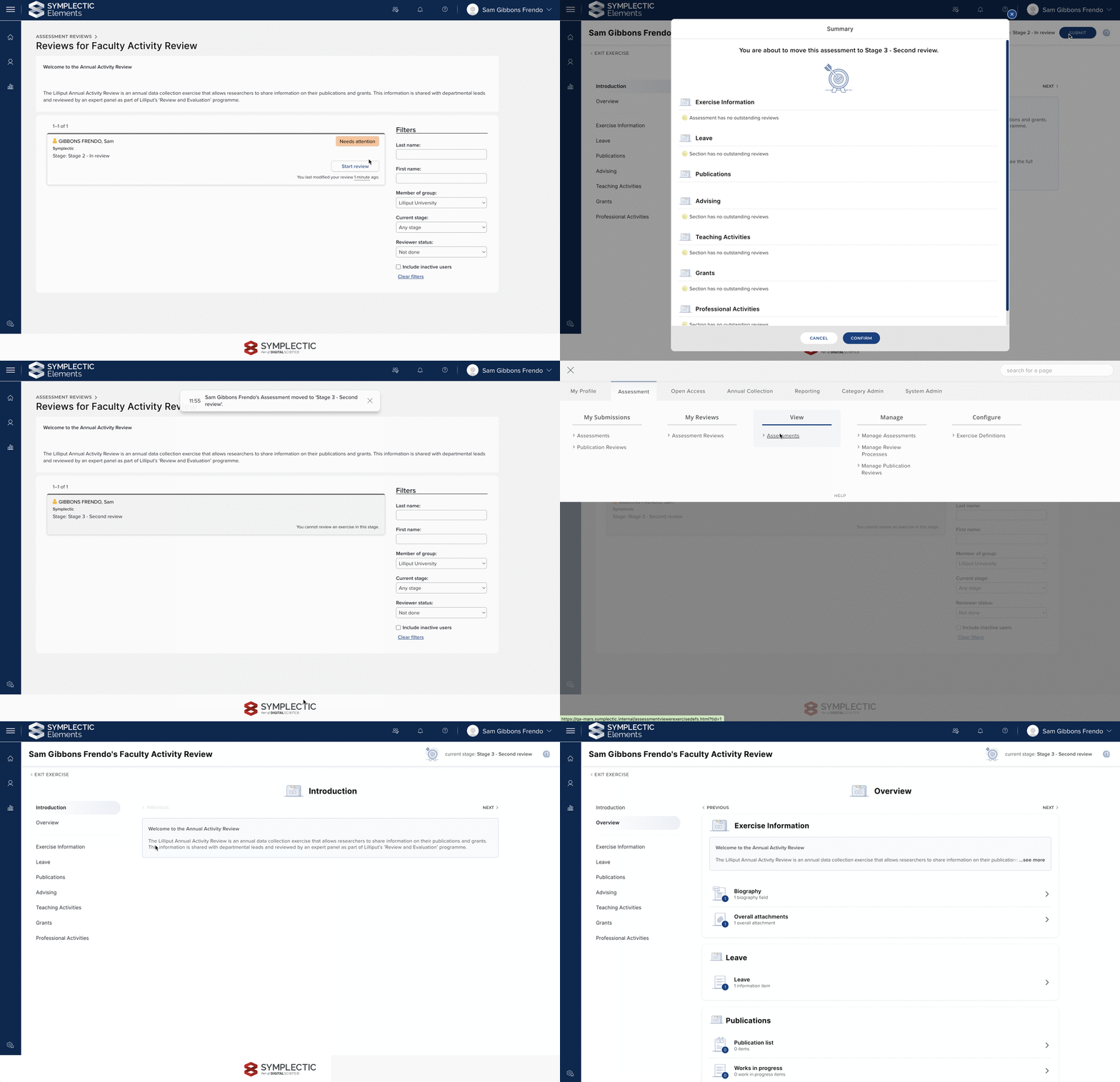
Image: A reviewer can be configured as a ‘viewer’ in a downstream stage, enabling them to maintain access to the Exercise form once they have completed their review.
Control over download of PDF attachments
Review and evaluation processes can include the collection of sensitive documentation in the form of attachments. In the last release, we introduced the ability to view PDF attachments in the browser, thereby reducing interruptions to the review workflow. In this release, we have extended this functionality so that the ability to download the PDF can be restricted to support organisations who wish to prevent download of attachments in line with their local confidentiality requirements.
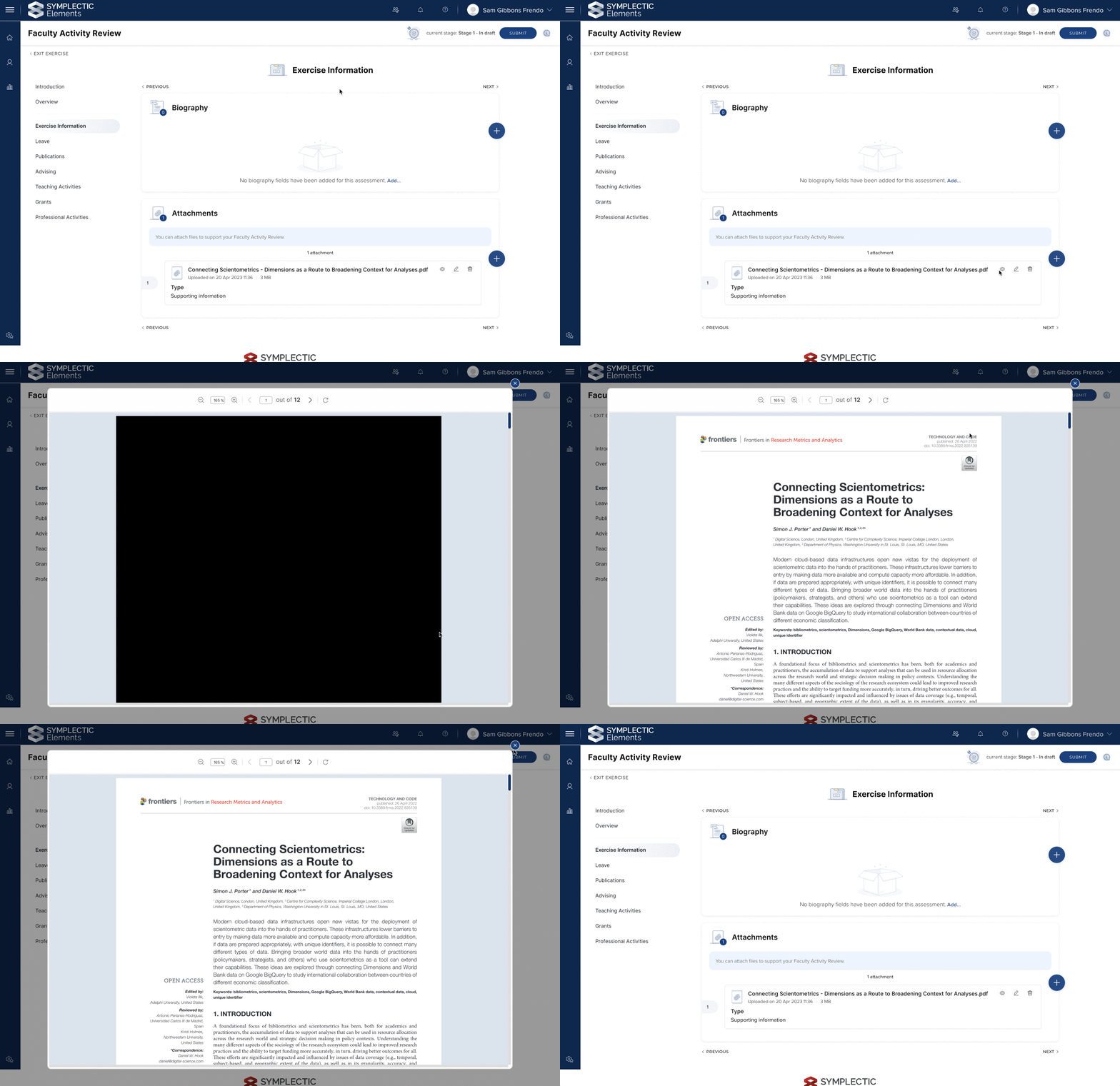
Image: A PDF attachment with the ability to download the attachment removed. Anyone viewing the Exercise form will not be able to download the PDF to their computer.
Additional configuration options and ux refinements
In response to community and user feedback on recent expansions to the Assessment module, we have also introduced a number of new configuration options and UX refinements to make the process of configuring and completing assessment exercises even easier. These include:
Set list pre-population order: Introduced in v6.11, pre-population of lists allows administrators to configure an Exercise such that all eligible items are added when a user starts their Exercise. In this release, we have introduced the ability for administrators to determine the sort order of items in the list when the list is pre-populated.
Configure the name of the ‘Exercise information’ section: Attachment, supporting fields and reviews added at the Exercise level are currently displayed in an automatically-created section with the default name ‘Exercise information’. It is now possible to configure the display name of this automatically-created section. This provides greater control over the display of the Exercise form, so you can ensure it is aligned with your specific use case.
Assessment header remains at the top of the screen: In order to make navigating through the Exercise easier and ensure that the ‘Submit’ button remains visible, the Exercise header bar and Navigator now remain in place as the user scrolls through a section.
Sort order preserved when adding ‘all’ items to a list: When a user adds all items using the bulk add functionality on the Selections page, the items are added to their exercise in the same sort order the user has chosen on the Selections page.
Adding items to a list now automatically saves the addition: To save users time, when they ‘add’ items on the selection page, those items will be automatically saved to the list, removing the need to save their selections before leaving the page.
Labels are now visible on lists and items: To provide additional context when researchers select items for a list and when reviewers review items, the ‘Labels’ tab is now surfaced on the list view, selection view, and item page.
Eligibility filter moved to filters section: To raise its prominence on the selection page, the ‘eligibility filter’ has been moved to the filters section so that users can more easily see when it is applied.
Administrators can now format List Overview text: To help administrators provide guidance as clearly as possible, the text input for List Overview text has been updated so that it supports formatted text instead of plain text.
Clearer highlighting of ineligible items: We have improved how we communicate to users why ineligible items cannot be selected for inclusion in a list.
Research Funding Solution
We continue to grow the Research Funding Solution (RFS) to support institutions with their research funding workflows. This is a major release and includes further enhancements to our bi-directional finance system integration to support ingesting additional data from institutional finance systems. We’ve also introduced support for project relationships, made improvements to review and approval functionality, and introduced new quick actions to save administrators time.
Finance integration
The RFS finance integration is a system-agnostic integration tool designed to help organisations easily pass information about newly-funded projects to and from their institutional finance system, in order to assist with setting up and managing project budgets. This functionality has been designed in consultation with our development partners to streamline project management and reduce the need for re-keying of data.
This release includes:
The final phase of functionality for ingesting data from institutional finance systems, which now includes the facility to import total Project income, and total expenditure per budget category or sub-category.
Enabling visibility of scheduled import job logs, so you will be able to investigate any import issues directly in the Management Console.
Updates to the Budget Extract from RFS to remove empty lines for Budget Categories that are not populated on the Project in question.
Relationships
In this release we have introduced Relationships functionality, to help organisations to track and report on associations between projects. This new functionality enables the creation of related projects for specific funding scenarios, including:
Extensions
Distributed budgets (with associated budget transfer functionality)
Additional internal contributions
Additional external contributions
Improvements to review and approval functionality
This release also includes improvements to Review and Approval functionality to help organisations manage and streamline the review and approval process. These include:
Introduction of a new reviewer/approver validation check to confirm that the assigned reviewer (group or individual) is still a valid reviewer/approver prior to dispatching. This allows administrators to delay or stage the dispatch of review and approvals with confidence.
Limiting users’ ability to push unvalidated Proposals to Under Review, reducing the risk of administrative errors.
Updates to the Review search pages in the Management Console to ensure consistent layouts, filters, and export options to improve the user experience for administrators.
Introduction of new post-award Approval review types to support tracking final approvals prior to project activation.
New quick actions for administrators
Highlighting email notifications: We have added a new email notifications feature in the Management Console header which notifies the logged-in user of any new emails marked for their attention in the inbox and offers a direct link to the email inbox from anywhere in the Console.
New Quick search: A new Quick Search function has been introduced to the Management Console banner that allows Funding records, Contacts (users), and Organisation details screens to be navigated to quickly.
Additional data available via the RFS API and Reporting Database
In order to support more comprehensive reporting and integration with institutional BI tools, we have:
Introduced further enhancements to the RFS API, including the addition of Eligibility form data
Added new fields to the Elements Reporting Database for individual Proposals
As with previous releases, full details of the RFS functionality released in v6.13 are available in the RFS release notes on our support site.
Accessibility improvements
We have introduced a new Skip to Main Content link which allows users relying on keyboard navigation to skip directly to the beginning of the main content of each page. This will reduce unnecessary tabbing as well as helping screenreader users.
We have improved the handling of focus for keyboard-navigation on pages with two-step pop-ups(e.g. with a confirmation step for a setting contained within a pop-up) to ensure a logical tabbing order is preserved. This improvement has been implemented in a number of places, including:
The API accounts page when deleting an account.
The Assessment exercise definitions page when deleting a definition.
The Annotation settings page, when saving after disabling availability for a category.
The Assessment scoreset page, when deleting the entire scoreset.
The Assessment section definitions page, when deleting a section OR a list definition.
We have fixed an issue on the Account settings page where it could shift up and down when selecting a delegate from the dropdown list of suggested users.
We have improved the PDF viewer within Assessment to allow users to use the keyboard to scroll through a PDF document.
Other improvements
System administrators are now able to delete API Accounts that are no longer needed via the API Accounts page.
We have made improvements to the Roles page to make it clearer to administrators when they are selecting which users or groups of users should have the role assigned. This applies to both the System Roles page and the Group Roles page.
‘Service & Engagement’ is now available as a module renaming option for the Professional Activities Module.
The ‘Add Another’ button will no longer be displayed on the object details page (e.g. publication details) when viewed by a user who is not linked to this item. This is to reduce confusion as to who the new work should be linked to.
We have retired the ‘Show instructions by default’ configuration setting for users, ensuring that users can always see guidance text across the system.
We have updated the Global Settings page and now provide updated guidance to administrators when resetting search terms. Administrators will now see a confirmation message with information about how many users' search terms will be updated, and how many have already modified their settings from the default.
We have updated the Authenticating Authorities page which administrators use to configure authentication for Elements. This includes introducing additional validation to ensure administrators can be confident they have completed their configuration successfully. As a part of this change we have retired the ‘Add Authentication Authority’ page as this functionality is now contained within the main page.
We have updated the API Endpoints and API Configuration pages to align the UX with the improvements made to the API Account settings page in the last release.
Fixes
Users with hyphenated first names could fail to resolve when added via the manual entry screen. This has been fixed.
When records from Europe PMC were harvested without a year, this could cause errors within the system log. This has been fixed.
Users could create duplicate tags on the Assessment Exercise Definitions page. This has been fixed.
If an administrator deleted a group which was targeted for an Assessment Exercise an issue could arise. This has been fixed.
If searches were saved without a description they could be inaccessible via the Saved Searches page. This has been resolved.
We have updated the wording of the link to the Automatic Claiming page on the ‘Edit Profile’ page as it previously referred to this as the Publishing Identities page.
We have made improvements to the differential search re-indexer as the presence of large numbers of declined or pending relationships to large objects could slow it down.
End of support
As always, we recommend that you regularly review our End of Support Announcements for information about upcoming end of support in Elements for various technologies.
We would particularly like to draw your attention to the announcement about the recent introduction of end of support dates for versions of Elements, as the first date for clients using Elements v6.1 or earlier is coming up on the 30th of June 2023. If you need assistance in planning to upgrade, please contact our team via the Support Site.
We’re here to help!
We hope you enjoy getting to know the latest version of Elements. Remember should you have any questions, we’re here to help! Just contact us at support@symplectic.co.uk for assistance.
Best wishes,
The Symplectic Team