
RFS 6.13 release notes
We continue to grow the Research Funding Solution (RFS) to support institutions with their research funding workflows. This is a major release and includes further enhancements to our bi-directional finance system integration to support ingesting additional data from the integrated institutional finance system. We’ve also introduced support for project relationships, made improvements to review and approval functionality, and introduced new quick actions to save administrators time.
RFS Finance integration
With this release we have delivered the final phase of data ingestion from institutional finance systems, which now includes the facility to import total Project income, and total expenditure per budget category or sub-category. We have updated the project Finance Summary screen and the Funding Records API endpoint to include income and expenditure values.
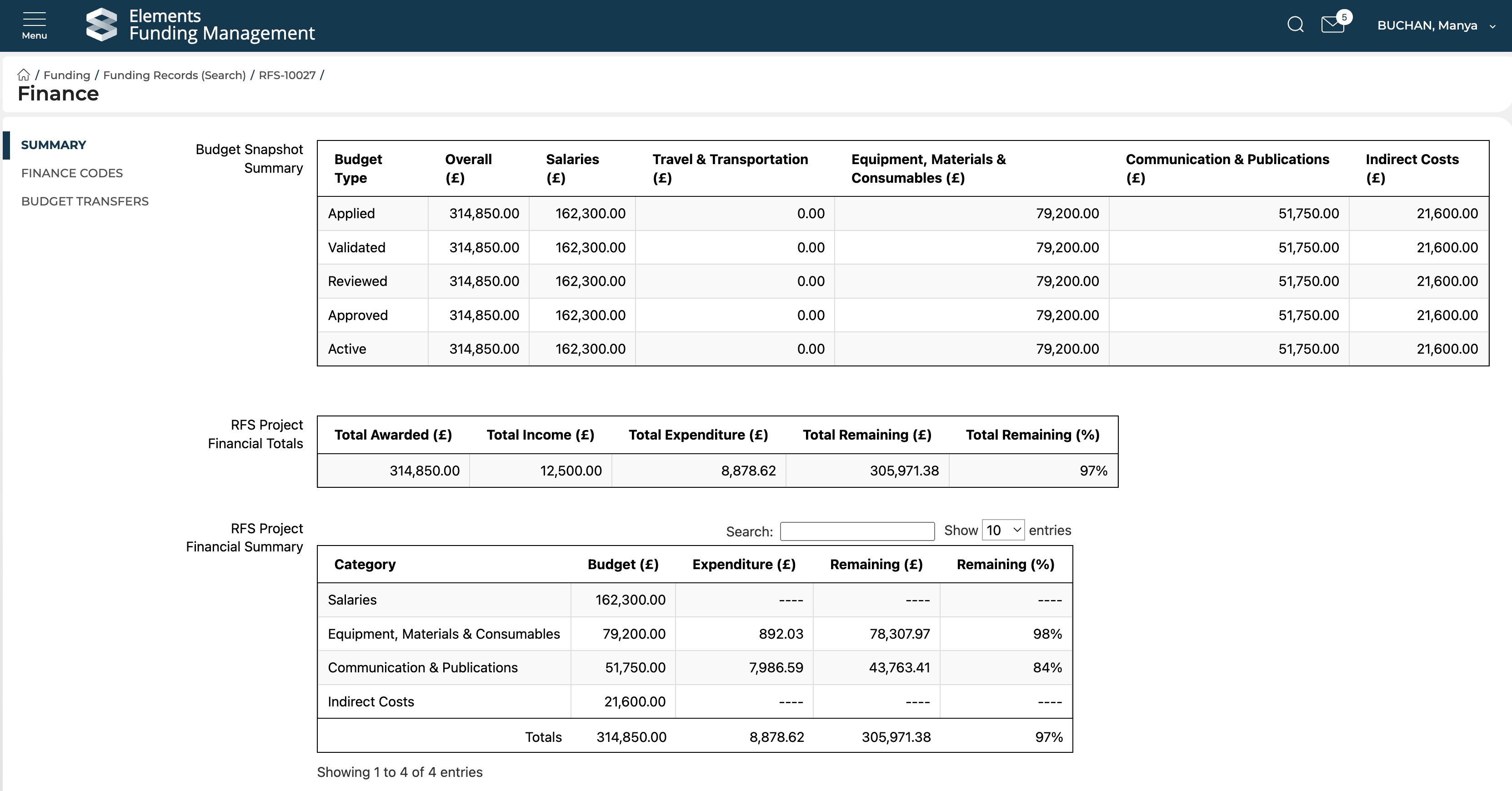
We have also made the status of scheduled import jobs visible to Console users, so you will be able to investigate and resolve any import issues directly.
Further we have updated the Budget Extract from RFS to remove empty lines for Budget Categories that are not populated on the Project in question.
Further information is available here.
Relationships
This release includes the introduction of Relationships functionality, enabling the creation of related projects for specific funding scenarios, including:
Extensions
Distributed budgets (with associated budget transfer functionality)
Additional internal contributions
Additional external contributions
Further details are available here.
Note that if you plan to use Relationships in RFS, we recommend temporarily disabling / not enabling the 'Elements Funding' datasource for Awarded Grants (details here). With the introduction of relationships, we need to make some adjustments to how Elements harvests grants (e.g. we don't want to create a new Grant in Elements for an extension). We will advise when these adjustments have been made.
Review & approval functionality improvements
This release also includes improvements to Review and Approval functionality to help organisations manage and streamline the review and approval process. These include:
Introduction of a new reviewer/approver validation check to confirm that the assigned reviewer (group or individual) is still a valid reviewer/approver prior to dispatching. This allows administrators to delay or stage the dispatch of review and approvals with confidence.
Limiting users’ ability to push unvalidated Proposals to Under Review, reducing the risk of administrative errors.
Updates to the Review search pages in the Management Console to ensure consistent layouts, filters, and export options to improve the user experience for administrators.
Introduction of new post-award Approval review types to support tracking final approvals prior to project activation.
Reporting database
We have added new fields to the Elements reporting database for individual Proposals, including:
Grant Manager
Current contract status and Contract signed date
Finance reference
Additional finance reference
Status history
More granular details on external organisations’ links to the Proposal
Funder currency and other currency fields as populated in the Funder submission and outcomes Console screens
API
We are continuing expand content available to query via the API, enabling support for more comprehensive reporting and integration with institutional BI tools. In this release we have:
Added a new endpoint for Eligibility form data
Updated the Funding Opportunities write API to capture additional fields
Further detail is available here.
Other improvements
New Management Console quick actions
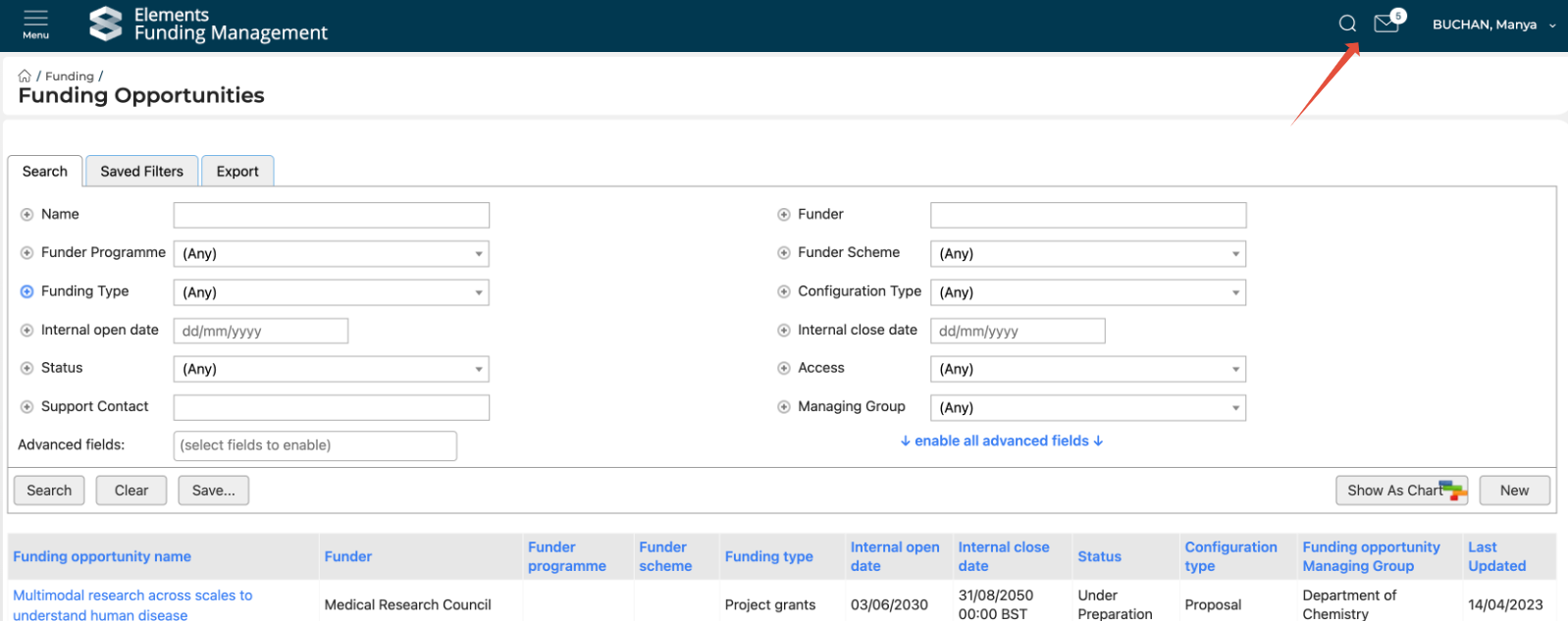
A new email notifications feature in the Management Console header which notifies the logged in user of any new emails marked for their attention in the inbox and offers a direct link to the email inbox from anywhere in the Console.
A new Quick Search function to the console banner that allows Funding records, Contacts (users), and Organisation details screens to be navigated to quickly by entering a search term that matches to one of the fields being searched on for each record type.
Award date
In this release, we have updated how Award date is calculated, to ensure it is accurate for both internal and external awards. The logic we now employ is as follows (previously it was the date of status change to Pre-approved for all Proposals):
Proposal outcome workflow | Award date calculation logic |
Default workflow (i.e. internal awards) | Date of status change to Pre-approved |
Proposal funder submission OR EOI funder submission (i.e. external awards) | Sourced from Funder outcome received date, OR if null (not a mandatory field), date of status change to Approved |
Bug fixes
The Internal Open Date field for Funding Opportunities has been updated to use your local site timezone, ensuring Funding Opportunities open on the expected date
We have resolved an issue on the Proposal details page where a Reviewer’s displayed Group was not always accurate
Archived documents are no longer displayed for users on the Proposal / Project details screens
We have resolved an issue where not all review types were automatically assigned upon proposal validation
On Review forms, only explicit members of the assigned review group are now available for selection (rather than also having members of parent groups available)
When budget item name or description text contains html formatting or quotation marks, these no longer result in budget amounts displaying in the wrong columns on the Budget Edit page in the Console and in Proposal forms.
Large numbers of Finance Codes no longer impact on the ability for the Finance Code page to load on the Contacts > Finance codes screen
The Funding Record > Organisations > Edit function is now available for all clients