
Symplectic Elements v6.15 - Release Notes
Symplectic Elements Release Notes October 2023 v6.15
Introduction
As part of our ongoing enhancement to Groups, this release includes powerful new functionality to automate the management of group hierarchies in bulk, reducing manual work and helping to ensure data accuracy.
We’ve also made further enhancements to the Discovery Module, continuing our work to increase ‘self-service’ configuration of more Discovery settings and further streamline the administration experience.
In our ongoing work to support the Research Funding Solution, this release introduces additional Project Closure and Related Projects features, along with additional enhancements to support the funding lifecycle.
Elements 6.15 also contains updates to repository integration functionality including the ability to set the file version field to be mandatory as well as increased file size for crosswalk files for all repository integrations and specific improvements for clients using Figshare for Institutions and DSpace.
Plus this release contains accessibility improvements and many other smaller features and enhancements, including a number of feature requests from our community!
As always, the new version of Elements and associated upgrade instructions can be found in the Elements upgrade forum.
Update your group structure in bulk with our new Group Importer
Groups have a key role in structuring user data. They underpin the configuration of the system, and are integral to reporting and analytics within Elements. Being able to capture a broad range of group types allows Elements to model large and complex group structures: from formal organisational structures, through to smaller research groups and groups used for administrative purposes, as well as many other types.
In this release we have added functionality that allows organisations to update the group hierarchy in Elements in bulk. This reduces the administrative burden associated with ensuring your group hierarchy is kept up-to-date.
Update the group hierarchy via CSV upload
The new Elements Group Importer functionality allows you to update your group structure ‘in bulk’ via the upload of a CSV file that contains the structure of your group hierarchy. Using the Group Importer, it is possible to move, create, delete, and update certain group properties.
To use the importer, you will first be prompted to upload a file in a defined format. The system will validate that the file is in the expected format before processing it, and will then display a high-level summary of pending changes so that you can review the impact of the import. In order to reduce the risk of unintended changes to group structure, you will be prompted to approve the outlined changes by selecting ‘Apply’.
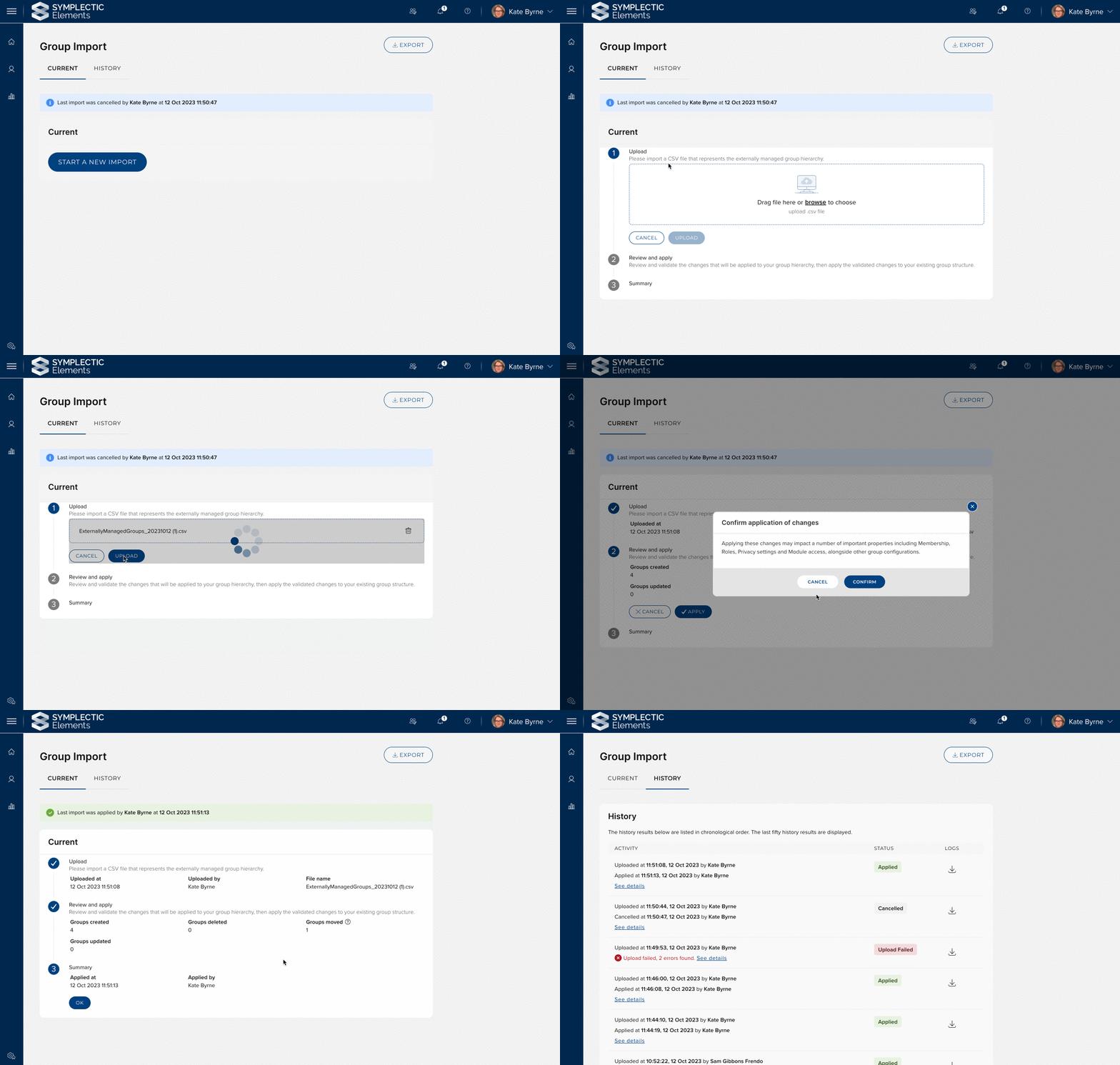
Image: Administrator can upload a CSV to make bulk updates to the group hierarchy. The impact of the update is reviewed and checked before being applied.
The high-level summary also provides the option to view additional Information about any groups that would be deleted as a result of the import, as group deletions should always be considered very carefully as they can lead to the loss of permissions and configuration settings.
Properties controlled by the Group Importer
Each Group within Elements must either be designated ‘externally managed’ or ‘locally managed’. Externally managed groups are those groups you wish to update in bulk using the importer (and in the future, if desired via a groups feed), whereas internally managed groups are the groups you plan to create or maintain via the Elements UI.
The Group Importer can control the following set of group properties, allowing this data to be managed in bulk:
Group Name
Parent Institutional ID: Allows the hierarchical nature of groups to be modelled in the CSV file.
Membership model: The membership model of the group can be set by the importer. In the case of Primary Groups and Auto-groups the membership condition can be set by the importer. Manual groups cannot have their membership set via the importer.
To avoid potential conflicts between source data, any groups set to externally managed cannot have these properties updated via the Elements UI. We intend to increase the range of group properties that can optionally be controlled by the group importer in a future release.
Preparing to use the Group Importer
As this is very powerful new functionality, we plan to work with early adopters wishing to enable this functionality to ensure we can effectively support you and provide you with relevant guidance. For this reason, the new Group Importer functionality in v6.15 can only be enabled by the Symplectic team upon request - please note, service fees may apply as per our SLA. In a future release, we plan to make this functionality more widely available, enabling you to configure this functionality on your own if desired.
If you are interested in using the Group Importer, there are a number of steps that need to be carried out to ready your system:
In order for the system to know which groups should be modified, it is necessary for groups to have an ‘Institutional Identifier’ added to them. Institutional Identifiers will often be the ID that is used to identify the group in an upstream system/s.
It is also necessary to determine which set of groups should be configured to be ‘externally managed’, allowing them to be managed by the importer.
As a part of the onboarding process, we will provide you with scripts to support the initial import of institutional identifiers for your existing groups and to configure which groups should be externally managed.
More information about this functionality can be found on our support site. If you are interested in exploring the use of this functionality please contact support@symplectic.co.uk.
Other improvements to groups
We have added support for ‘person-list’ fields for group records to support the capture of both structured person-user data and information about key people associated with the group who are not users of Elements. We have introduced new stock person-list fields to groups that resolve to the existing user-group relationship types. This functionality extends the range of options available following the recent introduction of group-to-user relationships.
We have added an additional group-project relationship to capture information on when a Group is funded by a Project.
We have made some adjustments to the permissions model for groups to ensure that this is aligned with our privacy framework. The impact of this work is that users will be able to see information about any groups they have a relationship with (e.g. on the ‘view all links’ page from the user profile). Users who do not have permission to view the group will see the group name but not be able to view the group page.
Discovery Module enhancements
Configuring filters and Google Analytics
To further assist administrators to be able to quickly and easily manage many of their Discovery configuration settings directly within the Elements admin UI, we have migrated additional settings to the Manage Discovery configuration page introduced in our last release Elements v6.14.
In this release, we have migrated the Filter configurations settings to allow System administrators to control the availability and appearance of filters for their Discovery Module. Through the new controls on the the Filters tab, administrators can add or edit the display name of each filter, select the relevant icon to be used, and choose to reorder the filters if desired. These new settings complement the existing settings on the Manage Discovery data page, that now allow administrators to be able to control both the data to be used and how the filters will appear on Discovery.
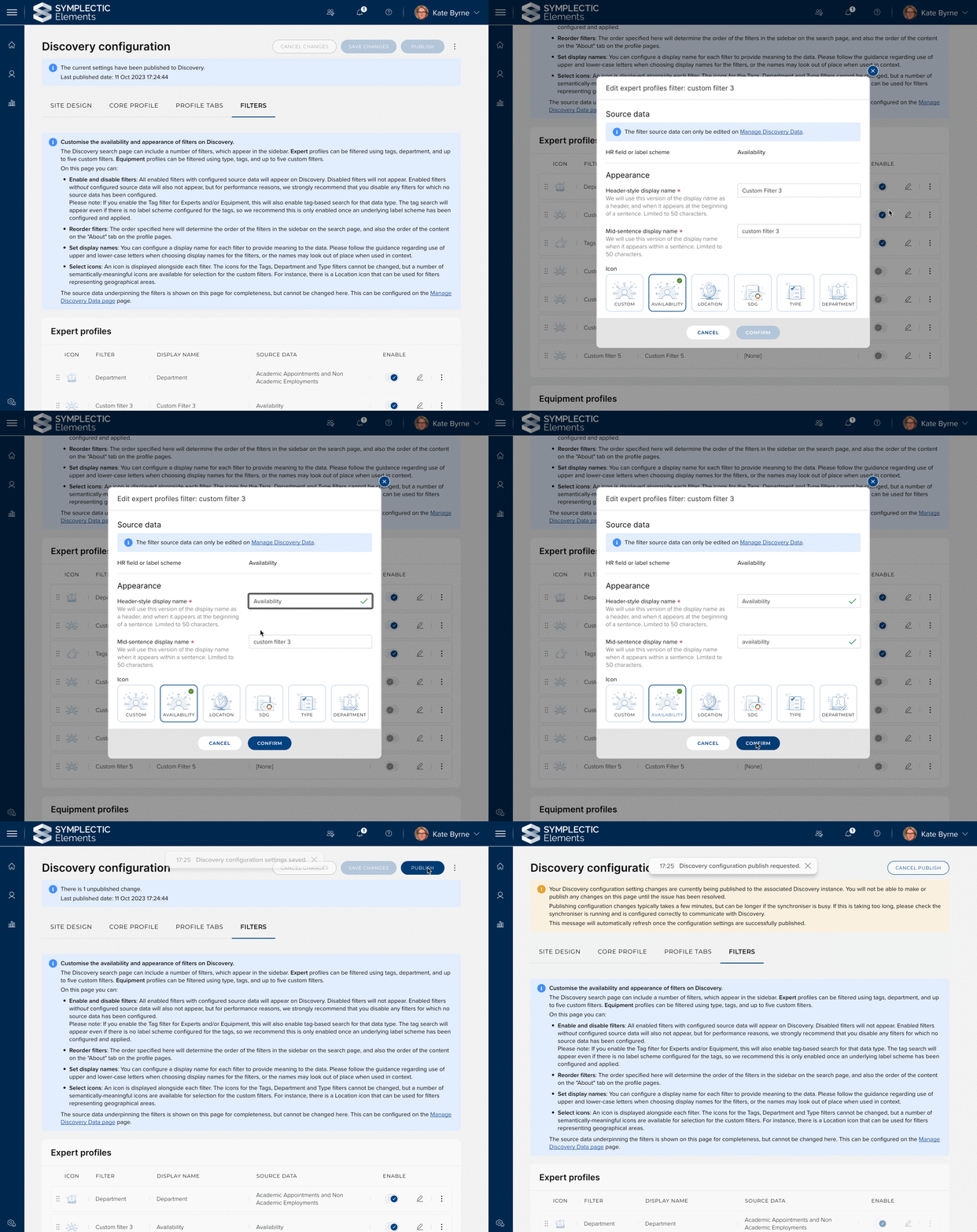
Image: System administrators can now easily update the configuration settings for how Filters will appear on your Discovery Module.
We have also introduced new settings to the Site design tab which allow administrators to add or edit their Google Analytics settings including adding your Google Tag Manager ID and any Google Analytics Measurement IDs. Please note that as a part of introducing these settings, we have removed support for the user of Universal Analytics, as these have been retired by Google, replaced by Google Analytics 4 (GA4). If you still have older Universal Analytics codes captured within Discovery, they will be automatically removed upon upgrade.
‘Manage Discovery Data’ page redesigned
To further streamline the Discovery administration experience, we have redesigned the ‘Manage Discovery data’ page, previously known as the ‘Manage Discovery Module’ page. This design update not only brings this page into alignment with the ‘Manage Discovery configuration’ page introduced in our last release, it also introduces improved configuration guidance and field-level validation to make it clearer and easier to use. For example, we have relocated the Discovery synchronisation status section to the top of the page to make it as easy as possible for administrators to monitor the synchronisation process.
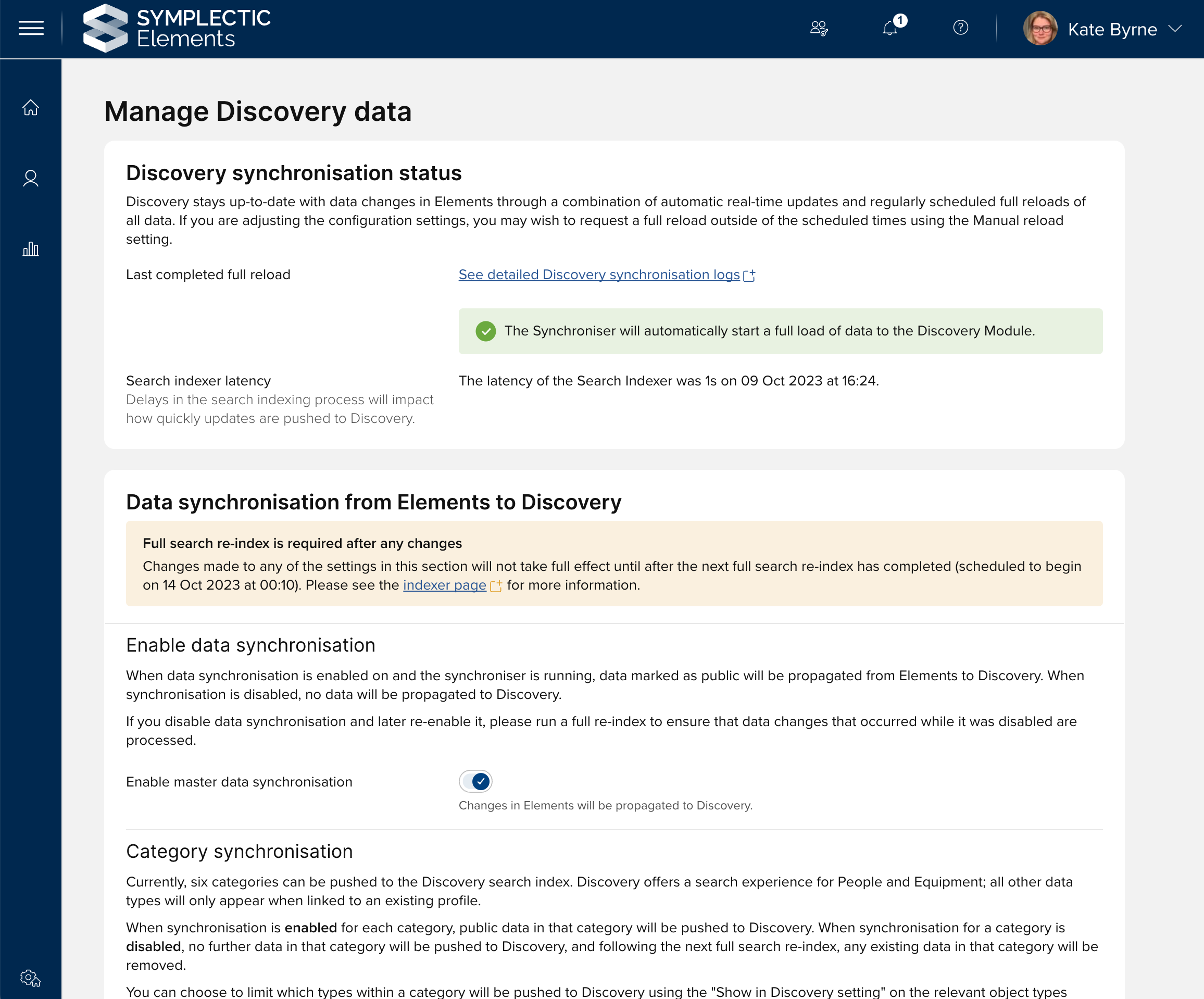
Image: The updated Manage Discovery Data page includes clear information about the Discovery synchroniser status to make it easy to monitor.
In response to community feedback, and to help avoid a comment misconfiguration, we have introduced additional configuration validation for the filters section. This new validation will clearly highlight to administrators if a filter is currently based on a label scheme that no longer requires use of a restricted vocabulary. To ensure we offer a consistent user experience for visitors to Discovery, all label schemes being used to underpin filters must be configured to require use of a restricted vocabulary. The system already offered validation to prevent the selection of a non-restricted label scheme during initial set-up. However, as it is possible for the label scheme itself to be subsequently reconfigured, a configuration mismatch could occur. Now, clear messaging will prompt administrators so they can make the necessary changes to resolve this.
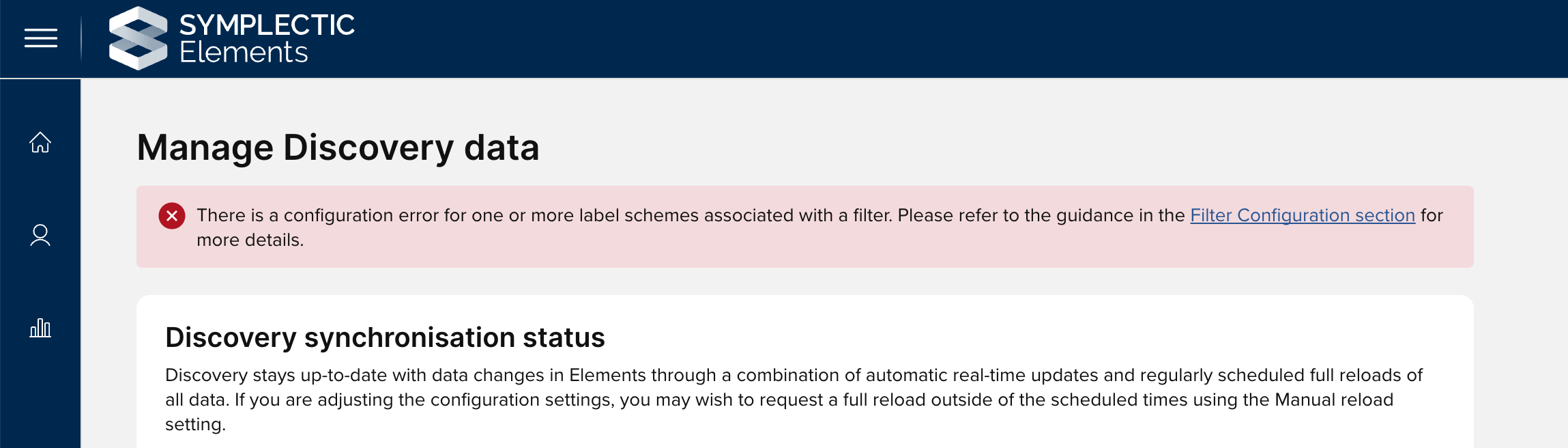
Image: The error message shown at the top of the Manage Discovery data and Manage Discovery Configuration pages if the filters are misconfigured.

Image: The validation message shown on the affected filter with more information about the misconfiguration.
Other Discovery Module Improvements
In response to community feedback, we have added reporting dates to the cascade of dates used to populate the date field for a publication on the Discovery Module. Now, if a publication does not have a publication date or an online publication date, the reporting date will be used instead.
For consistency, we have moved the Discovery Website URL field (which is used to add a link to the relevant Discovery instance to your Elements menu) from the ‘Manage Discovery Module’ page (now the ‘Manage Discovery data’ page) to the ‘Global Settings’ page.
We have introduced a new field, ‘Site name’, to the structured metadata available for Google search engine indexing. This field will be automatically populated with the configured organisation name.
We have increased the validation limits for the Address field in the Discovery footer to allow organisations to add up to 10 lines.
We have added a new configuration setting to rename the ‘Contact Us’ section in the footer.
We have also added a new configuration option to capture ‘Additional Information’ to be displayed in the Discovery Footer. This new section can support capturing up to 500 characters and can be used to add compliance-related information (e.g. CRICOS or TEQSA numbers), or locally relevant information and acknowledgements. The data entered in this new field will appear centred at the bottom of the footer, below three columns.
Redesigned Name-based search settings page
The Name-based search settings page allows researchers and other users to configure their search settings and select which data sources should be searched to find their research outputs. It also provides them with easy access information about when each data source was last searched and the outcome of that search. Typically, the settings presented on this page to each user will have been automatically set by the system based on your system’s default configurations. This means that researchers or administrators only need to visit this page to further refine the settings to help target their search results - either to find missing items or to refine the settings to reduce results from researchers with similar names.
In this release, we have redesigned this page to help simplify the process for researchers and administrators. The page now offers additional guidance information, and we have also moved settings that should be used sparingly into collapsible sections, so that users will first be presented with the settings most likely to be relevant to their needs.
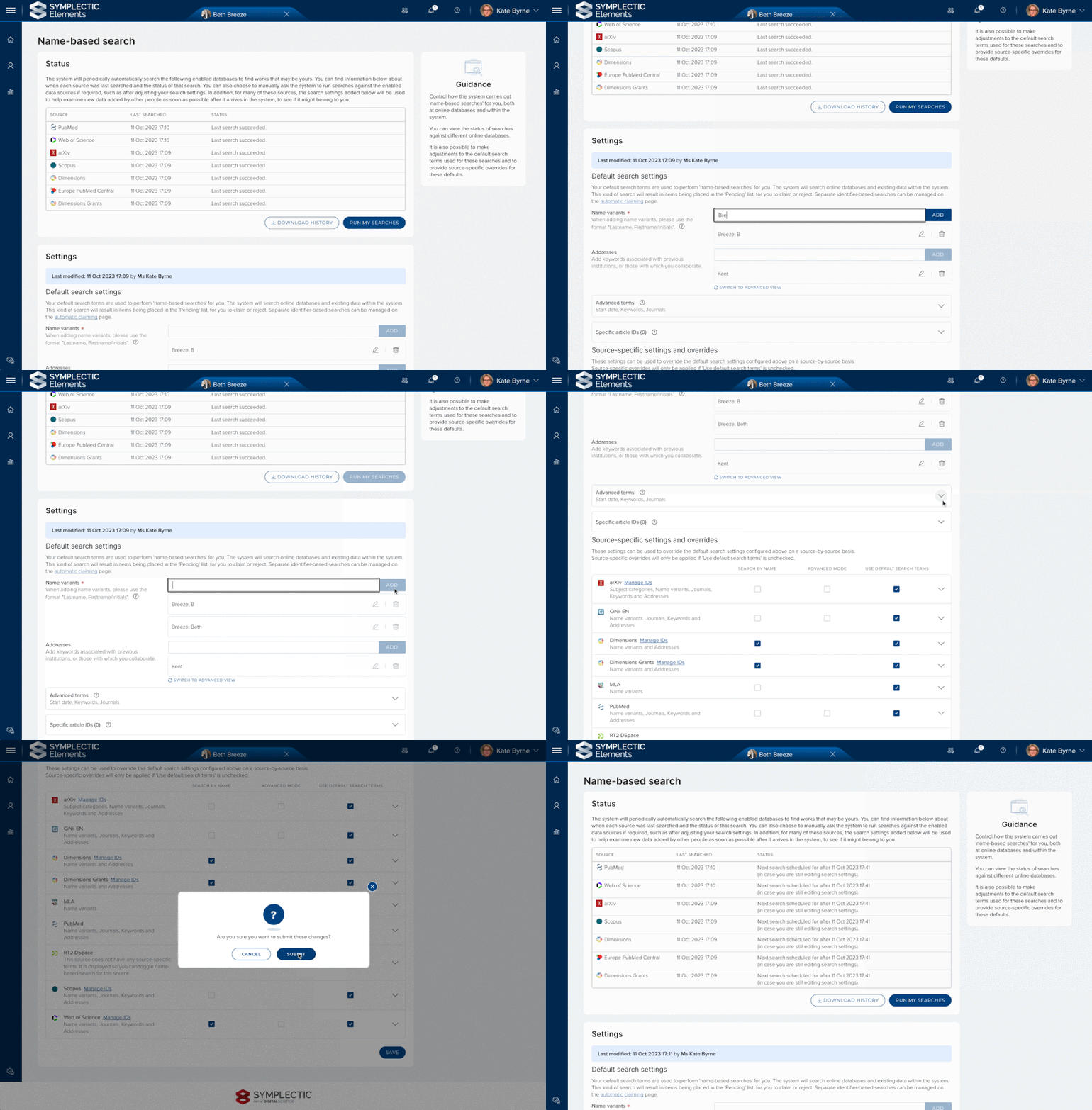
Image: The updated name-based search settings page has been redesigned to provide clearer guidance to users.
This redesign has not only updated the look and feel of the page, it has also included several significant accessibility improvements including the use of our new fully accessible date picker component and improvements for keyboard navigation and screen readers.
Repository integrations: Make file versions mandatory
Depositing files to your institutional repository via Elements helps to streamline the deposit process for users by maximising the reuse of metadata already captured within Elements so that deposits can be completed in just a few clicks. For many of our clients there are a number of key points of additional information that they must collect at time of deposit to help confirm that the deposited version is in compliance with their open access policy.
Elements has long offered the ability for organisations to configure a ‘file version’ field to allow depositors to indicate what each file uploaded as a part of their deposited version represented (submitted version, accepted version, published version, supporting information etc). In response to a very popular feature request, we have added a new configuration option which now allows the ‘file version’ field in the RT2 deposit workflow to be set to mandatory. This functionality is available for organisations using the RT2 DSpace, EPrints or Hyrax integrations and when enabled, will mean that your users are unable to complete their deposit unless they have selected a file version for each uploaded file. This will help reduce the administrative burden associated with following up with users to find out this information.
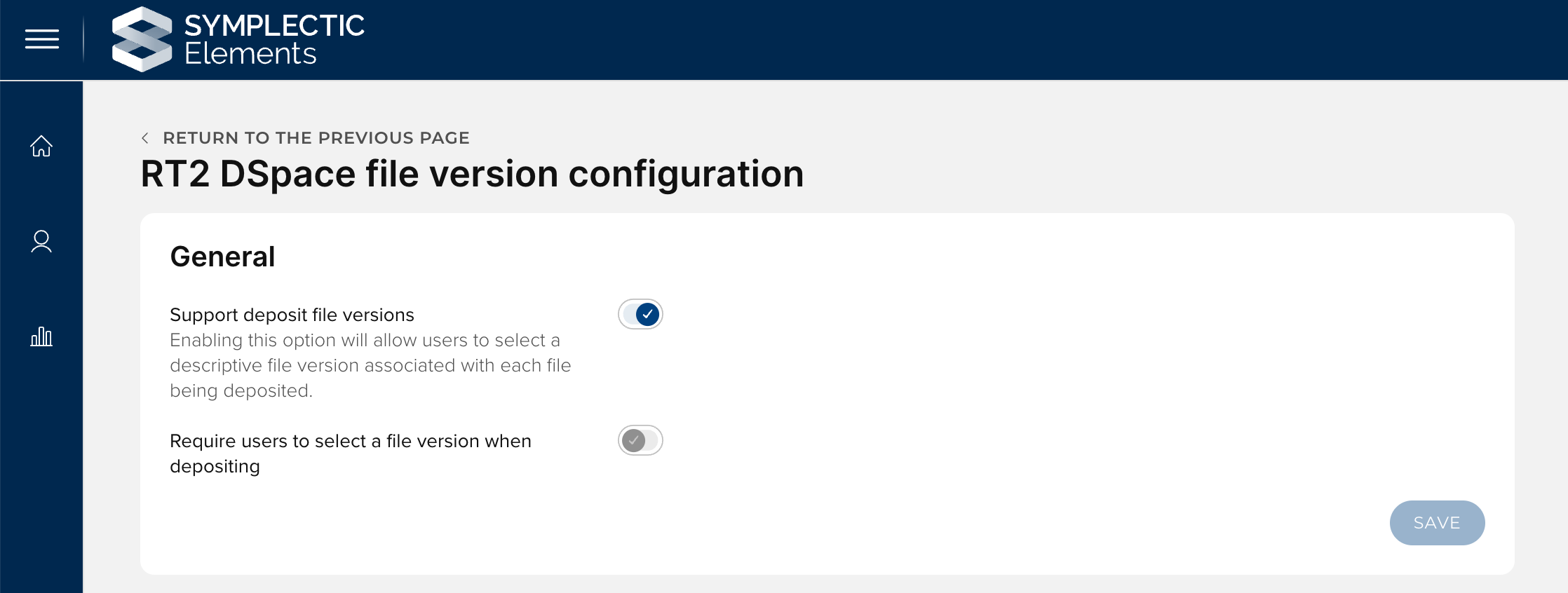
Image: A new configuration settings allow administrators to choose to make file versions mandatory.
Other Repository integration improvements
For clients using any of our RT2 repository integrations:
The maximum permitted file size for crosswalk files has been increased to 10MB, allowing much larger crosswalk files to be uploaded via the relevant repository data source management page.
For clients using our Figshare for institutions integration:
We have improved error logging for the automated metadata updated functionality. The additional logging will make it significantly easier to investigate should any issues arise.
Previously, automated metadata updates to Figshare would update the private version of the Figshare item but make no change in the public-facing version. We have updated this behaviour, so that for clients with the review functionality in Figshare turned off, changes will now be applied to the public-facing version automatically as well. For clients with the review functionality in Figshare enabled, changes pushed to Figshare will trigger a new review request.
For clients using our DSpace repository integration:
We have made adjustments so that file level metadata will no longer be harvested if the harvest crosswalk "xwalkin-without-files" parameter is set to “true”. Previously, this metadata would be harvested and then discarded without being applied. This change will reduce redundant calls to the repository, improving integration performance.
We have updated the system login process for our DSpace7 integration in anticipation of forthcoming changes to DSpace.
Research Funding Solution
In this release of the Elements Research Funding Solution (RFS), we are pleased to introduce additional Project Closure and Related projects features, along with a number of additional improvements and enhancements supporting various aspects of the research funding lifecycle. This additional functionality builds on features introduced in recent releases to help streamline the administration of grants and projects.
Project closure
Following on from the Project Closure functionality introduced in v6.15, we have added the facility to add a Project Closure Checklist that enables you to ensure all appropriate checks are undertaken prior to a Project being closed.
We have also updated the Closed Projects search screen in the Management Console to include new filters and export fields, and additional table columns.
Relationships
We have expanded the relationship types available to include 'Sub-grant - External distribution of funds', aimed at supporting projects where a portion of the main parent project budget is distributed to external parties (e.g. sub-contractors). We have also added a new organisation type for sub-contractors, to enable such organisations to be identified appropriately in reporting.
We have enhanced the Relationships screen to provide filters and export options, and more on-screen information.
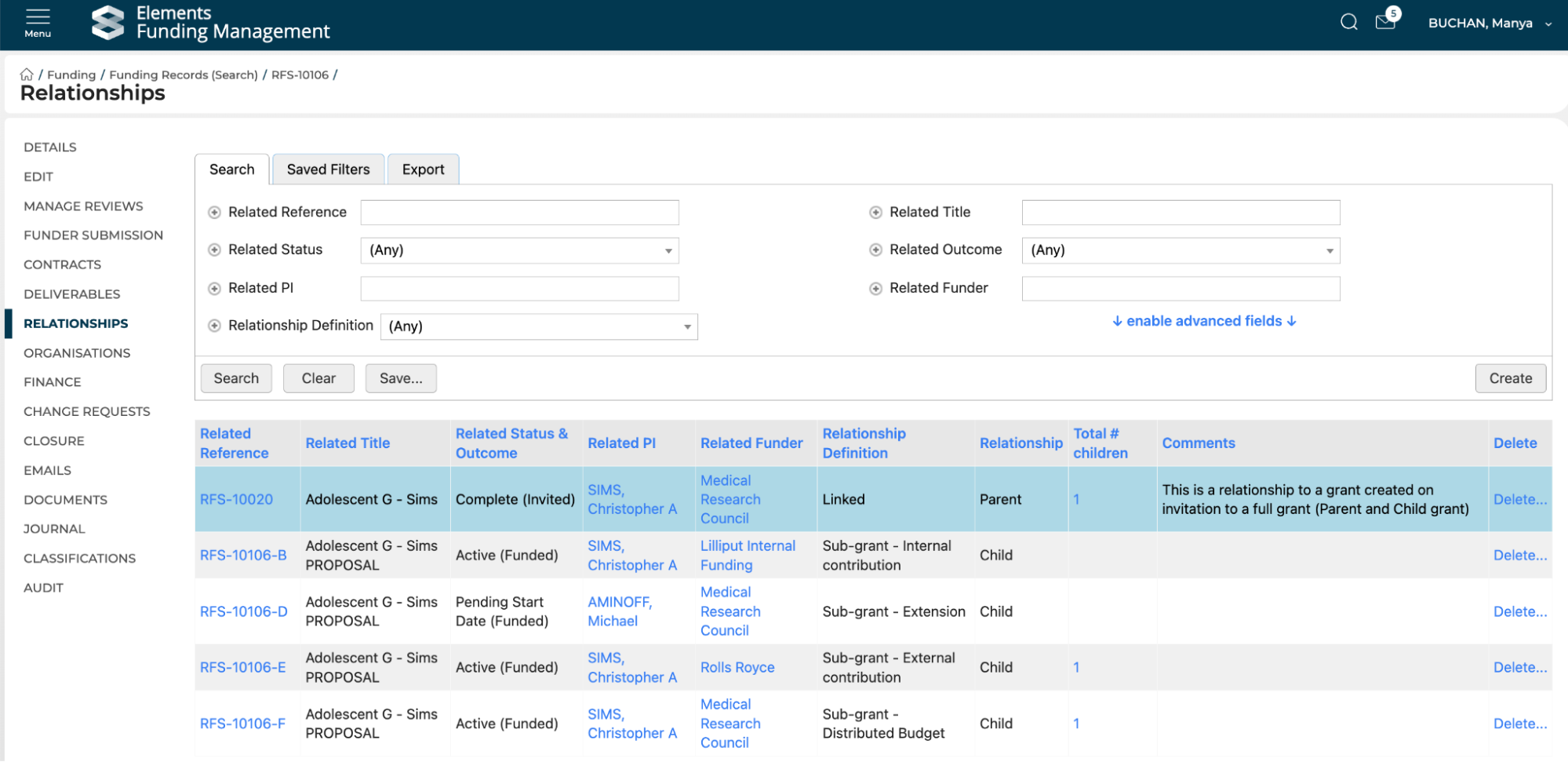
Image: RFS Relationships screen
We have also updated the default behaviour of RFS as a datasource for Awarded Grants, to ensure that Awarded Grants are only created for specified sub-grant types (i.e. Internal and External contributions), and the main award's Award Amount is accurately stated where the sub-grant is not harvested (i.e. Extensions, Distributed budget, and External distribution of funds).
Funder submission and outcome improvement
This release includes a number of improvements to Funder submission and outcome functionality, including:
A new function to enable the bulk upload of funder outcome data, helping users save time by not having to manually key in funder outcomes.
The introduction of an additional Funder outcome of 'Reserve', where the funder has indicated that funding may be awarded at some point in future, should other awards from the funding call not proceed.
Improvements to the Submitted to Funder search page in the Management Console.
The expansion of available default unsuccessful reasons.
A data model update such that the 'Submitted by' field is no longer mandatory when capturing funder submission details.
Reporting database
We are continuing to expand the RFS data available in the reporting database. In this release we have:
Added Change request and Eligibility form data.
Added Closure data to relevant Project tables.
Updated the harvest of Funding organisations to include those flagged as ‘inactive’.
As with previous releases, full details of the RFS functionality released in v6.15 are available in the RFS release notes on our support site.
Support for DHET Research Outputs Collections
The Department of Higher Education and Training (DHET) in South Africa operates an annual reporting exercise to evaluate and allocate subsidies for research outputs produced by South African public higher education institutions.
In this release, for our South African clients, we have introduced additional functionality to Elements to support the collection, verification and evaluation of research outputs in line with DHET requirements.
New 2022 and 2023 DHET Journal lists
To underpin the DHET data collection process, we have introduced two additional journal lists to the system, the 2022 and 2023 DHET Accredited journal lists. These lists are available within Elements for use in reporting, to support assisted data entry via manual entry forms, and for data validation within the Annual Collection Module.
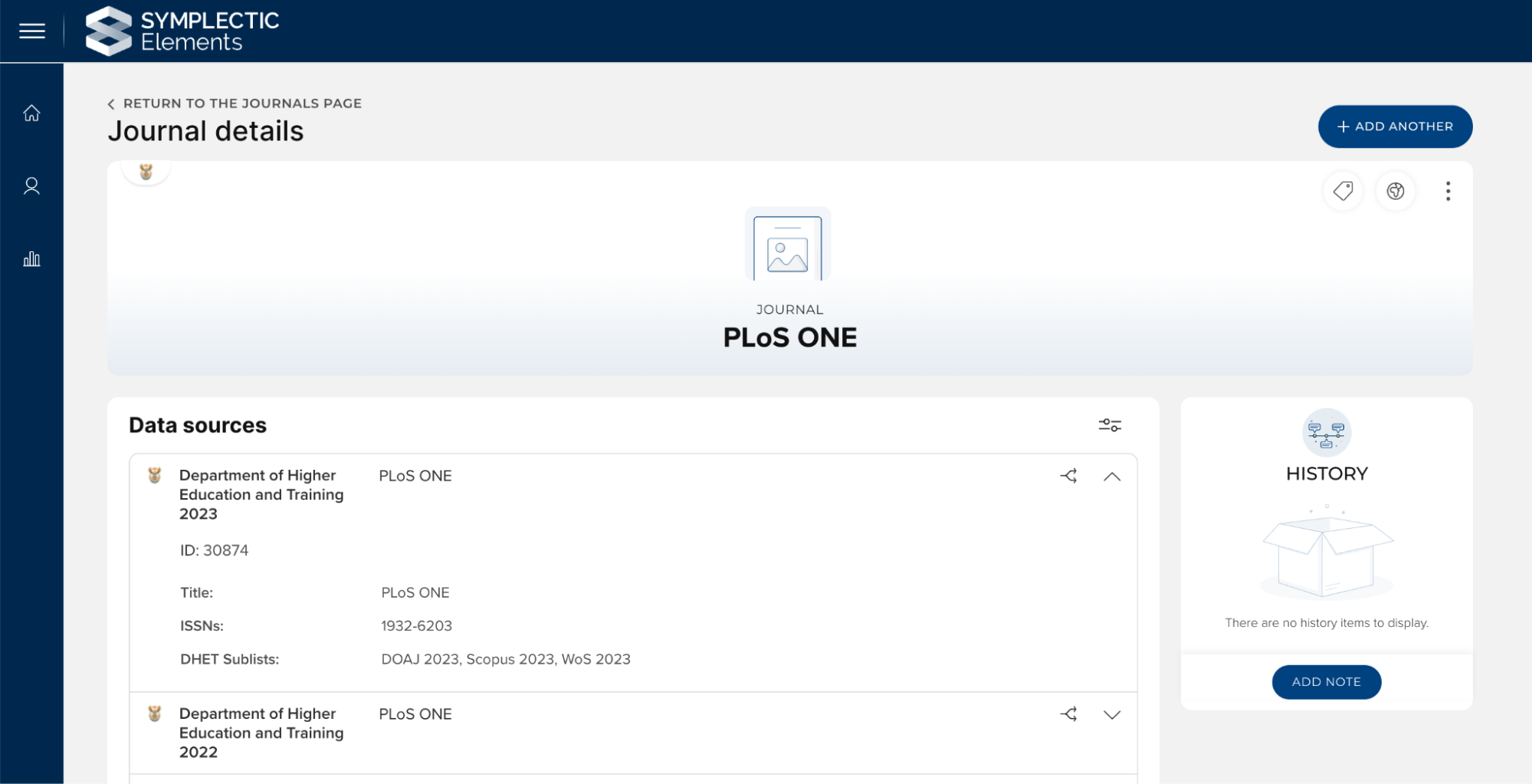
Image: An example of a record from the DHET 2023 list showing the data captured including title, ISSNs and which sublists the journal is included on.
DHET functionality within the Annual Collection Module
We have also introduced a number of new configuration settings for the Annual Collection module so that it can be used to support the collection, verification and evaluation of research outputs for inclusion in a DHET submission. The new functionality includes the introduction of:
A new ‘Is DHET collection’ configuration setting which enables additional functionality to support a DHET collection.
A new collection setting to choose a DHET journal list to associate with that year’s DHET collection. Once selected, the collection will pull through data from the relevant journal list to allow administrators to easily verify whether the article was published in a DHET accredited journal.
Support for automatically calculating the DHET subsidy associated with each nominated and accepted research output. These subsidy calculations automatically take into account both the authorship criteria and the output type based weightings and are represented in the Annual Collection module and the associated reports as ‘weighted points’.
A new field on the Author Affiliations pop-up for each nominated research output to capture how many additional South African affiliations each claimed author has. This data is used as a part of the subsidy calculation.
A new ‘total page count’ field which appears on the Details tab for each nomination to capture the number of pages in a book for use as a part of the DHET subsidy calculation. This will be automatically populated if it is available in the source record at the time the work is nominated.
A new ‘Declined by DHET’ checkbox which appears on the details pop-up for each accepted nomination to allow administrators to record for reporting purposes if a research output was ultimately declined by DHET.
Additional configurable Annual Collection permissions to allow organisations to confirm which of the Annual Collection administrative roles should be permitted to edit page counts on nominations or set the Declined by DHET flag.
Accessibility improvements
A new fully accessible character picker has been created for use as part of our configurable data entry forms.
Improved display and consistency of focus outlines to help users as they navigate through the system, particularly when using keyboard navigation.
Plus numerous other smaller improvements to other core components within Elements.
Other improvements
We have made a number of additions to the Elements API, including:
Introduction of new filters using the is-academic and is-current-staff flags which will allow you to select only data associated with users who are academics and/or are current staff.
Addition of the last-modified-when attribute to user photos to allow you to choose to do a differential pull of photos if desired.
Add last-modified-when to the records on an object to allow you to choose to pull this data differentially if desired. This can help reduce processing for your integration.
We have introduced a new configuration setting for the Web of Science integration to allow us to toggle on or off the throttling behaviour introduced in newer versions of the integration. This new setting is to be used as a workaround for clients impacted by the known issue with Web of Science’s change tracking mechanism.
We have expanded the Element’s currency list to include the Chilean Peso.
For clients using the Annual Collection Module, there is a new configuration setting that allows you to choose to disable the ability to nominate publications for a given collection. When enabled, this will prevent both manual and automatic nominations.
We have redesigned the 'Add/Edit <Type> Field' page which allows administrators to configure the setting associated with each field usage in Elements. This redesign has made significant user experience improvements.
Fixes
There was an issue on the RT2 crosswalk editor which could occur when saving changes using the Control-S keyboard function. This has been fixed.
If a user attempted to click cancel when adding data via a manual entry form, an issue could arise where they are prompted to complete mandatory fields incorrectly. This has been resolved.
The validation for Object Type identifiers’ names was not being correctly enforced. This has been fixed, and the page will now again correctly enforce that these identifiers can only contain numbers, lowercase letters and hyphens, and must end in a number or letter. Please note that if you have added any object types that do not comply with these validation rules, the identifiers for those object types will be automatically updated upon upgrade into a compliant format.
There was an issue where the Import page could successfully import the uploaded Bibtex or RIS file but report an error. This has been fixed.
We have fixed an issue on the Manage Discovery configuration page where line breaks were counting towards character limits.
There was an issue in the Assessment Module where if a user was only a manager of a single REF exercise, the system could fail to load the correct landing page for that exercise. This has been fixed.
For the Elements API, we have fixed the href for the contact-author on Annual Collection/HERDC nominations and the serialisation of the Favourites parameter.
End of support
As always, we recommend that you regularly review our End of Support Announcements for information about upcoming end of support in Elements for various technologies.
We would particularly like to draw your attention to the announcement about the upcoming end of support for some Cryptographic Protocols and Cypher Suites from the 12th of December 2023. Please ensure all client systems connected to Elements use a modern and secure set of cypher suites in order to ensure ongoing compatibility with Elements. For information on the specific cypher suites being phased out see the Support site.
We’re here to help!
We hope you enjoy getting to know the latest version of Elements. Remember: should you have any questions, we’re here to help! Just contact us at support@symplectic.co.uk for assistance.
Best wishes,
The Symplectic Team