
Repository Tools 1: FAQ
IMPORTANT: The information in this article relates to the Repository Tools 1 protocol (RT1). If you are connecting Elements to your repository using the more recent Repository Tools 2 protocol (RT2), please read the appropriate RT2 articles instead.
This article provides and overview of the Repository Tools module.
Deposit Configurables
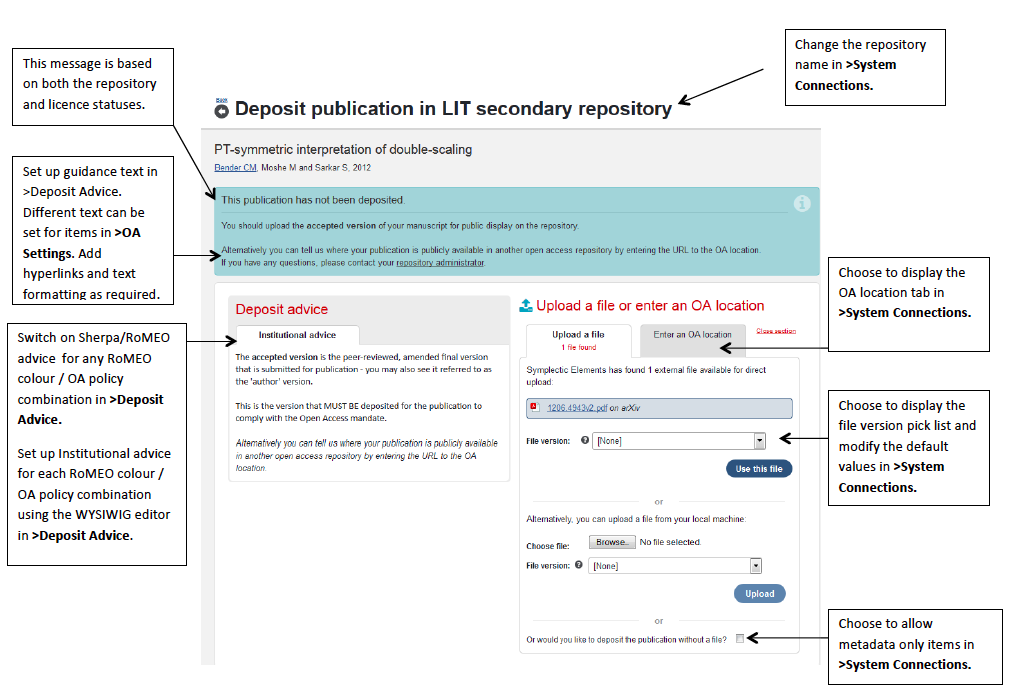
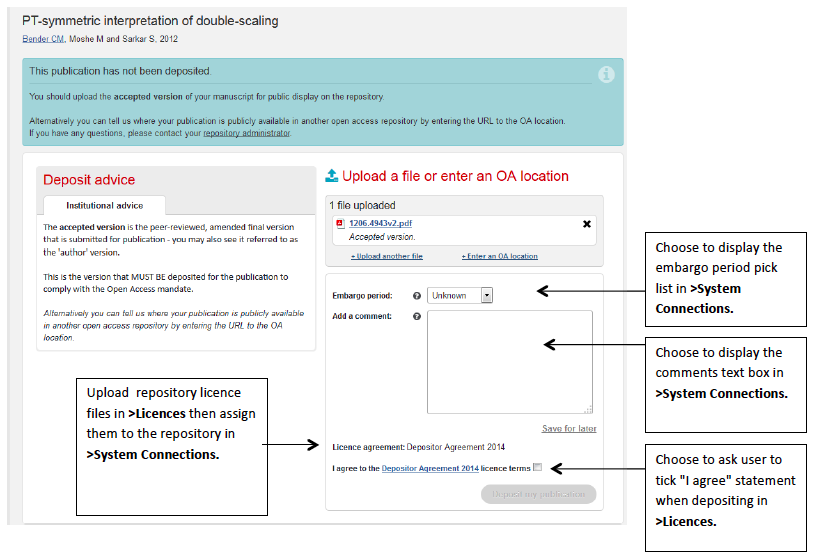
There are a large number of configuration options in the Repository Tools module. Many of these options determine what information is displayed on the Deposit Page and what information is requested about the deposit from the user. The following screen shots summarise these options and where to set them in the Repository Tools module.
Deposit Step 1
Deposit Step 2
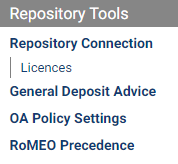
Repository Tools Module Admin Menu
RT1 connections are configured via the Module Admin > Repository Tools menu. Guides are available for each menu item:
FAQs
What does the Repository Tools module do?
It allows metadata and files to be ingested into your repository within the Elements user interface. With the Repository Tools module, there is no need for your end users to log in to a separate system or require any additional data entry within the repository.
There is an extra advantage for data sources like Arxiv and European PubMed Central as the end user is presented with pre-populated links to open access files to upload into your repository.
Metadata from licenced sources like Web of Science and Scopus is regulated and limited for internal use within your institution. You will need to seek permission to crosswalk fields other than title, author(s), date, and source into the public domain.
Where are the files stored when I upload an item? It looks like they are in Elements.
It's magic! It may look like the files are in stored in Elements, but when a full text file is uploaded it makes its way into a repository Workspace/Review State. At this stage, there is no permanent URL assigned and the item will need to be reviewed. After accepting the item, repository staff manage the item through the various workflow stages to fully process the item. At that stage, it is assigned a permanent URL and made available online.
Are there any size limits in depositing via Repository Tools?
The Repository Tools implementation does not have any specific limits on the size of files that can be deposited. However, in practice there may be a number of factors that limit the size of files that you can successfully transfer:
Support by your browser or server configuration to deposit large files. Typically, browsers will not allow you to upload files of more than 2GB.
Network speed between both browser and Elements, and Elements and your repository may affect the amount of data you can transfer in a reasonable timeframe.
Network configuration (e.g. firewalls) may limit the amount of time a connection can be active before it is timed out (closed), limiting the amount of data that can be transferred.
<>Additionally, if you are running a Fedora repository, then the connector has to buffer the files that are being deposited before initiating the REST API call to the underlying repository. Because of this, you may be more likely to run into timeout issues with larger files.
I don't have an existing repository. Can I combine an Elements and Repository implementation?
Yes, as long as you can manage the implementation of the repository software to align with the Elements implementation.
If I make a change to an item in Elements, will the item be updated in the repository?
Yes. There are two components to an item: File-based and metadata-based activities. After the initial deposit of metadata and file(s), the item will either be in review or fully processed. If there are changes to metadata, a scheduled job checks for updates and applies them to the existing item. If a file is deleted (and/or a file uploaded) while the item is in review, then these changes will apply to the existing item. If a file is deleted (and/or a file uploaded), when the item is fully processed, then a replacement item (clone) will be created, though from V4.14 you can configure Repository System Connection properties to prevent this.
If I make a change to an item in the repository, then what will happen in Elements?
The authoritative source of metadata is Elements so any changes you make in the repository metadata will not be reflected in your Elements item; however if a file is deleted (and/or a file uploaded) in the repository this will be mirrored in Elements. There is no problem with a repository administrator editing a live item to attach a file to it -- Elements will pick up that this has happened and reflect the change.
What do "List Metadata Updates" "Get Records" and "List Holdings" jobs do?
These jobs/tasks are regular Scheduled/Cron jobs run on the Repository side and check for changes between Elements and your Repository so changes are synchronised.
List Metadata Updates: Retrieves IDs of all accepted publications which have been updated since the last time it run.
Get Records: Retrieves records from your Repository of IDs picked up by List Updates.
List Holdings: Publishes all the records in a way so they can be picked up.
What does the "Synchroniser: Repository" scheduled job in Scheduled Jobs(System Admin) do?
This job works in conjunction with the "List Holdings" job run on the Repository and refreshes cached information so you see the current status of an item on the view object and repository deposit pages
What do Repository Status values indicate?
Live - item is public
In Review - deposited but not yet made public (in workflow)
Withdrawn - deposited and withdrawn
Not deposited - no action taken
Unknown (= Elements doesn’t recognise the status provided from the repository)
If I have a field in my repository that is not in Elements, will this field be overwritten if there is a change to the Elements metadata?
No.The set of fields is configurable, and any metadata fields not defined as having Elements as the authority will not be overwritten; therefore, you can add supplementary metadata fields without concern. Where Elements is the authoritative data source, expect that any changes to those fields you choose to map to will be overwritten with what comes from Elements. (only applies to DSpace and Eprints)
I would like to have the labels applied to an item in Elements available in my repository. Is this possible?
Yes, labels are present in the feed of information that is sent to the repository.
What does the embargo functionality do?
An embargo is applied to an item to restrict it from public view for a selected time period. The embargo functionality captures a time period, then passes this data through to the repository as text metadata values. It is then up to the repository manager to interpret that advice and apply an actual embargo to the repository file and/or item.
Are there reports in Elements to show publications marked with an embargo?
Not exactly - but alternatively within your repository you could programmatically create tasks to interpret the embargo values and apply this to the files automatically. From Elements 4.10 you can extract embargo information using the Reporting Database, after which you could create a custom report to extract this information.
I would like to crosswalk the Embargo Period and Comment information entered during the 2nd step of the deposit process to my repository can I do this?
Yes, this information is rendered as fields outside of the data sources, as object field mappings. A sample of the code required:
       <pubs:fields>
    <pubs:field name="p-requested-embargo-period" type="text" display-name="p-requested-embargo-period">
      <pubs:text>Not known</pubs:text>
    </pubs:field>
    <pubs:field name="fulltext-comment" type="text" display-name="Comment">
      <pubs:text>some words</pubs:text>
    </pubs:field>
  </pubs:fields>
Why do we need to wait until the data migration phase is complete to complete the repository integration?
The data match usually occurs when you are about to go live. If you wish to avoid gaps in the matching, it's important to not make changes to the repository from the time the data match files are supplied and the integration is completed. More information is available in this article Repository Data Matches.
I see there is an option to allow metadata-only records in the repository. Would you recommend this option?
If the administrator of Elements enables the “Allow complete submission before file upload” option this allows an academic to manually create and deposit metadata-only records to the repository as a complete submission. This record will be placed in a review state and either accepted or rejected by a repository administrator. If the record is rejected, it remains in the repository workspace and can be modified by the academic, resubmitted and the process repeats. If the record is accepted, it will go live so that when the file is uploaded it is to a live record, which triggers the creation of a clone of that record. This creates additional work for the repository administrators as they have to check the two (original and its clone) and decide which will be set to live. Metadata records that are left in a review state can’t be accessed via the repository which negates having them in the repository. Keeping metadata-only records in the review stage (not putting them live) is likely to impact your ability to determine which items are genuinely awaiting a review (e.g. have had a file uploaded).
If I had an item in my repository not connected to Elements, then a new item is created in Elements and a file uploaded - what would happen?
Any uploads against the Elements publication will create a new item in the repository.
I have an item in my repository that I want to link to Elements. Currently, they are not connected. Can I do this post go-live?
If you are prepared to customise your repository, it would be possible for you to add the capability for the administrator to supply the ID of an Elements publication and populate the appropriate tables in the repository database in order to link a repository item to an Elements publication post go-live. You could also request assistance from the Symplectic team by submitting a support request.
I would like the Sherpa Romeo colours available in my repository. Is this possible?
Not currently.
Can I change the wording of "Repository public URL" on the brief summary screen?
From V4.15, the name used is derived from the Repository Connection properties name. This is also displayed on the end user profile publications lists.
If an end user is not associated with a publication or resolved incorrectly on a publication what will the Repository Deposit Page look like?
The Deposit button will not display.
I would like to crosswalk the OA Location field in my repository can I do this?
Yes, though the OA information is rendered as fields outside of the data sources, you need to use the "object field mappings."
I am using DSpace and would like to capture the File Description selected during the deposit process, can I use the Elements API to retrieve this information?
No, that information is present as part of the Atom feed. It is ONLY present in the feed that is sent to the repository as part of the call that deposits the file. The information is not retained within Elements; however, as it is stored as the description of the bitstream in DSpace, you could always retrieve the information from DSpace.
Why are metadata fields duplicated or repeated in my DSpace repository?
Each field defined in your crosswalk needs to have a corresponding entry in the in the section publications.metadata.authority-list of your dspace.config file. Check and compare the listing of the fields. If a field appears in your crosswalks but is not in the publications.metadata.authority-list two fields appear.