Bulk edit REF2 content

Released : 5.17
Updated : 5.18, 5.19, 5.20 (and 5.20.0.2685, 5.20.0.2803, 5.20.0.2906), 5.21 (and 5.21.0.2804, 5.21.0.2915), 6.0.0.2805 (and 6.0.0.2897), 6.1.0.2898
Bulk edit REF2 content
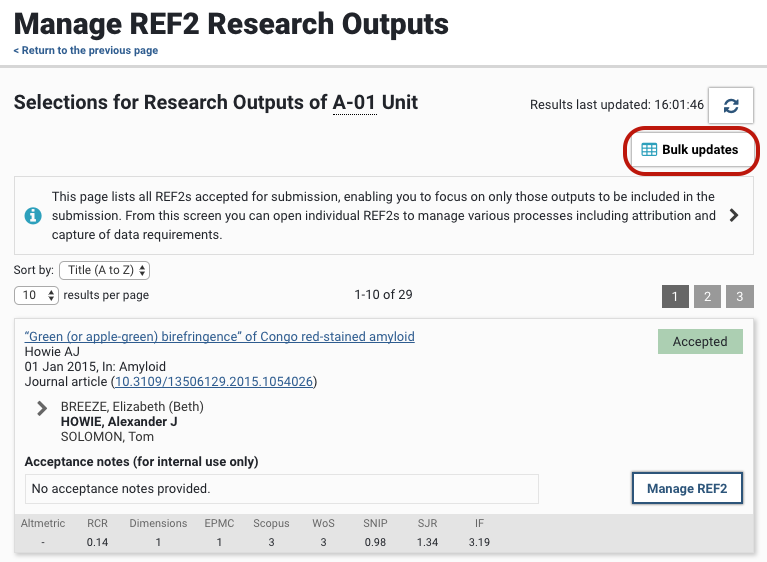
It is possible to edit REF2 metadata using a CSV bulk update function, accessed from the Manage REF2 Research outputs screen.
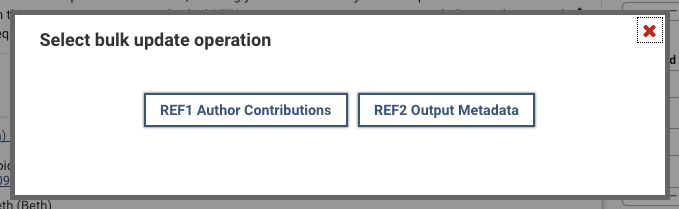
There are two bulk actions available:
REF2 metadata
REF1 Author contribution details
To access the import file templates, go to the Manage REF2 Research outputs screen for the desired UoA, and select 'Bulk updates'. From there you select which bulk action you wish to perform.
To bulk edit Submission statuses, go to the Bulk edit REF2 Submission state function available from the Manage Selections screen.
REF2 metadata
The REF2 metadata bulk edit function enables you to edit the majority of the non-bibliographic REF2 metadata fields, including:
REF2 output type
Overall score and notes
Publication date overrides
Additional co-authors override
Supplementary information
Additional information
Output sub-profile category (will be delivered following publication of taxonomies)
Interdisciplinary, Forensic, Criminology, and Sensitive flags
Double-weighting requests, statements, and reserve
Pending output flag and reserve
Cross-referral request
REF OA status override and reason
REF2 confirmation workflow
English abstract
COVID-19 delayed outputs
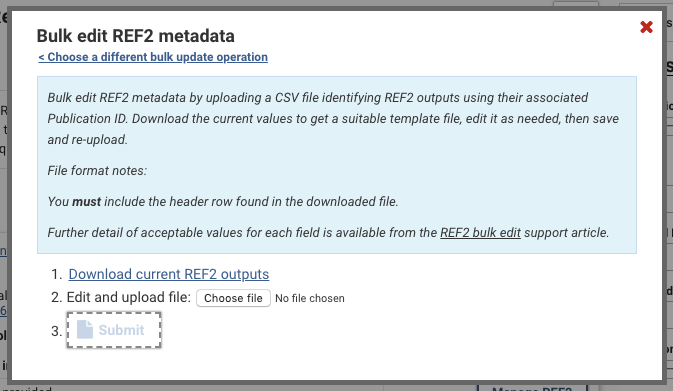
You can 'Download current REF2 metadata' for all outputs in the UoA, with their current values for the relevant fields. The downloaded file will reflect any filters you have applied on the Manage REF2 Outputs screen.
Notes:
You must include the header row found in the downloaded file.
To update a REF2 metadata field, replace the existing value in the file.
For boolean fields (where the only accepted values are TRUE or FALSE), these cells cannot be left blank - you must provide a value (either TRUE or FALSE). Leaving any other cell empty in the import file will leave the existing value as it is.
To clear the existing value, populate the cell with the text CLEAR (case sensitive) (only applies for certain fields - see table below)
Publications with multiple REF2 outputs due to merging of publications cannot be updated using this bulk function. A warning will be generated to advise you of any such records.
There is the possibility of job timeouts if the import file is quite large (but we've done work on this recently to optimise performance)

REF2 field | Description | Accepted values | CLEAR function? |
Publication ID | Elements ID of the associated publication | e.g. 15241 | - |
Publication title (for info only) | Title of associated publication | Is provided for information only. The import process completely ignores any values in this column. | - |
REF Output type | Type of output, as per REF output types | A, B, C, D ... | YES |
Overall score | Overall predicted score for the REF2 | Must match Score name within the REF scoreset | YES |
Overall score notes | Overall predicted score notes | String of text | YES |
Publication date (Month, Year) (for info only) | Is provided for information only. The import process completely ignores any values in this column. | - | |
Output date override | Override recorded publication year and/or month | Use YYYY format to override year only. Jan, Feb, Mar, Apr, May, Jun, Jul, Aug, Sep, Oct, Nov, Dec (it is not possible to override month only - to only override the month, you must also provide the year) | YES |
Add'l co-authors (for info only) | Number of additional co-authors (derived from the total number of authors on the associated Publication, minus one) | Is provided for information only. The import process completely ignores any values in this column. | - |
Add'l co-authors override | Override the derived number of additional co-authors | Integer, e.g. 17, 240 | YES |
Supplementary information | DOI (or other URL, if no DOI is available) for any supplementary information published alongside an output | String | YES |
Media of Output | Describe the form of the output that is being submitted where it has not been possible to submit the final version of the output in electronic form | String | YES |
Additional information - Significant material | Indicate whether the Additional information statement includes details of outputs that include significant material published prior to 1 Jan 2014 | TRUE / FALSE | - |
Additional information - Research process | Indicate whether the Additional information statement includes information about the research process and/or content | TRUE / FALSE | - |
Additional information - Significance (UoAs 11 and 12 only) | Indicate whether the Additional information statement includes factual information about the significance of the output | TRUE / FALSE | - |
Additional information - statement | Statement of additional information to inform the assessment, where required as per the Panel Criteria | String | YES |
Output sub-profile category (UoAs 3 and 12 only) | UoAs 3 and 12 only. | UoA 3:
UoA 12:
| YES |
Output allocation 1 (UoAs 7, 10, 11, 12, 26, 27, 28, 29, 33, 34 only) | UoAs 7, 10, 11, 12, 26, 27, 28, 29, 33, 24 only. | UoAs 7, 10, 11, 12, 26, 27, 28, 29, 33, 24 only | YES |
Output allocation 2 (UoAs 10, 12 and 26 only) | " | UoAs 10, 12, and 26 accept up to two Output allocations | YES |
Output allocation 3 (UoA 12 only) | " | UoA 12 accepts up to three Output allocations | YES |
Interdisciplinary | Indicates if the output embodies interdisciplinary research | TRUE / FALSE | - |
Forensic | Indicates if the output embodies research in forensic science | TRUE / FALSE | - |
Criminology | Indicates if the output embodies research in criminology | TRUE / FALSE | - |
Double-weighting | Indicates whether you would like to request that the sub-panel weights the output as two, for outputs of significant scale and scope | TRUE / FALSE | - |
Double-weighting statement | Statement explaining how the scale and scope of the output satisfies the panel criteria for double-weighting | String | YES |
Double-weighting reserve publication ID | Elements ID of the associated publication of the REF2 to act as the double-weighting reserve, should the request for double-weighting not be accepted | e.g. 5124 | YES |
Double-weighting reserve title (for info only) | Title of the associated publication of the REF2 to act as the double weighting reserve, should the request for double-weighting not be accepted | Is provided for information only. The import process completely ignores any values in this column. | - |
Pending | Indicates whether the output is expected to be made publicly available between the submission date and the end of the publication period (31 Dec 2020) | TRUE / FALSE | YES |
Pending reserve publication ID | Elements ID of the associated publication of the REF2 to act as the pending reserve, should the output not be published prior to 31 Dec 2020 | e.g. 75412 | YES |
Pending reserve title (for info only) | Title of the associated publication of the REF2 to act as the pending reserve, should the output not be published prior to 31 Dec 2020 | Is provided for information only. The import process completely ignores any values in this column. | - |
Cross-referral | Request to the sub-panel to consider cross-referring the output to another sub-panel for advice | e.g. A-03, B-12 | YES |
Delayed | Indicates where the final version of the output is not in the public domain by 31 Dec 2020 due to COVID-19 | TRUE / FALSE | - |
Delayed statement | Where a delayed output is submitted that is not yet in the public domain in its final form, an optional statement explaining the form of the submitted output. | String | YES |
Sensitive | Indicates if the output should be omitted from the published data for specific reasons, such as commercial sensitivity or security | TRUE / FALSE | - |
Mapped REF OA status (for info only) | REF OA status mapped against the OA monitor OA compliance status | Is provided for information only. The import process completely ignores any values in this column. | - |
REF OA override | REF2 output types D-Journal article and E-Conference contribution only. |
| YES |
REF OA override reason | If overriding the Mapped REF OA status, capture the reason for the override | String | YES |
Output format default (for info only) | The REF2 Output submission format (whether Electronic or Physical). The default Output format is selected depending on the REF Output type, as per the REF Submission System defaults. | Is provided for information only. The import process ignores any values in this column. | - |
Output format override | Override the default Output format. | YES | |
Current output submission status | Current physical / electronic submission status of the output | Acceptable values as defined in the Exercise Definition configuration (if enabled) | YES |
Output submission status notes | Notes relating to the physical / electronic submission of the output | String | YES |
REF2 data confirmation workflow | Data confirmation workflow state of the REF2 |
| - |
Publication language (for info only) | Language of the associated publication of the REF2 | Is provided for information only. The import process completely ignores any values in this column. | - |
Language within Unit remit | Indicates whether the output is produced in a language within the remit of the Unit | TRUE / FALSE | - |
English abstract | Brief abstract for outputs in languages other than English | String | YES |
REF1 Author contribution details
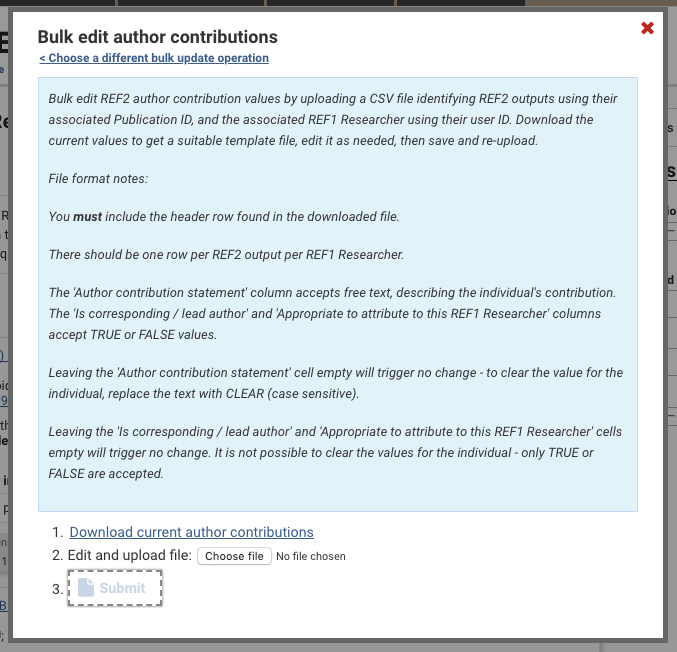
The REF1 Author contribution details bulk edit function enables you to edit author contribution information for each REF1 Researcher affiliated with a REF2:
Author contribution statement
Whether the individual is the corresponding / lead author
Whether it is appropriate to attribute the REF2 to the REF1 Researcher
You can 'Download current author contribution' details for all outputs in the UoA, with their current values for the relevant fields. The downloaded file will reflect any filters you have applied on the Manage REF2 Outputs screen.
Notes:
The file lists one row per REF2 output, per affiliated REF1 Researcher (so any one REF2 output may have multiple rows)
You must include the header row found in the downloaded file
To update a field, replace the existing value in the file
For boolean fields (where the only accepted values are TRUE or FALSE), these cells cannot be left blank - you must provide a value (either TRUE or FALSE). Leaving any other cell empty in the import file will leave the existing value as it is.
To clear the existing value, populate the cell with the text CLEAR (case sensitive) (only applies to the 'Author contribution statement' - see table below)
Publications with multiple REF2 outputs due to merging of publications cannot be updated using this bulk function. A warning will be generated to advise you of any such records.
There is the possibility of job timeouts if the import file is quite large (but we've done work on this recently to optimise performance)

REF1 Author contribution field | Description | Accepted values | Clear function? |
Publication ID | Elements ID of the associated publication | e.g. 5230 | - |
Publication title (for info only) | Title of the associated publication | Is provided for information only. The import process completely ignores any values in this column. | - |
REF1 user ID | User ID of the associated user One of REF1 User ID, REF1 Username, or REF1 User proprietary ID (or any combination that uniquely identifies one user) must be provided | e.g. 320 | - |
REF1 Username | Username of the associated user One of REF1 User ID, REF1 Username, or REF1 User proprietary ID (or any combination that uniquely identifies one user) must be provided | e.g. mbuchan | - |
REF1 User Proprietary ID | User Proprietary ID of the associated user One of REF1 User ID, REF1 Username, or REF1 User proprietary ID (or any combination that uniquely identifies one user) must be provided | e.g. 106066, buchan106 | |
REF1 name (for info only) | Name of the associated user | Is provided for information only. The import process completely ignores any values in this column. | - |
Author contribution statement | Statement providing details of the researcher's contribution to a co-authored or co-produced output (see Panel Criteria) | String | YES |
Is corresponding / lead author | Indicates whether the listed REF1 Researcher is the corresponding / lead author (for some sub-panels, whether the attributed REF1 Researcher is a corresponding / lead author determines whether an Author contribution statement is required - see Panel Criteria) | TRUE / FALSE | - |
Appropriate to attribute to this REF1 Researcher | Indicates whether it is appropriate to attribute to the listed REF1 Researcher (i.e. did the individual make a substantial contribution to the output) | TRUE / FALSE | - |
Research group | Where Research groups are enabled for the Unit and assigning REF2 Research outputs to Research groups has been enabled for the Unit, you can capture the Research Group for each affiliation | e.g. Nuclear physics | YES |
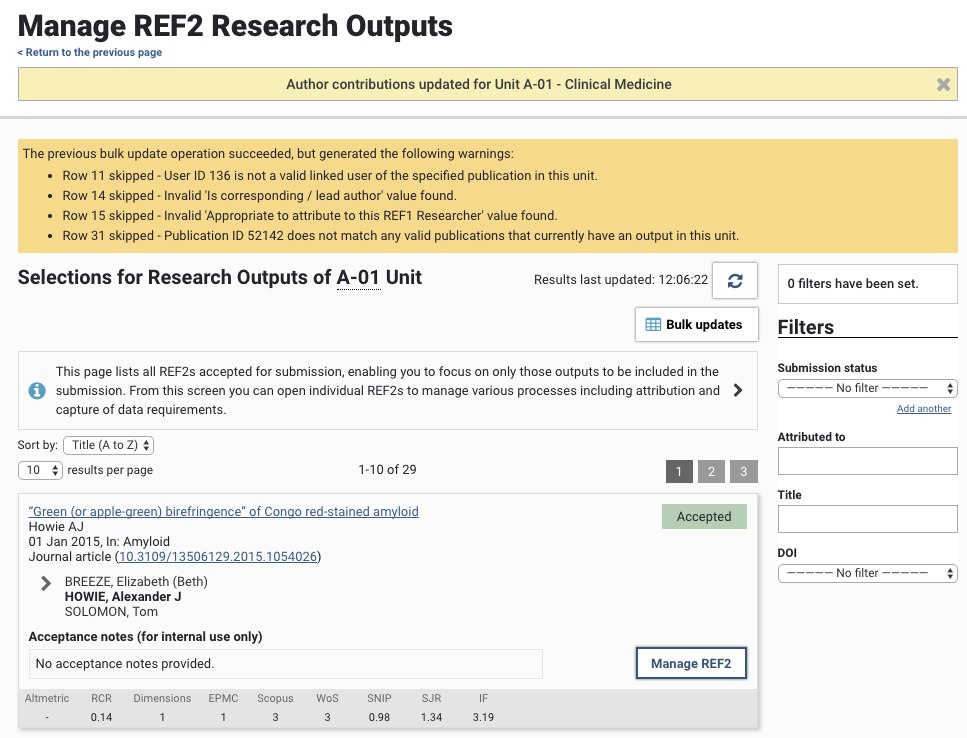
Job logging
Any errors encountered during the bulk edit operation will be listed in the yellow information box at the top of the screen following the import being actioned (note that row numbers cited ignore the header row). Note that a record will be skipped upon first encountering an error - so if there are multiple errors in a row, the log will only cite the first encountered.