
REF Data flags dashboard

Released : 5.20
Updated : 5.20.0.2803, 5.20.0.2927, 5.21.0.2804, 5.21.0.2926, 6.0.0.2805, 6.0.0.2928, and 6.1.0.2929
REF Data flags dashboard
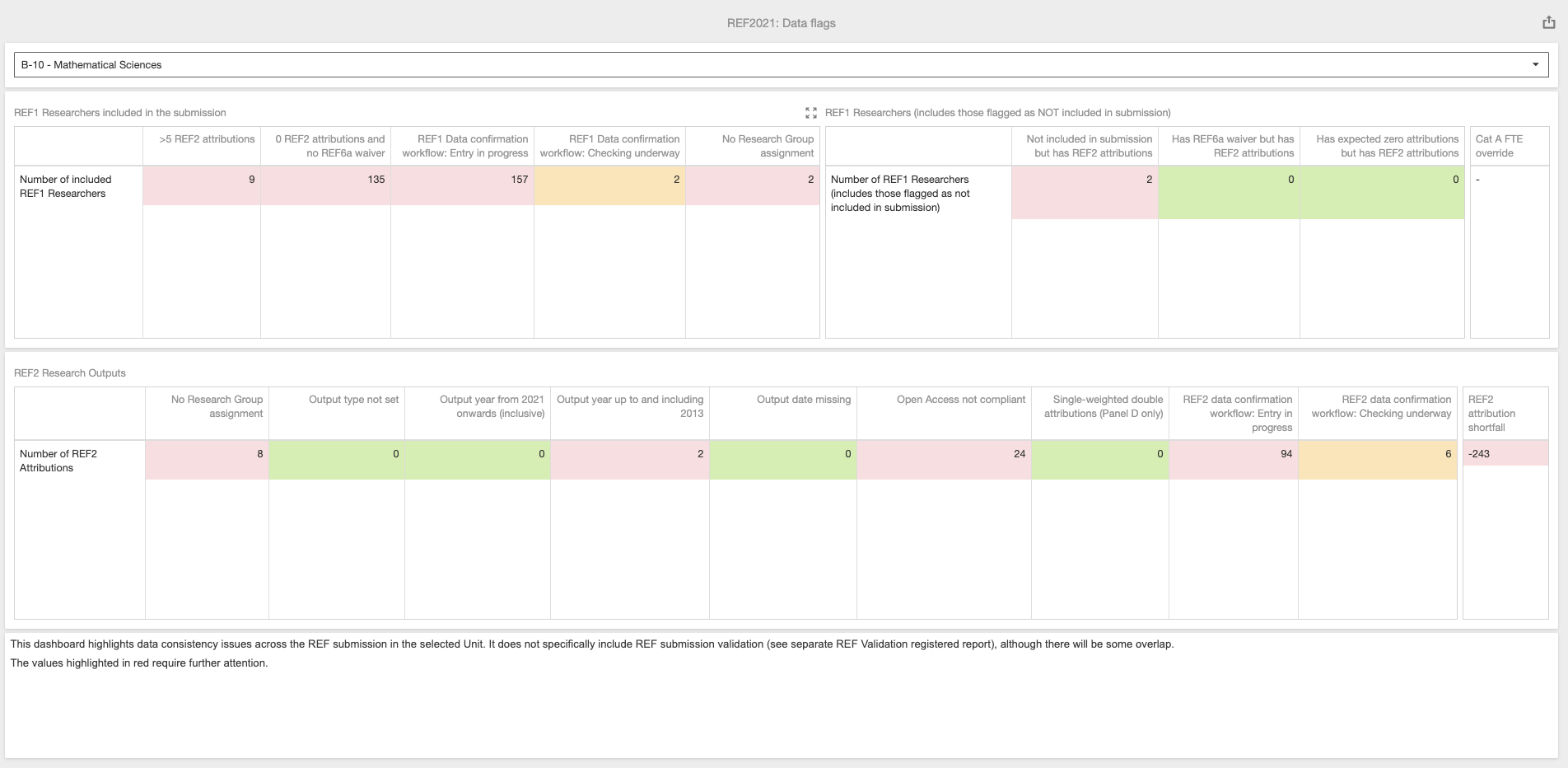
This dashboard highlights data consistency issues across the REF submission in the selected Unit. It does not specifically include REF submission validation (see separate REF Validation registered report) (although there will be some overlap)
Colour legend:
GREEN = No action required
RED = Action required
ORANGE = Action potentially required
New version released 22 January 2021 (and 28 Jan patches) |
We have fixed a bug where REF1 Researchers with zero attributions were not being correctly flagged. |
To apply this new version manually:
|
Attributed and Accepted REF2s tab
REF1 Researchers included in the submission table
Column | Description |
>5 REF2 attributions | Number of included REF1 Researchers with more than 5 REF2 attributions (excludes Reserves) |
0 REF2 attributions and no REF6a waiver | Number of included REF1 Researchers with zero attributions and no REF6a waiver (excludes Reserves) |
No Research Group assignment | Number of included REF1 Researchers with no Research Group assignment (values are only presented and cell is highlighted only where Research Groups are enabled for the Unit) |
REF1 Data confirmation workflow: Entry in progress | Number of included REF1 Researcher records in the 'Entry in progress' data confirmation workflow state |
REF1 Data confirmation workflow: Checking underway | Number of included REF1 Researcher records in the 'Checking underway' data confirmation workflow state |
REF1 Researchers (includes those flagged as NOT included in submission
Column | Description |
Not included in submission but has REF2 attributions | Number of NOT included REF1 Researchers with REF2 attributions |
Has REF6a waiver but has REF2 attributions | Number of included / NOT REF1 Researchers with a REF6a waiver but also REF2 attributions |
Has expected zero attributions but has REF2 attributions | Number of included / NOT REF1 Researchers with zero expected attributions but also has REF2 attributions |
Cat A FTE override
Where the Cat A FTE override is populated the Unit form, this is highlighted here. As you near the submission deadline, it is expected that this override value is removed to ensure accurate required REF2 calculations based on submitted Cat A FTE values.
REF2 Research Outputs
Column | Description |
No Research Group assignment | Number of attributed REF2 outputs with no Research Group assignment (values are only presented and cell is highlighted only if RGs are enabled for REF2s in the Unit, as captured in the Unit form). Note that where a REF2 is double-attributed and one of the attributed REF1 Researchers does not have a RG assignment, this may result in an odd count here. It is best to resolve the issue by ensuring that both attributed REF1 Researchers have RG assignments. |
Output type not set | Number of attributed REF2 outputs with no REF2 Output type set |
Output year from 2021 onwards | Number of attributed REF2 outputs where the publication year is 2021 or later |
Output year up to and including 2013 | Number of attributed REF2 outputs where the publication year is 2013 or earlier |
Output date missing | Number of attributed REF2 outputs where the publication date is not available |
Open Access Not compliant | Number of attributed D-Journal articles and E-Conference contributions with the REF Open Access status of 'Not compliant' (should not exceed 5% of in scope outputs) |
Single-weighted double attributions (Panel D only) | Number of single-weighted double attributions (applies to Panel D only) (should not exceed 5% of the total number of REF2 attributions) |
REF2 Data confirmation workflow: Entry in progress | Number of attributed REF2 outputs in the 'Entry in progress' data confirmation workflow state |
REF2 Data confirmation workflow: Checking underway | Number of attributed REF2 outputs in the 'Checking underway' data confirmation workflow state |
Notes:
Reserves are excluded
Outputs to be input directly into the REF submission system are not included (except in the REF2 attribution shortfall calculation)
REF2 outputs are counted as described here
Attributed REF2 counts include any outputs attributed to REF1 Researchers NOT included in the submission. It is recommended that any such attributions are removed to ensure accurate calculations.
REF2 attribution shortfall
Where [Number of Attributed REF2s] + [Outputs being input directly in REF submission system] is ≠ [Number of required REF2s], the cell is highlighted in RED. The number is presented as a negative if there are less REF2 attributions than are required; the number is presented as a positive if there are more REF2 attributions than are required.