
Symplectic Elements v6.7 - Release Notes
Elements Version 6.7
Introduction
Welcome to Elements v6.7!
Our March release is filled with improvements to Elements including lots of new features developed in response to popular feature requests and feedback from our community!
The Object details page (eg. Publication details, Grant details) is one of the most heavily used pages in Elements. It supports the curation and enrichment of the many works, activities and resources collected within Elements, and plays a key role in many workflows across the system, supporting open access deposits, annual reviews, internal reporting, national assessment exercises and more. It was time for us to give this hard-working page an update, so in this release we’ve done just that, redesigning the page to make UX enhancements, accessibility improvements and to introduce a number of new features as requested by our community.
We take data privacy very seriously and continue to prioritise and balance flexibility with fine-tuned control and we’ve made several updates in this release to ensure that privacy information is as clear as possible and easy to update. In our new blog, you can read guidance from Oklahoma State University on what to take into account when thinking about privacy in Research Management Systems.
One of the key strengths of Elements is our wide range of external data source integrations which both help to automate the collection of data and to ensure data is as accurate and up-to-date as possible. A number of data sources (including Web of Science, Dimensions and Figshare) have recently released updated APIs, so we’ve updated our integrations to ensure continuity of service and to ensure we continue to offer the richest metadata possible. Several of these data sources do plan to retire their older APIs so it is important that you upgrade Elements before the older APIs are deprecated to maintain continued service. Please see the full release notes for more guidance.
We continue to evolve and grow our Research Funding Solution. In this release, to support the reuse of grant information across as many activities as possible, we have introduced a new suite of functionality for managing and showcasing awarded grants, automatically creating Awarded Grant records when a project is activated within the Research Funding Solution. The new Award Grant records are then available for use across the system in reports & CVs, on Discovery and other public profiles as well as in Assessments and other reporting exercises. For more information about all the latest RFS features, please see the RFS Release notes.
We’ve also made a number of other updates to Elements in response to popular feature requests including:
A new feature which allows administrators to lock object types on specific objects, preventing other users from being able to make changes.
New functionality to capture the ‘Corresponding author’, ‘First author’, and/or ‘Last author’ for publications within Elements. To streamline the collecting of this data, we have also updated our Dimensions and Web of Science integrations to harvest ‘Corresponding Author’ metadata where available.
Supporting the configuration of object-level guidance text to appear at the top of the manual entry page for each object type within Elements.
And more…
For all the details about the release, you can view the full release notes below. As always, the new version of Elements and associated upgrade instructions can be found in the Elements upgrade forum.
Redesigning the object details page
The Object details page (eg. Publication details, Grant details) is one of the most heavily used pages in Elements. It supports the curation and enrichment of the many works, activities and resources collected within Elements, and plays a key role in many workflows across the system, supporting open access deposits, annual reviews, internal reporting, national assessment exercises and more. It was time for us to give this hard-working page an update, so in this release we’ve done just that, redesigning the page to make UX enhancements, accessibility improvements and to introduce a number of new features as requested by our community.
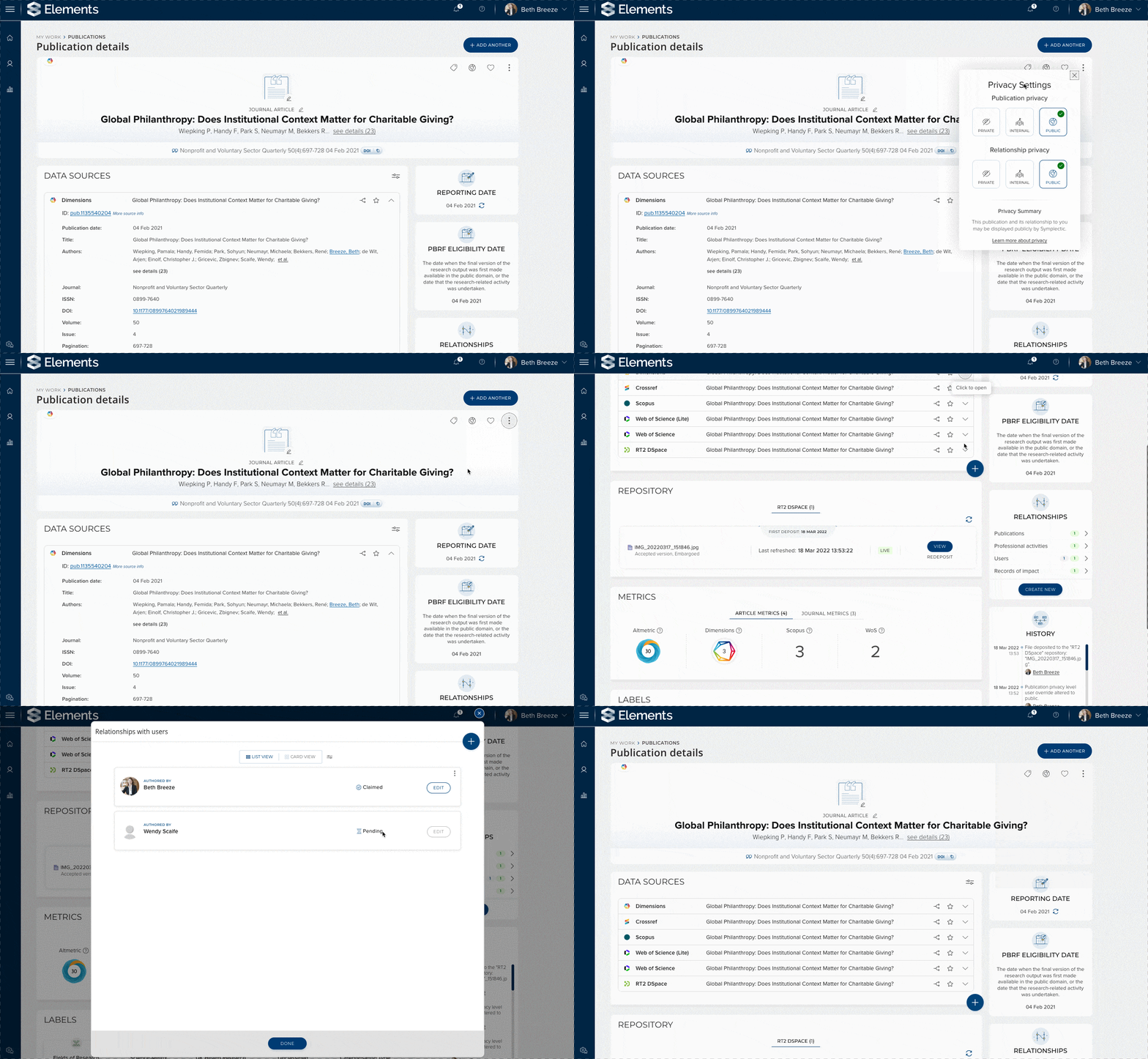
Image: An example of the redesigned publication details page highlighting some key aspects of the new design.
As a part of the new design, we’ve brought a number of new features together within the Object details page, consolidating functionality to make it quicker and easier for researchers and administrators to manage their records within Elements. As a result, you can now use the Object Details page to:
Manage privacy settings - Researchers and administrators (where permitted) can now view and control privacy levels of their works via the Object details page. In response to community feedback, we’ve also enhanced the styling of the privacy indicators to help provide a clearer ‘at a glance’ indication of the privacy level of each work. Now, in addition to displaying the relevant icon, the colour and styling of the overview section of the page will automatically update to a tint of the selected theme colour, white, or shaded lines based on whether the work is set to public, internal or private respectively.
Claim pending publications - It is now possible for a user to claim or reject their pending publications from the object details page. This provides another route to claiming and makes it easier for researchers or administrators to claim publications they needed to review a little more closely.
Copy professional and teaching activity objects - Following on from the release of our new ‘copy’ functionality that allows a user to create a new professional or teaching activity record that is pre-populated from an existing object, this feature is now available from the Object details page via the ‘More actions’ menu at the top right of the page.
Ensure repository metadata is up-to-date - To ensure we can present users with up-to-date information, the Object Details page will now automatically check for updates from the integrated repository upon page load if the system detects that this information has not been updated in the last 24 hours. We have also introduced a new refresh button to the repository section, to allow users to manually trigger a refresh of the record to see changes in close to real time if required. This new functionality complements the existing automated processes Elements runs to ensure repository metadata is routinely refreshed to help ensure that Elements accurately reflects the contents of your integrated repository.
Split records - Records can now be split from an object on the object details page, making it easier to remove any records which may have been merged in error. To minimise the risk of records being split off incorrectly, we have also introduced a confirmation message for record splitting to ensure users wish to proceed.
Upload thumbnail images - Similar to functionality recently introduced to the My <Objects> page, users can now upload a thumbnail image for each of their objects to help bring their work to life.
Configure your page experience by selecting preferred views - Feedback during our user research identified that for some of our new page components there was a split in how users preferred to interact with the page. Some users strongly preferred versions of the page that gave them access to detailed information as quickly as possible, whilst others a more streamlined version of the page they could then delve into as needed. As a result, the new Object details page allows users to set their preferred view of both the data sources section (to choose whether it should be collapsed by default) and the relationships section (to select card or list view).
Configure a display name for your OpenURL-resolver - Elements supports the use of an OpenURL link resolver to allow users to view a publication via your organisation’s library collections using an OpenURL resolver (such as SFX). As a part of this redesign, organisations can now set a display name for their link resolver to align it with local terminology instead of uploading an icon. This change ensures the system can guide your researchers to easily access copies of their work, whilst also improving accessibility. This is configured via the new ‘OpenURL configuration’ page which we recommend reviewing upon upgrade. Please see this support article for further information.
Clearer display of author details and funding metadata
One of the great strengths of Elements is the incredibly rich and detailed metadata it can collect about a researcher’s works, activities and resources. However, that strength also creates a UX challenge to ensure that we can make that rich metadata readily available to researchers and administrators without overwhelming them with information. A key focus of the redesign process has been to maximise the readability of the rich information collected here and to ensure the page can adapt appropriately to different kinds of works - including in cases whether there can be really large amounts of metadata such as for High Energy Physics papers.
We have introduced a new searchable author details window to the Object details page which allows users to review information about the authors associated with a work including their names, affiliations and researcher identifiers. This new interface has been specifically designed to support works with very large numbers of authors and features a search function to help users quickly find the author they are looking for.
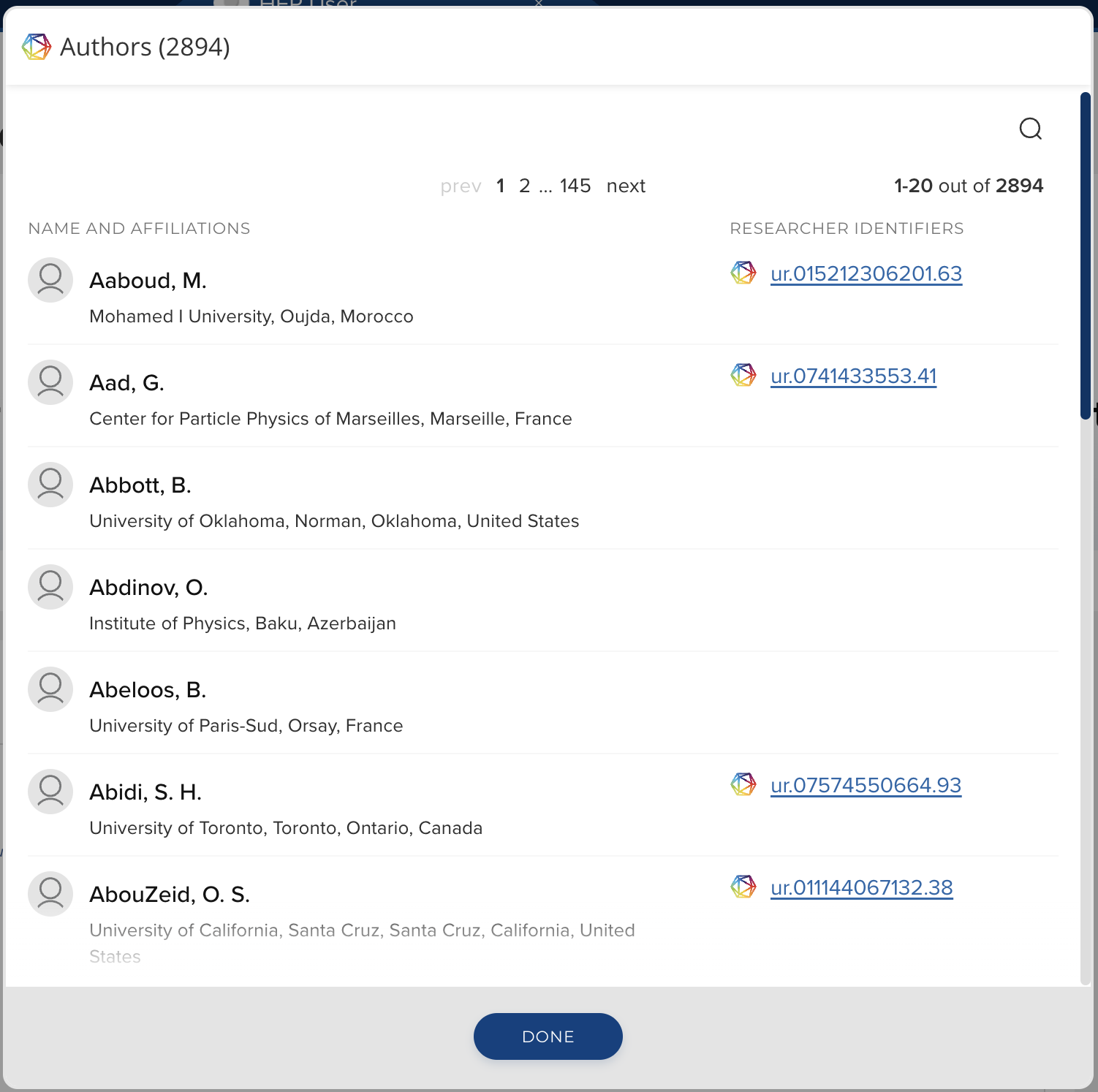
Image: The author details modal shows all author information available in the record. When there are more than ten authors the list can be searched by author name.
We’ve made similar improvements to the display of funding information captured in the ‘funding-acknowledgements’ field. This information is now being analysed to allow the display of each acknowledgment on its own line to maximise readability and if there are more than 10 acknowledgments, the full list of funding information will open in a new searchable window to help you find the information you need.
We have also redesigned the relationships section to better support the display and management of a large number of relationships. A new section on the right-hand side of the page shows users a summary count of all existing relationships. Users can click through to view the full details of each set of relationships, opening a new relationships window which allows them to claim or reject relationships (where relevant) and edit relationship details.
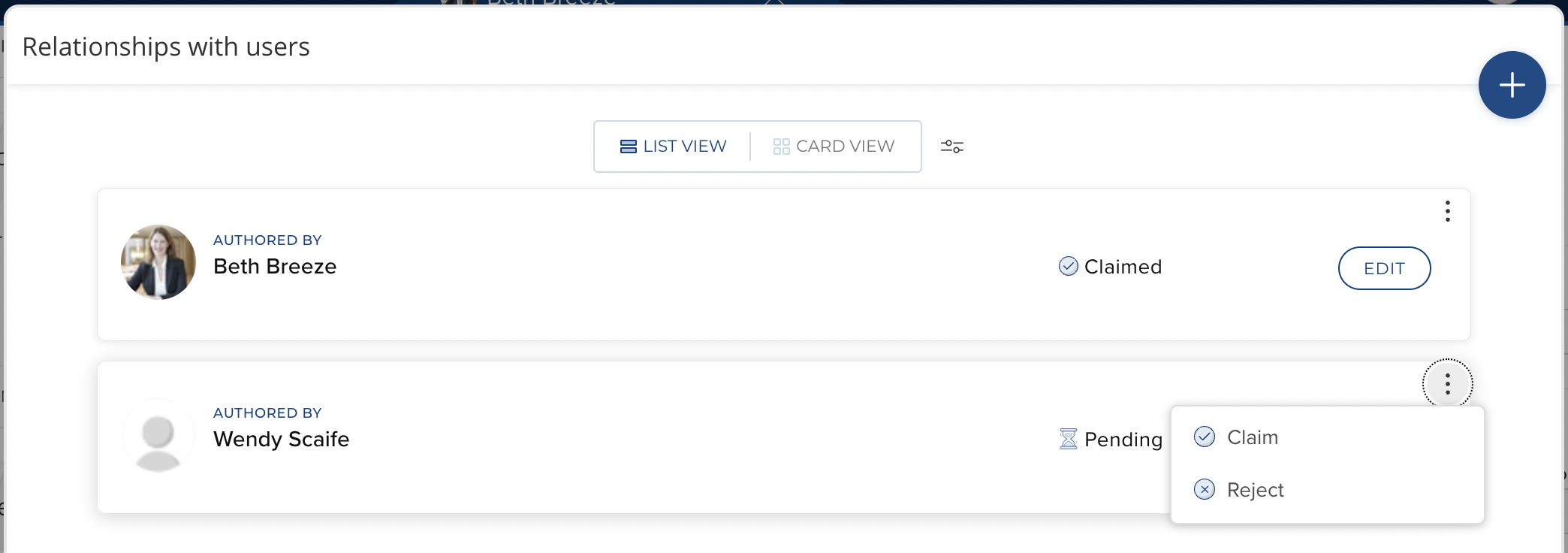
Image: The relationships modal shows existing relationships between objects. Researchers and administrators can manage relationships from here.
Locking object type
In response to a very popular feature request, we are pleased to introduce a new feature which allows administrators to lock object types on specific objects, preventing other users from being able to make changes. This new functionality complements existing verification functionality which allows administrators to review and lock manual records within the system. Together, they ensure that verified metadata can be appropriately preserved and preferenced for use in integrated systems.

Image: Users with permission to lock manual records can now also lock object type. Standard users are then unable to modify the object type.
Capturing corresponding, first or last author
Addressing another popular feature request, we’re also pleased to introduce new functionality to capture additional information about the authors of a specific work to record whether they were the ‘Corresponding author’, ‘First author’, and/or ‘Last author’ for that work. This functionality helps to ensure we are capturing a more complete picture of each author’s contributions to their research outputs.
To streamline the collecting of this data, we have updated our Dimensions and Web of Science integrations to harvest ‘Corresponding Author’ metadata where available. Otherwise, this additional metadata can be added manually via a configurable extension of the authors-list field within Elements. This new feature will be enabled by default for Journal Articles upon upgrade and can be enabled for any other publication type by administrators if desired.
Data Source Integration Updates
A number of our data sources have recently released new versions of their APIs, and so we have updated our integrations to ensure continued service and to make the most of the latest data available. You should not see significant changes in behaviour within Elements as a result of these changes, as they are largely changes to the underpinning technology, however where possible, we have made small updates to maximise the metadata available.
Updated Web of Science integration
We have updated our Web of Science data source integrations (both Expanded and Lite) to use the latest version of the Web of Science API. The team at Web of Science have let us know that the older version of their API will be deprecated, likely in Q2 2023, so it is important that you upgrade to this new version of Elements before then to continue to use Web of Science as a data source.
Please note: As a result of these changes, when you upgrade it is necessary to generate and use a new set of credentials to allow your instances of Elements to harvest data from Web of Science. If it's taken more than a week to get the applications approved, please let us know by submitting a support ticket. For details on how to reconfigure your connection, please see the Support Site.
Dimensions integration
We have updated our Dimensions integrations to make use of the latest version of the Dimensions CRIS API and have updated the integration to begin harvesting some additional fields where available including Online Publication dates, Arxiv IDs, Book Series Titles, Publisher, Resulting Publication DOIs and Mesh Terms. There are no changes to credentials required and the integration should continue to run without any disruptions upon upgrade. Any additional metadata available will be added to existing records the next time the records within Elements are refreshed from Dimensions. The team at Dimensions have let us know that the older version of their API will be deprecated in Q2 2023, so it is important that you upgrade to this new version of Elements before then to continue to use Dimensions as a data source.
Figshare.com integration
In addition to our RT2 Integration with Figshare for Institutions, Elements also offers an integration with Figshare.com, the publicly available version of Figshare to allow researchers to harvest their dataset records into Elements automatically. We have updated that integration to the latest version of the Figshare API, to allow organisations to continue to use this additional data source.
Please note: As a result of these changes, when you upgrade it is necessary to generate and use a new set of credentials to allow your instances of Elements to connect to Figshare.com. For details on how to do this, please see the Support Site.
MLA International Bibliography
We have updated our integration with the MLA International Bibliography to take into account some technical changes and ensure that Elements clients can access up-to-date metadata records from this source. As this data source is hosted by Symplectic, there are no changes to credentials required and the integration should continue to run without any disruptions upon upgrade.
CrossRef updates
We have also made some small updates to our CrossRef integration to update publication date logic for preprints, and to begin harvesting acceptance dates and editor information where available.
Expanded range of Grant types
To better reflect the wide range of funding types which can be represented in Elements, in this release we have significantly expanded the range of Grant Types available within Elements ‘out-of-the-box’. Whilst Elements’ highly configurable data model has always made it possible for organisations to capture a wider range of grant data, offering an expanded range of stock types creates a strong base from which we will be able to offer more type-based functionality across Elements in the future.
To support this functionality, the ‘Academic CV’ stock formatted user report has been updated to include all Grant types.
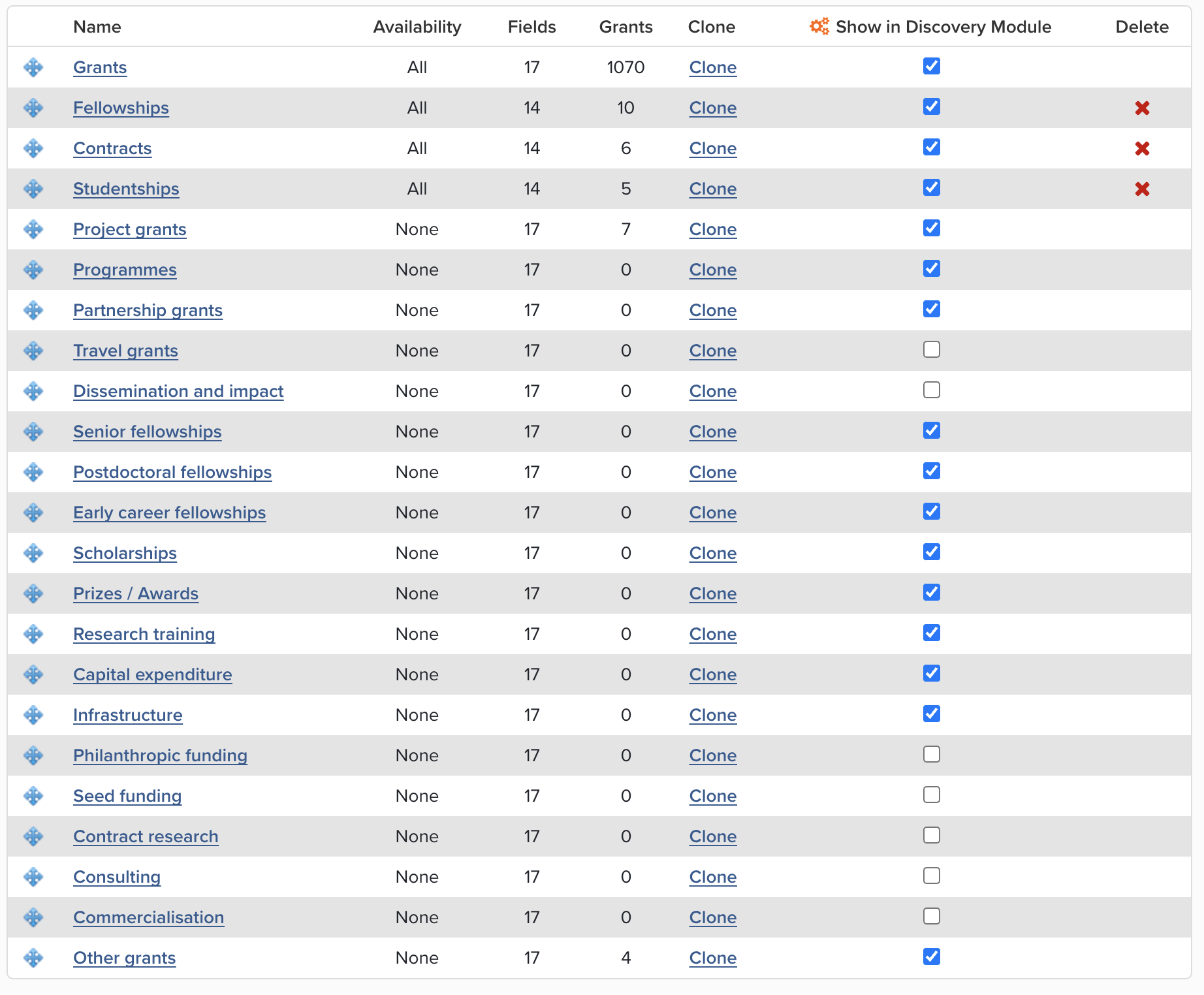
Image: New Grant types
To give you the flexibility to decide which, if any, of these new stock types you wish to make available to your users, the additional grant types are disabled upon upgrade (not visible to any users.
Research Funding Solution
We continue to grow the Research Funding Solution (RFS) to support institutions with their research funding workflows. Highlights from this release include:
To support the reuse of grant information across as many activities as possible, we have introduced a new suite of functionality for managing and showcasing awarded grants. Elements will automatically create Awarded Grant records when a project is activated within the Research Funding Solution, generating records which are then available for use across the system in reports & CVs, on Discovery and other public profiles as well as in Assessments and other reporting exercises.
The new Awarded Grant records are closely linked to the primary project record, but provide a more streamlined record limited to metadata which may be suitable for reuse in other parts of the system. They can be linked other objects (eg. publications, grants, impact & engagement records) within Elements to help track project outputs and outcomes. If you use Dimensions as a Grants Data Source, the records harvested from Dimensions will automatically be matched to your existing Awarded Grant records where possible, helping you to capture additional metadata and automatically create links to related publications.
In this release, we have also made improvements to the Funding Management Console navigation in response to community feedback and to further clarify the delineation between pre- and post-award sections within the system.
As with previous releases, the full details of the RFS functionality released in v6.7 are available in the RFS release notes on our support site.
Other improvements
We’ve have a number of updates to the My Objects page (eg. My Publications) to maintain alignment with the new Object details page. Changes include updates to the styling applied when a user changes the privacy levels of their works, and the layout of the relationships tab.
Administrators can now configure guidance text to appear at the top of the manual entry page for each object type within Elements. Previously this was only possible in the Publications data category.
The Group Impact Officer role has been updated to allow users with this role to lock manual impact records.
The Category admin role has been updated to allow users with this role to be able to lock object privacy settings (where enabled).
We have made a number of accessibility improvements to the ‘Manage label schemes’ page and the display of labels on the profile page.
The help text for the ‘link funding’ step on the grant settings page has been improved.
The Elements API has been extended to support filtering based on a user’s favourite objects and now includes the type display name in the base object entry.
[Edit September 2022] The Elements API has been extended to include the ability to manage object privacy levels.
Our dashboard functionality has been updated to the latest version of DevExpress (v21.2.4).
Fixes
There was an issue where label schemes with long names could become uneditable. This has been fixed.
Fixed an issue with the Discovery Module tag search in mobile mode where the tag function could become unclickable.
There was an issue with the filter on the ‘Bulk enable/disable name-based searches’ page. This has been fixed.
The ‘Person’ fields in the Reporting Database were missing prefixes. This has now been fixed.
Corrected the behaviour of the autocomplete component so that the scroll position resets appropriately as a user types.
We have improved error messaging on the Annual Collections page.
End of Support
As always, we recommend that you regularly review our End of Support Announcements for information about upcoming end of support in Elements for various technologies.
Learn more about the release
We hope you enjoy getting to know the latest version of Elements. Remember should you have any questions, we’re here to help! Just contact us at support@symplectic.co.uk for assistance.
Best wishes,
The Symplectic Team