
Symplectic Elements v6.8 - Release Notes
Elements Version 6.8
Introduction
Welcome to Elements v6.8!
Intelligent data harvesting means Elements is always working for you in the background, continuously identifying and matching research outputs from a wide range of sources to automatically populate and update records in Elements.
In this release we’ve expanded our range of repository integrations, introducing a new DSpace 7 integration which allows you to harvest data from a DSpace 7 repository into Elements. This latest addition to our suite of Repository Tools (RT2) integrations will allow organisations to upgrade their institutional repositories to explore all the new features of DSpace7 while maintaining all the benefits of integrating DSpace with Elements.
For clients using our Figshare for Institutions repository integration we’re excited to add support for our incredibly powerful automated metadata updates functionality. This unique framework provides organisations with a powerful combination of both flexibility and control, ensuring that you can automatically enhance your repository’s metadata using the rich collection of data within Elements.
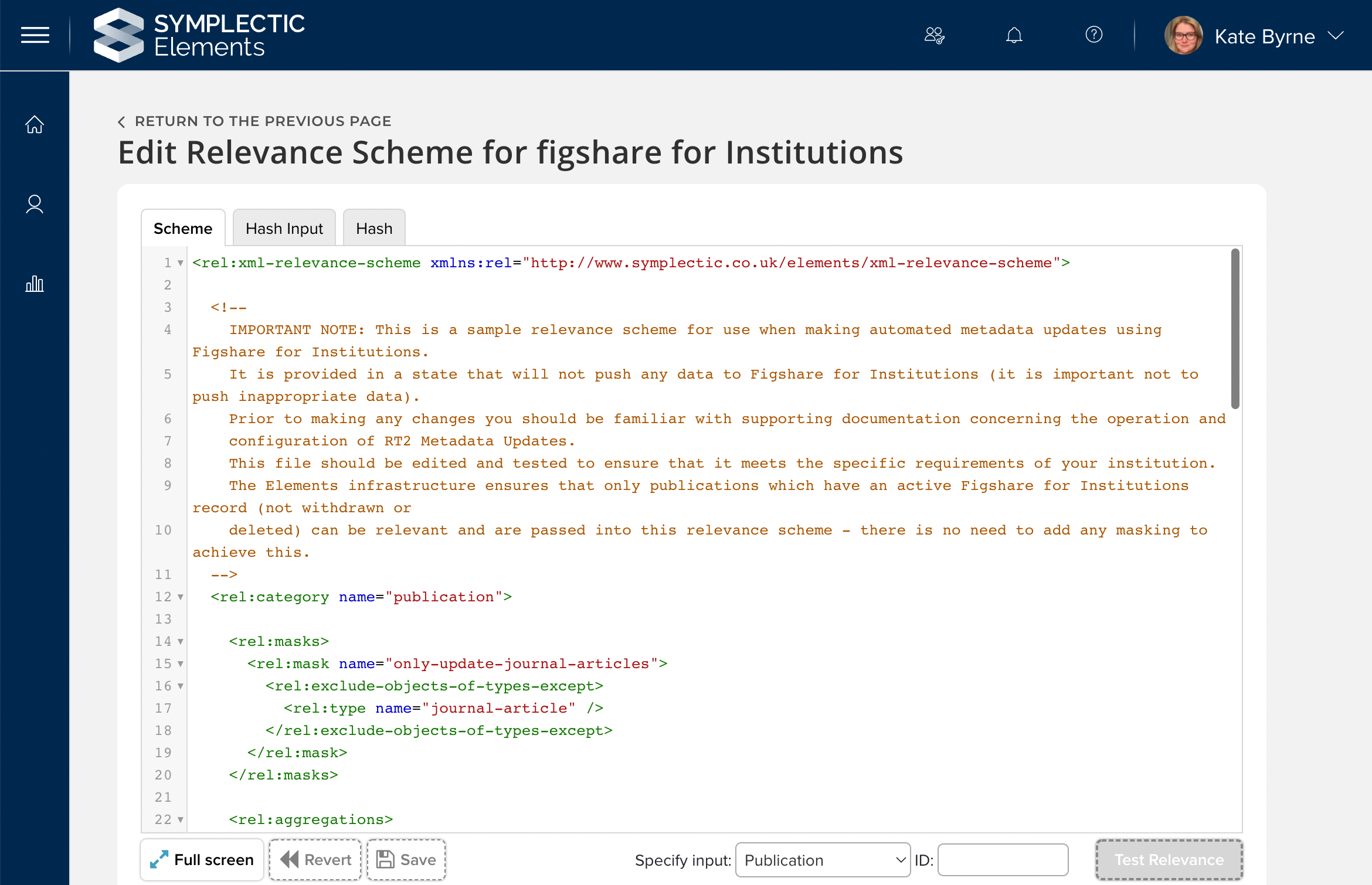
Image: Configuring the new automated metadata updates functionality for Figshare for Institutions..
For clients using the Elements Research Funding Solution, we’re excited to release the first phase of our bi-directional finance system integration with a new finance extract to support project set up. This will help organisations to easily pass information about newly funded projects to their institutional finance system to assist with setting up projects and project budgets.
In this release we’ve also made numerous enhancements to Elements as a direct result of feature requests and feedback from our community, including:
New functionality to allow administrators to configure which file version names will be displayed to users when depositing research outputs via Elements.
Introduction of a new view-only mode for homepage actions associated with Assessment exercises.
Supporting the capture of percentages for Labels on Researcher Profiles (eg. FOR Codes).
Expanding our Figshare.com integration to harvest all research output types.
Updates to the Import Publications page to improve accessibility and user experience.
And more…
For all the details about the release, you can view the full release notes below. As always, the new version of Elements and associated upgrade instructions can be found in the Elements upgrade forum.
Repositories and Open Access
New DSpace 7 repository integration
We are excited to introduce a new integration for DSpace 7, the latest iteration of the popular DSpace repository platform. This new RT2 integration will allow organisations to upgrade their institutional repositories to explore all the new features of DSpace7 whilst maintaining all the benefits of integrating DSpace with Elements.
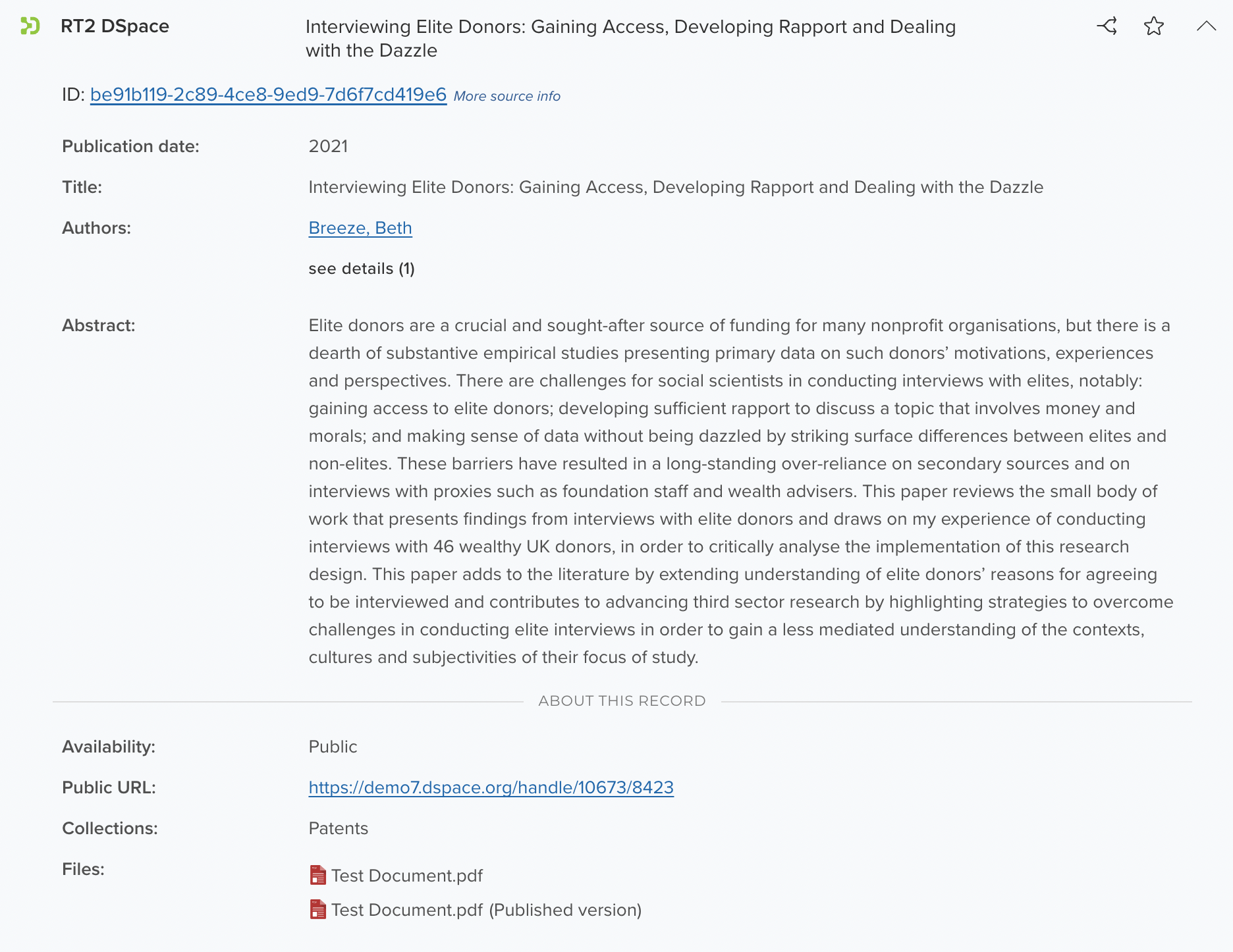
Image: An example record harvested from DSpace into Elements.
Building on our RT2 framework, this new integration allows organisations to connect their DSpace 7 repository as a data source for Elements, harvesting records from DSpace into Elements where they will be automatically matched to existing records and authors. Using our RT2 Crosswalk framework, institutions can control how the metadata will be mapped from DSpace into Elements. The integration features a differential harvest to ensure that any updates to the DSpace items are reflected within Elements as quickly as possible. Records harvested from DSpace are then available for use across Elements including for compliance and engagement monitoring via the OA Monitor and in a range of reports.
We look forward to expanding this integration further in our next release, introducing the ability to deposit via Elements as well as our suite of associated deposit-related features. For guidance on how to add DSpace 7 as a data source, please visit our support site.
Automated metadata updates now available for Figshare for Institutions
We’ve expanded our Figshare for institutions RT2 integration, introducing support for automated metadata updates. This new functionality allows administrators to configure the system so that Elements can automatically but selectively enrich the metadata held within Figshare with metadata from Elements.
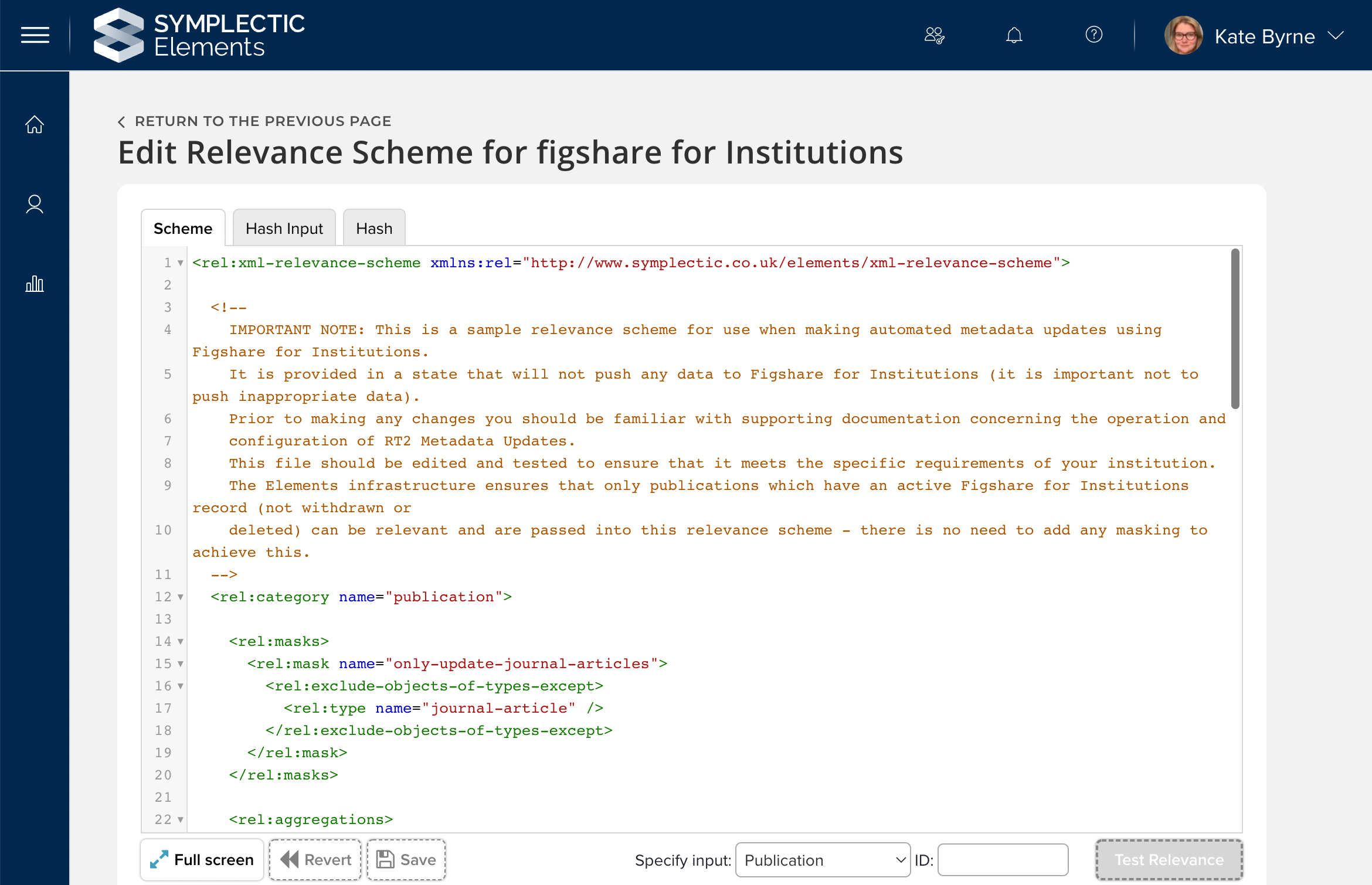
Image: Configuring the automated metadata updates relevant framework for a Figshare for Institutions integration.
Using our powerful and highly configurable ‘relevance’ framework, administrators can configure which metadata updates are ‘relevant’ to their repository, ensuring that Elements will only update those specific permitted metadata fields. This unique framework provides organisations with a powerful combination of both flexibility and control, ensuring that you can minimise data gaps within your repository and protect metadata you have already carefully curated. The relevance scheme can be configured at a very granular level to determine which fields should be updated and under what circumstances updates should be permitted. For example, the relevance scheme can be used to limit updates to specific fields within specific output types, to only use specific trusted sources and to only add data where there is a gap.
To ensure relevance schemes are easy to configure and maintain we offer a built-in relevance scheme editor, enabling system administrators to edit and test their relevance schemes directly within the Elements UI. For more information on how to configure automated metadata updates please see the Symplectic support site.
File version names now configurable by publication type
We are also pleased to introduce new functionality to allow administrators to configure which file version names will be displayed to users when depositing research outputs via Elements. Developed in response to community demand, this new functionality will allow organisations to further tailor the Elements deposit experience and streamline the associated administrative management.
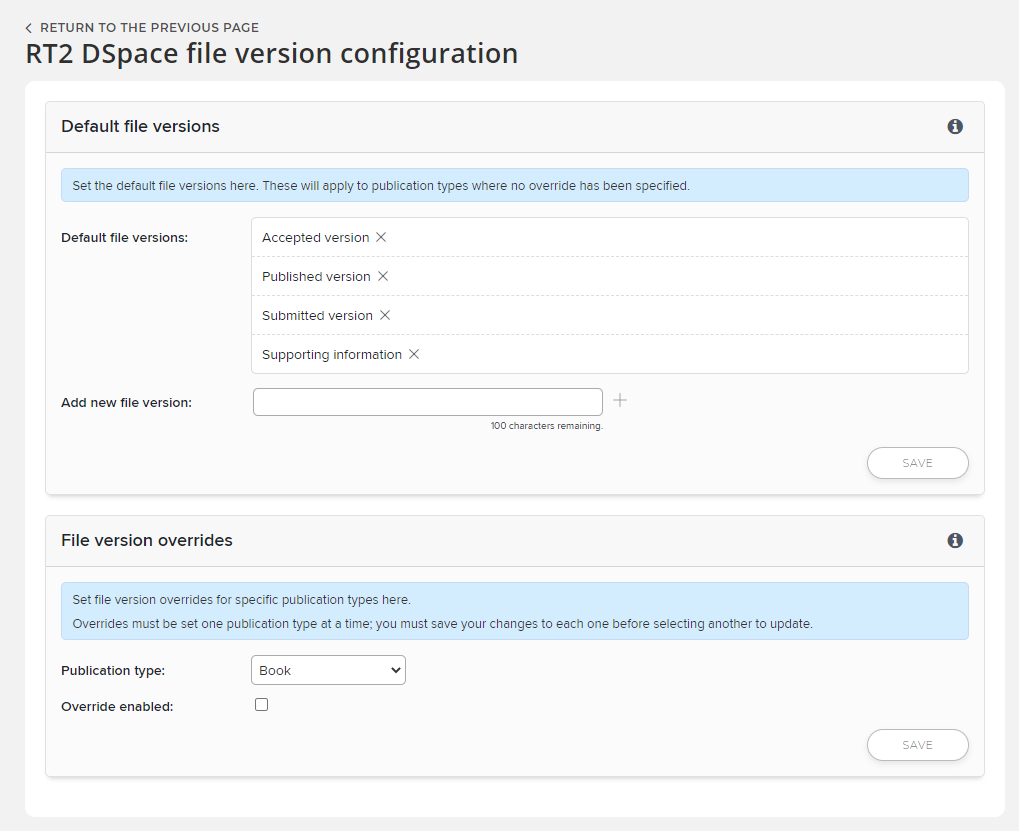
Image: RT2 version configuration page.
Available for use with our DSpace, EPrints and Hyrax RT2 integrations, this new feature allows administrators to configure the list of available file version names at both a system-wide level and on a per-publication type basis. It offers organisations significant flexibility, allowing them to tailor the list of supported file versions for specific types of outputs (eg. to differentiate the list of file versions offered when depositing a journal article vs a dataset or thesis).
This new functionality complements existing OA Policy configuration options which allow administrators to determine which, if any, file version names should be used as a part of the OA Monitor compliance calculations. Combined, these features can help you streamline your OA monitoring activities and help to ensure researchers are depositing the right versions to your repository. Please note, if you use Discovery you may need to make some additional Discovery configurations adjusted if you choose to configure the file version names within Elements. Please consult this support article or contact our team for more information if required.
New view-only option for Assessment-related Homepage ‘Actions’ when impersonating
Impersonation is a powerful tool that allows administrators and delegates to carry out actions on behalf of users. In this release we have made improvements to the display of homepage ‘Actions’ when impersonating users involved in an Assessment Exercise, to ensure that all of the actions in the ‘My Actions’ section on the homepage reflect the view of the impersonated user. These changes make it easier to understand what the impersonated user sees even if you are not permitted to complete the specific task.
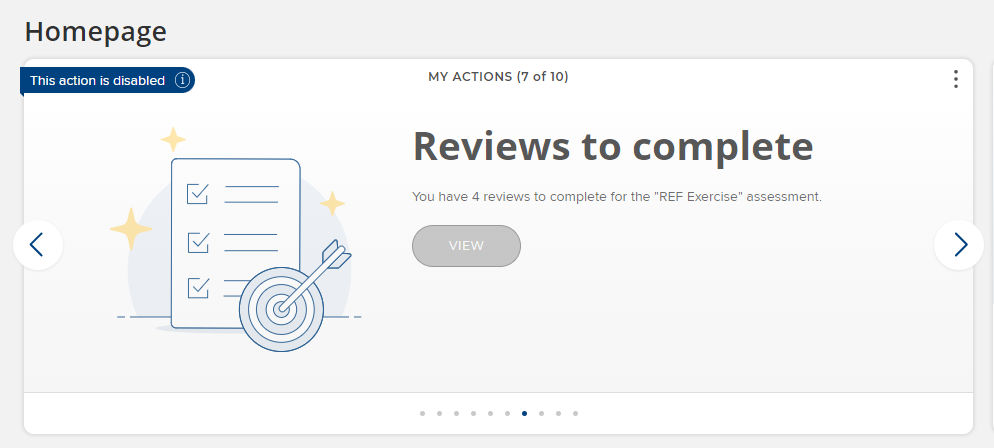
Image: When homepage actions cannot be carried out on the behalf of users, this is clearly indicated to the viewing user.
Elements offers homepage actions for researchers carrying out an Assessment Exercise and for reviewers who have been assigned to review an Exercise. When impersonating a user who would be eligible to see one or both of these actions, the logged in user will now see a full list of the impersonated users’ homepage actions - irrespective of whether or not they have permission to carry out the associated task. If they are not permitted to undertake the task, the action will be shown as disabled.
Research Funding Solution
We continue to grow the Research Funding Solution (RFS) to support institutions with their research funding workflows. In this release, we are excited to launch the first phase of our bi-directional finance system integration, by introducing new functionality to extract project, budget, and internal collaborator data from RFS.
The new Finance extracts will help organisations to easily pass information about newly funded projects to their institutional finance system to assist with setting up projects and project budgets within the finance system. This new functionality has been designed in consultation with our development partners to streamline project set-up and reduce the need for re-keying of data.
For more information about this and all of the other RFS related product updates, please see the RFS release notes on our support site.
Other improvements
In this release we have also made a substantial number of other improvements, many of which were developed in response to feature requests and feedback from our community. The other improvements in this release include:
We now support the capture of percentages for Labels on Researcher Profiles (eg. FOR Codes).
We have updated the Import Publications page to improve accessibility and user experience, as well as clarifying how the system handles matching to private publications. This change has also rectified some misleading messaging the page was displaying if a user tried to import a record matched to a publication with an existing locked manual record. The page now makes it clear that doing so will supplement the existing locked record and not overwrite it.
We have expanded our Figshare.com integration to bring in all work types (previously it would only import datasets) and adjusted the metadata mappings accordingly.
We are now harvesting online publication dates from EPMC and have made adjustments to the logic underpinning publication dates.
We have updated the My <Objects> page (eg. My Publications or My Grants) so that the ‘focus on’ behaviour is retained when moving between pages in the same way as for filters and sort options.
The Postgraduate training field on the User Profile page has been updated to include two new categories of training, ‘Chief Fellow’ and ‘Clinical Fellowship’, to better represent the breadth of postgraduate training in Medical Research organisations.
Elements ‘Installation’ information including version numbers will now only be visible on the Help page to users with a System Administrator role.
There is a new configuration option for the Impact Module to allow organisations to disable the ‘Link to additional users’ step when users are adding new impact records.
History events will now be recorded for all RT2 deposits and redeposits including deposits without files (i.e. an OA location or metadata-only deposit).
We have added the WHERE clause used to populate ‘auto-groups’ to the Reporting Database to make it easier to understand the configuration of groups in the system.
We have modified the language of the ‘You’re up-to-date’ homepage action to better encourage users to continue to explore the system.
Fixes
An error could be displayed in the Assessment Module if a name was added to a unit without a description. This has been fixed.
Additional ARIA-Labels were added to the Discovery module search box to improve accessibility including screen reader performance.
Fixed an issue where an incorrect object count could lead to the Discovery Module incorrectly displaying empty tabs even when configured not to.
End of Support
As always, we recommend that you regularly review our End of Support Announcements for information about upcoming end of support in Elements for various technologies.
Learn more about the release
We hope you enjoy getting to know the latest version of Elements. Remember should you have any questions, we’re here to help! Just contact us at support@symplectic.co.uk for assistance.
Best wishes,
The Symplectic Team