
Symplectic Elements v6.19 - Release Notes
Symplectic Elements Release Notes June 2024 v6.19
Introduction
Welcome to Elements v6.19!
We are very excited to announce the launch of Groups functionality for the Discovery Module! Delivering on an extremely popular feature request, the new Discovery Groups functionality will allow you to showcase groups from across your organisations as a part of your Discovery site, including both formalised organisational groups such as colleges, departments, schools and centres and less formalised groups such as research groups, clusters and themes.
In this release, we have continued our recent extensions of the Projects category, introducing a new projects tab to Discovery Expert profiles and the Elements profiles page, as well as new relationship types and a new homepage action.
We have also made several other smaller improvements based on feature requests from our community, including updated proposal closure functionality for RFS, new homepage actions, improvements to dates in APA6 citations and more.
As always, the new version of Elements and associated upgrade instructions can be found in the Elements upgrade forum.
Discovery module
New Groups functionality
The new Discovery Groups functionality will allow you to showcase groups from across your organisation as a part of your Discovery site, including both formalised organisational groups such as colleges, departments, schools and centres and less formalised groups such as research groups, clusters and themes.
By showcasing departments and other kinds of groups on the Discovery Module, you can help visitors learn more about your organisation, and provide them with additional pathways to find potential collaborators and relevant facilities.
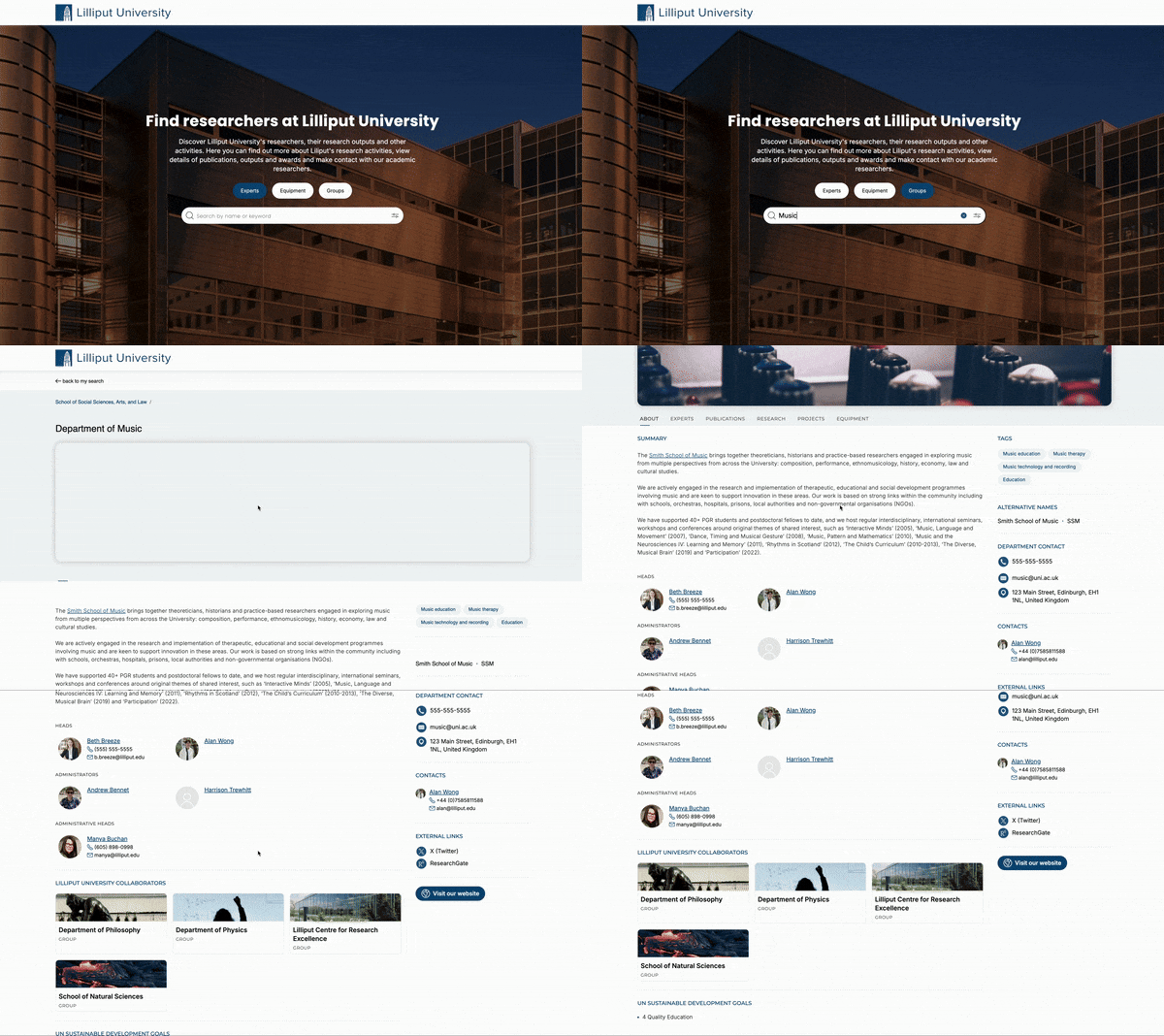
Image: Groups in Discovery
Group profile
Each group you wish to include in your Discovery site will have a dedicated group profile page, full of information describing the group and providing links to related experts, works and other sites.
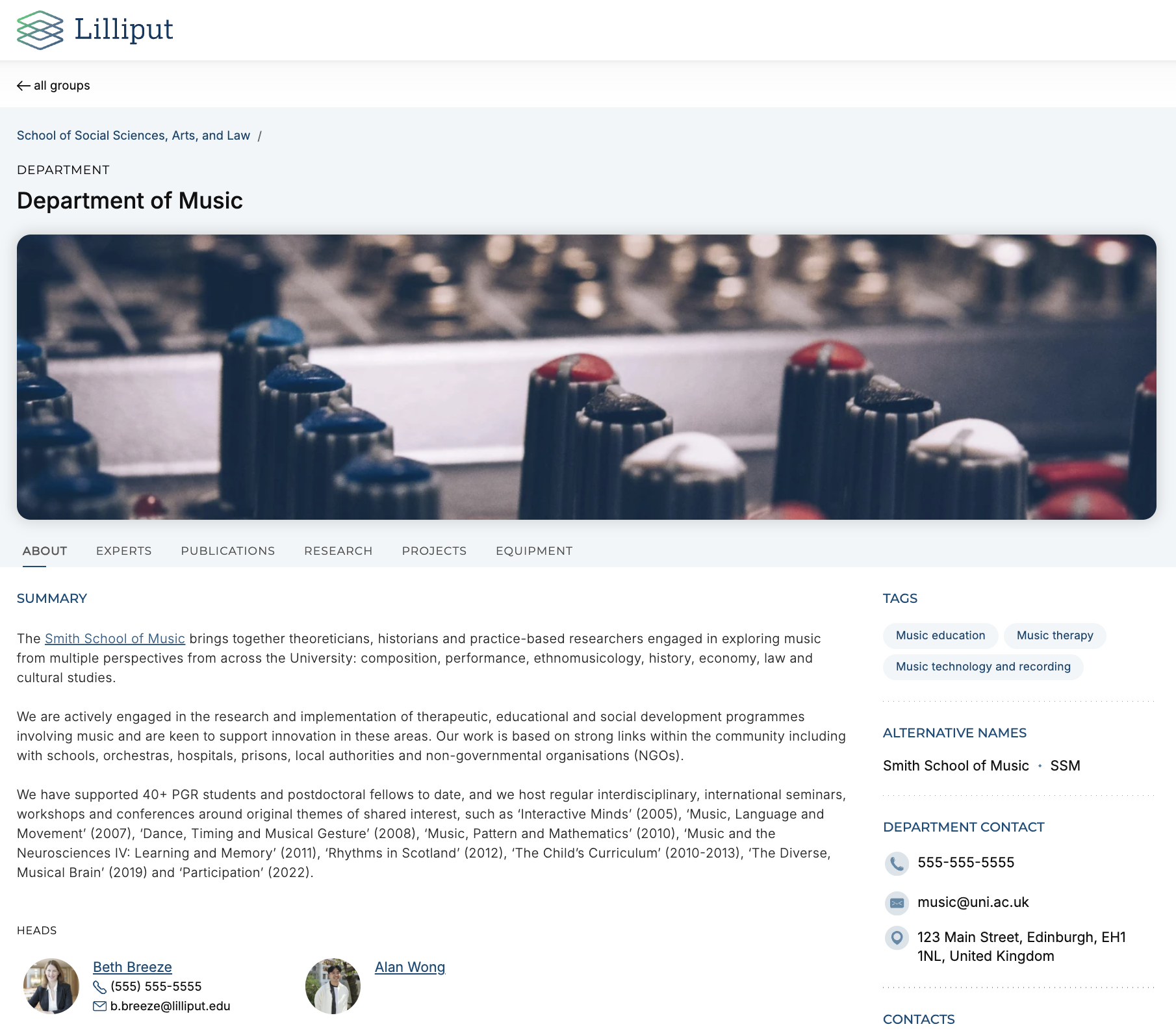
Image: Group profile page in Discovery
The group profile pages are populated with data curated by your administrators within Elements, allowing them to add information such as a description, contact information, and links as well as highlighted users and internal group collaborations. Groups can be ‘branded’ through the addition of a new banner image, helping visitors to the site visually distinguish the groups quickly and easily. You can also choose to add tags, and other labels (including custom labels) to help categorise your groups in ways relevant to your community.
Each Group profile page will include a tab for ‘Experts’, listing all of the members of the group which have a public profile in Discovery. There are additional optional tabs to list up to 500 ‘highlighted’ works (publications, grants, impact, projects and equipment) which have been directly linked to the group.
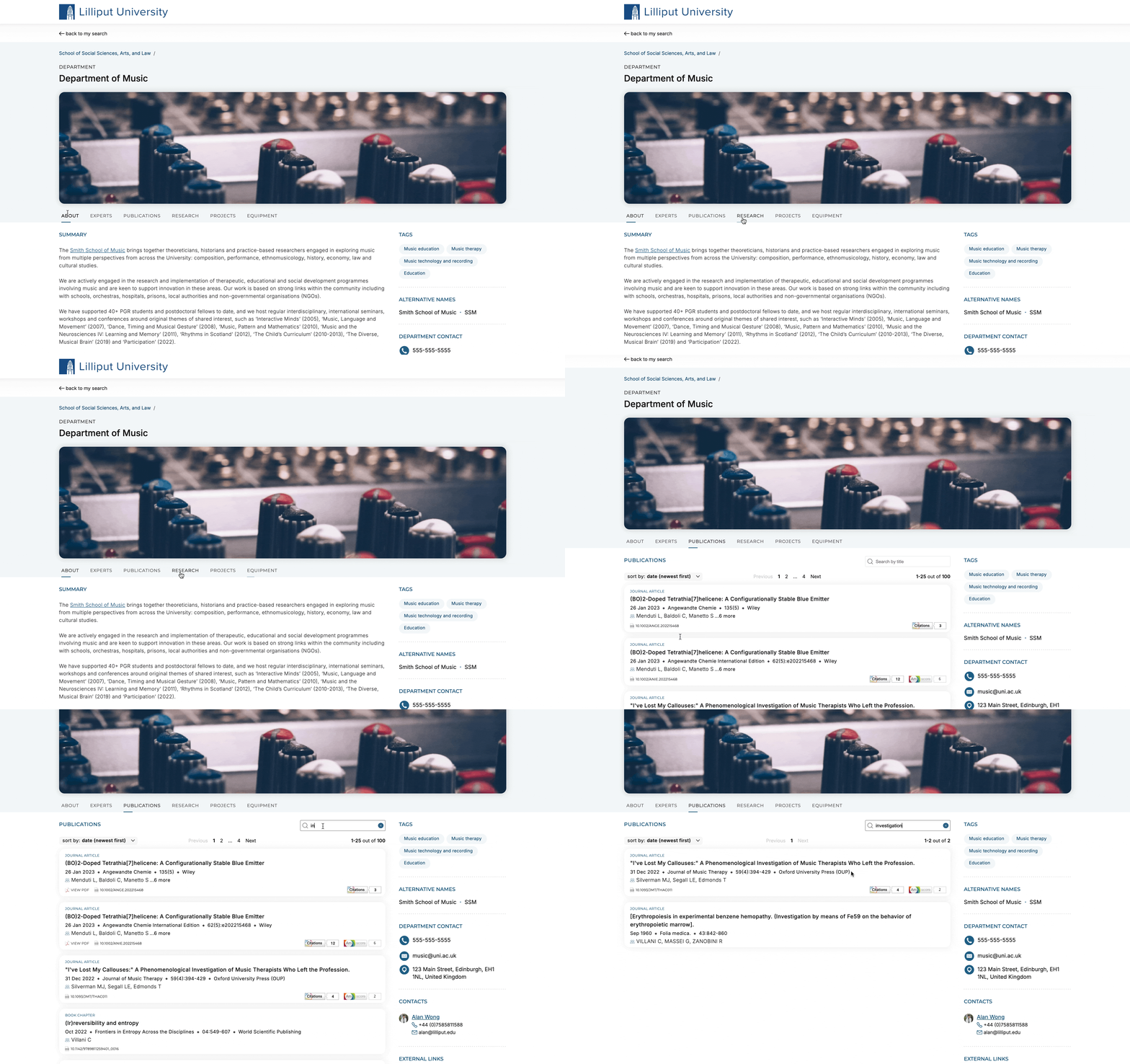
Image: Highlighted content on the Group profile in Discovery
Group profiles, like other types of data in Elements, are governed by privacy settings. Only groups marked ‘public’ will be shown in Discovery, allowing you to choose which of your groups are suitable to be showcased publicly.
Group search
Group profile pages can be found via a dedicated group search experience, which allows visitors to search by free text or tag search and then refine their results using a range of configurable filters. The new group search experience is consistent with other search categories in Discovery, allowing visitors to easily toggle between searching for Experts, Groups, or Equipment & Services using the search mode selector.
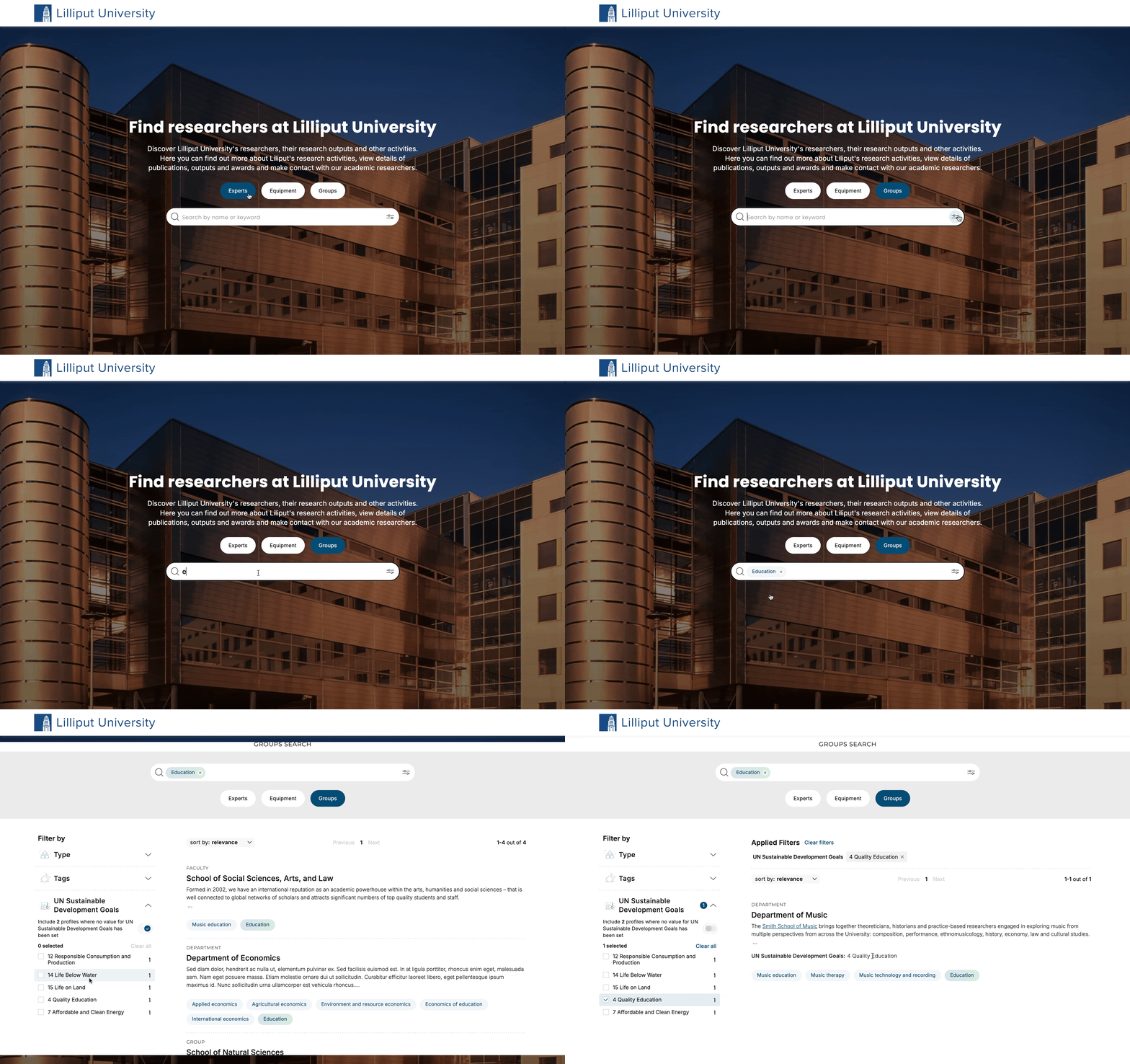
Image: Group search in Discovery
The Discovery Module supports the use of different customisable tag schemes for the Experts, Groups, and Equipment search experiences to ensure that profiles can be appropriately classified to aid discoverability.
Each organisation can also configure their choice of customisable label-based filters to help visitors find the resources they may be interested in, and these once again can be configured separately for the Experts, Groups, and Equipment search experiences. For example, in the animation above, the Group search features a custom label-based filter for UN Sustainable Development Goals, displaying only those that are specifically relevant to the Groups content.
We also offer the ability for organisations to configure the names of the different search modes (the defaults are Experts, Equipment, and Groups) from a range of options, ensuring that the Discovery portal accurately describes your organisation’s collection of profiles.
Groups on users' profiles
To help visitors to Discovery easily navigate between expert profiles and group profiles, we have added a new group membership section to the expert profile page. This new section will include any groups that the expert is an explicit member of, making it easy to click through to view related groups.
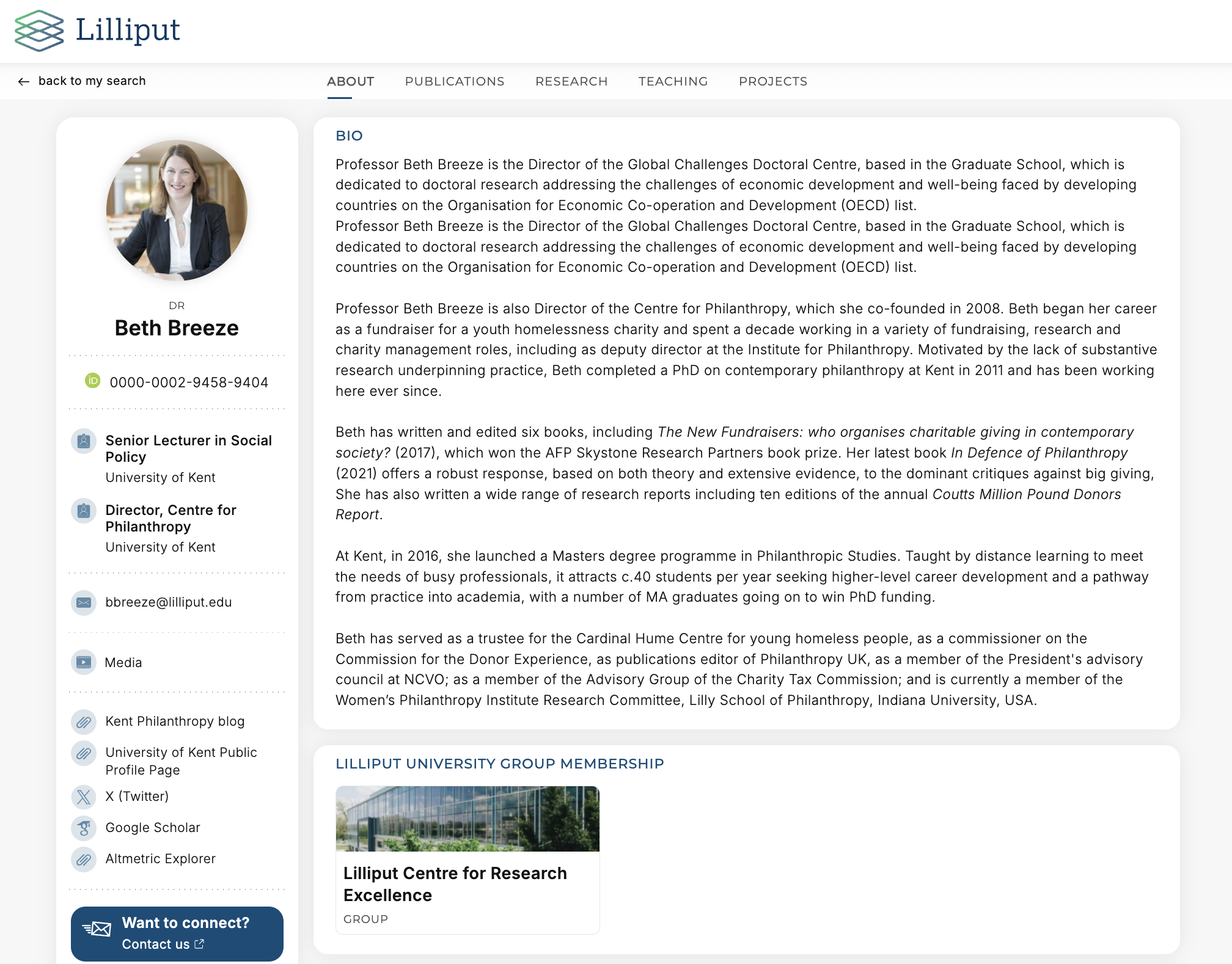
Image: Group membership section on user profile page in Discovery
Configuration
As with other Discovery functionality, you can configure the new Discovery Groups functionality quickly and easily via the Discovery administration pages within Elements. By default, the synchronisation process that sends group data to Discovery is turned off, allowing you to take the time that you need to curate your group data before starting to allow data to be pushed to Discovery.
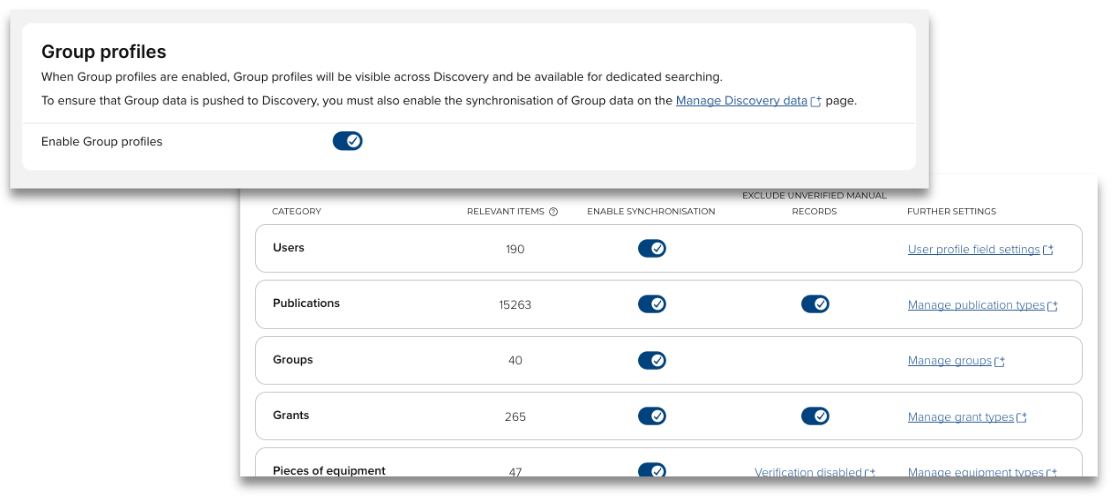
Image: Configure Groups in Discovery
For further information on how to configure Groups in Discovery and what Groups data is displayed, see this support article.
If you would like to learn more about implementing Groups in Discovery, please join us for our upcoming webinar Departmental Discovery: Leveraging New Groups Pages in Symplectic Elements on 22nd July 2024.
Projects
A new Projects tab in researcher profiles lets organisations showcase the data captured in the recently expanded Projects module. This adds a new dimension to profiles, highlighting researchers' participation in projects and helping to put their other outputs and activities into a wider context.
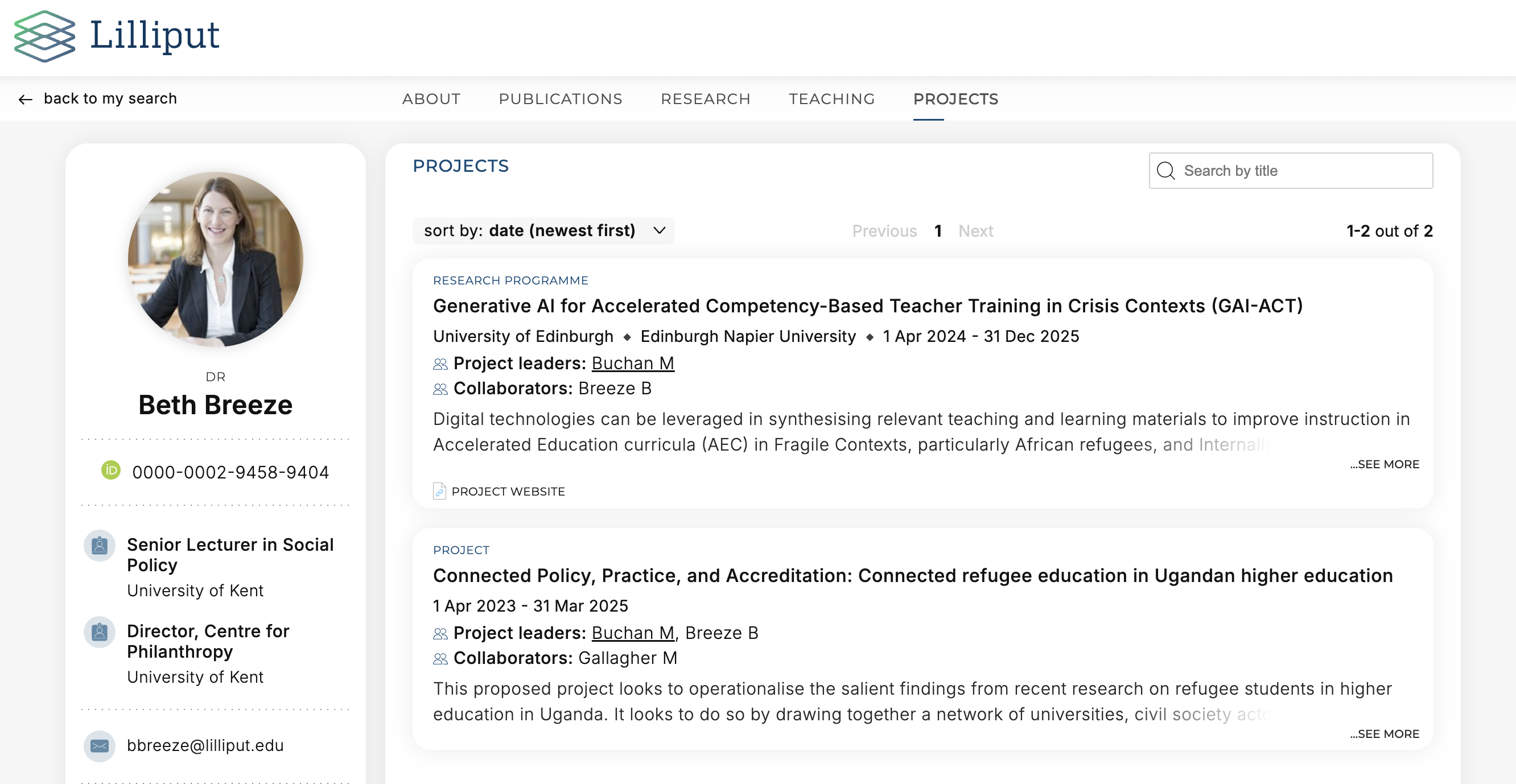
Image: Projects in Discovery
Like other tabs on the Expert Profile Discovery, the tab can contain a list of projects, and also optionally display a ‘summary’ field which profiles an overarching description of their projects. This summary field can be populated with data from Elements, either by relocating the research interests field, or through the use of a custom user profile summary field.
Additional Project enhancements
Building on recent enhancements to the Project module to allow organisations to capture more comprehensive metadata about projects, we are introducing two additional project features in Elements.
Projects tab on user profile
Bringing Projects in line with other data categories, we have introduced a Projects tab on the user profile. This new tab allows users within Elements to view projects set to internal or private associated with a given user profile, bringing projects further in alignment with other date categories in Elements.
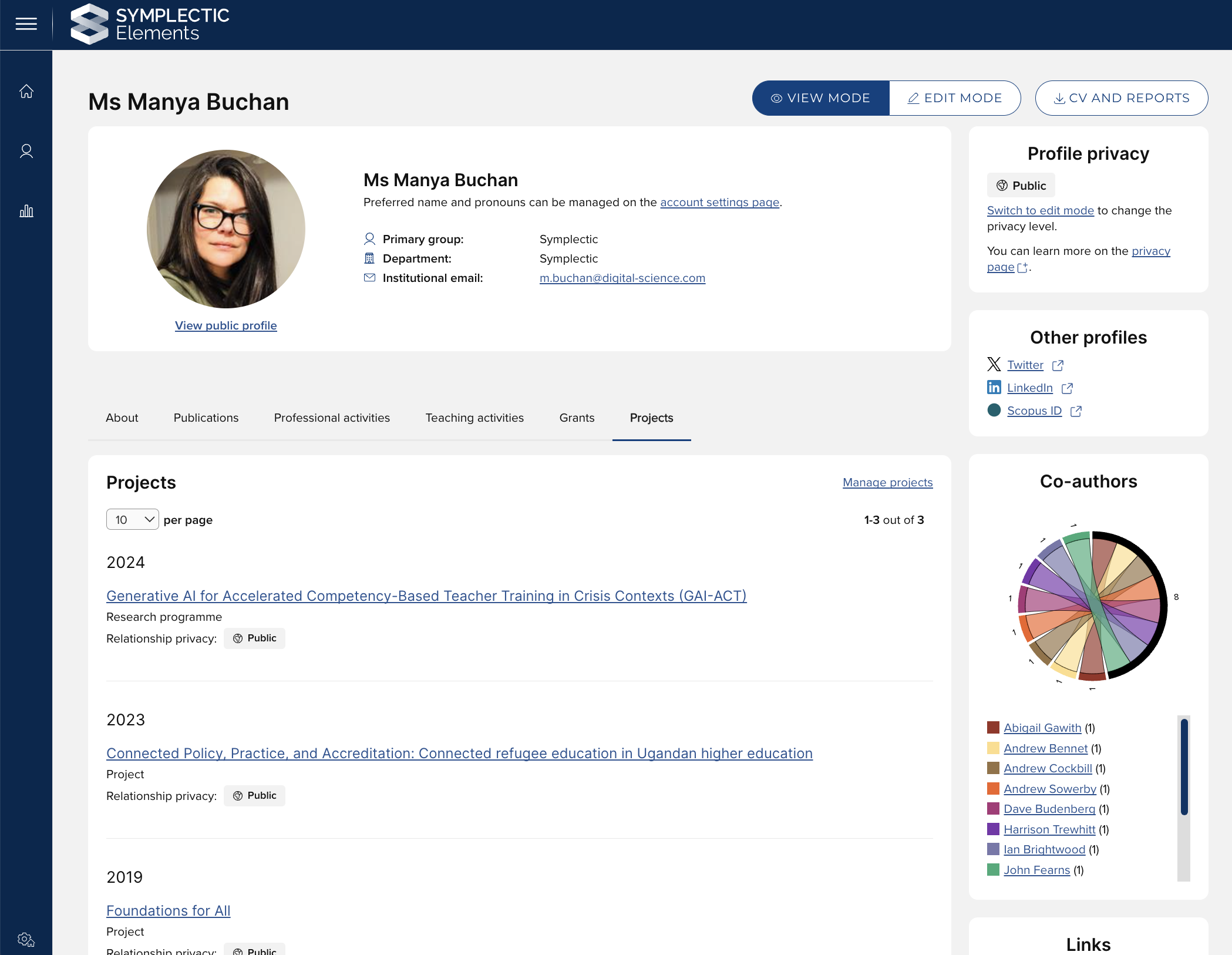
Image: Projects tab on user profile
New 'associated with' link type
We have also introduced a new ‘associated with’ User - Project link type. This general purpose link helps to support the wider scope of the Projects module, allowing users with a more general association to the project to still be linked.
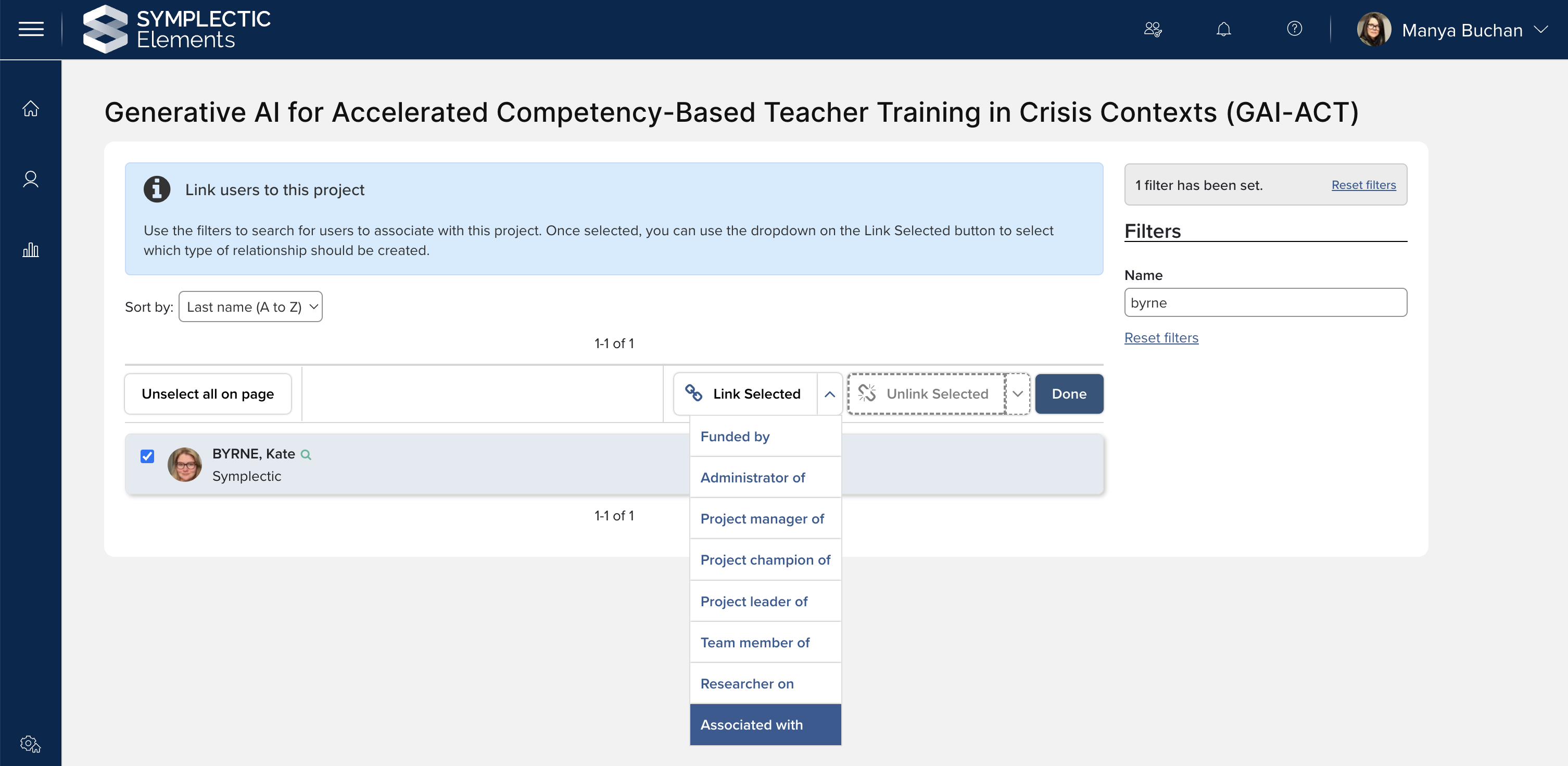
Image: New 'Associated with' User-Project link type
New Homepage actions
In response to community feature requests, we have introduced three new Homepage actions, helping to prompt users to create and curate valuable details about their research activities:
Update your profile
Add Professional activities
Add Projects
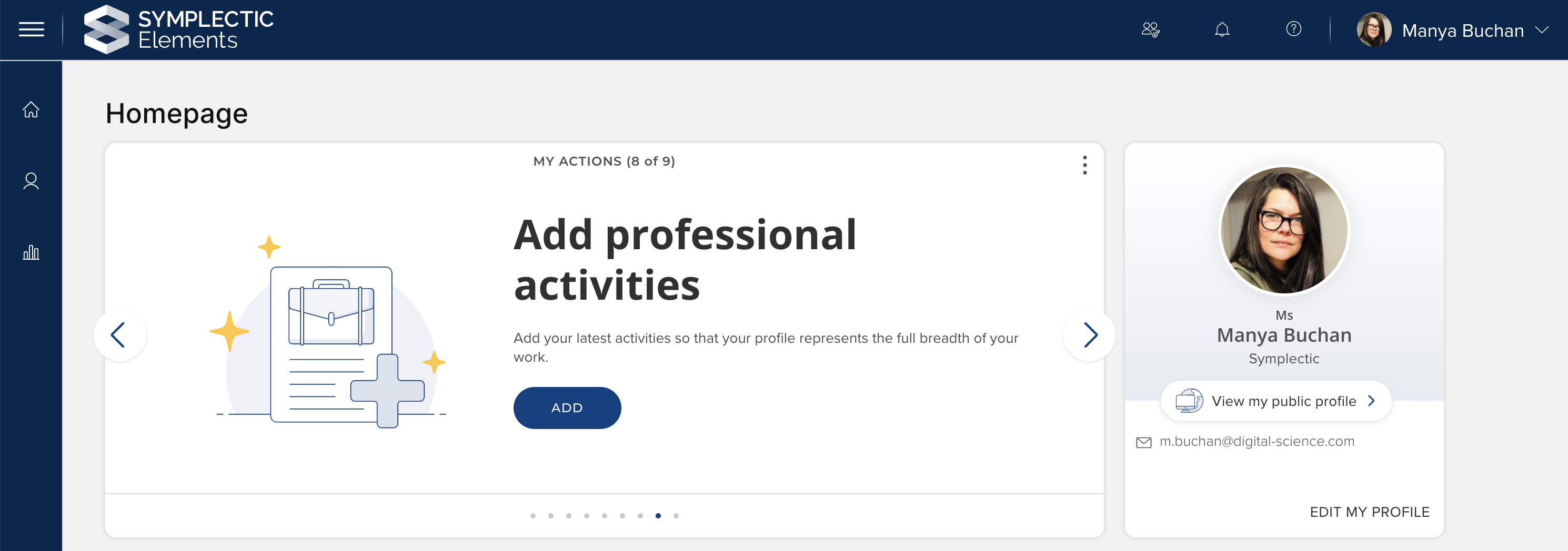
Image: New 'Add Professional activities' Homepage action
Further information on homepage actions, including the functions of these new actions and how to enable them, is available in this support article.
Research Funding Solution
In this release, we have made a series of enhancements to the Project closure functionality released in v6.14 to also cover pre-activation Proposals, ensuring that you and your Management Console users can:
Consistently capture closure metadata, regardless of where in the Management Console and at what pre-award stage closure is triggered;
Consistently have all closure metadata visible and/or editable in the Management Console after closure; and
Have all closure metadata available for querying via the RFS API and Elements reporting database.
This functionality consolidates all closure behaviour, enabling consistent capture, reporting, and insights. This will better help research administrators and managers to understand funding record closure behaviour.
As with previous releases, full details of the RFS functionality released in v6.19 are available in the RFS release notes on our support site.
Other improvements
The precalculated APA6 citations in the Reporting Database have been updated to use online publication date if publication date not available.
The 'Combined status and dates' field type has been updated to reintroduce the ability to adjust configuration settings for the included subfields.
The default download format for SSRS excel reports has been changed from .xls to .xlsx. This will increase the maximum number of rows that can be included in a single report. If you would like to disable this and continue to only offer .xls downloads, please contact the Symplectic Support team for assistance.
The Elements Reporting Synchroniser has been updated to use Snapshot isolation for all interactions with the reporting database. This improvement will eliminate deadlocks when interacting with the reporting database, allowing for more graceful reading and external interactions.
Fixes
There was an issue where the facility to drag and drop items was not operating as expected in the create/edit manual record form. This has been fixed.
If a degree was added to the user profile page with no field of study, an extra comma was displayed. This has been resolved.
End of support
As always, we recommend you regularly review our End of Support Announcements for information about upcoming end of support in Elements for various technologies. We would like to draw your attention to the upcoming end-of-support dates for versions of Elements. Upcoming dates include:
Elements version | Release date | End of support date |
6.18 | 25 April 2024 | 25 April 2026 |
6.17 | 29 February 2024 | 28 February 2026 |
6.16 | 7 December 2023 | 7 December 2025 |
6.15 | 12 October 2023 | 12 October 2025 |
6.14 | 6 July 2023 | 6 July 2025 |
6.13 | 27 April 2023 | 31 October 2024* |
6.12 | 23 February 2023 | 31 October 2024* |
6.11 | 8 December 2022 | 31 October 2024* |
6.10 | 6 October 2022 | 6 October 2024 |
6.9 | 21 July 2022 | 21 July 2024 |
If you need assistance in planning to upgrade, please contact our team via the Support Site.
We’re here to help!
We hope you enjoy getting to know the latest version of Elements. Remember should you have any questions, we’re here to help! Just contact us at support@symplectic.co.uk for assistance.
Best wishes,
The Symplectic Team
6.19 release notes updated on 31st July 2024 to include the Elements Reporting Synchroniser improvement.