
Overview: Installation
This article provides further detail of what is involved in the Installation activity described in How we run implementation projects.
Overview
The diagram below outlines the tasks likely to be undertaken during an installation of Elements, although it is possible there will be some variation depending on the requirements of your institution. The installation activity will be driven by an Implementation Manager from Symplectic, who will coordinate activity between your institution's representatives and Symplectic technical staff.
We use Basecamp to project manage the implementation and record relevant conversations and useful files. At the outset of the project we will create a workspace on Basecamp that represents your institution's implementation and grant access to everyone involved in the process. To promote discussion about all aspects of the project and to enable us to answer any pressing questions in a timely and personalised manner we also recommend having ad-hoc calls during UK hours - we will aim to discuss this in considerably more detail when the implementation process has begun.
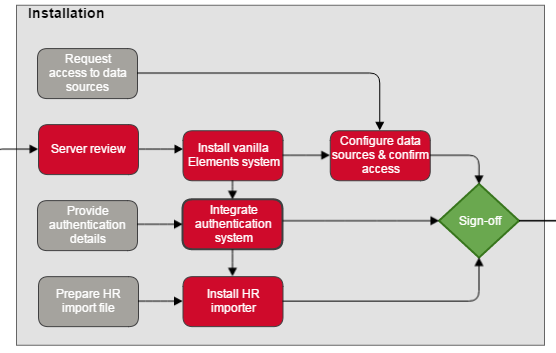
This diagram is part of the full implementation diagram.
Parameters
Driver | Symplectic |
|---|---|
Symplectic Primary Contact | Implementation Manager |
Tools | Basecamp |
Start of Activity | Implementation kick-off |
End of Activity | Client sign-off of acceptance criteria and scheduling of orientation session |
Expected Length | 4-6 weeks |
Installation
We will work with you to install a fully operational Elements system which includes the following components:
A single vanilla Elements instance on either your institution's hardware or on a hosted solution managed by Symplectic.
A working integrated authentication method.
A fully up to date list of user accounts, facilitated via an import of your institution's HR feed.
A working harvest of academic data (synchronisation)
Each of these 4 points is expanded upon directly below - please let us know if you have any questions and we will be happy to assist.
1. Installation of a Single Vanilla Elements Instance
When it comes to installation it is possible to install a single vanilla instance of Elements on a server provided by you on a server that resides on your institution's infrastructure. This route may be preferable if you want full control of security settings and to make every decision when it comes to server configuration.
Alternatively we can offer your institution a hosted solution on Amazon's AWS infrastructure. This option may be preferable for your institution if you wish to hand over some of the day to day technical management and upgrading to Symplectic in order to conserve technical resource. If this is preferable please let us know as early as possible in the implementation process and we will be happy to discuss the hosted option with you in more detail.
If your institution has chosen to host Elements on your own infrastructure there are some specifications that your hardware needs to meet for optimal performance. Please consult Prerequisites for a Symplectic Elements installation for more detail. Once your hardware is configured, we will need access to it in order to carry out the bulk of the installation - we normally ask that your institution gives us RDP access although it is also acceptable for us to connect via VPN. To make us as self sufficient as possible and to minimise your institution's resource usage we ask that the user account provided gives us full administrator rights on the server. We understand that there may be reticence around this request and are very happy to discuss it in more detail with you to allay your fears or come up with an alternative workable solution.
If you wish to install Elements on your own hardware and want to place the SQL database on a separate consolidated server, an empty database should be created with collation Latin1_General_CI_AS, CLR integration enabled. Please configure the server so that access is granted via SQL Management Studio installed on the Application Server and grant us DB Owner privileges on the database. We have a very handy page on Database Size and Performance that could come in useful. If Elements is to run under a service account, please provide us with the account credentials.
N.B We can provide documentation for the roll-out of Elements to other environments and can assist with advice and support - please let us know if this would be useful.
2. Working Integrated Authentication Method
As part of the installation process we normally configure your preferred user authentication method to work with Elements - this is so we can authenticate users as being valid institutional members. At the outset of the project we will need test credentials to be provided by your institution to ensure that everything is working as expected. We have experience of working with the authentication methods listed below:
Options | Assumption |
|---|---|
AD Federation Services (ADFS) | ADFS Metadata URL will be available |
Microsoft Entra ID | Microsoft Entra ID is configured and Symplectic Elements instances registered as services |
Central Authentication Service (CAS) | The CAS 2.0 Service Base URL will be provided |
LDAP | Information on how the LDAP server is to be accessed, and how the user will be authenticated against it will be provided |
Shibboleth 2 | The Shibboleth SP will have been installed on the application server and configured to allow the SP to communicate with the institution’s authentication IdP |
3. User Account Import via a HR Data Feed
During implementation we often develop and install a stand-alone tool to enable you to regularly import staff accounts from a single-source HR data file into Elements. The tool will only be used to import account information required for the functioning of Elements (additional institution specific information associated to a user can be imported in Elements’ generic fields). We have a more in depth explanation of Elements' HR data requirements available in the HR Data Import and User Groups article.
The following criteria are assumed:
Unique and non-recycled identifiers for each user should exist in the source file.
Source data must be well structured in computer understandable or readily machine-parsable form.
Each data file needs to be provided to Symplectic in either CSV or XML in a format specified by Symplectic. Standard HR Importer Sample Files are provided to assist you to construct the file.
The source file must contain details of all members of staff who are or are meant to be active users of Elements at any given import. This means that every generated source file should contain not only the new additions or deletions but also the core set of users whose user profiles you want to be kept active and working in Elements.
The source file should be deposited on a regular basis, (preferably nightly) in a location that is accessible, and navigable to, from the application server
The source file will need to include any and all members of staff (present or past) to whom publications, professional activities or grants need to be related as part of a data migration.
4. Working Harvest of Academic Data (Synchronisation)
During the implementation process we will assist you in the configuration and testing of connectivity to all data sources that your institution has access to. For more information on these steps please review the Data Sources Configuration page.
We normally request that your institution provides us with a dummy academic account on your installed Elements system. We then use these credentials to test connectivity to all configured data sources. If such an account was already provided for implementing the authentication integration, this will suffice.
Sign-Off
At the end of the installation phase the Implementation Manager will cross-reference your acceptance criteria with the delivered components, updating the project notes where necessary. We will work with you to allow you to verify the delivered components and to sign-off the installation phase. Subject to agreement we can also provide you with branded media (documentation or video) enabling you to replicate steps in other environments.
Acceptance Criteria
# | Acceptance area | Acceptance critera |
|---|---|---|
1 | Installation of single instance of Elements |
|
2 | On-going data feed from HR system |
|
3 | Integration of authentication |
|
4 | Elements Synchroniser connectivity |
|
Orientation
Following installation we will work with you to schedule orientation / training sessions. We view this as a very important phase of the implementation process as we want to make sure that your institution is well equipped to use Elements in a highly efficient manner in order to generate a tangible return on investment. The orientation sessions typically cover topics such as:
How to configure Elements from a system administrator's point of view.
How to refine your data structure for migration.
The training of support staff.