
Symplectic Elements v6.21 - Release Notes
Welcome to Symplectic Elements v6.21, our last release of 2024!
We’re excited to round out the year with an exciting set of new features and enhancements, including:
Expansions to the functionality available in the OA Monitor.
The completion of the migration of Discovery Configuration settings to the Elements administrative UI.
A new cookie consent management system in the Discovery Module (Public Profiles).
Many smaller improvements and fixes.
For the Open Access Monitor, we are introducing a set of new features designed to better enable you to monitor compliance with specific funder or other 3rd party OA policies. This includes new scope and compliance criteria, flexible compliance configuration options, and improved filtering options.
For those of you who utilise the Discovery Module for public profiles, we’ve also made some major enhancements to the Discovery Configuration settings, migrating all remaining settings to the Elements administrative UI, empowering you to more easily make your profiles portal your own. You can readily make changes to branding colours, favicons and logos, desktop and mobile homepage images, and search results page backgrounds. Elements v6.21 also sees the introduction of cookie consent management for Discovery.
This release also contains accessibility improvements and many other smaller features and enhancements.
As always, the new version of Elements and associated upgrade instructions can be found in the Elements upgrade forum.
Open Access Monitor
As the global Open Access movement continues to evolve, so too does the complexity of managing compliance. Research institutions now face a growing array of mandates from funders, governments, and internal bodies, each with its own unique requirements. Researchers must navigate multiple routes to Open Access, ranging from traditional repository deposits to paid Gold Open Access options.
Accordingly, we have begun a significant redesign and expansion of our OA Monitor functionality to support multiple, independent OA schemes that optionally offer deposit prompts and guidance tied to Primary Group affiliations. Through this redesign, we are also expanding the scope and compliance criteria available for selection (including ‘native’ OA properties such as open access status and DOAJ journals), and available reporting options.
Building on the new OA Monitor framework delivered in v6.20, this v6.21 release includes many exciting expansions to the functionality available in the OA Monitor.
New scope criteria
In this release, we have expanded the criteria available for setting the scope of an OA scheme to include funder, publication sub-type, and publication end date. The introduction of these new criteria will better enable you to monitor compliance with specific funder or other third party OA policies and ensure that only relevant publications are monitored.
Funder
You can now limit the scope of an OA scheme to only include those publications associated with specified funders, as listed on any linked grant.
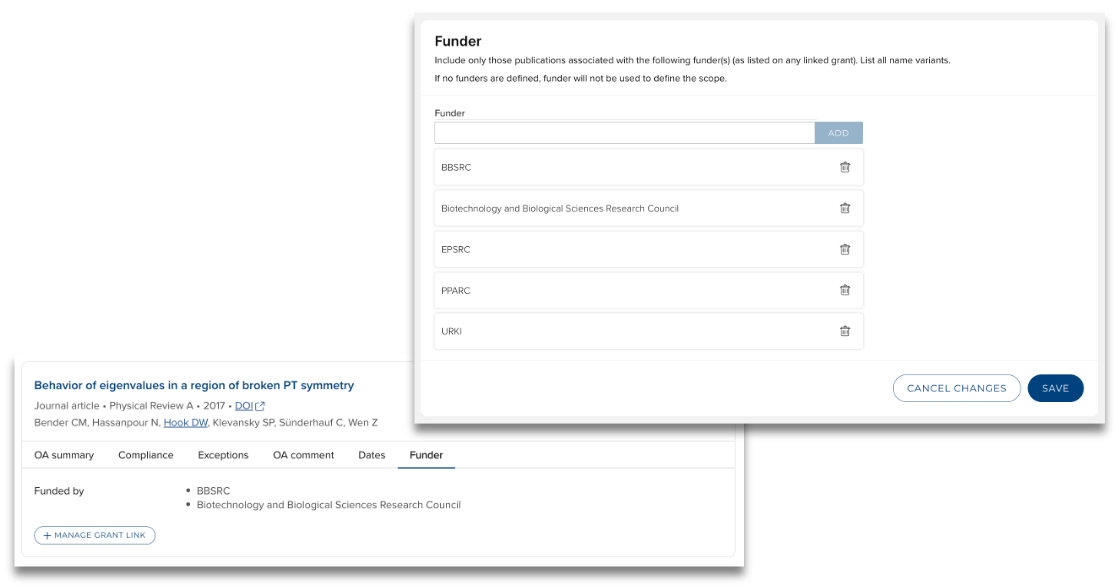
Image: Setting the scope of an OA scheme to only include publications associated with specific funders
Publication type and end date
The publication type selector has been expanded to enable you to exclude sub-types (e.g. Letters, Reviews) that may not be subject to monitoring within a specific OA scheme.
You can also now set a Primary source end date, enabling you to mirror changes in OA policies, in effect 'sunsetting' an old policy that is being superseded by a new one, while continuing to monitor compliance against the old policy.
The publication end date field is only available for schemes that do NOT include deposit prompts & reminders.
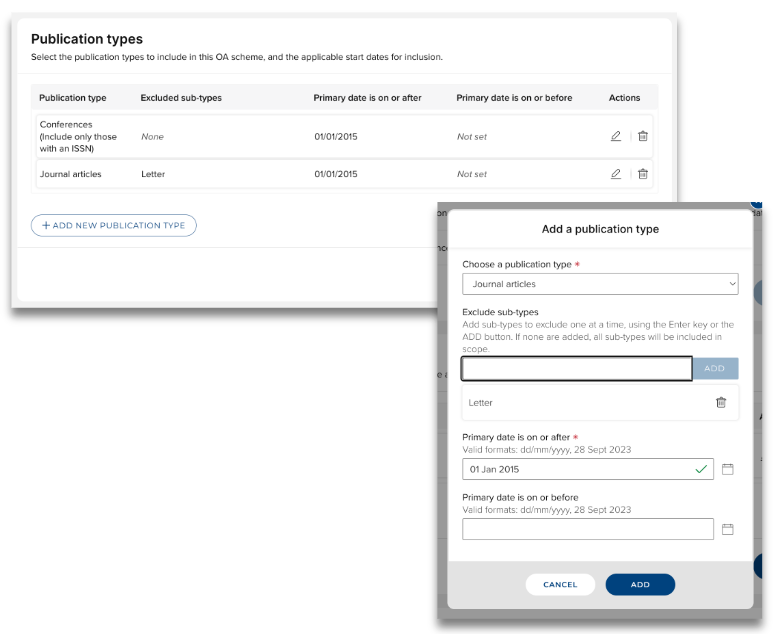
Image: Options for selecting publication types to be included in the scope of an OA scheme
Further information on these new scope criteria is available in the Create and configure an OA scheme support article.
Compliance criteria
In this release, we have made a number of modifications to the configuration options for setting compliance criteria, including the addition of new criteria for measuring compliance against Open Access status and journals indexed by the Directory of Open Access Journals (DOAJ).
Flexible compliance criteria
To provide you with the greatest amount of flexibility in configuring your OA schemes, we have made a number of modifications to the configuration options for setting compliance criteria.
In previous iterations of the OA Monitor, it was only possible to monitor compliance against repository criteria, and this was mandatory. In this release, we have introduced functionality to give you greater control over how you would like to measure compliance, if at all:
Set only repository criteria (useful if the scheme is only concerned with monitoring deposit in your institutional repositor(ies))
Set only publishing criteria (applicable if the scheme is only concerned with monitoring specified publishing criteria (e.g. Gold OA))
Set both repository and publishing criteria (applicable if the scheme takes a hybrid approach to compliance (e.g. published as Gold OA or deposited in your institutional repository))
Set no compliance criteria (useful if the scheme is only concerned with encouraging deposit of full-text files and you do not wish to monitor compliance)
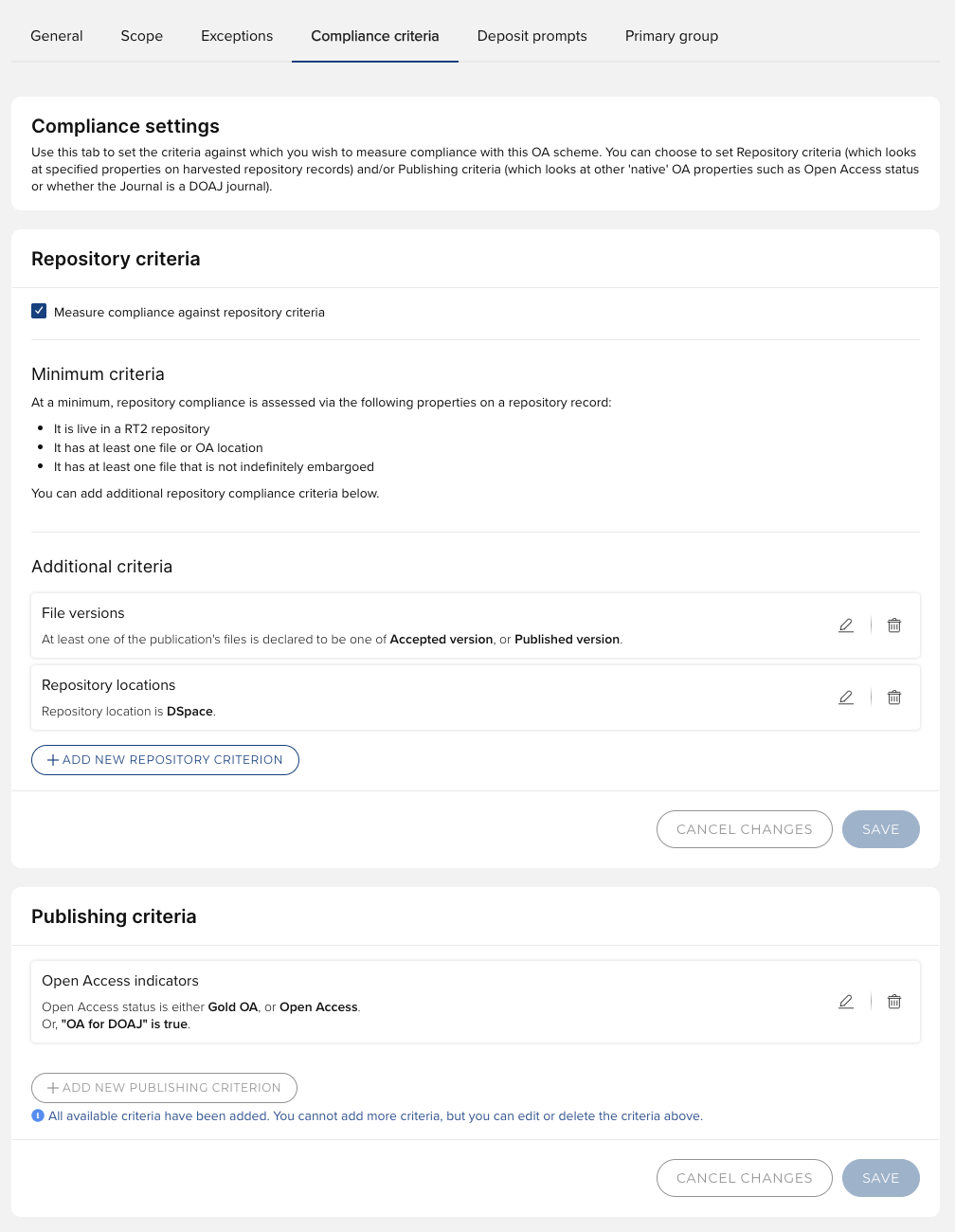
Image: Flexible compliance criteria
New compliance criteria
We have also added new compliance criteria to monitor against:
Publishing criteria | Open Access status | You can select which OA statuses are compliant with the OA scheme (e.g. Gold OA, Bronze OA), as harvested from EPMC, Dimensions, and Web of Science (licences required) |
OA for DOAJ | Publications will be assessed as compliant with this criterion if the associated journal is indexed in the Directory of Open Access Journals and is flagged as 'OA for DOAJ'. | |
Repository criteria | Repository locations | You can specify which repository locations are compliant with the OA scheme.
|
Repository decision | When this criterion is set, if the repository flags the record as compliant, no further repository compliance checks will be undertaken and the publication will be deemed compliant.
|
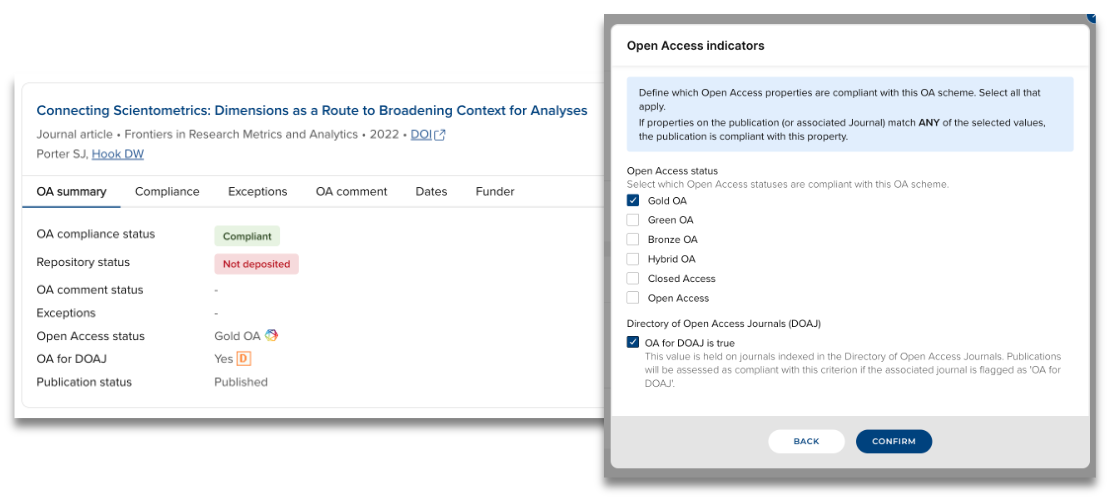
Image: New ‘Publishing’ compliance criteria
Further information on these new compliance criteria is available in the Create and configure an OA scheme support article. Details of how compliance is calculated using these new criteria can be found in the Compliance Logic and Overrides support article.
Upon upgrade to 6.21, the following settings from existing OA schemes will automatically migrate:
All existing schemes will be set to measure compliance against repository criteria, with the following individual criteria set:
Repository locations
As compliant repository location(s) were previously derived from the repositor(ies) defined in the deposit prompt settings, the selected repositor(ies) will automatically migrate to this compliance criterion upon upgrade.
Repository decision
As this was previously a mandatory minimum repository check for all OA schemes, this compliance criterion will automatically migrate to being set for all existing OA schemes.
For clients who do not provide this value in your repository crosswalk, the OA Monitor ignores this property and it does not impact on compliance calculations or the non-compliance reasons stated. If you do not provide this value in your repository crosswalk, you may want to update your scheme configurations to remove this criterion, but there are no implications if you do not.
Also included in this release is the facility for Figshare for Institutions clients to make use of the ‘Repository decision’ (is-compliant-with-inst-policy) field, thereby giving you the option to include this criterion in your OA scheme compliance configurations.
Additional OA Monitor improvements
Compliance-only OA schemes
To support you in creating OA schemes to monitor against multiple funder or other third party OA policies, you are now able to create ‘compliance-only’ schemes that are not tied to users’ primary group membership and do not offer deposit prompts.
To configure such an OA scheme, simply leave the ‘Include deposit prompts & reminders in this scheme’ setting unchecked when creating the new scheme. Observe that the ‘Deposit prompts’ and ‘Primary Groups’ tabs are not available when configuring a ‘compliance-only’ scheme’s settings, and the User Engagement and OA Dashboard screens are not available for ‘compliance-only’ schemes.
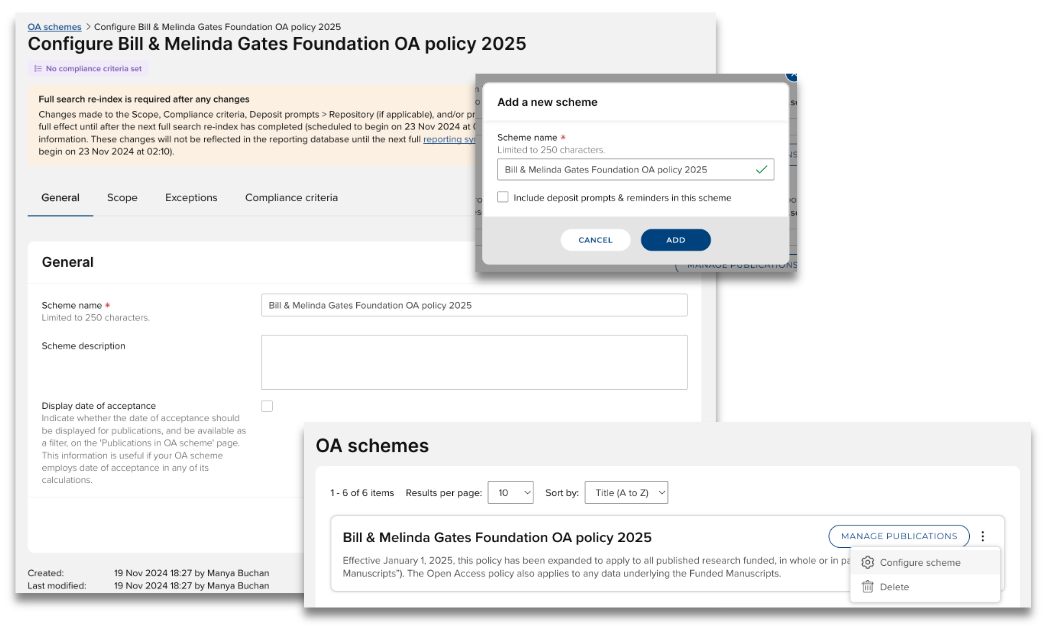
Image: Configuring a ‘compliance-only’ OA scheme
Unknown scope and ‘Indeterminate’ compliance status
In previous versions of the OA Monitor, when key date information was missing from a publication, the publication’s OA compliance status was returned as ‘Not compliant’ (or ‘Pending’). In this release, we have made it easier to identify where information is missing.
When a publication has no primary source date (neither publication nor acceptance date), and therefore the OA Monitor cannot determine whether the publication is within the scope of the scheme, we flag this publication with a scope value of ‘Unknown’.
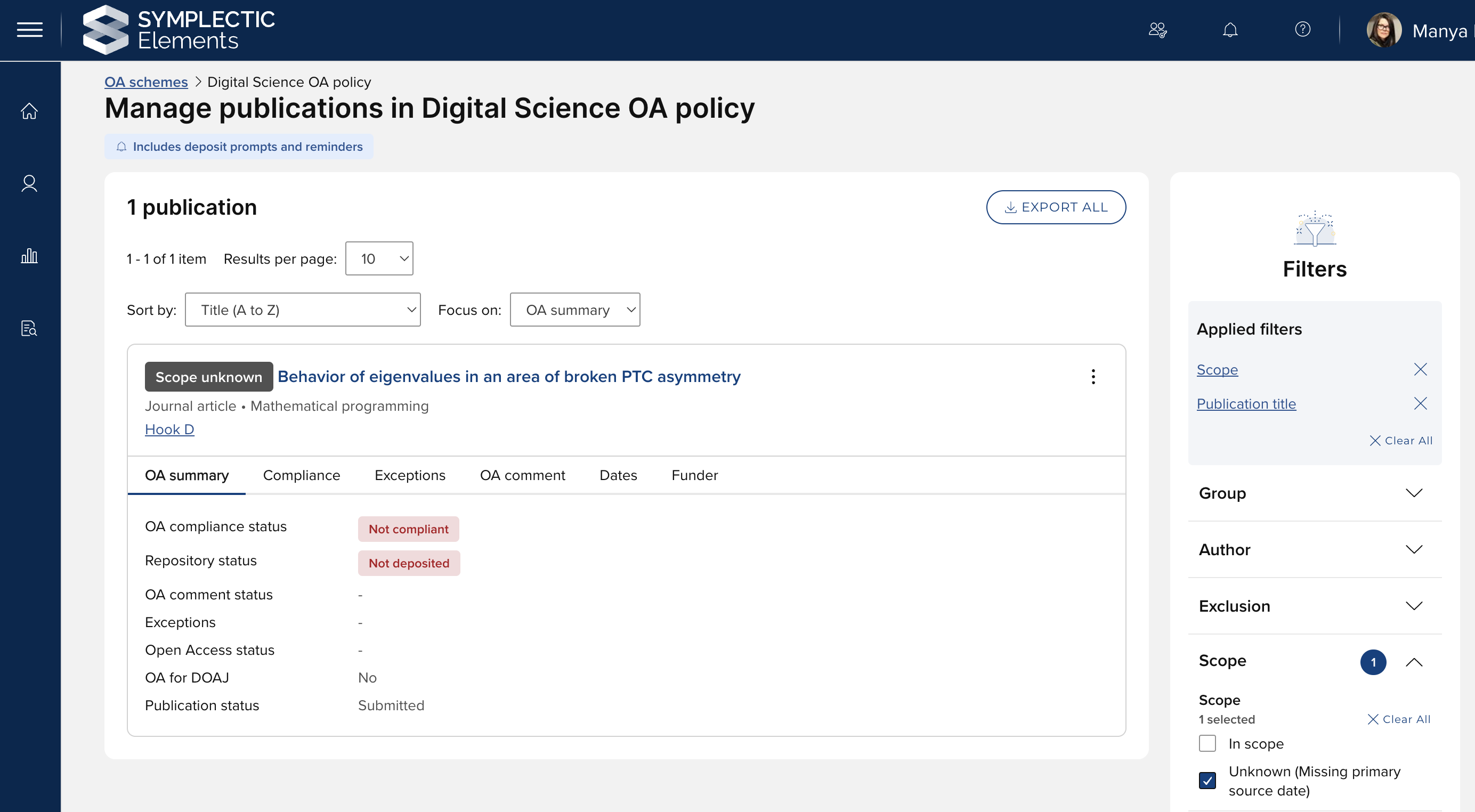
Image: Publications with missing primary source date are flagged as ‘Scope unknown’
Where dates are missing relating to deposit or embargo deadlines, we now return an OA compliance status of ‘Indeterminate’, to make it easier to identify where information is missing and therefore compliance cannot be calculated. This ‘Indeterminate’ status is returned in the following cases:
Where a deposit deadline is set for the scheme and the publication has no primary source date, the OA Monitor cannot determine whether the deposit was made within the allowed timeframe.
Where a maximum embargo period is set for the scheme and the publication has no publication date, the OA Monitor cannot determine whether the embargo period exceeds the maximum allowance period.
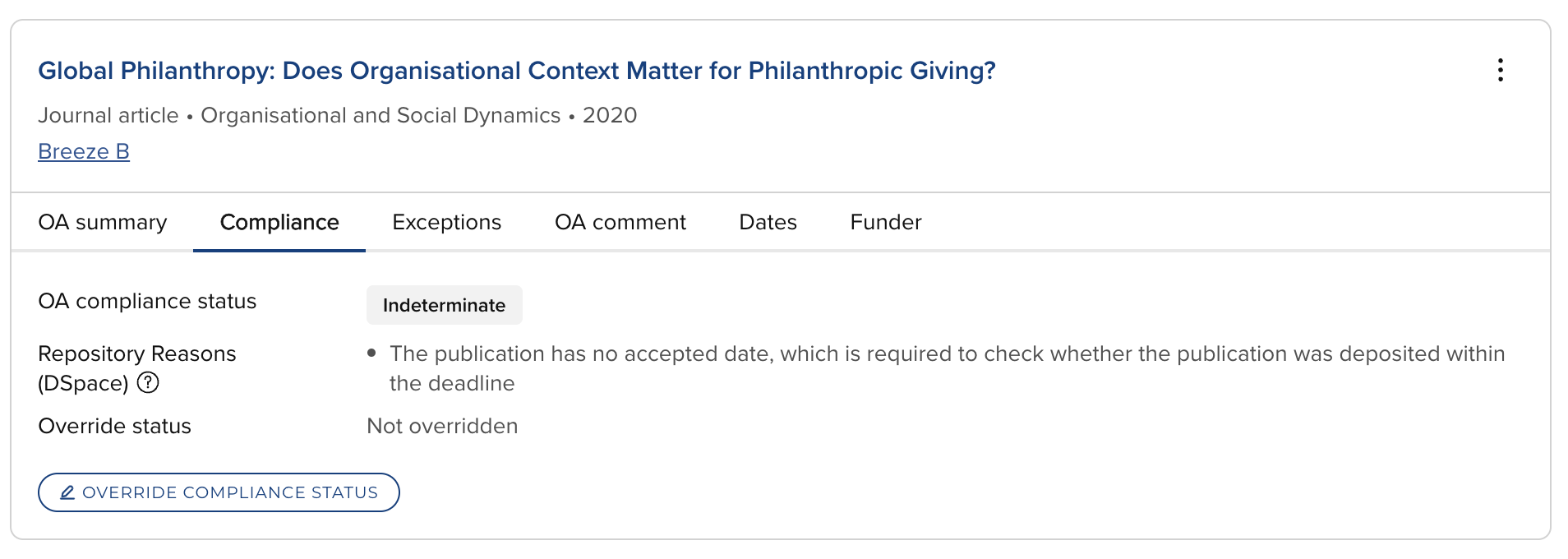
Image: Indeterminate OA compliance status
Manage publications in OA scheme list page improvements
This release includes a number of improvements to the filtering function on the ‘Manage publications in OA scheme’ list page, including:
Collapsible grouping of filters, to help you better navigate the extensive filter options available
Multi-select filter options, enabling you to generate desired lists more easily
New filters for:
Scope
Open Access status
OA for DOAJ
Repository flagged as compliant
Funding status
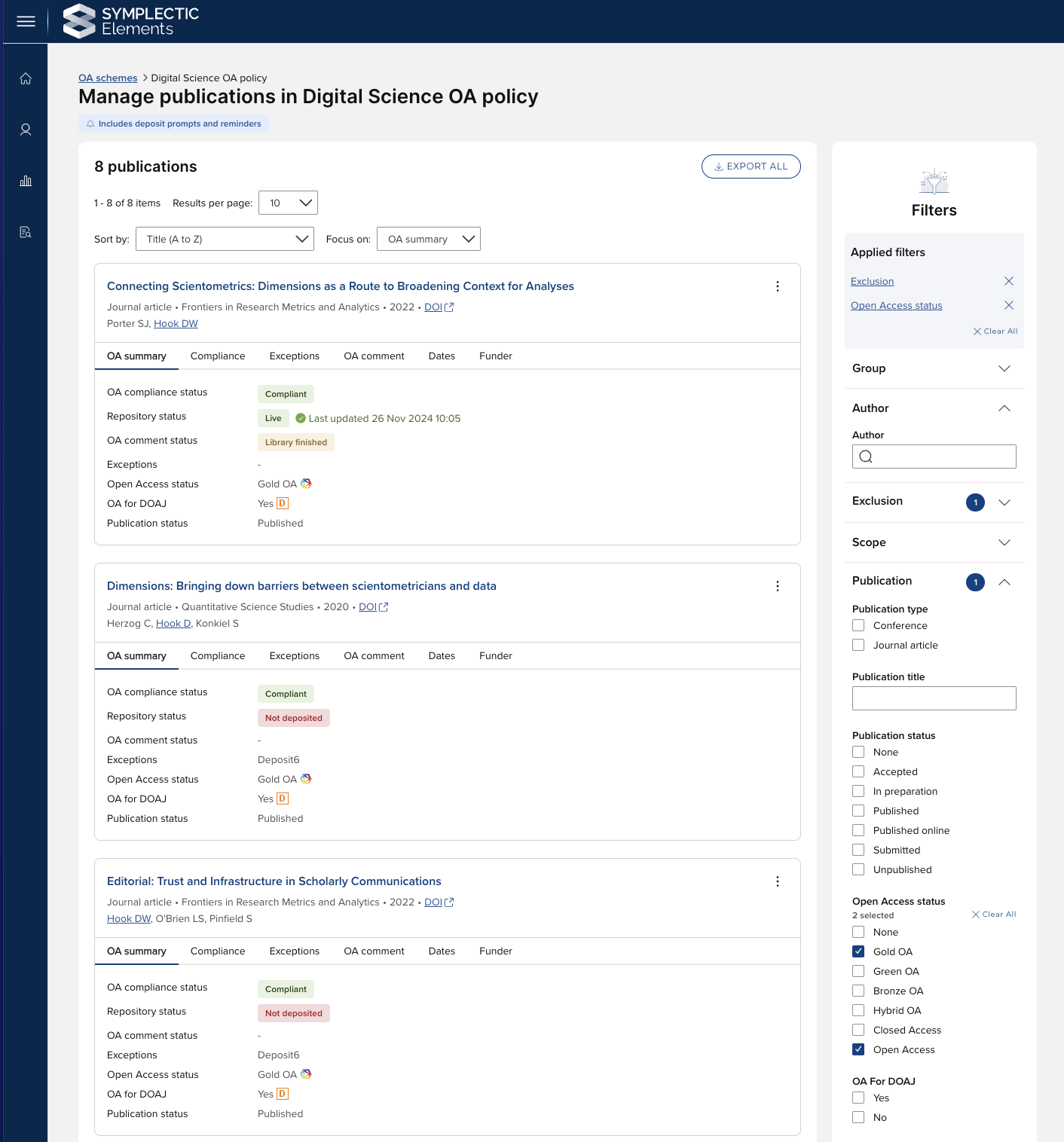
Image: Improved filtering options in the OA Monitor
Access to the OA Monitor for Research Managers (RI)
We have removed access to the OA Monitor for the group-level Research Manager (RI) role. The Research Manager (RI) role continues to be able to access the OA Reports page in v6.21.
In an upcoming Elements release, we plan to expand the OA Monitor roles available in Elements, with the delivery of a new system-level OA Administrator role and a new group-level OA Manager role. These new roles will deliver focussed OA Monitor permissions for relevant users, ensuring colleagues can perform their tasks with appropriate access rights.
Reporting database updates
The new OA Monitor framework delivered in the past two releases has necessitated updates to the reporting database in v6.21. The [dbo].[OA Policy] table has been removed and replaced with a number of OA scheme tables, as follows:
[dbo].[OA Scheme]
[dbo].[OA Scheme Assigned Deposit Config Group]
[dbo].[OA Scheme Compliance Rule]
[dbo].[OA Scheme Compliance Rule File Version]
[dbo].[OA Scheme Compliance Rule Open Access Status]
[dbo].[OA Scheme Compliance Rule Repository Location]
[dbo].[OA Scheme Exception Type]
[dbo].[OA Scheme Funder Name]
[dbo].[OA Scheme Publication Type Setting]
[dbo].[OA Scheme Publication Type Setting Excluded Sub Type]
If you would like to learn more about these exciting new features in the Open Access Monitor, please join us for our upcoming webinar Enhanced Open Access Compliance Tools in Elements on 12 December 2024.
Discovery Module enhancements
Discovery module cookie consent management
Version 6.21 sees the introduction of cookie consent management in the Discovery Module (Public Profiles), providing an easy and effective route to compliance with GDPR and other similar legislation. This is designed to have minimal impact on visitors to your Discovery site, with one-click accept and reject options. This follows on from similar cookie consent functionality introduced to the core Elements system in v6.20.
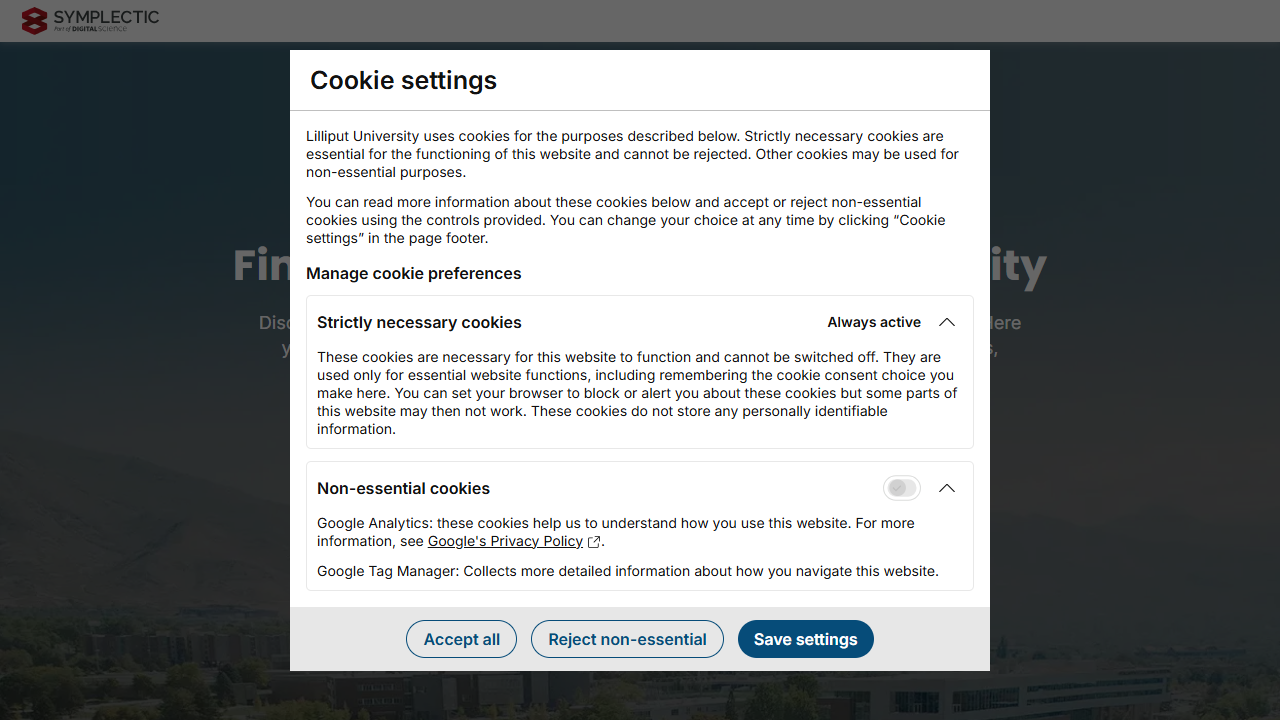
Image: The cookie consent popup in the Discovery module
The Discovery Configuration page in Elements has a new 'Analytics & Privacy' tab, where the new cookie consent configuration settings can be found, along with the existing SEO and analytics settings which have moved to this tab.
From this tab, admins can declare whether scripts that are added to the Discovery site via Google Tag Manager set any non-essential or strictly necessary cookies (or no cookies at all), and provide information about these cookies to help visitors to your Discovery site make an informed choice. If Google Analytics is used, these cookies are always classified as non-essential.
Depending on your current Discovery configuration, you may need to take action upon upgrading to 6.21 to ensure that cookie consent management is correctly configured. See the Elements v6.21 Upgrade Notes for details. For organisations using their own system to manage cookie consent, the built-in system can be disabled globally.
Discovery Module branding configuration settings
Since v6.14, we have been gradually migrating Discovery Configuration settings to the Elements administrative UI so that administrators can quickly and easily update their Discovery Module configuration settings. We are pleased to announce that as of this release, we have completed this migration and all Discovery configuration settings are now available directly to administrators.
Favicon and logo upload
If you are an administrator, you can quickly and easily update your organisation’s favicon and logo by simply uploading the relevant files and publishing them to your Discovery site. You will be prompted to ensure that the uploaded file is of the correct format. Guidance information is available to help prepare the relevant files.
Branding Colour configuration
System administrators can also now select desired primary and secondary branding colours simply by entering a hex code into the new settings on the ‘Manage Discovery Configuration’ page.
To maximise accessibility compliance, Elements will now automatically check that the selected colour will meet the contrast ratios required to meet WCAG 2.2 AA accessibility standards. If the selected colour has a sufficient contrast (4.5:1) with white, the colour will be stored for use. However, if the selected colour does not meet the required contrast ratio, the system will automatically generate the closest available colour that will comply with the requirements.
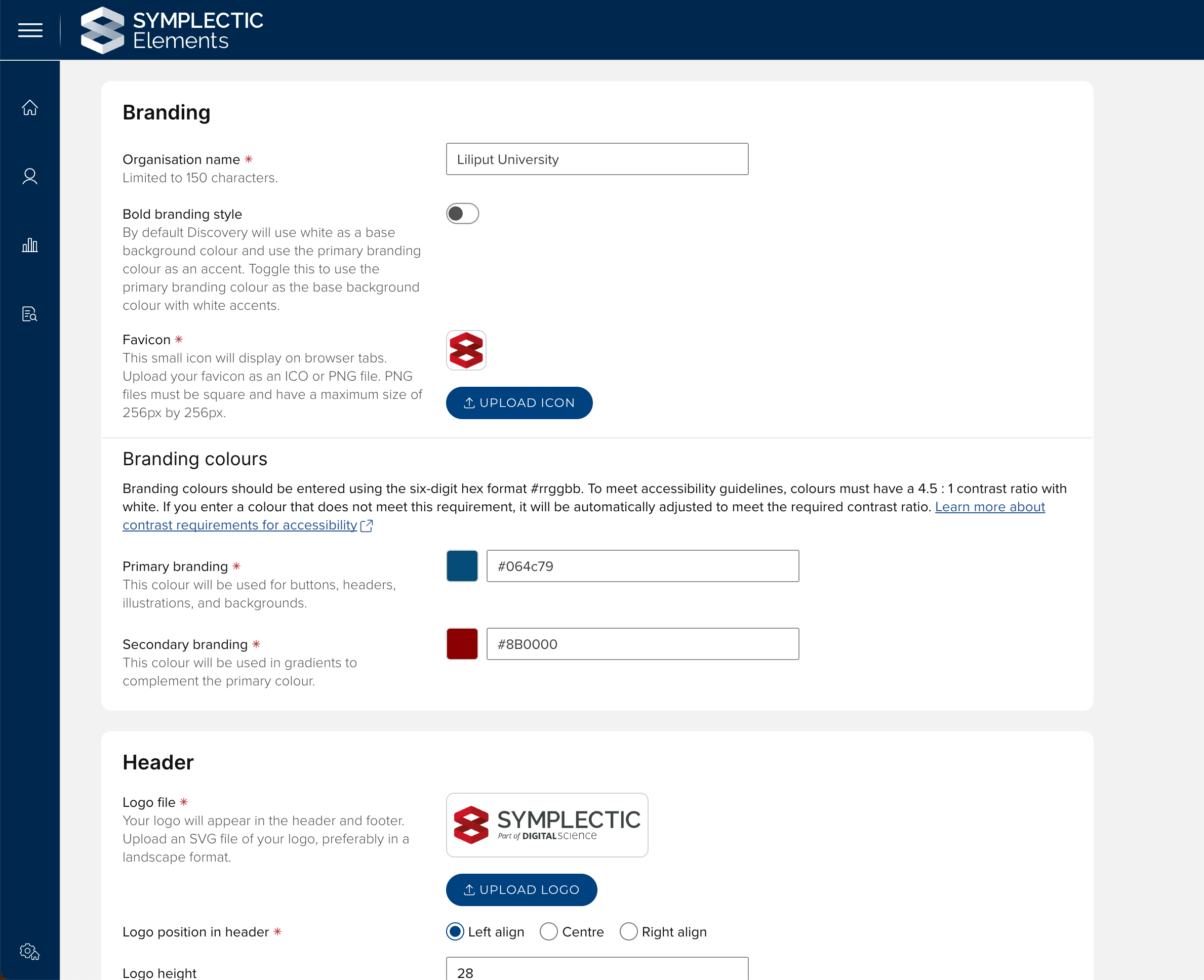
Image: Administrators can upload your favicon and logo files and select your primary and secondary branding colours
Branding images for the Discovery home page and search bar
We have also introduced new components to allow you to upload, crop and preview your branding images for the Discovery home page and search bar. These new components will allow you to easily customise the selected images to ensure they are appropriately cropped and formatted for both Discovery desktop and mobile experiences. You will be prompted to ensure that the uploaded file is of the correct format. Guidance information is available to help you prepare the relevant files. Once you are happy with the selected images, you can simply save and publish to Discovery.
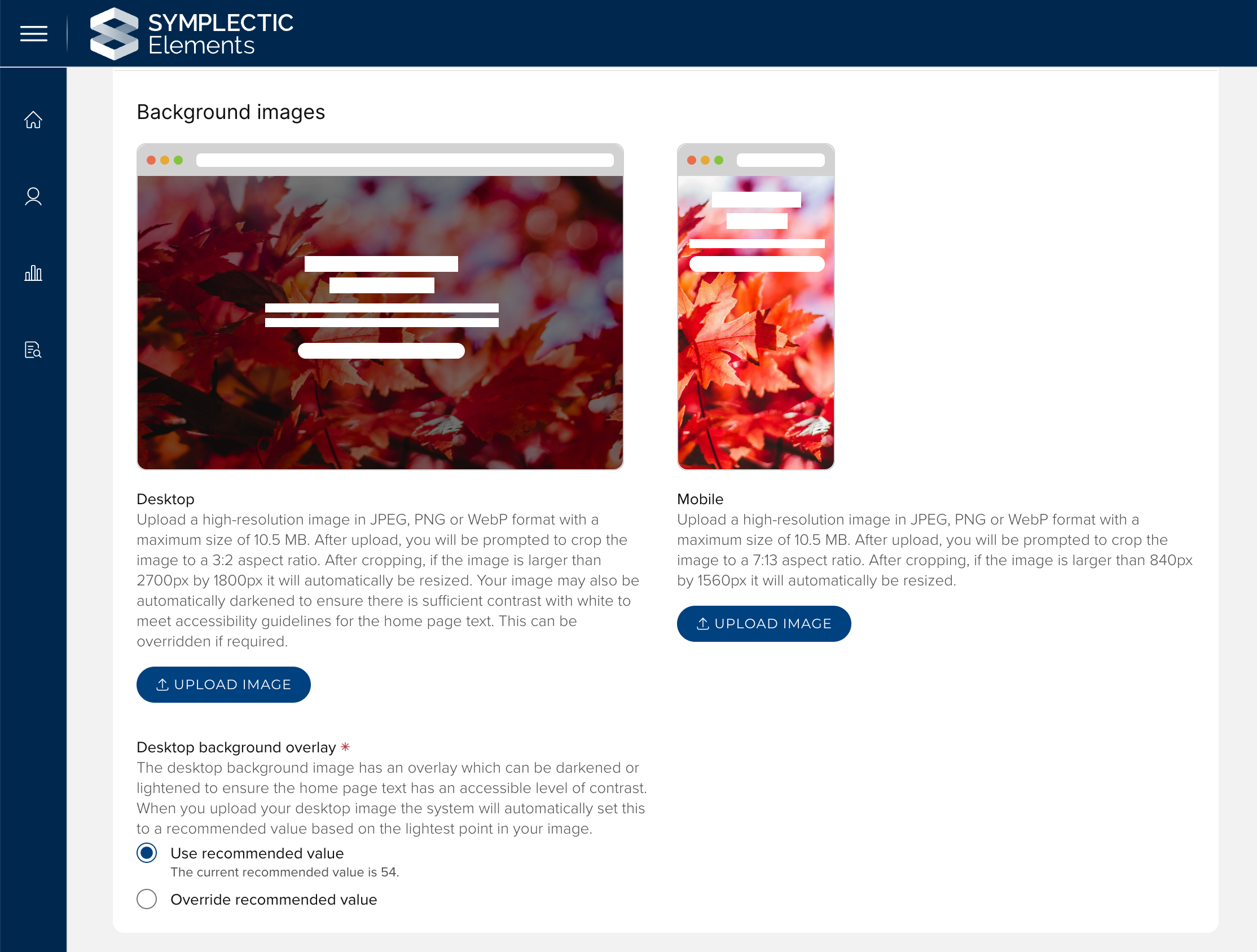
Image: You can now upload your branding images via the Discovery Configuration settings page
All of the newly migrated settings are available via the ‘Manage Discovery Configuration’ page in the System admin menu. For more information about all of the settings available, please see the Support site.
Important note: As a part of the upgrade process, you will need to reapply branding to your Discovery sites including uploading your logo, favicon, and branding images and selecting your branding colours. We recommend ensuring that you have all of the required branding materials available before starting your upgrade.
Summary statistics on Group & Equipment search results
To help visitors to your Discovery site find relevant groups or pieces of equipment, we are adding a new summary statistics section to each result on the search results page.
This new section will summarise the number of people, outputs and activities linked to each group or piece of equipment, giving visitors a preview of the information they will find if they click through to view the detailed profile.

Image: An example of summary stats appearing on a group search result
Accessibility improvements
As part of our continual incremental work to improve the accessibility of Elements, enhancing the navigability of the system for users with disabilities, this release includes a number of changes, including:
New focus outlines for buttons across Discovery have been added to provide clearer guidance to keyboard users.
Improvements have been made to the aria-labels on pagination buttons in Discovery, providing clearer guidance to keyboard users.
On Discovery sites, the redundant text alternative has been removed from the user profile decorative image.
The font size for breadcrumbs and back links in Elements has been increased for improved readability.
We have improved screen reader interactions with non-interactive badges and chips.
We have updated some of the stock colours in the Elements branding palette to ensure they meet contrast requirements.
We have introduced a confirmation step when copying the structure on the Annual Collection groups page, as per WCAG 2.2 success criterion 3.3.4.
Other improvements
The Elements API has been updated to include a privacy filter to enable the extraction only of objects of the desired privacy level(s).
When adding a person (e.g. an author or contributor) to a manual record, if the person corresponds to a user of the system, the auto-populated metadata now takes account of the user's preferred first and last names, and/or "Known As" name, if present.
For customers completing DHET returnsusing the Annual Collection module, we have added two new features to support DHET compliance. When the ‘Is DHET return’ setting is enabled:
If a user chooses to view or upload associated files, the list of permitted file type descriptions has been updated to be specific to DHET return requirements.
On the ‘Author affiliations’ modal, users will now be prompted to specify any other South African affiliations, selecting the relevant institutions from a standard list. Users can add as many affiliations as required, and the system will automatically count the total number of other affiliations. The resulting additional metadata is available via the Reporting Database and the API (read-only).
For clients who utilise Awards Management (Research Funding Solution), some minor improvements have been delivered in this release. Further details are available here.
Fixes
We have resolved an issue where an update in DSpace 7.6.2 led to deposit issues for a handful of Elements clients.
End of support
As always, we recommend you regularly review our End of Support Announcements for information about upcoming end of support in Elements for various technologies. We would like to draw your attention to the upcoming end-of-support dates for versions of Elements. Upcoming dates include:
Elements version | Release date | End of support date |
6.21 | 28 November 2024 | 28 November 2026 |
6.20 | 19 September 2024 | 19 September 2026 |
6.19 | 27 June 2024 | 27 June 2026 |
6.18 | 25 April 2024 | 25 April 2026 |
6.17 | 29 February 2024 | 28 February 2026 |
6.16 | 7 December 2023 | 7 December 2025 |
6.15 | 12 October 2023 | 12 October 2025 |
6.14 | 6 July 2023 | 6 July 2025 |
If you need assistance planning to upgrade, please contact our team via the Support Site.
We’re here to help!
We hope you enjoy getting to know the latest version of Elements. Should you have any questions, we’re here to help! Just contact us at support@symplectic.co.uk for assistance.
Best wishes,
The Symplectic Team