
OA Monitor: Compliance Logic and Overrides
This article provides an overview of the OA Monitor compliance logic and override functionality available.
Jump to the middle of the article if you are on Elements v6.20 or v6.21
Jump to the bottom of the article if you are on a version of Elements prior to v6.20.
Key Takeaways for Compliance Determination
✔ Compliance is assessed progressively, starting from publication-level rules, then repository deposits, and finally specific file properties.
✔ A compliance override can be applied to change the final compliance status. But we will always store the original compliance status and issues without the override.
✔ The final compliance status reflects the highest-priority outcome, ensuring that compliant publications are recognised while addressing non-compliance issues where necessary.
1. Scope Evaluation
The OA Monitor’s scope evaluation determines whether a publication falls within the scope of an OA scheme.
Several checks are performed depending on the scope criteria set in the scheme, such as:
If the publication type is included in the OA scheme.
If the conference has an ISSN (if applicable).
If the publication is linked to an specified funder.
If the primary source date falls within the scheme’s required range.
If there are approved authors linked to the scheme.
If the authors were current members of staff.
If the publication is out of scope, compliance assessment stops.
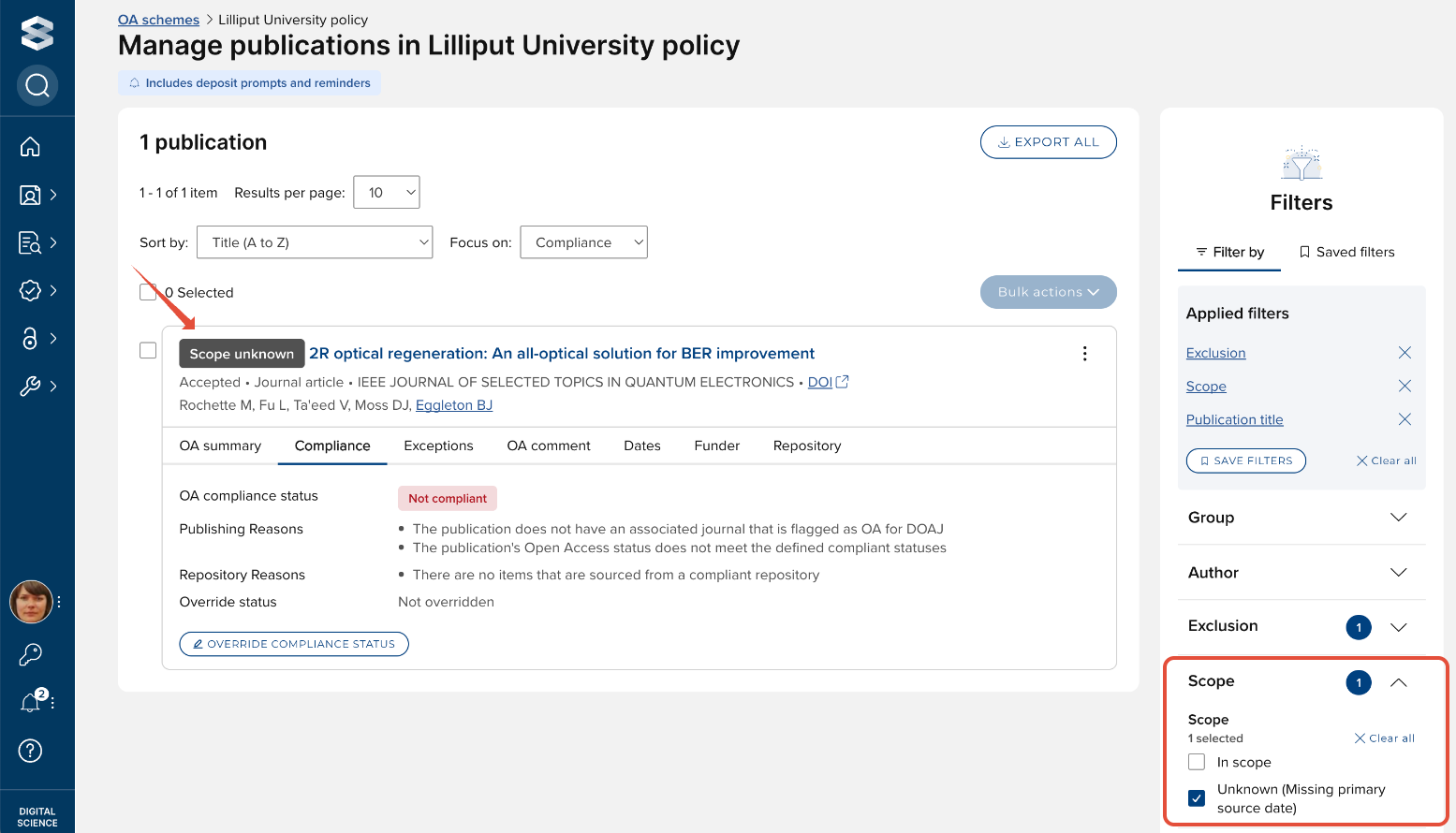
Where a publication has no primary source date (neither publication nor acceptance date), the OA Monitor cannot determine whether the publication is within the scope of the scheme and will return a 'Scope unknown' value.
2. Compliance Evaluation
If the publication is within scope or scope is unknown, compliance is assessed based on publishing and repository criteria, as set in the OA scheme configuration.
Compliance evaluation follows a structured process:
Checks if any compliance criteria exist. If none, the process stops.
Evaluates publishing and repository compliance.
3. Publishing & Repository Compliance Rules
After confirming that a publication is in scope, compliance is assessed across two key dimensions:
Publishing compliance criteria – Evaluates whether the publication meets the specified Open Access indicators (if set).
Repository compliance criteria – Evaluates whether the publication meets the specified repository compliance criteria (if set).
Compliance Assessment Process
The compliance evaluation process follows a structured, multi-level approach:
A. Object-Level compliance (publication-level properties)
Evaluates overall compliance criteria based on the publication itself.
Checks for (depending on the compliance criteria set):
OA status
OA for DOAJ
Any record from compliant repository
If any records from a compliant repository are found, the system proceeds to the next level of assessment.
B. Record-Level compliance (individual repository records)
Identifies and evaluates repository records associated with the publication.
Determines whether the record is deposited in a compliant repository using the RepositoryLocation rule.
Orders repository records by source precedence
For each record, checks for (depending on the compliance criteria set):
Deposit deadline
Repository decision
Repository status (item is live)
Author reuse licence
Any file or OA location
If no repository records meet compliance, the publication is considered non-compliant at this level, and compliance issues of the top precedence record will be stored
C. File-Level compliance (specific file properties)
Evaluates individual files attached to a repository record for compliance.
For each file, checks for (depending on the compliance criteria set):
Compliant file version
File reuse licence
Maximum embargo period
If no files meet compliance, the publication remains non-compliant at this level, and compliance issues of the first file will be stored
Compliance Outcomes at This Stage
✔ If a compliant file+repository record is found, compliance is determined and further evaluation stops.
✔ If a record is set as compliant by repository decision (if set), compliance is assigned at the record level, stopping additional checks.
✔ If all checks fail, the compliance evaluation proceeds to final status determination. We will store non-compliant/indeterminate reasons for the top precedence record and its first file.
4. Compliance status determination
Once all compliance checks have been performed, the final compliance status is determined based on the results of the publishing and repository criteria evaluations.
Possible Compliance Statuses
Compliant
The publication (and, where relevant, at least one repository record with at least one file) meets either the set publishing or repository compliance criteria.
The publication is overridden to compliant
The publication is set to compliant by repository decision (if set as compliance criterion)
Non-Compliant
At least one publishing or repository compliance rule fails explicitly.
Compliance cannot be achieved at any level (object, record, or file).
The publication is overridden to non-compliant
The publication is set to not compliant by repository decision (if set as compliance criterion)
Indeterminate
The system cannot determine compliance due to missing data.
This status occurs where the only reasons are:
MissingDateForDepositDeadline, and/or
MissingPublicationDateForEmbargoPeriod
No Compliance Criteria Set
No compliance criteria apply to the publication.
Compliance assessment is not necessary, and the publication is recorded as NoComplianceCriteriaSet.
Determining the Final Compliance Status
If both publishing and repository compliance criteria are set, the system applies priority rules:
If both criteria assessments result in a compliant status, the OA Monitor status will be returned as Compliant.
If either criteria assessment results in a compliant status, the OA Monitor status will be returned as Compliant.
If both criteria assessments result in a not-compliant status, the OA Monitor status will be returned as Not compliant, with both publishing and repository non-compliance reasons provided.
Non-compliance reasons
Key | Non-compliance reason | Explanation |
EmbargoPeriodExceedsPolicyDeadline | The embargo period exceeds the maximum allowed | A file's embargo period exceeds the embargo deadline defined by the OA scheme, or the file is indefinitely embargoed. |
ItemNotLive | The publication is not live in the repository | An item has been deposited in a compliant repository, but is not yet public. |
MissedDepositDeadline | The publication was not deposited by the deposit deadline | An item has been deposited in a compliant repository, but it's first deposit date exceeds the deposit deadline defined by the OA scheme. |
NotCompliantFileVersion | The file or OA location is not of a compliant version | A file's version does not match the file version required by the OA scheme. |
NoFileOrOALocation | There are no fulltext files or OA locations sourced from the repository | An item has no file or OA locations. |
RepositoryDecision | The repository has indicated that the publication is not compliant | The repository has identified the item as being not compliant with the institutional OA scheme. |
MissingPublicationDateForEmbargoPeriod | The publication has no publication date, which is required to check that the file embargo period is not too long | The publication has no publication date from which to calculate an embargo period. |
MissingDateForDepositDeadline | The publication has no reference date, which is required to check whether the publication was deposited within the deadline | The publication has no date from which to calculate a deposit deadline (depending on the settings, the could either be the acceptance date or publication date that is missing). |
OverriddenAsNotCompliant | The compliance was overridden for this publication | The compliance status has been manually overridden to Not compliant |
NoRecordFromCompliantRepository | There are no items that are sourced from a compliant repository | There are no records from a compliant repository location. |
NotOpenAccess | The publication's Open Access status does not meet the defined compliant statuses | The publication's Open Access status does not match any of the defined compliant Open Access statuses. |
NotOAForDOAJ | The publication does not have an associated journal that is flagged as OA for DOAJ | The publication's associated journal is not flagged as OA for DOAJ |
NoCompliantFileReuseLicence | There is no fulltext file with a compliant reuse licence in the repository | Where the reuse licence data is sourced from repository file metadata, the file's reuse licence does not match the reuse licence required by the OA scheme. |
NoCompliantAuthorLicence | The publication has no record with a compliant author licence | Where the reuse licence data is sourced from the Author's licence (record metadata), the publication has no record with a compliant reuse licence. |
Definitions and further notes:
Primary source date
If “Acceptance date” is selected, the acceptance date is used. If it is not available, the earlier of the online publication date and publication date is used to determine if the publication is within the scope of the OA scheme.
If “Publication date” is selected, the earlier of the online publication date and publication date is used. If neither is available, the acceptance date is used to determine if the publication is within the scope of the OA scheme.
The most precedent dates are used (e.g. when calculating "Publication date", the earliest of the most precedent publication date and most precedent online publication date is used).
Precedence rules are always followed (even if there is a more complete date of lower precedence).
If a date is incomplete (e.g. year only or month+year only), the OA Monitor presumes the earliest possible value (so 1 Jan or 1 of month).
Repository location
Where multiple repository locations are set as compliant, and no compliant file can be sourced from any repository location, only the non-compliance reasons relating to the highest precedence data source are stated.
Deposit deadline
The deposit deadline is the maximum number of days / months that can elapse between the calculated date of first deposit and the primary source date (with no fallback).
If a deposit deadline has not been set, then the time elapsed between primary source date and deposit date will not be used to assess compliance.
Maximum file embargo
If the maximum file embargo has been set to X days, then a publication can only be compliant if any compliant file versions (if set) are out of embargo on within X days after the publication date.
If the maximum file embargo has not been set, then file embargo periods will not be used to assess compliance.
Note that the maximum file embargo period always relates to the publication date, regardless of which date is set as the primary source date.
Compliant file versions
If any versions are specified, then a publication can only be compliant if at least one of its files is declared to be one of the specified versions.
If for example both maximum embargo period and compliant file versions are specified, then a publication can only be compliant if it has a file with a compliant version that is out of embargo within the specified period.
If no compliant file versions are specified, then file versions will not be used to assess compliance.
Note that the OA Monitor looks for an exact text match (case insensitive) between the file version returned by the repository and the file version set in the OA scheme configuration.
Compliant reuse licences
If any reuse licences are specified, then a publication can only be compliant if at least one of its files is declared to be one of the specified licences.
If for example both maximum embargo period and compliant reuse licences are specified, then a publication can only be compliant if it has a file with a compliant reuse licence that is out of embargo within the specified period.
If no compliant reuse licences are specified, then reuse licence will not be used to assess compliance.
Note that the OA Monitor looks for an exact text match (case insensitive) between the reuse licence returned by the repository and the reuse licence set in the OA scheme configuration.
OA status
The most precedent OA status is used - the first populated open-access-status is assessed against the set values in the OA scheme configuration.
Indeterminate status
Where a publication has multiple indeterminate / non-compliance reasons, an OA status of 'Not compliant' will be returned UNLESS the only reasons are:
MissingDateForDepositDeadline, and/or
MissingPublicationDateForEmbargoPeriod
Overriding the compliance status
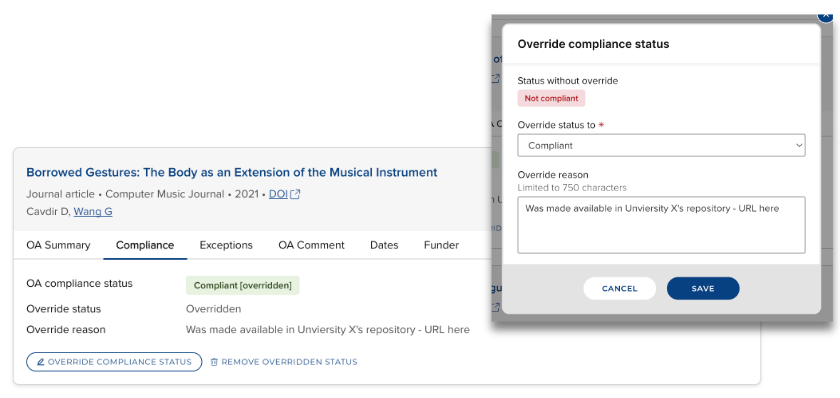
There will always be some publications where the metadata just doesn't accurately reflect its actual compliance with the OA scheme. Accordingly, a publication's compliance status can be overridden, as described in the Manage publications list for the scheme. The facility to enable overrides of OA scheme compliance is available in the OA Monitor settings.
Embargoes
EPrints
EPrints has an optional process (scheduled job) which deletes embargo end dates upon lifting them. If you are regularly running the lift_embargos scheduled job on the connected EPrints system, we that recommend you enable a feature we offer to use cached embargo dates in the OA Monitor after the embargo date has been deleted from the source. This allows OA Monitor to continue to use those embargo dates to calculate compliance even after the embargo has been lifted. To do this, enable the "Use cached values for the embargo date" feature for RT2 Eprints connections via the relevant repository connection settings page in Elements.
Figshare for Institutions
Figshare for Institutions deletes embargo end dates upon lifting them. We therefore recommend you enable a feature we offer to use cached embargo dates in the OA Monitor after the embargo date has been deleted from the source. This allows OA Monitor to continue to use those embargo dates to calculate compliance even after the embargo has been lifted. To do this, enable the "Use cached values for the embargo date" feature for RT2 Figshare for Institutions connections via the relevant repository connection settings page in Elements
OA Monitor compliance logic and overrides (v6.20 and v6.21)
Key concepts when discussing an OA scheme are scope and compliance.
Scope
For each configured OA scheme, the OA Monitor examines each publication in Elements and determines whether or not it is in the scope of the scheme, based on a set of criteria (e.g. publication type, publication date). Criteria that define whether a publication is in scope are defined in the OA Monitor : Create and configure an OA scheme support article.
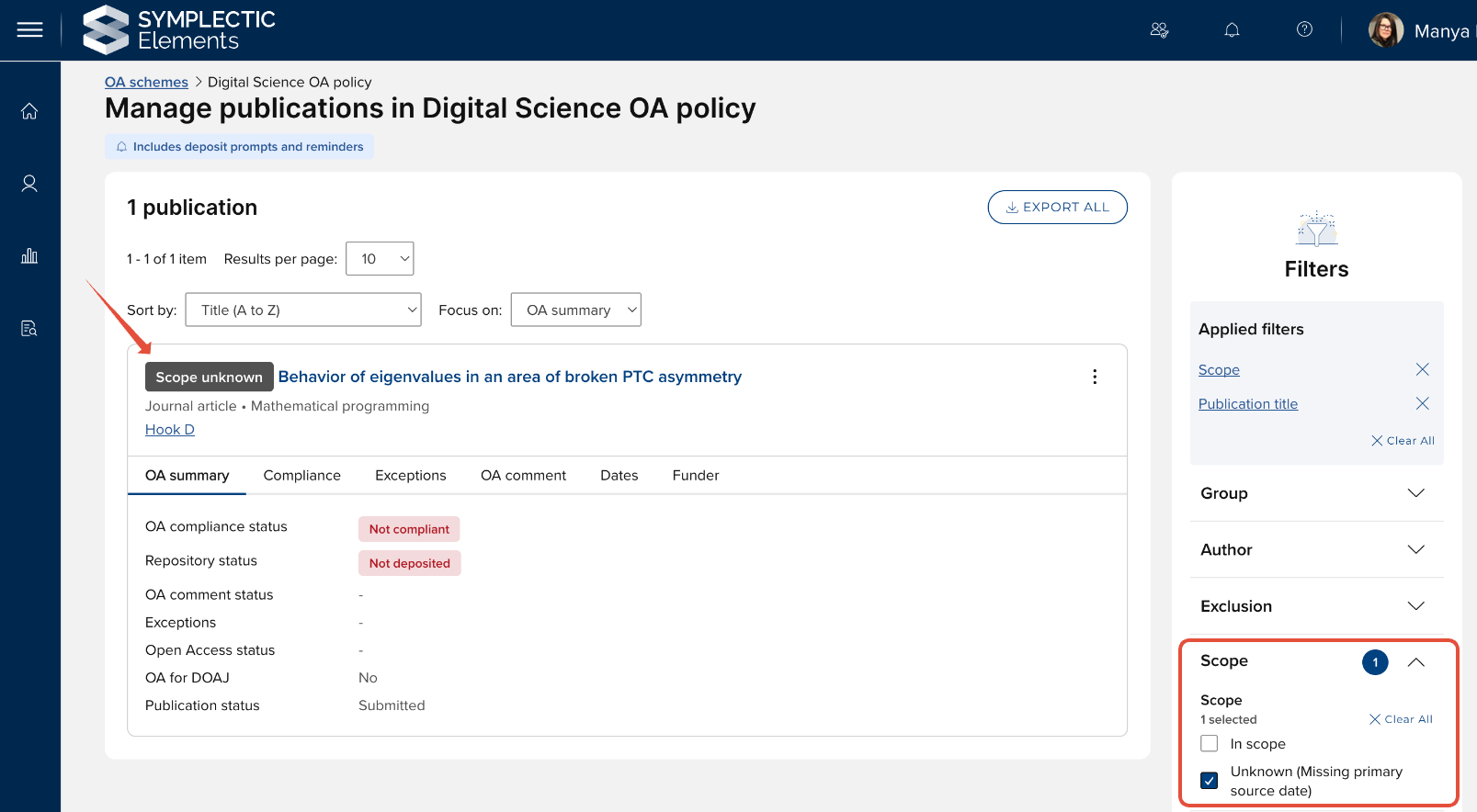
Where a publication has no primary source date (neither publication nor acceptance date), the OA Monitor cannot determine whether the publication is within the scope of the scheme and will return a 'Scope unknown' value.
If the publication is in the scope of the OA scheme, the OA Monitor then applies another set of criteria to determine whether or not it is compliant with the scheme. Available compliance criteria are defined in the the OA Monitor : Create and configure an OA scheme support article.
The OA Monitor applies an algorithm to determine whether or not a publication is compliant with the OA scheme. The algorithm's output is a list of reasons for non-compliance or indeterminate compliance.
If there are no reasons for non-compliance / indeterminate compliance once the algorithm is complete, the publication is judged to be compliant.
If there are one or more reasons for non-compliance / indeterminate, these are stored and can be viewed in the Manage publications list for the scheme, and in OA reports.
The compliance logic algorithm works as follows:
Are Publishing criteria set?
YES → Look at each rule in turn:
If Open Access status is set as a compliance criterion, does the publication's OA status match any of the defined compliant OA statuses?
YES → STOP and set as Compliant
NO → remember NotOpenAccess
If OA for DOAJ is set as a compliance criterion, is the publication's associated journal flagged as OA for DOAJ?
YES → STOP and set as Compliant
NO → remember NotOAforDOAJ
Are Repository criteria set?
YES → Look at the minimum requirements:
Is the repository record live in a RT2 repository?
Does the repository record have at least one file or OA location?
Does the repository record have at least one file that is not indefinitely embargoed?
NO → output ItemNotLive and NoCompliantFileVersion and NoFileFromCompliantRepositoryLocation
YES → if there no files that are not indefinitely embargoed, output EmbargoPeriodExceedsPolicyDeadline
Then look at each record in turn (each rule only applies if set as a compliance criterion):
Is the record sourced from a compliant RT2 data source?
NO → output NoFileFromCompliantRepositoryLocation
Are there one or more records from a compliant RT2 data source which say this publication is compliant, i.e. have
is-compliant-with-inst-policy = true?YES → STOP and set as Compliant
If the record says it's not compliant (
is-compliant-with-inst-policy = false) → remember RepositoryDecision
If the record is not live → remember ItemNotLive
Are there any compliant files marked as open-access (is-open-access = true)?
NO → remember NoCompliantFileVersion
YES → if the item is live and none of the compliant files is out of embargo on time or are indefinitely embargoed → remember MissingPublicationDateForEmbargoPeriod or EmbargoPeriodExceedsPolicyDeadline (depending on whether we have a publication date)
Is the deposit deadline date missing?
YES → output MissingDateForDepositDeadline
If the item is live and there is a deposit deadline which was not met → remember MissedDepositDeadline
If we didn't already STOP and output Compliant in steps 1 or 2, and haven't remembered any reasons for this record → STOP and output nothing (since we have found a compliant record)
Finally, if we have not found a compliant record through all of these checks → output all remembered reasons now.
OA compliance status | Reasons |
Indeterminate |
|
Not compliant |
|
Definitions and further notes:
Primary source date
If “Acceptance date” is selected, the acceptance date is used. If it is not available, the earlier of the online publication date and publication date is used.
If “Publication date” is selected, the earlier of the online publication date and publication date is used. If neither is available, the acceptance date is used.
The most precedent dates are used (e.g. when calculating "Publication date", the earliest of the most precedent publication date and most precedent online publication date is used).
Precedence rules are always followed (even if there is a more complete date of lower precedence).
If a date is incomplete (e.g. year only or month+year only), the OA Monitor presumes the earliest possible value (so 1 Jan or 1 of month).
Deposit deadline
The deposit deadline is the maximum number of days that can elapse between the date of first deposit and the primary source date (with no fallback).
If a deposit deadline has not been set, then the time elapsed between primary source date and deposit date will not be used to assess compliance.
Maximum file embargo
If the maximum file embargo has been set to X days, then a publication can only be compliant if any compliant file versions (if set) are out of embargo on within X days after the publication date.
If the maximum file embargo has not been set, then file embargo periods will not be used to assess compliance.
Note that the maximum file embargo period always relates to the publication date, regardless of which date is set as the primary source date.
Compliant file versions
If any versions are specified, then a publication can only be compliant if at least one of its files is declared to be one of the specified versions.
If both maximum embargo period and compliant file versions are specified, then a publication can only be compliant if it has a file with a compliant version that is out of embargo within the specified period.
If no compliant file versions are specified, then file versions will not be used to assess compliance.
Note that the OA Monitor looks for an exact text match (case insensitive) between the file version returned by the repository and the file version set in the OA scheme configuration.
Repository locations
Where multiple repository locations are set as compliant, and no compliant file can be sourced from any repository location, only the non-compliance reasons relating to the highest precedence data source are stated.
If repository location is not set as a compliance criterion, compliance will be assessed using all repository locations.
NOTE that if your scheme is measuring repository compliance criteria, it is STRONGLY RECOMMENDED that you set compliant repository location(s) (even if you only have 1 repository) - otherwise you may see a lot of irrelevant 'noise' in your non-compliance reasons.
OA status
The most precedent OA status is used - the first populated open-access-status is assessed against the set values in the OA scheme configuration.
Indeterminate status
Where a publication has multiple indeterminate / non-compliance reasons, an OA status of 'Not compliant' will be returned UNLESS the only reasons are:
MissingDateForDepositDeadline, and/or
MissingPublicationDateForEmbargoPeriod
Overriding the compliance status
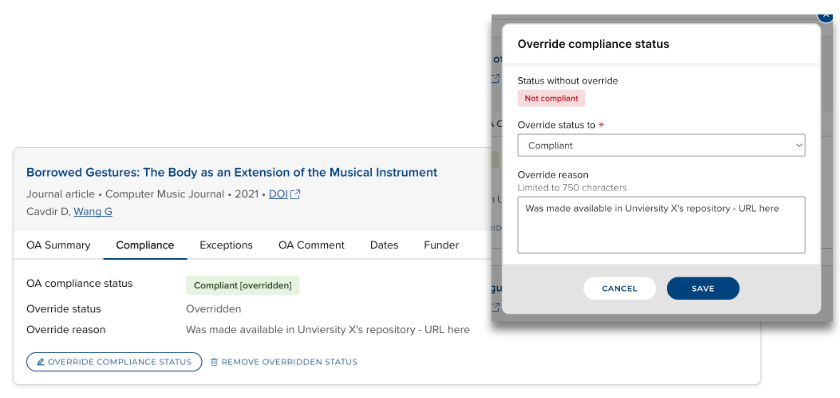
There will always be some publications where the metadata just doesn't accurately reflect its actual compliance with an OA scheme. Accordingly, a publication's compliance status can be overridden, as described in the Manage publications list for the scheme. The facility to enable overrides of OA scheme compliance is available in the OA Monitor settings.
Embargoes
EPrints
EPrints has an optional process (scheduled job) which deletes embargo end dates upon lifting them. If you are regularly running the lift_embargos scheduled job on the connected EPrints system, we that recommend you enable a feature we offer to use cached embargo dates in the OA Monitor after the embargo date has been deleted from the source. This allows OA Monitor to continue to use those embargo dates to calculate compliance even after the embargo has been lifted. To do this, enable the "Use cached values for the embargo date" feature for RT2 Eprints connections via the relevant repository connection settings page in Elements.
Figshare for Institutions
Figshare for Institutions deletes embargo end dates upon lifting them. We therefore recommend you enable a feature we offer to use cached embargo dates in the OA Monitor after the embargo date has been deleted from the source. This allows OA Monitor to continue to use those embargo dates to calculate compliance even after the embargo has been lifted. To do this, enable the "Use cached values for the embargo date" feature for RT2 Figshare for Institutions connections via the relevant repository connection settings page in Elements.
OA Monitor compliance logic and overrides (v6.19 and below)
Key concepts when discussing an Open Access policy are scope and compliance.
Scope ("in policy")
For each configured policy, the OA Monitor examines each item in Elements and determines whether or not it is in scope for the policy, based on a set of criteria. A publication that is in scope is referred to as being in policy. Criteria that decide whether a publication is in policy include:
Publication type (examples: Journal article, Conference paper)
Primary source date (see below)
Primary source date
Most Open Access policies have a start date, before which they do not apply. Policies vary in whether they compare this start date to the publication date or acceptance date when determining whether a publication is in policy. To account for this variation, Elements allows you choose a primary source date for each policy. The options are:
Accepted - the publication's acceptance date. If the publication has no acceptance date in any data source, use the earliest of publication date and online publication date.
Published - the earliest of publication date and online publication date. If the publication has neither a publication date nor an online publication date in any data source, use the publication's acceptance date.
For each of the above dates, the OA Monitor takes all data sources into account. E.g. if primary source date is set to "Accepted" and the most precedent data source does not have an acceptance date, the OA Monitor will check all other data sources for an acceptance date (in default precedence order) before falling back to publication date or online publication date.
Compliance
If the publication is in-policy, the OA Monitor then applies another set of criteria to determine whether or not it is compliant with the policy, i.e. whether it meets the Open Access requirements expected by the policy.
A publication is compliant when it meets key criteria defined by the institution. Criteria that decide whether an in-policy publication is compliant with the policy can include:
Deposit deadline date, i.e. the date by which the item must be submitted to the repository
Maximum embargo length, i.e. the maximum length of time the repository item can be embargoed, measured from the publication's formal publication date
Version of the deposited full text files, e.g. "Published version", "Accepted version", "Submitted version"
Elements applies an algorithm to determine whether or not a publication is compliant with the policy. The algorithm's output is a list of reasons for non-compliance. If there are no reasons for non-compliance once the algorithm is complete, the publication is judged to be compliant. If there are one or more reasons for non-compliance, these are stored and can be seen in the OA Monitor's interface and reports. The algorithm used depends on whether the targeted repository for that publication type is RT1 or RT2.
For RT1
Is the primary source datemissing?
YES → output MissingDateForPolicy
NO → Is the deposit deadline datemissing?
YES → output MissingDateForDepositDeadline
Is there a live item in the repository?
NO → output ItemNotLive
Is there a compliant file or OA location (taking version into account if applicable)?
YES → is at least one of those out of embargo on time?
NO → output MissingPublicationDateForEmbargoPeriod or EmbargoPeriodExceedsPolicyDeadline (depending on whether we have a publication date)
NO → output NoCompliantFileVersion
If there is a live item [note step 2] and a deposit deadline, was that deadline missed?
YES → output MissedDepositDeadline
For RT2
Are there one or more records from the correct RT2 data source which say this publication is compliant, i.e. have
is-compliant-with-inst-policy = true?YES → STOP and output nothing
Is the primary source datemissing?
YES → output MissingDateForPolicy
NO → Is the deposit deadline datemissing?
YES → output MissingDateForDepositDeadline
Are there any records from the correct RT2 data source?
NO → output ItemNotLive and NoCompliantFileVersion
YES → Look at each such record in turn:
If the record says it's not compliant (
is-compliant-with-inst-policy = false) → remember RepositoryDecisionIf the record is not live → remember ItemNotLive
Are there any compliant files marked as open-access?
NO → remember NoCompliantFileVersion
YES → if the item is live [note step b] and none of the compliant files is out of embargo on time → remember MissingPublicationDateForEmbargoPeriod or EmbargoPeriodExceedsPolicyDeadline (depending on whether we have a publication date)
If the item is live [note step b] and there is a deposit deadline which was not met → remember MissedDepositDeadline
If we didn't output anything in step 2, and haven't remembered any reasons for this record → STOP and output nothing (since we have found a compliant record)
Finally, if we have not found a compliant record amongst the records from the RT2 data source → output all remembered reasons now
Overriding the Compliance Status
It is possible for authorised users to override the calculated OA compliance status via the 'Publications in OA policy' screen.
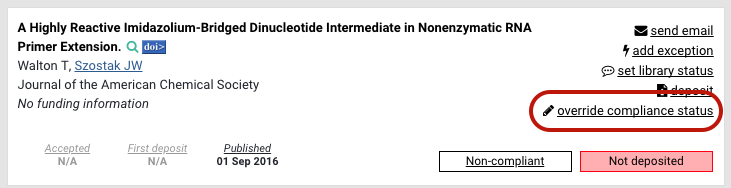
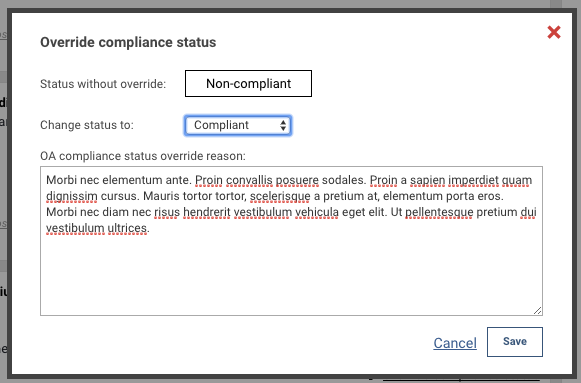
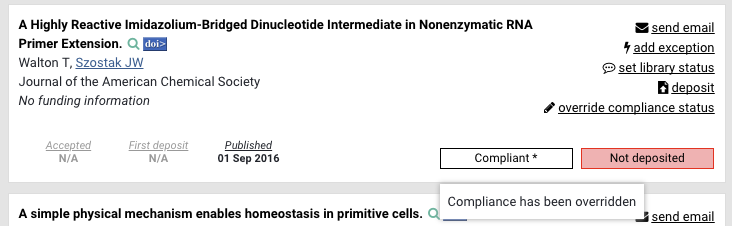
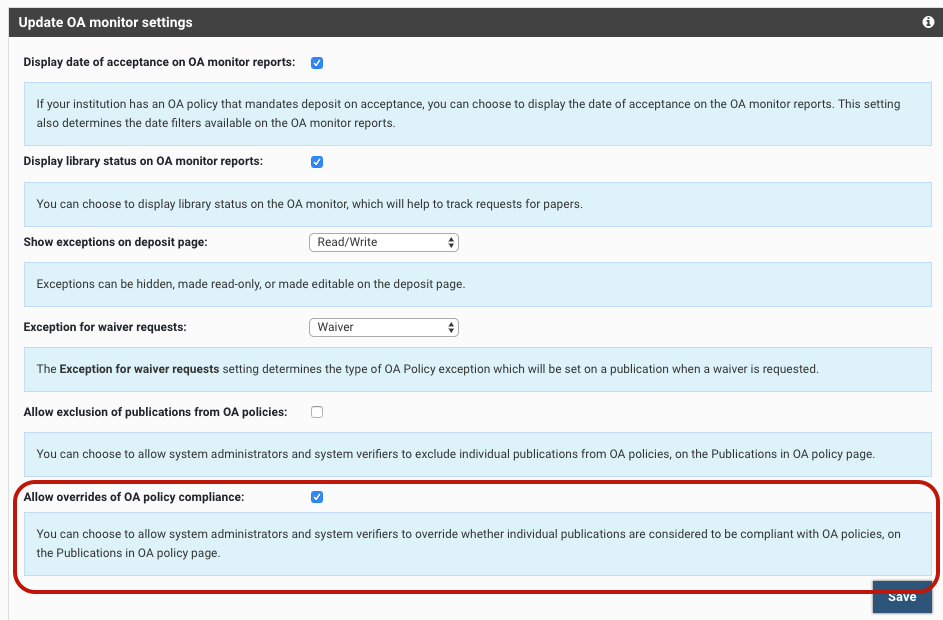
By default, this feature is enabled upon upgrade (to 5.16). To disable this functionality, go to Module admin > Open Access monitor settings, and disable 'Allow overrides of OA policy compliance'
A note about embargoes & EPrints
EPrints has an optional process (scheduled job) which deletes embargo end dates upon lifting them. If you are regularly running the lift_embargos scheduled job on the connected EPrints system, we that recommend you enable a feature we offer to use cached embargo dates in the OA Monitor after the embargo date has been deleted from the source. This allows OA Monitor to continue to use those embargo dates to calculate compliance even after the embargo has been lifted. To do this, enable the "Use cached values for the embargo date" feature for both RT1 and RT2 Eprints connections via the relevant repository connection settings page in Elements.