
Overview: Configuration
This article provides further detail of what may be involved in the Configuration activity described in How we run implementation projects.
Overview
After your Elements installation is complete you will be able to configure the system. The diagram below outlines the tasks that are required during this activity:
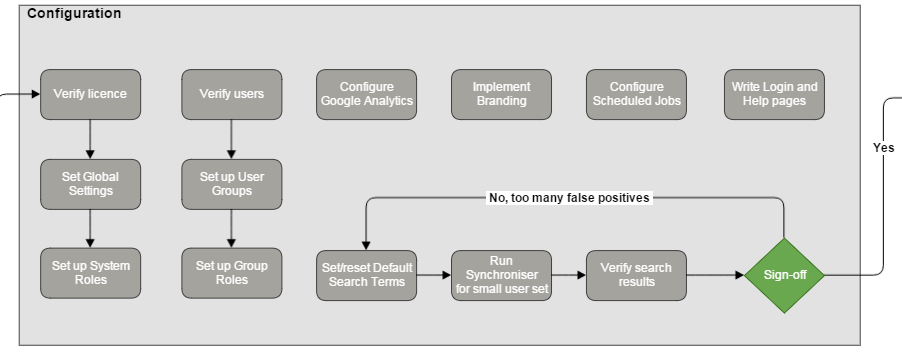
This diagram is part of the full implementation diagram.
Parameters
Driver | Client |
|---|---|
Symplectic Primary Contact | Client Support Manager in region |
Start of Project | Installation complete |
End of Project | Client sign-off of acceptance criteria |
Expected Length | 2-3 weeks, depending on scope and number of modules to implement |
Configuration
The configuration activity of the implementation project is when you first get your hands on the system. We will be there to help you but this activity is your responsibility.
The following two guides provide a structure narrative to assist you with the two most significant topic of this activity
Testing the Elements Synchroniser which discusses strategies for configuring your user's default search settings
A number of other relevant guides are available on this site:
Tip: If you want to experiment with configuration in our sandbox, please raise a support request on this site.
Tip: As Elements is highly configurable we recommend that you record the configuration settings for future reference.
Acceptance Criteria
As this is entirely your activity the acceptance criteria below are only suggestions:
# | Acceptance area | Acceptance critera |
|---|---|---|
1 | Users and Groups |
|
2 | Search Settings | FOR A SMALL SET OF USERS:
|