
Symplectic Elements v6.22 - Release Notes
Welcome to Symplectic Elements v6.22, our first release of 2025!
We’re excited to start the year with an inviting set of new features and enhancements, including:
The introduction of a new External Organisations category, improving the capture and management of organisation metadata for affiliations and funding.
Discovery module enhancements, including the ability to generate AI-driven publication summaries in public profiles.
Continuing expansions to the functionality available in the OA Monitor, with new compliance and reporting features to support Open Access management.
For those using the Discovery Module, we’ve made exciting improvements to public profiles to improve visibility of research, including the display of abstracts and the ability to auto-generate AI-powered publication summarisations. This optional tool provides clear, digestible summaries and key highlights.
In a major change to our data structure, we’ve introduced a new External Organisations data category to improve how Elements captures and disambiguates external affiliations and funder metadata. The system will now maintain an authoritative list of external organisations, pre-populated with GRID data and, where applicable, kept up to date via Dimensions synchronisation.
As part of our ongoing enhancements to the Open Access Monitor, we’re introducing expanded compliance criteria, new scope filtering options, and enhanced reporting capabilities which will help you monitor and manage Open Access policies with greater flexibility and control.
This release also includes enhanced data integrations, improved UI features, and a range of smaller refinements to improve usability across Elements.
As always, the new version of Elements and associated upgrade instructions can be found in the Elements upgrade forum.
External organisations
Elements 6.22 sees the introduction of a new External Organisations category and improvements to the harvesting of affiliation and funder data from various publications and grants data sources. These are the first in a set of enhancements aimed at helping you and your users get a clearer picture of your collaboration networks and other kinds of research partnerships.
New External Organisations category
A new 'External Organisations' data category will provide a model for capturing details of organisations outside your own institution. This new, admin-managed category will act as an authoritative list of external organisations, to be used in disambiguating organisation metadata such as co-author affiliations and funding organisations.
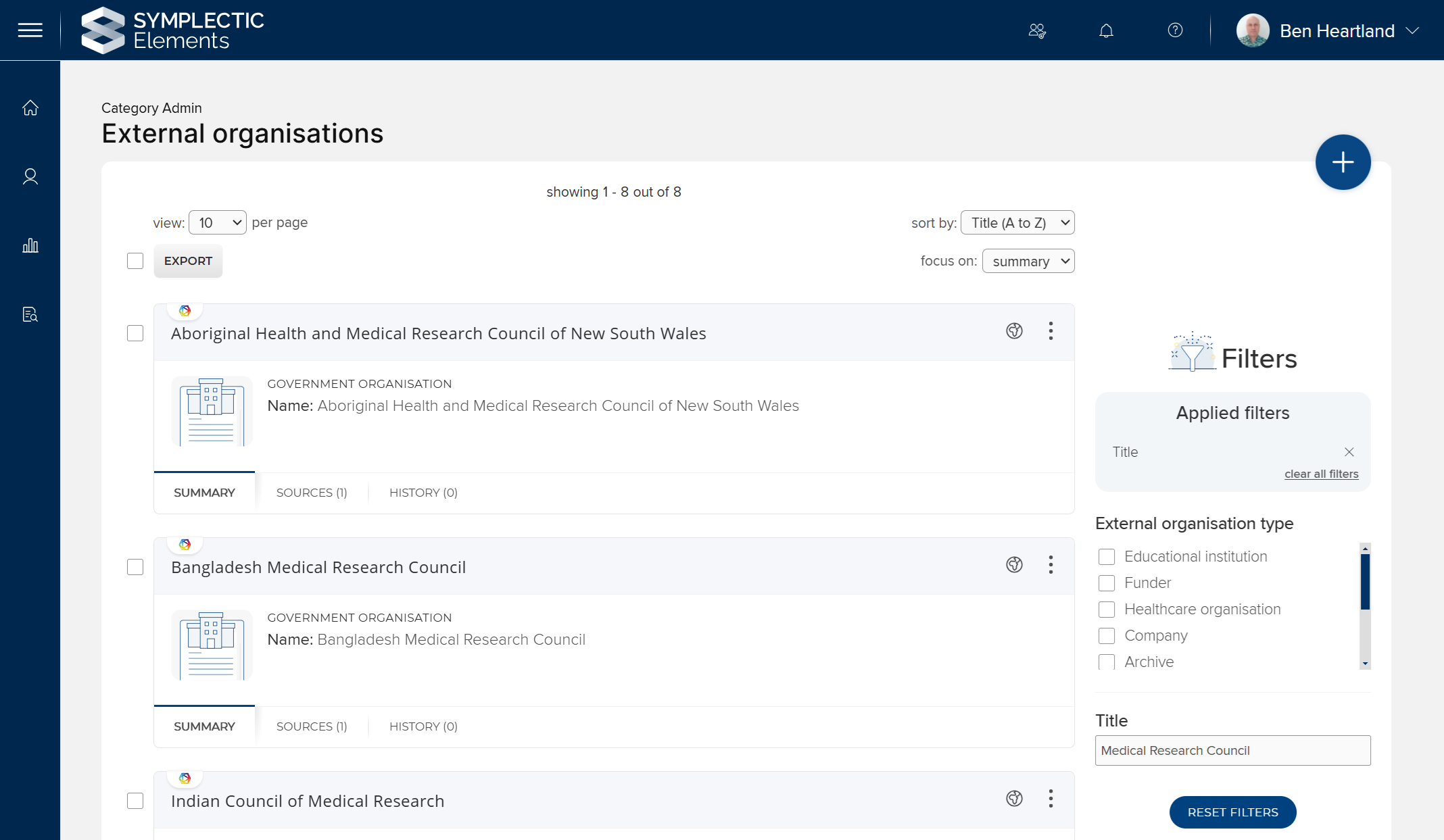
Image: The list page for the External Organisations category
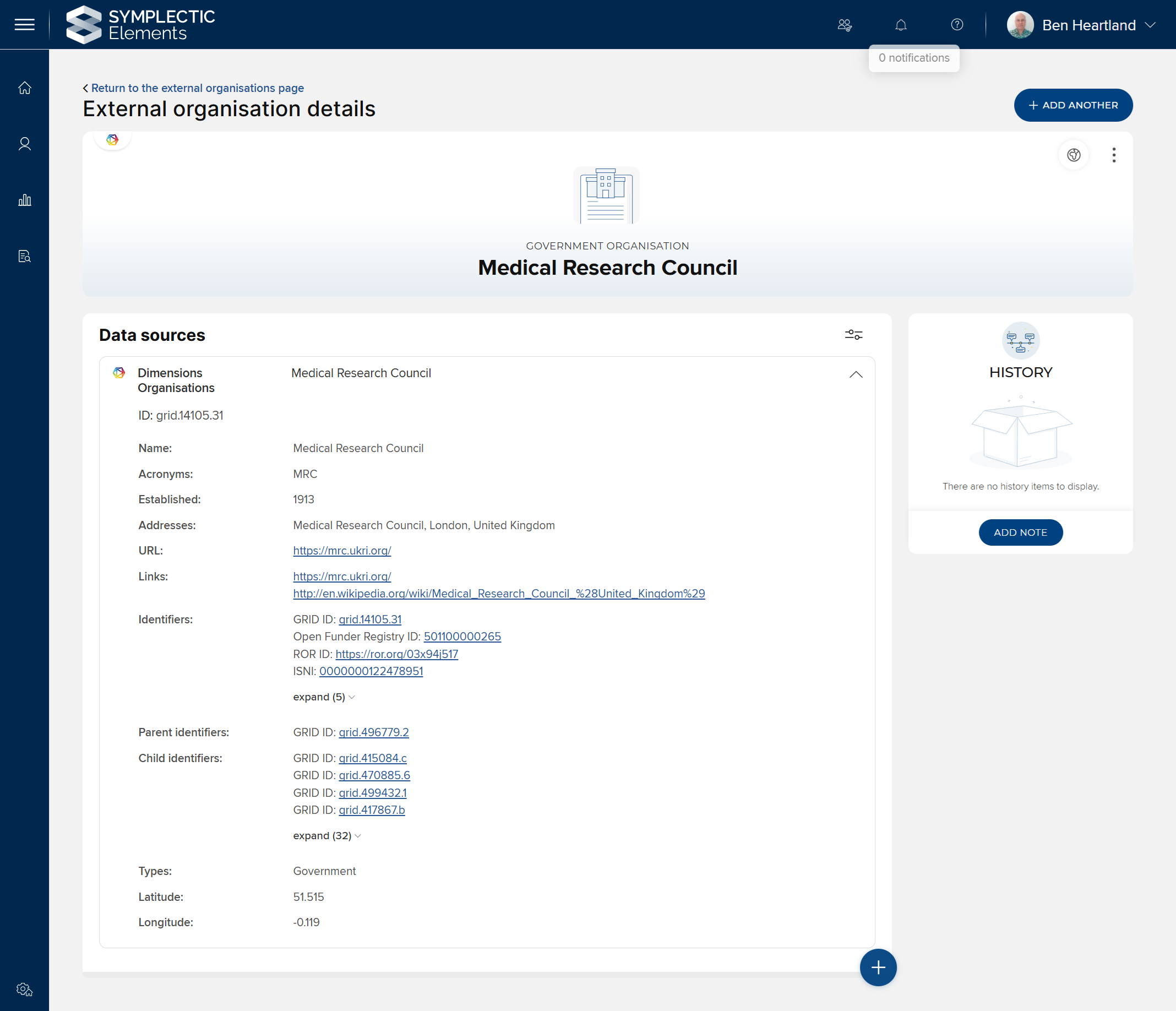
Image: The details page for a single External Organisation
For documentation about administration of the new category, please see the Elements support site.
Data sources for external organisations
For all clients, the new data category will be pre-populated with metadata from the last public release of the GRID database. Clients with a Dimensions-as-a-Data-Source licence will additionally benefit from ongoing synchronisation with Dimensions to keep this organisation metadata up-to-date.
Organisation identifiers
External organisations will use identifiers from the following schemes to aid with disambiguation:
Open Funder Registry (formerly FundRef)
Adding your own external organisation data
If your organisation maintains its own set of data about external organisations, this can be imported via the Elements API. If your data includes identifiers from any of the above schemes, your institutional records will be automatically matched with existing records in the system, thus avoiding duplication between your organisation's data and the data from GRID/Dimensions.
Additionally, administrators can add or edit external organisations’ metadata directly within the user interface by creating a manual record.
Improvements to publication and grants data sources
To make best use of this new data category, we have improved the harvest of affiliation and funding metadata from various data sources. This extra metadata will assist in relating a publication or grant to the appropriate external organisation(s).
Grants data sources:
Dimensions Grants: Elements now harvests the funder's GRID ID where available, providing a means of unambiguously associating each grant to its funder.
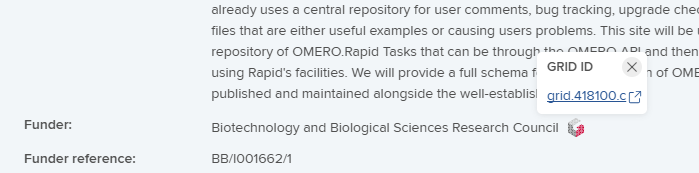
Image: A Dimensions grant record, including the funder's GRID ID in addition to the funder name
Publications data sources:
Dimensions: author affiliations and funding acknowledgements will now include GRID IDs.
CrossRef: we have added harvesting of funding acknowledgement metadata, including the funder's OFR ID where available.
Europe PubMed Central: we have added harvesting of author affiliation metadata.
Scopus: we have added harvesting of funding acknowledgement metadata.
figshare.com: we have improved harvesting of funding acknowledgement metadata.
Note: It will typically take at around 14 days from upgrade for this new metadata to be harvested from all data sources.
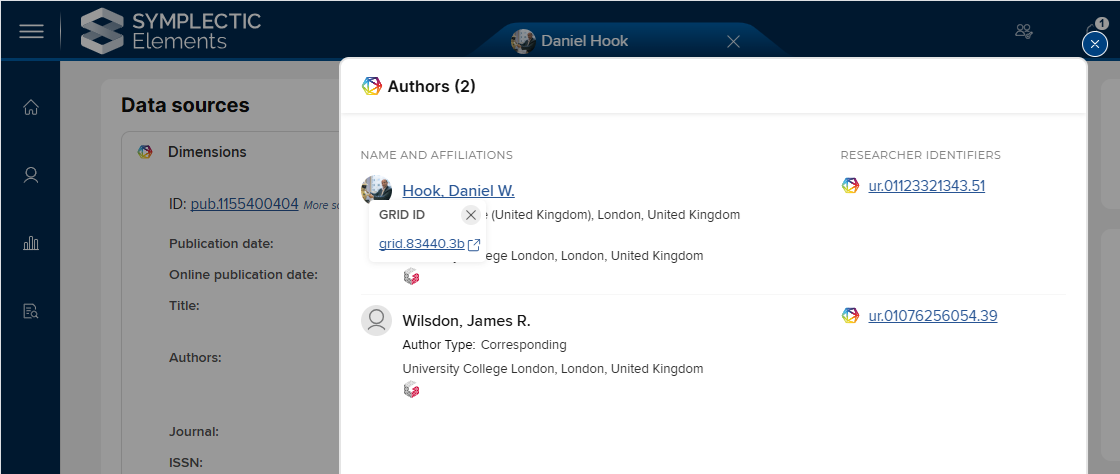
Image: A Dimensions publication record, showing organisation GRID IDs harvested for author affiliations
Using Dimensions to resolve organisation names to GRID IDs
Organisation identifiers are not available from all data sources. Without identifiers, confidently relating an affiliation to an organisation becomes difficult. For clients with a Dimensions-as-a-Data-source licence, text-only organisation metadata will be enriched by searching Dimensions for the organisation's GRID ID, providing a means of unambiguously associating an author affiliation with an organisation, regardless of which data source it came from. This enriched data will enable more complete and accurate reporting on co-authorship networks.
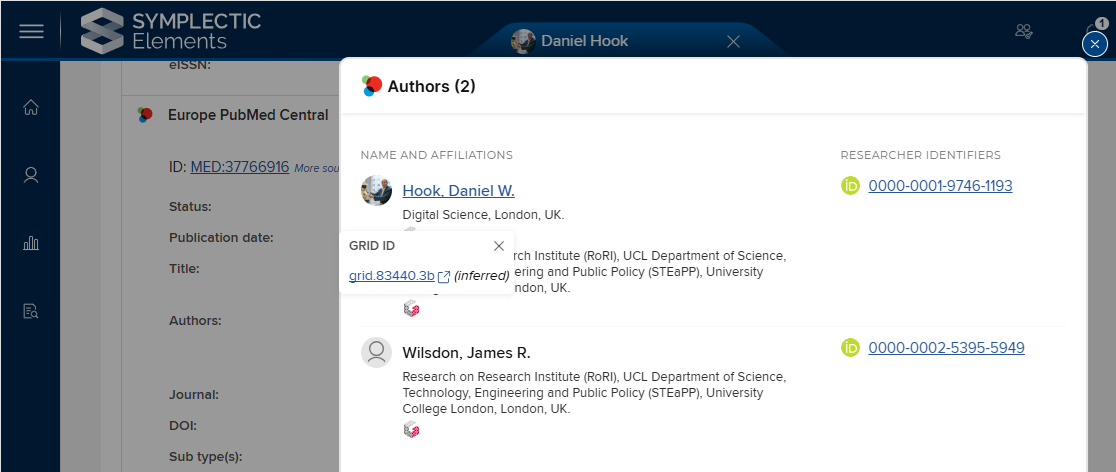
Image: An EPMC publication record, showing author affiliation GRID IDs that were inferred by searching Dimensions
Improved visibility of the Funding Acknowledgements field
To ensure that the newly enhanced funding acknowledgements data is visible to users, stock usages of the funding acknowledgements field have been added to the following item types:
Book
Chapter
Conference
Journal article
Other
Preprint
Report
Scholarly edition
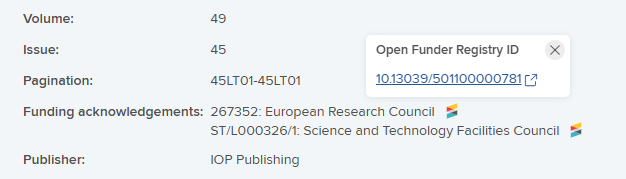
Image: Funding acknowledgements in a CrossRef publication record, including grant reference, funder name and OFR ID
If your system is already configured with custom usages of the funding acknowledgements field for any of these item types, your custom usages will not be altered, other than becoming non-deletable.
Reporting using the External Organisations category
To demonstrate the use of external organisations data in reporting, we've added two new stock dashboards:
Approved grants by disambiguated funder: count grants awarded by each funding organisation, disambiguated using organisation IDs harvested from Dimensions.
Publication funding acknowledgements: count references to funding organisations in publication funding acknowledgements, disambiguated using organisation IDs harvested from Dimensions and CrossRef.
Note: The words "grants" and "publication" will be replaced with your system's selected display names for those categories.
Note that these dashboards will be very sparsely populated immediately after upgrade. Over time, they will become more populated as funder identifiers are harvested from Dimensions and CrossRef.
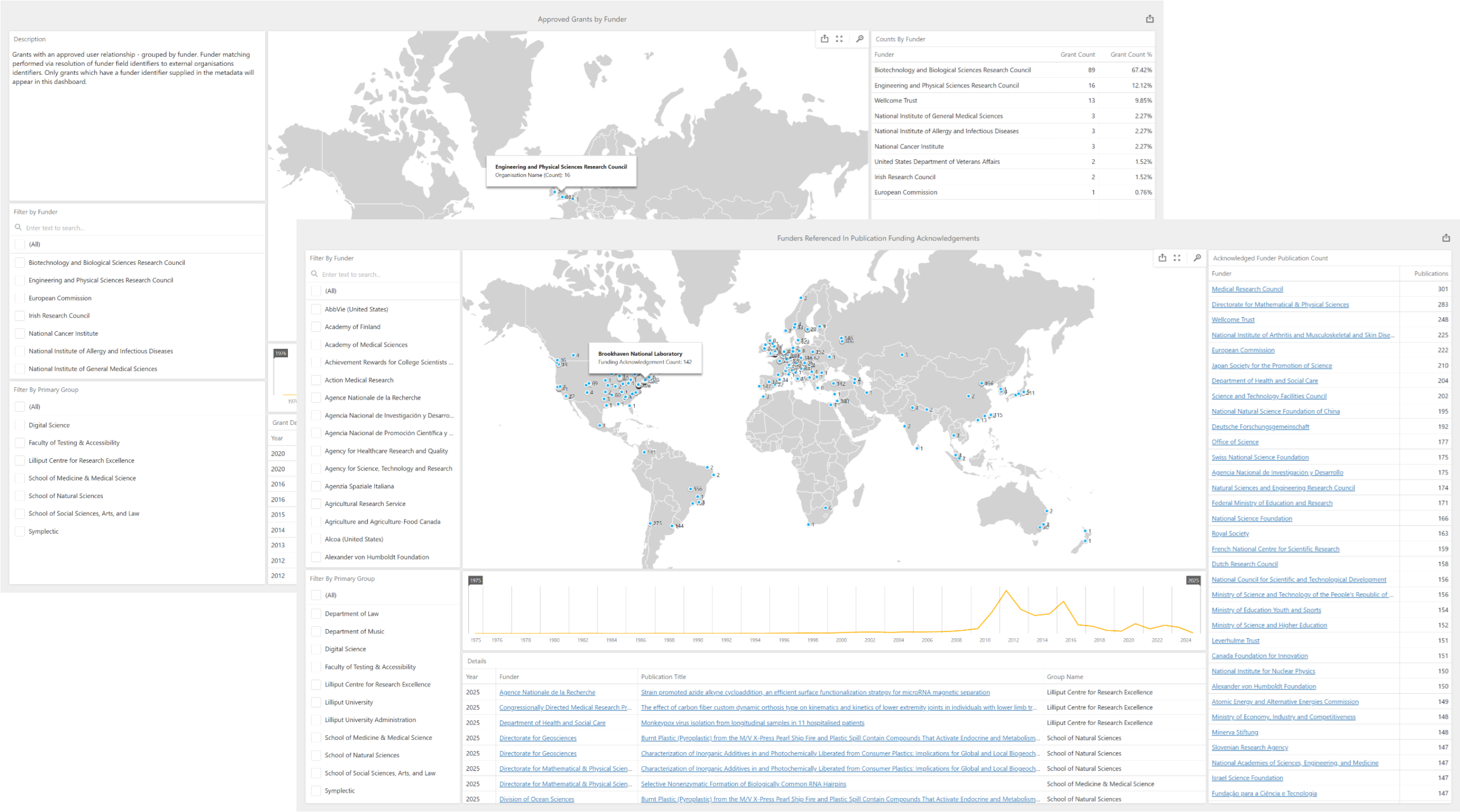
Image: Two new stock dashboards using disambiguated External Organisations data
We aim to expand the reporting possibilities of External Organisations in future releases.
Discovery Module enhancements
We are committed to improving the discoverability and impact of research and are excited to introduce two major enhancements to our Discovery profiles module that will make it easier than ever for visitors to assess research at a glance and for researchers to highlight their work.
These updates introduce:
Surfacing Abstracts in Discovery profiles: Abstracts will now be displayed directly within Discovery profiles, offering a richer view of publications without having to navigate away and look up additional information.
New AI-powered publication summarisation (opt-in): A new AI-driven feature will generate on-demand, easy-to-digest summaries, key highlights, and keywords to help visitors and non-specialists understand research at a glance.
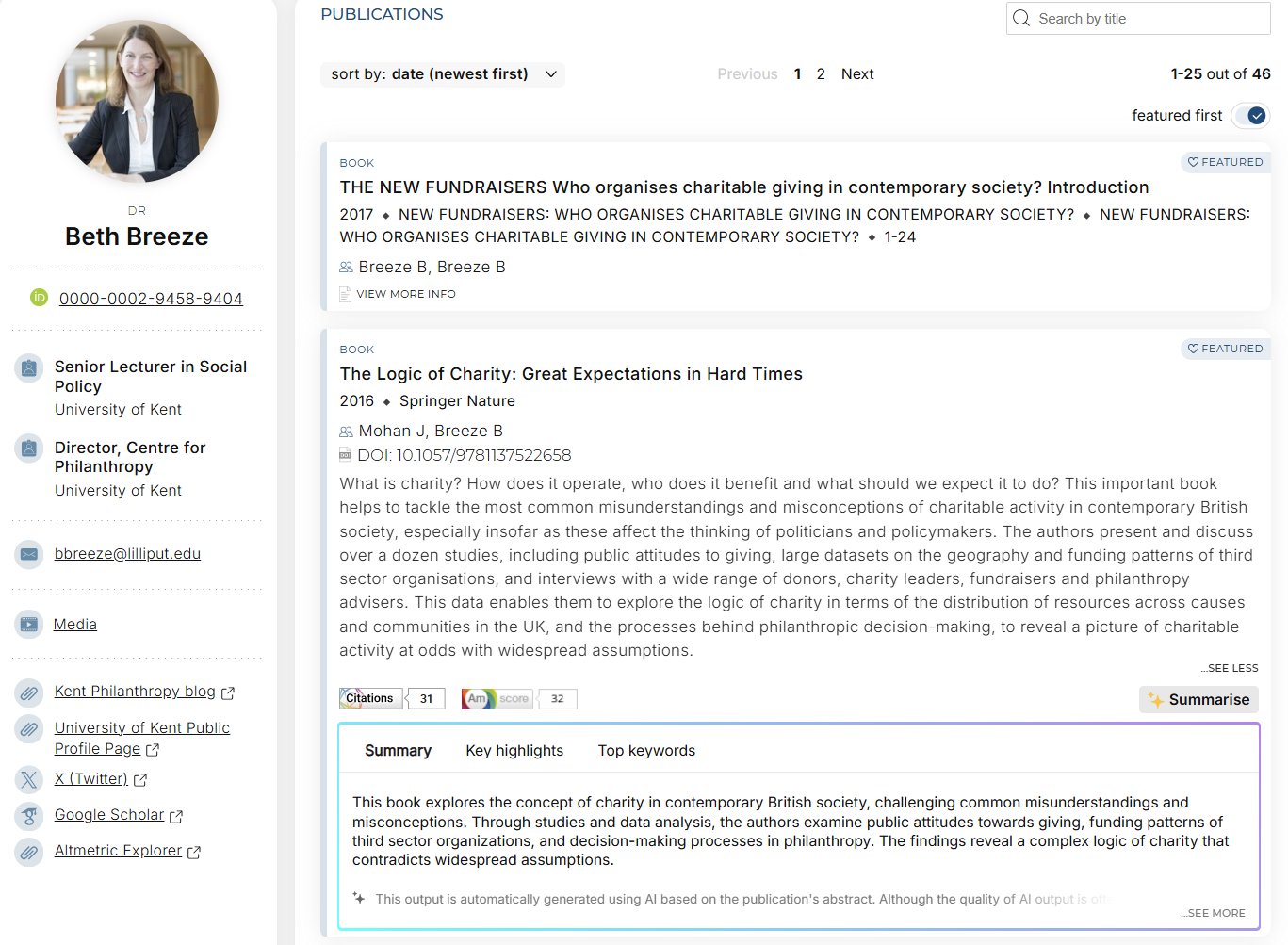
Image: A Discovery profile with the new abstract and summarisation features enabled
Surfacing Abstracts in Discovery Profiles
Overview
Visitors to researcher profiles — whether fellow researchers, potential collaborators, industry partners, or members of the public — often need a quick way to assess the relevance of a researcher’s work. With this enhancement, publication abstracts are now displayed directly within profiles, eliminating the need to navigate away to external sources.

Image: An abstract displayed on a public Discovery profile publication card
Abstracts will appear anywhere a publication card is displayed in the Discovery module, including the Publications tabs for individual researchers, groups, and equipment.
Requirements
Abstract data source: This feature relies on Dimensions as the data source. Only abstracts sourced from Dimensions will be displayed as part of this feature.
Supported publication types include journal articles, books, book chapters, and conference proceedings.
Institutional prerequisites: Institutions must have the Discovery module and an agreement that includes a licence for Dimensions-as-a-Data-Source.
Configuration
This feature is automatically enabled in v6.22 of Discovery. It does not require any additional configuration.
Note that there may be a delay in abstracts appearing in Discovery while the relevant synchronisation jobs run.
New AI-powered publication summarisation (opt-in)
Overview
Research can be complex, making it difficult for non-specialists, journalists, and the public to quickly grasp the significance of a publication. Our new AI-powered feature generates clear, digestible summaries, key highlights, and keywords for publications, helping to bridge this gap.
When enabled, this feature automatically provides:
Plain-language summaries to make research more accessible.
Key highlights to convey major findings at a glance.
Relevant keywords to enhance searchability and discovery.
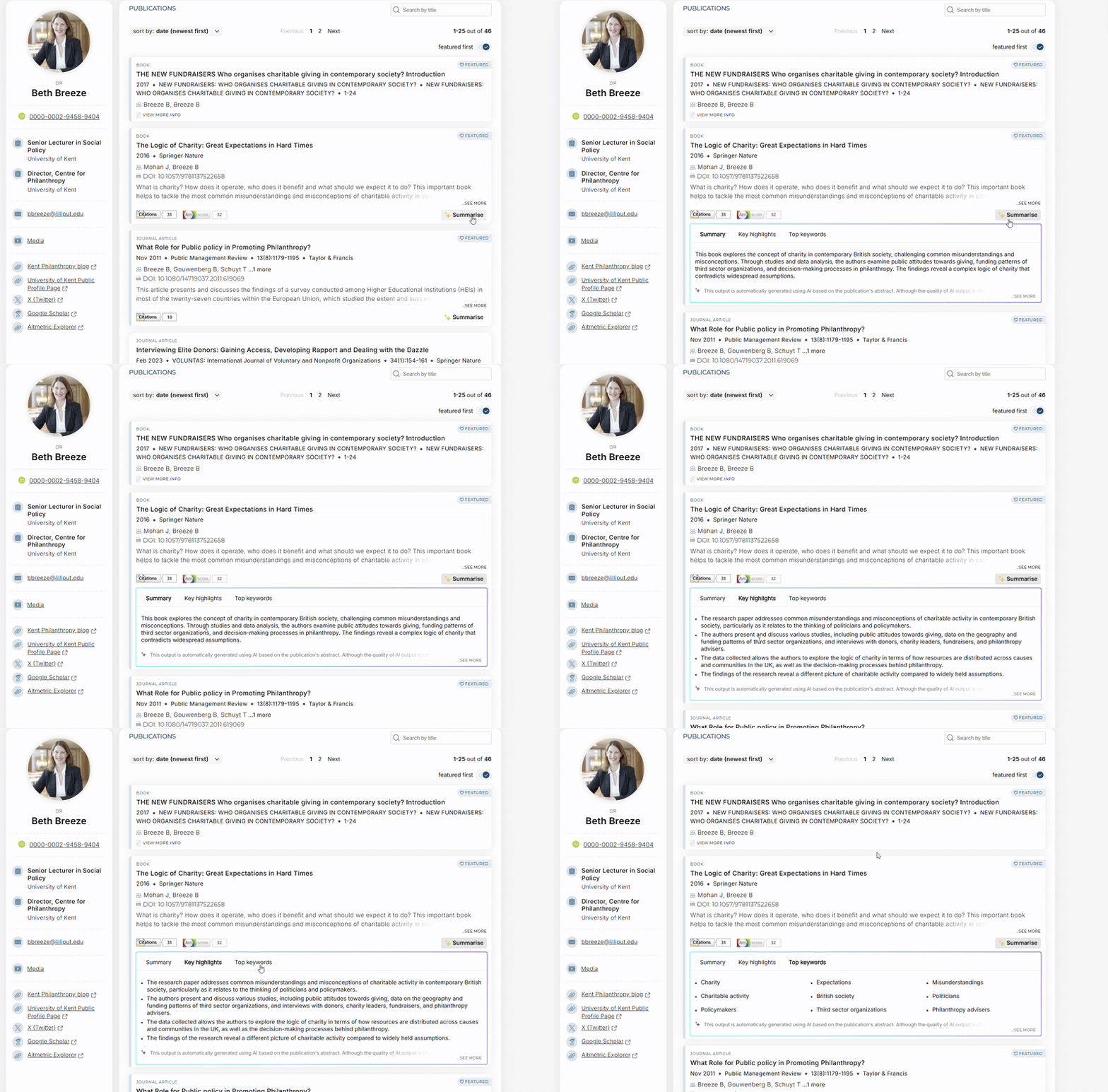
Image: Interaction with a publication summarisation on a Discovery profile
The option to generate a summary will appear anywhere a publication card is displayed in the Discovery module, including the Publications tabs for individual researchers, groups, and equipment.
Requirements
Institutional Opt-In: Institutions must actively enable this feature before the option to create AI-generated summaries will appear.
Individual Control: Individual users can opt out of having AI-generated summaries displayed on their personal profiles.
Note: if a publication appears on a group or equipment page, AI-generated summaries will be displayed as long as the institution has enabled the feature.
Abstract data source: This feature relies on having a valid abstract available, using Dimensions as the data source. Only publications with available abstracts sourced from Dimensions will have the summarisation option available.
Supported publication types include journal articles, books, book chapters, and conference proceedings.
Institutional prerequisites: Institutions must have the Discovery module and an agreement that includes an appropriate Dimensions API subscription.
Security & Compliance
We know that institutions have different policies and approaches where it comes to AI, and individuals have different opinions on its use, so we have been mindful of this when developing this new feature.
All data is processed securely, and no information is used to train third party models.
Institutions must opt in to enable AI-driven summarisation across Public Profiles.
Once enabled at an institutional level, individual users can opt out if they prefer not to have AI-generated summaries displayed on their personal profiles.
Configuration
Institutional opt-in
As an institutional administrator, to opt-in:
Go to the Discovery Configuration page > Profiles Tabs > Publications tab heading
Switch the ‘Enable AI summarisations’ toggle to the ‘enabled’ position
Push the settings updates to Discovery
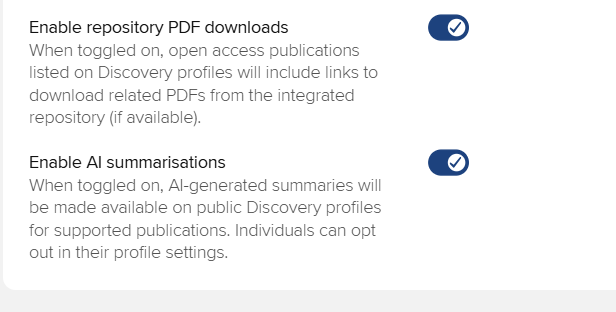
Image: Enabling AI summarisations at an institutional level
After enabling the display of AI summarisations, two things will occur:
Individual users will now see an option on their profile configurations, allowing them to opt out of displaying the summarisation feature on their Discovery profiles if they wish.
Once synced, the option to generate AI-powered summarisations will now display on any valid publications in the Discovery module (no additional configuration required).
Note that there may be a delay in AI summarisation functionality appearing in Discovery while the relevant synchronisation jobs run.
User level opt-out
Once the display of AI summarisations has been enabled at the institutional level, individual users will have the option to not display the summary feature on the publications in their profiles, as part of their individual Discovery profile settings.
As an individual user, to opt-out:
Go to your 'Account settings' page
Unselect the ‘Show AI summarisation button in public profile’ option
This option will be selected as ‘on’ by default for all individual users after an institution first enables AI summarisation at an institutional level
If a user opts-out and then their institution temporarily disables the summarisation feature, and then re-enables it, the individual preference will be maintained
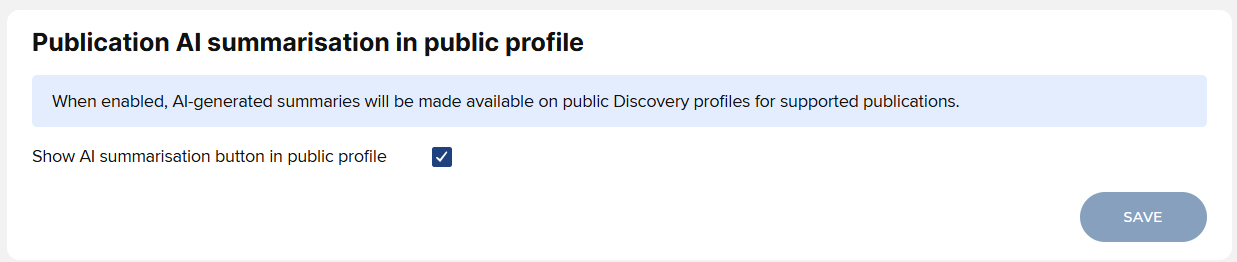
Image: Enabling AI summarisations at an individual level
Note that if a publication appears on a group or equipment page, AI-generated summaries will be displayed as long as the institution has enabled the feature.
To help with the awareness of the summarisation feature for individual users, and where to manage their personal settings, we have also introduced a card linking them to their account setting from the right sidebar of their ‘My profile’ page.
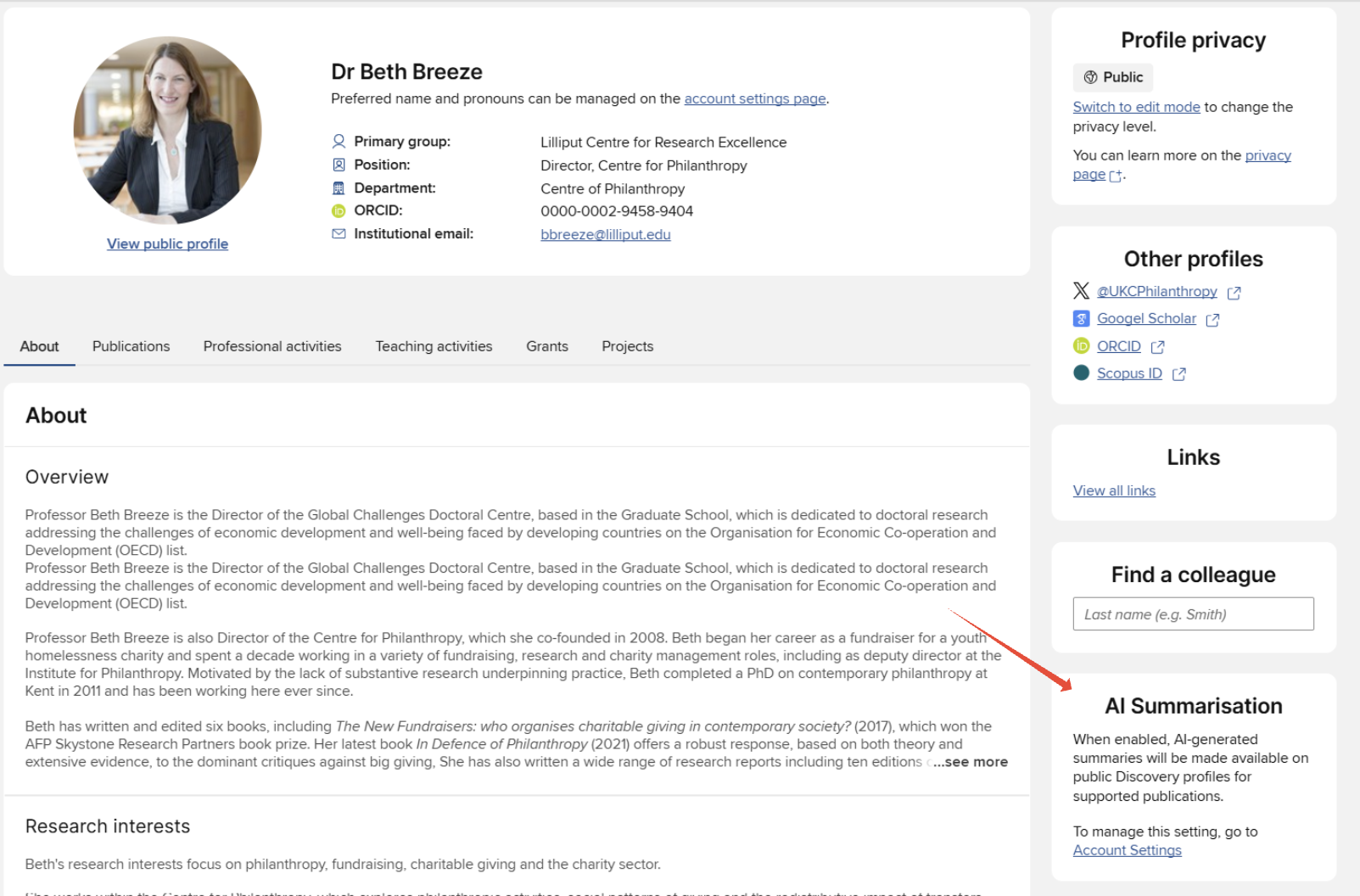
Image: New 'My profile' page tile linking to the individual summarisation opt-out option
For Visitors & External Users: Generating and Viewing Publication Summaries
AI summaries make it easier to grasp key takeaways from complex research.
Simply click the ‘✨Summarise’ button on publications in order to auto-generate AI summaries and keywords for the publication you are interested in.
After generation completes, three tabs will be available:
Summary: A plain-language interpretation of the abstract, designed to make research more accessible.
Key highlights: Key highlights to convey the major findings at a glance.
Top keywords: A list of relevant keywords that enhances searchability and discovery.
Open Access Monitor
Continuing to build on the new OA Monitor framework delivered in the latter half of 2024, this release includes a number of enhancements, providing even greater alignment with funder compliance and scope criteria, and offering an enriched user experience for Open Access managers.
Compliance criteria
In this release, we have expanded the configuration options for setting repository compliance criteria.
File reuse licence
A key open access compliance criterion for many funders is file reuse licence, encouraging research to be widely accessible, reusable, and legally protected for further use. In this release, we have added file reuse licence as a repository compliance criterion, enabling you to monitor compliance against this fundamental measure.
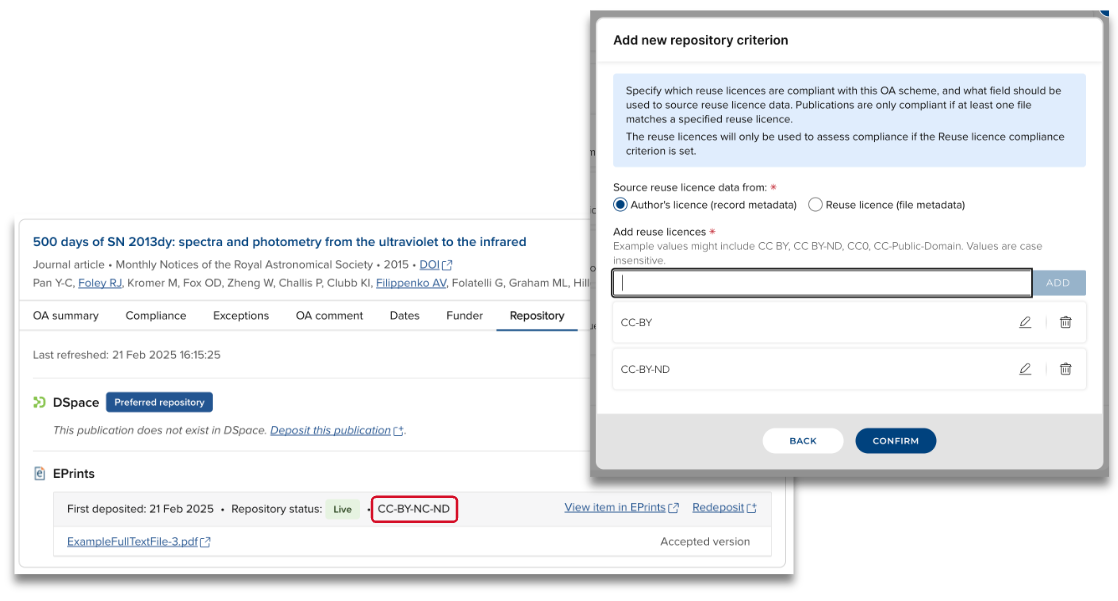
Image: Including file reuse licence as repository compliance criteria
Repository location
We have expanded the Repository location compliance criterion to enable you to set this per publication type, giving you greater flexibility in determining how to incorporate this criterion in your compliance monitoring. Repository location is also now a required setting when repository compliance is enabled.
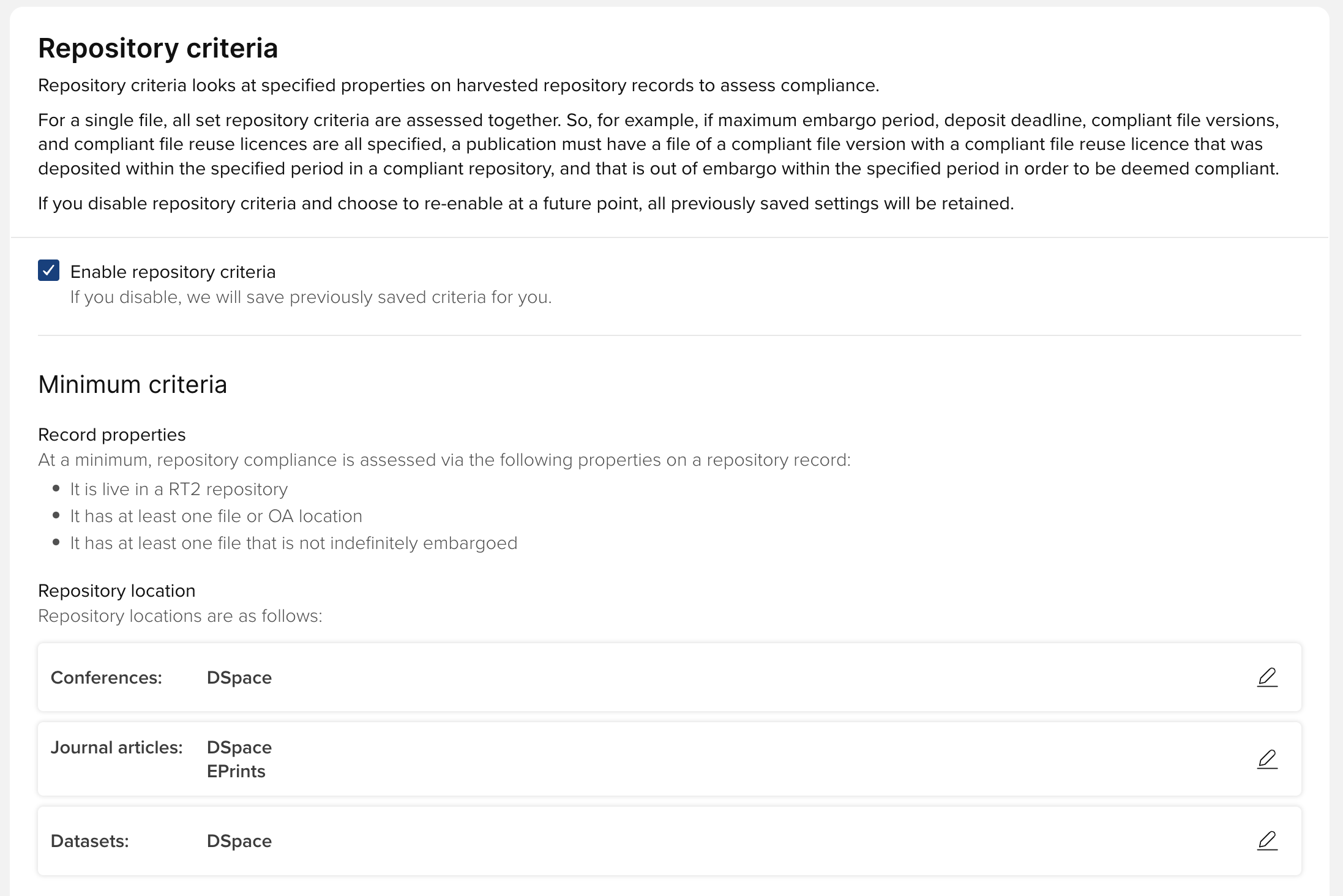
Image: Setting compliant repository locations in an OA scheme
When setting up a new scheme, the OA Monitor will default populate repository location as follows for each publication type set in the scope:
Default to enabled repositor(ies) for the publication type (most will only have one)
If no repositor(ies) are enabled for the publication type, select the top precedent disabled repository
For existing OA schemes where repository location was set as a compliance criterion, upon upgrade the selected repository location will be set as the compliant repository location for each publication type.
Further information on these new compliance criteria is available in the Create and configure an OA scheme support article. Details of how compliance is calculated using these new criteria can be found in the Compliance Logic and Overrides support article.
New scope criteria
In this release, we have expanded the user properties available for refining the scope of an OA scheme to include students and non-academic staff. The introduction of these new criteria will better enable you to ensure that your OA schemes target relevant users at your institution and your OA schemes only include applicable publications.
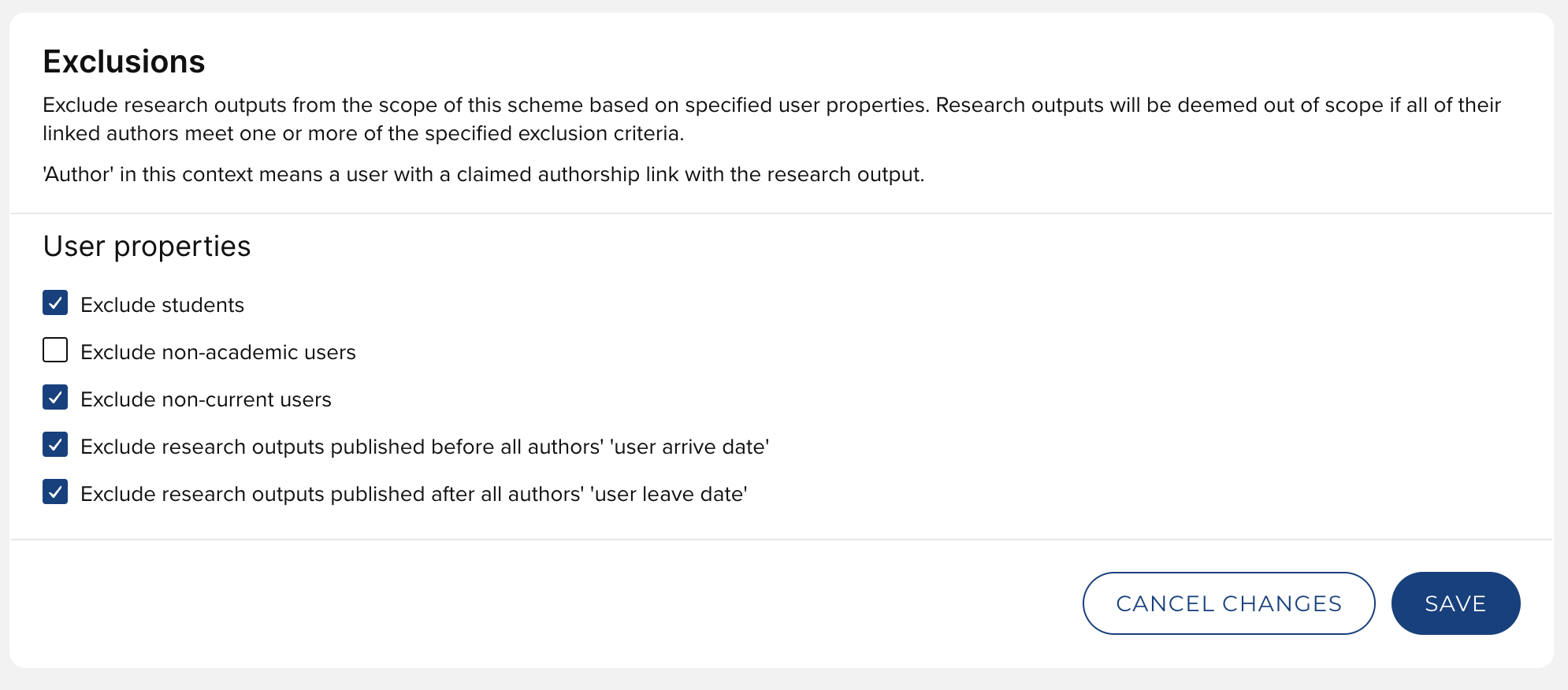
Image: Expanded user properties available for refining scope
Upon upgrade, for existing OA schemes, these settings are migrated such that non-academic users are excluded and student users are included by default (reflecting existing behaviour).
Open Access reporting
In this release, we have delivered major improvements to OA Monitor reporting. We have significantly expanded the OA Monitor content available in the reporting database and we have improved data synchronisation.
Additionally, this release includes a number of new Open Access stock data extract reports available via the Reporting Hub:
OA Monitor: OA scheme configuration
OA Monitor: Publications in OA scheme
OA Monitor: Publications in OA scheme: Repository items
OA Monitor: Non-compliance and Indeterminate reasons
OA Monitor: Exceptions
OA Monitor: Exclusions
Three new reporting parameters are also available in the Reporting Hub when reporting on OA Monitor content:
OA scheme
Acceptance date
Publication date
These improvements to the availability of OA Monitor content in the reporting database, and the addition of these new OA Monitor stock reports, has enabled us to remove the old ‘OA reports’ page, providing a more consistent reporting experience for you and your users.
New OA Monitor Administrator role
We have added a new ‘OA Monitor Administrator’ system role in this release. This role gives the user rights to:
Perform all functions in OA Monitor,
Edit all publications (including deposits [if RT2 licenced], verification) without impersonation, and
Report on all OA Monitor content.
The addition of this new role gives relevant colleagues (e.g. central Librarian or other central research support staff) sufficient permissions to manage and monitor the institution’s Open Access behaviour and compliance, without needing the more powerful System Administrator role.
Note that if both Repository Tools and Open Access Monitor are licenced, for a specific admin user to perform all repository, deposit, and OA configuration and management functions, they should be assigned both the Repository Tools Administrator and OA Monitor Administrator roles.
Manage publications in OA scheme page improvements
In this release, we have made a number of improvements to the ‘Manage Publications in OA scheme’ page, enriching the user experience for you and your colleagues.
New ‘Repository’ tab
We have added a new ‘Repository’ tab to the Publication stub, giving OA Monitor users direct visibility of deposited files, repository status, version, and repository location; along with the function to deposit, re-deposit, and view the item directly in the repository.
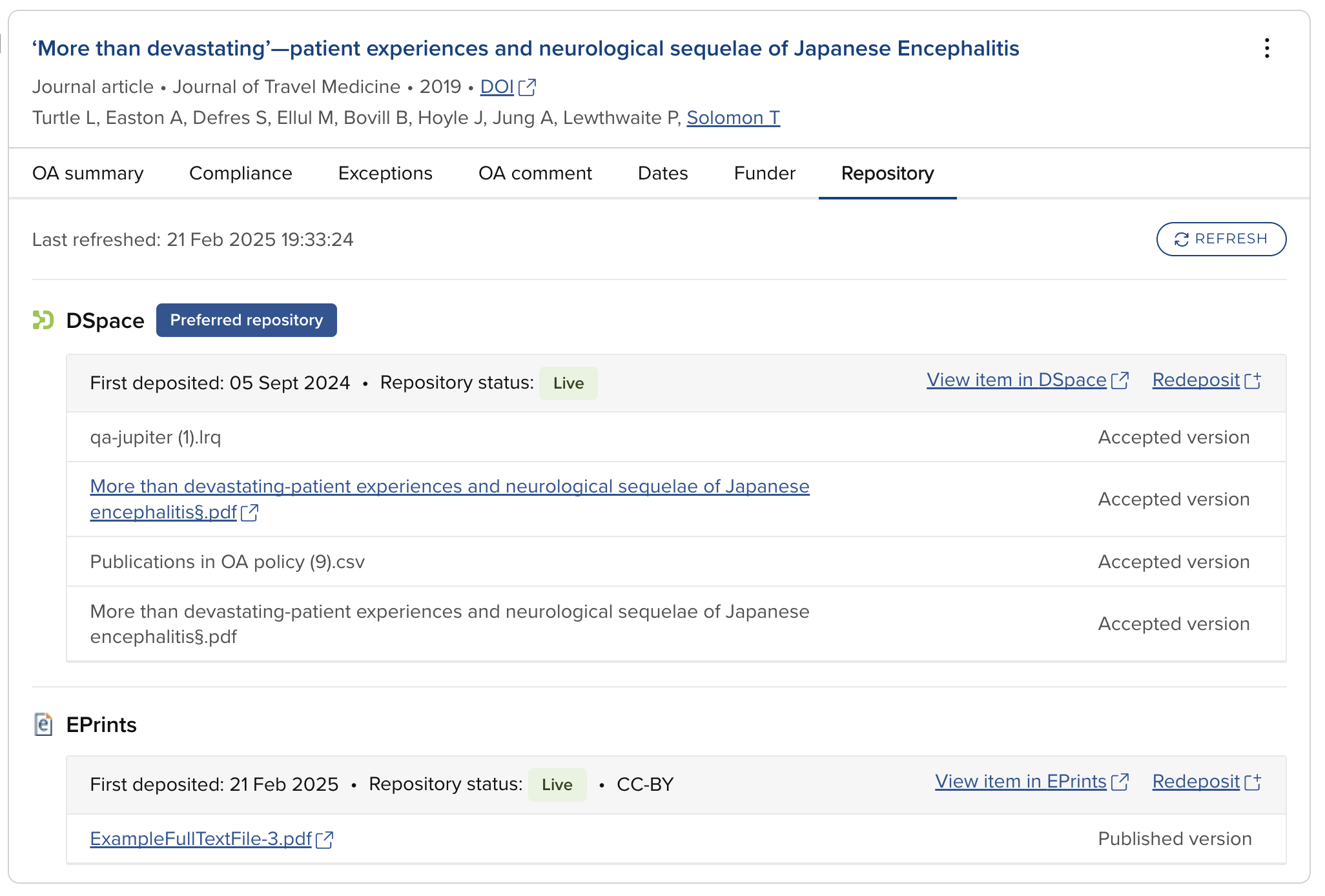
Image: New Repository tab in the Manage Publications in OA scheme page
Improvements to ‘Dates’ tab
The calculations used in the OA Monitor can be complex and difficult to interpret. To aid users in assessing scope and compliance calculations, we have added information to the ‘Dates’ tab to identify which dates are used in which calculations, and indicators when certain actions have exceeded the set maxima (i.e. deposit deadline, embargo deadline).
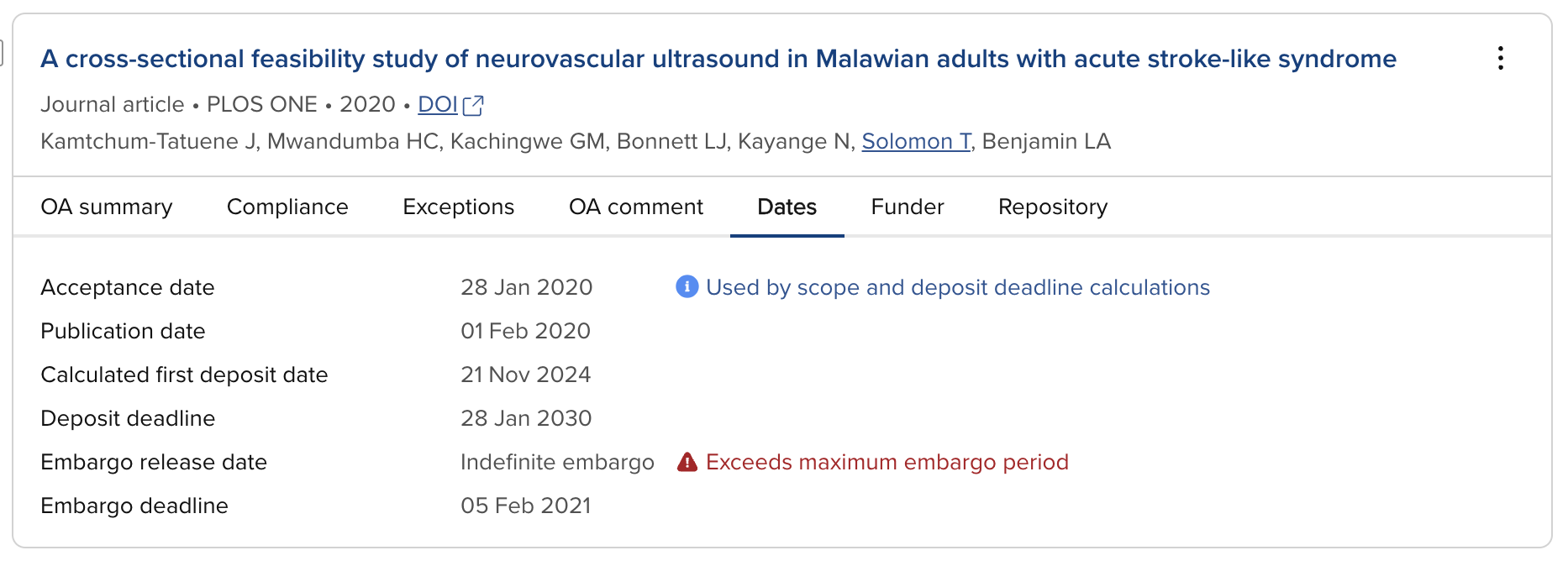
Image: Improvements to the Dates tab
Bulk actions
In this release, we have added the facility to add and remove exceptions in bulk, saving OA managers valuable time in applying exceptions.
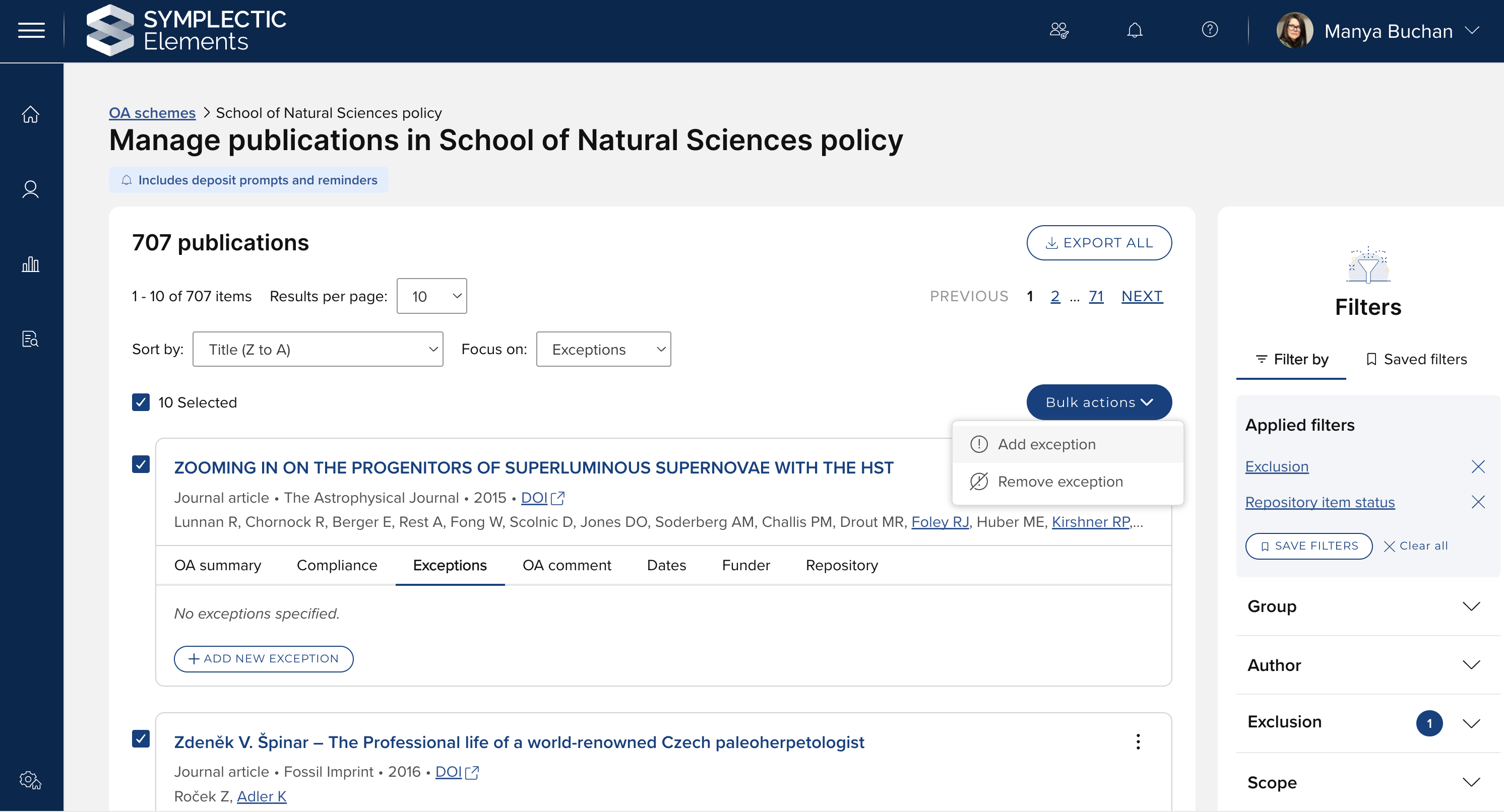
Image: Modifying exceptions in bulk
Filters
We have made a number of improvements to the filter functions in this release.
We have introduced the facility to save filter sets, making it easier for you to return to drilled-down lists of publications that need further attention.
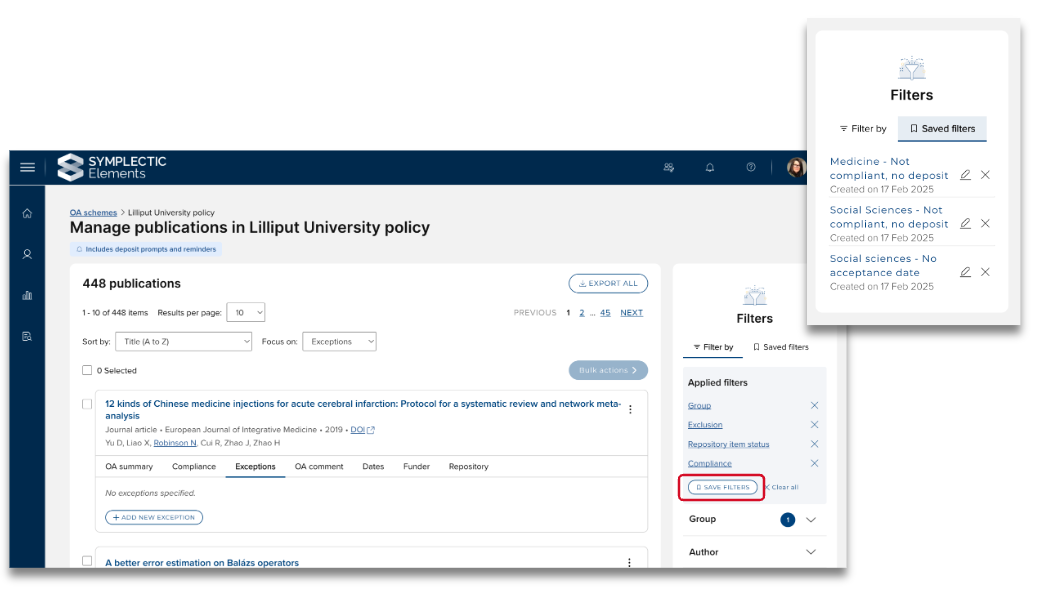
Image: Saving filters on the Manage publications in OA scheme page
To save a filter set, once you have applied all of the desired filters, simply select the ‘Save filters’ function in the ‘Applied filters’ box and give the filter set a name. It will then be available for your future use in the ‘Saved filters’ tab. When saved, these filter sets will be available for you to apply across all OA schemes. Saved filters are personal - they are not available globally.
We have also made improvements to filtering by compliance status and non-compliance reasons, and by calculated first deposit date and deposit due date, separating these all out into separate filters.
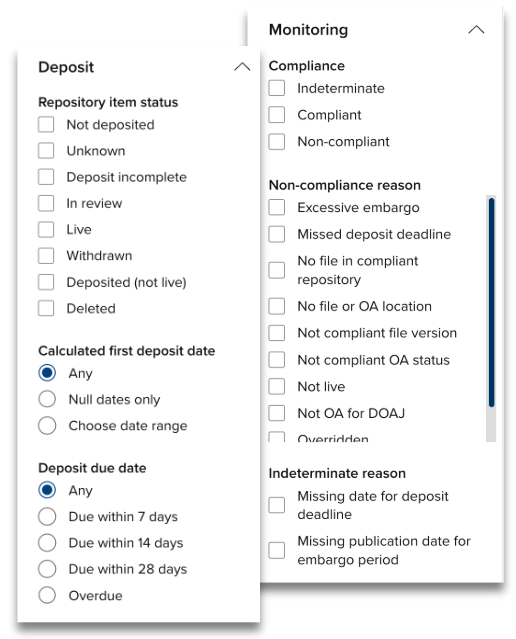
Image: Filter improvements on the Manage publications in OA scheme page
Additionally, we have resolved an issue where the ‘First Deposit Date’ filter was not returning accurate results.
Other improvements
Exceptions
In v6.20, we introduced a change to Exceptions behaviour such that Exceptions are applied against a publication, rather than per OA scheme. This was aimed at reducing the admin burden by managing non-compliance reasons across all schemes where the publication is in scope.
In this release, we have made improvements to this behaviour to ensure that only those Exceptions that are enabled in an OA scheme are visible when managing that scheme. This means that a publication that has an Exception applied that is not enabled in the OA scheme in question will not have that Exception listed in that OA scheme.
We have also expanded the list of exceptions available to apply on a publication when a waiver is enabled to include all enabled exceptions, not just ‘Other’ and ‘Waiver’. This is set in the global OA Monitor settings.
Homepage actions
We have updated the behaviour of relevant homepage actions to ensure that only those users included in the scope of an OA scheme are prompted to action (e.g. if non-academic users are excluded from the scope of the relevant OA scheme that includes deposit prompts, they will not be prompted to deposit their publications).
We have updated the logic behind the ‘Deposit accepted publications’ and ‘Supply missing acceptance dates’ homepage actions to ensure that these actions will only be displayed if the user is within the scope of an OA scheme that includes deposit prompts that has ‘acceptance date’ selected as the primary source date.
Disable User Engagement pages and OA dashboard
In this release, we have introduced the global facility to disable the User Engagement pages and OA dashboard, for those clients who do not wish to employ these pages. By default, these pages are enabled. To disable, go to Open Access > OA Management > OA Monitor settings > Additional settings.
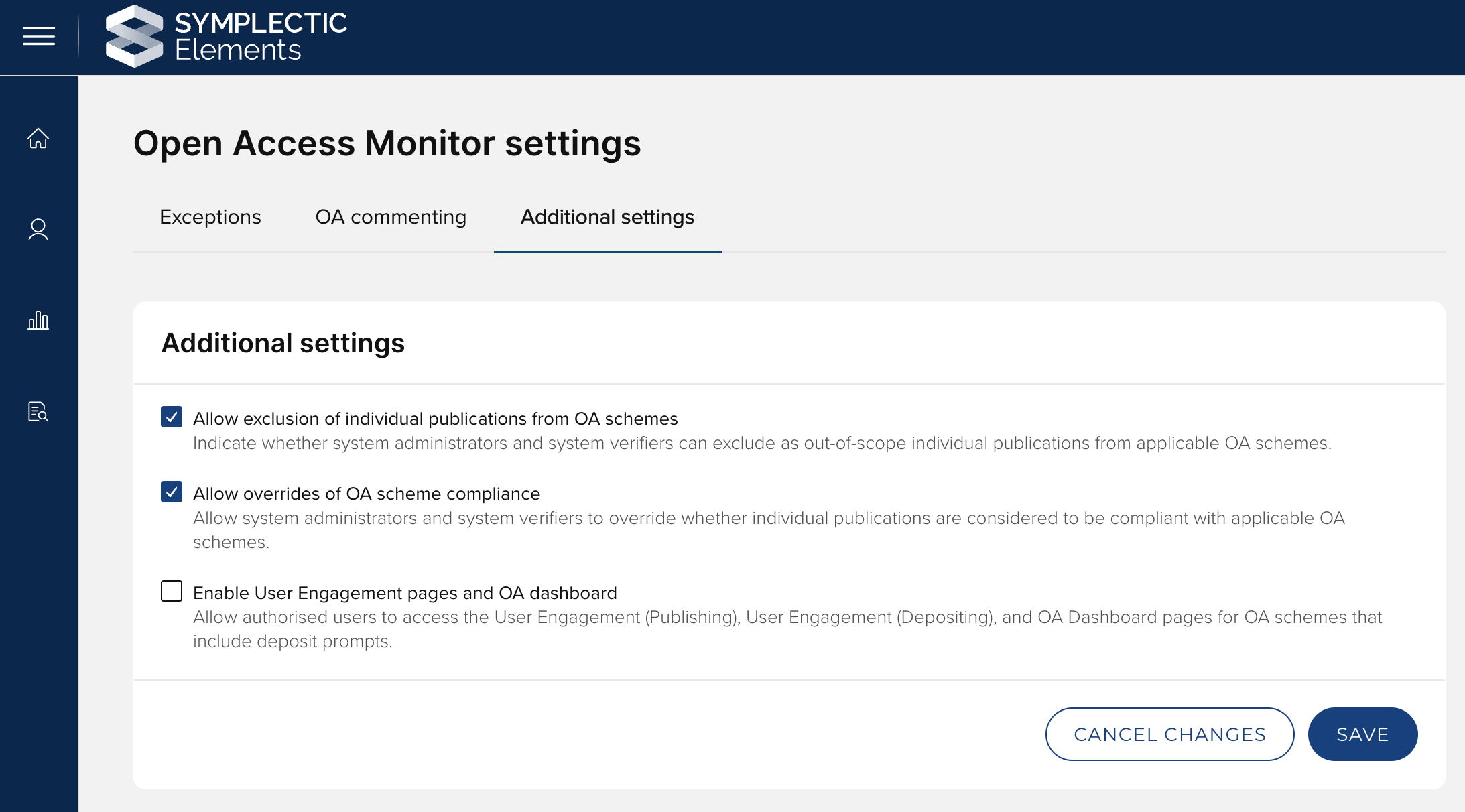
Image: Disable User Engagement pages and OA dashboard in the OA Monitor settings
Re-assessment of compliance calculations
This release includes a re-assessment of how compliance is calculated by the OA Monitor, improving support for the expansion of compliance pathways introduced in recent releases. Overall compliance status outcomes remain consistent with previous releases, but some non-compliance reason statements have been revised for clarity. Therefore, upon upgrade, you may see minor changes in non-compliance reasons stated. Further detail is available in the Compliance logic and overrides support article.
Accessibility improvements
As part of our continual incremental work to improve the accessibility of Elements, enhancing the navigability of the system for users with disabilities, this release includes a number of changes, including several improvements for screenreader users:
Clearly flag the "required" status of mandatory date input fields
When opening an “options” menu, move focus to the first menu item
Clearer naming for the user account options menu
Other improvements and fixes
Refresh the Directory of Open Access Journals (DOAJ)data.
Note that DOAJ data will only be fully incorporated in an upgraded environment once the new values have been harvested via the synchroniser and a full re-index has been performed following the harvest.
Update the Professional Activities 'Service type' field to replace outdated terminology.
Improve the ordering of search results for user suggestions when there are many suggestions and/or the searched-for user has a short name.
In the Assessment module:
resolve an issue on the Manage Exercises page to ensure that the ‘Reviewers started’ and ‘Reviewers marked as complete’ filters return accurate results.
resolve a performance issue that could occur when an assessment exercise contains many PDFs.
On the Data source management page, resolve an issue where saved changes to the data source precedence appeared to revert when navigating across tabs.
For clients with an EPrints RT2 integration, harvest release dates for expired embargoes from the date_embargo_retained field added in EPrints 3.4.3.
Clients using the EPrints RT2 integration are advised to keep the "Use cached embargo dates" setting enabled. This will ensure that Elements continues to use cached embargo dates for repository items for which the embargo expired before EPrints was upgraded to 3.4.3 or above.
For clients who utilise Awards Management (Research Funding Solution), some minor improvements have been delivered in this release. Further details are available here.
End of support
As always, we recommend you regularly review our End of Support Announcements for information about upcoming end of support in Elements for various technologies. We would like to draw your attention to the upcoming end-of-support dates for versions of Elements. Upcoming dates include:
Elements version | Release date | End of support date |
6.21 | 28 November 2024 | 28 November 2026 |
6.20 | 19 September 2024 | 19 September 2026 |
6.19 | 27 June 2024 | 27 June 2026 |
6.18 | 25 April 2024 | 25 April 2026 |
6.17 | 29 February 2024 | 28 February 2026 |
6.16 | 7 December 2023 | 7 December 2025 |
6.15 | 12 October 2023 | 12 October 2025 |
6.14 | 6 July 2023 | 6 July 2025 |
If you need assistance planning to upgrade, please contact our team via the Support Site.
We’re here to help!
We hope you enjoy getting to know the latest version of Elements. Should you have any questions, we’re here to help! Just contact us at support@symplectic.co.uk for assistance.
Best wishes,
The Symplectic Team