
Symplectic Elements - v7.2 Release Notes
Welcome to Symplectic Elements v7.2!
Symplectic Elements was created with the overarching mission of minimizing administrative burden and relieving some of the repetitive, time-consuming nature of manual tasks. Our current initiative to enhance data capture and data entry in Symplectic Elements through responsible use of AI aims to harness new technologies to continue to make the lives of researchers, research officers, and librarians easier.
As a major step forward in this initiative, version 7.2 introduces AI assisted data entry for all Symplectic-hosted institutions. This new capability allows users to create items quickly by copying plain text directly into Symplectic Elements. AI then works quickly to extract structured metadata, which can be reviewed and saved in seconds, significantly reducing the effort required for traditional manual entry. This feature is available for four categories of data: Publications, Grants, Professional activities, and Teaching activities.
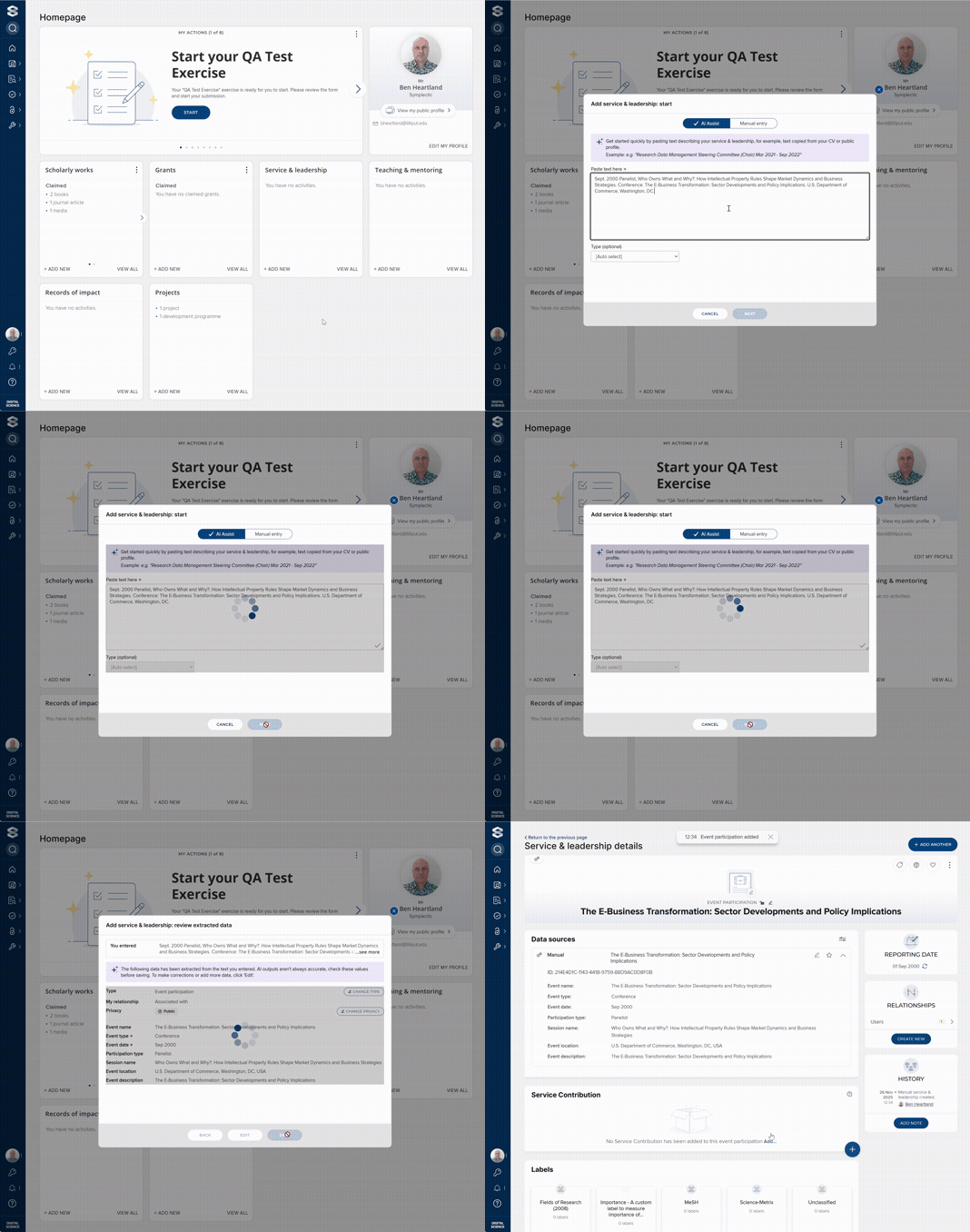
Image: Adding a new professional activity with AI Assisted Data Entry
Symplectic Elements 7.2 also delivers the final foundational features of the Item Evaluation module. The module now supports a complete review workflow, from nomination and reviewer assignment through to review completion and outcome recording. Whether your reviews happen once a year or continuously, the Item Evaluation Module can help you match each output with the right reviewers, spread activity to avoid last-minute rushes, and maintain full visibility over every stage.
Additionally, we've included several enhancements to the Awards Management module to improve the Administrator experience and surface additional data for users, as well as the introduction of automatic email notifications for reviewers in Assessment to alert them of outstanding reviews.
This release also contains additional smaller features and enhancements.
As always, the new version of Symplectic Elements and associated upgrade instructions can be found in the upgrade forum.
AI assisted data entry
AI assisted data entry is an exciting new feature that allows users to create a new item quickly and easily by copying plain text directly into Elements. AI is used to extract structured metadata which can be reviewed and saved in seconds, saving users the time and effort associated with traditional, manual data entry. For example, a user could copy-paste:
text describing an item or activity from their CV, resume or a public profile
publication details and abstract from a preprint or accepted manuscript
publication details from an open access source on the web
Details of a grant from their award letter
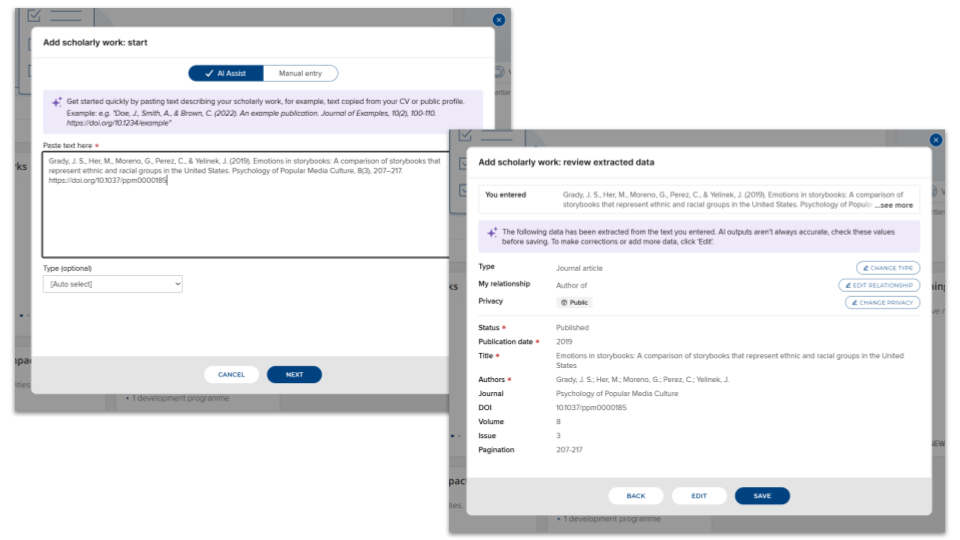
Image: AI Assisted Data Entry extracting structured metadata from plain text
This feature is available for four categories of data:
Publications
Grants
Professional activities
Teaching activities
Please note: This functionality is available to Digital Science-hosted Elements customers only. Usage quotas will apply. Additional fees may apply to increase usage limits.
Duplicate detection
To help prevent the accidental creation of duplicate items, Elements will alert the user if it detects repeated input - if the user inputs text that they already used to create an item previously, the system will offer them the existing item.
Additionally, for publications, if the text input includes a DOI, Elements will use this to check for matching items within the system and in CrossRef.
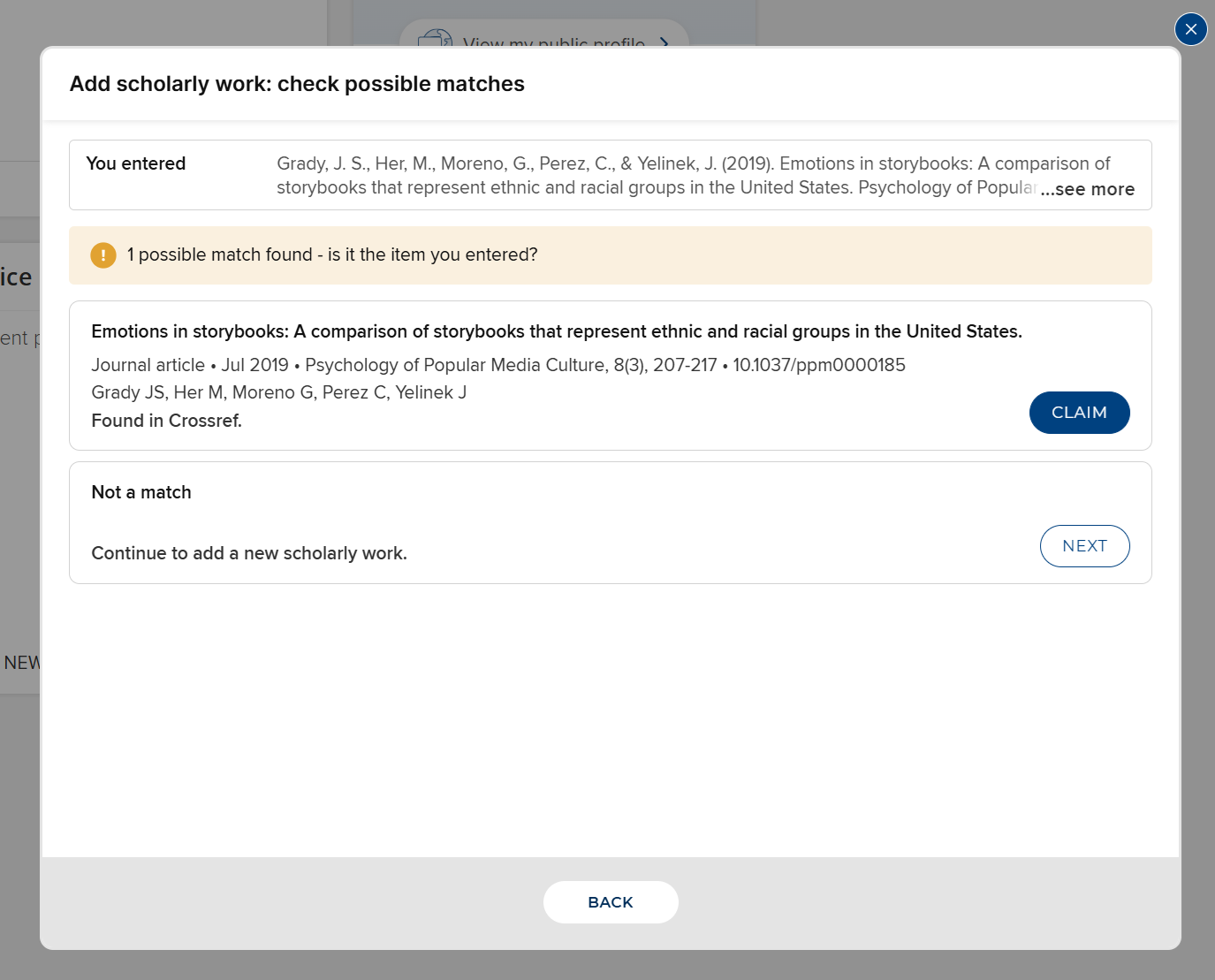
Image: Duplicate detection finding the CrossRef record for a publication
In upcoming versions, we'll be adding more sophisticated duplicate detection, covering a wider range of scenarios.
AI usage and quotas
Due to the significant computing power required for AI processing, usage of the new AI Assisted Data Entry and future AI features will be governed by a quota system which tracks usage of the features against a pot of AI credits.
Quota management: Usage of AI features will be tracked automatically by Elements, with all usage tracked against your organisation’s quota of AI credits (per instance). You will be able to purchase additional AI credit top-ups for your organisation, similar to how support hours are purchased today.
Control through configuration: To ensure you maintain control over your AI usage and quotas, each AI feature includes configuration settings to easily enable or disable its functionality at any point. For example, for the AI assisted data entry feature, there is a global on/off configuration setting, as well as the ability for you to choose which data categories you wish to enable the feature for.
Initial allowance: To celebrate the launch of our new AI functionality, we are giving all organisations an initial one-off batch of AI credits per Elements instance to allow you to explore this new functionality within your own Elements instances. Your AI credit quota allowance will be automatically applied to your Elements system when you upgrade to an eligible version and enable the functionality for the first time. As a rough guide, this initial allowance is estimated to be sufficient to add 30,000 to 60,000 items using the AI Assisted Data Entry (depending on input length).
Future monitoring: For this initial release, we are already tracking quota use behind the scenes so we can support our early adopters who are keen to start trying this functionality out in monitoring usage. In upcoming versions, we plan to surface the usage monitoring of this functionality in the Elements Administrative UI to allow Elements administrators to independently track AI feature usage and remaining quota, helping you to budget effectively and plan for future usage.
Support site
For more information about using this new feature, see the AI Assisted Data Entry support article. Guidance on how to enable the feature is available in the Managing AI Features support article.
Item Evaluation module expansion
The new Item Evaluation module in Symplectic Elements is a powerful recent addition to the Elements suite, designed to streamline the peer review of individual research outputs, such as publications. This module complements the existing Assessment module - which focuses on evaluating a portfolio of a researcher’s academic activity - by supporting item-centric reviews, giving you a dynamic new way to approach continuous or time-bound evaluation workflows.
In this release, we have delivered the remaining module foundations, supporting the full flow of an item evaluation, from nomination, assignment and dispatch of reviews, through to the capture of the overall outcome and the completion of an item evaluation. Functionality in this release includes the ability to:
Configure review and overall outcome forms for an exercise,
Select reviewer pool members for Units,
Assign and dispatch of items to reviewers,
Submit individual reviews, and
Record overall outcomes and complete individual item evaluations.
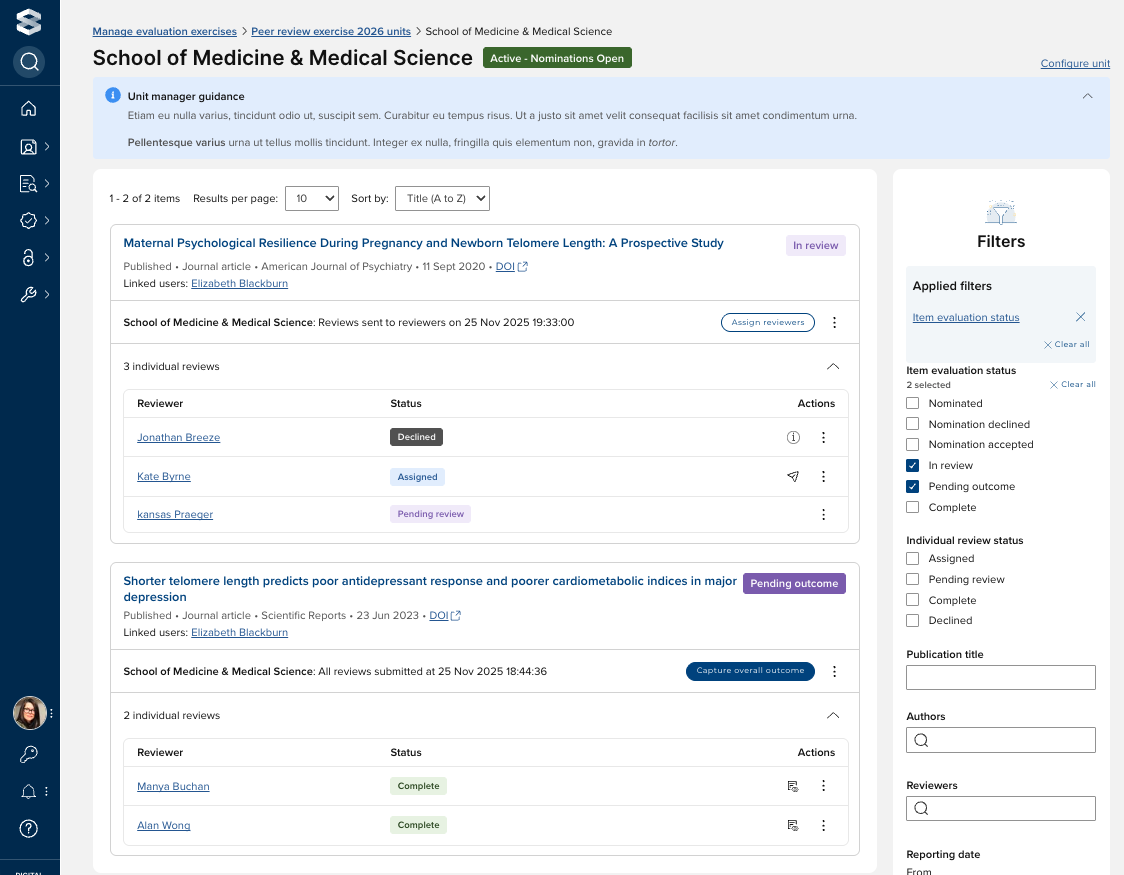
Image: Managing a unit’s Item evaluation exercise
Future module development
When fully realised, the Item Evaluation module should support a wide range of use-cases including:
Peer review by subject experts
Annual collections
Impact case study reviews
Professional activity reviews for accreditation
Metadata verification for accuracy
Our next priorities for development include:
Reporting
Bulk actions & other management tools
Support site
The Item Evaluation section of our support site, where all Item Evaluation support articles can be accessed, has been expanded to include further information on the functionality included in this release.
Reviewer notifications in Assessment
This release includes a significant enhancement to Assessment reviewer workflows with the introduction of automatic email notifications to alert reviewers when they have outstanding assessment reviews requiring their attention.
This ensures reviewers are promptly alerted to pending work, minimising delays in your review cycles and preventing process bottlenecks.
This new email notification works in tandem with the existing 'Assessment (single- and multi-response): Reviewer complete reviews' homepage action. Where the action provides an in-system task list, the email provides a critical external reminder to drive immediate attention.
Further detail on this feature, including scheduling and configuration options, is available in this support article.
Awards Management
In this Symplectic Elements release, we are very pleased to introduce a number of enhancements designed to improve the Administrator experience in the Awards Management module, and to surface additional data for users. These include:
Functionality to enable Management Console users to create a proposal directly in the Console, at the desired pre-award status.
A new group-based read-only Management Console user role.
Enhancements to the Participant Single form control and to the funding record Contacts page in the Management Console to display / capture:
Represented group, selected from the user’s existing group membership(s)
Email
Primary position title
As with previous releases, full details of the Awards Management functionality released in v7.2 are available in the Awards Management release notes on our support site.
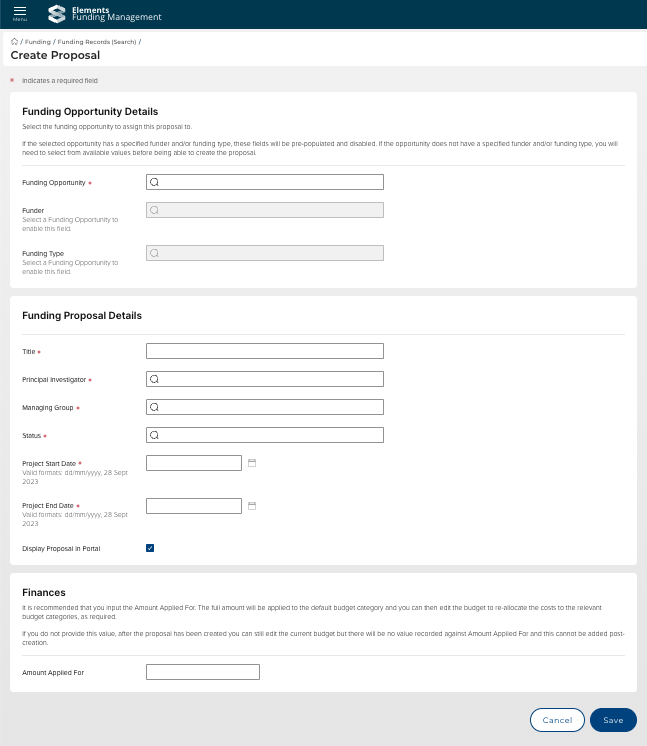
Image: Creating a proposal directly in the Management Console
Other improvements and fixes
We have updated the role types available for person list configuration to support Grant roles, working in the same manner as the role types available on Publication person lists.
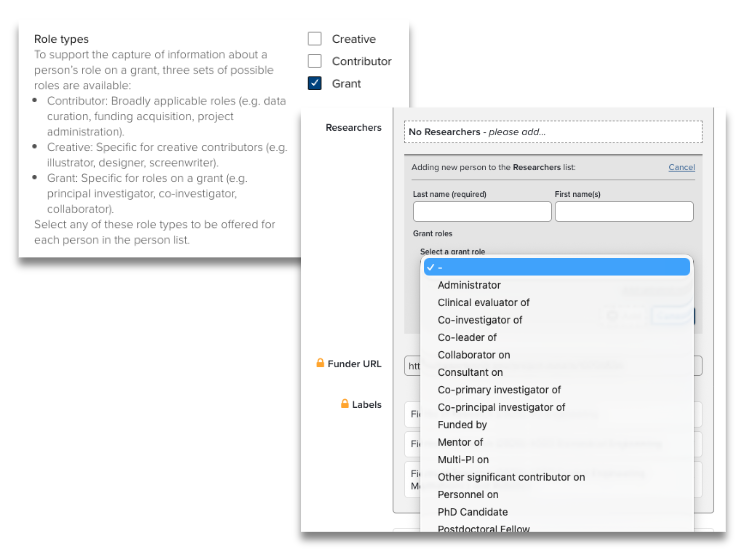
Image: Grant role types
End of support
As always, we recommend you regularly review our End of Support Announcements for information about upcoming end of support in Symplectic Elements for various technologies.
We would like to highlight the end of support and removal of the Elements 5.5 API in this release. Clients are advised to ensure that any API integrations still using the 5.5 API are migrated to the 6.13 API in good time before upgrading to this version.
We would also like to draw your attention to the upcoming end-of-support dates for versions of Symplectic Elements:
Version | Release date | End of support date |
7.1 | 18 September 2025 | 18 September 2027 |
7.0 | 26 June 2025 | 26 June 2027 |
6.23 | 24 April 2025 | 24 April 2027 |
6.22 | 28 February 2025 | 28 February 2027 |
6.21 | 28 November 2024 | 28 November 2026 |
6.20 | 19 September 2024 | 19 September 2026 |
6.19 | 27 June 2024 | 27 June 2026 |
6.18 | 25 April 2024 | 25 April 2026 |
6.17 | 29 February 2024 | 28 February 2026 |
6.16 | 7 December 2023 | 7 December 2025 |
If you need assistance planning to upgrade, please contact our team via the Support Site.
We’re here to help!
We hope you enjoy getting to know the latest version of Symplectic Elements. Should you have any questions, we’re here to help! Just contact us at support@symplectic.co.uk for assistance.
Best wishes,
The Symplectic Team